10 Best Tablet Kickstand (November 2026) Expert Guide
Written by admin · Updated November 2026
A tablet kickstand can make a supported device far more useful by adding a stable viewing angle, a secure grip, or a compact way to support a tablet without occupying much desk space. The right accessory depends on device size, case design, viewing habits, portability needs, and how securely the attachment grips the tablet.
This guide compares ten tablet kickstands across the supplied specifications, focusing on materials, mounting method, angle control, supported sizes, portability, and practical functions. It includes adhesive ring holders, spring-action case stands, a strap-based holder, a phone-style folding stand, and a tablet with an integrated kickstand.
Each pick highlights the features that distinguish it, along with practical limitations to consider before buying. The listings show one included tablet with a built-in kickstand and another universal option intended primarily for phones, so compatibility deserves close attention. Product details and prices can change, so check the current listing before purchasing.
Top 3 Picks for Best Tablet Kickstand
Best Budget
Ringke Outstanding Universal Tablet Stand Spring-Action Kickstand Multi Angle Adhesive Attachment for iPad Tablets, E-Reader, and More – Dark Gray
Tablet Stand with Hand Strap Universal Tablet Hand Strap Holder 360 Degree Rotating Sticky Tablets Stand Loop Fastening Handle Grip with Adjustable Length for All 7-11" Tablets
Ptwola Universal Tablet Holder Black Tablet Stand Foldable Multi Angle Tablets Grip Stand Adhesive Tablets Kickstand Attachment Desk Accessories for More Reader PC Laptop
As an Amazon Associate we earn from qualifying purchases.
Top 10 Best Tablet Kickstand in 2026 Compared
The comparison below covers every listed tablet kickstand, showing its mounting approach, size support, adjustability, and most important practical feature. It also highlights the products designed for tablets specifically rather than for phones or other compatible devices.
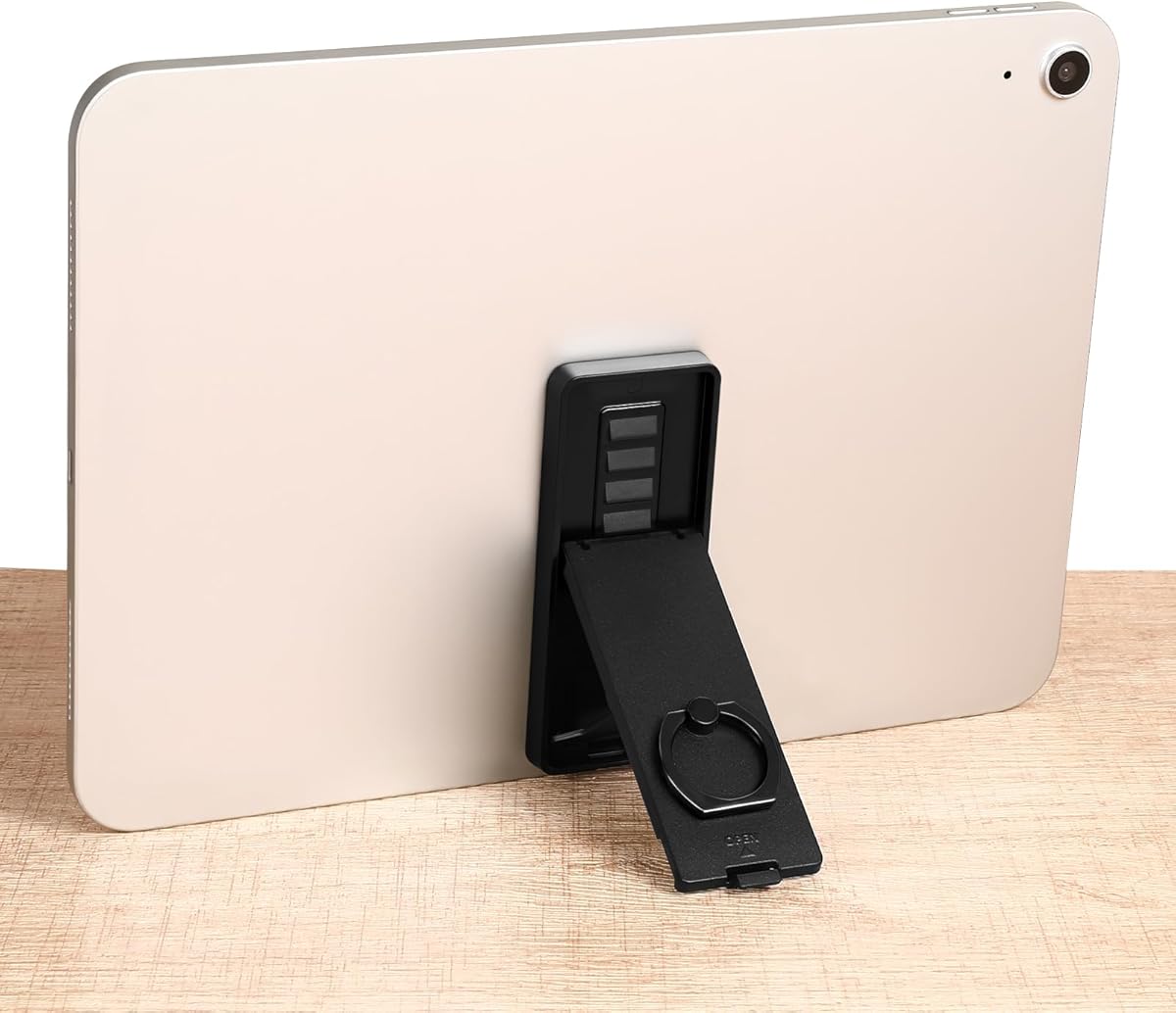
The Ptwola Universal Tablet Holder is a compact adhesive stand designed to support tablets while also providing a rotating grip. It carries a 4.1 rating and stands out for a triangular support structure, durable PC and zinc alloy construction, and a practical balance between stability and portability. Its broad universal positioning also makes it useful for readers, travelers, and home-office users.
Pros
Sturdy mixed-material construction
Useful triangular anti-tip design
Compact enough for travel
Rotates through multiple positions
Cons
Maximum tilt is below 90 degrees
Adhesive mounting may be permanent
We may earn a commission when you buy through this link, at no additional cost to you.
The key strength is the support geometry. Rather than relying on a narrow foot alone, the holder uses a triangular arrangement intended to resist tipping, while the anti-slip adhesive helps keep the device secure. Four height settings provide meaningful viewing adjustment, and the rotating bracket allows the tablet to move between positions for reading, typing, or media viewing. At 5.9 by 1.97 by 0.2 inches, it can remain behind the tablet when not actively used.
There are trade-offs. The stated maximum vertical adjustment is 60 degrees, so users who need a flatter 90-degree position may prefer the closely related ring-holder model listed later. Adhesive installation also requires care because the listing describes the attachment as self-adhesive. Surface texture, cleanliness, and removal method can affect adhesion, and the accessory may be better suited to a device that does not need frequent repositioning.
This is a sensible budget choice for viewers who want more support than a simple hand grip without moving up to a case-mounted spring stand. It is particularly attractive for reading, video viewing, and light typing at a desk. Buyers should verify the back of their tablet is clean and dry, check case clearance, and confirm the angle range suits their preferred working position.
Stable Support Without a Bulky Desktop Base
The triangular support and anti-slip adhesive create a more reassuring setup than a loose hand strap. This design is useful when a tablet needs to remain upright while both hands are occupied, such as during a video call or recipe demonstration.
Portable Positioning for Daily Carrying
Its slim 0.2-inch profile and foldable format make the holder easy to tuck into a bag or leave attached while traveling. The rotating grip also allows the tablet to move freely between landscape and more upright positions.
The Ptwola Universal Tablet Ring Holder offers a small adhesive mounting point with a foldable ring grip. Its 3.9 rating reflects a mixed customer response, but the supplied specifications show useful flexibility, including four height settings and a maximum vertical adjustment of 90 degrees. That range is notably greater than the 60-degree limit of the related Ptwola holder.
Pros
Wider vertical adjustment range
Compact folding construction
Rotating grip for multitasking
Suitable for most tablets
Cons
Lowest rated product in the guide
Adhesive may complicate repositioning
We may earn a commission when you buy through this link, at no additional cost to you.
Durable PC and zinc alloy materials give the attachment a more substantial feel than a purely flexible accessory. A triangular support helps prevent tipping, while the rotating bracket and ring design let users reposition the device for reading, typing, or hands-free viewing. The 3.9-by-1.6-inch format is compact and can sit behind the tablet without taking up much room.
The main concern is its 3.9 rating, which is the lowest numerical score among the ten listed options. That does not prevent it from meeting a basic need, but it makes careful consideration more important, especially for users who depend on adhesive security. The holder also shares the general drawback of self-adhesive systems: repositioning may be less convenient than with a clamp or integrated support.
Choose this model when a compact, rotating grip and a 90-degree vertical range are priorities. It is best suited to users who want a lightweight holder for occasional reading, media viewing, or desk support. Confirm that the tablet surface is compatible with adhesive, avoid placing it near heat or moisture, and inspect the attachment periodically for signs of loosening.
A Wider Angle Range for Flexible Viewing
The advertised 90-degree vertical adjustment gives users more latitude than many adhesive ring grips. This is helpful for moving from a low reading position to a steeper media-viewing angle.
Compact Grip for Multitasking
The small rotating ring can be held by one hand while the other operates the tablet. Its foldable construction also makes the accessory less conspicuous when the tablet is being carried.
The Ringke Outstanding in Dark Gray is an adhesive, spring-action stand designed for tablets, e-readers, and other compatible devices carried in cases. It has a 4.3 rating and offers a more structured viewing experience than a basic adhesive grip. Its standout feature is the semi-automatic spring mechanism, which allows the stand to open and close with one touch.
Pros
Quick spring-action deployment
Seven convenient angle positions
Broad tablet size compatibility
Supports portrait and landscape use
Cons
Compatible case not included
Requires installation on a case
We may earn a commission when you buy through this link, at no additional cost to you.
Seven default angles make it easy to find a suitable position for typing, reading, watching video, or joining a call. The anti-skid silicone pad supports the device in both horizontal and vertical orientations. Compatibility extends across tablets with screen sizes from 8 to 13 inches, and the listing specifically identifies several iPad, Galaxy Tab, and e-reader models among the supported devices.
The important qualification is that this accessory is intended for use with a case, and the case is not included. The adhesive attachment must be placed on a compatible surface, so buyers should check the shape, material, and condition of their existing case. It is also less appropriate for a bare tablet because a secure, flat bonding surface may not be available.
This is a strong premium pick for someone who already owns a compatible protective case and values repeatable, hands-free positioning. The spring action and seven angle settings create a polished daily workflow, particularly for typing or media viewing. For bare-device owners, an adhesive ring or strap-based holder may offer a more straightforward installation.
One-Touch Spring Positioning
The spring-powered mechanism deploys quickly, making it convenient to raise the tablet when needed and fold it away for transport. This is useful in workspaces where a propped tablet is needed only intermittently.
Reliable Support in Two Orientations
Seven selectable angles and an anti-skid pad accommodate both landscape and portrait use. That versatility makes the stand suitable for reading, typing, presentations, and video calls.
The Clear Mist version of the Ringke Outstanding is a slim, minimalist case accessory with a 4.3 rating. It shares the core strengths of the Dark Gray model: a semi-automatic spring mechanism, seven default angles, and an anti-skid silicone pad for horizontal or vertical positioning. Its clearer, thinner appearance is especially relevant to users who want the stand to blend into a tablet case.
Pros
Minimalist low-profile appearance
Fast one-touch opening
Seven stable angle choices
Works in both orientations
Cons
Compatible case not included
Limited to case-based installation
We may earn a commission when you buy through this link, at no additional cost to you.
The lightweight construction avoids the visual bulk associated with larger desktop stands. One-touch opening and closing make the mechanism easy to operate, while the seven angle settings cover common viewing and typing positions. The holder supports tablets with screen sizes from 8 to 13 inches and is marketed for iPad, Android tablets, and e-readers.
Like the Dark Gray version, the Clear Mist model is only for use with a case. The supplied information does not include a case, so shoppers must already own one. The adhesive also needs a clean, suitable bonding area, and case texture or curvature may affect installation. Those constraints make it less convenient than a stand that clamps directly to a bare device.
This model is a good fit for a minimalist setup involving a compatible case and a tablet used for reading, typing, or media. It provides the same core positioning system as the Dark Gray option in a more understated format. Buyers should confirm case compatibility and ensure the chosen surface is smooth, dry, and free of debris before installation.
Discreet Styling for Minimalist Setups
The slim Clear Mist design is made for users who prefer an unobtrusive support. It can add functionality without the visual weight of a large external tablet stand.
Repeated Angles with Quick Access
The spring action and seven angle presets reduce the need to reposition the tablet manually. This makes the accessory convenient for alternating between reading, typing, and entertainment.
The Kinizuxi Cell Phone Kickstand is a two-pack of ultra-thin aluminum attachments that can also support some tablets and e-readers. It carries a 4.2 rating and distinguishes itself through a one-piece folding design, an approximately 0.08-inch thickness, and a maximum weight below 0.8 ounce per stand. For users who need more than one mounting point, the two-pack offers practical flexibility.
Pros
Two stands included
Very thin portable profile
Broad stated device compatibility
Supports wireless charging positions
Cons
Designed primarily for phones
Large tablets may be less stable
We may earn a commission when you buy through this link, at no additional cost to you.
The adjustable angle reaches up to 75 degrees, which is suitable for horizontal video viewing and vertical video calls. High-viscosity adhesive is intended to attach the stand firmly to a phone or case, and the listing notes that residue after removal can be wiped away with rubbing alcohol. The flexible position is also designed to remain compatible with wireless charging use.
The main caveat is that this is primarily a phone stand, even though the stated compatibility list includes 4-to-12-inch smartphones, tablets, and e-readers. A larger tablet may place more leverage on the adhesive and narrow support than a phone does. Its 75-degree range also does not reach the full 90-degree position advertised by some ring-style tablet stands.
The two-pack is appealing for people who use both a phone and another compatible device, or who want a spare attachment. It is best for light tablet use such as reading or short video viewing rather than intensive touch interaction. Check the device dimensions, case shape, and adhesive surface before installation, and avoid relying on the stand for unsupported heavy equipment.
Two Attachments for Flexible Placement
The included pair allows one stand to remain on a phone while the other is used elsewhere. It is useful for travelers or households that regularly switch between devices.
Near-Flush Portability
At approximately 0.08 inch thick and under 0.8 ounce, each folding stand adds little bulk. It can remain attached to a compatible case or be carried in a pocket.
The Acer Iconia A Kickstand Tablet is the only complete tablet in this guide rather than a stand accessory. Its defining advantage is an integrated kickstand that props the device up without requiring a cover, separate mount, or desktop stand. The supplied information does not include a customer rating, so this review evaluates the documented features rather than assigning a reliability impression from user feedback.
Pros
No separate stand required
Large high-resolution touch display
Built-in cameras and speakers
10-hour stated battery life
Cons
Substantially different product category
No customer rating supplied
We may earn a commission when you buy through this link, at no additional cost to you.
The tablet combines a 16-inch WUXGA IPS touch display with a 1920-by-1200 resolution and 300-nit brightness. It runs Android 15 on an octa-core Allwinner A733 processor, with 6GB LPDDR5 memory, 128GB storage, and a microSD card slot. Wi-Fi 6, Bluetooth 5.4 or later, USB-C charging, and a stated battery life of up to 10 hours round out the core specification.
Other features include a 5MP front camera, an 8MP rear camera, four front-facing stereo speakers, and a built-in digital microphone. The listed AI functions cover presence and gesture response, video upscaling, and smile-triggered capture. These details matter because a kickstand is most useful when the device can support video calls, streaming, learning, and entertainment without frequent charging.
This option suits a buyer who wants a new 16-inch tablet and values a built-in kickstand over a small add-on. It is not an alternative for owners who already own a compatible tablet and merely need a stand. Before purchasing, buyers should evaluate the full device specifications, software support, storage needs, and accessories separately from the kickstand feature.
Hands-Free Support Without Extra Hardware
The rear kickstand sets up on any suitable surface without a case or add-on. That makes the device immediately useful for streaming, learning, typing, and video calls.
A Large Display Built for Media
The 16-inch IPS touchscreen and four front-facing speakers make the tablet a complete entertainment and productivity device. Built-in cameras also support communication without another display or accessory.
The Universal Tablet Stand Adjustable Ring Holder is a compact accessory made for 7-to-11-inch tablets. It has a 4.1 rating and combines a rotating ring, a hand strap, four selectable angles, and a maximum vertical tilt of 90 degrees. Its most notable travel feature is the folded weight of only 30 grams, which is considerably lighter than a conventional desktop stand.
Pros
Exceptionally light folded design
Four useful viewing positions
Full ring rotation
Broad 7-to-11-inch fit
Cons
Adhesive bond limits repositioning
Ring may pressure the device
We may earn a commission when you buy through this link, at no additional cost to you.
The 360-degree rotating ring gives users a broader range of motion than a fixed bracket. A hand strap offers a more secure way to hold the tablet during one-handed use, while the four angle settings support different viewing positions. The holder is made from sturdy materials intended to reduce slipping and falling, and its broad size range covers many common tablets and electronic devices.
Its adhesive mounting method is the central trade-off. Adhesive attachments are convenient for travel because they eliminate the need to carry a separate clamp, but they can be difficult to reposition or remove. Users should also consider whether pressure from the ring or strap could affect a tablet's finish, particularly if a case is not present between the accessory and the device.
This holder is a good choice for travelers, students, and readers who prioritize low weight and handheld flexibility. It works particularly well when occasional grip support is more important than the stability of a large desktop frame. Clean the attachment surface before installation, test the adhesive on a compatible case, and avoid overextending the ring or strap.
Minimal Weight for Bags and Travel
The 30-gram folded construction and 3.9-by-1.6-inch size make this holder easy to carry. Users can add grip support without packing a bulky folding stand.
Flexible Positioning in a Small Form
The rotating ring and four angle settings provide useful control despite the compact construction. It can shift between handheld use and a supported viewing position.
The Tablet Stand with Hand Strap is a versatile 360-degree swivel accessory that combines a padded hand strap with a foldable support handle. It has a 4.5 rating, the highest numerical customer rating among the listed products, and offers a more complete grip solution than a plain ring or adhesive foot. Its detachable, adjustable strap is particularly useful for one-handed operation.
Pros
Highest available customer rating
Combines grip and support functions
Adjustable strap improves one-handed use
Supports portrait and landscape modes
Cons
Adhesive swivel base requires care
4.53-inch diameter may crowd smaller tablets
We may earn a commission when you buy through this link, at no additional cost to you.
The listing describes PC, nano-glue, and cloth materials, producing a lightweight, odorless accessory that does not add substantial weight. The soft but firm strap can be adjusted as needed and is designed to help with operating or drawing on a tablet using one hand. The padded section can also support hands-free viewing, while the swivel structure allows portrait and landscape positioning.
A separate adjustable support handle on the back provides another angle of control and can close when it is not needed. The circular hand-holder section measures 4.53 inches, or 11.5 centimeters, in diameter. While the product is suitable for most makes and models of tablets, the relatively large loop may occupy a meaningful portion of the back of a compact tablet.
This is the strongest all-around recommendation for a reader, artist, student, or traveler who wants both a grip and a kickstand. It provides more control than a basic adhesive ring and does not require a case, unlike the spring-action Ringke models. Installation still calls for a clean bonding surface, and users should check how the 4.53-inch holder relates to their tablet's dimensions.
A Strap Designed for One-Handed Control
The adjustable fabric strap gives the user a secure place to hold the tablet while operating it. That makes the accessory especially useful for drawing, note-taking, or scrolling without constantly balancing the device.
One Accessory, Several Working Styles
The swivel base, padded grip, and collapsible support handle allow the tablet to move between handheld, portrait, and landscape use. This versatility makes the stand useful across reading, travel, and entertainment.
The Foldable Universal Tablet Holder is a self-adhesive grip for most 7-to-11-inch tablets. It has a 5.0 rating, the highest rating value in the supplied dataset, and offers a notably light design at 1.3 ounces. Its 5.9-by-1.97-by-0.2-inch profile and foldable format prioritize portability over the bulk of a traditional desk stand.
Pros
Perfect five-star listed rating
Very light and compact
Strong adhesive pad design
Simple self-adhesive installation
Cons
Fewer documented angle settings
Adhesive requires a dry clean surface
We may earn a commission when you buy through this link, at no additional cost to you.
ABS construction provides a simple, lightweight body, while strong adhesive pads are designed to hold the device in place and reduce slippage or drops. The angle can be adjusted to suit work or general viewing. Because the holder attaches directly to the tablet, it can be used at home, in an office, or while traveling without a separate support base.
The provided specifications are less detailed than those for the leading products. No precise number of preset positions or maximum tilt is stated, so buyers may find less control over exact angle placement than with a seven-setting spring stand. The installation requirement is explicit: the back of the tablet should be dry before the adhesive is applied, and the surface should be cleaned for a secure bond.
This holder is a compelling pick for buyers who want a minimalist accessory, prefer a very light design, and want broad compatibility with 7-to-11-inch tablets. Its simple installation can be more approachable than a case-based spring attachment. Confirm that the back surface will accept adhesive and leave enough room to move the tablet comfortably while it is supported.
A Very Light Attachment
At 1.3 ounces, the holder adds little bulk to a tablet. Its foldable profile is convenient for users who alternate between a desk, sofa, and travel bag.
Direct Installation Without a Case
Unlike stands that must be mounted to a protective case, this holder attaches directly to the tablet. That broadens the potential uses for owners who do not carry a case.
The Ring-Shaped Tablet Hand Strap uses a ring-style adhesive mount, a rotating swivel, and a detachable fabric strap to support a tablet. It carries a 3.6 rating, the lowest score in the guide, so buyers should focus on whether its physical design meets their needs rather than relying on a strong customer-rating consensus. The 4.53-inch holder is designed for most tablet makes and models.
Pros
Combines secure grip and support
Adjustable strap supports one-handed use
Portrait and landscape positioning
Lightweight mixed-material construction
Cons
Lowest customer rating in the guide
Large loop may not suit compact devices
We may earn a commission when you buy through this link, at no additional cost to you.
The accessory combines PC, nano-glue, and cloth materials, keeping it lightweight and relatively soft against the hand. The strap can be adjusted to support one-handed operation, which is helpful for drawing or using touch controls. Its padded section doubles as a hands-free support for movies and videos, and the swivel allows both portrait and landscape positioning.
An adjustable rear support handle adds another angle of control, and it can close when the user wants a less bulky setup. Nevertheless, the 3.6 rating suggests that some users may have found aspects of the construction or installation less satisfying. The large circular footprint can also cover a substantial area of the tablet back, and adhesive mounting may be permanent or leave residue.
This is most appropriate for a user who prioritizes a secure hand strap and adjustable one-handed control, particularly for drawing or travel. It can work for reading and video viewing as well, though the separate strap-equipped pick with a 4.5 rating is the stronger all-around option. Buyers should compare the footprint with their tablet size and test the adhesive carefully.
Secure Handling for Touch Work
The adjustable strap offers a more secure way to hold the device while drawing or entering information. Users can maintain a controlled grip without covering the screen.
Portable Support in Several Modes
The swivel, padded section, and collapsible handle let the tablet shift between handheld and supported use. Its lightweight construction also makes it practical to carry between locations.
We may earn a commission when you buy through this link, at no additional cost to you.
Buying Guide – How to Choose the Best Tablet Kickstand
The right tablet kickstand balances attachment security, viewing control, portability, and device fit. The most important questions are how the stand is mounted, whether it works with a bare tablet or requires a case, and whether its angle and support design match the intended use.
Attachment Method and Surface Compatibility
Adhesive-backed stands are simple to install and travel well because they eliminate a separate clamp, but the bond can be sensitive to dust, oils, texture, heat, and repeated repositioning. A clean, dry, smooth surface gives the best chance of secure attachment. Case-mounted spring stands generally require a compatible protective case and a suitable flat bonding area, while integrated kickstands avoid adhesive mounting altogether. Buyers should also consider whether the attachment may be difficult to remove later.
Tablet and Case Compatibility
Screen size is only one part of fit. A 7-to-11-inch designation provides useful guidance for many smaller tablets, while the Ringke options extend to 13 inches. Check the product's model examples, the shape of the back, any camera cutout, and whether a protective case is required. The listed Ptwola products and strap holders are described as suitable for most tablets, but broad compatibility does not guarantee an ideal fit for every device or accessory.
Angle Range and Orientation
A useful kickstand should support both portrait and landscape use and provide enough range for reading, typing, video viewing, and calls. The listed adjustment limits range from 60 to 90 degrees, while the spring-action models offer seven default positions. More precise or numerous settings can make a stand easier to use consistently, especially for prolonged work. A 360-degree swivel adds another dimension by allowing the device to move around the attachment point.
Support Strength and Stability
A larger tablet exerts more leverage and places more stress on an adhesive mount than a phone. Stability therefore depends on the support geometry, material strength, anti-slip contact, and the weight of the device. Triangular structures, broad bases, and case-integrated stands may feel more dependable for prolonged viewing, while small ring grips prioritize portability. Light-touch drawing and video viewing generally demand less than two-handed typing or a larger unsupported screen.
Portability and Folded Size
Travelers benefit from an attachment that folds flat, weighs little, and can remain on the device without interfering with normal handling. The guide includes options weighing approximately 30 grams, 1.3 ounces, and under 0.8 ounce. A larger profile may feel more stable but take up more room in a bag. Consider whether the accessory needs to share a case with other gear and whether a separate support base would create unnecessary bulk.
Grip Comfort and Hand Control
A ring grip offers a secure hold, but a padded strap can be more comfortable over longer periods and more useful for one-handed drawing. Fabric also spreads pressure differently from a hard ring, although fit and pad thickness still matter. Buyers who use their tablet for sketching, note-taking, or frequent touch input should prioritize a comfortable grip, an adjustable strap, and enough clearance around the screen.
Materials and Everyday Durability
The listed products use PC, zinc alloy, ABS, aluminum alloy, silicone, fabric, and nano-glue components. Hard materials can provide effective support, while fabric and silicone improve grip and comfort. Adhesive quality is equally important because it is the weak link in many portable designs. Look for a smooth surface, clean the device before attachment, avoid exposing the bond to excessive heat, and periodically check whether the holder remains tight.
Case-Free Use Versus Case Integration
Owners who do not use a tablet case generally have more freedom with direct adhesive holders and hand straps. Case-based products may offer a cleaner deployment mechanism and a more integrated appearance, but they require the correct case and careful placement. Buying a stand for a tablet that already has a case can be worthwhile if the case has a flat rear surface and enough room around the camera. A bare tablet may be better served by a direct-mount accessory.
How to Use and Care for Your Tablet Kickstand
Begin by cleaning the back of the tablet or the intended case surface with a dry, lint-free cloth. Remove dust, oils, and residue, then allow the surface to dry completely. Check the product dimensions, case requirements, and viewing orientation before applying the adhesive. Position the holder where it will not block buttons, speakers, cameras, ports, or a keyboard cover.
Attach the stand according to its design. For an adhesive model, press the mounting pad firmly and hold it in place for the period recommended by the manufacturer. For a spring-action case stand, align it on a flat case area and confirm that the mechanism opens and closes correctly. Once installed, unfold the support slowly and test the tablet with light pressure before relying on it for typing, drawing, or calls.
Use the stand within its documented angle range and avoid loading a mount beyond the weight and size it was designed to support. Clean the grip and hinge periodically, and do not pull sharply on a rotating ring or strap. If an adhesive begins to loosen, remove the accessory according to its instructions, clean both surfaces, and reinstall it. Keep the device away from excessive heat, moisture, and crowded surfaces where the tablet could be knocked or slid.
Frequently Asked Questions
Do tablet kickstands work on every tablet?
No, even products described as universal have limits based on screen size, back shape, camera placement, and case design. Check the listed dimensions and model examples before buying. Direct adhesive models are usually easier to fit, while spring-action case stands require a compatible case with a suitable flat surface.
Will an adhesive tablet stand damage the device?
A properly installed adhesive accessory should not damage a clean, smooth surface, but residue or heat can sometimes leave marks. Follow the installation instructions, avoid pulling the mount sideways, and remove it slowly when instructed. Some residue may be cleanable, but the safest approach is to use a surface or case recommended by the manufacturer.
Are ring grips better than kickstands for drawing?
A padded or adjustable hand strap can provide better control during extended one-handed drawing than a small rigid ring. A ring is simpler and more compact, while a strap spreads the hold across the hand. The best choice depends on grip comfort, tablet size, and how much of the back can be covered.
Can I use a tablet kickstand while charging?
That depends on the tablet, case, stand, and cable position. Some accessories leave the charging port accessible, while others may interfere with the cable when the tablet is propped at certain angles. The Kinizuxi phone-style stand is specifically described as allowing flexible positioning for wireless charging, but users should verify their own device and charging setup.
What is the difference between a tablet kickstand and a tablet case stand?
A tablet kickstand is a broad category that can include adhesive grips, swiveling rings, straps, and integrated supports. A case stand is specifically designed to attach to a protective case and often uses a spring or hinged mechanism. Case stands can look neater and deploy quickly, but they generally require a compatible case.
Are larger tablet kickstands more stable?
They can be, but size alone does not determine stability. Material strength, the support geometry, anti-slip contact, and adhesive quality also matter. A small adhesive ring may work well for reading, while a larger 12-to-16-inch tablet generally benefits from broader support and stronger attachment points.
Can I use a tablet kickstand in portrait mode?
Most products in this guide can support portrait orientation, either through a rotating ring, swivel joint, or spring mechanism. Ringke models explicitly list an anti-skid pad for horizontal and vertical use, while the strap products are designed to rotate between both orientations. Confirm the product's rotation range before installation.
How do I keep a tablet from slipping out of its stand?
Use a clean bonding surface, apply the adhesive evenly, and press it firmly as directed. Avoid placing the tablet on uneven or slippery surfaces, and use the provided silicone or anti-slip contact where available. Periodically check the grip and tighten or reinstall the accessory if it begins to move.
Final Thoughts on Choosing the Best Tablet Kickstand
The Tablet Stand with Hand Strap is the strongest all-around pick because it combines a 4.5 rating, an adjustable padded strap, 360-degree swivel movement, and a foldable support handle. The Ringke Outstanding Dark Gray is the premium option for case owners who prioritize spring deployment and seven viewing angles, while the Ptwola Universal Tablet Holder offers an affordable, compact solution with a triangular support structure.
The right choice ultimately depends on the device and routine. Direct adhesive and strap designs are more accessible for bare tablets, spring-action stands suit compatible case owners, and larger integrated stands make more sense when replacing or adding a complete device. Prioritize secure attachment, the correct size range, comfortable angles, and a shape that suits the amount of travel or handheld use involved.
Before ordering, compare the current listing details with your tablet, protective case, and typical viewing position. Pay particular attention to case requirements, maximum angle, adhesive limitations, and stated device compatibility. Prices and product information can change, so check the current Amazon listing before making a final purchase.