
Perixx PERIBOARD-512B Wired Ergonomic Keyboard
4.4Editor score
One-piece split layout
Curved stepped key rows
Tactile membrane key feedback
Wired USB connectivity
A split keyboard separates the keys into two angled sections, helping your forearms and wrists adopt a more natural position than a conventional flat keyboard. The right model can improve comfort during long typing sessions while adding useful features such as wireless connectivity, tenting, backlighting, and programmable controls.
We compared all ten keyboards by examining their layout, support features, connection options, key design, adjustability, compatibility, and intended use. The list covers conventional ergonomic models, mechanical gaming keyboards, compact wireless designs, and bundles for buyers who want a coordinated keyboard-and-mouse setup.
Each review identifies the strongest reasons to consider a particular model and the compromises worth understanding before purchase. Ratings reflect the supplied customer feedback, while product details may change over time. Check current listings, availability, and pricing before choosing.
4.4Editor score

4.4Editor score

4.3Editor score
As an Amazon Associate we earn from qualifying purchases.
This side-by-side comparison shows how the ten split keyboards differ in layout, connection method, physical adjustability, and everyday convenience. It is designed to make it easier to narrow the field before choosing the model that best fits your desk, typing habits, and device setup.



The Logitech Ergo K860 is the strongest all-around choice in this guide, combining a well-balanced split frame with the kind of refined support that makes the keyboard practical for extended work. Its supplied rating is 4.4 out of 5, reflecting generally favorable customer feedback. The design is especially attractive for office users, writers, programmers, and anyone moving between a desktop and laptop who wants familiar full-size typing with a more neutral wrist position.
We may earn a commission when you buy through this link, at no additional cost to you.
The curved split keyframe is the centerpiece. Rather than separating the halves into completely independent modules, Logitech uses a gently curved, elevated layout that guides the hands outward without requiring a major adjustment. Its pillowed wrist rest includes a memory foam layer and is shaped to support the palms while reducing outward wrist bending. The design can also be raised to 0, negative 4, or negative 7 degrees, allowing users to experiment with seated, standing, and reclined positions.
The sculpted keys are another major strength. Their scooped shape is intended to match the fingertips, while the full-size layout retains a number pad, function row, Caps Lock indicator, and familiar navigation controls. Connectivity is flexible: the keyboard can work through a USB receiver or Bluetooth, and Logitech Options supports Fn-key remapping, custom shortcuts, and battery notifications. The keyboard also includes quiet keys and uses recycled plastic in its graphite components, adding a modest environmental benefit.
Its limitations are relatively minor for the category. The separation and tenting are fixed rather than freely adjustable, so someone who wants dramatic splay or steep tenting may prefer the Kinesis Freestyle2 or Cloud Nine C989M. Logitech Options expands customization, but it also creates a software dependency for advanced assignments. Even so, the K860 balances comfort, familiar typing, multi-device convenience, and professional presentation better than most competitors here, making it the most versatile recommendation.
The curved wrist rest and adjustable palm lift work together to keep the hands supported while the angled keyframe reduces the need to rotate the wrists outward. The result is a familiar full-size keyboard that can feel noticeably more natural without requiring the steep learning curve associated with fully independent halves.
Bluetooth and USB receiver options make the keyboard easy to move between work and personal devices. Logitech Options expands the experience with shortcut assignment and battery notifications, which is useful for users who repeat the same commands throughout the day.
We may earn a commission when you buy through this link, at no additional cost to you.
The Perixx PERIBOARD-512B is an appealing first step into split-keyboard typing, particularly for buyers who want a meaningful ergonomic change without dealing with wireless pairing, batteries, or a steep mechanical-switch learning curve. It carries a supplied rating of 4.4 out of 5. The keyboard separates the left and right key zones while keeping them in one connected frame, creating a gentler transition than a fully modular ergonomic board.
We may earn a commission when you buy through this link, at no additional cost to you.
Its old-school curved rows are a deliberate ergonomic choice. The stepped profile helps the fingers reach each row without forcing the hand into a flat position, and the curved keycaps have flatter tops and shaped rear edges intended to follow the contours of the fingertips. Long key travel provides clear tactile feedback and audible confirmation similar to brown mechanical switches, although the underlying mechanism is a durable membrane design rated for up to 20 million keystrokes.
The wired USB connection is straightforward and removes charging or receiver-management concerns. Its one-piece construction also keeps the halves aligned and avoids cables between modules, though that means the user cannot independently splay or tent the two sides as dramatically as on fully adjustable models. The keyboard is specified for a US English layout, which may not suit people who need another language arrangement.
Buyers should expect a short adjustment period. The supplied information notes that most users adapt within one to two weeks and subsequently experience improved comfort and reduced wrist pressure. That makes the PERIBOARD-512B a sensible, uncomplicated choice for home offices, students, and occasional typists. It is less suitable for users who require extensive remapping, RGB lighting, multi-device wireless operation, or aggressive positional adjustment.
Because the two key zones remain attached, the keyboard retains visual and physical unity while still encouraging the hands apart. This makes it a practical option for typists who want the ergonomic direction of a split design without immediately adapting to two independent halves.
The long travel and audible tactile response provide a clear sense of each keystroke. It can feel closer to a mechanical brown switch than a typical laptop keyboard, although it does not offer the same freedom to change switches or customize the feel.
We may earn a commission when you buy through this link, at no additional cost to you.
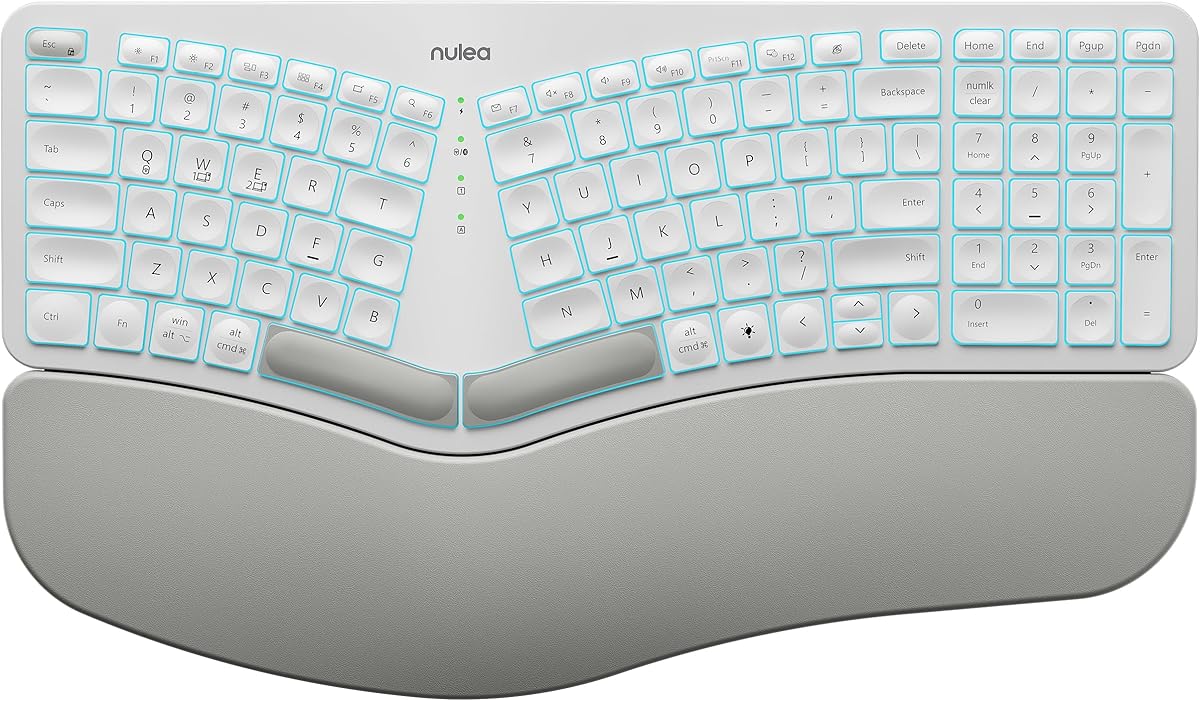
The Nulea RT05 combines a split, splayed, curved layout with wireless convenience and adjustable lighting. Its supplied rating is 4.2 out of 5. It appeals to users who type on multiple platforms because it can maintain Bluetooth connections to up to three devices and let the user switch between them using a dedicated button.
We may earn a commission when you buy through this link, at no additional cost to you.
The keyboard's visual and functional customization extend beyond the basic split layout. Its backlight offers seven color choices and three brightness levels, allowing it to match different workspaces or remain subdued during daytime use. A 2000mAh rechargeable battery supports extended operation, particularly with the backlight turned off, and a visible battery indicator helps indicate when charging is needed through the included USB-C connection.
Four adjustable tilt legs provide three levels of positioning, allowing the user to change the angle while sitting or standing. The split, curved, and splayed design is intended to relax the shoulders and reduce the outward rotation of the arms. Compatibility includes Windows and Mac systems, making it a broad choice for mixed-device workspaces. The feature set is generous for a conventional ergonomic wireless keyboard, although the information provided does not describe independent positioning of the two halves.
One practical limitation is the automatic shutdown of the backlight when battery power falls below 10 percent. That safeguard preserves basic functionality, but it means the lighting can disappear unexpectedly if the keyboard is not recharged promptly. Some users may also want software-level remapping, which is not emphasized in the supplied specifications. Overall, the RT05 is a strong option for people prioritizing device switching, lighting, and flexible tilt over fully modular ergonomics.
The ability to connect to three devices simultaneously makes the RT05 well suited to a workflow that moves between a desktop, laptop, and tablet or phone. A dedicated switching button reduces the process to a quick action rather than navigating through extensive device menus.
Seven colors and three brightness levels give the keyboard more personality than a standard office model. The backlight also improves key visibility in dim rooms, though users should monitor the battery indicator because the lighting shuts off below the stated threshold.
We may earn a commission when you buy through this link, at no additional cost to you.
The SABLUTE bundle is an attractive choice for buyers building an ergonomic workstation rather than replacing only a keyboard. It pairs a full-size split keyboard with a contoured wireless mouse offering palm and thumb support. The supplied customer rating is 4.8 out of 5, the highest among the ten products, which indicates strong reception for the overall package.
We may earn a commission when you buy through this link, at no additional cost to you.
The keyboard uses a curved key layout designed to place hands at a more natural typing angle. Its cushioned wrist rest uses soft memory foam beneath a water-resistant, easy-to-clean soft-touch surface. Four adjustable tilt legs let users alter the typing angle for different working positions. The layout includes a numeric keypad and provides a dedicated key for switching between Windows and Mac layouts, along with shortcuts for media, calculator, screenshots, and emoji functions.
The included mouse is more than an accessory. Its sculpted shape supports the palm and thumb, while four adjustable DPI levels—800, 1200, 1600, and 2400—allow the pointer speed to suit different tasks. Forward and back buttons support routine browser and productivity navigation. Both devices use rechargeable power, with stated standby figures of up to 250 hours for the keyboard and 350 hours for the mouse, while a five-second auto-sleep function helps conserve energy.
The main trade-off is physical size. The keyboard measures 19 by 10.45 by 1.88 inches and therefore needs considerably more room than a compact model. Prospective buyers should measure their desk before ordering, especially if they already use a large monitor or other accessories. The USB-A receiver is stored inside the mouse, and a separate USB-C adapter supports devices with USB-C ports. For shoppers wanting a matched keyboard-and-mouse solution, this is one of the most complete packages here.
The matching mouse addresses another common source of wrist and hand discomfort during long computer sessions. Its palm and thumb supports complement the keyboard's split layout, making the bundle easier to justify as a complete ergonomic upgrade rather than an isolated accessory.
Dedicated controls for the calculator, screenshots, emoji, media, and common tasks are especially useful for frequent office users. The Windows and Mac layout switch further improves its value in mixed-platform environments.
We may earn a commission when you buy through this link, at no additional cost to you.
The RK ROYAL KLUDGE S70 is the most enthusiast-oriented split keyboard in the guide, combining independent halves, mechanical switches, wireless connectivity, and programmable macros. Its supplied rating is 4.3 out of 5. It is aimed at gamers, programmers, and writers who want to tune the physical feel and layout rather than simply replace a conventional office keyboard.
We may earn a commission when you buy through this link, at no additional cost to you.
The two modules can be positioned independently, and eight adjustable feet let the user alter or tent the typing angle. A coiled cable links the halves, while the left module contains a battery that preserves wireless functionality and macro controls even when the keyboard is used with only one hand. The hot-swappable PCB accepts both three-pin and five-pin switches, and the included pre-lubed linear creamy switches deliver smooth travel and a distinct sound.
Connectivity is unusually flexible for a mechanical split board. It supports low-latency 2.4GHz wireless, Bluetooth, and USB-C, while the 75-percent layout preserves essential navigation and function keys without the footprint of a full-size keyboard. The 3150mAh battery is stated to last up to two weeks with the backlight disabled. Five macro keys on the left side can be activated to perform assigned commands, and RK software for Windows supports remapping, macro creation, and RGB adjustments.
There are important constraints. The software-based customization is specified for Windows, even though the keyboard can connect to Mac and Android devices. The 75-percent format omits a dedicated number pad, which may frustrate spreadsheet-heavy users. Its gaming-oriented styling, RGB lighting, and macro features also make it less understated than the Logitech or Perixx alternatives. Even with those qualifications, it is the strongest choice here for users who prioritize switch customization and independent positioning.
Hot-swappable sockets make it possible to change mechanical switches without soldering. The pre-lubed creamy linear switches offer a smooth, direct feel, while compatibility with different pin configurations broadens the range of possible switch upgrades.
The separable design allows each half to be moved, rotated, or tented according to shoulder width and desk geometry. This is more adjustable than a fixed one-piece split keyboard and particularly useful for users who want to fine-tune their forearm angle.
We may earn a commission when you buy through this link, at no additional cost to you.
The Wired Ergonomic Split RGB is a straightforward full-size option for users who want angled typing, an integrated wrist rest, and conspicuous lighting without managing wireless connections. Its supplied rating is 4.2 out of 5. The design is especially approachable because it connects through a standard USB-A cable and requires no pairing process, batteries, charging, or driver installation.
We may earn a commission when you buy through this link, at no additional cost to you.
Its split frame includes an integrated palm rest and two pairs of adjustable kickstands, allowing the user to fine-tune the tilt. The RGB illumination provides ten dynamic rainbow patterns, seven solid colors, seventeen total effects, and five brightness levels. That gives it more visual variety than most conventional ergonomic keyboards, making it suitable for gaming setups, dim offices, and users who enjoy coordinating their peripherals.
The full-size layout includes a numeric keypad and seventeen dedicated shortcut keys for play and pause, volume, track navigation, screen brightness, lock, calculator, emoji, search, home, and print screen. A five-point-six-foot USB-A cable provides the connection, and a USB-C adapter is included for laptops and desktops with different ports. The stated lifespan is ten million keystrokes, and the product is FCC certified.
Compatibility covers Windows, macOS, Chrome OS, and Linux, as well as common laptops, desktops, and iMac systems. It does not work with gaming consoles such as the PlayStation 5 or Xbox, and minor functional differences may occur when switching operating systems or using dual-boot configurations. The fixed cable is another limitation for anyone wanting a clean, flexible wireless desk. Within those limits, it delivers a rare combination of full-size utility, shortcuts, and vivid lighting.
Ten dynamic patterns, seven solid colors, and five brightness levels allow the keyboard to serve both practical and decorative purposes. The range makes it easy to select a subdued static setting for daytime work or a more animated effect for gaming and low-light sessions.
The numeric keypad and dedicated shortcuts appeal to spreadsheet, media, and general office workflows. A wired plug-and-play connection is dependable and easy to deploy, though the attached cable takes more desk space than a wireless receiver.
We may earn a commission when you buy through this link, at no additional cost to you.
The Cloud Nine C989M is the premium option here for users who want substantial physical control over the position of their hands. Its supplied rating is 4.3 out of 5. The two keyboard sections can separate by up to eight inches, and the built-in palm supports use a seven-degree angle to help keep the forearms aligned.
We may earn a commission when you buy through this link, at no additional cost to you.
Mechanical Kailh tactile brown switches provide low activation force with a tactile bump and satisfying feedback. This is a meaningful upgrade for users moving up from membrane keyboards, particularly if they want clearer confirmation of each keystroke. RGB backlighting illuminates the characters, and an included app allows users to select backlight colors. The keyboard also includes a full number keypad, USB passthrough, and ten programmable macro keys.
Its business and gaming versatility comes from the combination of a substantial numeric pad, macro access, and mechanical feedback. Programmable keys can automate repetitive sequences or game actions, while the RGB lighting can be adjusted to suit different environments. The split modules are not merely angled; their wide separation allows each user to match the position to shoulder width and desk dimensions, which can be valuable when a standard fixed split still feels too narrow.
Because it is sold as a keyboard for PC, buyers should verify that their software and application requirements align with the included configuration. The premium mechanical construction and adjustable design also create a larger footprint than a compact model. Some users will need time to adapt to the separation and tactile switches. For those who value fine positioning, programmable controls, and mechanical response, however, the C989M offers one of the most adaptable ergonomic experiences in this comparison.
The ability to move the modules up to eight inches apart makes the keyboard adaptable to different shoulder widths and desk layouts. Combined with the built-in angle, it offers a more individualized wrist and forearm position than a fixed one-piece design.
Tactile brown switches provide a clear bump without the extreme force associated with some heavier switch types. Ten macro keys and selectable RGB lighting add useful customization for both productivity and gaming workloads.
We may earn a commission when you buy through this link, at no additional cost to you.
The Logitech Ergo K860 for Business is built for organizations that need to deploy ergonomic keyboards at scale while retaining centralized security and management. Its supplied rating is 4.1 out of 5. The physical design is closely related to the standard K860, but Logi Bolt connectivity and device-management capabilities distinguish it as an IT-focused model.
We may earn a commission when you buy through this link, at no additional cost to you.
Logi Bolt uses fully encrypted Secure Connections Only mode, which is designed to meet enterprise wireless security requirements. The keyboard is certified in more than 100 countries and supports remote mass deployment, firmware updates, and management through Logitech Options. These features matter when a company needs to standardize equipment across many employees rather than configure each keyboard manually.
Ergonomically, it uses the familiar curved split keyframe to encourage a natural typing posture and reduce muscle strain on the wrists and forearms. The pillowed wrist rest adds support, while three tilt-leg positions accommodate seated or standing work. A full-size numeric pad, connection to up to three devices, and a stated two-year battery life preserve the productivity features that business users need.
The trade-off is that some of the business-oriented capabilities may be unnecessary for home users, and the managed ecosystem adds another layer of setup compared with a standard wireless keyboard. Its supplied rating is also lower than that of the standard K860 listing in this guide, although ratings can vary by model and sales channel. Organizations with managed IT requirements will find the deployment and security features valuable; individuals seeking the simplest home setup may prefer the standard wireless version.
Encrypted Secure Connections Only mode and Logi Bolt create a more controlled wireless environment. These features are particularly relevant for organizations handling sensitive information and for IT teams responsible for maintaining a consistent hardware standard.
Remote deployment, firmware management, and broad certification support make it easier to equip many employees consistently. The ergonomic design can then serve as a shared standard without requiring every user to learn a completely unfamiliar compact layout.
We may earn a commission when you buy through this link, at no additional cost to you.
The Kinesis Freestyle2 remains one of the most adjustable split keyboards because both halves can rotate and separate by as much as nine inches. Its supplied rating is 4.3 out of 5. Unlike a keyboard with a fixed ergonomic frame, it allows users to tailor hand, wrist, and forearm positions to their body and preferred setup.
We may earn a commission when you buy through this link, at no additional cost to you.
The V3 tenting lifters are pre-installed and offer five-, ten-, or fifteen-degree angles. A pivot tether controls separation while keeping the two halves visually and physically coordinated. The modular approach allows a gradual adjustment process: users can begin with less separation and open it as they become familiar with the layout. This makes the design accessible to people interested in split typing who may not tolerate a dramatic geometry from the first day.
The keys use a custom membrane switch with low activation force and tactile feedback. That combination is intended to reduce finger fatigue while still confirming each keystroke. The standard Windows layout includes familiar cut, copy, paste, and multimedia hotkeys, plus an embedded numeric keypad for productivity. No special software or drivers are required, making setup straightforward.
The package includes the keyboard, V3 tenting accessory, adhesive cushioned palm pads, detachable pivot tether, and quick-start guide. Its older-style platform design does not offer the wireless switching, RGB lighting, or hot-swappable switches found among newer models. Steep tenting can also require time to adapt to. Even so, no other option in this guide provides this much freedom to shape the typing position, making the Freestyle2 ideal for dedicated ergonomic users.
The pivot tether lets the modules move closer together or farther apart without losing their coordinated alignment. This gradual adjustment makes it possible to find a comfortable width while avoiding the abrupt repositioning some users experience with fully independent halves.
The included V3 lifters raise the inner edges of the keyboard at three angle options. More tenting can help reduce outward forearm rotation, although the best setting depends on shoulder position, desk height, and the user's familiarity with the layout.
We may earn a commission when you buy through this link, at no additional cost to you.
The Arteck Split Ergonomic Keyboard offers a straightforward wireless route to a more natural typing position. Its supplied rating is 4.3 out of 5. The split design angles the two key groups outward, with the stated goal of positioning wrists and forearms in a more relaxed, natural alignment.
We may earn a commission when you buy through this link, at no additional cost to you.
A soft cushioned wrist and palm rest supports the hands during long typing periods. The keyboard uses a 2.4GHz USB connection and includes a nano receiver stored at the back of the unit, making setup as simple as inserting the receiver into a computer. This approach avoids Bluetooth pairing complexity and keeps the signal focused on the wireless connection included with the product.
The built-in rechargeable lithium battery is stated to last up to six months on a single charge when usage is approximately two non-stop hours per day. A USB-C charging cable is included, so a separate proprietary charger is unnecessary. The package also contains a welcome guide, a 24-month warranty, and customer service, which gives the product a more complete ownership package than a bare keyboard alone.
Its main limitations are the lack of stated Bluetooth, RGB lighting, or extensive software customization, as well as less explicit positional adjustment than fully modular models. For a buyer who wants a comfortable split layout, palm support, and uncomplicated wireless use without a steep learning curve, the Arteck remains a practical recommendation. It is best suited to a single-computer workspace where those fundamental features matter most.
The stored nano receiver creates a direct 2.4GHz connection to the computer. Users can begin typing almost immediately after plugging in the receiver, which is convenient for anyone who prefers wireless freedom but does not need multi-device Bluetooth switching.
The stated six-month battery duration is based on two hours of non-stop use per day. Recharging through the included USB-C cable adds convenience and makes the keyboard practical for regular office use.
We may earn a commission when you buy through this link, at no additional cost to you.
The best split keyboard is not simply the model with the most features. A comfortable choice depends on your shoulder width, desk depth, typing habits, operating systems, and tolerance for adjustment periods, so the layout and connection design should be evaluated together.
A split keyboard divides the typing area into left and right sections so each hand can approach its keys without twisting outward. The most important distinction is whether the design is fixed or modular. One-piece models such as the Perixx and Arteck preserve visual unity and usually require less adjustment, while independent halves from Kinesis, Cloud Nine, and RK allow the user to control separation, rotation, and tenting. A wider separation can reduce shoulder strain when matched to body proportions, but it also enlarges the desk footprint. Beginners should favor a model with gradual adjustment or a modest fixed split before committing to an extreme layout.
Tenting raises the inner edges of the keyboard so the forearms angle inward rather than outward. It can complement a split layout, but too much angle may feel unfamiliar or unstable. Wrist and palm rests provide a different kind of support by preventing the hands from resting sharply on the desk. Look for a broad, contoured rest that supports the palms rather than a narrow ridge under the wrists. The Kinesis offers the widest range of tenting angles, the Cloud Nine includes a built-in seven-degree angle, and the Logitech models use fixed palm lift with a sculpted rest.
Key feel is highly personal. Membrane models, including the Perixx and Kinesis, generally provide lower-cost, lighter designs with relatively quiet operation. Mechanical boards provide more pronounced feedback and greater opportunities for personalization, although they are usually louder and require more desk space. The Cloud Nine uses tactile brown mechanical switches for a moderate bump, while the RK ships with smooth linear creamy switches and allows hot-swapping for future changes. Consider both the force required and the sound because a switch that feels excellent can still be disruptive in a shared office.
Wired keyboards offer immediate plug-and-play behavior and avoid charging, pairing, and interference concerns. Wireless designs provide a cleaner desk and greater freedom to reposition the keyboard. Bluetooth is ideal for switching among laptops, tablets, and phones, while 2.4GHz receivers tend to provide a straightforward dedicated connection to one computer. The Nulea supports three Bluetooth devices, the standard Logitech K860 offers Bluetooth and receiver options, and the Arteck focuses on a simple 2.4GHz nano receiver. Check whether your computer has the required USB port and whether a USB-C adapter is included.
Split geometry naturally increases the width of a keyboard, and full-size models add a numeric keypad on the right. The SABLUTE bundle requires a particularly generous desk area, while the RK uses a 75-percent layout to save space by removing some navigation and dedicated function keys. Other full-size choices retain the number pad, which is valuable for accounting, data entry, and spreadsheet work. Users should also account for the coiled cable on modular boards, receiver storage, and any palm supports. Measure the available width before ordering, especially when a monitor or laptop is already occupying the desk.
Backlighting improves visibility in dim environments and can add visual appeal to a gaming setup. The Nulea provides seven colors and three brightness levels, the RK adds RGB effects and programmable lighting through its Windows software, and the wired RGB model offers seventeen effects with five brightness levels. Some models disable lighting when the battery is low to preserve basic operation. Dedicated media and application shortcuts can save time, but they also create layout differences between operating systems. Confirm that every shortcut matches your needs, especially if you regularly switch among Windows and Mac environments.
Programmable keys and remapping software can transform a split keyboard into a productivity or gaming tool. The RK offers five programmable macro keys with Windows software, and the Cloud Nine includes ten programmable macros and an app for lighting. The Logitech K860 uses Logitech Options for Fn-key configuration, custom shortcuts, and battery notifications. Other options prioritize a standard layout with no special software. Before buying a programmable model, confirm that your primary operating system is supported and that you are willing to configure the device. A standard layout can be more dependable when portability and simple setup matter most.
Business deployments should consider security, centralized management, and the ability to equip many users consistently. The Logitech K860 for Business adds encrypted Logi Bolt connectivity, remote deployment support, and device management. Home users may not need those enterprise tools. The Kinesis and Cloud Nine favor detailed positioning, while the Arteck, Perixx, and SABLUTE prioritize simple, accessible setups. For users with ongoing wrist, forearm, or shoulder discomfort, an ergonomic split can support a more neutral posture, but it is not a medical treatment. Persistent symptoms deserve evaluation by a qualified healthcare professional.
Begin by placing the keyboard directly in front of your body with the seam aligned to the center of your torso. Keep your shoulders relaxed, elbows near your sides, and forearms approximately level. For a fixed split, use the supplied feet or supports to find a comfortable angle. For independent halves, begin with modest separation and adjust gradually, moving the modules farther apart only as your wrists become comfortable with the wider posture. Take frequent short breaks instead of waiting until discomfort becomes noticeable.
For wireless models, install the receiver or pair through Bluetooth before moving the keyboard into position. If the device includes adjustable lighting, software, or macro controls, configure those settings after confirming the basic layout works for you. Learn the new key locations gradually and resist the urge to return immediately to a conventional keyboard, since frequent switching can make adaptation feel slower. Keep the keyboard and any receiver in open areas rather than enclosed spaces that could obstruct the wireless signal.
Clean the keyboard by unplugging it or switching it off, then use a soft, dry or lightly dampened cloth to wipe the keys and palm rest. Avoid spraying liquid directly onto the keyboard, especially around mechanical switches, charging ports, and adjustable supports. Do not submerge any component, and follow the manufacturer instructions before using chemical cleaners. Recharge wireless models before long work periods, keep the battery contacts free of debris, and inspect the cable or removable modules occasionally for signs of wear.
A split keyboard can reduce the outward bending of the wrists and help keep the forearms in a more neutral position. It may also lessen strain associated with repeatedly reaching for keys on a flat board. However, comfort depends on the overall setup, including desk height, chair support, shoulder position, and how long you type. Anyone with persistent pain, numbness, weakness, or other symptoms should seek advice from a qualified healthcare professional rather than relying on a keyboard alone.
Most users need several days to a couple of weeks to become comfortable, while some continue refining their positioning for longer. The Perixx product information specifically notes that most users adapt within one to two weeks. Fixed one-piece splits generally involve a gentler adjustment than fully separated modules. Practicing for short periods at first and avoiding frequent switching to a conventional keyboard can make the transition smoother.
A fixed split is easier to manage and usually provides a smaller learning curve. It works well for general office users who want more neutral wrist positioning without extensive configuration. Fully separated halves offer better control over separation, splay, and tenting, making them ideal for users who want to match the keyboard precisely to their shoulders and forearms. Users with larger desks and more experience with ergonomic typing often benefit from the added adjustability.
No. Tenting can further reduce outward forearm rotation, but a well-positioned flat split with appropriate palm support may already feel comfortable. The Kinesis offers the most tenting choices, while the Cloud Nine and Logitech K860 use fixed angles. Begin with a modest setting and increase it gradually if your forearms still rotate outward. Excessive tenting can feel unstable or unfamiliar if your desktop height is poorly matched.
Mechanical switches generally produce more distinct sound because each press actuates a physical switch mechanism. The precise noise level depends on the switch type, case construction, desk surface, and typing force. Membrane models such as the Perixx and Kinesis tend to be quieter and require less force. Mechanical options can be appropriate in a private office, while quieter options may work better in shared spaces or during calls.
Many models support both platforms, but compatibility varies by feature. The Nulea and SABLUTE explicitly include Windows and Mac support, while the Logitech K860 and Logitech Options are designed for cross-platform use. The RK can connect to Windows, Mac, and Android, although its listed macro software is for Windows. Keyboard labels and shortcut positions may also differ between operating systems, so check the layout before making a multi-platform purchase.
Start with the connection method. Bluetooth is convenient for switching among several devices, while a 2.4GHz receiver is often simpler for one computer. Battery life, charging connector, backlight behavior, and wireless range also deserve attention. The Nulea supports three Bluetooth devices, the Arteck emphasizes a rechargeable 2.4GHz setup, and the standard Logitech K860 offers both receiver and Bluetooth options. Choose the system that matches the devices you actually use.
Expect more width than a conventional keyboard because the two halves angle away from the center. Full-size models with a numeric keypad require additional room, especially when the right half sits farther from the body. The SABLUTE keyboard is particularly large and should be measured against available desk space. Compact models such as the RK's 75-percent layout reduce some of that footprint, but their independent halves and cable still need room to spread.
The Logitech Ergo K860 stands out as the most balanced overall option because it combines a refined curved split layout, sculpted keys, generous palm support, adjustable palm lift, and wireless multi-device convenience. The Perixx PERIBOARD-512B is the clearest choice for buyers seeking a simpler introduction to split typing, while the Cloud Nine C989M takes the lead for adjustable positioning, mechanical feedback, and programmable macros.
Prioritize the features that match your actual work rather than selecting the model with the longest feature list. Frequent travelers may value compact wireless construction, spreadsheet users may require a number pad, shared offices may prefer quieter keys, and dedicated ergonomic users may want independent halves with tenting. Allow time to adapt, adjust the keyboard around your body rather than changing your body around the keyboard, and assess both comfort and the reliability of the features you will use daily.
Product details, ratings, availability, and pricing can change over time, so verify the current listing before purchasing. The supplied information supports the comparisons in this guide, but checking the latest model details, compatibility notes, warranty terms, and current cost can help prevent surprises. Once you match the keyboard to your desk, devices, and workflow, a split design can become a meaningful and lasting improvement to your everyday computing setup.
