Our guide compares the best Soundbar for Console Gaming Setup options, covering connectivity, bass, dialogue clarity, audio, and gaming-focused features.
As an Amazon Associate we earn from qualifying purchases. We may earn a commission when you buy through links on this page, at no additional cost to you.As an Amazon Associate we earn from qualifying purchases.Purchases through our links may earn us a commission, at no extra cost to you.
A soundbar for a console gaming setup can transform compressed television audio, game dialogue, menus, and environmental effects into a fuller presentation. The right model should deliver clear voices, convincing bass, responsive controls, and dependable connection options without taking over the room or cluttering the console area.
The ten products in this guide were compared by examining their channel configurations, output power, subwoofer design, wireless features, room-calibration tools, gaming modes, and supported wired connections. The list includes compact desktop bars, living-room systems, and surround setups intended for different screen sizes, budgets, and space constraints.
Each review identifies the product's strongest use case and the trade-offs that shoppers should consider. Ratings reflect the available customer feedback, while features and specifications come from the supplied product information. Availability and pricing can change, so confirm the current listing and compatibility before purchasing.
Top 3 Picks for Best Soundbar for Console Gaming Setup
Best Budget
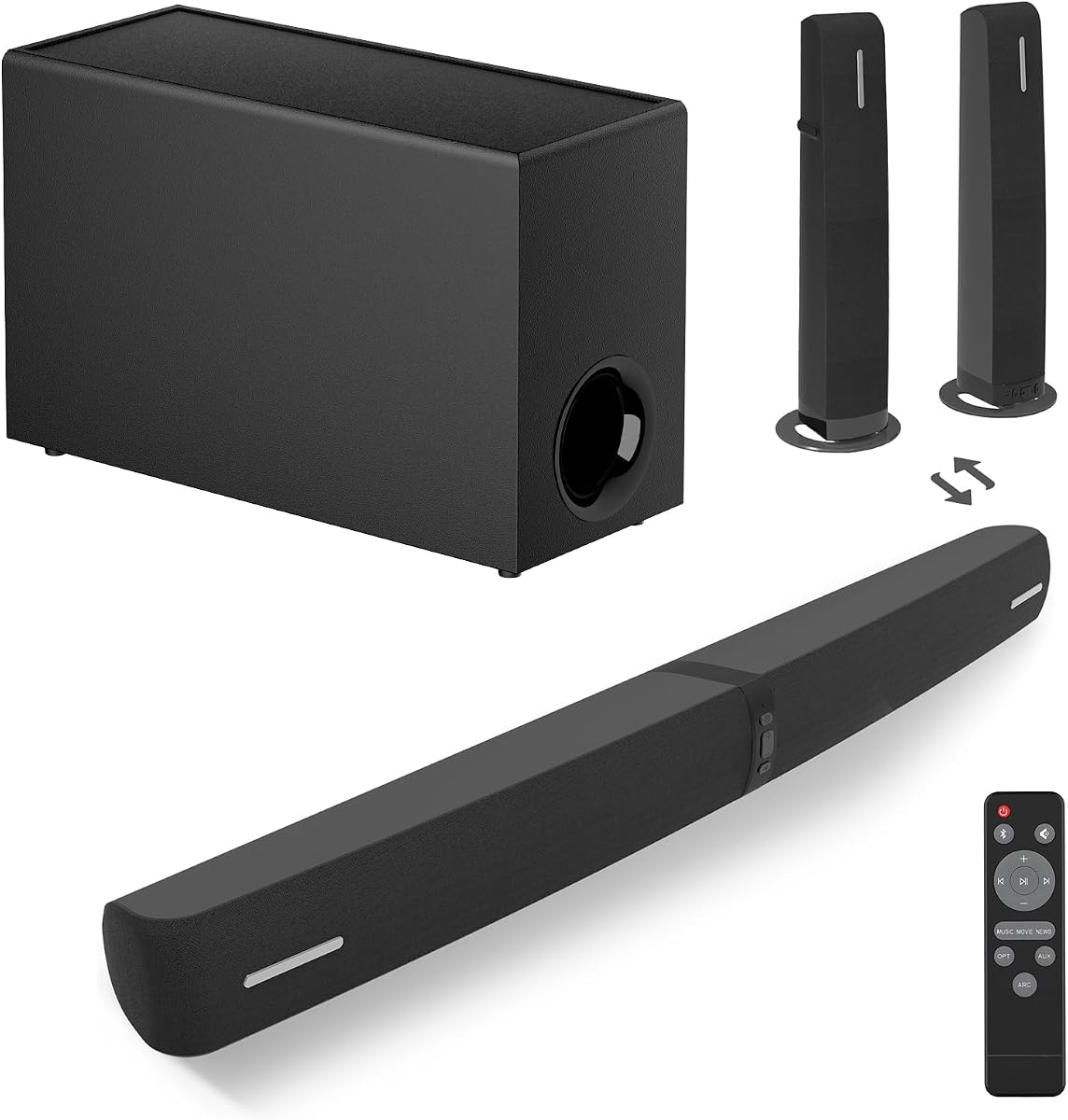
Sound Bar with Subwoofer, 110W Sound Bar for Smart TV with Adjustable Deep Bass & Volume Boost & 3 Equalizer Modes, Bluetooth/ARC/Opt/AUX, Detachable Soundbar for TV/PC/Gaming/Projectors
TCL S45H 2.0 Sound Bar for Smart TV | Dolby Atmos DTS:X Auto Room Calibration| 100W Power Wireless Bluetooth Home Theater Audio | App & Remote Control | Latest Model
TCL S65K S Series 5.1 Channel Soundbar System with Dolby Atmos, DTS:X, Wireless Subwoofer, Wireless Surround Speakers, Bluetooth Music Streaming, and AI Sonic Auto Room Calibration
Top 10 Best Soundbar for Console Gaming Setup in 2026 Compared
The comparison below shows how the ten soundbars differ in channel layout, bass support, gaming features, calibration, and connectivity, helping console players select a system that matches their available space and connection needs.
This detachable 2-in-1 soundbar is a versatile option for console gaming setups that need to work across a television, PC, or projector. It carries a 4.1 customer rating and stands out through its unusual physical design: the bar can be positioned horizontally, vertically, on a tabletop, or mounted on a wall. That flexibility makes it easier to accommodate different consoles, displays, and furniture arrangements.
Pros
Highly flexible physical placement
Useful wired connection choices
Separate equalizer presets
Supports PCs and projectors
Cons
No dedicated subwoofer listed
No virtual surround specification
We may earn a commission when you buy through this link, at no additional cost to you.
Audio is produced by four high-performance drivers with a listed 80W output. Automatic volume boost is intended to make quieter details more noticeable, while movie, music, and news equalizer modes offer quick adjustments for cinematic sequences, game soundtracks, and spoken dialogue. The design is not limited to one orientation, allowing the system to fill a room differently depending on where it is installed.
Connectivity is unusually accommodating for this category. Bluetooth 5.0 supports wireless streaming, while ARC, optical, and AUX connections cover common television and console arrangements. In ARC mode, the television remote can control the soundbar according to the supplied instructions. The absence of a listed subwoofer means bass will not have the same dedicated low-frequency reinforcement as several competing systems.
This is a sensible pick for gamers who value connection flexibility, multiple placement options, and straightforward equalizer presets over a more elaborate surround package. It can serve as a shared audio upgrade for gaming and everyday television use, especially when the console is connected through one of the supported inputs. Buyers seeking deep bass or height effects should compare it with the included subwoofer and surround-equipped alternatives.
Placement Flexibility Improves Setup Options
The detachable construction allows the soundbar to adapt to a console area rather than forcing one fixed arrangement. Horizontal placement emphasizes clean output, vertical placement can create a room-filling effect, tabletop placement prioritizes clarity, and wall mounting can help create a more enveloping presentation.
Useful Modes for Mixed Entertainment
Movie, music, and news modes make the bar practical for a console setup that also handles streaming television and casual listening. These presets provide a quick way to emphasize cinematic impact, melodic detail, or dialogue without requiring extensive manual adjustment.
The Razer Leviathan V2 X is tailored to desktop gaming, where a low-profile bar can sit beneath a monitor without occupying much space. It has a 4.2 customer rating, two full-range drivers, and two passive radiators. A single USB Type-C cable handles both power and audio, reducing cable clutter and making the bar convenient to pair with a compatible gaming desktop or laptop.
Pros
Exceptionally compact desktop footprint
Single-cable USB Type-C setup
Detailed RGB customization
Low-latency Bluetooth connection
Cons
Designed primarily for PCs
No listed television gaming mode
We may earn a commission when you buy through this link, at no additional cost to you.
Gaming atmosphere extends beyond audio through Razer Chroma RGB lighting. The bar includes 14 lighting zones, multiple patterns, and dynamic in-game effects that can complement a matching gaming setup. Razer Audio App and Razer Synapse provide control over lighting and device switching, allowing console gamers to tailor the appearance even if the primary connection is through a PC.
Bluetooth 5.0 offers another way to stream audio with low latency and smooth switching between a paired computer and a preferred mobile device. The soundbar is positioned for near-field listening beneath the monitor, and its output is listed at up to 90dB. It does not include a separate subwoofer or a named gaming sound mode, so its appeal depends on clean integration and physical compactness.
Choose the Leviathan V2 X when desk space is limited and synchronized RGB lighting matters nearly as much as sound. It is particularly suitable for a gaming station centered on a PC, although its USB Type-C-focused design makes it less natural for a television-only console area. Buyers should confirm that their console can route audio through compatible equipment or a PC with the necessary capture and routing setup.
A Cleaner Single-Cable Desktop Setup
Carrying both power and audio over USB Type-C keeps the desk more orderly. The compact form is designed to fit below a monitor, while detachable-looking placement space and angled desktop positioning help preserve a clear view of the gaming area.
Chroma Lighting Extends Gaming Immersion
Fourteen lighting zones support patterns and dynamic effects that can visually echo the action on screen. Razer Audio App and Synapse make those lighting choices and audio-device settings manageable from software rather than physical controls alone.
The Bose TV Speaker is designed around a clear objective: making television audio easier to hear while remaining simple to operate. Its 4.3 customer rating, angled full-range drivers, and dedicated dialogue focus make it appealing for console games in which character voices, announcers, and mission instructions carry important information.
Pros
Strong emphasis on voice clarity
Simple television setup
Compact wall-mountable design
Remote control included
Cons
No dedicated gaming mode
Bass expansion sold separately
We may earn a commission when you buy through this link, at no additional cost to you.
The speaker can connect through HDMI, optical, or AUX input, and Bluetooth allows separate music and podcast streaming. The included remote adds a dialogue mode for further speech emphasis and a bass boost for greater depth. Compatibility with Bose Bass Module 500 or 700 products also creates a path to more low-frequency output when a larger system is desired.
Its compact body measures just over two inches tall, making it suitable for a television stand, smaller entertainment area, or wall installation. The optical cable is included, while an HDMI cable and wall brackets are sold separately. The product does not list a dedicated gaming mode, surround-sound processing, or a subwoofer as part of the standard package.
This model makes sense for gamers who prioritize speech intelligibility, uncomplicated controls, and a modest footprint. It is less suited to shoppers seeking a complete surround system with wireless rear speakers, but its dialogue mode and optional bass-module compatibility offer a simple path to improve an existing console setup.
Dialogue Focus Helps Competitive Games
The remote's dialogue mode is particularly relevant when a game's character voices compete with explosions, effects, and background music. Bose designed the TV Speaker to elevate vocals and pronunciation, making it easier for listeners to follow instructions during competitive or story-driven sessions.
Simple Connections Limit Setup Friction
A single optical, HDMI, or AUX connection is enough to begin using the speaker with a television-based console. The included optical cable and remote simplify the initial process, while Bluetooth provides a convenient route for music when the console is not playing.
The TCL S45H offers one of the strongest combinations of gaming-relevant audio, flexible connectivity, and room setup features in this guide. It has a 4.3 customer rating, a 2.0 channel configuration, and up to 100W of total output. Dolby Atmos and DTS Virtual:X expand the presentation beyond conventional left-and-right playback without requiring a bank of separate speakers.
Pros
Balanced feature set
Virtual height and surround effects
Calibrates to room layout
Complete accessory package
Cons
No wireless subwoofer included
App setup required for calibration
We may earn a commission when you buy through this link, at no additional cost to you.
AI Sonic Auto Room Calibration is one of its most valuable additions for a living-room console setup. Through the TCL app, the system adjusts its output to the room layout and listening position. This can improve consistency when furniture, walls, or speaker placement affect how sound reaches the couch. The process is described as a one-time setup, making it practical for users who want calibration without a complex manual procedure.
The S45H supports HDMI eARC and ARC, optical, Bluetooth, and AUX connections, giving console owners several paths into the system. Its low-profile dimensions of 31.89 inches wide, 2.36 inches high, and 3.86 inches deep are designed to fit neatly below a television. The package includes an HDMI cable, power cord, remote with batteries, and a wall-mounting kit.
This is the most balanced recommendation for console players who want virtual surround, stronger output, and automatic room adjustment without moving into a full surround-and-subwoofer system. It is especially useful in apartments, bedrooms, and medium-sized rooms. The lack of a bundled subwoofer keeps the footprint controlled, but shoppers wanting dedicated bass should examine the TCL 2.1 and 5.1 alternatives.
Virtual Spatial Processing Expands the Image
Dolby Atmos and DTS Virtual:X are designed to simulate height and surround effects from a slim two-channel enclosure. That makes game environments feel wider and more dimensional, particularly when supported content is played through the soundbar's compatible television or console pathway.
Calibration Reduces Placement Guesswork
The AI Sonic system uses the TCL app to adjust the output for the room and listening position. For a shared console area, this makes the result less dependent on exactly where the bar is placed relative to the television and seating.
This soundbar-and-subwoofer system offers a direct way to add more impact to a console gaming setup. It has a 4.4 customer rating, a listed 110W output, and a dedicated adjustable subwoofer. The result is a more convincing low-frequency foundation for racing games, combat sequences, explosions, and cinematic soundtracks than a basic all-in-one bar can provide.
Pros
Dedicated adjustable subwoofer
Strong room-filling output
Multiple equalizer modes
Broad wired connectivity
Cons
No named surround processing
No automatic calibration listed
We may earn a commission when you buy through this link, at no additional cost to you.
Four high-performance drivers are paired with the subwoofer, and automatic volume boost is designed to make quieter content more noticeable. Movie, music, and news modes give users a fast way to tailor the output. The bar can be placed horizontally, vertically, on a tabletop, or wall-mounted, creating flexibility for a compact gaming room or a larger television area.
Connection options include Bluetooth 5.0, ARC, optical, and AUX. ARC mode allows control through the television remote, reducing the number of remotes needed beside a console. The supplied information also highlights easy-to-follow setup guidance and video tutorials, useful for buyers connecting the system for the first time.
The trade-off is that the product does not list advanced virtual surround processing or automatic room calibration. Even so, the included subwoofer, adjustable bass, and flexible input selection make this a strong option for gamers who care more about punchy sound and straightforward operation. It is especially suitable for a television and console sharing a room with everyday music and news use.
Dedicated Bass Improves Game Impact
The adjustable subwoofer gives the system dedicated low-frequency output rather than asking the main drivers to reproduce every effect. That can make fast-paced action feel more substantial while leaving the bar responsible for voices, music, and higher-frequency detail.
Flexible Connections Suit Multi-Device Gaming
Bluetooth 5.0 and three wired options allow the system to serve a console, PC, projector, or other source. The detachable design and multiple orientations further help it fit neatly into an entertainment area without a fixed installation.
The Razer Leviathan V2 is built for a more elaborate PC gaming station, combining a desktop soundbar with a down-firing subwoofer. It has a 4.0 customer rating and uses two full-range drivers to provide the main output. THX spatial audio is included to create a more detailed surround presentation for games, movies, and music.
Pros
Detailed spatial audio processing
Integrated desktop subwoofer
Extensive RGB customization
Broad paired-device support
Cons
Desktop-focused physical design
Not a wireless surround system
We may earn a commission when you buy through this link, at no additional cost to you.
Its integrated subwoofer gives the system more low-frequency authority than a compact two-driver bar. The compact desktop format is designed to fit beneath a monitor, and the detachable rubber feet angle the soundbar toward the listener to reduce obstruction. Although the main emphasis is desktop use, the system's gaming audio and lighting can complement a console displayed in the same area.
Bluetooth 5.2 supports low-latency wireless audio and pairing with a PC plus as many as eight other devices through Razer Audio App. Razer Chroma adds 18 lighting zones, multiple patterns, and dynamic in-game effects. Razer Synapse and the mobile app provide control over RGB behavior, audio settings, and device selection.
This model is ideal for gamers who want a soundbar, subwoofer, spatial processing, and synchronized lighting as one desktop package. It is less appropriate for a minimalist television setup because the design and connection emphasis are oriented toward computers. It also does not provide separate wireless rear speakers, so the surround experience remains a simulated desktop presentation rather than a room-based multi-speaker layout.
THX Processing Adds Directional Detail
The system's THX spatial audio is intended to improve the placement and detail of sounds around the listener. In a gaming context, that can make approaching effects, environmental audio, and dialogue feel more distinctly separated from a compact desktop footprint.
Lighting Extends the Gaming Setup
Eighteen Chroma zones offer more visible customization than basic accent lighting. The supported patterns and in-game effects can help the bar feel integrated with a broader Razer ecosystem, while the included subwoofer adds bass without requiring a separate floor speaker.
The TCL S55H 2.1 adds a wireless subwoofer to the S45H-style feature set, creating a strong middle ground for console players who want bass and virtual surround without a full rear-speaker system. It carries a 4.4 customer rating and a listed total output of up to 220W, giving it more headroom for powerful effects and larger entertainment rooms.
Pros
Powerful combined output
Wireless subwoofer placement
Advanced virtual sound processing
Automatic room adjustment
Cons
Subwoofer adds floor space
No wireless rear speakers
We may earn a commission when you buy through this link, at no additional cost to you.
Dolby Atmos and DTS Virtual:X create simulated height and surround cues from the main soundbar. The wireless subwoofer handles deep bass, freeing the bar to focus on crisp dialogue and midrange detail. AI Sonic Auto Room Calibration through the TCL app adjusts the presentation to the room and listening position, which is useful when the subwoofer and screen are not perfectly symmetrical.
HDMI eARC and ARC, optical, Bluetooth, and AUX provide several ways to connect the system. The main bar measures 31.89 inches wide, 2.36 inches high, and 3.86 inches deep. The subwoofer is 7.68 inches wide, 12.60 inches high, and 7.68 inches deep, so it requires more placement consideration than a compact all-in-one unit.
The package includes an HDMI cable, power cord, remote with batteries, and a wall-mounting kit. This system is a good fit for gamers seeking deep bass, clear voices, and room-aware tuning in a medium-sized space. It remains a 2.1 arrangement rather than a discrete 5.1 system, so anyone wanting sound behind the listening position should look toward the TCL S65K.
Wireless Bass Simplifies Subwoofer Placement
A wireless subwoofer can be positioned away from the main bar without running a long audio cable back to the television cabinet. That flexibility is valuable when the console area includes a side table, open shelving, or a subwoofer location that improves bass response.
Calibration and Processing Work Together
Room calibration accounts for the room's layout while virtual processing expands the apparent soundstage. Together, these features help the S55H deliver balanced output in spaces where dialogue, effects, and bass would otherwise compete at the primary listening position.
The 120W soundbar with wired subwoofer combines straightforward home-theater connectivity with one of the strongest customer ratings in the guide at 4.6. Its listed 120W output and dedicated subwoofer give console games a fuller low-frequency foundation, while the slim main unit is designed to complement a television stand, bedroom, office, or gaming area.
Pros
Highest listed customer rating
Consistent wired subwoofer link
Modern Bluetooth standard
Remote and mounting hardware included
Cons
Wired subwoofer limits placement
No advanced calibration specified
We may earn a commission when you buy through this link, at no additional cost to you.
The subwoofer uses a wired connection to maintain stable audio synchronization without wireless interference. This is a practical strength for gaming because sound effects and dialogue remain tied to the on-screen action. The main speaker offers clear dialogue, detailed highs, and impactful bass, with connection support for Bluetooth 5.3, ARC, optical, and AUX.
Installation is described as straightforward. The system can sit on a television stand or be wall-mounted using the included hardware, and the included remote controls volume, input modes, and playback settings. Its modern, space-saving profile is designed to blend with an existing entertainment area rather than dominate it visually.
The primary compromise is placement flexibility. A wired subwoofer must remain physically connected, so it cannot be moved around the room as freely as a wireless model. The product information also does not mention automatic calibration or named virtual surround processing. Even so, its high rating, strong output, broad device support, and stable bass connection make it an attractive console-focused choice.
Wired Bass Prioritizes Synchronization
The dedicated wired subwoofer link is designed to deliver consistent low-frequency output without wireless interference. That reliability is valuable for games where rapid effects need to remain aligned with what appears on screen.
Broad Compatibility Covers Multiple Devices
Bluetooth 5.3, ARC, optical, and AUX make the system usable with a console, PC, projector, television, smartphone, or tablet. The included remote and mounting hardware further reduce the friction of building a compact home-theater arrangement.
The TCL S65K S Series is the most complete surround-oriented product in this guide, combining a 5.1 channel system with a wireless subwoofer, wireless surround speakers, Dolby Atmos, and DTS:X. It has a 4.4 customer rating and is designed for gamers who want sound to extend behind and above the primary listening position rather than remain confined to a front-facing bar.
Pros
Most complete surround package
Flexible wireless speaker placement
Dedicated center-channel tweeter
Automatic room calibration
Cons
Largest physical footprint
Requires more setup and placement
We may earn a commission when you buy through this link, at no additional cost to you.
Ray Danz technology is intended to produce an expansive soundstage, while the built-in center channel focuses on dialogue and the center-channel tweeter provides high-frequency detail. Together, these features can help character voices remain intelligible during busy action scenes. The wireless subwoofer uses a 6.5-inch driver and Bass Boost technology for deeper low-frequency output.
AI Sonic Auto Room Calibration customizes the system to the surrounding space, an important benefit in a multi-speaker arrangement. The wireless surround speakers can be positioned more flexibly than permanently attached rear channels, while Bluetooth supports convenient music streaming from a phone or tablet. A single HDMI connection is highlighted as the straightforward route to the system's main theater functions.
This is the premium recommendation for a dedicated console gaming room or a large television setup. Its complete channel package offers more positional audio than a 2.0, 2.1, or virtual-surround system. The trade-off is complexity and footprint: more speakers require more cables, more placement decisions, and more room around the seating area for the intended immersive result.
Real Surround Placement Improves Directionality
Wireless surround speakers provide dedicated rear sound, allowing effects behind the player to be reproduced rather than only simulated. That positional difference is especially valuable in competitive games, where a sound arriving from the correct side can help communicate an opponent's position or an environmental event.
Center Channel Keeps Dialogue Accessible
A built-in center speaker and dedicated tweeter are designed to clarify voices during action-heavy scenes. In a console setup, this helps preserve story details, squad commands, and objective instructions without requiring the entire output to be turned up to an uncomfortable level.
The Samsung HW-Q600C combines a 3.1.2 channel design with several television-specific features, making it particularly interesting for console gamers using a compatible Samsung display. It has a 4.4 customer rating, up-firing speakers, strong woofers, and Dolby Atmos support. Its Game Mode Pro is explicitly designed to create a more intuitive gaming presentation with optimized 3D sound.
Pros
Dedicated gaming sound mode
Up-firing height channels
Automatic content-aware optimization
One remote for compatible Samsung televisions
Cons
Q-Symphony requires compatible Samsung television
Multi-device Bluetooth does not mean simultaneous console audio
We may earn a commission when you buy through this link, at no additional cost to you.
Adaptive Sound analyzes scenes in real time and adjusts the mix to emphasize important audio, including voices at lower levels. This is useful during games because it can help bring forward dialogue and critical information while maintaining the impact of explosions, effects, and music. Samsung Acoustic Beam technology is also included to create a more panoramic sense of movement around the screen.
HDMI eARC provides a single-cable route for advanced audio, including Dolby Atmos from a compatible television. Q-Symphony can pair the soundbar with the television's speakers so they operate together, although that feature is limited to compatible Samsung televisions. Bluetooth multi-connection allows two smart devices to remain paired, and Tap Sound offers a convenient way to stream music from a phone.
The one-remote feature is valuable for reducing clutter around a console and television. However, shoppers should check television compatibility before relying on Q-Symphony or the shared remote. This is a strong all-around option for a Samsung television gaming setup, combining an explicit gaming mode, height channels, and automatic audio optimization in a single soundbar.
Game Mode Pro Targets Console Listening
The dedicated gaming mode combines up-firing speakers, acoustic-beam processing, and strong woofers to create a more enveloping effect. It is one of the clearest gaming-oriented feature sets among the products compared here.
Adaptive Sound Prioritizes Important Details
Real-time scene analysis can pull important audio forward, including dialogue at low volume. For story-driven games and competitive titles, that emphasis can make character speech, team communication, and mission cues easier to follow.
We may earn a commission when you buy through this link, at no additional cost to you.
Buying Guide – How to Choose the Best Soundbar for Console Gaming Setup
The right console soundbar depends on your display, room, platform, and priorities. Channel count, bass, gaming tools, latency, calibration, and installation requirements matter more than any single specification, so the following factors help narrow the field before purchase.
Console and Television Connection
Start with the output your console and television can provide. HDMI eARC or ARC is the most convenient route for compatible televisions because it can carry advanced audio through one cable, while optical and AUX offer useful alternatives. Some modern consoles can also send audio directly to a soundbar over Bluetooth, but a wired television connection generally reduces uncertainty and avoids wireless delay. Confirm that the soundbar's input matches the television output you plan to use rather than assuming every connector is shared. Razer models designed around USB Type-C may be better suited to a PC-centered setup than to a television-only console arrangement.
Channel Layout and Spatial Audio
A 2.0 bar uses left and right channels, while 2.1 adds a subwoofer and 3.1.2 adds height channels. Systems with 5.1 channels and separate surround speakers can place audio behind the listener, which is especially useful for directional game effects. Virtual surround processing can create an expanded impression from fewer physical speakers, but it does not reproduce the same directional information as dedicated rear channels. Decide whether you value a compact system with simulated height or a larger arrangement built for genuine rear playback. The TCL S65K is the clearest dedicated-surround choice in this guide, while several less complex bars focus on front-filling output and virtual effects.
Bass and Subwoofer Requirements
A subwoofer can materially improve explosions, engines, impacts, and music in action games. Wireless subwoofers are easier to reposition, while wired models provide a stable connection that can reduce synchronization concerns. If space is limited, a bar with full-range drivers and a volume boost may still be more practical than a two-piece system. Adjustable bass is useful because the ideal subwoofer level in a console room can change with source content and late-night listening. Compare the size of the included subwoofer as well as its output claim, since a large cabinet and a larger driver can affect placement around furniture.
Dialogue and Adaptive Processing
Game dialogue is often buried beneath music and environmental effects. A dialogue mode, dedicated center channel, or adaptive sound system can make characters and instructions easier to understand without forcing the master volume higher. Bose TV Speaker focuses on vocal clarity, the Samsung HW-Q600C analyzes scenes in real time, and the TCL S65K uses a dedicated center channel. These approaches serve different needs: a dialogue preset is simple and direct, while adaptive processing can alter the balance automatically. For competitive or story-heavy games, prioritizing intelligibility can be more valuable than maximizing the apparent width of the soundstage.
Gaming Modes and Latency
A named gaming mode can provide a convenient starting point for effects, dialogue, and spatial processing. Samsung's Game Mode Pro is the most explicitly gaming-focused option among these products, while Razer models emphasize PC gaming integration, Chroma lighting, and software control. Low-latency Bluetooth is stated for both Razer Leviathan models, which is relevant when a console or mobile device connects wirelessly. Wired HDMI remains the most broadly practical choice for a television-based console, but you should still enable the console's game-optimized display or audio mode when available and use matching game titles for the fairest comparison.
Room Calibration and Placement
A soundbar's performance depends partly on the room, its position, and the listener's seat. AI Sonic Auto Room Calibration on the TCL S45H, S55H, and S65K adjusts output to the room and listening position through the TCL app. That can be especially helpful when a subwoofer or surround speaker cannot be placed symmetrically. Even without automatic calibration, allow breathing room around the soundbar and keep the listening position centered for the most balanced result. Wall-mounted models need attention to nearby furniture and reflective surfaces, while desktop bars benefit from being angled toward the player.
Size, Design, and Control
A compact bar is easier to place under a television or beneath a monitor, but large systems need enough space for a subwoofer and rear speakers. Razer Leviathan V2 X is designed for a clutter-free desktop, while Bose TV Speaker is only just over two inches tall and can sit in front of a display or be mounted. Consider the included remote, app support, wall-mount hardware, and whether the bar can be controlled through the television remote. Fewer separate accessories generally make a console area cleaner, although smart-TV control is most reliable when the television and soundbar support the appropriate control method.
Multi-Device Flexibility
Most console soundbars also serve as television speakers, music systems, and home-theater components. Bluetooth is common, while some systems retain several paired devices or support switching through an app. Razer Leviathan V2 supports as many as eight additional paired devices through Razer Audio App, and Samsung's Bluetooth multi-connection keeps two smart devices paired. Clarifying whether the soundbar is primarily a console product or a shared family-room system prevents unnecessary compromises. A simple, always-connected soundbar may suit a dedicated gaming room, while flexible inputs and wireless streaming are more valuable in a multi-use space.
How to Use and Care for Your Soundbar for Console Gaming Setup
Begin by positioning the soundbar below the television, in front of it without blocking infrared signals, or in a compatible desktop position beneath a monitor. Connect the console to the television first, then link the television to the soundbar through HDMI eARC or ARC when supported. Optical and AUX are useful alternatives. Power the system on, select the matching input, and adjust the television's speaker output so game audio is sent to the soundbar rather than the built-in television speakers.
Run the manufacturer's calibration or setup process after choosing the final room and listening positions. For systems with an app-based room calibration, complete the requested measurements before comparing sound effects or dialogue. Set the subwoofer level and equalizer mode separately for different content, then use the console's game mode if one is available. Keep the main volume moderate during calibration so that the automatic adjustments reflect normal listening conditions rather than a temporarily high output level.
For care, keep the soundbar and subwoofer away from moisture, direct heat, and crowded cables. Clean the housing with a soft dry cloth, and avoid pushing objects into the drivers, bass ports, or control buttons. Check that the subwoofer connection remains secure if it is wired, update any associated app when an update is offered, and periodically verify that the television, console, and soundbar remain on the intended input. These simple steps help maintain stable performance and reduce avoidable setup problems.
Frequently Asked Questions
Is a soundbar better than gaming speakers for a console setup?
A soundbar can be a better choice when a single front-filling unit, tidy installation, and enhanced television audio matter most. Dedicated gaming speakers may offer more precise left-and-right separation, while a surround-equipped soundbar can provide positional sound behind the player. The right option depends on room layout, display placement, and whether the console is the system's primary entertainment source.
Does HDMI eARC reduce audio delay for console gaming?
HDMI eARC provides a convenient single-cable connection and can carry advanced audio formats from a compatible television to the soundbar. It is generally a practical way to maintain a stable home-console connection without adding a separate transmitter. You should still use the console's game-optimized display setting and compare the television's game mode, because processing elsewhere in the signal chain can affect perceived latency.
Can I connect a soundbar directly to a game console with Bluetooth?
Some modern consoles support Bluetooth audio, but compatibility depends on the console model, system software, and soundbar. A wired path through the television often provides a more consistent connection and makes advanced formats easier to use. Check the current setup guidance for both devices before selecting Bluetooth as the only method.
Do I need a soundbar with a subwoofer for gaming?
A subwoofer is not mandatory, but it can add considerable impact to explosions, vehicles, impacts, and cinematic game music. A good 2.0 bar may be sufficient for dialogue-heavy titles or a smaller room. If you add a subwoofer, consider its footprint, connection method, and whether you can set the bass independently for late-night play.
What soundbar size is best for a gaming room?
Choose a width that fits beneath the television without crowding the console or blocking the screen, and leave enough space for the soundbar's drivers. Compact models work well in apartments and bedrooms, while wider bars can deliver stronger output in medium rooms. A separate subwoofer and surround speakers require additional floor or shelf space around the main listening position.
Does a gaming mode actually improve the sound?
A gaming mode can make effects more prominent, emphasize dialogue, or apply spatial processing designed for interactive entertainment. The result depends on the source mix and room, so it may not be preferable for every game. Treat the preset as a useful starting point and compare it with movie or neutral dialogue settings for titles with different audio demands.
Should I enable room calibration before playing games?
Yes, it is sensible to complete calibration after the soundbar, subwoofer, and speakers are in their final positions. Automatic systems can account for room layout and listening location, making tuning less dependent on trial and error. If the equipment is moved later, repeating the process may produce a more consistent result.
How do I prevent console audio from playing through both devices?
Set the television's audio output to the soundbar or home-theater device rather than its built-in speakers, then select the appropriate soundbar input. On systems with Q-Symphony or another speaker-combination feature, the television and soundbar may operate together by design, so check that mode before troubleshooting. Disabling any additional Bluetooth pairing can also prevent unintended playback from another device.
Final Thoughts on Choosing the Best Soundbar for Console Gaming Setup
The TCL S45H is the most balanced overall recommendation because it combines 100W output, Dolby Atmos and DTS Virtual:X processing, AI Sonic room calibration, and several connection options without adding a separate subwoofer. The 110W soundbar with subwoofer is a strong value-oriented choice when deep bass and adjustable placement are priorities, while the TCL S65K offers the most complete home-theater experience with wireless surround speakers, a wireless subwoofer, and a dedicated 5.1 channel layout.
Choose the Razer Leviathan V2 X for a compact PC-centered desk with synchronized RGB lighting, the Razer Leviathan V2 for a more elaborate desktop package with THX spatial audio, and the Bose TV Speaker when clear dialogue and simple setup matter most. The Samsung HW-Q600C stands out for Game Mode Pro, adaptive scene analysis, and integration with compatible Samsung televisions. In every case, verify console output, television compatibility, room placement, and the connection method before finalizing your choice.
Product ratings, feature sets, availability, and prices can change over time, so review the current listing before purchasing. Compare the soundbar with the dimensions of your television stand, the location of your console, and your preferred gaming display mode. The right system is the one that delivers the sound effects, dialogue, and bass you value while fitting cleanly into the way you already play.
Our nitrate meter for testing water guide compares 10 options for nitrate, TDS, radiation, and multi-parameter testing to help you choose with confidence.