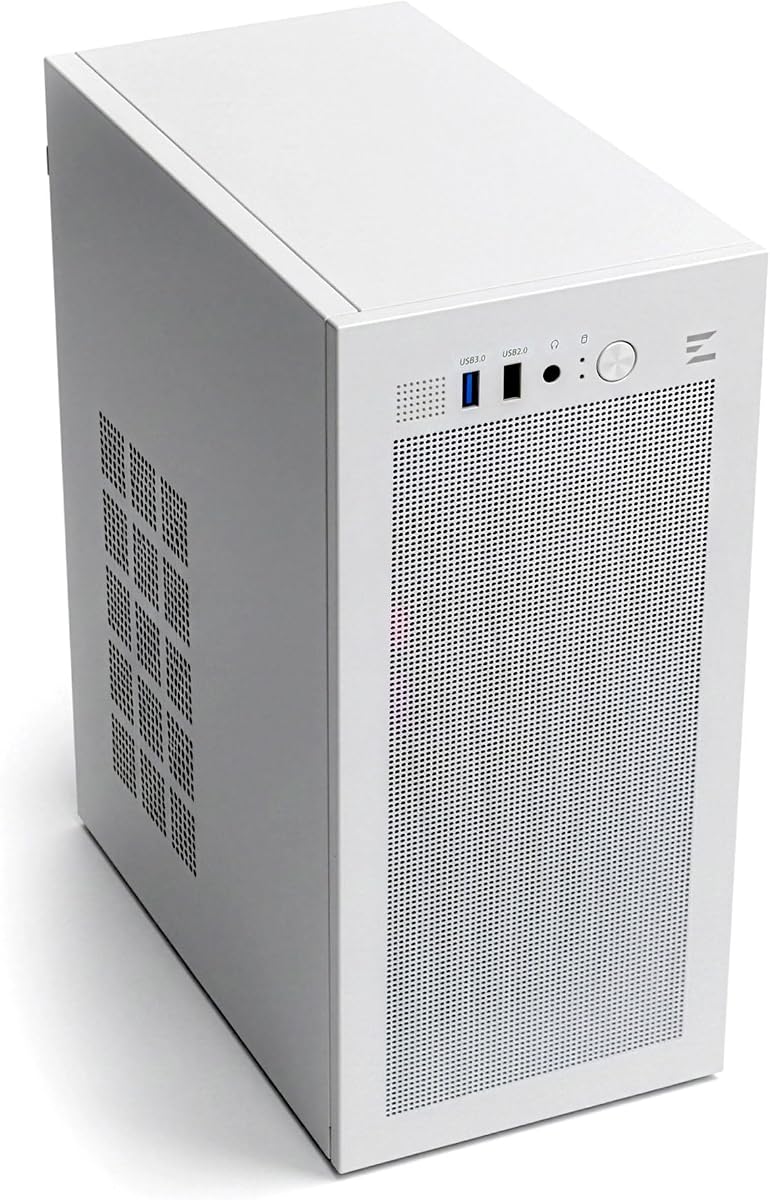
Zalman CUBIX
4.5Editor score
Very compact 17.1-liter design
Standard ATX PSU support
260mm graphics card clearance
Perforated airflow front panel
Our Smallest ATX Case guide compares 10 compact Micro-ATX and ATX-compatible cases for airflow, component clearance, build flexibility, and usability.
A compact PC case can make a powerful system easier to place, transport, and build on, but choosing the smallest option requires balancing internal clearance against cooling and expandability. The best enclosure depends on your motherboard, graphics card, power supply, cooler, and the space available in your setup.
We compared all 10 cases by examining their stated dimensions, motherboard support, GPU and PSU limits, cooling options, front connectivity, cable-management features, and included fans. The list covers genuinely compact Micro-ATX designs as well as models that accept Micro-ATX boards while remaining more flexible than traditional small-form-factor cases.
Each pick highlights a different reason to buy, from budget-friendly enclosure value to high ratings, extensive hardware compatibility, or polished compact design. Product ratings and specifications reflect the supplied listing information, while availability and prices can change, so compare current listings and verify dimensions before ordering.
4.5Editor score

4.8Editor score

4.8Editor score
This side-by-side comparison highlights each case's form-factor support, core hardware limits, cooling approach, and distinguishing features, helping buyers identify the compact enclosure that best matches their components.


The FOIFKIN F100 combines a compact 340 by 275 by 330mm footprint with a feature set that goes well beyond a barebones enclosure. Its 4.3 rating reflects a mixed but broadly positive buyer response, while the supplied specifications make it appealing to builders who want a compact Micro-ATX system without surrendering cooling options or a polished exterior. It is especially relevant to the search for the smallest ATX case because many buyers actually need a compact case that accepts Micro-ATX rather than a full-size ATX board.
We may earn a commission when you buy through this link, at no additional cost to you.
Its dual-chamber design separates the power supply and drive area from the main hardware chamber. That separation is useful in a compact enclosure because it gives cables a dedicated route and prevents storage or PSU clutter from interfering with airflow. The case also includes three 120mm ARGB fans: two reverse fans and one forward fan. Reverse fans can direct air toward the front intake area, while the forward and rear arrangement creates a basic path for moving heat through the chassis.
Cooling headroom is another strength. The F100 can accommodate two 240mm radiators simultaneously, subject to the stated support arrangement, and it has enough power for a modern CPU and GPU configuration without immediately forcing a component upgrade. The 320mm GPU allowance and 170mm PSU clearance provide useful margins, while storage support covers one hard drive and two solid-state drives. The tempered-glass panels add visual appeal and allow the internal lighting and component layout to remain visible.
The main trade-off is motherboard support. The F100 accepts M-ATX and ITX boards rather than standard ATX motherboards, so it cannot serve as a compact full-ATX enclosure. Its 4.3 rating is also lower than the strongest options in the list, meaning buyer experiences have not been as uniformly favorable. Even so, the combination of preinstalled lighting fans, dual radiators, panoramic glass, and organized chambers makes it a strong all-around choice for a compact Micro-ATX gaming or productivity build.
The included three-fan arrangement gives buyers an immediate cooling foundation, while support for 240mm radiators leaves room for a liquid-cooling upgrade. The dual-chamber structure also helps preserve a clean airflow path despite the case's relatively compact dimensions.
High-hardness tempered glass provides a broad view of the components, while the dedicated PSU and driver area keeps wiring out of the primary chamber. Together, these details make the F100 easier to present neatly than a basic budget enclosure.
We may earn a commission when you buy through this link, at no additional cost to you.
The TGDGAMER MATX is positioned as a straightforward, affordable enclosure for builders assembling a compact system around a Micro-ATX or Mini-ITX motherboard. Its 4.0 rating is the lowest in this comparison, but that figure should be considered alongside its clearly stated purpose: offering a slim chassis with airflow-focused construction and useful component compatibility. It is a practical choice for office computers, entry-level gaming systems, and builders who want to avoid spending heavily on exterior features.
We may earn a commission when you buy through this link, at no additional cost to you.
The perforated front panel is designed to pull filtered air directly into the case. That basic approach makes more sense here than in a sealed decorative enclosure because the product emphasizes cooling over visual presentation. The case can hold two 120mm fans and one 80mm fan, and a preinstalled 80mm fan is included. This provides a functional cooling foundation, although it does not match the richer fan configurations of several competitors.
Component support is reasonably practical for a slim budget chassis. It supports standard-size ATX power supplies, which is helpful because many similarly compact cases require short SFX units. Graphics cards can reach 250mm when no chassis fan occupies the front position, but that maximum falls to 225mm if a front fan is installed. Builders with a long GPU must therefore account for the cooling arrangement before ordering. The front I/O includes one USB 3.0 port and one USB 2.0 port.
The trade-offs are evident: the case lacks the panoramic glass, extensive radiator options, modern Type-C connectivity, and elaborate cable management seen elsewhere. Its 4.0 rating also suggests that some buyers have found shortcomings. Even so, it delivers the essentials at a restrained cost. Choose the TGDGAMER MATX when affordability, a slim footprint, and basic airflow matter more than polished styling, maximum GPU capacity, or an extensive cooling upgrade path.
Supporting a normal-size ATX power supply removes a common compact-building obstacle. Buyers can avoid replacing a capable PSU solely to fit a narrow enclosure, although they should still verify the unit's exact dimensions before assembly.
The perforated front and included 80mm fan provide direct airflow through the chassis. GPU clearance changes with front-fan placement, so the case's potential can be maximized by planning fan positions around the selected graphics card.
We may earn a commission when you buy through this link, at no additional cost to you.
The ASUS Prime AP201 is a compact Micro-ATX enclosure that emphasizes refined construction, efficient airflow, and unusually practical space use. Its 4.6 rating is among the strongest in the list, and the stated 33-liter footprint positions it as compact without entering the highly restrictive dimensions of the smallest traditional Micro-ATX cases. That balance makes it appealing to buyers who need strong component compatibility but still want a smaller footprint than a conventional mid-tower.
We may earn a commission when you buy through this link, at no additional cost to you.
The chassis front is covered by a quasi-filter mesh panel containing more than 57,000 precision-machined 1.5mm holes. This approach combines a clean industrial appearance with a large number of open paths for air. Cooling is further supported by the ability to install up to six fans and 280mm or 360mm radiators, offering enough flexibility for a high-performance compact build. The included information does not state that those cooling components are included, so they should be treated as supported upgrades rather than standard equipment.
Its interior dimensions are particularly useful. Despite the 33-liter footprint, the AP201 accepts ATX power supplies up to 180mm long, graphics cards up to 338mm, custom liquid cooling, and several storage devices. Tool-free side panels simplify access, while the extended motherboard tray, routing cutouts, and 32mm space behind the tray provide practical cable-management room. These features collectively reduce the compromises commonly associated with a compact chassis.
The AP201 is not the smallest enclosure in this comparison, and its product information does not list a front USB Type-C connection. It is also more elaborate than a basic budget case, making it better suited to builders who value presentation, cooling flexibility, and convenient maintenance. For a Micro-ATX system that must accommodate a substantial GPU and full-size PSU, however, the AP201 provides one of the strongest combinations of capability and refinement in this guide.
The precision-machined mesh provides a visually restrained front while allowing air to pass through thousands of openings. This makes the AP201 suitable for builders who want a restrained appearance without sealing off the intake path.
Support for a 338mm GPU and 180mm PSU is especially valuable in a 33-liter chassis. Buyers can retain longer desktop components without moving into a much larger mid-tower.
We may earn a commission when you buy through this link, at no additional cost to you.
The DARKROCK EC2 is a mid-tower that supports ATX, Micro-ATX, and ITX motherboards, making it a flexible alternative when a full-size ATX board is a nonnegotiable requirement. Its 4.4 rating indicates generally favorable buyer feedback, while the mesh front, tempered-glass sides, separate dust filters, and Type-C readiness give it the visual and practical features associated with a modern gaming chassis. It is included because some searches for the smallest ATX case actually require a case that preserves full ATX support.
We may earn a commission when you buy through this link, at no additional cost to you.
Cooling flexibility is the EC2's strongest area. It supports up to eight 120mm fans and a front-mounted 360mm radiator. The front mesh helps feed air into those positions, while the tempered-glass side panel allows the internal layout and lighting to remain visible. Buyers considering a 360mm liquid cooler should still confirm mounting and radiator placement details, but the stated support provides a clear path to substantial thermal capacity.
The hardware limits are generous for a compact-oriented mid-tower. It supports graphics cards up to 340mm and power supplies up to 200mm, as well as 50-series graphics cards. The tempered-glass design creates a more premium presentation than a plain steel enclosure, and the Type-C-ready front panel aligns with modern accessories. Magnetic dust filters mounted separately at the top and bottom are useful for routine cleaning because they can be removed and maintained independently.
Its obvious disadvantage is size. A mid-tower with support for eight fans and a 360mm radiator will not satisfy a buyer seeking the absolute smallest enclosure. The EC2 is better understood as a compact-feature option for standard ATX builds than a true small-form-factor solution. Choose it when full ATX compatibility, broad cooling expansion, and clean styling matter more than minimizing every exterior dimension.
Eight 120mm fan positions and front 360mm radiator support create more cooling flexibility than most small Micro-ATX alternatives. This makes the EC2 suitable for builders who want to upgrade cooling without changing chassis.
Separate top and bottom magnetic filters make routine cleaning more convenient. Removing and cleaning those filters helps preserve airflow through the mesh front and reduces the need for frequent full-case disassembly.
We may earn a commission when you buy through this link, at no additional cost to you.
The Zalman CUBIX-G is a compact mini-tower aimed at budget gaming systems and clean desktop setups that benefit from built-in illumination. Its 4.4 rating suggests a generally positive response, and the enclosure's combination of Micro-ATX support, three preinstalled fans, and modern front I/O makes it a more complete starting point than a bare enclosure. It is a practical choice when the objective is to reduce desk footprint without sacrificing basic PC-building conveniences.
We may earn a commission when you buy through this link, at no additional cost to you.
Three preinstalled 120mm fans use fixed RGB lighting and are controlled through three-pin DC connections. Fixed RGB means the lighting is present without requiring additional configuration, though it does not provide the same color-selection flexibility as ARGB. The fans are positioned to contribute airflow out of the box, allowing the builder to focus on installing the core components rather than sourcing an initial cooling set.
The main compatibility concern is the power supply. ATX PSUs are accepted when they are no more than 140mm long, which is tighter than the 200mm allowance of several larger cases in the list. Graphics cards may reach 280mm, and CPU air coolers may measure up to 155mm. The case also accommodates up to three 2.5-inch hard drives or a combination of two 2.5-inch drives and one 3.5-inch drive, giving it useful storage flexibility for a compact system.
Front connectivity includes USB Type-C and USB 3.0, which is a welcome improvement over basic compact cases. The limitations are the short PSU allowance, fixed rather than configurable lighting, and a smaller overall component envelope than the ASUS, DARKROCK, or LIAN LI options. Choose the CUBIX-G when you want a small, prebuilt-fan, RGB-equipped gaming enclosure and can confirm that your power supply and cooler fit.
Three fixed-RGB fans eliminate the need to purchase an initial cooling and lighting package. This is especially helpful for builders creating their first compact gaming system on a defined budget.
USB Type-C and USB 3.0 front ports provide convenient access to compatible accessories. The connector selection gives the CUBIX-G a more current feel than many similarly minimal cases.
We may earn a commission when you buy through this link, at no additional cost to you.
The Okinos MiniArt 4 is among the most convincing answers for buyers seeking a genuinely small case that still supports substantial modern hardware. Its 24.5-liter volume is considerably smaller than many mid-towers, yet it accommodates Micro-ATX motherboards, a 240mm radiator, up to five fans, and graphics cards as long as 330mm under the right PSU conditions. The 4.8 rating is tied for the highest in this comparison, providing another positive signal about the overall package.
We may earn a commission when you buy through this link, at no additional cost to you.
Its exterior uses clean full-mesh panels and a refined walnut-style wooden logo badge. The mesh treatment supports airflow, while tool-free top and side panels simplify access and routine maintenance. Three 120mm three-pin non-PWM fans are preinstalled: two bottom reverse fans and one rear fan. A 240mm radiator can be mounted at the top, and the case supports up to five fans overall, providing enough cooling expansion for a compact gaming system.
The front-mounted PSU arrangement is unusual and useful. PSUs up to 150mm without the cable are supported, and a 10A extension cable is included. GPU clearance is conditional: a card up to 330mm fits with a PSU of 140mm or less, while longer PSUs reduce the GPU allowance to 280mm. This relationship makes component measurement essential, but the design can still support a long graphics card when paired with a sufficiently short PSU.
Its 4.8 rating and broad feature set make it our overall recommendation for this category, although full-size ATX motherboards are not supported. The front I/O includes a power button, USB Type-C 3.2 Gen 2, USB 3.1, and a combined headphone and microphone jack, though the Type-C port is primarily intended for data rather than device charging. Choose the MiniArt 4 when compact volume, modern connectivity, preinstalled fans, and high-rated overall satisfaction matter most.
A 24.5-liter chassis can still accommodate a 330mm graphics card when paired with an appropriately short PSU. That balance makes the MiniArt 4 compelling for compact gaming builds that would otherwise require a much larger enclosure.
Tool-free top and side panels make it easier to reach internal components, while USB Type-C, USB 3.1, and the combined audio jack provide a practical modern I/O arrangement.
We may earn a commission when you buy through this link, at no additional cost to you.
The Cooler Master QUBE 540 is a compact-form-factor ATX mid-tower with a distinctive flexible orientation design. Rather than limiting itself to the traditional upright arrangement, it can operate horizontally or vertically, and its reversible I/O panel and movable handles are intended to make repositioning easier. Its 4.4 rating points to solid overall satisfaction, while its unusual layout broadens the ways it can be used around a desk, entertainment center, or workstation.
We may earn a commission when you buy through this link, at no additional cost to you.
Its full front mesh panel is designed to maximize ventilation, and a 120mm SickleFlow fan is preinstalled for rearward airflow. The chassis supports up to 415mm graphics cards when the front fan position is left open, giving it exceptional clearance for high-end cards. CPU cooling capacity is not listed, so builders using large air coolers should verify the available dimensions rather than assume compatibility based on GPU clearance alone.
Motherboard support is unusually broad for a compact ATX enclosure. The case accepts Mini-ITX, ATX, and large E-ATX motherboards up to 11 inches wide. Front connectivity includes two USB 3.2 Gen 1 ports and a USB 3.2 Gen 2 Type-C port, providing useful access for everyday accessories. Tempered glass adds visual appeal, while the mesh front keeps the enclosure from presenting a completely solid intake surface.
The primary caveat is that the QUBE 540 is not the smallest case in this comparison. Its focus is versatility within the ATX mid-tower category rather than minimal volume, and the ability to change orientation may not compensate for a buyer who needs a tiny enclosure. It is a strong choice for full ATX builders who value motherboard options, long-GPU support, modern I/O, and flexible placement more than the smallest possible footprint.
Horizontal and vertical operation can help builders adapt the system to different rooms or workspaces. The reversible I/O panel and movable handles support that flexibility rather than forcing one fixed installation.
The 415mm GPU allowance is one of the strongest limits among the cases reviewed. Removing the front fan preserves clearance for particularly long cards, though that arrangement should be considered during cooling planning.
We may earn a commission when you buy through this link, at no additional cost to you.
The JONSBO D32 STD uses a small desktop-case format to deliver a Micro-ATX system that can still accommodate demanding components. Its 4.7 rating is among the highest in this guide, and the stated support for 365mm graphics cards, a top-mounted 240mm AIO, and multiple PSU formats makes it particularly interesting for compact gaming builds. Its dimensions are listed as 15.55 by 8.15 by 12.36 inches, with a foot included.
We may earn a commission when you buy through this link, at no additional cost to you.
Graphics card compatibility is the standout feature. A card up to 365mm can fit, providing room for even very long desktop GPUs. Cooling options include a 240mm AIO at the top, along with several 120mm and 140mm fan positions across the top, bottom, and rear. CPU air coolers can reach 164mm with Intel processors or 163mm with AMD processors, so platform-specific verification remains important.
The power supply section is flexible. Standard ATX units from 150mm to 200mm, SFX-L, and SFX power supplies are listed as compatible, although buyers should refer to the specific PSU specification and the 16A plug exception noted in the product information. The motherboard section supports Mini-ITX, standard Micro-ATX, and back-connect Micro-ATX boards. Storage capacity includes three 2.5-inch drives or two 2.5-inch SSDs plus one 3.5-inch hard drive.
Front I/O consists of USB 3.2 Gen 1 Type-A, USB 3.2 Gen 2 Type-C, and a combined headphone and microphone port. A magnetic dust-proof net covers the bottom intake, helping protect the interior in a compact chassis. The D32 STD is not a full ATX case, but for a Micro-ATX build it combines excellent clearance, a high rating, and broad power-supply support. It is a strong choice for a compact desktop gaming system.
The 365mm maximum GPU length is particularly helpful in a small chassis because it preserves access to high-end desktop cards. This reduces the chance that buyers must compromise on graphics performance to save desk space.
ATX, SFX-L, and SFX support gives builders more ways to reuse or select a power supply. Support for back-connect Micro-ATX boards can also simplify the visible cable layout when the selected motherboard uses that design.
We may earn a commission when you buy through this link, at no additional cost to you.
The white Zalman CUBIX is the smallest enclosure in this comparison by stated volume, measuring only 17.1 liters. Its 4.5 rating reflects a positive buyer response despite the severe dimensional constraints. For a shopper specifically searching for the smallest ATX case, this compact Micro-ATX model deserves attention because it preserves standard ATX power supply support while using very little desk space. It is especially suitable for simple office systems, media centers, and modest gaming configurations.
We may earn a commission when you buy through this link, at no additional cost to you.
Despite its tiny dimensions, the CUBIX supports graphics cards up to 260mm and standard ATX power supplies. CPU air coolers may reach 137mm, which is enough for many low-profile and compact tower coolers but not for the tallest desktop models. The perforated front panel and preinstalled 80mm fan provide a basic airflow solution. Builders who need additional cooling should account for the limited clearance and install compact components rather than assuming unlimited upgrade room.
Construction uses 0.8mm steel, giving the enclosure a durable feel despite its small footprint. The front panel offers one USB 3.0 port, one USB 2.0 port, and a 3.5mm stereo auxiliary connection. This is a basic I/O selection without USB Type-C, but it covers the needs of many conventional peripherals. The compact shape and white finish also make the case easy to integrate into a smaller office or entertainment setup.
The decision comes down to priorities. Choose the CUBIX when minimizing volume is more important than premium appearance, extensive radiator support, modern Type-C connectivity, or a large CPU cooler. For gaming, confirm that the GPU and cooler fit before ordering, and expect fewer fan upgrade paths than with the larger cases. Within genuinely small Micro-ATX enclosures, it remains one of the most space-conscious options in the guide.
At 17.1 liters, the CUBIX provides the greatest volume reduction in the group. That makes it useful for constrained desks and small rooms where every inch of the enclosure affects placement.
Standard ATX power supply support removes a major limitation seen in some ultra-compact cases. Builders can use a conventional desktop PSU as long as its physical design fits the stated clearance.
We may earn a commission when you buy through this link, at no additional cost to you.
The LIAN LI Vector V100 MINI is a premium compact platform built around a panoramic tempered-glass enclosure and an unusually generous hardware allowance. Its 4.8 rating is tied for the highest in this guide. The product supports Micro-ATX, back-connect Micro-ATX, and Mini-ITX motherboards, but not full-size ATX boards. That distinction matters because the word MINI describes its compact M-ATX platform rather than an ultra-small SFF enclosure.
We may earn a commission when you buy through this link, at no additional cost to you.
The case measures 436 by 221.5 by 443.9mm, so buyers should measure available furniture or shelf space before ordering. Its 4mm tempered-glass front and side panels create a seamless 270-degree view, while an integrated ARGB strip adds illumination. The aesthetic is likely to appeal to builders who want a small system to function as a display piece as well as a practical computer.
The V100RMIX version includes four 120mm ARGB PWM side-intake fans and one 120mm rear-exhaust fan. In total, the chassis can support up to nine fans, with room for a top-mounted 240mm or 360mm radiator. Graphics cards up to 415mm are supported, CPU coolers up to 163.5mm, and ATX power supplies up to 200mm. An adjustable horizontal GPU anti-sag bracket is included, adding stability for heavier cards mounted away from the PCIe support area.
The trade-off is that this is not one of the smallest enclosures in absolute terms, despite its Mini designation. It is also incompatible with full-size ATX motherboards. Choose the Vector V100 MINI when visual design, integrated ARGB cooling, long-GPU support, and premium construction take priority over maximum volume reduction. It delivers a polished compact build with a strong rating and substantial room for high-end components.
The 270-degree glass presentation and integrated ARGB strip turn the enclosure into a display-focused component. Side-mounted ARGB intake fans add further illumination without requiring separate decorative lighting.
A 415mm GPU limit, nine-fan support, and top radiator options make the V100 MINI unusually flexible for a compact platform. The included anti-sag bracket adds practical support for the long cards this enclosure is designed to accept.
We may earn a commission when you buy through this link, at no additional cost to you.
The smallest suitable case is not determined by marketing labels alone; motherboard format, component dimensions, cooling needs, and available physical space must all align before a purchase makes sense.
ATX is a motherboard standard, but the term is often used loosely when people search for a small PC enclosure. Full-size ATX boards measure 305 by 244mm and require a case explicitly designed around them. Micro-ATX boards are smaller, and Mini-ITX is smaller still. Most genuinely compact cases in this guide accept Micro-ATX but not full ATX. If your existing motherboard is full-size ATX, the DARKROCK EC2 and Cooler Master QUBE 540 are the relevant choices because their stated specifications include ATX support.
Graphics cards are often the decisive dimension in a compact build. Stated maximum lengths range from 250mm in the TGDGAMER MATX to 415mm in the QUBE 540 and Vector V100 MINI, but those figures can depend on fan and PSU placement. The TGDGAMER, for example, supports less GPU length when a front fan is installed, while the Okinos MiniArt 4 reduces its GPU allowance when a longer PSU is used. Measure the actual card, including its bracket and connector overhang, and compare it with the case's stated clearance before buying.
A smaller case does not automatically require a smaller power supply. The Zalman CUBIX and ASUS Prime AP201 both claim support for standard ATX PSUs within stated length limits, while the JONSBO D32 STD supports ATX, SFX-L, and SFX formats. The Okinos MiniArt 4 instead places the PSU at the front and supports units up to 150mm without a cable. Match the form factor, body length, modular connectors, and cable bend radius rather than looking only at wattage.
CPU cooler height can determine whether a powerful processor is practical in a small enclosure. The Zalman CUBIX supports coolers up to 137mm, the Zalman CUBIX-G reaches 155mm, the JONSBO D32 STD supports 163mm for AMD and 164mm for Intel, and the LIAN LI Vector V100 MINI reaches 163.5mm. The Okinos MiniArt 4 includes top radiator support, while the ASUS AP201 supports 280mm and 360mm radiators. If you expect to use a tall air cooler, measure its width and height carefully in addition to checking the published limit.
Included fans can determine how soon the system is ready to run and how much airflow remains available for expansion. The FOIFKIN F100 and Okinos MiniArt 4 each include three 120mm fans, the Zalman CUBIX-G includes three fixed-RGB fans, and the Vector V100 MINI includes four side-intake ARGB fans plus a rear exhaust. The QUBE 540 includes a 120mm SickleFlow fan, while the CUBIX includes one 80mm fan. Support for additional fans and radiators matters if the included configuration does not match your component heat levels.
Compact cases trap heat more readily than open mid-towers, so the intake and exhaust design deserves careful attention. The ASUS AP201 uses a precision-machined mesh front, the Okinos MiniArt 4 uses multi-zone mesh, and the QUBE 540 uses a full mesh front. By contrast, a basic case such as the TGDGAMER MATX uses a perforated front and a single 80mm fan. Pair the visual design with an understanding of the airflow path, radiator position, and filter maintenance so the enclosure does not restrict the installed cooling.
Front I/O matters more often than expected because it determines how quickly you can connect peripherals. USB Type-C appears on the ASUS Prime AP201? No—the AP201's supplied information does not list Type-C, but the CUBIX-G, DARKROCK EC2, JONSBO D32 STD, QUBE 540, and Vector V100 MINI do list it. The MiniArt 4 also includes Type-C 3.2 Gen 2, though its information notes that the port is designed mainly for data and is not recommended for charging. Match the connector types and data standards to the accessories you use every day.
Exterior dimensions are the final and sometimes most decisive step. The CUBIX offers only 17.1 liters, the MiniArt 4 uses 24.5 liters, and the AP201 uses 33 liters, while the Vector V100 MINI has dimensions that appear larger despite its Mini name. Measure the height, width, and depth of the intended location, including clearance for cables and the handle on the QUBE 540. Also check whether the case must sit beside a monitor or underneath furniture where airflow and front access could be restricted.
Before assembling the system, place the empty case on a stable surface and install the standoffs for the exact motherboard form factor. Connect the front-panel wires, power supply, storage devices, and fans according to the case and component instructions. Keep the graphics-card clearance rule in mind, especially in models where front-fan or PSU placement changes the available length. Fit the power supply first when it uses a nonstandard position, then route cables through the designated channels without forcing sharp bends.
After the hardware is installed, confirm that every fan spins in the intended direction. Intake fans should face toward the case interior, while exhaust fans should face outward; reverse-blade fans may be used where the product's airflow design calls for them. Connect PWM or DC fan headers to the correct motherboard or controller header, and verify that RGB or ARGB lighting software matches the fan connection standard. Test the cooling system under a realistic workload rather than relying only on the first power-on result.
Compact cases benefit from regular maintenance because dust can restrict their shorter intake paths. Remove the bottom or top dust filter as designed, clean it away from the computer, and let it dry fully before reinstalling it. Inspect visible fan blades and clean any buildup with gentle, appropriate tools. Keep the interior uncluttered, avoid blocking mesh panels, and periodically verify that internal cables have not shifted into a fan or obstructed a drive mount. These habits preserve airflow and make future component servicing easier.
Among the reviewed models, the Zalman CUBIX is the smallest by stated volume at 17.1 liters. It supports Micro-ATX and Mini-ITX motherboards, graphics cards up to 260mm, standard ATX PSUs, and CPU coolers up to 137mm. The Okinos MiniArt 4 is another compact option, but its 24.5-liter volume, front-mounted PSU, and component relationships require more careful clearance planning.
Only if the manufacturer explicitly lists full ATX support. In this guide, the DARKROCK EC2 and Cooler Master QUBE 540 list ATX compatibility, while most compact choices accept Micro-ATX and Mini-ITX. The LIAN LI Vector V100 MINI explicitly does not support full-size ATX despite its compact-platform positioning. Check the motherboard specification before purchasing any enclosure.
It depends on the case's physical PSU allowance, even when the motherboard itself is Micro-ATX. The Zalman CUBIX and ASUS Prime AP201 list standard ATX PSU support, while the JONSBO D32 STD accepts ATX, SFX-L, and SFX formats. Other cases may impose shorter limits or require SFX-style units. Measure the PSU body and account for cable bends and modular connectors.
Compare the card's full length with the case's published maximum, including the PCIe bracket and any connector overhang. Also check whether installing a front fan, using a longer PSU, or adding a front radiator reduces clearance. The TGDGAMER MATX, for example, has different GPU limits depending on front-fan placement, while the Okinos MiniArt 4 varies its limit according to PSU length.
They provide a useful starting point, but the answer depends on the CPU, GPU, workload, and case design. Cases with three or five included fans generally have a stronger airflow foundation than those with one 80mm fan. Builders using high-power components should also evaluate radiator support, fan directions, exhaust placement, temperatures, and acoustic targets rather than assuming the included set is sufficient.
It can be more constrained because the motherboard tray, fans, cables, and power supply share less space. The ASUS Prime AP201 and Okinos MiniArt 4 address this with tool-free panels, routing space, and dedicated chambers, while the Vector V100 MINI includes a GPU support bracket. Building in stages, connecting the power supply early, and routing cables as components are installed can make a compact build more manageable.
It can benefit from more frequent cleaning because restricted intake paths and dense internal layouts may accumulate dust sooner. Models with removable magnetic or fine-mesh filters, including the DARKROCK EC2, MiniArt 4, and JONSBO D32 STD, make maintenance more convenient. Clean filters according to the manufacturer's guidance and avoid compressed air that could force debris deeper into the chassis.
A glass panel improves component visibility and can suit a display-oriented build, but it is not essential to performance. Some compact designs prioritize airflow, tool-free access, or a smaller volume instead. If appearance is not a priority, choose the enclosure that best fits the hardware and offers the cooling layout you need rather than paying extra for a decorative viewing panel.
The Okinos MiniArt 4 stands out as the strongest overall compact recommendation, combining a 24.5-liter volume with three included fans, 240mm radiator support, modern front I/O, and a 4.8 rating. The Zalman CUBIX is the choice for maximum space reduction, while the LIAN LI Vector V100 MINI offers the most polished design, extensive ARGB cooling, and long-GPU support among the compact alternatives.
Prioritize exact component compatibility over the smallest possible number. Measure the motherboard, GPU, PSU, CPU cooler, and intended installation area, then check whether fan placement changes the published limits. For full-size ATX boards, the DARKROCK EC2 and Cooler Master QUBE 540 are more appropriate than the genuinely compact Micro-ATX models. For a balanced build with long GPUs, the ASUS Prime AP201, JONSBO D32 STD, and FOIFKIN F100 also deserve close consideration.
Ratings, availability, and prices can change, so confirm the current listing and final specifications before purchasing. The most suitable case is the one that fits your hardware without compromising airflow and remains small enough for the space where it will live. Recheck every clearance, especially GPU length, PSU dimensions, radiator placement, and CPU-cooler height, before completing the order.