
8U 10 Inch Network Rack
4.8Editor score
Eight usable rack units
Reinforced cold-rolled steel frame
Includes shelf and panels
Explore the best Server Rack for Home Lab options, comparing capacity, rack size, mounting style, cooling, included accessories, and setup flexibility for your
A home lab rack brings order, protection, and serviceability to a collection of servers, switches, patch panels, power protection, and audiovisual equipment. The right cabinet should fit your available space, match your equipment, provide useful mounting options, and make cables and components easier to access without creating an overly complicated installation.
The racks in this guide were compared using the supplied product specifications, focusing on rack width and height, usable capacity, depth, construction, included shelves or panels, cooling characteristics, mobility, and whether the frame can stand alone or mount to a wall. The list covers compact 10-inch cabinets, standard 19-inch open frames, wall-mounted racks, and rolling server carts.
Each review explains where a particular rack is strongest, as well as the compromises that may affect a home lab. The three highlighted picks cover a compact enclosure, a high-capacity mobile rack, and a deeper premium mini cabinet. Product details and current pricing can change, so confirm dimensions, equipment compatibility, and included accessories before ordering.
4.8Editor score
4.6Editor score

4.8Editor score
This side-by-side comparison covers ten racks with different form factors, from desktop 10-inch cabinets to wheeled 19-inch frames, helping readers identify the right balance of capacity, footprint, depth, cooling, and mounting flexibility.


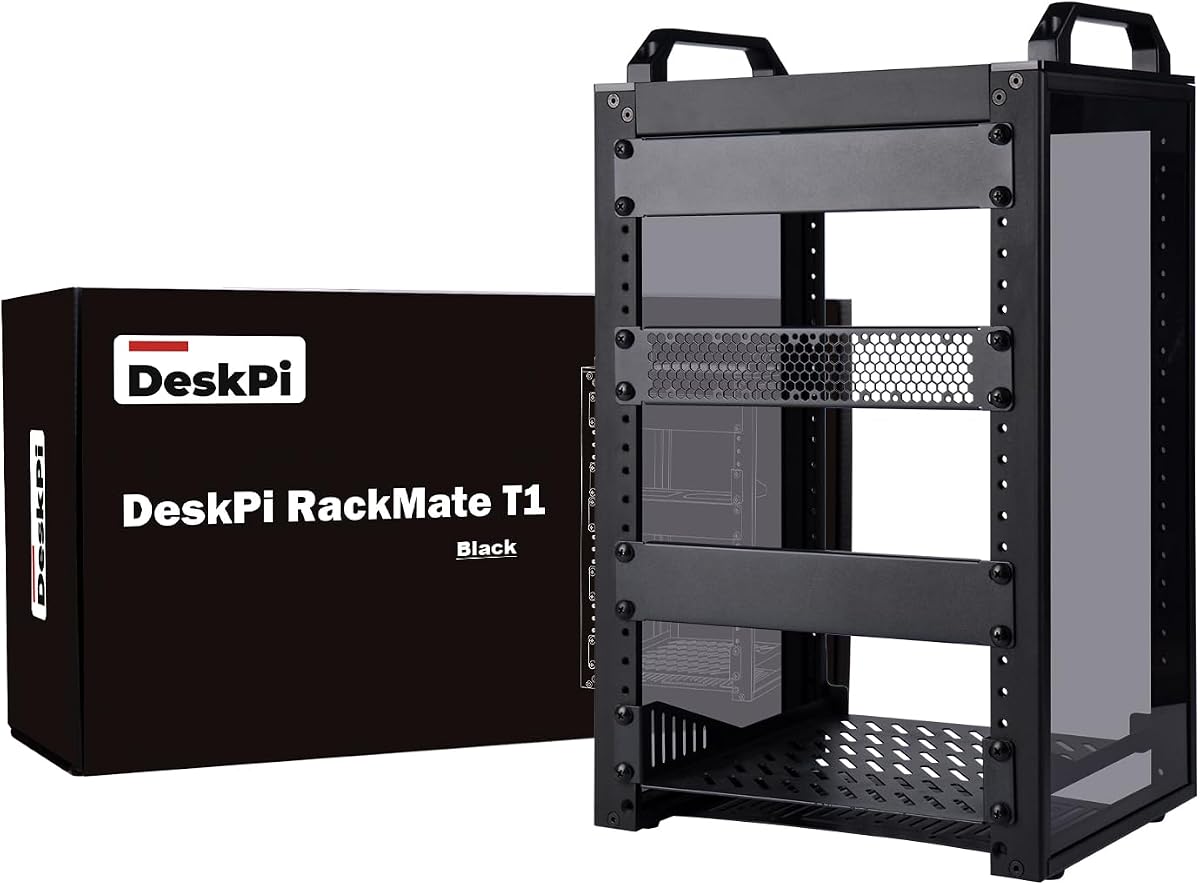
The GeeekPi RackMate T1 is a compact 10-inch, 8U home lab cabinet that combines a space-conscious footprint with an enclosure-like appearance. It holds a 4.6 rating, the highest among the original 8U mini racks in this comparison, and its translucent sides make the installed equipment easy to inspect. The open front also supports convenient access during installation and routine maintenance.
We may earn a commission when you buy through this link, at no additional cost to you.
Its most useful feature is the way it preserves usable rack space without surrounding the equipment with a bulky full-height enclosure. The stated dimensions are 11 by 7.8 by 16 inches, while the 8U designation corresponds to 14 inches of rack height. That makes the T1 a credible choice for compact home assistant servers, 10-inch switches, small network appliances, and other specialized equipment where a full 19-inch frame would be excessive.
Construction combines an aluminum alloy frame with translucent acrylic sides. According to the supplied details, the panels provide some dust resistance while keeping the setup visible, and the open construction promotes airflow. The cabinet arrives flat-packed with the necessary assembly hardware, so buyers should allow time for construction and verify that their devices use compatible 10-inch mounting dimensions. It should not be assumed to accept standard 19-inch enterprise hardware.
This is the strongest all-around pick for a home lab that values organization without giving up desk space. Choose the T1 when your equipment is explicitly designed for a 10-inch rack, when visual access matters, and when a small, attractive cabinet fits the room better than a tall open frame. It is less appropriate for a collection of conventional 19-inch servers or for users who require a large integrated power-distribution setup.
The T1 turns a loose collection of compact network and server equipment into a structured 8U installation. Its narrow width and small depth make it especially useful near a desk, entertainment center, or home assistant setup where a conventional server rack would dominate the available area.
Translucent acrylic sides allow status lights to remain visible, while the open design simplifies cable routing and component access. This combination is useful for active home labs in which equipment may be restarted, monitored, or reorganized frequently.
We may earn a commission when you buy through this link, at no additional cost to you.
This 10-inch, 6U mini server rack stands apart because its accessory package includes a rack-mount PDU with four power sockets. That turns the frame into more than a simple equipment shelf: it provides a defined place for compatible network hardware, power distribution, and cable management within a compact 10-inch format. The product carries a 4.3 rating and is aimed at small home networks, home labs, offices, and audiovisual systems.
We may earn a commission when you buy through this link, at no additional cost to you.
The open steel frame and premium acrylic side panel balance airflow with partial dust protection. Equipment remains visible, and the open construction allows heat to dissipate effectively. The supplied description specifically identifies patch panels, network switches, cable management systems, and power strips as compatible classes of 10-inch rack-mount equipment, giving the rack a practical networking focus.
The main limitation is its 6U height, which offers less expansion room than the 8U and 12U alternatives in this guide. The included PDU also uses sockets designed for 10-inch racks, so buyers should confirm that their plugs and power distribution arrangements are suitable. The accessory set includes a blank panel, a rack bracket, a PDU, and mounting hardware, reducing the need to source those basics separately.
Home labs with a modest collection of 10-inch network gear will appreciate the integrated PDU and tidy, compact arrangement. It is a strong match for users who want a dedicated power and network hub without building a large open frame. Those planning a rapid expansion should favor a taller rack, while users with 19-inch devices should choose a standard-width alternative.
The included four-outlet rack PDU gives the home lab a central power location designed to match the 10-inch format. It is especially useful when a switch, patch panel, modem, and other compact devices need a consistent, organized arrangement.
A blank panel, rack bracket, mounting hardware, and the PDU create a useful starting point for a compact network installation. The included components make it easier to assemble a complete-looking rack without separately planning every basic mounting element.
We may earn a commission when you buy through this link, at no additional cost to you.
The VEVOR 12U open frame offers a broad range of placement options for home labs that may evolve over time. It can stand on the floor or be wall-mounted, and its four-post frame uses standard 19-inch equipment. The 4.0 rating is the lowest among the ten products, but the supplied specifications show a versatile structure with useful depth and load characteristics.
We may earn a commission when you buy through this link, at no additional cost to you.
The key advantage is the adjustable 23- to 40-inch depth. That range can accommodate shallow network gear or deeper servers, power supplies, and AV equipment while preserving room for cables. The carbon steel construction supports a 500-pound load when floor-mounted and 150 pounds when wall-mounted, so the intended installation method has a direct effect on the amount of equipment the frame can safely carry.
Its open frame makes airflow and access to rear connections more straightforward, while the added top panel creates space for accessories. Four casters make the rack easier to reposition, which is useful when a home lab needs to move for maintenance or room rearrangement. The supplied package includes pallets, M5 screws, casters, M10 expansion screws, M6 cage nuts, a grounding wire, and a user manual.
This rack suits a homeowner who wants one frame to support both floor-standing and wall-mounted configurations, especially if equipment depth may change. Buyers should use the appropriate mounting mode and follow the included instructions carefully. The lower rating suggests it may not be the strongest aesthetic or organizational choice, but its adjustable depth and dual-use installation remain compelling for a flexible lab.
The wide 23- to 40-inch adjustment helps the rack accommodate everything from shallow patch panels to deeper computing equipment. It also creates room for cable management behind installed devices, reducing the need to compress cables into a frame that is too shallow.
Users can begin with the rack in a freestanding position and later wall-mount it, or choose the wall-mounted form from the start. Because the load capacity differs between configurations, the mounting method should match the weight and location of the planned equipment.
We may earn a commission when you buy through this link, at no additional cost to you.
This 15U open frame is a generous middle ground for home labs that contain more than conventional network equipment. Its stated overall size is 19.7 inches long, 18.8 inches wide, and 32.3 inches high, with mounting-hole spacing listed at 18.35 inches. It receives a 4.2 rating and supports up to 200 pounds, making it a substantial home or small-office installation.
We may earn a commission when you buy through this link, at no additional cost to you.
Two 1U rack shelves add immediate value because they create stable mounting points for equipment that may not use standard rack holes. The top and bottom platforms contribute further storage, while five included hook-and-loop straps help keep loose cables and small accessories organized. Compatibility spans server, stereo, switch, data, AV, and IT equipment, making the frame flexible for mixed technical and entertainment systems.
The cold-rolled steel frame is powder coated for resistance to rust and corrosion. Its open, ventilated design supports heat dissipation, which is valuable when switches, media devices, and other powered equipment operate together. Swivel casters provide mobility, and the product is wall-mountable for locations where floor space is limited. Installation guidance is shown in the product listing, and the frame requires user assembly.
Choose this rack when 15U of capacity and useful shelves matter more than a compact footprint. It is particularly appealing to users combining network infrastructure, audio equipment, and home theater components. The tradeoff is its larger physical presence compared with a 10-inch desktop cabinet, so buyers should measure the room and confirm the listed mounting-hole spacing against their hardware.
The two included 1U shelves provide support for devices that do not present conventional rack-mount holes. They also make it easier to stage lighter components while leaving open rack space for switches, panels, and more formally mounted devices.
The frame is designed for network, data, stereo, computer, IT, and AV equipment. That broad compatibility makes it a practical central structure for a home lab whose components serve networking, storage, media, or automation tasks.
We may earn a commission when you buy through this link, at no additional cost to you.
The RackPath 12U network rack is a 19-inch open frame designed for locations where wall space and floor space are both valuable. It can be wall-mounted or used as a freestanding floor unit, giving home lab owners flexibility as their setup changes. The 4.6 rating places it among the stronger-rated products in this guide.
We may earn a commission when you buy through this link, at no additional cost to you.
Its most distinctive accessory package includes two 14-inch-deep vented 1U shelves with rear support brackets. Those shelves are intended to add stability and distribute the load of heavier equipment such as modems, DVRs, or UPS units. Ventilation helps preserve airflow around shelf-mounted devices, while the rear supports make this a more substantial shelf design than a simple flat platform.
The reinforced cold-rolled steel frame has a black powder-coated finish and supports up to 150 pounds. Installation hardware is included: 30 10-32 mounting screws and eight M5 wood screws. Standard 19-inch compatibility allows use with switches, patch panels, AV gear, and other conventional rack equipment, avoiding the form-factor restrictions associated with smaller mini racks.
This is a good match for a dedicated home lab nook where a wall-mounted frame can preserve walking space. Buyers should consider whether the 150-pound rating is sufficient for a dense collection of servers, and whether 14-inch shelf depth accommodates their non-rack-mount equipment. The included hardware and flexible placement make it particularly approachable for a new installation.
Wall mounting can free the floor beneath the rack and create a more organized technical area. The same frame can stand independently when a permanent wall installation is unnecessary, which is useful during early development or testing.
Rear support brackets give the 14-inch vented shelves a more stable configuration for heavier devices. Their open design also supports cooling, making them a more thoughtful alternative to a completely solid shelf in an active powered setup.
We may earn a commission when you buy through this link, at no additional cost to you.
This second listing for the GeeekPi RackMate T1 describes the same 10-inch, 8U mini rack format and may appeal to shoppers who encounter it through a different product page. It combines an aluminum alloy frame with translucent acrylic sides, carries a 4.6 rating, and is positioned for network, server, audio, and video equipment.
We may earn a commission when you buy through this link, at no additional cost to you.
The cabinet measures 11 by 7.8 by 16 inches, making it well suited to a home lab situated on a desk, shelf, or small stand. Its open design improves access and cooling, while the translucent panels offer some dust protection and a clear view of the equipment. The form is especially attractive for home assistant servers, compact clusters, and specialized 10-inch networking equipment.
As with other 10-inch racks, compatibility is the essential issue. Users need hardware designed for the 10-inch form factor and should verify the dimensions of any prospective switches, servers, or accessories. The flat-packed format includes the required hardware for assembly, but the construction process should be considered before purchase. Its depth also limits the size of equipment that can be installed.
This listing is best viewed as an option for buyers prioritizing a compact, visually organized desktop installation. The open construction and translucent panels make it easier to monitor a living home lab than a solid cabinet would. It is less suitable for standard 19-inch server gear, deep chassis equipment, or a rapidly expanding collection that will need substantial rack capacity.
The narrow cabinet makes it possible to mount compatible gear without installing a floor-standing structure. This can be a decisive advantage in apartments, offices, and other spaces where every piece of furniture must perform several functions.
The open frame supports airflow and straightforward maintenance, while translucent sides let users see status lights and cable routes. It combines enclosure benefits with the accessibility associated with an open rack.
We may earn a commission when you buy through this link, at no additional cost to you.
The VIVO 25U freestanding server rack cart is the most substantial rack in this guide, offering 25U of capacity, a 22- to 40-inch depth range, and a stated 1,200-pound load capacity. Its 4.7 rating is the highest among the larger standard-width racks. It is intended for substantial collections of servers, UPS systems, patch panels, switches, and other networking or AV gear.
We may earn a commission when you buy through this link, at no additional cost to you.
Four vertical support rails organize equipment into a conventional rack layout, while the open steel frame maximizes airflow and ventilation. Adjustable depth changes in one-inch increments, allowing the cart to accommodate different chassis sizes and leave practical space for rear cabling. The 23.5-inch length and 51-inch height make this a full-size installation rather than a compact cabinet.
Four durable casters allow the rack to move across different floor types, which is useful when the home lab shares space with offices, workshops, or entertainment systems. Optional leveling feet are included to stabilize the cart when it is stationary. Hardware and step-by-step assembly instructions are also supplied, although the size of the frame makes setup more involved than assembling a small desktop rack.
Choose this cart for a growing or equipment-heavy home lab that values mobility, depth adjustment, and strong load support. It is a particularly good option when servers need to be rolled temporarily for access to cables or wall connections. Users with only a few lightweight network devices will find it unnecessarily large, but serious home infrastructure can benefit from its flexibility and substantial frame.
Twenty-five rack units provide room for a broad mixture of servers, switches, patch panels, storage, and AV equipment. That expansion headroom can keep a home lab organized as services and hardware are added over time.
Casters make the rack easy to reposition, while leveling feet stabilize it once its final location is chosen. This combination is useful in multipurpose rooms where the home lab may need to share floor space temporarily.
We may earn a commission when you buy through this link, at no additional cost to you.
The 8U 10 Inch Network Rack combines a desktop-friendly 10-inch width with a 9.45-inch depth and a 4.8 rating, the highest listed rating among the products compared. It is designed for 10-inch rack-mount equipment such as patch panels, network switches, cable organizers, and power strips, making it a focused solution for compact networking setups.
We may earn a commission when you buy through this link, at no additional cost to you.
Durable cold-rolled steel provides the main structural support, while reinforced rack shelf supports improve stability. The open frame promotes airflow, and transparent panels allow users to observe device indicators while adding some separation from dust. Its overall dimensions of 10.4 by 9.4 by 16.6 inches preserve a relatively small footprint without reducing rack height below 8U.
The accessory kit includes one blank panel, one brush panel, one rack shelf, and the necessary mounting hardware. The brush panel can help manage airflow around cable openings, while the blank panel can cover unused mounting positions. These included components make the frame more immediately useful than a bare chassis, although exact panel placement depends on the user's equipment and preferred cable routing.
This is a strong value-oriented pick for a small home lab centered on 10-inch networking devices. It provides more depth than the 7.87-inch RackMate T1 and a steel frame, making it a useful middle ground between a tiny desktop enclosure and a full-size rack. It remains unsuitable for standard 19-inch equipment, so buyers should verify their hardware form factor before choosing it.
Eight rack units offer useful vertical capacity, while the 9.45-inch depth gives cables and supported equipment more room than the shallowest mini cabinet. That balance makes the rack useful for compact but real network installations.
The included blank panel, brush panel, and shelf provide essential rack-building components. They help users control open mounting positions, guide cables, and create a stable platform before additional accessories are added.
We may earn a commission when you buy through this link, at no additional cost to you.
The GeeekPi RackMate T2 is the most spacious of the compact 10-inch cabinets in this guide, with 12U of height, 10.23 inches of depth, and a 4.8 rating. Its aluminum alloy and acrylic frame creates a polished enclosure-like structure for home assistant servers, clusters, and compatible 10-inch network equipment.
We may earn a commission when you buy through this link, at no additional cost to you.
The stated dimensions are 11.02 by 10.23 by 23.22 inches. That makes the T2 noticeably taller than an 8U desktop rack, but it remains much smaller than a conventional floor-standing server frame. The open front provides access to installed equipment and supports cooling, while translucent sides allow direct observation of status lights and internal cable routing.
A 12U height equals 21 inches, leaving ample vertical space for multiple 10-inch devices. The greater depth also makes the cabinet more accommodating than a shallow mini rack, although buyers must still verify individual chassis dimensions. Most importantly, the T2 is explicitly designed for 10-inch form factors and is not compatible with standard 19-inch enterprise equipment.
This is the premium compact pick for a home lab that has outgrown an 8U enclosure but does not need a full 19-inch frame. It suits users who value appearance, visibility, and a compact enclosure together. Those with conventional networking gear should use a standard-width rack instead, while buyers seeking the most mobile or highest-capacity option should consider the larger open-frame alternatives.
Twelve rack units provide room for a meaningful collection of switches, servers, and accessories while preserving a relatively narrow footprint. It is a practical step up for compact labs that have already planned their equipment list.
The aluminum alloy structure and translucent acrylic sides give the rack a more finished look than a bare steel frame. Equipment remains visible and accessible, helping the installation fit comfortably into a home office or media-oriented space.
We may earn a commission when you buy through this link, at no additional cost to you.
The AxcessAbles 8U Network Rack is a standard 19-inch open-frame AV and networking rack with an emphasis on mobility and accessory compatibility. It carries a 4.5 rating and supports equipment up to 18 inches deep. Its 8U height, locking three-inch casters, and vented side panels make it well suited to a compact home or small-business AV installation.
We may earn a commission when you buy through this link, at no additional cost to you.
The open front and rear provide access to equipment and cables, while protective vented sides add some separation from the surrounding environment without creating a fully enclosed cabinet. Real rails offer mounting points for standard gear. The rack accommodates both American 5mm and European 6mm rack-mount standards, and packs of screws for each standard are included.
The caster wheels are described as suitable for moving over carpet, and their locking function keeps the rack stationary when needed. The listed load capacity is 330 pounds with wheels and 440 pounds without them. A 1U blank panel and screwdriver are also supplied, although the rack itself requires assembly. Wheels arrive preassembled according to the product details.
This rack is a good fit for users combining home theater, audio, networking, and general rack equipment, especially when the installation must be moved occasionally. Compatibility with standard 19-inch rack accessories broadens the available options. Its 8U height limits expansion, so buyers planning dense server collections should choose a taller frame, but it remains a convenient, polished option for a mobile mixed-media rack.
The three-inch caster wheels allow a loaded rack to move while the locking mechanism keeps it stable in its chosen position. This is useful in home offices and studios where equipment may need to be rolled aside for cleaning or cable access.
Support for 5mm and 6mm mounting standards makes the frame adaptable to a wide selection of network, AV, and electronic equipment. The included screw packs reduce friction when installing compatible accessories.
We may earn a commission when you buy through this link, at no additional cost to you.
Choosing a home lab rack means balancing equipment format, available space, growth plans, cooling, power needs, and the convenience of maintenance. The most important first step is identifying the hardware you already own and the direction in which the lab is likely to expand.
Rack width determines which equipment can be mounted. Standard home and enterprise equipment generally uses the 19-inch rack format, while compact home assistant and specialty network products may use 10-inch frames. The RackPath, VIVO, VEVOR, 15U open frame, and AxcessAbles racks support 19-inch equipment, whereas the GeeekPi and other 10-inch products are limited to compatible 10-inch devices. Choosing the wrong width can make otherwise attractive equipment impossible to install.
Rack height alone does not reveal whether a frame will fit. Measure the room, pathway, and intended mounting location, then compare those figures with the product's stated dimensions. Depth deserves equal attention because long cables, power connectors, and rack-mounted equipment can consume more space than the hardware's own depth suggests. Compact desktop racks save room but may restrict chassis size, while adjustable-depth frames provide more flexibility for mixed equipment.
Rack height is measured in units, with one U representing 1.75 inches. The products range from 6U compact frames to a 25U mobile cart, with 8U, 12U, and 15U options in between. Buy for realistic future capacity rather than filling every open position immediately. A slightly larger frame can make expansion and reorganization easier, but only if it still suits the intended physical space and does not create unnecessary installation complexity.
Home labs can generate meaningful heat, especially when switches, servers, storage, and AV equipment run continuously. Open frames and open-front cabinets generally favor airflow, while enclosed or paneled designs require careful spacing and unobstructed paths. Vented shelves and panels can add protection without completely restricting circulation. Equipment cooling also depends on its own airflow direction, so rack position and cable management matter alongside the cabinet's design.
A rack with useful accessories can simplify assembly and improve stability. Included 1U shelves provide a place for modems, UPS units, DVRs, and equipment without standard mounting holes. Blank panels cover unused positions, while brush panels can help organize cable openings. The mini rack with the four-outlet PDU offers integrated power, while the 8U 10-inch model includes a shelf, blank panel, brush panel, and mounting hardware. Compare the accessory list with the equipment that needs support.
A frame can be freestanding, wall-mounted, or designed to transition between both. Wall mounting preserves floor space but introduces installation and load considerations, while a freestanding rack is easier to reposition. The VEVOR rack supports both methods with different stated load capacities. RackPath also offers both options and includes wall fasteners. Swivel casters and locking wheels can make a freestanding rack more convenient, especially in a room shared with other technical or entertainment equipment.
Mobility is valuable when equipment needs to be accessed, moved for maintenance, or shared between tasks. Casters make larger racks manageable, but the frame also needs stable feet or locking wheels. Load ratings provide a useful indication of structural capacity, though they should be compared with the combined weight of equipment, shelves, accessories, and cabling. The VIVO cart offers the greatest stated capacity, while smaller wall-mounted frames naturally carry lower limits.
A good rack makes cables easier to route, hide, and trace. Open frames provide access to rear connections but need disciplined management to avoid clutter. Semi-transparent and vented panels can reduce visual dust exposure while still allowing status lights to be monitored. Depth, hook-and-loop straps, brush panels, and cable organizers all contribute to a cleaner installation. Ensure that the chosen rack leaves room for power leads, patch cables, and service loops rather than forcing them into tight bends.
Begin by inventorying every device that will enter the rack. Record whether each item uses 19-inch or 10-inch mounting holes, measure its depth, note its weight, and identify the direction in which its cables and cooling vents face. Place the heaviest and deepest equipment toward the lower portion of the frame when possible, while keeping frequently serviced devices near accessible heights. Assemble the rack in the location where it will be used, particularly if it is wall-mounted or has casters.
Secure equipment using the specified screws and the included mounting hardware, but check screw and hole compatibility before tightening. Attach shelves to structural mounting points and confirm that heavier devices are supported evenly. Route patch cables, power cords, and network leads through the rear or designated cable-management area, leaving enough slack for service loops. Use the included blank or brush panels to manage unused spaces, and avoid blocking ventilation openings or creating tight cable bends.
For upkeep, periodically inspect the rack for loose fasteners, shifted equipment, dust, and cable strain. Dust the frame and panels with an appropriate dry or lightly damp method, taking care not to push debris into vents. Casters should be checked for movement, and locking wheels engaged when the rack is stationary. Wall-mounted racks require extra attention to mounting security, while open frames benefit from periodic cable tidying. Keep the installation area ventilated and confirm that the final layout continues to match the equipment's service and cooling requirements.
No. A 10-inch rack is designed for equipment manufactured to the smaller 10-inch form factor. Standard 19-inch switches, servers, and patch panels require a compatible 19-inch frame. The T2 rack explicitly notes that it is not compatible with standard 19-inch enterprise equipment, and the same distinction applies to the other compact racks in this guide.
The answer depends on the height of each device because not every component occupies a full rack unit. A 1U switch uses one position, a 2U appliance uses two, and some servers or chassis occupy more. Users should list each device's specified rack height, add any shelves or power accessories, and leave additional space for future expansion.
Wall mounting is useful when floor space is limited or the home lab is in a dedicated nook, but installation quality and the wall-mounted load rating are important. A freestanding rack is easier to move, inspect, and expand, especially when it has casters. Several products support both approaches, allowing the choice to depend on the room rather than the rack itself.
Casters are helpful if the rack must be moved for access to cables, wall connections, cleaning, or shared floor space. They are less important in a permanent installation. If mobility is not needed, stable leveling feet can reduce movement, while locking wheels can provide both occasional mobility and a stationary final position.
A rack unit, abbreviated as U, is a standardized vertical measurement used to describe rack-mountable equipment. One U equals 1.75 inches. An 8U rack therefore has 14 inches of nominal mounting height, while a 12U rack has 21 inches and a 25U rack has 43.75 inches, before considering the dimensions of the complete cabinet.
Yes, and they are often advantageous in home environments because their open construction makes equipment and cables easier to access while supporting airflow. The tradeoff is less physical shielding from dust and a more exposed appearance. Compact cabinets with acrylic sides provide a more enclosed look and some dust resistance, but they limit equipment dimensions and may require more precise compatibility.
The stated limits vary substantially, from 150 pounds for some wall-mountable designs to 1,200 pounds for the large VIVO cart. Buyers should include the combined weight of mounted devices, shelves, power distribution, and accessories, then use an appropriate margin. The installation method also matters because some frames have different load ratings when floor-mounted and wall-mounted.
At minimum, confirm that the rack includes suitable mounting screws, cage nuts or brackets, and any panels needed for the chosen layout. Shelves are valuable for UPS units and non-rack equipment, while blank panels can improve appearance and reduce open spaces. A rack-mount PDU, brush panels, and cable-management hardware may also be useful depending on the number of devices and the complexity of the cable routes.
The GeeekPi RackMate T1 is the strongest overall choice for a compact, visually organized 10-inch home lab, while the 8U 10 Inch Network Rack offers excellent value, useful included accessories, and a high customer rating. The GeeekPi RackMate T2 takes the premium compact route with 12U of capacity and greater depth for users who need more room without moving to a full-size server frame.
Prioritize equipment format first, then space, expansion needs, cooling, and included accessories. A 19-inch open frame is the safer choice for conventional switches and servers, whereas a 10-inch cabinet is appropriate only when all relevant hardware is designed for that smaller format. Larger installations may benefit from a wheeled rack, while fixed wall-mounted frames are useful where preserving floor space matters.
Before ordering, verify the current product specifications, dimensions, included components, load rating, and equipment compatibility. Product details and pricing can change over time, and the same rack may be listed under different product pages. Taking the time to measure the installation area and document each device's size will produce a home lab rack that remains practical long after the initial build is finished.