
USR-TCP232-304 Serial Server
5.0Editor score
Built-in webpage configuration
DHCP and DNS support
Wide baud rate range
Our RS485 to Ethernet Converter guide compares 10 models for serial connectivity, Modbus conversion, ports, mounting, network modes, and setup ease in 2026.
An RS485 to Ethernet Converter bridges legacy serial equipment with a modern IP network, making it useful for industrial monitoring, remote control, Modbus systems, and automation projects. The strongest choices balance protocol support, configuration convenience, protective design, and installation flexibility while remaining appropriate for different project scales.
We compared the 10 listed converters by examining their supported serial interfaces, Modbus capabilities, Ethernet or wireless connectivity, work modes, configuration methods, mounting options, environmental protection, and practical feature sets. The list includes single-port and multi-port devices for projects ranging from a single sensor to several connected controllers.
Each review identifies the features that distinguish its converter, along with sensible limitations to consider before purchase. Ratings reflect the supplied product information, while recommendations prioritize application fit rather than cost alone. Product prices and availability can change, so verify the current listing before ordering.
5.0Editor score

4.5Editor score

4.3Editor score
This side-by-side comparison highlights the major differences in serial-port count, Modbus support, network modes, configuration access, mounting style, and connectivity options. Use it to identify the converter that matches your devices, operating environment, and remote-management requirements.




The DR302 DIN Rail Modbus Gateway is a well-balanced converter for industrial users who need to connect an RS485 Modbus RTU device to an Ethernet network. Its supplied rating is 4.5, and its combination of Modbus conversion, flexible work modes, virtual COM support, and DIN rail installation makes it a strong general-purpose recommendation.
We may earn a commission when you buy through this link, at no additional cost to you.
Its standout feature set includes TCP server and client operation, UDP server and client operation, and virtual COM access. These options let it adapt to different network arrangements rather than limiting it to a single connection model. The industrial-grade RS485 port and direct Modbus RTU-to-Modbus TCP conversion make it particularly appropriate for controllers, meters, sensors, and other automation equipment.
The compact, lightweight DIN rail format also makes physical installation straightforward in a control cabinet. That is a meaningful advantage over improvised serial-to-network arrangements that occupy valuable panel space. Its main limitation is that the supplied specification centers on RS485, so buyers expecting simultaneous RS232 and RS485 connectivity should choose a dual-port model instead.
This is a suitable recommendation for a technician or controls engineer adding networked monitoring to one or more existing RS485 devices without changing the field equipment. Choose the DR302 when compact mounting, multiple connection modes, Modbus functionality, and virtual COM support are the priorities.
TCP and UDP server or client modes allow the gateway to fit different network roles. The virtual COM option is also useful when existing software expects a locally assigned serial connection.
DIN rail mounting and a compact enclosure suit control panels and equipment cabinets. This keeps the serial-to-network link organized close to the devices it serves.
We may earn a commission when you buy through this link, at no additional cost to you.
The USR-TCP232-410s is a flexible converter for installations that need both RS232 and RS485 connections rather than a single serial interface. Its supplied rating is 4.4, while simultaneous serial-port use, Modbus polling, redundant power options, and three configuration routes distinguish it from simpler one-port gateways.
We may earn a commission when you buy through this link, at no additional cost to you.
The RS232 and RS485 ports can be used at the same time, allowing the converter to connect two categories of legacy equipment to one Ethernet gateway. Modbus RTU-to-Modbus TCP conversion and Modbus polling make it relevant for industrial data acquisition, while TCP and UDP server or client modes and an HTTPD client mode provide a broad set of operating patterns.
Setup flexibility is another strength. The device supports configuration through a webpage, AT commands, and setup software, so technicians can choose the method that best fits their access and familiarity. Redundant power options include a DC 5–36V input and terminal power supply, offering useful installation flexibility, although the final wiring arrangement still needs to match the equipment.
Choose this model when you have both RS232 and RS485 devices, require Modbus functionality, or want several configuration paths available. It is less suitable for the simplest single-device link because its broader feature set adds complexity that may not be necessary.
The ability to use RS232 and RS485 simultaneously reduces the need for separate converters. This can simplify panel design when legacy equipment uses different serial standards.
Webpage, AT command, and setup software options support both quick commissioning and more controlled administration. The available methods also help troubleshooters approach a configuration problem in different ways.
We may earn a commission when you buy through this link, at no additional cost to you.
The USR-TCP232-306 is a serial-to-Ethernet gateway for projects that may encounter more than one legacy interface. Its supplied rating is 4.2, and support for RS232, RS485, and RS422 gives it broader applicability than a converter limited to RS485 alone.
We may earn a commission when you buy through this link, at no additional cost to you.
Its ARM Cortex-M0 platform uses an optimized TCP/IP protocol stack for low latency and scalability. Modbus RTU-to-Modbus TCP conversion and multi-host polling are useful for centralized equipment management, while the 10/100Mbps Ethernet interface and automatic MDI/MDIX handling reduce network-cabling uncertainty.
Hardware and software watchdogs provide an important reliability feature: the device automatically restarts if it goes down. That makes it attractive for unattended installations where a temporary converter failure could interrupt monitoring or control. The trade-off is that the multi-protocol design is less purpose-built for a user who only needs one simple RS485 connection.
This model is well suited to integrators supporting mixed RS232, RS485, and RS422 equipment, especially where Modbus polling and automatic recovery matter. Choose it when interface breadth and dependable Ethernet conversion outweigh the simplicity of a single-purpose model.
RS232, RS485, and RS422 compatibility lets one gateway serve varied equipment populations. It reduces the need to standardize every connected device before adding network access.
Hardware and software watchdog functions automatically restart the converter when it goes down. That behavior is especially helpful for installations managed from another location.
We may earn a commission when you buy through this link, at no additional cost to you.
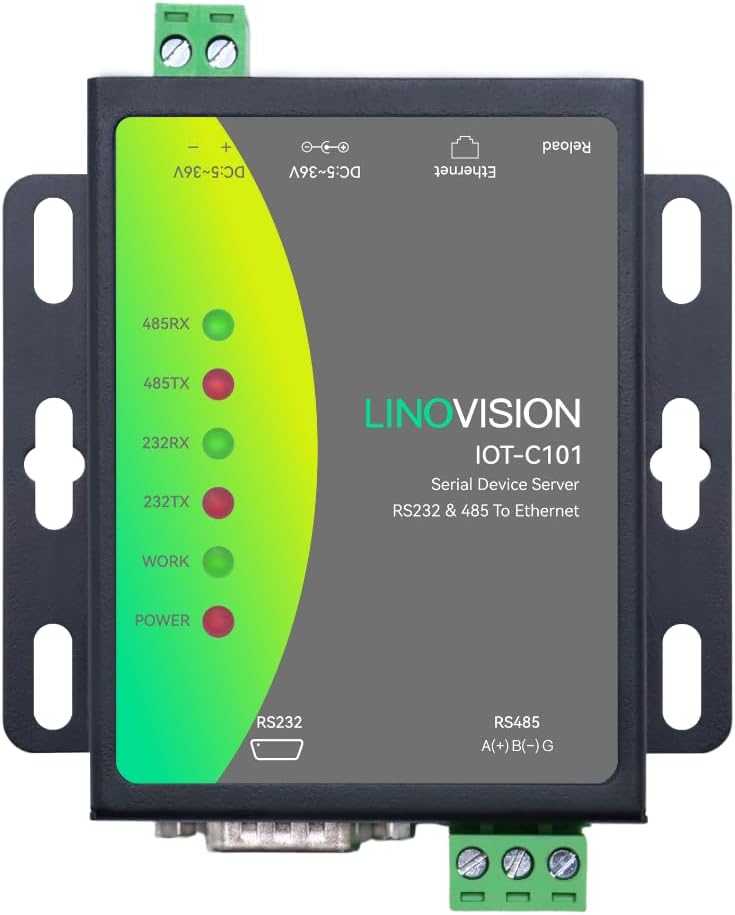
The LINOVISION Dual Port RS485 RS232 to Ethernet Converter combines two serial interfaces with remote monitoring capabilities. Its supplied rating is 4.1, and the inclusion of cloud access for up to 30 managed devices makes it appealing for projects where centralized visibility is important.
We may earn a commission when you buy through this link, at no additional cost to you.
The gateway converts Modbus RTU and TCP signals and supports multi-host polling for as many as 16 hosts. It is designed for remote monitoring and control of equipment such as point-of-sale systems, agricultural sensors, programmable logic controllers, and medical devices, where extending serial access over Ethernet removes distance and location constraints.
Its standard cloud service through the Linovision AIoT RemoteMonit platform is a meaningful distinction from converters offering only local web configuration. Wall or rail mounting, IP30 protection, and an operating range from -40°F to 185°F support industrial installation. However, IP30 means it should be protected from harsh ingress in exposed locations.
Buy this converter when you need RS232 and RS485 together, multi-host Modbus access, or an organized cloud-monitoring path. It is a stronger fit for managed deployments than for an isolated benchtop link with no interest in remote platform features.
The included RemoteMonit service supports management of up to 30 devices. This gives distributed installations a simpler way to monitor connected equipment without relying solely on local access.
A -40°F to 185°F operating range supports use across demanding temperature environments. The wall and rail mounting choices also allow installation close to the connected equipment.
We may earn a commission when you buy through this link, at no additional cost to you.
The USR-W610 stands apart from wired-only converters by supporting both WiFi and Ethernet connectivity. Its supplied rating is 4.2, and the combination of RS232 and RS485 ports, bidirectional transparent transmission, and several wireless operating modes makes it useful for distributed or retrofit installations.
We may earn a commission when you buy through this link, at no additional cost to you.
It supports 2.4GHz 802.11b/g/n wireless standards alongside Ethernet. Network roles include TCP server, TCP client, UDP server, UDP client, and HTTP client, while AP, STA, and AP+STA modes offer different ways to connect the device. That flexibility can help with local commissioning, centralized access, or bridging through an existing network.
The principal trade-off is that wireless connectivity adds security, coverage, and reliability considerations that a wired link does not. A 2.4GHz connection may also face congestion or coverage limitations in some facilities. Physical placement and network security therefore deserve careful attention even though the converter itself supports flexible modes.
Choose the USR-W610 when running a cable to an RS232 or RS485 device is inconvenient or impractical, but Ethernet remains useful as an alternative path. It is particularly relevant for remote monitoring, temporary installations, and industrial systems that benefit from flexible network access.
AP, STA, and AP+STA modes support different network arrangements. The unit can therefore participate in direct access-point use, join an existing wireless network, or combine both functions.
Ethernet and 2.4GHz WiFi connectivity give installers more than one path to the same serial equipment. That is valuable when the final network layout is not yet fixed.
We may earn a commission when you buy through this link, at no additional cost to you.
The USR-TCP232-306 is a straightforward serial-to-Ethernet device server for linking TCP/IP networks with RS232, RS485, or RS422 equipment. Its supplied rating is 4.2, and its support for five work modes makes it adaptable to both server and client arrangements.
We may earn a commission when you buy through this link, at no additional cost to you.
TCP server, TCP client, UDP client, UDP server, and HTTPD client modes cover common networking patterns. The HTTPD client mode can send serial data in HTTP format, which is useful when the receiving system expects web-style requests. A wide 5–36V DC power supply also provides installation flexibility.
Unlike a dual-port converter, this model cannot operate RS232, RS485, and RS422 at the same time. That limitation makes it better suited to one selected serial interface per unit. It also lacks some of the more advanced edge-computing and cloud features found in the LINOVISION options.
This converter is a practical choice for a technician who needs one established serial interface, multiple work modes, and straightforward TCP/IP connectivity. It is well suited to remote monitoring and serial bridging where one port at a time is sufficient.
TCP and UDP server or client roles allow the unit to connect with software, other converters, or network infrastructure in different ways. HTTPD client support adds another integration path.
The 5–36V DC range makes the converter usable in installations with varying available supply levels. Confirm the correct terminal connection before energizing the device.
We may earn a commission when you buy through this link, at no additional cost to you.
The LINOVISION 4 Port RS485 to Ethernet Converter is the feature-rich option for installations with several serial devices. Its supplied rating is 4.3, and the combination of four RS485 connections, local edge processing, SSL/TLS support, a 400MHz Cortex-M7 processor, and cloud access justifies consideration as a premium multi-port gateway.
We may earn a commission when you buy through this link, at no additional cost to you.
Edge computing allows data from multiple serial devices to be processed locally and sent to servers in a custom JSON format. This can reduce server load and improve network reliability by moving part of the data-handling process closer to the equipment. The device also supports Modbus RTU-to-TCP conversion and multi-host polling for up to 16 hosts.
Security is a standout benefit. SSL/TLS encryption helps prevent data leakage and unauthorized access during transmission, which is important in industrial environments handling operational or sensitive information. The broad feature set also includes five work modes, optional U.S. cloud server access, wall or rail mounting, and an IP30 enclosure.
Choose this model for a cabinet containing multiple RS485 devices or for a site that needs local processing and encrypted transport. It may be excessive for a single instrument, but it offers an integrated alternative to managing several separate converters.
Four RS485-to-Ethernet connections simplify installations that would otherwise require multiple converters. Multi-host polling further helps when one gateway serves several device conversations.
Custom JSON edge processing handles serial data locally before sending it onward. This approach can reduce backend processing demands and improve overall network reliability.
SSL/TLS support protects data during transmission and helps prevent unauthorized access. It is a valuable consideration for industrial networks carrying operational information.
We may earn a commission when you buy through this link, at no additional cost to you.
The USR-TCP232-304 is a focused RS485-to-TCP/IP converter with a 5.0 supplied rating. It is especially attractive for users who want transparent bidirectional data transfer, straightforward webpage configuration, and reliable network assignment without requiring a large multi-port gateway.
We may earn a commission when you buy through this link, at no additional cost to you.
Its serial port supports baud rates from 600 bps to 230.4Kbps and offers None, Odd, Even, Mark, and Space check-bit options. DHCP allows the device to obtain an IP address automatically, while serial-setting protocol support can query the assigned address. The RJ45 interface provides 10/100Mbps connectivity with automatic MDI/MDIX.
Five work modes are available: TCP server, TCP client, UDP client, UDP server, and HTTPD client. The unit can operate across a local network or an external network, and virtual serial port support with USR-VCOM can help existing applications interact with the remote RS485 link. As a single-interface device, it does not provide the port breadth of the dual- and four-port alternatives.
This converter is a strong candidate for a simple one-device network link, especially when automatic addressing and local browser setup matter. Choose it when you prioritize clarity and core RS485-to-Ethernet functions over multi-port consolidation or cloud edge processing.
DHCP support simplifies initial IP assignment, while DNS and serial-setting protocol access help locate and manage the converter. These features reduce manual network administration.
A wide baud-rate range and multiple check-bit settings support varied RS485 equipment. Matching the converter to the device settings is essential for reliable transparent transmission.
We may earn a commission when you buy through this link, at no additional cost to you.
The USR-DR302 is a DIN-rail RS485-to-Ethernet converter designed for compact panel installation and protected operation. Its supplied rating is 4.1, while bidirectional transparent transmission, editable identity heartbeat packets, and layered electrical protection set it apart from basic serial servers.
We may earn a commission when you buy through this link, at no additional cost to you.
Via a webpage or software, the device can transparently transmit serial data and TCP/IP data packets between an RS485 network and Ethernet. DIN rail mounting keeps its small footprint easy to organize and maintain, which is useful in control cabinets where space and serviceability matter.
The heartbeat feature is especially useful when the unit operates as a TCP client. It can send an identification packet to the TCP server, with options including IMEI, ICCID, and user-edited identity content. Advanced protection includes level 4 anti-static, level 3 electrical pulse, and level 2 surge protection, adding confidence in electrically active environments.
Choose this model for an RS485 installation where compact mounting, transparent transfer, identification, and electrical protection matter. Its listed network functions are less expansive than those of gateways advertising TCP, UDP, and HTTPD work modes, so confirm that its available modes meet your architecture.
Layered anti-static, electrical pulse, and surge protection helps the gateway withstand electrical disturbances. These safeguards are valuable near motors, relays, and other industrial equipment.
The heartbeat and identity packet can identify a TCP client to the receiving server. Editable content makes it easier to associate a connection with a particular device or location.
We may earn a commission when you buy through this link, at no additional cost to you.
The Dual Serial RJ45 Converter is built around a useful idea: allowing RS232 and RS485 equipment to communicate over Ethernet at the same time. Its supplied rating is 3.1, the lowest among these products, but the independent concurrent operation and bidirectional transparent transmission can still make it relevant for appropriately scoped projects.
We may earn a commission when you buy through this link, at no additional cost to you.
The industrial converter uses an M4-series 32-bit ARM processor operating up to 120MHz and provides a 10/100M Ethernet interface with automatic MDI/MDIX. That means standard crossover or straight-through Ethernet cables can be used without manual differentiation, while webpage configuration supports setup of the serial links.
The trade-off is that the supplied information gives less detail about advanced network modes, cloud management, and security than the higher-rated alternatives. Its 3.1 rating also warrants closer attention to compatibility, documentation, and the specific application before committing to a larger deployment.
Choose this converter when simultaneous RS232 and RS485 operation is essential and the transparent Ethernet path is the main requirement. Developers may also appreciate the stated support for example code involving host-computer sockets and VB, C++, Delphi, Android, and iOS environments, although project-specific validation remains important.
RS232 and RS485 ports can operate independently at the same time without interfering. This makes the unit useful when two dissimilar legacy devices must share an Ethernet connection.
Bidirectional transparent transmission allows software to exchange data with connected serial equipment through the Ethernet interface. Webpage configuration keeps initial setup within a familiar browser-based workflow.
We may earn a commission when you buy through this link, at no additional cost to you.
The right converter depends on serial-device compatibility, network architecture, operating environment, and the amount of remote management your project needs. Review the following factors before choosing a model.
Begin with the ports actually present on your equipment. RS485 is essential for the keyword category, but some installations also need RS232 or RS422. A single-port converter may handle one interface adequately, while dual-port models can serve RS232 and RS485 devices concurrently. Consider whether the serial ports are selectable or genuinely independent, because the supplied specifications describe these architectures differently.
Match the converter's interface type to the connected device rather than relying on a broad compatibility claim. Also verify the connector type and pin arrangement before installation.
If your serial devices use Modbus RTU, look for a gateway that converts Modbus RTU to Modbus TCP. Multi-host polling can be valuable when several devices or software clients need access, and the four-port and dual-port LINOVISION models advertise support for as many as 16 hosts. Transparent conversion models may also be useful when an application already manages the protocol itself.
Choose native Modbus support when you want the converter to bridge protocol families directly. Verify device addressing and polling behavior against the documentation for your particular instruments.
Network work modes determine how the converter communicates with software or remote systems. TCP server mode is common when multiple clients connect to one gateway, while TCP client mode lets the converter initiate a connection. UDP modes support datagram-style traffic, and HTTPD client operation can send serial information in HTTP format. The product list includes gateways with one, several, or five listed modes.
Map the mode to the behavior expected by your host software. More modes provide flexibility, but they also make configuration more complex than a device designed for one clear operating pattern.
Count the number of RS485 devices and whether they need independent channels. The four-port LINOVISION gateway consolidates four RS485-to-Ethernet connections and adds local edge processing, making it appropriate for denser installations. Dual-port models handle RS232 and RS485 together, while single-port devices are generally easier to deploy for isolated equipment.
A multi-port gateway can simplify cabling and administration, but it is unnecessary when only one instrument needs networking. Choose the smallest architecture that meets the required channel count without leaving useful ports idle.
Configuration methods affect both initial commissioning and ongoing maintenance. A built-in webpage is convenient for local setup, AT commands can support scripted or command-line access, and dedicated setup software may assist with structured configuration. Cloud platforms add centralized visibility but create another service to administer. Virtual COM support is another consideration for software that expects a local serial port.
Choose a management approach that matches the skills and access available to the installer. Local webpage control is often the most straightforward starting point, while remote management is valuable across multiple locations.
Industrial installation details can matter as much as protocol support. DIN rail mounting is useful inside standard control cabinets, while wall mounting offers flexibility in equipment rooms. Check the listed operating temperature against the site conditions; the LINOVISION models advertise a range from -40°F to 185°F. An IP30 enclosure is suitable for protected indoor locations but should not be treated as a weatherproof enclosure.
Match protection and temperature specifications to the actual environment. Cable routing, panel ventilation, surge exposure, and access for maintenance can affect reliability as much as the converter itself.
Most converters in this category use wired Ethernet, which provides a predictable path and straightforward integration into an existing LAN. The USR-W610 also supports 2.4GHz 802.11b/g/n WiFi and AP, STA, and AP+STA modes, offering flexibility where pulling cable is inconvenient. Wireless operation introduces coverage, interference, and security considerations that must be addressed during commissioning.
Use Ethernet for a fixed control room or cabinet when it is available. Consider the hybrid wireless model for temporary links, difficult retrofits, or installations where both connection paths are valuable.
For networks carrying operational or sensitive information, encryption can be important. The four-port LINOVISION gateway supports SSL/TLS transmission, while other models offer more basic local or serial configuration methods. Reliability features also vary: the TCP232-306 includes hardware and software watchdogs, and the DR302 offers graded anti-static, pulse, and surge protection.
Assess the network path, available encryption, recovery behavior, and electrical environment rather than assuming one converter is universally secure or rugged. Remote and unattended installations deserve especially careful review.
Begin by identifying every connected device's serial interface, baud rate, parity, data bits, stop bits, addressing method, and wiring arrangement. Configure the converter to match those settings and select the network mode required by your software. Connect the RS485 conductors correctly, paying attention to polarity, termination, and grounding requirements established by the equipment manufacturer.
Connect the Ethernet cable, provide the appropriate DC power, and use the built-in webpage, supplied setup software, AT commands, or other documented method to assign and verify network settings. If using DHCP, confirm that the lease is working and record the resulting address. Test a basic connection before enabling advanced features such as Modbus polling, virtual COM operation, cloud monitoring, or encryption.
For ongoing care, keep the enclosure protected from moisture and dust, inspect terminals for looseness, and avoid placing the converter near excessive heat unless its operating range permits it. Review link status and serial traffic, update documentation when settings change, and recheck configuration after power interruptions. A periodic connection test can reveal failing cables, changed IP assignments, or mismatched serial parameters before they interrupt an entire monitoring system.
It converts data between an RS485 serial connection and an Ethernet or TCP/IP network. This allows computers, SCADA systems, cloud services, or other network software to communicate with legacy serial equipment. Depending on the model, it may provide transparent transport or actively convert protocols such as Modbus RTU to Modbus TCP.
Not always. If your application handles the serial protocol itself, a transparent serial-to-Ethernet converter can carry the data without interpreting it as Modbus. Native Modbus conversion is more useful when the network client expects Modbus TCP while the field device communicates using Modbus RTU.
In TCP server mode, the converter listens for incoming network connections. In TCP client mode, it initiates a connection to a configured server. Server mode is useful when several clients need to access the same serial device, while client mode is often convenient for connecting to a centralized data collector.
It depends on the model and the network architecture. The four-port LINOVISION gateway explicitly provides four RS485-to-Ethernet connections, while other gateways expose one or two serial ports. Multi-host polling can let multiple clients or devices share a gateway, but the exact behavior and supported device count should be verified in the documentation.
Virtual COM support allows software to communicate as though the remote RS485 interface were locally installed. The USR-TCP232-304 includes corresponding USR-VCOM software, while the DR302 also lists virtual COM functionality. It can simplify adaptation of existing serial applications, although port mapping and network stability must be configured correctly.
First verify power, Ethernet link activity, the assigned IP address, and the selected TCP or UDP work mode. Then confirm that the baud rate, parity, data bits, and stop bits match the connected equipment. Check RS485 wiring and termination, ensure the client and converter are using compatible roles, and review firewall or access settings if communication crosses network segments.
A DIN rail converter is specifically suited to organized cabinet installation because it mounts directly on standard rails. You should still verify the operating temperature, enclosure rating, available clearance, and terminal arrangement. Devices with IP30 protection are intended for protected locations and should not be assumed to withstand direct weather exposure.
Wired Ethernet is generally preferable for a fixed industrial installation because it avoids wireless coverage and interference concerns. A converter with WiFi can be valuable when running cable is impractical or when temporary mobile access is needed. If using WiFi, plan for appropriate signal coverage, network security, and reliable reconnection behavior.
The DR302 DIN Rail Modbus Gateway is the strongest all-around recommendation because it combines Modbus conversion, several network modes, virtual COM support, and a compact DIN rail format. The USR-TCP232-304 is especially compelling for a focused single-RS485 link with automatic addressing and webpage setup, while the LINOVISION 4 Port Gateway is the most capable option for multiple serial devices and centralized edge processing.
Prioritize the requirements that directly affect reliability: correct serial interface, matching baud settings, a suitable network mode, sufficient port capacity, and an enclosure appropriate for the environment. Advanced features such as cloud monitoring, SSL/TLS, watchdogs, and local JSON processing are valuable when the deployment requires them, but they should not distract from the basic task of transporting serial data reliably.
Before ordering, verify the current product listing, documentation, connector details, and electrical requirements. Prices and availability can change, and firmware or revised documentation may affect feature availability. Matching the converter to your equipment and network plan is the surest way to avoid unnecessary complexity after installation.
