
TP-Link AX1800 WiFi 6 Router
4.4Editor score
AX1800 dual-band Wi-Fi 6
Up to 1.8 Gbps aggregate bandwidth
OFDMA and beamforming support
Discover the best router for 700 Mbps internet by comparing Wi-Fi speed, coverage, wired ports, features, security, and device capacity.
A router for 700 Mbps internet must do more than reach a headline speed. It should distribute that connection efficiently among phones, computers, televisions, game consoles, cameras, and other smart-home devices while maintaining stable coverage. The right choice depends on home size, device count, internet type, and whether wired connections matter.
We compared ten routers using the specifications provided for each model, including wireless generation, aggregate bandwidth, port speeds, coverage claims, concurrent-device capacity, management options, and security features. The list includes standalone routers, a cable modem-router combination, and a portable cellular model, allowing buyers to compare options for homes and temporary locations.
Each review explains the strongest reason to consider a particular router, along with meaningful limitations and the households most likely to benefit. Wireless maximums are not the same as guaranteed internet speeds, and compatibility depends on the modem and service provider. Prices and promotions can change, so confirm current listings and plan compatibility before purchasing.
4.4Editor score

4.5Editor score

4.4Editor score
The table below compares the ten shortlisted routers by wireless standard, headline bandwidth, wired connectivity, and practical capacity. It highlights how the list ranges from an affordable dual-band model to high-end Wi-Fi 7 systems, a DOCSIS 3.1 combination unit, and a cellular travel router.





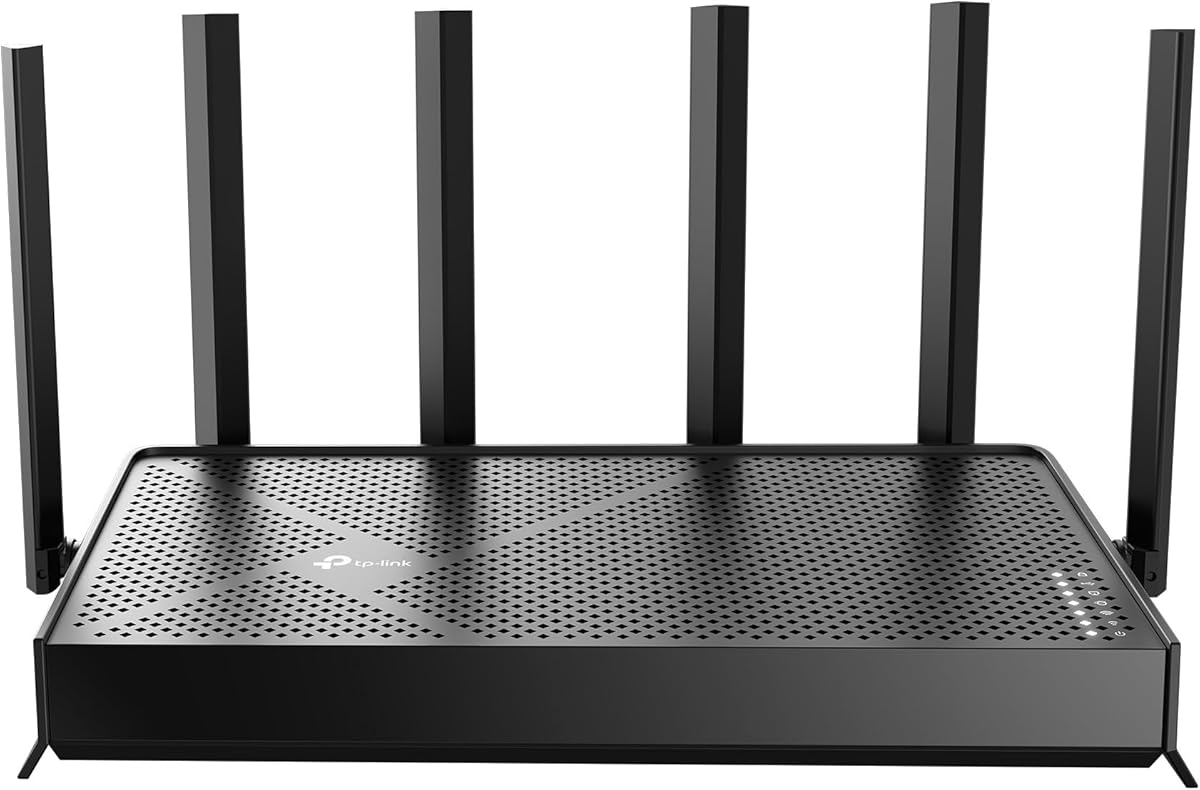

The TP-Link Archer AX21 is a dual-band Wi-Fi 6 router with a 4.4 rating and enough aggregate capacity to comfortably complement a 700 Mbps internet service. Its stated bandwidth totals up to 1.8 Gbps, including up to 1,200 Mbps on the 5 GHz band and up to 574 Mbps on 2.4 GHz. That makes it a sensible mainstream choice for a home with many wireless devices but no need for a multi-gig port.
We may earn a commission when you buy through this link, at no additional cost to you.
Its standout feature is the combination of OFDMA, beamforming, and four high-gain antennas. OFDMA allows the router to communicate with multiple devices simultaneously, while beamforming concentrates signals toward clients rather than scattering them indiscriminately. The result is a more efficient use of the 2.4 and 5 GHz bands, particularly when several phones, computers, and smart-home products are active at once. A 5 GHz connection also keeps compatible modern devices away from the more crowded 2.4 GHz band.
The main limitation is that a separate modem is required, and the AX21 lacks the 2.5 Gbps Ethernet hardware found on several higher-end alternatives. It also operates on dual-band Wi-Fi 6 rather than Wi-Fi 6E or Wi-Fi 7, so newer 6 GHz clients cannot use that spectrum. These omissions are reasonable for a 700 Mbps connection, especially when the router is intended for general household use rather than a heavily wired home network.
This is the most broadly appealing option for buyers who want more than an entry-level Wi-Fi 6 router without paying for premium multi-gig features. Choose the Archer AX21 when a compatible modem is already available, most clients use Wi-Fi, and the goal is reliable distribution of a 700 Mbps service. Its combination of coverage features, simultaneous transmission, provider flexibility, and useful management support makes it a strong general-purpose recommendation.
OFDMA is particularly valuable in a busy household because it lets one transmission serve multiple compatible clients. Combined with the dedicated 5 GHz band, this helps maintain responsive performance when 2.4 GHz devices, streaming boxes, and other clients are active simultaneously.
Four external antennas, beamforming, and an advanced front-end module support stronger signal delivery in ordinary homes. The design is aimed at extending reliable service to distant rooms without requiring the mesh equipment or complex setup found in larger systems.
We may earn a commission when you buy through this link, at no additional cost to you.
The GL.iNet Flint 2 carries a 4.5 rating and combines high-speed Wi-Fi 6 with two 2.5 Gbps Ethernet ports. Its 8-stream wireless design is advertised at up to 6 Gbps, placing it well above the needs of a 700 Mbps internet plan. That extra capacity is useful for local transfers, demanding connected devices, busy households, and users who want a router that can accommodate network growth.
We may earn a commission when you buy through this link, at no additional cost to you.
The defining benefit is the unusual balance of wireless performance and multi-gig wired connectivity. A 2.5 Gbps port can provide a meaningful upgrade over standard Gigabit Ethernet for compatible workstations, network storage, and other high-throughput devices. The router also supports OpenVPN and WireGuard as both client and server, with stated potential speeds of up to 880 Mbps and 900 Mbps respectively. Actual VPN results depend on the internet service, server location, provider, and local network conditions.
Storage and processing specifications reinforce its suitability for enthusiast setups: the device includes 1 GB of DDR4 memory and 8 GB of eMMC storage. It is designed to serve more than 100 connected devices, and AdGuard Home support provides built-in DNS filtering options. These are not essential for every 700 Mbps subscriber, but they distinguish the Flint 2 from basic dual-band routers. Users should update the firmware during initial setup, as the manufacturer specifically says doing so enhances performance and the overall experience.
The Flint 2 is the most convincing choice for buyers who want a 700 Mbps connection delivered through a robust router with unusually fast wired options. It suits gamers, remote workers, smart-home enthusiasts, and anyone maintaining a home server or advanced network configuration. For a simple two-device apartment, its capabilities may be more than necessary, but for a connected household that values flexibility, it offers one of the strongest feature combinations in this guide.
The pair of 2.5 Gbps ports creates room for high-speed wired devices without requiring a different network architecture. Users can connect compatible computers and storage systems while retaining additional LAN connectivity through the router's other ports.
OpenVPN and WireGuard support gives connected clients a path to remote VPN services, while server mode can make home resources available through a secure tunnel. AdGuard Home adds another layer of DNS-level filtering and ad-blocking control.
We may earn a commission when you buy through this link, at no additional cost to you.
The NETGEAR Nighthawk RS700S is a tri-band Wi-Fi 7 router with a 4.4 rating and an exceptional stated aggregate capacity of 19 Gbps. It includes 2.4, 5, and 6 GHz bands, giving modern clients more spectrum than a conventional dual-band Wi-Fi 6 router. The design is aimed at households seeking a premium platform for high-speed internet, dense device environments, and large homes.
We may earn a commission when you buy through this link, at no additional cost to you.
Its premium standing comes from more than raw wireless speed. The router uses a dedicated high-speed band, MU-MIMO, OFDMA, and a 12-stream design. NETGEAR states coverage for up to 3,500 square feet and as many as 200 devices, although walls, floors, interference, and the capabilities of connected devices can change real results. The 10 Gbps WAN port can accept a compatible fiber or multi-gig gateway, while a separate 10 Gbps LAN port supports demanding wired equipment.
There are trade-offs. The RS700S is unnecessary if the goal is merely to distribute 700 Mbps through a small apartment, and its premium hardware does not make the internet service itself faster. It also needs an existing modem or gateway, with some combinations requiring bridge mode. The Nighthawk app, automatic firmware updates, WPA3 protection, firewall tools, and optional NETGEAR Armor subscription add convenience, but a buyer interested only in the trial period should review the terms of the paid continuation service.
Choose the RS700S when the household wants a high-end router that can grow with newer Wi-Fi 7 devices, extensive local traffic, and future multi-gig internet plans. It is a particularly compelling option for large homes, owners of current high-end devices, and users who value 10 Gbps connectivity. For a typical 700 Mbps plan, its capacity is generous, but that headroom is exactly what makes it suitable as a long-term premium platform.
The 6 GHz band can offer wide, low-interference channels for compatible modern clients. Separating demanding traffic from the 2.4 and 5 GHz bands helps a busy network keep important devices responsive.
The 10 Gbps WAN and LAN ports create a path toward faster fiber and other multi-gig services. They also allow compatible local devices to exchange data without being constrained by a one-gigabit Ethernet link.
We may earn a commission when you buy through this link, at no additional cost to you.
The NETGEAR Nighthawk CAX30 combines a DOCSIS 3.1 cable modem with an AX2700 dual-band Wi-Fi 6 router. Its 4.1 rating reflects a practical one-box solution for compatible cable subscribers. Instead of pairing a standalone router with a separate modem, users can consolidate the core home-network equipment into a single unit.
We may earn a commission when you buy through this link, at no additional cost to you.
Provider compatibility is the most important consideration. The product is listed for Xfinity plans up to 800 Mbps, Spectrum up to 1 Gbps, and Cox up to 1 Gbps, making it an appropriate fit for many 700 Mbps cable packages. ISP activation is required, and the device is not compatible with Verizon, AT&T, CenturyLink, DirecTV, DISH, or bundled voice plans. Its DOCSIS 3.1 design also provides multi-gig download capability where the provider supports it.
On the wireless side, the CAX30 offers a claimed 2,000-square-foot coverage area and capacity for more than 25 connected devices. Four Gigabit Ethernet ports support gaming consoles, desktop computers, and streaming devices. DOCSIS 3.1 OFDMA is intended to improve responsiveness during congestion, while the Nighthawk app assists with setup, speed tests, guest networks, and device pausing. Optional NETGEAR Armor features are available after a trial period.
This is a strong recommendation for a compatible cable customer who wants one device rather than separate modem and router hardware. It is less suitable for fiber, DSL, satellite, and unsupported cable providers, and buyers should confirm activation eligibility before ordering. For a 700 Mbps plan from a supported provider, it offers a convenient path to a faster DOCSIS connection and modern Wi-Fi 6 without a complicated multi-box arrangement.
Combining DOCSIS 3.1 modem hardware with Wi-Fi 6 reduces the number of separate boxes on the network. It also removes the need to configure a traditional router for basic internet, wireless, and local Ethernet use.
Four Gigabit Ethernet ports are enough to hardwire several high-priority devices. A wired connection can reduce wireless contention and provide consistent performance for gaming, large file transfers, and video calls.
We may earn a commission when you buy through this link, at no additional cost to you.
The TP-Link AX3000 is a dual-band Wi-Fi 6 router rated 4.4, with advertised band speeds of up to 2,402 Mbps on 5 GHz and 574 Mbps on 2.4 GHz. Its aggregate AX3000 classification provides ample headroom for a 700 Mbps service and makes it a practical choice for buyers who want a current-generation router without moving into Wi-Fi 6E or Wi-Fi 7.
We may earn a commission when you buy through this link, at no additional cost to you.
OFDMA, four high-gain external antennas, and beamforming form the core of its performance strategy. These features allow multiple compatible clients to share spectrum more efficiently and help maintain signal quality across a home. Target Wake Time can also improve client power efficiency by coordinating communication, which may help battery-powered phones and tablets use less energy during idle periods.
Its cooling design is worth noting because sustained wireless performance depends on heat management. TP-Link says a larger heat sink and revised case help prevent thermal throttling in varied environments. The router also includes five Gigabit Ethernet ports, which is unusually generous for a value-oriented model. It supports VPN server and client functions, Alexa voice control, and basic HomeShield features such as network security scans, IoT identification, parental controls, and quality of service.
Choose this router when a separate modem is already in place or the internet provider already supplies compatible equipment. It suits medium homes, student accommodations, and typical households seeking an easy upgrade from older Wi-Fi. The absence of multi-gig ports and a 6 GHz band limits its appeal for advanced local networks, but those limitations matter little when the main goal is distributing a 700 Mbps connection among ordinary wireless clients.
A theoretical 5 GHz link of up to 2,402 Mbps leaves considerable room above a 700 Mbps internet plan. That headroom is helpful when several high-throughput clients are active, although real internet speeds remain limited by the service and local conditions.
Five Gigabit Ethernet ports provide ample room for a desktop, game console, smart television, and other fixed devices. Their Gigabit limitation is still sufficient for a 700 Mbps WAN connection in most installations.
We may earn a commission when you buy through this link, at no additional cost to you.
The TP-Link Archer AXE75 is a tri-band Wi-Fi 6E router with a 4.3 rating. It provides up to 5,400 Mbps across three bands, including 2,402 Mbps on 6 GHz, 2,402 Mbps on 5 GHz, and 574 Mbps on 2.4 GHz. The 6 GHz spectrum is its defining feature, offering additional bandwidth and lower interference for compatible modern devices.
We may earn a commission when you buy through this link, at no additional cost to you.
True tri-band operation and OFDMA increase capacity when many clients are online. A 1.0 GHz dual-core processor and 512 MB of memory support the stated emphasis on reliable performance, while the revised housing is designed to dissipate heat. EasyMesh compatibility gives buyers an option to add compatible routers, extenders, or wireless powerline adapters when larger homes develop dead zones.
The limitation is client compatibility. Devices that support only older Wi-Fi generations cannot use the 6 GHz band, so a household filled with older phones, printers, and smart-home products may not receive the full benefit. The router also requires a separate modem for most internet services. OpenVPN, PPTP, and L2TP client and server support adds flexibility, and TP-Link HomeShield includes basic network security, parental controls, and quality-of-service features.
The AXE75 is an attractive middle ground for buyers who want access to 6 GHz without moving to a Wi-Fi 7 model. It is especially suitable for mixed homes with several current-generation phones, laptops, and televisions, plus room to expand coverage through EasyMesh. For a basic 700 Mbps connection, it offers more capacity than required, but that makes it a sound choice for users planning to keep the router for several years.
The dedicated 6 GHz band gives compatible clients access to spectrum that is not shared with legacy 2.4 or 5 GHz traffic. This can improve responsiveness in congested homes and support very high local wireless throughput.
EasyMesh compatibility allows additional compatible hardware to become part of a unified network. That makes the AXE75 a flexible starting point for homes where one router cannot cover every floor or room evenly.
We may earn a commission when you buy through this link, at no additional cost to you.
The TP-Link Archer BE230 is a dual-band Wi-Fi 7 router with a 4.2 rating and a stated aggregate classification of BE3600. It provides up to 2,882 Mbps on 5 GHz and 688 Mbps on 2.4 GHz. Those figures comfortably exceed a 700 Mbps internet plan, while Multi-Link Operation, Multi-RUs, and 4K-QAM offer meaningful improvements for compatible Wi-Fi 7 clients.
We may earn a commission when you buy through this link, at no additional cost to you.
Its most practical feature is the inclusion of two multi-gig ports: one 2.5 Gbps WAN/LAN port and one 2.5 Gbps LAN port. Three additional Gigabit LAN ports cover conventional wired devices. This arrangement makes the BE230 more flexible than a basic gigabit router without moving to a design with 10 Gbps ports. The next-generation 2.0 GHz processor is intended to manage high throughput with low latency under demanding conditions.
Coverage is stated at up to 2,000 square feet for as many as 60 devices, using four internal antennas and beamforming. It works with EasyMesh hardware for broader coverage, supports HomeShield security and parental controls, and can be managed through the Tether app. Alexa and Google Assistant compatibility are also listed. As a dual-band system, however, it does not offer the 6 GHz spectrum found on the higher-end TP-Link tri-band models.
The Archer BE230 is a strong choice for a medium-sized home that wants modern Wi-Fi 7 and multi-gig wired options without a large, premium design. It is especially appealing to buyers with current Wi-Fi 7 devices and a need for one or two fast Ethernet connections. Buyers expecting to connect only a 700 Mbps service can still benefit from its processing, efficiency, and capacity, although the absence of 6 GHz and a 10 Gbps port narrows its long-term flexibility.
Two 2.5 Gbps ports allow a faster connection between the router, service equipment, and selected wired clients. This is a meaningful improvement over Gigabit Ethernet for compatible local networks without imposing a full premium multi-gig design.
The 2.0 GHz processor and Wi-Fi 7 radio features are designed to maintain responsiveness as traffic grows. Multi-Link Operation can also use multiple links on compatible devices to improve reliability and aggregate available bandwidth.
We may earn a commission when you buy through this link, at no additional cost to you.
The TP-Link Archer BE600 is a tri-band Wi-Fi 7 router rated 4.2, with a BE9700 aggregate designation. Its stated band maximums reach 5,765 Mbps on 6 GHz, 2,882 Mbps on 5 GHz, and 1,032 Mbps on 2.4 GHz. The network is built for demanding homes that want more than enough wireless capacity for a 700 Mbps broadband plan.
We may earn a commission when you buy through this link, at no additional cost to you.
Wi-Fi 7 features include Multi-Link Operation, Multi-RUs, 4K-QAM, and support for channels up to 320 MHz. The router is positioned for current devices such as recent high-end phones and consoles, though clients that do not support Wi-Fi 7 will continue using older standards. Six antennas and beamforming support coverage of up to 2,600 square feet and capacity for as many as 120 devices, subject to the usual effects of walls, interference, and client limitations.
Its port selection is unusually strong: one 10 Gbps WAN/LAN port, one 2.5 Gbps WAN/LAN port, and three 2.5 Gbps LAN ports. This makes it well prepared for a multi-gig fiber or cable connection and advanced wired networks. TP-Link HomeShield, automatic security-oriented design, VPN client and server functions, and management through the Tether app add everyday utility.
The obvious drawback is that this level of hardware is more than a 700 Mbps service requires. A smaller or less expensive router could distribute that same connection very well in a modest home. The BE600 makes sense when the household expects to upgrade its service, add many connected devices, use current Wi-Fi 7 hardware, or build a wired network that benefits from multi-gig throughput. It is a future-focused choice rather than a minimal solution.
The 10 Gbps WAN/LAN port can accept a compatible high-speed connection, while the 2.5 Gbps ports serve modern wired clients. This creates a smooth path from future service upgrades to local network capacity.
A stated capacity of 120 devices suits households with numerous phones, televisions, appliances, cameras, and work devices. MU-MIMO, OFDMA, and separate frequency bands help the router allocate capacity among them.
We may earn a commission when you buy through this link, at no additional cost to you.
The GL.iNet GL-E5800 NA MUDI 7 is a 5G cellular travel router with tri-band Wi-Fi 7 and a 4.4 rating. It is designed for situations where a conventional home router cannot be used: travel, temporary accommodation, mobile work, retail pop-ups, and other locations without a permanent broadband line.
We may earn a commission when you buy through this link, at no additional cost to you.
The Qualcomm Dragonwing MBB Gen 3 platform is advertised at up to 4.67 Gbps for 5G downloads, while the tri-band wireless system provides substantial local capacity. A 2.5 Gbps Ethernet port supports wired backhaul or a single high-speed client, and a 10 Gbps USB-C port is intended for tethering, storage, and external NAS synchronization. Its quad-path multi-WAN design can combine Ethernet, repeater, USB tethering, and cellular links while automatically rerouting traffic if a connection fails.
Built-in eSIM and two physical nano-SIM positions provide flexible carrier access. The 2.8-inch touchscreen provides direct access to SIM switching, VPN controls, Wi-Fi sharing, and data monitoring, while the mobile app handles deeper configuration. A 5,150 mAh battery supports up to 13.5 hours of untethered operation according to the supplied information, and 30W USB-C charging can refill it in roughly 1.3 hours.
This is the most specialized choice in the guide, but its preinstalled VPN client and server functions are valuable for travelers who want controlled access to home or business networks. The stated OpenVPN-DCO speed is up to 700 Mbps and WireGuard speed is up to 600 Mbps, although the manufacturer notes that measured results vary. It is not the normal choice for a fixed home, but it is the most compelling option for dependable, high-speed 5G internet on the move.
The combination of a built-in eSIM and dual nano-SIM support lets travelers choose between readily available regional plans and their own carrier service. A touchscreen simplifies switching without requiring a laptop for everyday connection changes.
Quad-path multi-WAN failover can keep traffic moving when one link becomes unavailable. This is particularly useful for mobile professionals, temporary offices, and events where a single connection failure could interrupt work.
We may earn a commission when you buy through this link, at no additional cost to you.
The TP-Link Archer BE550 is a tri-band Wi-Fi 7 router with a 4.0 rating. Its BE9300 class combines stated maximums of 5,760 Mbps on 6 GHz, 2,880 Mbps on 5 GHz, and 574 Mbps on 2.4 GHz. That provides a modern wireless platform for a 700 Mbps connection while also supporting newer devices that can benefit from the 6 GHz band.
We may earn a commission when you buy through this link, at no additional cost to you.
Multi-Link Operation, Multi-RUs, 4K-QAM, and 320 MHz channels are the main Wi-Fi 7 technologies. Six positioned antennas and beamforming are intended to improve reach and reliability, while proprietary optimization helps manage interference. Its most distinctive wired feature is the complete set of five 2.5 Gbps ports, including one WAN port and four LAN ports. This avoids the usual mixture of Gigabit and multi-gig ports found on many competing routers.
The Archer BE550 supports EasyMesh expansion, a separate WPA3-protected IoT network, HomeShield security, and robust parental controls. It can operate as a VPN client or server, including simultaneous VPN and regular internet connections, and is managed through the Tether app. Alexa and Google Assistant are supported, and backward compatibility allows older Wi-Fi generations to connect.
It is a versatile option for a household that wants 6 GHz and Wi-Fi 7 without needing a 10 Gbps port. Five 2.5 Gbps ports make it particularly attractive for owners of multiple high-speed wired devices. Its lower 4.0 rating does not erase the strong specification set, but it is a reminder to evaluate the complete network configuration rather than selecting on a headline wireless number alone.
A 2.5 Gbps WAN port and four 2.5 Gbps LAN ports let many fixed devices operate above Gigabit limits. The uniform design also simplifies decisions about which cable and which network port to use.
A private IoT network with WPA3 encryption can keep compatible smart devices on a separate wireless network. This offers a practical way to organize household traffic and improve the isolation of connected products.
We may earn a commission when you buy through this link, at no additional cost to you.
For a 700 Mbps plan, the decisive factors are usually service compatibility, wired port speed, wireless coverage, and simultaneous-device capacity rather than the largest possible headline number. The following guide explains how each specification affects real use and which trade-offs are most likely to matter.
Start by identifying how the internet enters the home. Most standalone routers require a separate cable, fiber, DSL, or satellite modem, and some provider gateways are already configured as router-modem combinations. The NETGEAR CAX30 is the exception in this list: it includes a DOCSIS 3.1 cable modem but works only with supported cable providers and listed plans. A 700 Mbps plan does not automatically mean every router or combination modem can support it, so verify the provider, technology, and required activation process before ordering.
Choose a compatible standalone router when you already own suitable modem hardware or want to separate equipment for easier upgrades. Choose a combination unit when simplicity and fewer boxes matter. Always check the provider's approved-device list and current service restrictions.
A router's advertised wireless speed is the maximum theoretical throughput of its radios under ideal conditions, not a promise that every device will receive 700 Mbps. Real results depend on the service line, client radio, distance, walls, interference, channel congestion, and the number of active users. A router with aggregate capacity well above 700 Mbps is generally sufficient because the internet connection remains the ultimate limit. The value of extra capacity appears in local transfers, simultaneous traffic, weak-signal recovery, and future service upgrades.
Prioritize a modern standard, efficient spectrum use, and good range rather than chasing the largest number. Real-world wired and wireless speed tests remain the most useful final check after installation.
Wi-Fi 6 improves efficiency and supports OFDMA, MU-MIMO features, and faster device connections. Wi-Fi 6E adds a 6 GHz band with additional clean spectrum, while Wi-Fi 7 introduces features such as Multi-Link Operation, 4K-QAM, and wider 320 MHz channels. Compatible clients are necessary to realize the largest benefits. A dual-band Wi-Fi 6 router can comfortably serve a 700 Mbps connection, but a tri-band Wi-Fi 6E or Wi-Fi 7 system offers a more advanced platform for newer devices.
For current equipment, match the router to the clients you own or plan to purchase soon. If most devices are older, prioritize coverage and stability over unused high-end radio features.
Coverage claims are useful comparisons but should be treated as guidance rather than guarantees. Dense walls, floors, metal appliances, wiring, neighboring networks, and router placement can all change results. Beamforming, high-gain antennas, internal radio placement, and EasyMesh support are especially relevant in multi-room homes. A mesh system may provide a more consistent solution than one very powerful router when dead zones occur across several floors.
For a small or single-story home, a capable standalone router may be enough. For a larger or awkward layout, use a router that supports easy expansion and consider placing a central unit in an open position. Test signal and latency in the rooms where devices are actually used.
A 700 Mbps internet service can be delivered through Gigabit Ethernet, so one-gigabit ports are generally adequate. Multi-gig ports become useful for local network traffic, network storage, high-end workstations, and future internet plans above one gigabit. The Flint 2 includes two 2.5 Gbps ports, the Archer BE230 adds two multi-gig ports, and the Archer BE550 provides five 2.5 Gbps ports. The Nighthawk RS700S and Archer BE600 go further with 10 Gbps connectivity.
Count the wired devices that genuinely need faster-than-Gigabit links before paying for extra port capability. Otherwise, invest in wireless coverage, management, or security features that better match how the household works.
Modern households may include televisions, phones, computers, speakers, cameras, appliances, consoles, and wearable devices, many of which remain connected even when not actively streaming. OFDMA and MU-MIMO help networks serve multiple clients more efficiently, while tri-band designs can separate traffic. Published capacity figures range from more than 25 devices on the CAX30 to as many as 200 on the RS700S, but device capabilities and traffic patterns ultimately determine performance.
Avoid selecting by capacity alone. A smaller household with high-speed clients may perform well on a 60-device router, while a family with many inactive but connected products may appreciate greater capacity. Look for efficient band allocation and stable concurrent performance.
All modern routers should use current wireless encryption, automatic firmware updates, a firewall, and secure administrative credentials. WPA3, private IoT networks, VPN client or server support, DNS filtering, parental controls, and device-specific network protection can add useful layers. Some subscriptions offer additional identity, malware, or network protection, but their continuing terms should be reviewed separately from the router's purchase.
Prioritize features you will configure and maintain. Change default administrator information, use a strong Wi-Fi password, enable automatic updates, and decide whether separate guest or IoT networks would improve your household's organization.
A good router should be straightforward to configure and monitor. The Tether app covers the listed TP-Link models, while the Nighthawk app supports NETGEAR devices, and the GL.iNet app and touchscreen provide control for their specialized systems. Look for clear interfaces, useful diagnostics, guest-network controls, pause tools, and easy firmware updates. EasyMesh support gives many TP-Link choices a path to expand coverage with compatible hardware without maintaining completely unrelated systems.
Choose management tools that match your comfort with networking. A simple app-based interface helps many users, while browser-based controls and advanced VPN or DNS options benefit enthusiasts who want deeper configuration.
Begin by confirming that the router and any separate modem support your internet service. Connect the modem to the appropriate WAN or Internet port, power both devices, and use the manufacturer's app or web interface to complete initial setup. Change the default administrator credentials, set a strong Wi-Fi password, select the appropriate regional settings, and update the firmware before moving devices to their final locations.
For the best distribution of a 700 Mbps connection, place the router in a central, elevated, and open area rather than beside a television, modem cabinet, or large metal appliance. Connect stationary computers, game consoles, and televisions with Ethernet when practical, especially if several devices stream at once. Separate 2.4 GHz and 5 GHz or 6 GHz network names during testing so clients can choose the appropriate band, and allow some 2.4 GHz IoT devices to remain on the more broadly compatible band.
Monitor performance with speed tests, wireless diagnostics, and the router's device-management tools. Reboot when firmware is updated or after a major network change, and check for new firmware periodically. Keep the router ventilated, use the correct power adapter, avoid placing it inside a closed enclosure, and review connected devices, guest access, parental controls, and security settings on a regular basis. If coverage is weak, relocate the router first, then consider compatible mesh expansion.
No, a modern Wi-Fi 6 router can comfortably distribute a 700 Mbps connection when placed well and used with compatible devices. Wi-Fi 7 is more useful for newer clients, simultaneous high-volume traffic, local transfers, and future service upgrades. The best value is usually a dual-band Wi-Fi 6 model unless the home specifically needs 6 GHz or multi-gig wired networking.
A capable gigabit Ethernet connection can handle a 700 Mbps service, while a good Wi-Fi 6 or newer client on a clear 5 GHz or 6 GHz connection may also approach it. Actual results depend on the internet plan, ISP equipment, local Wi-Fi conditions, and client capabilities. Speed tests taken near the router provide a useful baseline, while distant tests reveal coverage limits.
Most standalone routers in this guide require a separate modem for most internet services. The NETGEAR CAX30 contains its own DOCSIS 3.1 cable modem and can replace both pieces for supported cable providers, but it cannot replace a fiber or DSL modem. Confirm ISP approval, plan support, and activation requirements before purchasing a combination unit.
Yes, Gigabit Ethernet supports data rates well above 700 Mbps. Multi-gig ports are more relevant to local network traffic, network storage, high-end computers, and future WAN service upgrades. For most households using a 700 Mbps plan, the quality and placement of the router matter more than paying for 2.5 or 10 Gbps ports.
The number of connected devices matters less than how many are active simultaneously. Idle phones and sensors create little traffic, while several 4K streams, cloud backups, and large downloads can strain a connection. OFDMA, tri-band radios, and sufficient processor capacity improve concurrent handling, but the 700 Mbps internet limit still applies across the entire household.
Wi-Fi 6 offers the strongest balance for many current households and generally covers a 700 Mbps service well. Wi-Fi 6E adds a clean 6 GHz band for compatible modern devices, while Wi-Fi 7 improves efficiency and offers faster multi-link features. Consider the standard supported by your phones, computers, televisions, and consoles before choosing a more advanced router.
It may, but walls, floors, wiring, and building materials can reduce wireless range substantially. A router with beamforming and strong antennas can work well in many homes, while EasyMesh-compatible expansion can address larger layouts. If several rooms remain slow, adding compatible mesh nodes is usually more reliable than repeatedly increasing the transmit power of a single unit.
No. The GL.iNet GL-E5800 NA MUDI 7 is designed for cellular use, travel, and temporary setups rather than a typical fixed home. It is valuable when a conventional broadband connection is unavailable or unreliable. Its eSIM, 5G, failover, and battery features make it a specialized solution for mobile work and temporary locations.
The TP-Link Archer AX21 is the most balanced general recommendation, offering Wi-Fi 6, simultaneous transmission, beamforming, and enough wireless capacity for a 700 Mbps plan. The GL.iNet Flint 2 stands out for advanced users who want faster Ethernet and VPN options, while the NETGEAR Nighthawk RS700S is the premium choice for large homes, current Wi-Fi 7 devices, and future multi-gig service.
Prioritize compatibility, placement, and the way your household uses the network before focusing on the largest number on a product listing. A compatible 700 Mbps service, properly provisioned modem, and well-positioned modern router often deliver a more satisfying result than an unnecessarily complex system. Count wired devices, consider building materials, and choose a standard that your clients can actually use for the best return on the purchase.
Finally, check the current listing, product revisions, firmware availability, warranty terms, and ISP support before ordering. Router specifications, internet plans, and promotions can change, and advertised wireless maximums remain distinct from real-world transfer speeds. Reviewing the final specifications at the point of purchase helps ensure that the selected router suits both present needs and future expansion.