
Redragon M901K MMO Mouse
4.4Editor score
Twelve side shortcut buttons
Removable weight tuning
Up to 12400 DPI
Our Redragon Gaming Mouse guide compares 10 models for DPI, wireless connectivity, programmable buttons, RGB lighting, comfort, battery life, and everyday
A Redragon gaming mouse can add useful sensitivity, programmable controls, wireless freedom, and RGB styling to a competitive setup. The right model depends on whether you favor rapid FPS movement, extensive MMO shortcuts, dependable wired performance, or flexible use across gaming and office tasks.
This guide compares every Redragon gaming mouse in the supplied range, focusing on sensor settings, polling rates, button layouts, connectivity, battery life, adjustability, comfort, and platform support. It also identifies the most practical options for competitive play, productivity, and mixed-device setups.
Each review explains the product's strongest features, meaningful trade-offs, and ideal user profile. Ratings and specifications reflect the available product information, while prices and promotions can change at any time, so confirm current listings before purchasing.
4.4Editor score

4.5Editor score

4.6Editor score
This side-by-side comparison highlights the defining strengths of all ten Redragon gaming mouse listings, from wired simplicity and tri-mode wireless to high-DPI sensors, extensive MMO controls, macro profiles, RGB lighting, and rechargeable battery systems.


The Redragon Gaming Mouse with 8000 DPI combines wireless freedom, extensive programmability, and a rapid-fire button in one broadly compatible design. It carries a 4.5 rating and stands out as the most balanced recommendation in this guide because it accommodates competitive gaming, everyday productivity, and users who want RGB lighting without giving up a rechargeable wireless connection.
We may earn a commission when you buy through this link, at no additional cost to you.
Its sensor can be adjusted from 250 to 8000 DPI, while four polling rates of 125Hz, 250Hz, 500Hz, and 1000Hz let users balance responsiveness with power consumption. Every button can be remapped through the driver, including complex macro assignments, RGB effects, and DPI changes. The fire button translates one click into three clicks, which may be useful in compatible games where rapid repeated input is permitted.
Battery life is listed at up to 70 hours with RGB off and 35 hours with RGB on. The mouse can also operate while charging, reducing the inconvenience of taking a break to recharge. Its wireless design removes cable drag and desk clutter, although users who value absolute consistency over charging management may still prefer a wired model. The ergonomic skin-friendly construction is intended to reduce fatigue during extended sessions.
This is the strongest general choice for a gamer who wants meaningful customization, wireless mobility, and a useful rapid-fire feature in one mouse. It is less suitable for someone who refuses to install configuration software or needs a very large bank of side buttons. Even so, its balanced feature set and cross-platform positioning make it an excellent starting point for most gaming setups.
Programmable macros, selectable DPI levels, and adjustable polling rates make the mouse adaptable to different games and sensitivity preferences. The dedicated fire button provides quick access to repeated input, subject to the rules of the software or game being used.
The rechargeable design supports extended play without a permanent cable, and use while charging helps maintain continuity. Turning RGB off produces the longest stated runtime, while automatic sleep after one minute of inactivity conserves power during short breaks.
We may earn a commission when you buy through this link, at no additional cost to you.
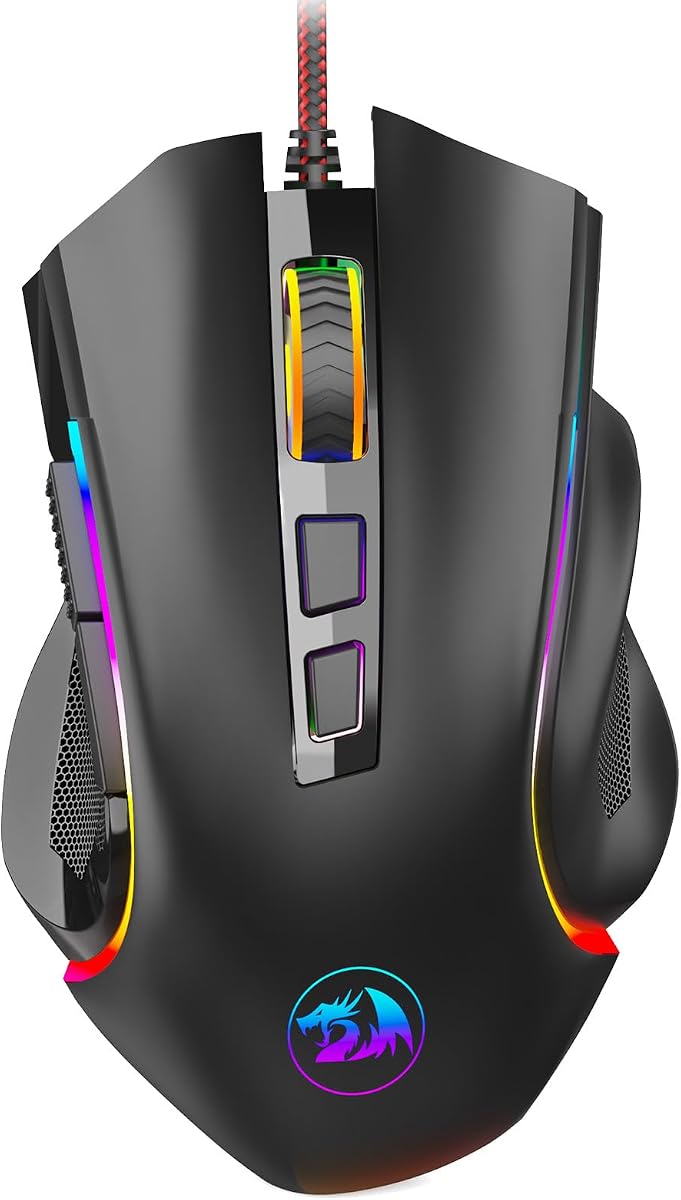
The Redragon M901K is built for players who want direct access to a large number of commands. Its 19 programmable buttons include 12 side buttons, giving it one of the most extensive layouts among the featured models. The 4.4 rating reflects a specialized approach that prioritizes control density, adjustment, and profile flexibility over a compact everyday shape.
We may earn a commission when you buy through this link, at no additional cost to you.
Sensitivity reaches 12400 DPI and can be configured between 100 and 12400. Polling rates from 125Hz to 1000Hz provide several levels of response, while five memory profiles make it possible to retain separate configurations for games, applications, or users. Button remapping and macro editing can turn the numerous controls into keyboard-style shortcuts or more complex command sequences.
The most distinctive feature is the set of eight removable 2.4-gram weights. Players can adjust mass and balance to create a lighter, faster-feeling setup or a more planted configuration. This is a meaningful advantage for users who value feel as much as technical specifications, although it requires experimentation and can make the mouse less convenient for people who prefer a single fixed setup.
The M901K is best suited to MMO, MOBA, strategy, and macro-heavy gaming. It may feel unwieldy for a conventional FPS setup or for users who only use a few buttons. Those who can take advantage of its shortcut array and tuning system will find it to be one of the most sophisticated Redragon gaming mice in this roundup.
Nineteen programmable buttons offer substantially more direct control than a standard mouse. The 12 remappable side buttons can execute keyboard combinations or macros, helping players place frequent actions within easy reach.
Eight removable weights give users direct control over the mouse's mass and balance. This is especially appealing for competitive players who understand how a heavier or more centered mouse can influence deliberate movement and comfort.
We may earn a commission when you buy through this link, at no additional cost to you.
The Redragon M602 is a straightforward wired gaming mouse that combines a 7200 DPI sensor, nine programmable buttons, and RGB lighting. Its 4.6 rating is among the highest in the guide, and the model offers a compelling option for players who prioritize a stable connection, familiar ergonomic shape, and useful customization without needing wireless features.
We may earn a commission when you buy through this link, at no additional cost to you.
The sensor supports adjustable DPI for both gaming and general office use. Through Redragon software, users can remap button functions, change lighting, adjust speed, and create macros. Seven RGB modes include solid colors, cycling effects, and an off setting, providing enough visual customization for most setups without overwhelming the mouse's core controls.
The ergonomic shell is shaped around dedicated finger positions, making it a practical all-day option. Its wired connection means there is no battery to charge and no wireless receiver to manage. That simplicity comes with a trade-off: the cable can occupy desk space and may feel less unrestricted than the rechargeable alternatives in this roundup.
The M602 is a strong recommendation for budget-conscious gamers who want reliable sensor performance, programmable controls, and RGB lighting. It also works for office productivity and laptop use where a compact button arrangement is preferable to an MMO-style layout. Its combination of a strong rating and long-running design makes it one of the most approachable entries in the guide.
A wired design eliminates battery concerns and wireless interference. For players who want consistent input without managing a receiver or charging cable, that direct connection remains a practical advantage.
The M602 supports macro editing, button remapping, speed adjustment, and seven RGB effects. This makes it useful for games, productivity shortcuts, and general desktop control rather than being limited to a single genre.
We may earn a commission when you buy through this link, at no additional cost to you.
The Redragon M901P-KS combines the highest stated sensor range in the guide with a large programmable button array and wireless operation. It is a serious MMO and MOBA-oriented mouse, designed for users who want numerous shortcuts without giving up cable-free movement. Its 4.4 rating reflects a capable but specialized package.
We may earn a commission when you buy through this link, at no additional cost to you.
The DPI adjustment range extends from 100 to 16000, and polling rates cover 125Hz through 1000Hz. Sixteen buttons can be remapped through macro editing, including the 12 side buttons. Five memory profiles and two working modes make it possible to retain different configurations for separate games or tasks, reducing repeated setup work.
A built-in 1000mAh battery provides over 70 hours of stated standby time with RGB disabled. The mouse can also be used in a wired state while charging, which is helpful when the battery runs low or when a player prefers continuous connection. As with the other RGB models, leaving illumination on reduces the available endurance.
The M901P-KS is best for MMO players, macro-heavy strategy gamers, and users who appreciate extensive controls in a wireless format. It is less ideal for minimalist FPS players who only use a handful of buttons or for users who want a light, travel-oriented mouse. Within its intended niche, however, it offers an impressive combination of resolution, control, and flexibility.
The broad 100-to-16000 DPI range accommodates slow tactical aiming as well as fast cursor movement. Players can begin with a comfortable setting and make finer adjustments using the available software rather than being locked to a narrow range.
Sixteen programmable buttons and 12 side controls give the mouse a deliberately dense layout. Combined with five profiles, this allows several games or workflows to coexist without losing each user's preferred bindings.
We may earn a commission when you buy through this link, at no additional cost to you.
The supplied listing for ASIN B00GU4F4OM does not include a product title, rating, image, price, or descriptive specifications. That limited information prevents a meaningful feature-by-feature assessment of the mouse, and this guide avoids inventing any details that are not present in the source data.
We may earn a commission when you buy through this link, at no additional cost to you.
Because the ASIN has a direct Amazon address, it can still be checked for current listing information, model identity, availability, and customer feedback. Any shopper should confirm the exact model name, connectivity method, DPI range, button count, battery requirements, software compatibility, and included accessories before considering a purchase.
There is also no evidence in the supplied data about grip style, dimensions, weight, sensor performance, polling rate, or lighting features. Those factors can materially affect comfort and competitive suitability, so it would be inappropriate to label this listing as a budget, premium, lightweight, or specialized choice without confirmation.
This entry should therefore be treated as an incomplete reference rather than a recommended purchase. If the live page reveals a fully documented model with strong compatibility and useful features, it may become a contender, but based on the available information alone, a buyer cannot make a confident comparison.
Start with the ASIN and confirm that the listing has not been replaced by an unrelated product. Model numbers can change between versions, and the current page title is necessary before comparing controls or connectivity.
Review the listed sensor range, polling rate, dimensions, weight, software requirements, and battery information. These details should be compared against the other featured models rather than inferred from the brand alone.
We may earn a commission when you buy through this link, at no additional cost to you.
ASIN B07VFQMVRL is included in the product data, but its title, image, rating, and descriptive information are all listed as unavailable. Without those facts, the mouse cannot be compared responsibly with models whose sensors, controls, connectivity, and ergonomics are clearly documented.
We may earn a commission when you buy through this link, at no additional cost to you.
A shopper should open the listing and look for a precise model name first. After that, it is important to determine whether the mouse is wired or wireless, whether it requires a receiver, and whether its software supports the intended operating system. The number of programmable buttons and the available DPI levels should also be verified because these features define most Redragon gaming mouse comparisons.
Comfort cannot be evaluated from the supplied data. Hand size, grip style, button placement, scroll-wheel construction, and surface texture can all affect prolonged use. Buyers should consult the current product imagery and description, then consider whether a model with a known ergonomic design is a safer alternative.
Although the listing may resolve into a recognizable Redragon model when viewed directly, it does not earn a recommendation from the evidence supplied here. The responsible approach is to treat it as a candidate for further verification, not as a proven contender for any of the guide's leading positions.
A visible model number makes it possible to match the listing with an established Redragon design. It also helps confirm whether two listings represent different versions of the same general mouse category.
Many Redragon gaming mice depend on downloadable configuration software. Confirm operating-system support, driver permissions, and whether essential features remain available without the software.
We may earn a commission when you buy through this link, at no additional cost to you.
The data supplied for B08M9FZWN9 contains no usable product title, rating, image, or about section. As a result, this mouse cannot be assigned a defensible DPI range, button count, connectivity standard, lighting capability, or comfort rating based on the source material.
We may earn a commission when you buy through this link, at no additional cost to you.
The live listing should be used to check whether this ASIN corresponds to a current Redragon gaming mouse or a historical or unavailable item. If the page is active, users should look for the manufacturer model number, included accessories, charging method, receiver type, and software download location. These details are necessary to determine whether it competes with the M602, M814, or another featured model.
The absence of stated information also prevents analysis of potential weaknesses. There is no basis for judging battery endurance, wireless latency, grip design, button durability, software stability, or platform compatibility. A confident recommendation would therefore misrepresent the available evidence.
This listing is best treated as an open item for further research. If its live specifications match a documented Redragon model, those verified details can be compared directly. Until then, choosing it over one of the fully specified picks would sacrifice clarity for little demonstrated benefit.
Check whether the mouse includes a cable, a USB receiver, or both. A wireless listing should also state its supported connection modes and battery expectations before it is compared with wired or tri-mode alternatives.
Determine whether the mouse includes onboard profiles or relies entirely on a computer driver. Users who switch operating systems or travel between devices should pay particular attention to software installation and customization compatibility.
We may earn a commission when you buy through this link, at no additional cost to you.
ASIN B0CDC6X2BG appears in the source list without a product name, rating, image, or factual description. This limits the review to an evidence-based warning that the listing's actual features and current status need to be checked before it can be considered alongside the more thoroughly documented Redragon mice.
We may earn a commission when you buy through this link, at no additional cost to you.
Once opened, the listing should be examined for the exact model identifier and the presence of a manufacturer product page. Buyers should also verify its connection method, maximum sensitivity, polling rate, button count, physical dimensions, weight, and battery arrangement. The presence and scope of RGB lighting should also be confirmed rather than assumed from the Redragon name.
Because ergonomics are subjective, current images and a clear grip description are especially important. A mouse with too many side buttons may work well for MMO players but be uncomfortable for a standard office setup. Similarly, a wireless model may be ideal for travel yet less attractive to someone who wants an uninterrupted wired connection.
No award or purchase recommendation is appropriate for this entry on the current evidence. It is best treated as a listing to investigate, with the final judgment deferred until its model identity and core specifications are available. Buyers who want an immediate guide should favor one of the documented products whose features can be compared transparently.
Use the ASIN and listing images to locate the manufacturer model number. Once identified, you can distinguish its intended gaming style and compare it with similarly equipped Redragon products.
Button layout, grip shape, and connectivity influence daily usability more than decorative lighting alone. Confirm those characteristics first, then use DPI, polling rate, and battery figures as secondary differentiators.
We may earn a commission when you buy through this link, at no additional cost to you.
The Redragon M910-K pairs a wired connection with 8000 DPI, nine programmable buttons, and a rapid-fire button. It holds a 4.6 rating, tying the M602 for the highest listed score, and stands out as a value-focused option for gamers who want meaningful DIY configuration without moving to a wireless or MMO-scale design.
We may earn a commission when you buy through this link, at no additional cost to you.
The sensor offers five redefinable DPI levels. Its defaults are 500, 1000, 2000, 3000, and 4000, while the driver allows adjustment across a 500-to-8000 range. Users can change DPI, report rate, RGB effects, macro assignments, and other button functions. The fire button can turn one click into three, providing quick access to rapid input in games that permit it.
Five user profiles allow different games, applications, or people to retain separate configurations. RGB lighting includes five modes, adjustable color and brightness, and the ability to select a single color or turn the effect off. The ergonomic contour is designed to fit different hands and resist slipping during fast movements or when the mouse is lifted.
The M910-K is best for FPS players and generalists who want more programmability than a basic office mouse without the bulk of a 12-side-button MMO controller. Its main trade-off is the fixed cable, but that also removes battery management and receiver pairing. For a straightforward, customizable wired setup, it is among the strongest value choices available.
Separate profiles make it easier to switch among games, work applications, and personal preferences. Once the bindings and sensitivity are established, users can change context with a profile selection rather than rebuilding every setting.
The dedicated fire button provides a shortcut for three-click repeated input, while five lighting modes let the visual setup match different games or work environments. Both features remain subject to software and game rules.
We may earn a commission when you buy through this link, at no additional cost to you.
The Redragon M814 is the most flexible connectivity option in the guide, combining 2.4G wireless, Bluetooth, and wired USB-C operation. With a 4.5 rating, 8000 DPI, seven programmable buttons, and a tactile rapid-fire key, it is well suited to players who also use their setup for productivity or regularly move between devices.
We may earn a commission when you buy through this link, at no additional cost to you.
The 2.4G mode is intended for responsive gaming, while Bluetooth supports general office work and the USB-C cable supports continuous wired use. The included flexible cable also allows charging during work or play. Its 1000Hz polling rate and adjustable sensitivity from 800 to 8000 DPI provide useful control for different movement styles.
Seven primary buttons can be remapped through downloadable Windows software, excluding the dedicated rapid-fire key. That button is described as turning one click into three clicks and is intended for tactical use in FPS games. Users must follow applicable game rules, and the software customization feature is not supported on Mac OS even though Bluetooth can still serve general work functions.
Battery life is listed at up to 250 hours in 2.4G mode with RGB disabled. The contoured shape and textured grips are designed for medium to large hands, reducing fatigue during long sessions. The M814 is an ideal choice for hybrid gaming and office use, but Windows-focused players should be prepared to use Mac software limitations, while minimalist users may find seven programmable buttons unnecessary.
2.4G, Bluetooth, and USB-C modes allow the M814 to move between gaming, office work, and wired operation. This flexibility is useful for hybrid setups where a dedicated gaming mouse would otherwise remain idle.
The stated 250-hour runtime in 2.4G mode with RGB off makes the M814 appealing for regular wireless use. Charging through the flexible USB-C cable adds convenience, while the longer-running configuration requires accepting a more subdued lighting setup.
We may earn a commission when you buy through this link, at no additional cost to you.
Choosing a Redragon gaming mouse means balancing control density, sensor performance, connectivity, comfort, software, and battery needs. The most important step is identifying how you play and which features you will genuinely use rather than assuming that more buttons or higher specifications always create a better experience.
Wired mice provide a direct, uncomplicated connection and eliminate receiver pairing, battery charging, and wireless interference. They are well suited to competitive desks where consistent input and a stationary setup matter more than cable-free movement. Wireless mice offer freedom from cable drag and can be cleaner for mixed gaming and office routines, but battery life and receiver management become part of the ownership experience. Tri-mode options add another layer of flexibility by supporting 2.4G, Bluetooth, and wired USB-C use.
Choose wired for maximum simplicity, wireless for cleaner movement, and tri-mode for a device-flexible setup. Also verify the receiver type and operating-system support.
DPI describes how far the cursor moves for a given physical movement, while polling rate describes how often the mouse reports its position to the computer. A wide DPI range gives you room to change sensitivity, but a high maximum number does not automatically make every game better. Begin with a setting that feels controlled, then increase it only as needed. Polling rate can also affect responsiveness and power consumption, so a 1000Hz option is useful for competitive play while lower rates may extend wireless endurance.
Prioritize an adjustable range rather than the largest advertised figure. Choose 1000Hz when responsive input is your main concern and lower settings when battery life matters more.
The number of buttons should reflect the games and software you actually use. A conventional mouse with seven or nine controls is usually easier to manage in FPS titles, while MMO and MOBA players may value 12 side buttons or more. Programmable controls can launch abilities, execute macros, or perform keyboard combinations, but they are only useful if the software makes binding and profile management intuitive. A physical layout with many crowded buttons can also cause accidental presses and become uncomfortable over time.
Choose a modest button count for competitive simplicity and a larger bank for macro-heavy games. Confirm that every useful control is remappable and that profiles can be saved.
Mouse weight affects how easily a device can be moved, stopped, and repositioned. Some players prefer a light mouse for quick flicks, while others favor a more planted feel for deliberate aiming. Removable weight systems allow experimentation without replacing the entire mouse, although they require more setup than a fixed design. Comfort also depends on grip shape, hand size, and button placement, so a weight feature cannot compensate for a shape that does not suit your hand.
Try a mouse in your preferred grip before committing when possible. If weights are adjustable, begin near the default configuration and change them gradually.
Redragon gaming mice often rely on downloadable software for DPI changes, button remapping, lighting effects, polling-rate settings, and macro editing. Check the supported operating systems before purchase, especially if you use macOS, Linux, or a mixture of devices. Some products retain essential controls through physical buttons while leaving advanced customization unavailable on certain platforms. Profile storage is also important because users who switch between games should not need to rebuild their bindings every session.
Verify software requirements, customization permissions, profile storage, and platform limitations. A feature is only useful if it works on your intended device.
Battery specifications are easiest to interpret with lighting considered. The listed models provide their longest runtimes with RGB disabled, while active lighting shortens endurance. Rechargeable mice that can operate while charging provide a useful fallback for extended sessions. Check the battery capacity, stated runtime, charging connector, and whether the mouse supports simultaneous wired use. For a permanently installed gaming mouse, a wired design may still be the simplest long-term choice because it removes charging from the routine.
Compare realistic battery conditions rather than headline maximums. If your setup requires uninterrupted wireless operation, verify charging flexibility and expected RGB-off runtime.
Sensitivity specifications are only one part of a useful gaming mouse. Sensor consistency, button actuation, grip shape, polling rate, and weight can have a more noticeable effect on everyday performance. An extremely high maximum may be unnecessary for your preferred games, while a modest range with reliable presets can be more convenient. Focus on models that let you select and save sensible settings, because those features matter more day to day than an unused specification at the top of the range.
Treat maximum DPI as a ceiling rather than a target. Prioritize control, stability, and the ability to save settings that fit your games.
A mouse is held continuously, so comfort should be evaluated carefully. Consider hand size, preferred claw, palm, or fingertip grip, finger access to side buttons, and whether the surface may slip during quick movement. RGB lighting can enhance a gaming setup, but it is a secondary benefit that may reduce battery life and consume customization attention. The best model is one you can control comfortably and operate intuitively, even if it offers fewer visual effects than a larger alternative.
Choose the shape first and treat RGB as an added benefit. A comfortable, reliable mouse should matter more than matching a particular color scheme.
Begin by installing the mouse and pairing it through the method specified for that model. Wired versions should be connected directly, while 2.4G models generally require a USB receiver and Bluetooth models need to be selected through the computer's device settings. Rechargeable models should receive a full initial charge according to the included instructions. For tri-mode mice, designate 2.4G as the gaming connection, Bluetooth for compatible office use, and USB-C for wired operation when consistent connectivity is preferred.
Next, install the appropriate Redragon configuration software on a supported computer and update it before making major binding changes. Create a named profile for each game or workflow, set a comfortable DPI, and test the polling rate under your normal conditions. Remap side buttons to useful abilities or keyboard shortcuts, then verify every binding in practice. If a rapid-fire feature is present, use it only where repeated clicks are allowed by the game's rules. Keep a separate basic profile for general desktop work so accidental activation is less likely.
For care, keep the underside free of dust, hair, and sticky residue, and clean the sensor gently with a dry or lightly damp cloth. Avoid dragging the mouse across debris because particles can affect tracking. Clean the scroll wheel and button gaps periodically, and check the USB receiver or charging cable for damage. Wireless users should avoid leaving the battery depleted for long periods, while removable weights should be removed or reinstalled securely before travel. Always update software cautiously and keep a record of important macros in case a profile needs to be recreated.
No. DPI should match your screen resolution, sensitivity preference, and the pace of your movements. A wide adjustable range is useful, but the correct setting is the one that lets you aim accurately without moving the mouse too far. Many players can benefit from the product's saved presets even if they never approach the maximum advertised DPI.
The M901K and M901P-KS are the strongest MMO-focused choices in this guide because they offer large banks of programmable buttons and multiple side controls. The M901K adds removable weights, while the M901P-KS provides higher stated DPI and wireless operation. The better choice depends on whether physical balance or cable-free movement matters more to you.
Wireless models such as the 8000 DPI mouse, M901P-KS, and M814 include 2.4G options intended for gaming with up to a 1000Hz polling rate. Performance can also depend on the computer, receiver placement, interference, and power management. Wired models remain the simplest choice for users who want to eliminate wireless variables entirely.
DPI controls how sensitive the mouse is to physical movement, while polling rate controls how frequently the device reports input to the computer. A sensitive mouse with a lower polling rate and a less-sensitive mouse with a faster polling rate serve different needs. Adjust DPI first, then test polling rates based on responsiveness, power use, and your hardware.
Yes. Every documented model in the guide supports PC use, with Windows and Mac compatibility stated for several products, while the M814's advanced software customization is limited to Windows. Productive users may prefer the M814's Bluetooth and USB-C modes or the M602's conventional button layout, but RGB should be switched off when battery conservation is important.
Several listed models explicitly support Mac, including the 8000 DPI wireless mouse and M602, but customization capabilities vary. The M814 supports Bluetooth for general use, yet its downloadable customization software is not supported on Mac OS. Always verify the current listing and software requirements for your exact operating system before ordering.
Choose wired if you prioritize simple setup, continuous connectivity, and freedom from battery management. Choose wireless if you value a clear desk and freer movement, especially when the mouse supports use while charging. Tri-mode options are the most versatile but require the most attention to connection switching and software compatibility.
Save separate profiles within the official software and keep a written note of essential bindings, DPI levels, and polling rates. Software updates can occasionally alter settings, so a backup helps with quick restoration. If a profile becomes unstable, create a fresh profile rather than repeatedly changing many bindings at once, and test each action in the relevant application.
The Redragon 8000 DPI wireless mouse is the strongest all-around recommendation because it combines a broad sensitivity range, programmable controls, RGB lighting, a rapid-fire button, and rechargeable freedom. The M901K takes the lead for MMO and macro-heavy play, while the M910-K offers an especially approachable wired experience with nine customizable buttons and five profiles.
Prioritize the features that directly affect your routine: a comfortable grip, the correct number of controls, dependable connectivity, and software that supports your operating system. Higher DPI, more lighting modes, and extra buttons can be useful, but they are less important than a setup you can understand and use consistently. Wired, wireless, and tri-mode designs each have a legitimate place, so choose based on how you actually play and work.
Finally, check the current listing, technical specifications, software requirements, and latest customer feedback before buying. Product versions and availability can change, and promotions also vary over time. The recommendations in this guide are based on the available November 2026 information, so verifying the live product page helps ensure that the selected Redragon gaming mouse still matches your needs.