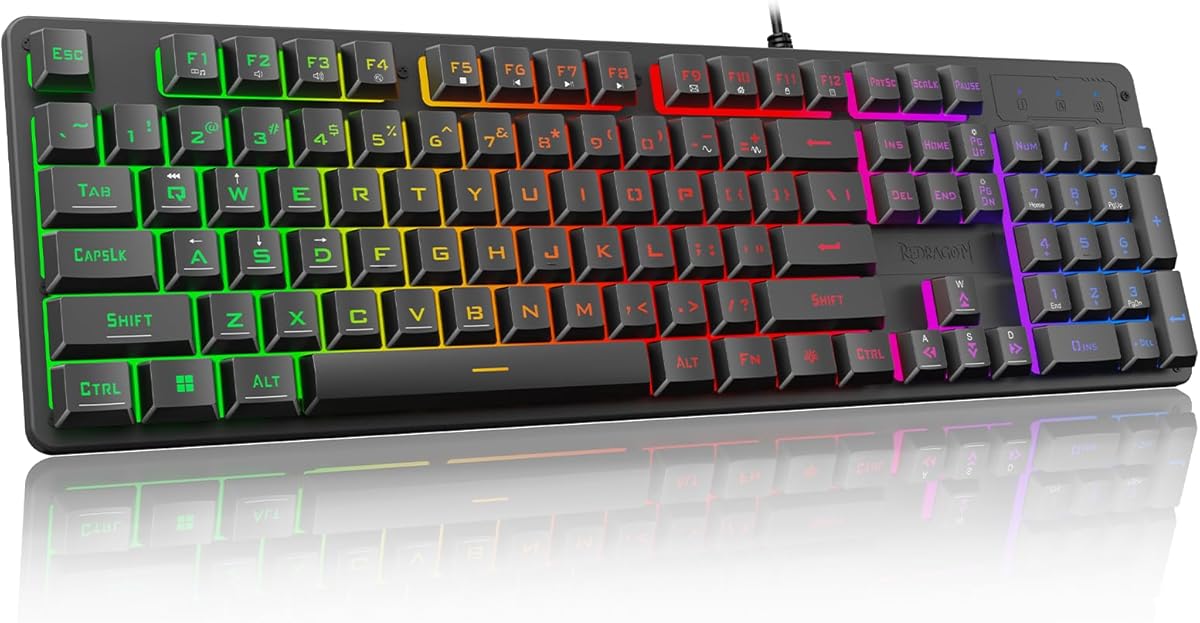
Redragon K521 Gaming Keyboard
4.3Editor score
Mechanical-feeling key response
Rainbow LED illumination
19-key anti-ghosting
Twelve multimedia shortcuts
Broad device compatibility
This Redragon Gaming Keyboard guide compares ten models for switch type, connectivity, lighting, macros, build quality, and everyday versatility.
A Redragon Gaming Keyboard can suit nearly any setup, from a compact mechanical board for competitive play to a wireless keyboard-and-mouse bundle for a clutter-free desk. The important differences lie in switch behavior, layout, lighting, programmability, anti-ghosting support, and the quality of the included controls.
This guide compares ten Redragon keyboards using their supplied specifications, covering mechanical and membrane designs, wired and wireless connections, full-size and compact layouts, macro controls, RGB lighting, and bundled software. Each recommendation highlights the strongest reasons to choose that model while also identifying compromises that may affect particular users.
The list shows how the same brand serves very different needs, including budget membrane boards, hot-swappable mechanical models, versatile wireless peripherals, and productivity-focused boards with advanced programming. Ratings reflect the supplied customer feedback, while availability and prices can change, so readers should confirm current product details before buying.
4.3Editor score

4.4Editor score

4.6Editor score
The comparison below places all ten Redragon gaming keyboards side by side, focusing on their physical design, switch approach, lighting, connectivity, programmable features, and intended use.





The Redragon K552 is a compact tenkeyless mechanical keyboard built around linear red switches, and its supplied rating is 4.4 out of 5. It offers a particularly balanced combination of gaming-oriented response, useful programmability, and a footprint that leaves more room on the desk than a conventional full-size board. Its metal top plate also gives it a more substantial appearance than many entry-level alternatives.
We may earn a commission when you buy through this link, at no additional cost to you.
The standout feature is the hot-swappable switch system. Rather than committing permanently to the installed red switches, users can replace them with compatible 3-pin or 5-pin mechanical switches. That makes the K552 useful for experimenting with linear, tactile, or clicky feedback without buying an entirely new keyboard. Dedicated software expands the experience by allowing keys to be remapped and complex macro commands to be assigned.
Its RGB implementation is less elaborate than that of some competitors in the list. The K552-KR offers six preset patterns, including breathing, wave, ripple, and reactive effects, with brightness adjusted through keyboard shortcuts. However, the supplied information specifically notes that its rainbow LED version uses fixed color patterns and does not support software-based color customization. Buyers who want individually selected lighting colors should not expect the same level of control as the K556 or K668.
The tenkeyless layout is another major strength because it preserves the essential gaming and typing area without the separate number pad. All 87 keys support N-key rollover, and full anti-ghosting helps prevent conflicts when several commands are triggered together. The K552 is best suited to competitive gamers who want a compact mechanical board, reliable key registration, and switch flexibility without moving into the more advanced programming and multi-device environment offered by the K742.
The K552 removes the number pad to create a compact board that leaves more mouse room. It retains 87 keys, full anti-ghosting, and N-key rollover, making it practical for games that demand fast combinations while remaining useful for everyday typing.
Hot-swappable sockets allow the supplied red switches to be replaced with compatible 3-pin or 5-pin options. This is valuable for gamers who want to experiment with switch feel or sound without committing to a permanently soldered configuration.
Redragon's software supports remapping and complex macro commands, allowing frequently used actions to be placed on convenient keys. The controls are not limited to fixed presets, which makes the board suitable for both gaming shortcuts and productivity workflows.
A metal top plate and anti-slip feet help the keyboard remain steady during active sessions. These details are particularly useful on smaller desks where a lightweight board could otherwise shift as the user reaches for different controls.
We may earn a commission when you buy through this link, at no additional cost to you.
The Redragon K671 is a full-size wired mechanical keyboard with a supplied rating of 4.3 out of 5. It brings several features usually associated with more advanced models into a straightforward package: hot-swappable red switches, full-key anti-ghosting, double-shot PBT keycaps, programmable macros, and eleven backlighting effects. It is a compelling mechanical upgrade for gamers who want more customization than a basic membrane keyboard offers.
We may earn a commission when you buy through this link, at no additional cost to you.
Linear red switches provide a smooth, comparatively light press that suits fast gaming actions. The sockets let users change switches without soldering, and the package includes four spare red switches and two spare red keycaps. That makes routine maintenance more approachable and gives owners a simple way to replace a switch that develops an uneven feel or stops responding as expected.
Lighting and programmability form the most useful parts of the feature set. Eleven backlight modes can be selected, while brightness and lighting speed are adjustable across five levels. Software permits key remapping, shortcuts, and combined functions, but the color itself cannot be changed. That limitation keeps the lighting system less flexible than the multi-effect RGB boards elsewhere in this guide, although the range of patterns still gives the desk a more animated appearance than a single-color backlight.
The K671 is best for players who want a conventional full-size layout, mechanical red switches, and hot-swappable construction at an accessible entry point. It is less suitable for someone whose main priority is a highly specific lighting color scheme, but it offers an unusually capable feature set for the money and includes a 24-month warranty.
The switch sockets accept replacements without soldering, while four spare red switches are included in the package. Users can maintain the board or experiment with compatible mechanical switches without buying a new keyboard.
The double-injection PBT keycaps are designed to resist wear and maintain their appearance through extended daily use. They also allow light to pass through more consistently than many basic printed keycap sets.
Software can remap keys, assign shortcuts, and combine multiple functions under one key. Twelve multimedia shortcuts also provide direct access to common functions such as media control, calculator access, volume adjustment, and email.
We may earn a commission when you buy through this link, at no additional cost to you.
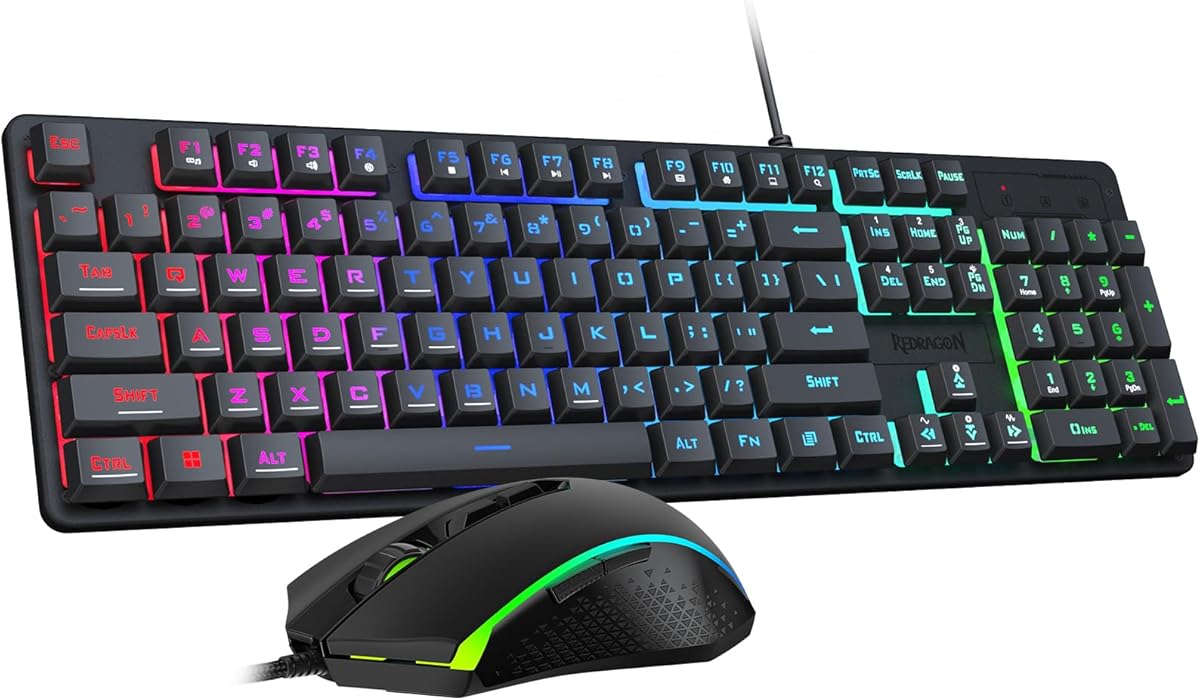
The Redragon S101-3 PRO is a wired keyboard-and-mouse package for gamers, students, and everyday users, and it carries a supplied rating of 4.5 out of 5. Rather than asking shoppers to assemble a complete gaming setup one peripheral at a time, it combines an RGB keyboard, adjustable-DPI mouse, wrist rest, and dedicated macro controls in a coordinated package.
We may earn a commission when you buy through this link, at no additional cost to you.
Its soft-touch membrane keys are designed to deliver comfortable, quiet feedback for long sessions. Although they do not provide the distinctive feel or interchangeable construction of a mechanical board, the supplied information positions them as a practical option for shared rooms, offices, late-night play, and study. Anti-ghosting helps the keyboard register commands reliably, while the detachable ergonomic wrist rest adds support during extended use.
Programming is unusually accessible for a bundle. Five dedicated macro keys can record command sequences directly, and downloadable software controls the keyboard and mouse lighting, mouse sensitivity, and related settings. Profiles are stored in the hardware, so configurations remain available after a restart. The keyboard offers six backlight modes, while the mouse supplies ten lighting effects, allowing the two peripherals to create a coordinated desk appearance.
The S101-3 PRO is best for a first gaming setup, a student, or anyone who wants a complete functional bundle without choosing each component separately. Its main limitation is the fixed membrane construction, which will disappoint users seeking hot-swappable switches or the sharper tactile response of mechanical keys. Even so, the combination of macro recording, onboard storage, wrist support, and an adjustable mouse makes it a convenient all-in-one package.
The package contains both essential gaming peripherals, reducing the need to source a separate mouse immediately. Matching lighting effects help the two devices look like a deliberate desk setup rather than unrelated accessories.
Five dedicated macro keys allow command sequences to be recorded directly from the keyboard. This makes frequently repeated actions easier to execute without first navigating a larger software interface.
Quiet membrane feedback reduces distraction in shared environments, while the included ergonomic wrist rest helps support the hands. These features are especially relevant for students, office workers, and casual players.
Lighting and mouse DPI settings can be saved directly to the hardware. This makes recurring configurations easier to maintain without repeatedly changing them whenever the computer restarts.
We may earn a commission when you buy through this link, at no additional cost to you.
The Redragon K556 is a full-size wired mechanical keyboard with a supplied rating of 4.6 out of 5. It combines a brushed aluminum top plate, 104 keys, hot-swappable brown switches, and an extensive RGB lighting system. It is especially attractive to gamers who want a substantial desktop keyboard without losing the software-based control found on more specialized mechanical models.
We may earn a commission when you buy through this link, at no additional cost to you.
The aluminum construction is the model's most immediately useful physical advantage. A sturdy top plate resists the flex and wobble associated with lighter plastic frames, helping the keyboard feel stable during rapid input. The supplied brown switches add a soft tactile bump that is comfortable for extended typing, while the hot-swappable sockets accept nearly any compatible 3-pin or 5-pin switch for users who prefer a different sound or feel.
Its lighting system offers 20 preset modes, adjustable brightness, and variable flow speed. Companion software adds custom RGB effects and macro programming, allowing the K556 to go beyond its onboard presets. Full anti-ghosting across all 104 keys supports rapid multi-key combinations, and the basic wired connection works with Windows and Mac without requiring drivers.
This keyboard is a strong option for a full-size gaming or productivity desk where the number pad is genuinely useful. The main compromise is footprint: 104 keys take up more space than the K552 or K742, which may matter in a compact workstation. Buyers who favor the more direct response of linear switches for competitive play can use the hot-swappable sockets to make that change.
The brushed aluminum top plate gives the board a steady feel and an understated appearance. It is particularly beneficial for users who play aggressively or prefer a keyboard that remains planted during long sessions.
Twenty onboard lighting modes provide quick visual variety, and the software adds custom RGB effects with adjustable brightness and flow speed. This is one of the most developed lighting setups among the conventional full-size models in the list.
The supplied brown switches deliver a softer tactile bump than a linear switch. That can be comfortable for long typing sessions while still giving clear feedback when a key is actuated.
We may earn a commission when you buy through this link, at no additional cost to you.
The Redragon K521 is a full-size wired keyboard with a supplied rating of 4.3 out of 5. It offers mechanical-feeling keys, rainbow LED illumination, 19-key anti-ghosting, and twelve multimedia combinations in a simple package. It is one of the most accessible options here for a new gamer who values recognizable gaming features more than advanced macro software.
We may earn a commission when you buy through this link, at no additional cost to you.
The key action is described as mechanical feeling and fast tapping, but the underlying construction is not a conventional hot-swappable mechanical board. That distinction matters for buyers who care about the exact feel, sound, and durability of mechanical switches. In exchange, the K521 delivers a responsive-looking, familiar full-size layout at a budget-oriented level without requiring software installation.
Lighting is handled through a one-touch on-and-off button, a three-position breathing mode, and four brightness positions. The rainbow design creates a vivid effect without requiring individual color selection. Anti-ghosting is specified for 19 keys, which is sufficient for many common gaming combinations, though it is not the same as the complete N-key rollover support listed for some mechanical models.
The K521 suits students, casual gamers, and anyone seeking a simple upgrade with broad compatibility. It is listed as compatible with numerous Windows versions, MacOS, PS4, PS5, and Xbox, with no driver required. Its limitations are the absence of genuine mechanical switches and limited customization, making it best suited to buyers prioritizing ease of use, full-size convenience, and visual appeal.
A dedicated lighting button, adjustable brightness, and three breathing positions make the rainbow effect easy to manage. The controls are straightforward enough for a user who does not want to install configuration software.
Twelve multimedia combinations can handle common tasks such as media control and system functions. They make the board useful beyond gaming without occupying the primary typing area.
The supplied compatibility list covers Windows systems, MacOS, PS4, PS5, and Xbox. Plug-and-play operation reduces setup friction for a mixed household of computer and console users.
We may earn a commission when you buy through this link, at no additional cost to you.
The Redragon S101M-KS is a wireless keyboard-and-mouse bundle with a supplied rating of 4.5 out of 5. It supports wired USB-C, Bluetooth 5.0, and 2.4 GHz wireless connections, and a single 2.4 GHz receiver can control both peripherals. That combination makes it one of the most flexible packages for gamers who want fewer cables or need to move between devices.
We may earn a commission when you buy through this link, at no additional cost to you.
The keyboard uses a rechargeable battery rated for up to 300 hours with the RGB lighting turned off. A battery indicator provides a quick way to check remaining charge, while a detachable six-foot USB-C cable offers a wired option. Splash resistance and a Windows lock function add practical protection for regular use, and ten independent multimedia keys sit alongside twelve multimedia combinations for quick system control.
The included mouse is more capable than many simple bundle mice. It offers five listed DPI levels from 800 to 4800, seven programmable buttons, and an adjustable polling rate from 125 to 1000 Hz. Software can also customize key mappings, lighting, and mouse behavior. The keyboard and mouse support eight RGB patterns with adjustable speed and brightness, giving the pair a coordinated gaming appearance.
The S101M-KS is best for a tidy, flexible setup where wireless freedom matters. It is less suitable for someone who wants maximum battery duration with lighting active, since the stated 300-hour figure applies when RGB is off. Software is needed for advanced customization, but the core experience remains straightforward, and the included 36-month warranty adds reassurance.
The combined 2.4 GHz receiver can control both the keyboard and mouse, reducing the number of USB ports occupied. Bluetooth and wired modes provide additional options for switching between computers or clearing cable clutter.
Five DPI presets and software-based adjustment support different sensitivity needs. Seven remappable buttons and polling rates up to 1000 Hz make the mouse more versatile than a basic pointing device.
The keyboard's rechargeable battery and visible status indicator help prevent unexpected shutdowns. Turning the lighting off extends battery life for users who prioritize wireless freedom over visual effects.
Splash resistance and a Windows lock function help protect against everyday interruptions. The detachable USB-C cable also makes charging and replacement straightforward.
We may earn a commission when you buy through this link, at no additional cost to you.
The Redragon K512 is an RGB membrane gaming keyboard with a supplied rating of 4.5 out of 5. Its defining feature is a set of six onboard macro keys that can be recorded and reassigned without software, giving it an easy path from installation to useful customization. The included media wheel and wrist rest make it a comfortable option for extended play.
We may earn a commission when you buy through this link, at no additional cost to you.
Users can record and assign the G1 through G6 keys on the fly, eliminating the need to install drivers just to create a shortcut. This is helpful for gamers who want one-button access to a repeated command sequence or for productivity users who want to assign their own shortcuts. Companion software remains available for deeper macro configuration and custom backlight effects.
The RGB system offers 13 modes: seven presets and six customizable slots. Brightness can be adjusted all the way down to off, which is useful in shared or late-night environments. Anti-ghosting is specified for 26 keys, and the dedicated media controls allow music playback and track changes without leaving the game.
The K512 is best for a gamer who values straightforward macro recording and comfort but does not need genuine mechanical switches. Its membrane construction is quieter and less demanding to type on, while the detachable wrist rest and fade-resistant double-shot keycaps support regular use. The tradeoff is that the key action will not satisfy users who specifically prefer the sharper response and acoustic character of mechanical switches.
The six onboard macro keys can record and reassign commands directly. This lowers the learning barrier for casual gamers and makes frequently repeated sequences available almost immediately.
A dedicated media wheel provides familiar playback and volume controls. It keeps common actions accessible without requiring users to remember keyboard combinations.
The magnetic wrist rest supports the hands and can be positioned according to the user's preference. Membrane keys offer a quieter alternative that can work well in shared rooms.
Thirteen lighting modes combine presets with customizable slots, while adjustable brightness includes an off setting. Software can be used for more advanced effects when required.
We may earn a commission when you buy through this link, at no additional cost to you.
The updated Redragon S107 combines an RGB membrane keyboard with a gaming mouse whose sensitivity can reach 10000 DPI through software. Its supplied rating is 4.5 out of 5, and the package is aimed at gamers who want a complete wired setup with programmable features but do not necessarily need mechanical keys.
We may earn a commission when you buy through this link, at no additional cost to you.
The keyboard includes six RGB lighting modes with adjustable speed and brightness, while the mouse adds eight lighting effects. Both lighting levels can be turned off for a cleaner desk. The keyboard's foldable stand, skin-friendly coating, and floating keycaps are intended to improve positioning and typing comfort, and 25-key anti-ghosting supports reliable multi-key combinations.
The mouse is the more technically ambitious half of the bundle. A DPI button provides a quick on-key route to five listed sensitivity levels, while the driver expands the maximum to 10000 DPI and allows the polling rate to reach 1000 Hz. Software supports macro, DPI, report-rate, RGB, and button customization, giving advanced users room to adapt both devices.
The S107 is a good fit for a first wired gaming setup or a player who values a capable mouse more than mechanical key feel. Twelve multimedia function keys improve daily convenience, and basic operation is plug-and-play without drivers. Its main limitation is the membrane keyboard, while users seeking advanced customization must download the software from Redragon.
The mouse reaches 10000 DPI through software and supports polling rates up to 1000 Hz. These options provide flexibility for fast aiming, detailed cursor work, and user-preferred control settings.
The keyboard offers six modes and the mouse provides eight, with speed and brightness adjustment available. Users can disable either lighting system when a subtler appearance is preferred.
A foldable stand, floating keycaps, and a skin-friendly coating are intended to reduce visual bulk and improve comfort. These details make the membrane board more suitable for extended everyday use.
The driver supports macros, DPI, report rate, RGB effects, and button assignments. This gives the bundle more flexibility than a basic plug-and-play keyboard-and-mouse pair.
We may earn a commission when you buy through this link, at no additional cost to you.
The Redragon K742 is a 98 percent compact wireless mechanical keyboard with a supplied rating of 4.6 out of 5. It combines a gasket structure, five layers of sound-absorbing padding, hot-swappable sockets, tri-mode connectivity, a volume knob, and QMK/VIA support. It is the most advanced model in the guide and the strongest choice for users who want a flexible premium mechanical board.
We may earn a commission when you buy through this link, at no additional cost to you.
The supplied RPC linear switches are pre-lubed and described as producing a creamy sound. A 40±10 gf operating force and 3.6 mm total travel define the switch characteristics, while a listed keystroke life of 50 million presses indicates a long-term design target. The gasket frame and internal padding are intended to create a softer, more controlled feel and reduce harsh sound within the case.
Connectivity is a major strength. Bluetooth 5.0, 2.4 GHz wireless, and USB-C wired operation can be selected with one-click switching, and the keyboard can connect to up to three devices. The built-in receiver collection design helps keep the USB dongle secure. A 4000mAh battery is listed for up to 53 hours with the backlight off or 16 hours with it on, so lighting choice has a meaningful effect on endurance.
QMK/VIA support gives the K742 advanced remapping, layers, and macro automation, while the included puller tools and spare switches make customization approachable. It is best for an enthusiast who wants a compact wireless mechanical keyboard for both gaming and work. The main drawbacks are shorter battery life with lighting enabled and the greater complexity of a programmable layout compared with a basic gaming board.
A gasket-mounted case filled with five layers of padding is designed to soften the acoustic profile and improve the typing experience. Pre-lubed linear switches complement that internal structure with a smooth, creamy sound.
Bluetooth, 2.4 GHz, and wired modes allow the keyboard to move among up to three devices. Dedicated shortcuts for Windows and macOS make that transition more convenient.
QMK and VIA support allow key remapping, layer editing, and macro automation. The supplied information notes that Redragon can provide the required JSON file for users setting up VIA.
The 98 percent layout preserves essential navigation and function keys while omitting the number pad. A multimedia knob handles volume and media tasks, helping preserve desk space without removing useful controls.
Hot-swappable sockets accept compatible 3-pin and 5-pin switches, and the package includes a two-in-one puller, spare switches, and replacement keycap tools. Users can maintain or personalize the board without a soldering iron.
We may earn a commission when you buy through this link, at no additional cost to you.
The Redragon K668 is a full-size 108-key wired mechanical keyboard with a supplied rating of 4.5 out of 5. It combines hot-swappable red switches, four dedicated shortcut keys, extensive RGB lighting, and two included keycap sets. It is a strong option for a desk that needs a numeric keypad and for gamers who want mechanical customization without moving to a compact layout.
We may earn a commission when you buy through this link, at no additional cost to you.
The hot-swappable sockets accept nearly any compatible 3-pin or 5-pin switch, while the supplied red linear switches offer smooth and relatively discreet feedback. Four extra hotkeys default to functions such as mute, calculator, screen lock, and desktop. Software allows those keys to be reassigned to custom shortcuts, and it can also handle macros and personalized keybindings.
Lighting is a major strength. The keyboard supports up to 19 preset RGB modes, adjustable brightness, and variable flow speed, including a music-sync mode that reacts to desktop audio. Two-stage feet allow the typing angle to be adjusted, while two sets of mixed-color keycaps let the user change the board's appearance without sourcing a separate set.
The K668 is best for a full-size mechanical setup that prioritizes programmability, switch maintenance, and visual effects. Its drawbacks are practical rather than fundamental: it is wired only and its 108-key arrangement needs meaningful desk space. Buyers wanting wireless connectivity or a smaller footprint should compare it with the tri-mode K742.
Compatible 3-pin and 5-pin switches can be installed without soldering. This allows the included linear reds to be replaced when a different feel, sound, or maintenance approach is preferred.
The additional keys begin with useful system commands and can be reassigned through software. They provide room for commonly used actions without occupying the main typing cluster.
A dedicated music-sync lighting mode responds to desktop audio, adding a dynamic effect beyond static rainbow patterns. Brightness and flow speed remain adjustable for different environments.
Adjustable two-stage feet support different hand positions, while two mixed-color keycap sets allow quick visual changes. These details help the board fit both comfort and decorative preferences.
We may earn a commission when you buy through this link, at no additional cost to you.
The right Redragon Gaming Keyboard depends on switch preference, desk size, connection style, lighting requirements, and the depth of customization needed. Reviewing these factors before shopping prevents a buyer from paying attention to features that do not improve the intended setup.
Mechanical keyboards use individual switches beneath each keycap and generally provide a more distinct response, sound, and customization path. The K552, K556, K671, K742, and K668 are mechanical models, with several using hot-swappable sockets so users can replace compatible 3-pin or 5-pin switches. Membrane boards such as the K521, K512, S101-3 PRO, and Updated S107 may feel lighter or quieter and often require less complexity for a new user.
Choose mechanical if switch feel, serviceability, and long-term customization matter. Choose membrane if you want a simple, approachable keyboard with familiar gaming styling and do not need swappable switches.
The supplied models most commonly use red linear switches, which actuate smoothly without a pronounced tactile bump and suit fast repeated input. The K556 uses brown tactile switches, adding a softer bump that many typists find comfortable. Click-style feedback is not emphasized in the supplied information, so shoppers seeking it should confirm the exact switch specification before choosing. Switch preference also affects the level of maintenance a board requires.
Linear switches are a practical choice for quick gaming input, while tactile switches can help typists distinguish activation more clearly. The best choice depends on personal preference rather than a single universal rule.
Hot-swappable sockets allow mechanical switches to be removed and replaced without soldering. This is particularly valuable for users who want to experiment with switch sound or feel, replace a faulty switch, or alter the keyboard for different tasks. The K552, K556, K671, K742, and K668 all support this approach. Confirm socket compatibility and check whether spare switches or puller tools are included for the specific model.
Prioritize a hot-swappable model if maintenance and experimentation are important. It adds flexibility that fixed-switch boards cannot offer.
Redragon's lineup ranges from compact 98 percent and tenkeyless designs to full 104-key and 108-key boards. The K742 omits the number pad and includes a knob, while the K552 is also compact. Full-size models preserve numeric input and dedicated navigation controls but occupy more desk space. Consider mouse movement, monitor placement, and whether the number pad is genuinely useful before selecting a layout.
Choose a compact model for a gaming-focused or space-limited desk. Choose a full-size board when numeric entry, navigation keys, and a familiar workstation arrangement matter more than maximizing free space.
Wired keyboards provide a direct connection and avoid battery management, making them dependable for stationary gaming. Most mechanical models in this list are wired. The S101M-KS offers wired, Bluetooth, and 2.4 GHz modes for both its keyboard and mouse, while the K742 provides tri-mode wireless connectivity for multiple devices. Wireless convenience comes with considerations involving charging, range, latency, and lighting-related battery consumption.
Choose wireless when desk flexibility and multi-device use are priorities. Choose wired when consistent power, simple setup, and uninterrupted operation are the main concerns.
Lighting options range from the K521's fixed rainbow effect to models with numerous preset modes, brightness controls, flow-speed adjustment, and software-created effects. The K552 uses fixed color patterns despite offering several animated modes, while the K556, K668, and S101M-KS support more detailed RGB personalization. Some keyboards include a music-sync mode, and the K742 uses south-facing switch positions for its illumination.
Prioritize the number of effects and the ability to select colors only if lighting is central to your setup. Otherwise, adjustable brightness and an off setting may matter more than extensive customization.
Macro support ranges from dedicated onboard recording to full desktop software. The K512 can record G1 through G6 directly without installation, the S101-3 PRO includes five independent macro keys, and the K668 offers four reassignable hotkeys. The K552, K556, K671, Updated S107, and K742 support deeper software customization, with the K742 adding QMK/VIA programming for layers and advanced key remapping.
Choose onboard macros for quick setup without software. Choose a software-driven model when you need complex command sequences, custom layers, or more detailed control over lighting and key assignments.
Construction can influence both stability and typing experience. The K556 uses a brushed aluminum top plate, the K552 includes a metal top plate, and the K742 uses a gasket structure with five layers of sound-absorbing padding. The K512 and S101-3 PRO include detachable wrist rests, while the Updated S107 has a foldable stand and floating keycaps. Switch feedback, two-stage feet, and included keycaps also influence long-session comfort.
For a stable premium feel, consider metal or gasket construction. For everyday comfort, compare wrist rests, adjustable feet, keycap shape, and the sound profile of the selected switches.
Begin by connecting the keyboard using its supplied wired cable or pairing it through the appropriate wireless mode. For a 2.4 GHz model, connect the receiver to an available USB port and use the keyboard's controls to select that connection. Bluetooth devices generally require the keyboard to be placed in pairing mode and selected from the computer or phone's device list. Wired models are designed for straightforward plug-and-play use, although optional lighting, macro, or polling settings may require the relevant Redragon software.
Customize the experience gradually. First choose lighting brightness and a preferred pattern, then add only the macro assignments you will actually use. Download the current software from Redragon's website, confirm that it supports the user's operating system, and avoid installing software from unofficial sources. Users of QMK/VIA-compatible models should obtain the appropriate configuration file from Redragon before attempting advanced layouts or remapping. Keeping the setup uncomplicated makes it easier to identify whether a change improves the experience.
For care, disconnect the keyboard before cleaning it and use a soft, dry or lightly dampened cloth rather than pouring liquid onto the keys. Compressed air can remove dust between keycaps, but it should be directed carefully to avoid forcing debris into switches. Hot-swappable boards can be maintained by removing and inspecting individual switches, while fixed-switch models should not be opened unless the manufacturer specifically authorizes it. Periodically check wireless charge levels and firmware or software updates, and contact Redragon if a key or switch behaves inconsistently.
The Redragon K552 is a strong all-around choice because it combines linear red switches, hot-swappable sockets, full anti-ghosting, and N-key rollover in a compact tenkeyless design. The K671 or K668 may suit players who prefer a full-size layout, while the K742 offers the most sophisticated wireless and programming features. The best choice ultimately depends on layout, switch feel, and whether advanced QMK/VIA control is important.
Mechanical Redragon keyboards use individual mechanical switches, providing a distinct feel and, in several models, the option to replace switches without soldering. Membrane models use a flexible pressure-based layer and are often quieter and less mechanically complex. The K552, K556, K671, K742, and K668 are mechanical, while the K521, K512, S101-3 PRO, and Updated S107 use membrane-style key construction.
Basic typing, gaming, lighting selection, and plug-and-play operation generally do not require advanced configuration. Software becomes useful for assigning complex macros, changing certain RGB effects, adjusting mouse polling rates, or selecting custom keybindings. The K512 and S101-3 PRO also provide onboard recording methods that reduce the need for software for basic macro creation.
The K552 is the smallest conventional option listed because it uses a tenkeyless layout, while the K742 offers a 98 percent layout with a knob and wireless connectivity. Both omit the full number pad and preserve useful navigation or media controls. The K552 is the more focused gaming board, whereas the K742 provides broader productivity and programming features.
They can be approachable because users can change compatible switches without soldering and replace a failed switch more easily than on a fixed-switch model. However, they still require care when removing keycaps and installing switches correctly. Beginners should check the supplied manual, confirm switch compatibility, and keep spare components organized in a safe place.
The Redragon K742 stands out with QMK and VIA support for remapping keys, editing layers, and creating automated macros. Redragon can provide the JSON file needed for VIA setup. Other models offer more conventional macro software, which may be simpler for basic remapping but less flexible for advanced keyboard layouts.
A wired model offers the simplest setup and avoids battery management, making it well suited to a fixed gaming station. The K742 and S101M-KS support wireless options for cleaner desks and multi-device use. Keep in mind that wireless models require charging, and the stated battery duration for both is significantly longer when their backlighting is turned off.
Yes, most models provide standard typing layouts and multimedia shortcuts that are useful outside games. The K552 and K742 are especially practical for compact workspaces, while the full-size boards are better when a numeric keypad is needed. Features such as wrist rests, macro keys, lighting controls, and quiet operation can make a gaming-focused board more comfortable for daily productivity.
The Redragon K552 is the most balanced general recommendation, combining a compact layout, mechanical red switches, hot-swappable sockets, N-key rollover, and software macros. The K521 is the simplest budget-oriented full-size choice, while the K742 is the premium option for users who want wireless multi-device control, refined construction, QMK/VIA programming, and advanced personalization.
Before buying, prioritize the features that affect daily use rather than the longest specification list. Mechanical and membrane boards feel fundamentally different, full-size layouts require more space, and wireless convenience introduces battery management. Switch feel, anti-ghosting coverage, macro access, lighting customization, and software ease of use should be matched to the games and desk arrangement you already have.
Ratings, product details, software behavior, and prices can change over time, so shoppers should verify the current listing before purchasing. Comparing the physical layout, switch system, connectivity, and included accessories against the supplied information will help ensure that the selected Redragon Gaming Keyboard fits both gameplay and everyday requirements.
