
Hyte Y40
4.7Editor score
Panoramic tempered glass display
Included PCIe 4.0 riser cable
Flexible vertical GPU mounting
Explore the best red PC cases for 2026, comparing airflow, fan support, radiator clearance, cable management, expansion, design, and build quality.
A red PC case can transform a functional build into a striking centerpiece, but visual appeal should not come at the expense of airflow, component clearance, or ease of installation. The strongest models combine expressive color with a practical layout, effective ventilation, tidy cable routing, and enough flexibility for modern hardware.
This guide compares ten cases and one closely related four-pack of red replacement fans, evaluating airflow architecture, radiator support, motherboard compatibility, graphics card clearance, pre-installed fans, front connectivity, cable management, and visible design. Products with listed black finishes are included transparently where they remain relevant to buyers seeking strong case designs or matching components.
The selections show how red cases differ from one another: some prioritize a panoramic view, others emphasize open-frame visuals, and several focus on efficient cooling and straightforward maintenance. Ratings and specifications reflect the supplied product information, while current prices and availability can change, so confirm those details before purchasing.
4.7Editor score

4.8Editor score

4.5Editor score
The table below compares the featured cases by visual design, cooling hardware, radiator capability, and key build features. One product is a red fan set rather than a complete enclosure, so it is best considered as a matching accessory.



The HYTE X50 is the strongest all-around choice in this guide, combining the requested wild cherry finish with a performance-focused mid-tower layout. Its supplied rating is 4.8, the highest among the complete cases here, and its defining visual feature is a 4mm curved laminated acoustic-glass panel. Rather than treating red as a superficial accent, the X50 uses it across a modern chassis that also emphasizes front intake efficiency and practical cable handling.
We may earn a commission when you buy through this link, at no additional cost to you.
Airflow is supported by a low-pressure, low-resistance micro-mesh front panel designed to draw air into the enclosure while helping control temperatures and noise. Louvered blades in the front structure are intended to reduce exhaust impedance and reinforce the chassis. A structural power-supply canopy at the top creates a purposeful visual division while improving cable management, and the listing specifically notes accessible tie-down points and hook-and-loop straps. For additional cooling, the case can accommodate up to three 120mm fans along the bottom, directly feeding airflow toward the graphics card.
Some details remain less clearly defined in the supplied specifications. The listing does not state how many fans ship with the X50, nor does it provide a maximum radiator size. Those omissions deserve attention from buyers who want a particular liquid-cooling configuration or a complete set of fans. The side panel's 4mm laminated construction also provides a reassuring safety-oriented design, and its curved shape helps the red enclosure feel more expressive than a conventional flat-sided tower.
The X50 is best for a builder who wants a genuinely red mid-tower with a modern appearance, an open view of internal components, and a layout designed around cool intake air and organized cables. It is especially suitable for a gaming system with a large graphics card that benefits from direct bottom intake. Confirm the included fan configuration and radiator dimensions for your planned build, but as a visual and functional combination, this is the most compelling red enclosure in the list.
The micro-mesh front panel is intended to operate as a low-resistance intake, while the louvered blades help hot air leave the chassis with less impedance. The bottom mounting area for up to three 120mm fans adds another route for directing air toward the graphics card.
The wild cherry finish, curved laminated glass, stamped-steel structure, and upper PSU canopy make the X50 look more like a deliberate design object than a basic painted enclosure. That visual consistency helps justify considering it for a showcase build.
We may earn a commission when you buy through this link, at no additional cost to you.
The Hyte Y40 is the premium red option because it treats a gaming case as both a cooling platform and a display piece. Its 4.7 rating reflects a strong reception, while the panoramic tempered-glass panel and vertical graphics-card architecture create a more dramatic presentation than a conventional horizontal layout. The supplied red model name, CS-HYTE-Y40-BR, also makes its intended finish clear to shoppers comparing listings.
We may earn a commission when you buy through this link, at no additional cost to you.
A major point of differentiation is the included PCIe 4.0 luxury riser cable. This allows the graphics card to be mounted vertically, improving the view of the card and freeing the lower area for airflow or a different internal arrangement. The cable is color-matched to the chosen case color, including the red version, while the PSU canopy follows the same design language. The Y40 also supports a side-mounted radiator up to 280mm with a combined thickness of up to 120mm, opening the door to large custom-loop configurations.
Cooling starts with two pre-installed 120mm fans: one beneath the power-supply shroud and another at the rear. That is a sensible foundation for airflow, though a buyer planning a high-power graphics card or a warmer processor may want additional intake and exhaust fans. The product information also emphasizes robust cable management, with dedicated spaces and tie-downs behind the motherboard shelf and inside the PSU shroud, helping prevent a premium exterior from being undermined by a messy interior.
The Y40 is best for someone who wants a red showcase build, particularly if the graphics card has a visually appealing backplate or vertical orientation suits the desk setup. It also appeals to builders planning custom liquid cooling because of the unusually flexible side radiator arrangement. Confirm motherboard, graphics card, riser, and radiator measurements before assembly, but its included riser and polished panoramic presentation make it a particularly complete premium choice.
The bundled PCIe 4.0 riser enables a vertical graphics-card arrangement, turning the card into a central display element. Buyers should verify physical fit and cable routing because the mounting method differs from a conventional horizontal installation.
Support for an up-to-280mm side radiator with a combined thickness of up to 120mm makes the Y40 relevant to custom-loop builders. The spacious side area also helps distinguish this premium model from compact cases with more restrictive mounting options.
We may earn a commission when you buy through this link, at no additional cost to you.
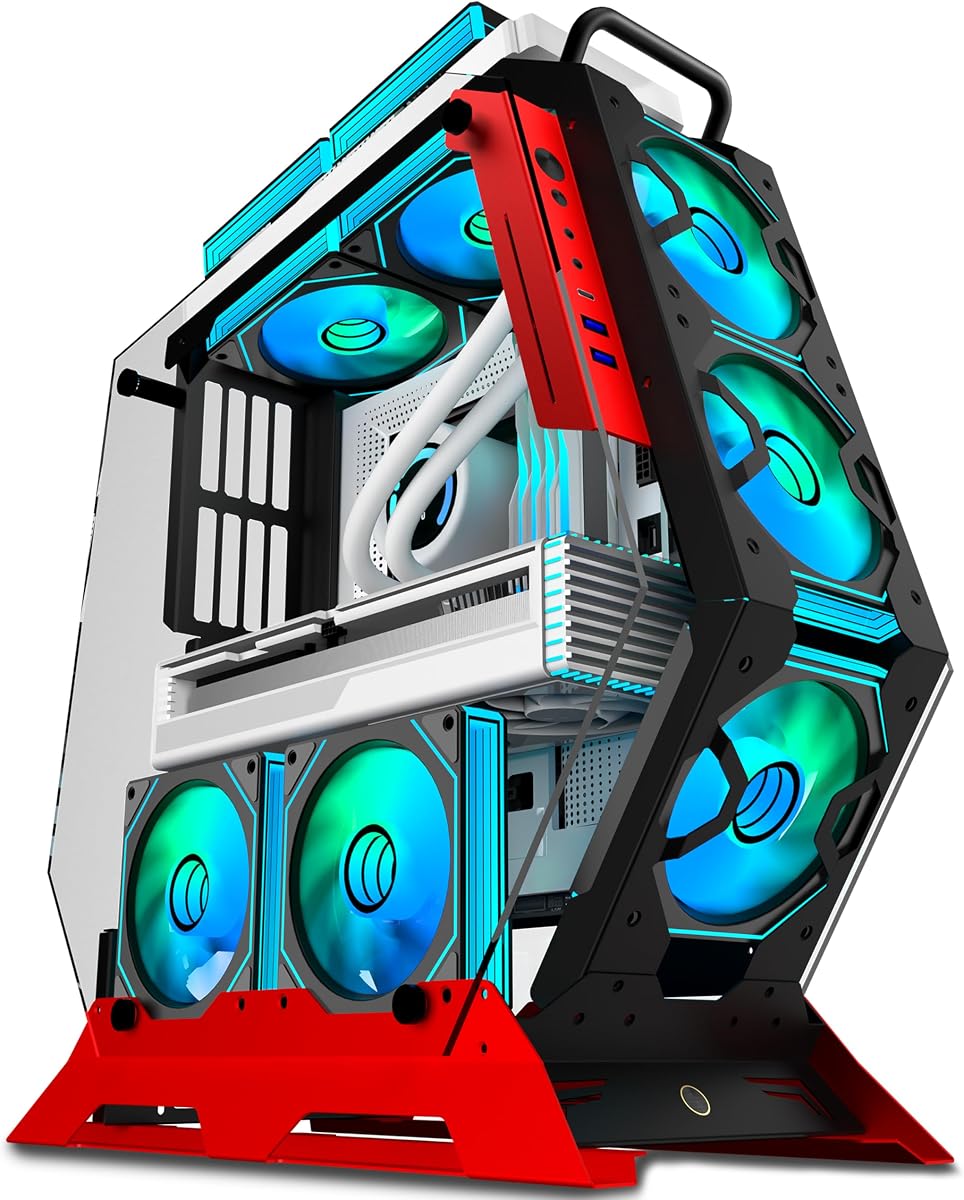
The KEDIERS C570 is the list's most unconventional red case, using an irregular open-frame form rather than a conventional rectangular tower. Its supplied rating is 4.5, but the defining reason to consider it is visual drama. A thick metal frame, two 4mm tempered-glass panels, and seven pre-installed PWM ARGB fans create a structure designed to be noticed from across a room.
We may earn a commission when you buy through this link, at no additional cost to you.
Cooling is the C570's clearest practical feature. All seven included fans support ARGB lighting and can be synchronized through computer software through a simple 5V ARGB motherboard header, with no separate controller stated as necessary. The open construction is also intended to promote airflow and help maintain lower GPU temperatures. Although the supplied information does not give exact fan positions or static-pressure figures, the quantity of pre-installed hardware means a new build begins with substantial cooling coverage already in place.
Component compatibility covers ATX, Micro-ATX, and Mini-ITX motherboards, making the case usable across many common build sizes. Its front panel includes one USB-C port, two USB 3.0 ports, and one HD audio connection, covering the essentials without an elaborate list of legacy connectors. The trade-off is that the irregular open frame may not appeal to buyers who prefer a conventional rectangular silhouette, and the supplied listing gives limited detail about radiator placement, maximum graphics card length, and internal mounting flexibility.
The C570 is best for a builder who wants the case itself to be the centerpiece of a gaming room. It is particularly attractive when colorful internals, synchronized lighting, and an unconventional silhouette are priorities, while the seven included fans reduce the need for immediate cooling purchases. Prospective buyers should confirm component dimensions and cooling requirements before committing. For anyone seeking a bold red showpiece rather than a restrained office-friendly tower, it is a memorable choice.
The seven pre-installed PWM ARGB fans provide immediate cooling coverage and a strong lighting foundation. Their control through a 5V ARGB motherboard header simplifies synchronization with compatible hardware.
The irregular metal frame and two tempered-glass sections create an exhibition-like appearance. That makes the C570 ideal for creative builds, though buyers who require a conventional footprint should verify dimensions carefully.
We may earn a commission when you buy through this link, at no additional cost to you.
The NZXT H440 offers a subtler interpretation of a red gaming case, using a matt black and red finish with a window rather than covering the entire enclosure in red. Its 4.5 rating and long-established feature set make it a practical budget-minded option for builders who want red as a coordinated accent. The understated approach can integrate more easily with mixed-color components than a fully saturated chassis.
We may earn a commission when you buy through this link, at no additional cost to you.
Four NZXT FN V2 fans come preinstalled: three 120mm models at the front and one 140mm model at the rear. This is unusually generous for a budget-focused mid-tower and provides a useful combination of intake and exhaust capability from the start. The case can also support 240mm, 280mm, or 360mm radiators at the front and top, including two 360mm radiators out of the box according to the supplied product information.
Graphics card clearance is generous at 428mm when the HDD cage is removed, compared with 294mm while it is installed. That distinction is important for builders using a modern, lengthy graphics card. CPU cooler clearance reaches 180mm, and the integrated power-supply shroud conceals cables while increasing cable-management space. The rear fan hub simplifies fan connections, and the chassis includes improved airflow, scratch-resistant paint, and additional storage space as part of the listed design improvements.
The H440 is best for a gamer who wants recognizable red accents, a windowed mid-tower, and strong cooling hardware without assembling a fan configuration from scratch. It is less suitable for someone insisting on an entirely red exterior, and the 180mm CPU cooler limit may rule out oversized air coolers. For most mainstream ATX gaming systems, however, the balance of clearance, fans, radiator support, and clean styling makes it a compelling budget selection.
The included mix of 120mm and 140mm NZXT FN V2 fans gives builders immediate airflow, while support for multiple 360mm radiators creates uncommon upgrade flexibility for a budget-oriented model.
The matt black and red combination works well when other components also use black or dark colors. It provides a clear red theme while maintaining the restrained appearance associated with many established mid-tower designs.
We may earn a commission when you buy through this link, at no additional cost to you.
The Hyte Flow FA12 four-pack is not a PC case, so it does not compete directly with the ten enclosure selections. It earns inclusion because it provides a practical way to complete or refresh a red HYTE build. The fans use the same Wild Cherry red color language found on the X50 and are specifically described as color-matched to HYTE cases, making them a logical choice for adding intake, exhaust, or replacement capability.
We may earn a commission when you buy through this link, at no additional cost to you.
Each fan is a conventional 120mm model with a maximum speed of 1500 RPM. The stated performance figures are 72 CFM of airflow and 1.6 mm-H2O of static pressure, giving buyers useful information for comparing the set with other case fans. A hybrid blade design is intended to balance those two measures, which matters because high airflow alone does not guarantee effective pressure against restrictive grilles or radiators.
The four-pin PWM connectors provide variable-speed control, and braided sleeved cables make the installation appear more durable and manageable than exposed wire. Fluid dynamic bearings support smooth, low-noise operation, while built-in vibration isolators help reduce unwanted sound transferred into the chassis. The design is efficiently focused: these are performance and cooling fans, not illuminated RGB models, so buyers should not expect addressable lighting from the pack.
This fan set is best for someone who already owns a compatible HYTE case, wants to replace aging fans, or wants red components that visually match the X50. It is also a sensible add-on after buying another case in this guide, particularly when the selected enclosure does not include enough fans. Do not choose it as a substitute for an enclosure, but choose it when coordinated color and solid 120mm cooling are the main priorities.
A stated 72 CFM airflow rating and 1.6 mm-H2O static pressure give the set a useful balance between moving large volumes of air and maintaining pressure through restrictive positions.
The Wild Cherry finish is designed to coordinate with HYTE cases, allowing a builder to expand cooling without introducing a clashing red shade. It is especially relevant to the X50 featured higher in the guide.
We may earn a commission when you buy through this link, at no additional cost to you.
The KEDIERS P4 ARGB is a highly equipped black mid-tower rather than a red case, and that distinction is important for accurate shopping. It appears here because it serves as a useful comparison for buyers who prioritize component count, panoramic presentation, and modern connectivity over exterior color. Its supplied rating is 4.5, and the specification list is notably comprehensive.
We may earn a commission when you buy through this link, at no additional cost to you.
Seven 120mm PWM ARGB fans arrive preinstalled: three as side intake, three as top and rear exhaust, and one additional exhaust position according to the product description. A 270-degree viewing angle comes from fully glass-covered front and side panels with diamond-cut angles, while the tempered glass is described as hard, durable, and helpful for sound insulation. Infinity Mirror styling gives the fans a layered appearance when their lighting is active.
The interior accommodates ATX, Micro-ATX, and Mini-ITX motherboards, a 360mm radiator, CPU coolers up to 180mm, graphics cards up to 440mm, and ATX power supplies up to 220mm. It includes HDD and SSD trays, seven expansion slots, and room for up to nine 120mm case fans and two simultaneous radiators. The front I/O includes USB 3.2 Gen 2 Type-C, one USB 3.0 port, one USB 2.0 port, HD audio, power, restart, and an LED switch.
This is the right case for a builder who wants a dramatic black glass tower and an unusually complete set of preinstalled lighting fans. Its back-connect design can create a cleaner front interior when paired with compatible motherboards, while generous cable spaces improve the general build experience. It is not a red model, and the large number of installed fans may constrain additional cooling positions. For users willing to accept black as the dominant color, the P4 ARGB offers strong visual and functional value.
Three intake and four exhaust-oriented positions create a visually balanced foundation. The Infinity Mirror PWM ARGB fans add depth, though users should plan the cable and header arrangement before finalizing the build.
Support for long graphics cards, a 360mm radiator, multiple fan sizes, and several storage options gives the P4 ARGB enough flexibility for a broad range of modern gaming systems.
We may earn a commission when you buy through this link, at no additional cost to you.
The NZXT H5 Flow is a compact ATX mid-tower with a 4.7 rating and a clean airflow-first design. Although the supplied model is black rather than red, it provides an important point of comparison for buyers whose priority is a manageable footprint, unobstructed component layout, and strong cooling potential without a large or visually dramatic enclosure.
We may earn a commission when you buy through this link, at no additional cost to you.
Ultra-fine mesh across the top, front, and side panels supports airflow while helping filter dust. Two 120mm Quiet Airflow fans are preinstalled, one at the front and one at the rear, providing sensible airflow in opposite positions. The case also supports up to a 360mm radiator at the front and a 240mm radiator at the top, so it can accommodate a substantial liquid-cooling setup despite its compact mid-tower format.
One of the more useful details is the perforated PSU shroud, which allows air to enter from both its side and bottom. That approach can improve airflow around the power supply and the lower interior. Cable management is handled through wide channels, hooks, and straps intended to route and conceal wiring without requiring a separate accessory. The design is simple and functional rather than aggressively futuristic, which may suit builders who value a tidy interior more than a maximalist display.
The H5 Flow is best for a compact gaming setup or workstation that still needs full ATX motherboard support. It is also a good choice for a quiet build because the included fans are specifically marketed for quiet airflow, while the mesh design maintains a consistent cooling path. Buyers wanting a red enclosure will need to look elsewhere, but those prioritizing compactness, mesh airflow, radiator support, and cable organization will find a focused, uncomplicated solution.
The H5 Flow supports full ATX boards while maintaining a compact mid-tower format. That balance makes it useful for builders who want ATX expandability without moving to a large full tower.
Ultra-fine mesh on the front, top, and side surfaces supports cooling while filtering dust. The perforated PSU shroud adds another intake path and helps keep the lower internal region ventilated.
We may earn a commission when you buy through this link, at no additional cost to you.
The H3 HYXN uses a compact dual-cavity design to separate the hardware area from the power supply and storage region. Its supplied rating of 4.2 is the lowest among the complete cases in this guide, so the model requires more careful consideration. However, its six Infinity Mirror PWM ARGB fans, tempered-glass display, and 360mm radiator support remain appealing for a builder who prioritizes a visually coordinated gaming system.
We may earn a commission when you buy through this link, at no additional cost to you.
The dual-chamber arrangement is intended to improve thermal performance and cable management by isolating power supply and drive areas from the main hardware space. High-hardness tempered glass provides a broad view of the internals, while the included fan group comprises five reverse-blade 120mm fans and one forward-blade 120mm fan. This mix can help direct air and create a layered lighting effect, although the exact mounting locations are not fully described in the supplied information.
Compatibility is broad for a compact mid-tower. It supports ATX, Micro-ATX, and Mini-ITX motherboards, graphics cards up to 400mm, and power supplies up to 200mm. Storage capacity includes one HDD and two SSDs, and the case is compatible with back-mounted motherboards. A 360mm radiator is supported, while M-ATX boards can use a dual-fan configuration. The A/B partition layout includes built-in anchor points to simplify routing and reduce visible clutter.
The front I/O includes USB-C 3.2, one USB 3.0 port, one USB 2.0 port, microphone and audio connections, plus restart and power buttons. The H3 HYXN is best for a lighting-focused build where the six included fans and partitioned interior matter more than the highest possible rating. Prospective buyers should confirm radiator placement and detailed clearances. Its main attraction is the combination of a compact footprint, dual-cavity organization, and coordinated Infinity Mirror illumination.
The dual-cavity structure isolates power supply and drive areas from the primary hardware chamber. That separation can support airflow and make cables easier to route out of sight.
Five reverse and one forward 120mm Infinity Mirror fan provide both directional airflow options and a dramatic visual treatment. The included quantity makes this an attractive starting point for a coordinated RGB system.
We may earn a commission when you buy through this link, at no additional cost to you.
The Zalman S6 carries a supplied rating of 5.0, the highest numerical rating in the guide, and pairs that strong reception with a straightforward high-airflow mid-tower design. It is finished in black rather than red, so its relevance to a red-case search is comparative rather than literal. It may still be worth considering for buyers who are willing to introduce a separate red accent through fans, components, or a coordinated interior.
We may earn a commission when you buy through this link, at no additional cost to you.
The front uses a mesh panel to admit air, supported by four preinstalled FRGB fans: three 140mm models at the front and one 120mm model at the rear. This is a generous cooling package, and the larger front fans can move substantial air while supporting a 360mm front radiator. The top accommodates a 240mm radiator, while the case can hold up to eight 120mm fans. An LED on/off control provides straightforward lighting management.
Maintenance is a particular strength. The side panel is tool-free tempered glass with a quick-release design, while magnetic dust filters cover the top, front, and bottom. These features make routine cleaning easier and improve long-term ownership. The top I/O includes USB-C, one USB 3.0 port, two USB 2.0 ports, HD audio, and dedicated LED controls. A generous 19mm of cable-management space helps keep the interior clean.
The S6 supports graphics cards up to 345mm and accommodates a 360mm front radiator, making it suitable for many modern gaming systems, although some competing cases provide more GPU room. It is best for buyers who place airflow, easy maintenance, and included cooling ahead of exterior color. The simple design also has broader appeal than an aggressively open or highly stylized chassis. Confirm precise component dimensions if using a particularly large card, but the Zalman S6 is a practical, well-equipped alternative.
Three front-mounted 140mm fans and a rear 120mm fan provide a robust airflow foundation. The mesh front and support for a 360mm radiator make the case suitable for substantial cooling configurations.
A quick-release tempered-glass panel and removable magnetic dust filters simplify access and cleaning. These practical touches can make a long-term build easier to maintain.
We may earn a commission when you buy through this link, at no additional cost to you.
The CORSAIR 3500X RS is another black showcase model included as a design comparison. Its supplied 4.6 rating reflects a balanced mix of visual appeal, cooling capacity, and practical access. The wraparound glass aesthetic gives the case a premium presentation, while removable front and side panels make it easier to assemble and service than fully enclosed glass designs can be.
We may earn a commission when you buy through this link, at no additional cost to you.
Three RS120-R ARGB fans are included, and the product information explicitly notes that other components shown in promotional imagery are not part of the package. The fans use the standard 5V ARGB motherboard header for simple lighting control. Cooling capacity is one of the strongest aspects: side, roof, and PSU mounting locations can accommodate up to ten 120mm fans, providing considerable freedom for a customized airflow configuration.
Motherboard support ranges from Mini-ITX through EATX, making the 3500X RS flexible for different build plans. It is also validated for ASUS BTF, MSI Project Zero, and Gigabyte Project Stealth motherboards with rear-facing connections. That compatibility can produce an especially clean interior because cables connect behind the motherboard tray rather than crossing the visible chamber. The panoramic front and side glass panels take full advantage of that back-connect aesthetic.
The CORSAIR is best for a builder who wants a polished panoramic enclosure, particularly one using a reverse-connection motherboard and an ARGB lighting scheme. The main limitation is that only three fans are included despite a capacity for ten, so additional cooling hardware may be necessary. It is also not red. Still, the removable panels, broad motherboard range, and exceptional fan capacity make the 3500X RS a strong reference design for anyone prioritizing a clean, luminous showcase build.
Validated support for ASUS BTF, MSI Project Zero, and Gigabyte Project Stealth boards keeps motherboard cables behind the tray. The result is a clearer panoramic view and fewer visible obstructions.
Side, roof, and PSU mounting areas support as many as ten 120mm fans. Although only three RS120-R ARGB fans are included, the chassis allows buyers to build a highly customized cooling layout.
We may earn a commission when you buy through this link, at no additional cost to you.
Choosing a red PC case requires balancing appearance with airflow, compatibility, build convenience, and long-term maintenance. The most useful specification is the one that matches your motherboard, graphics card, cooling hardware, storage, and preferred layout rather than simply the number of fans advertised on the box.
Choose a fully red model when color coordination is the main objective. Choose a two-tone case when the red should complement other dark components without dominating the room.
Measure every large component before buying, especially the graphics card. A case with ample clearance will make the assembly process less stressful.
Look for a sensible mix of front intake and rear exhaust. Add fans where the chosen case has capacity, but avoid blocking filtered intake or exhausting warm air back into the case.
Choose a case that supports your radiator in its intended position. Confirm pump dimensions, mounting screws, tubing clearance, and interference with the motherboard or graphics card.
Look for dedicated routing space, anchor points, and a PSU shroud that does not interfere with planned components. Plan the cable path before installing the motherboard.
Choose removable panels and accessible filters if you expect to add storage, upgrade cooling, or clean the system regularly. Easy maintenance matters even in a finished build.
Choose the connectivity layout based on the devices you plug in regularly. A top-mounted Type-C port can be especially convenient with a monitor positioned behind the system.
Measure desk space and consider a compact model if accessibility is important. Use controlled fan speeds to balance cooling, airflow, and acoustic comfort.
Begin by assembling the case outside the final operating position, especially if it has tempered glass or an unusual open-frame structure. Install the power supply, storage, rear fan, and radiator or additional cooling hardware before securing the motherboard. Keep protective film on glass panels until the build is complete, and use a soft microfiber cloth to avoid streaking or scratching the finish.
Plan cable routes before fastening components and follow the case's tie-down points, straps, and partition channels. Avoid forcing cables behind the motherboard tray or beneath the power-supply shroud. Connect the front I/O and fan headers, use the supplied cable-management space, and verify that intake and exhaust fans are oriented consistently around the case's intended airflow path.
For routine care, power down and disconnect the system before opening the chassis. Remove dust from mesh panels and filters on a schedule suited to the environment, particularly if the system sits near a window, desk, or carpeted floor. Check that filters seat fully when reinstalled, keep ventilation openings clear, and inspect fan cables after transport. Gentle cleaning and proper reassembly help preserve airflow and keep the red finish looking sharp.
No. The HYTE X50 and Hyte Y40 are explicitly offered in red, while the NZXT H440 combines matt black and red. The other complete cases and the FA12 product set are black or are not complete enclosures. They are included for comparison or as matching components, so confirm the selected color carefully before buying.
The HYTE X50 is the strongest all-around red selection based on its supplied rating, distinctive wild cherry finish, high-airflow front design, curved acoustic glass, and purposeful cable-management canopy. The Y40 is a more premium alternative for buyers who prioritize a panoramic view, vertical GPU mounting, and custom-loop flexibility.
That depends on the model and your cooling plan. The C570 and P4 ARGB include seven fans, while the H440, S6, and H5 Flow include four, four, and two respectively. The Y40 includes two 120mm fans. Additional intake or exhaust fans may improve airflow, especially for a powerful graphics card, but compatible positions and radiator choices should guide the purchase.
An open frame can provide excellent access to components and ample airflow. The KEDIERS C570 includes seven PWM ARGB fans and uses an open design intended to help keep the GPU temperature low. Builders should still manage dust carefully, secure cables, and verify that all expected components and mounting points suit their chosen hardware.
Choose the X50 if you want a red case with a conventional but modern mid-tower layout, a micro-mesh intake, and a curved laminated acoustic-glass side panel. Choose the Y40 if you want a premium panoramic showcase, a vertical graphics card with the included PCIe 4.0 riser, and more elaborate side-mounted liquid-cooling options.
Check motherboard form factor, graphics card length, CPU cooler height, power-supply length, radiator placement, storage needs, drive cage position, and available fan headers. Also review the front I/O, cable-management layout, removable panels, dust filters, and the exact color of the chosen variation before ordering.
Yes. A red enclosure can act as a deliberate accent against black or white components rather than needing to match them exactly. The HYTE Y40's included color-matched riser demonstrates how accessories can preserve visual coordination, while the NZXT H440 offers a subtler two-tone approach for mixed-color systems.
No. The ratings are the supplied ratings associated with the product listings and are reproduced for comparison. The recommendations are based on the stated specifications, feature combinations, compatibility information, and design characteristics rather than a claim that each product was personally tested.
The HYTE X50 is the most convincing overall red PC case because it combines a clearly described wild cherry finish with a high 4.8 rating, an airflow-oriented micro-mesh front, curved acoustic glass, and a top PSU canopy designed for organized wiring. The Hyte Y40 is the premium option for showcase builders, particularly those attracted to panoramic glass, vertical graphics cards, and the included PCIe 4.0 riser. The NZXT H440 offers a subtler red accent, four fans, broad radiator support, and generous clearance at a budget-conscious level.
Whichever direction you favor, prioritize the details that affect daily ownership rather than relying on appearance alone. Match the motherboard and graphics card, confirm CPU cooler and radiator dimensions, assess the included fan arrangement, and make sure the cable-management layout suits your wiring plan. Open frames and panoramic glass create striking results, while compact mesh designs may fit a smaller workspace more effectively. Red components and coordinating fans can help complete a theme even when the main enclosure is black.
Finally, check the current listing, selected finish, included accessories, dimensions, and current price before purchasing. Product configurations and prices can change, and a listing image may show optional parts that are not included. Verifying those details against your hardware will help ensure that the case you choose delivers the appearance, compatibility, and cooling arrangement you actually intended.