
4K Mirror Dash Cam 10-inch
4.5Editor score
4K front camera recording
1080P rear backup camera
10-inch touch display
WiFi app connectivity
24-hour parking monitor
A rearview mirror backup dash camera combines a wide digital display, forward-facing incident recording, and a rear camera in one vehicle-mounted package. The best models improve visibility around a car while documenting traffic, parking activity, and unexpected impacts, making them especially useful for commuters, ride-share drivers, and owners of large vehicles.
We compared the ten featured products using their stated resolution, screen size, viewing angles, parking functions, connectivity, storage support, and low-light capabilities. The list covers everything from compact systems to large displays with 4K recording, GPS, ADAS, blind-spot alerts, wireless app access, voice commands, and integrated parking surveillance.
Each review identifies the feature that sets the model apart while also noting important limitations, such as separate hardwire-kit requirements, card compatibility, vehicle fit, or a smaller display. Ratings reflect the supplied customer feedback, and pricing, availability, bundle contents, and promotional details can change, so confirm the current listing before purchasing.
4.5Editor score

4.2Editor score

4.3Editor score
As an Amazon Associate we earn from qualifying purchases.
The table below compares the ten mirror dash cameras by display size, recording resolution, parking and safety features, and connectivity, making it easier to identify the model that matches your driving priorities.




The WOLFBOX G840S combines a 12-inch curved mirror display, a 4K UHD front camera, and a 1080p rear camera into one of the most visually complete options in this guide. Its supplied rating is 4.3, and its strongest qualities are the large viewing area, broad camera angles, GPS support, and ability to monitor both road directions at once.
We may earn a commission when you buy through this link, at no additional cost to you.
The front camera records at 2160p, while the rear camera records at 1080p, giving users sharper evidence of distant traffic and parking situations. A 170-degree front lens and 140-degree rear lens widen the scene, while the smart split-screen layout keeps both feeds accessible. The low-reflectivity LCD, WDR, HDR, a professional-grade sensor, and a six-glass lens support visibility in sunlight, shadows, and nighttime conditions.
The included GPS antenna displays real-time positioning data, and 5.8GHz WiFi provides phone-based live viewing, playback, and sharing through the WOLFBOX app. Its 24-hour parking monitor uses time-lapse recording to conserve storage, but a hardwire kit is required. The company also advises using original accessories, and improper installation or incompatible accessories may affect guarantee coverage.
This is an excellent choice for drivers who want a large display, detailed forward recording, GPS, and simultaneous rear visibility without navigating a complex menu. It suits daily commuters and anyone who regularly parks in exposed locations. Those seeking a smaller, lighter unit or a system with advanced collision warnings should compare the G850 PRO and the AZDOME model, but the G840S remains a strong all-around recommendation.
The 12-inch curved display provides substantially more visual information than a conventional mirror, and the low-reflectivity panel is designed to reduce daytime glare. It is particularly helpful for drivers who want a large rear image without sacrificing a wide forward field of view.
GPS data can be shown directly on the screen, while the WOLFBOX app supports live viewing, playback, and quick sharing over 5.8GHz WiFi. With an appropriate hardwire kit, time-lapse parking mode adds continuous surveillance while the vehicle is unattended.
We may earn a commission when you buy through this link, at no additional cost to you.
The WOLFBOX G930 is a balanced mirror dash camera that pairs front 4K recording with a 1080p rear feed on a 10-inch display. It carries a 4.3 rating and stands out for flexible screen movement, straightforward camera switching, 5.8GHz WiFi, GPS information, and a generous included 64GB card.
We may earn a commission when you buy through this link, at no additional cost to you.
Its display slides vertically to adjust the viewing angle and responds to horizontal swipes for selecting the front camera, rear camera, or split-screen image. The WOLFBOX app supports video downloads and sharing, while the GPS receiver can present speed and direction on the display. Reviewing recorded clips through the GPS Player also allows access to valid GPS information.
For everyday incident protection, the G930 records continuously in selectable one-, two-, or three-minute loops. A G-sensor locks the current file when it detects a collision, reducing the chance that important evidence will be overwritten. WDR, a low-reflectivity LCD, and a six-glass lens support balanced images in difficult lighting, although the supplied information does not describe a dedicated parking monitor.
Drivers who want WOLFBOX reliability, 4K forward detail, GPS, and phone connectivity without moving to the largest 12-inch or 13-inch formats should consider the G930. It is especially practical for everyday road recording and shared family vehicles. Buyers whose priority is parked-car surveillance should choose a model with an explicit parking mode and plan for the necessary power connection.
The sliding screen lets the driver tune the unit's position around the original mirror, while swipe controls change among front, rear, and split-screen views. These physical adjustments are helpful for finding a comfortable viewing angle in different vehicle cabins.
The GPS receiver can display real-time speed and direction, adding useful context to saved footage. Loop recording provides continuous coverage, and the G-sensor locks collision-related clips so they are not routinely replaced by later recordings.
We may earn a commission when you buy through this link, at no additional cost to you.
The Jansite 10-inch Mirror Dash Cam offers dual 1080p recording, a full touchscreen, and one of the most thoughtful rear-camera setups in the group. Its 4.1 rating reflects a capable package centered on parking visibility, adjustable guide lines, night imaging, and support for memory cards up to 128GB.
We may earn a commission when you buy through this link, at no additional cost to you.
The 10-inch IPS screen is described as offering a much wider view than a traditional mirror. Swiping left or right switches between camera images, while vertical swipes adjust the angle, brightness, exposure, and other settings. When reverse is selected, the backup image fills the screen and displays parking lines. Users can manually move the displayed range and adjust the rear camera angle with a one-key control.
The rear camera uses a six-layer glass lens and upgraded low-light processing, while the front and rear cameras record at 1080p. The rear camera is IP68 waterproof, and an optional vertical-flip camera and extension cable are listed for roof or trailer-style installations. Loop recording overwrites older files, whereas a built-in G-sensor locks collision recordings. A compatible Jansite hardwire kit enables time-lapse and 24-hour parking monitoring.
This model is a practical fit for drivers who want precise parking-line placement and a generous touchscreen interface. Its dimensions and weight should be checked against the original mirror, and the display is deliberately optimized for video rather than functioning as a reflective mirror when powered off. It is a strong parking-focused alternative when 4K front resolution is not essential.
Six guide-wire height options and a manual display-range adjustment make this one of the more flexible parking systems in the list. Those settings can make the rear perspective easier to interpret in vehicles with unusual camera placement or differing ground levels.
The system supports cards up to 128GB, although one must be purchased separately. A listed vertical-flip rear camera and extension cable expand the installation possibilities for roof-mounted, trailer, or other nonstandard camera positions.
We may earn a commission when you buy through this link, at no additional cost to you.
The 13-inch wireless CarPlay and Android Auto model is the most unusual entry in this guide because it combines a very large mirror display with smartphone integration. It records 4K video through a 160-degree front camera and 1080p video through a waterproof 140-degree rear camera, while supporting Bluetooth and WiFi connections.
We may earn a commission when you buy through this link, at no additional cost to you.
The large display is designed to present navigation, music, calls, traffic information, and camera views in one place. It works with Siri and Google Voice Assistants, reducing the need to handle a phone while driving. Side-by-side split-screen playback shows front and rear road views, and the 5.8GHz WiFi supports live preview and downloading through a dedicated app without removing the memory card.
Loop recording overwrites older unlocked clips, while an integrated G-sensor protects footage associated with sudden impacts. Reverse assist provides a rear-camera view during backing. A 24-hour parking-surveillance function can record when unusual activity is detected, but the required parking-monitor cable is sold separately. No customer rating was supplied for this model, so its feedback history is less established in the provided data.
This is the leading choice for drivers who want their mirror display to act as a modern smart-car interface as well as a camera. The expansive screen may be especially valuable in larger vehicles, though installation and visibility should be checked carefully. It is less compelling for buyers who only need dependable recording and have no interest in wireless phone integration.
Wireless CarPlay and Android Auto support turns the mirror into a broad command display for navigation, calls, music, and voice assistance. This makes it useful for older vehicles that lack factory connectivity, provided the user's phone and vehicle support the required functions.
The 13-inch screen provides room for split-screen review and large touch icons. A 160-degree front lens and 140-degree rear camera expand scene coverage, while reverse assist and the 5.8GHz app simplify camera access and playback.
We may earn a commission when you buy through this link, at no additional cost to you.
The AZDOME 12-inch model is the most feature-oriented choice in the guide, combining 4K front recording, 2.5K rear recording, ADAS, blind-spot detection, lane-change assistance, and AI-assisted video review. Its supplied rating is 4.2, and the 12-inch touchscreen gives those features a practical and highly visible control surface.
We may earn a commission when you buy through this link, at no additional cost to you.
Forward footage is recorded at 3840 by 2160, while the rear camera captures 2560 by 1440. ADAS alerts support awareness of forward collisions, pedestrians, lane departures, and lead vehicles, while BSD and lane-change assistance help during merges. In downloaded footage, the AZDOME app can present augmented-reality overlays for recognized license plates, vehicle distance, speed, and lane guidance.
The 5.8GHz WiFi app provides live preview, downloads, sharing, settings control, and a timeline for finding particular clips. Ten English voice commands can capture still images, lock video, switch views, and manage audio, WiFi, or the screen without touch input. Reverse assist adds parking lines, while time-lapse and collision-detection parking modes require a separately sold three-lead Type-C hardwire kit.
This is the top recommendation for drivers who want more than basic recording and a large display. It is particularly compelling for frequent highway drivers, ride-share operators, and anyone who values lane and blind-spot warnings. Buyers should account for the separate parking accessory and confirm that the advanced app features fit their preferred workflow before installation.
ADAS, BSD, and lane-change assistance create an additional layer of information around the recorded image. These alerts are designed to prompt attention, although they should be treated as supporting tools rather than substitutes for attentive driving and sound judgment.
The app's augmented-reality analysis can surface recognized plates, distance, speed, and lane context in downloaded clips. Timeline playback and app-based downloads make it easier to locate relevant footage without repeatedly searching through separate files.
We may earn a commission when you buy through this link, at no additional cost to you.
The WOLFBOX G850 PRO is built around advanced driver assistance and an enhanced blind-spot algorithm. It has a supplied rating of 4.3, includes a 64GB card, and pairs a 1440p front camera with a 1080p rear camera. Its major advantage over basic dual-camera systems is the breadth of its real-time safety alerts.
We may earn a commission when you buy through this link, at no additional cost to you.
The ADAS suite can issue forward-collision, pedestrian-collision, lane-departure, lead-vehicle-start, and distance-monitoring alerts. Blind-spot detection is intended to identify hazards during lane changes, while rear-collision alerts add another layer around the vehicle. The IPS touch screen makes access to these functions and camera views more intuitive, and both channels use WDR or HDR processing with wide-angle lenses.
Upgraded 5.8GHz WiFi supports app-based streaming, downloading, and sharing. Twelve voice commands let a driver activate WiFi, take a photograph, lock a clip, and perform other operations without touching the mirror. The included card reduces setup friction, although card capacity and formatting requirements should still be verified before recording a full day of footage.
The G850 PRO is best for drivers who prioritize collision prevention, lane awareness, and blind-spot monitoring over a strictly 4K forward file. It combines those functions with solid dual-channel recording and convenient phone access. It is less ideal for anyone who requires 4K resolution in the supplied configuration or wants a large, explicitly stated screen size.
Forward-collision, pedestrian-collision, lane-departure, and lead-vehicle-start alerts address several distinct risks encountered on busy roads. They can give drivers earlier information, but the alerts still require active observation and should never encourage distracted operation of the device.
The blind-spot system is designed to identify risks around lane changes, including relevant vehicles and potential rear impacts. This makes it particularly relevant to highway drivers and anyone who frequently changes lanes in heavy traffic.
We may earn a commission when you buy through this link, at no additional cost to you.
The upgraded Jansite 10-inch model emphasizes straightforward recording, night visibility, and a notably long rear-camera cable. It has a supplied rating of 4.1 and records 1080p video through both front and rear cameras, using a 170-degree front lens and 140-degree rear lens for broad road coverage.
We may earn a commission when you buy through this link, at no additional cost to you.
The 19.6-foot cable addresses the problem of reaching a rear camera in larger vehicles or installations where the standard cable is too short. The rear camera is IP68 waterproof, making it suitable for external mounting, while the included rubber straps simplify attachment around the original mirror. Swiping vertically adjusts the angle, and horizontal swipes control brightness and camera selection.
When reverse is engaged, the screen automatically presents the rear perspective, and parking guidelines support maneuvering. Loop recording overwrites the oldest material, while the G-sensor locks collision-related files. In parking mode, the cameras can capture a roughly 20-second locked clip after an impact, but this function requires an additional ACC hardwire kit. Cards up to 128GB are supported and must be purchased separately.
This model is a sensible choice for owners of SUVs, trucks, vans, or other vehicles where rear-camera cable length matters. It provides many of the same essentials as costlier systems without app connectivity or advanced collision warnings. Users seeking a more streamlined installation should consider a shorter-cabled model, while larger-vehicle owners may find the extended lead especially valuable.
The extended 19.6-foot lead provides much more routing flexibility than a short rear-camera cable. It can make external mounting easier on long vehicles and reduces the need to splice or replace wiring when the standard lead cannot reach.
Night-vision processing, a STARVIS sensor, a six-glass lens, and WDR or HDR balancing work together to improve low-light imagery. Automatic reverse switching and parking guidelines make the rear camera useful during everyday parking maneuvers.
We may earn a commission when you buy through this link, at no additional cost to you.
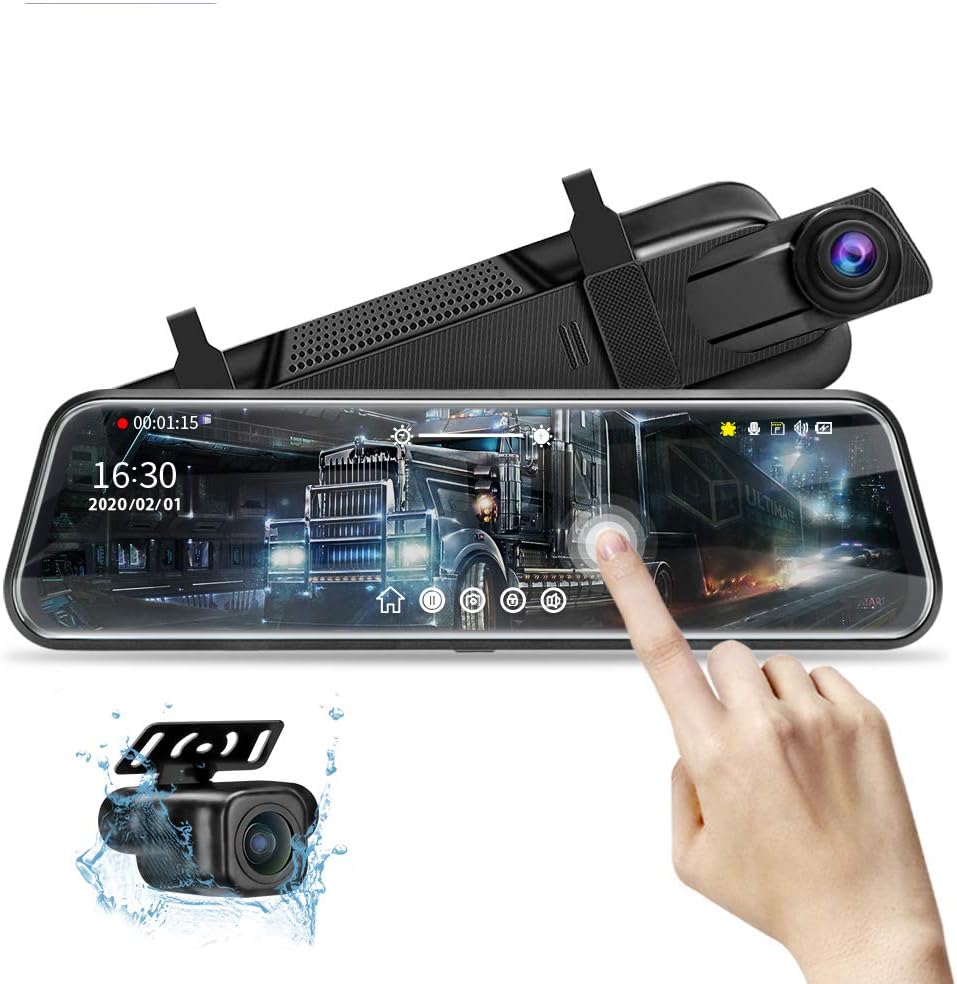
The 4K Mirror Dash Cam with a 10-inch display is the strongest budget-oriented selection in the guide. It combines 4K front recording, 1080p rear footage, a touch interface, WiFi, night vision, and an included 32GB card. Its supplied 4.5 rating is also the highest numerical customer score among the featured products.
We may earn a commission when you buy through this link, at no additional cost to you.
The front and rear cameras cover 130 and 145 degrees respectively, creating a broad combined field of view. An F1.8 aperture is intended to gather more light during low-light conditions, while the stated night-vision mode improves visibility after dark. The 10-inch IPS display provides a substantially larger view than a conventional mirror, and responsive touch controls make switching between camera feeds uncomplicated.
When the vehicle shifts into reverse, the display automatically changes to the rear-camera perspective. WiFi connectivity works with an app for downloads and sharing, while a G-sensor locks the current file when a collision is detected. The parking-monitor function is accessed through an OBD connection and is described as providing 24/7 monitoring, although no dedicated hardwire kit is identified in the supplied information.
This is the most balanced recommendation for a driver who wants modern features without moving to a premium safety system. It delivers the key elements: sharp forward evidence, a useful rear view, night performance, phone connectivity, and automatic reverse switching. It is especially attractive for commuters who want a straightforward dash camera with a roomy but manageable display.
A 4K front camera captures more detail than a standard 1080p setup, while the 1080p rear camera handles reversing and traffic monitoring. The included 32GB card means the system can be set up and used without separately sourcing immediate storage.
Built-in WiFi makes it possible to preview and download recordings through the compatible app instead of repeatedly removing the card. This makes incident review more convenient, especially when evidence needs to be shared soon after an event.
We may earn a commission when you buy through this link, at no additional cost to you.
The AUTO-VOX Dual 2K OEM camera is the premium installation choice in the guide. Rather than strapping over the factory mirror, it replaces the original unit at its mounting position and includes four bracket adapters intended to fit many vehicles. The result is a cleaner, more integrated appearance with dual front and rear cameras.
We may earn a commission when you buy through this link, at no additional cost to you.
Its cameras capture 2K video with HDR and WDR processing, which is designed to preserve detail under difficult lighting and reduce overexposure from headlights. A 9.36-inch streaming-media touchscreen provides a wider rear perspective than a traditional mirror, helping reduce blind spots while driving and parking. Automatic brightness adjustment dims the display at night and increases visibility in bright daylight.
Wireless CarPlay support adds navigation, music, calls, and voice control through a more integrated interface. Because the unit occupies the original mirror position, it avoids the straps, suction mounts, and dashboard clutter associated with many mirror-style dash cams. Multiple mounting options support different vehicle designs, and the manufacturer encourages buyers to confirm compatibility before ordering.
This is the best choice for drivers who care about a factory-style dashboard and want both recording and smart-car functions. It is especially persuasive for newer vehicles with compatible mounting hardware and owners who dislike strap-on mirrors. Those needing the largest possible display should note that it is smaller than several other selections, and anyone with a specialized mirror or unusual mounting setup should verify fit first.
Mounting at the original mirror position reduces visual clutter and makes the camera look more integrated with the vehicle. Four included bracket adapters support a range of vehicles, while the need for vehicle-specific compatibility checks prevents an installation assumption.
Automatic screen brightness helps keep the 9.36-inch display readable in daylight and dimmer at night. Dual 2K HDR recording and WDR processing support clearer front and rear footage when the scene contains strong headlight glare or sharp contrast.
We may earn a commission when you buy through this link, at no additional cost to you.
The compact 4.5-inch dual-camera model is designed for drivers who want the functionality of a mirror dash camera without a large display blocking the view ahead. It records 1080p footage through a 150-degree front camera and a 120-degree rear camera, and the supplied information does not include a customer rating.
We may earn a commission when you buy through this link, at no additional cost to you.
Its 2-channel design provides both an in-car front-facing perspective and a rear road view. The front camera is intended to capture fine details during a collision, while the rear camera supports awareness of traffic and obstacles behind the vehicle. A gravity-shock sensor automatically locks footage after a crash, and loop recording replaces older unprotected files when storage fills.
Parking operation includes motion detection and collision-triggered recording, allowing the cameras to begin saving clips when the vehicle detects relevant activity. An extra hardwire kit is required for this feature. The IPS touchscreen keeps controls manageable despite the smaller panel, and the rear camera can be connected without removing the vehicle's reversing light.
This is the most compact option in the guide and may appeal to drivers of cars and trucks who prioritize a less obstructed windshield. It offers the essential recording, impact-locking, and parking functions without premium resolution or app connectivity. The small display provides less visual information than larger mirrors, so buyers who prioritize easy parking visibility should examine a 10-inch or 12-inch model.
The 4.5-inch footprint is the smallest listed and is intended not to shade the driver's forward view. This can be a meaningful advantage in vehicles where a large strap-on mirror feels intrusive or sits awkwardly against the windshield.
The gravity sensor locks collision footage, while loop recording continues to manage older unprotected clips. During parking, motion or collision triggers can initiate a new recording, subject to installing the required hardwire kit.
We may earn a commission when you buy through this link, at no additional cost to you.
The most useful mirror dash camera balances image detail, a readable display, dependable rear visibility, secure installation, and recording features that suit the vehicle. Comparing these factors before buying can prevent an attractive but poorly fitted system from becoming a frustrating daily compromise.
Resolution determines how much fine detail a camera can preserve, which matters for license plates, road signs, vehicle shapes, and other evidence. The strongest models here record the front view at true 4K, while several alternatives use 1080p or pair 4K with a lower-resolution rear feed. A higher number is not automatically better in every situation, but it generally provides more pixels for cropping and later review. Buyers should also consider the lens, sensor, HDR or WDR processing, and night performance rather than relying on resolution alone.
Mirror dash cameras range from a compact 4.5-inch screen to expansive 12-inch and 13-inch displays. A larger panel can make parking lines, road details, and split-screen views easier to inspect, but it may occupy more windshield space or appear oversized in a small vehicle. A 10-inch display is a common middle ground, while a factory-style unit may be better for drivers who dislike strap-on hardware. The controls should also be understandable at a glance, particularly for reverse and camera-switching functions.
Wide-angle lenses expand the visible scene, but excessive distortion can make vehicles and distance harder to judge. The featured front cameras span 130 to 170 degrees, while rear cameras range from 120 to 145 degrees. Wide coverage is useful for detecting vehicles in adjacent lanes and viewing the area behind a large vehicle, yet a smaller vehicle or trailer may require an extended cable or an alternate mounting position. Adjustable viewing angles can help fine-tune the scene after installation.
Parking-focused systems typically switch to the rear camera in reverse, display guide lines, and allow the driver to adjust the visible range. Some include a time-lapse mode that conserves storage, while others record only when motion or an impact is detected. Many parking functions require a hardwire kit, OBD connection, or separate parking cable. Check whether that accessory is included, because the core dash camera can operate normally while its unattended-surveillance feature remains unavailable without the proper power connection.
Loop recording keeps the camera running by replacing older files when storage fills, so adequate capacity matters. Included cards are convenient, and capacities in this list range from 32GB to 64GB, with some models supporting cards up to 128GB. A G-sensor or gravity sensor should lock collision clips so they are not overwritten during ordinary loop cycling. Users should also verify the supported card format and capacity before buying a larger card, especially when a product includes one as part of the bundle.
WiFi and a phone app make it easier to preview recordings, download clips, and share evidence without carrying a card reader. 5.8GHz WiFi is common among the more advanced options in the guide. Wireless CarPlay or Android Auto can combine navigation, calls, music, and camera functions in one screen, but compatibility depends on the vehicle, phone, and system. GPS adds speed, direction, and route context, while voice commands reduce the need to touch the display while moving.
Night driving, parking garages, and dim streets can expose the limits of a camera's sensor and lens. Features such as night vision, HDR, WDR, an F1.8 aperture, low-reflectivity displays, and specialized sensors can improve visibility, but no specification guarantees perfect footage in every dark condition. External rear cameras should also have suitable weather resistance; the listed Jansite models specify IP68 protection. A low-reflectivity screen is also valuable at night, where bright display content can otherwise create uncomfortable glare.
Mirror-style cameras install in several different ways. Strap-on systems are universal but may sit loosely, while OEM-style units replace the factory mirror and require vehicle-specific compatibility. Large screens can affect the original mirror's coverage, and a heavy or wide unit may require more clearance. Cable length is another major factor: the featured Jansite model includes a 19.6-foot lead for long vehicles. Buyers should also determine whether the reverse light, OBD port, or hardwire connection will be used and whether the necessary cable or kit is included.
Begin by identifying the correct front and rear camera connections, then mount the mirror unit securely over the original mirror or at its factory mounting point according to the vehicle-specific instructions. Route the rear-camera cable away from sharp edges, moving components, and direct sunlight. If using a hardwire kit, OBD connection, or parking cable, install the required power connection before testing the unattended-recording functions.
Insert a compatible memory card, format it if necessary, and set the correct date, time, recording mode, and display preferences. Before relying on the system, drive briefly and verify that the front image faces the roadway, the rear camera shows the intended area, and the display switches automatically when reverse is engaged. Adjust the camera angle and parking lines until they match the vehicle's dimensions, then confirm that recorded files open correctly in the app or playback menu.
For ongoing care, clean the front lens, rear camera lens, and display with a soft microfiber cloth. Avoid harsh cleaners, compressed air that may force dust into seams, and fingerprints on the display that can increase nighttime glare. Review locked incident clips periodically, check that the recording light and storage capacity remain normal, and inspect the mount and cable connections after rough weather or a collision. Replace the memory card if the device shows write errors or unreliable loop recording.
A mirror dash camera can combine forward recording, rear recording, and a large live display in one unit, reducing the need for separate devices. It is particularly useful for parking and wide rear visibility. A conventional compact dash cam may be easier to install in some vehicles and can leave the original mirror unobstructed, so the better choice depends on display size, mounting style, and recording priorities.
It depends on the model. Several products require a hardwire kit, ACC adapter, OBD connection, or separately sold parking cable to maintain power while the vehicle is parked. The AZDOME, WOLFBOX G840S, and both featured Jansite systems explicitly require an appropriate accessory for continuous parking monitoring. Always check the current product listing to confirm what is included and how the parking function is powered.
Some models are designed to do so. The AUTO-VOX Dual 2K OEM mounts at the original factory mirror position and includes several bracket adapters, while most other selections strap over the existing mirror. OEM-style installation requires checking vehicle compatibility, mirror mounting hardware, and screen coverage before purchase.
Four-K recording generally preserves more detail and gives you more room to inspect license plates, signs, or distant vehicles after an incident. However, sensor quality, lens clarity, exposure control, and night performance also influence the result. A well-tuned 1080p system can still provide useful evidence, so consider the complete feature set rather than resolution alone.
Many mirror dash cameras use a reflective or low-reflectivity screen that behaves differently from a traditional mirror. For example, the 10-inch Jansite model was optimized to reduce reflections and nighttime glare, which means it does not function as a reflective mirror when powered off. This tradeoff can reduce rearward glare but may disappoint drivers who expect traditional mirror behavior.
Use a card with a capacity supported by the manufacturer and a speed class appropriate for continuous video recording. Some featured products support up to 128GB, while others include 32GB or 64GB cards. Confirm the required format, maximum capacity, and recommended card type in the current manual, and format the card in the camera before relying on it for important recordings.
A properly configured hardwired installation is designed to minimize drain, often by entering a low-power or time-lapse mode when the vehicle is parked. Actual results depend on the vehicle, parking duration, and the specific parking mode. Review the manual's power-management instructions and avoid leaving a non-hardwired camera in a state that prevents the vehicle from shutting down normally.
Use the app over WiFi when the model supports wireless access, or remove the memory card and transfer the files to a computer. Look first for a clip locked by the G-sensor or gravity sensor because it should be protected from routine loop overwrite. Save a backup copy before formatting the card or performing any other cleanup.
The AZDOME 12-inch 4K+2.5K is the most feature-rich selection, combining detailed dual-channel recording, ADAS, blind-spot detection, lane-change assistance, AI overlays, and a large touch display. The WOLFBOX G840S is another refined all-around option with a 12-inch screen, GPS, WiFi, and strong front and rear image specifications, while the compact 4.5-inch model serves drivers who prefer minimal windshield obstruction.
For straightforward value, the 10-inch 4K Mirror Dash Cam offers an unusually complete package with 4K front video, a 1080p rear camera, WiFi, night vision, an included card, and parking support. The AUTO-VOX Dual 2K OEM stands apart for its clean factory-style installation, while the 13-inch wireless CarPlay model is best for drivers who want their mirror to double as a connected smart-car display.
Prioritize the features that match your actual routine: larger screens for parking, extended cables for large vehicles, factory-style mounting for a clean dashboard, and hardwired parking mode for unattended monitoring. Confirm current bundle contents, compatibility, and accessory requirements. Although prices and offers may change, these models provide a clear range of options for different vehicles, budgets, and driving needs.