
RasTech Raspberry Pi 5 8GB Complete Kit
4.6Editor score
Includes 8GB Raspberry Pi 5
Bundles 27W USB-C supply
Adds storage and card readers
Includes active cooling and case
Our Raspberry Pi 5 accessories guide compares starter kits, displays, cooling, cases, storage, cameras, and power options to help you choose with confidence.
Raspberry Pi 5 accessories can transform a compact single-board computer into a capable learning platform, desktop system, camera project, or network appliance. The right add-ons should improve usability, thermal performance, expansion, and everyday handling without creating unnecessary installation complexity.
We compared the ten featured products by examining their stated compatibility, included components, installation requirements, project flexibility, display support, cooling design, and practical role in a Raspberry Pi 5 setup. The list covers general kits, power and cooling bundles, cases, displays, storage hardware, and camera accessories.
Each pick reveals the reason it belongs on the list, from a broad electronics starter package to specialized displays and high-speed storage. Product availability, bundle contents, and prices can change, so verify the current listing and confirm that every component matches your board and intended project.
4.6Editor score

4.6Editor score

4.3Editor score
The comparison below highlights each accessory's core purpose, compatibility, and major included components so readers can quickly distinguish learning bundles, display options, cooling hardware, storage expansions, and camera equipment.




The Freenove Ultimate Starter Kit is the most comprehensive learning-oriented accessory package in this roundup, earning a 4.6 rating for its combination of components, example projects, and coding options. It is designed for Raspberry Pi 5 and also supports several older Pi models, making it a flexible foundation for experimenting with electronics.
We may earn a commission when you buy through this link, at no additional cost to you.
Its strongest feature is the breadth of the package. The stated contents encompass 223 components, including common modules, sensors, wires, and electronic parts. The accompanying learning material provides 128 projects ranging from introductory exercises to more involved builds, with schematics, wiring diagrams, complete code, and explanations. Five sets of code cover Python, C, Java, Scratch, and Processing, while the graphical interfaces help younger or less experienced users begin with visual programming.
There are a few practical compromises. The Raspberry Pi board itself is not included, and the detailed tutorial is downloaded or viewed online rather than supplied as a paper manual. With 223 items, the package may also be more extensive than someone needs for a single project. These are considerations rather than defects, especially for a kit intended to support many kinds of builds over time.
This is the strongest all-around choice for learners, educators, and hobbyists who want one purchase to cover many experiments. Buyers should check the component list before ordering to ensure it contains what their planned lessons require, but for broad, structured Raspberry Pi 5 electronics education, it offers exceptional flexibility.
The 128-project structure turns the kit into more than a box of components. Each exercise is designed to teach electronics and coding through practical assemblies, with diagrams and code supplied to reduce guesswork.
Python, C, and Java support more technical experimentation, while Scratch and Processing offer approachable graphical workflows. This makes the same hardware useful for students, teachers, and experienced makers.
We may earn a commission when you buy through this link, at no additional cost to you.
The Hosyond 7-inch touchscreen is a practical way to add an integrated, interactive display to a Raspberry Pi 5. Its 4.4 rating reflects a straightforward installation, a responsive capacitive screen, and broad compatibility with common Raspberry Pi models, although it is designed exclusively around the MIPI DSI interface.
We may earn a commission when you buy through this link, at no additional cost to you.
The 7-inch IPS panel offers 800×480 resolution and wide viewing angles, producing clear output for dashboards, status panels, control interfaces, and kiosk-style applications. Because it connects directly to the Raspberry Pi's MIPI DSI interface, no separate display cabling is required. The manufacturer describes the setup as plug-and-play for new systems and unchanged existing configurations, with no additional connections or configuration stated for normal use.
Compatibility requires attention. The display is not an HDMI screen, and it is not intended for other device categories. Raspbian supports two-point page zoom in the older version, while Ubuntu, Kali, and Windows 10 IoT are listed with single-touch support. The 800×480 resolution also feels modest compared with larger modern desktop panels, though it remains practical for embedded interfaces.
Choose this display when a larger, touch-operated Raspberry Pi 5 interface is the priority and a fixed 800×480 canvas meets your needs. It is especially attractive for compact control panels and information displays where avoiding external monitor connections simplifies the overall build.
A dedicated touchscreen can turn a bare Pi 5 into a self-contained control panel, environmental dashboard, or information kiosk. The direct DSI connection also reduces cable clutter around compact enclosures.
The driver-free approach and stated plug-and-play operation reduce setup friction. Support for backlight brightness adjustment also helps align the display with different ambient conditions.
We may earn a commission when you buy through this link, at no additional cost to you.
The RasTech Accessories Kit provides three of the most practical additions for a new Raspberry Pi 5 setup: a 27W USB-C power supply, an active cooler, and an ABS case. Its 4.3 rating makes it a sensible core-accessory option for owners who already have the board and want a compact, ready-to-run foundation.
We may earn a commission when you buy through this link, at no additional cost to you.
The GaN power supply is rated at 5.1 volts and 5 amps, with additional output voltage options listed at 9, 12, and 15 volts. The active cooling assembly combines an aluminum heatsink, PWM fan, and thermal pads, allowing fan-speed regulation under Pi OS. Together, the cooler and ventilated case are designed to maintain airflow and help keep the board below its thermal-throttling point during demanding workloads.
The case provides access to the USB-C power connector, micro HDMI ports, USB ports, Ethernet jack, card slot, power button, and other relevant connections. Its removable top makes the GPIO and camera connectors easier to reach. The trade-off is that this is a focused bundle rather than an all-inclusive computer kit: the board, storage, display, and input devices are not included.
This kit is best for a first-time Raspberry Pi 5 owner who has already chosen a board and wants suitable power, cooling, and enclosure accessories together. It offers a simpler buying decision than assembling those three categories separately, particularly for users who understand the importance of active cooling.
A compatible power supply, active cooling system, and protective case address the first accessories most Pi 5 builders need. Their combined packaging also simplifies inventory for workshops or classroom preparation.
The PWM fan adjusts according to system control, while the case uses mesh and slot designs to encourage airflow. This combination is more appropriate for sustained computing than a decorative cover alone.
We may earn a commission when you buy through this link, at no additional cost to you.
The RasTech Raspberry Pi 5 8GB Complete Kit is the most inclusive Pi 5 bundle in the list, combining the computer itself with power, cooling, storage, case, card readers, cables, and instructions. Its 4.6 rating reflects the convenience of receiving a broad set of coordinated components in one package.
We may earn a commission when you buy through this link, at no additional cost to you.
At its center is an 8GB Raspberry Pi 5 with a 64-bit quad-core Arm Cortex-A76 processor running at 2.4GHz and an 800MHz VideoCore VII GPU. The stated specifications include support for OpenGL ES 3.1 and Vulkan 1.2, two 4Kp60 display outputs with HDR, and dual 4-channel MIPI camera and display transceivers. The package also includes a 64GB card, two card readers, a 27W 5A USB-C supply, an active cooler, a compatible case, two micro HDMI cables, a screwdriver, and instructions.
The main drawback is that buyers cannot individually substitute every element. A specific case, storage card, or cable requirement could make a custom bundle more economical. The two card readers are useful for transfers and backups, but the 64GB capacity may become modest for demanding media libraries or large project archives. As a result, the package works best for someone wanting a ready-to-configure foundation rather than a carefully tailored set of parts.
This is the top premium pick for buyers who want the board and major supporting accessories in one purchase. It reduces the need to research power, cooling, storage, and enclosure requirements separately, making it especially convenient for first-time users, families, and classroom kits.
The inclusion of the 8GB board, 64GB card, power supply, cooling assembly, case, card readers, and display cables covers the essential stages of assembling a functional desktop or development environment.
The listed VideoCore VII GPU, Vulkan 1.2 support, and dual 4Kp60 outputs make the bundle relevant to multimedia interfaces, lighter gaming, and graphics-oriented experiments where stronger visual performance is useful.
We may earn a commission when you buy through this link, at no additional cost to you.
The RasTech Case and Cooler is a focused solution for Raspberry Pi 5 owners who need protection and active thermal management but already have suitable power. It carries a 4.5 rating and combines an ABS enclosure, a PWM fan and aluminum heatsink assembly, thermal transfer surfaces, and a small screwdriver.
We may earn a commission when you buy through this link, at no additional cost to you.
The case is designed for 4GB, 8GB, and 16GB Raspberry Pi 5 boards. It provides access to the USB-C power jack, micro HDMI outputs, USB connections, Ethernet jack, card slot, power button, and 4-lane MIPI DSI and CSI connectors. Its high-temperature-resistant ABS construction is intended to protect against dust, scratches, and everyday physical damage while retaining practical access to the board.
This package does not include a power adapter or the Raspberry Pi itself, and it does not offer the storage, display, and cable assortment found in the larger complete kit. That narrower scope is not inherently a disadvantage: it gives buyers a way to add protection and cooling without committing to accessories they already own. Confirm case dimensions and connector clearance if you plan to use unusual USB devices or a separate HAT.
The RasTech bundle is a good recommendation for owners who need an inexpensive, straightforward enclosure and active cooler pairing. It is especially useful for compact desktop builds, robotics projects, and portable installations where cooling and physical protection are more important than extra bundled components.
The enclosure is designed around the Pi 5 layout rather than obscuring essential connections. That makes it easier to attach peripherals and service the board without dismantling the entire setup.
The active cooler combines a PWM fan with an aluminum heatsink and thermal pads. Temperature-based fan control can reduce unnecessary noise while preserving cooling capacity when the processor works harder.
We may earn a commission when you buy through this link, at no additional cost to you.
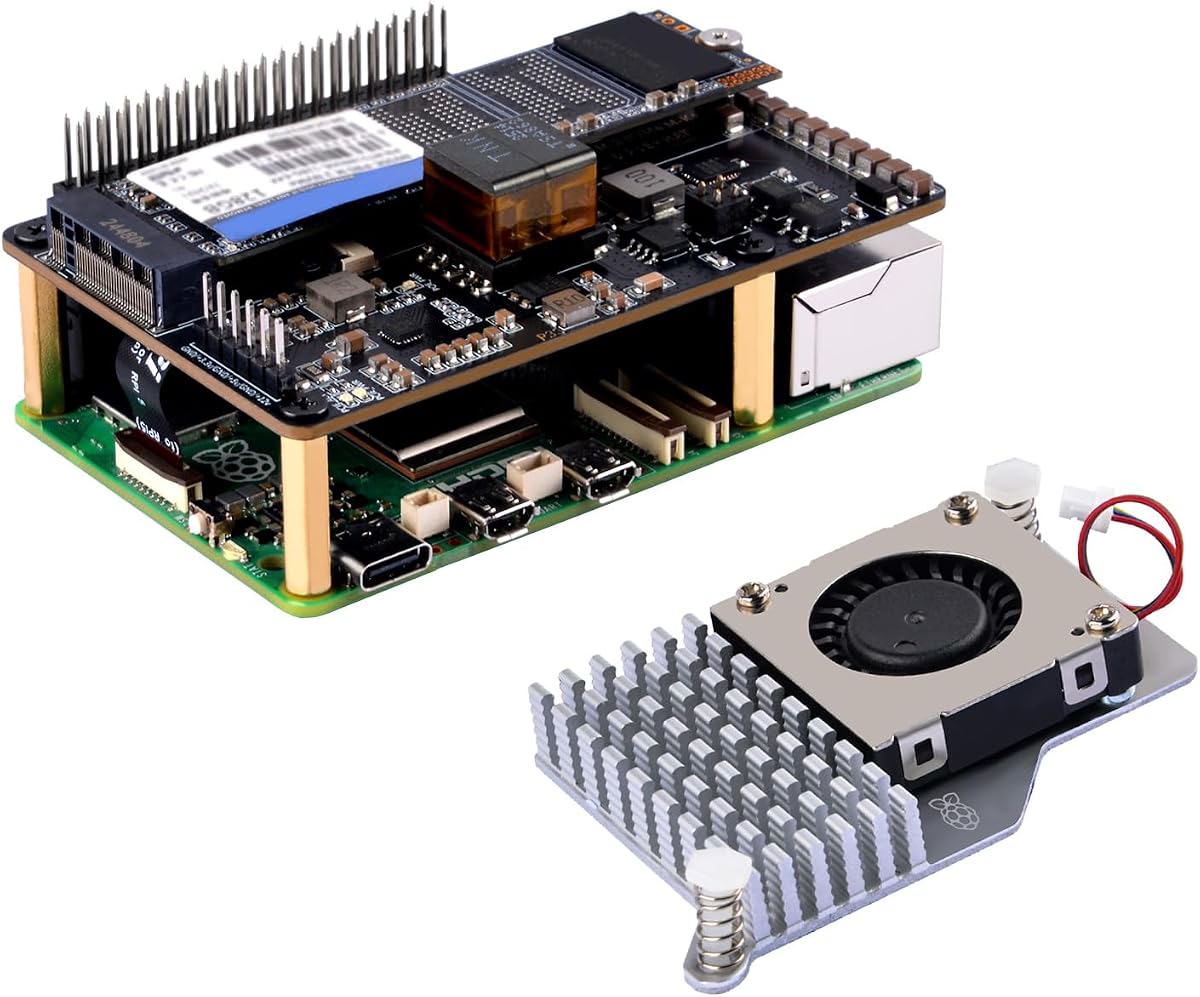
The GeeekPi P33 combines three useful Pi 5 expansions: an M.2 NVMe storage interface, Power over Ethernet capability, and an active cooler. Its 4.2 rating reflects a specialized design aimed at users who want faster local storage and a cleaner network-powered installation.
We may earn a commission when you buy through this link, at no additional cost to you.
The HAT uses the Raspberry Pi 5's PCIe interface for NVMe SSD communication and supports M.2 drives in 2230, 2242, 2260, and 2280 formats. PoE+ can deliver power through the Ethernet connection using the 802.3at protocol, with a stated maximum input of 25.5 watts and a 5.1-volt, 4.5-amp output. The included active cooler pairs an aluminum heatsink with a PWM fan to manage board temperature.
Power configuration is the critical consideration. The listing explicitly says not to connect the USB-C power supply while the PoE+ HAT is in use, because the intended power source is Ethernet. A compatible network switch or injector is therefore necessary, and buyers should plan cable routing carefully. The M.2 SSD itself is also not stated as included, so compatible storage must be selected separately.
This HAT is well suited to network-attached storage, servers, kiosks, and installations where a single Ethernet cable can carry both data and power. Choose it when you specifically value NVMe performance and PoE+ convenience; for a simple desk setup, a conventional power supply and microSD card may remain simpler.
Using the PCIe connection for an NVMe drive can provide a substantial storage upgrade over standard removable media. The HAT supports several common drive lengths, offering flexibility when selecting capacity and form factor.
PoE+ power is useful where a nearby outlet is inconvenient. With suitable 802.3at network equipment, the Pi can receive both network connectivity and electrical power through the Ethernet route.
We may earn a commission when you buy through this link, at no additional cost to you.
The Arducam 5MP OV5647 is a straightforward camera module for adding image capture to Raspberry Pi 5 projects. Its 4.4 rating is supported by broad compatibility with Pi A and B series systems, familiar Raspberry Pi hardware, and a sensor capable of still photography and 1080p video.
We may earn a commission when you buy through this link, at no additional cost to you.
The camera uses an Omnivision OV5647 five-megapixel sensor with a fixed-focus lens and an integral infrared filter. Still images can reach 2592×1944, while maximum video resolution is 1080p. It supports Raspberry Pi 5, Pi 4, Pi 3, Pi 3B+, Pi 2, and other A/B-series models, making it a useful shared component across several generations of hardware.
The fixed-focus design is the main limitation. It will not provide the motorized focusing behavior associated with some premium autofocus modules, and it is explicitly not compatible with Pi Zero boards. Optional accessories referenced in the product information include an acrylic enclosure, an ABS case, and a mini tripod case kit, but the core listing centers on the camera module itself. Applications should account for the resolution and focus characteristics rather than expecting specialist-camera performance.
This camera is best for learning, motion-detection demonstrations, simple streaming experiments, robotics, and introductory machine-vision projects. It provides a manageable path into Pi camera development without adding a complex enclosure or lens system to the initial build.
The module's five-megapixel sensor is suitable for introductory image processing and programmable camera projects. Its familiar form factor also makes it convenient to use with existing Raspberry Pi learning materials.
A 1080p video ceiling and 2592×1944 still-image maximum are meaningful for many educational tasks. The fixed lens keeps the module simple, but projects requiring very close focusing should consider a compatible autofocus alternative.
We may earn a commission when you buy through this link, at no additional cost to you.
The ElectroCookie Aluminum Mini Tower Case combines a desktop-inspired appearance with integrated active cooling for Raspberry Pi 5. Its 4.4 rating makes it an appealing option for builders who care about presentation as well as practical port access and thermal management.
We may earn a commission when you buy through this link, at no additional cost to you.
The aluminum enclosure uses a mini-PC-style design intended for a desk, wall, or workshop. Its large heat-dissipation structure is combined with an RGB-lit PWM fan that illuminates with system power and adjusts its speed based on CPU temperature. A soft-touch power button adds convenience, while openings preserve access to GPIO pins, the SD card slot, USB, Ethernet, power, and micro HDMI connections.
Compatibility is specific to the Pi 5 because the Pi 4 has different USB and Ethernet port placement. The lighting also is not programmable, and the fan may not spin while the CPU is cool or may run continuously if no operating system or bootable drive is available to control it. In addition, the listed compatible M.2 HAT NVMe shield is sold separately, so the case should not be assumed to include SSD expansion hardware.
This case is best for users creating a polished desk-based Pi 5 system, compact workstation, or display-oriented installation. Its appearance and substantial cooling structure set it apart from basic plastic covers, while the separate expansion shield provides a path to add fast storage for compatible builds.
The silver aluminum tower changes the visual character of a Pi 5 compared with standard acrylic or plastic cases. It works well when the computer is intended to remain visible as part of a neat workspace.
The large cooling assembly and temperature-responsive fan support sustained operation. Color-changing ambient lighting adds visual feedback, although the fixed lighting behavior offers less customization than a programmable RGB system.
We may earn a commission when you buy through this link, at no additional cost to you.
The Hosyond 5-inch touchscreen delivers a compact, integrated display for Raspberry Pi 5 projects where screen size matters less than a self-contained, touch-operated interface. Its 4.4 rating reflects an easy installation, an IPS panel, and broad operating-system support for the listed touch behavior.
We may earn a commission when you buy through this link, at no additional cost to you.
The capacitive screen measures 5 inches and uses an 800×480 resolution. It connects directly through the Raspberry Pi's MIPI DSI output, and the product information states that no driver installation is required. The interface is compatible with Raspberry Pi 5, 4B, 3B+, 3B, 3A+, 2B, 1B+, and 1A+, and documentation is provided for setup and use.
As with the larger Hosyond display, this is not an HDMI monitor and does not target other device types. Raspbian offers two-point zoom in the older version, while Ubuntu, Kali, and Windows 10 IoT are listed with single-touch support. At five inches, the screen is more appropriate for a compact control panel than for a conventional desktop, and the 800×480 resolution limits space for dense content.
Buyers should choose this model for small embedded systems, portable projects, appliances, and focused status interfaces. It delivers the core benefit of a dedicated touchscreen without requiring a separate monitor, making the Raspberry Pi 5 more self-contained in projects where physical space is limited.
A five-inch screen is easier to embed in a compact enclosure than a seven-inch panel. It works well for simple menus, sensor readings, environmental controls, and appliance-style interfaces.
The direct MIPI DSI connection and stated lack of additional driver requirements simplify initial configuration. PWM backlight adjustment also provides a convenient way to tune visibility in different environments.
We may earn a commission when you buy through this link, at no additional cost to you.
The Raspberry Pi Active Fan is the highest-rated product in this guide, with a 4.8 score. It is a focused cooling accessory designed for Raspberry Pi 5 development kits, offering a straightforward alternative to a full case-and-cooler bundle when protection is not the priority.
We may earn a commission when you buy through this link, at no additional cost to you.
The assembly combines a single-piece anodized aluminum heatsink with a temperature-controlled blower fan. It attaches to the Pi 5 using three screws and spring-loaded push pins, while pre-applied thermal pads provide the interface between the cooler and processor. This compact arrangement is intended to improve heat dissipation without requiring a separate enclosure.
Its limitations are equally clear. It is a cooling solution rather than a case, so it does not provide enclosure-level protection from dust, scratches, or impact. It also does not include a power supply, and users who require both a full case and active cooling should compare the available bundles. Clearance around the fan should be checked in compact projects where ventilation or additional HATs are planned.
This fan is best for owners who already have a suitable enclosure and want a direct, well-rated cooling upgrade for the Pi 5. Its simple mounting method, integrated heatsink, and temperature-controlled blower make it an attractive choice for focused builds where space and simplicity matter more than a complete accessory bundle.
The spring-loaded push pins and three-screw arrangement are designed specifically for the Pi 5 mounting pattern. Pre-applied thermal pads simplify the physical installation and help position the heatsink correctly.
A temperature-controlled blower can respond as processor demand changes. This focused approach is useful when the goal is thermal performance without adding the weight, dimensions, and visual bulk of a full metal tower enclosure.
We may earn a commission when you buy through this link, at no additional cost to you.
The right Raspberry Pi 5 accessory depends on whether you need a complete first setup, focused protection, extra computing power, a display, or project hardware. Compatibility, thermal needs, and the intended workload should guide the decision before considering convenience or appearance.
Choose accessories that explicitly support the exact board and storage capacity you intend to use.
Inventory what you already have before paying for a multi-item package.
Use the specified power source for your chosen accessory and avoid improvised connections.
Choose temperature-controlled active cooling for demanding or prolonged workloads.
Compare boot media, capacity needs, speed, and enclosure clearance before choosing storage.
Select display size based on the interface, viewing distance, and available enclosure space.
Decide whether physical protection, visual presentation, or minimal size has the highest priority.
Start from the project requirements, then add only the accessories that solve a specific need.
Before assembly, compare every connector with the corresponding Raspberry Pi 5 port or expansion header. Install software and check device recognition before securing a display, camera, or HAT inside a case. Read the included instructions, and for electronics kits, select one project at a time so the supplied schematics and code remain easy to follow.
Power down the Raspberry Pi before attaching a camera, active cooler, or HAT board, and avoid forcing connectors. Route cables so they do not press against the active cooler or obstruct ventilation. If using a PoE+ HAT, disconnect USB-C power and use the specified Ethernet power route. Allow airflow around the case and keep the board away from direct sunlight and enclosed, poorly ventilated spaces.
For ongoing care, keep the case and vents free of dust, inspect connectors for looseness, and verify that cooling components remain firmly attached. Store the microSD card or other media safely when the system is not in use, and back up important project files. Software updates and fan behavior depend on the operating system, so use the controls available in Raspberry Pi OS and confirm that all peripherals are still detected after major changes.
A suitable USB-C power supply, active cooling, a microSD card or other boot storage, and a protective case form the practical foundation. A complete bundle can supply these items together, while a board-only buyer may prefer to select each component separately. Add a display or camera only when the planned project requires them.
It can, especially during sustained processor-intensive tasks or in warm environments. A temperature-controlled PWM fan responds to system demand, helping the board avoid thermal throttling. A ventilated case or aluminum enclosure can further improve airflow, so cooling and enclosure design should be considered together.
No. Both featured Hosyond models connect through the Raspberry Pi's MIPI DSI interface and do not use HDMI. They are designed for compatible Raspberry Pi models rather than general-purpose devices. Verify that your application supports the display and check the stated operating-system touch behavior before installation.
Choose five inches when enclosure space is limited or the interface contains a small number of controls. A seven-inch screen is easier to read for dashboards, information kiosks, and status displays. Both provide an 800×480 capacitive touchscreen, so display size is the primary practical difference beyond physical footprint.
An NVMe HAT uses the Pi 5's PCIe interface to support fast M.2 solid-state drives, which can benefit storage-intensive projects. The featured GeeekPi model also provides PoE+ power over Ethernet. It requires a compatible NVMe drive and suitable network equipment, and USB-C power should not be connected while the PoE+ HAT is operating as directed.
The listed Arducam OV5647 module supports Raspberry Pi 5, 4, 3, 3B+, 2, and other A/B-series models. It is not compatible with Pi Zero boards. Its fixed-focus lens and maximum 1080p video output are also important limitations for projects that need autofocus or higher-resolution recording.
No. The featured Freenove Ultimate Starter Kit includes electronics components, wiring, modules, sensors, and learning materials, but the Raspberry Pi is not included. You will need to obtain a compatible board separately and confirm that your preferred operating system and tutorials align with the kit.
Check the case dimensions, mounting areas, and included hardware, then compare them with the cooler's mounting pattern. Some bundles explicitly include both pieces as a matched set. A case and cooler purchased separately may work together, but buyers should verify clearance, port access, and the presence of appropriate mounting points.
The Freenove Ultimate Starter Kit is the most versatile pick for learning and experimentation, while the RasTech 8GB Complete Kit is the strongest choice for buyers who want a broad, ready-to-build package. The RasTech Essential Accessories Kit offers a focused combination of power, active cooling, and a case for owners who already have a board.
Prioritize exact compatibility, correct power delivery, and the thermal needs of the intended workload before appearance or bundled extras. A dedicated NVMe HAT suits storage-heavy networked systems, the Hosyond screens add touch control, and the Arducam module provides an accessible path into vision projects. Choose accessories that solve a clear need in your build.
Bundles, included components, and prices can change as listings evolve. Before purchasing, review the current product page, verify board compatibility, and confirm that power supplies, storage, cooling hardware, and case parts are actually included. This final check helps avoid unexpected omissions or incompatible additions.