
SIMSONN HB Pro V2
Hydraulic handbrake mechanism
Advanced multi-chip processing
Software-based force customization
CAN or Type-C PC connection
Discover the best Racing SIM Handbrakes for PC, comparing sensor precision, platform compatibility, adjustability, construction, mounting options, and overall
A racing sim handbrake can transform an ordinary steering-wheel setup into a much more convincing rally or drifting experience. The best models provide progressive braking, dependable sensors, realistic resistance, secure mounting, and broad compatibility with popular PC racing games. They are especially useful for drivers who want more control than a standard gamepad can offer.
This guide compares ten USB and direct-connection sim racing handbrakes on Windows PC. We examined the supplied information for sensor resolution, supported wheels and games, mounting options, adjustability, materials, construction, installation requirements, and practical feature sets. The list covers budget clamp models, adjustable aluminum units, and a more sophisticated hydraulic handbrake.
Each review explains the standouts and trade-offs of its featured product, while the comparison table makes the key differences easier to scan. Ratings reflect the supplied product data, and one product does not have a published rating. Product availability, retailer details, and bundle contents can change, so confirm the current listing before purchasing.

4.7Editor score

4.5Editor score
The comparison covers sensor technology, platform support, construction, adjustability, and installation style across all ten handbrakes, helping PC racers identify the model that best matches their wheel, rig, and preferred games.


The aikeec USB Sim Racing Handbrake is a straightforward USB e-brake built for Windows racers who want a conventional lever and dependable digital input without a complicated setup process. It carries a supplied rating of 4.3 and stands out for broad compatibility with Logitech wheels, Thrustmaster wheels, and a substantial list of popular PC racing games.
We may earn a commission when you buy through this link, at no additional cost to you.
Its core strength is the combination of a Hall-effect sensor, automatic calibration, and direct USB operation. That combination is particularly useful for rally and drift titles in which progressive input is more satisfying than a simple digital button. The lever also supports height and angle adjustment, making it easier to position beside different wheel brackets, seats, and cockpit layouts.
The limitations are practical rather than fundamental. This is designed for Windows PC and does not support Xbox One, PlayStation 4 or 5, or Mac. Game support can also depend on the title's own input options, so the compatibility list should be treated as a useful guide rather than a guarantee that every menu exposes every function.
It is a strong recommendation for a first sim handbrake, especially for someone already using a compatible Logitech or Thrustmaster wheel on Windows. Drivers who need console support, advanced software control, or a highly specialized hydraulic mechanism should look elsewhere, but most PC racers will find this model practical and approachable.
The Hall-effect position sensor provides a proportional signal rather than behaving like a simple on-or-off switch. That allows games to translate lever movement into a progressive handbrake input, which can make slow corner entries and controlled slides feel more natural.
Height and angle adjustment give the handbrake a better chance of fitting comfortably beside a wheel, whether the setup uses a basic desk stand, a wheel bracket, or a more permanent racing cockpit.
We may earn a commission when you buy through this link, at no additional cost to you.
The aikeec 64 Bit USB Handbrake combines a higher-resolution sensor with a clamp-based mounting system, making it an appealing option for PC racers who want a quick installation and a conventional horizontal-style lever. Its supplied rating of 4.4 reflects a well-rounded feature set covering sensor performance, construction, compatibility, and calibration.
We may earn a commission when you buy through this link, at no additional cost to you.
The clamp is a major practical advantage for owners who do not have permanent handbrake mounting holes in their wheelbase or table. The body uses CNC-machined aluminum and mild steel, which should provide a firmer and more durable assembly than many basic plastic alternatives. Its 64-bit on-contact Hall sensor is designed to deliver fine control during sustained pulls and releases.
Automatic calibration and memory of the starting point make this unit easy to prepare for a session. The stated game support includes major rally, circuit, truck-simulation, and open-world racing titles on Windows. However, individual titles may present handbrake options differently, so players should verify input naming and axis behavior in their preferred game.
This handbrake is best for Windows users who prioritize a clamp, refined digital sensing, and broad software compatibility. It may not suit a console racer, and anyone with a unique cockpit may need to check clamp clearance. For a conventional PC setup, though, it offers a useful balance of installation simplicity and control.
The included clamp allows the handbrake to attach to compatible wheel rails or a suitable rig edge without requiring permanent drilling. That makes the product convenient for changing between a home station and a mobile or shared driving setup.
Automatic start-point calibration helps establish a consistent neutral position. Drivers can focus on their technique instead of repeatedly checking whether the game has recognized the full lever range.
We may earn a commission when you buy through this link, at no additional cost to you.
The PXN HB S PC Handbrake is one of the most adjustment-focused options in this guide. It has a supplied rating of 4.4 and distinguishes itself with configurable force, damping, stroke, height, lever angle, and grip orientation. Those controls make it appealing to drivers who want to tune the handbrake rather than accept one fixed feel.
We may earn a commission when you buy through this link, at no additional cost to you.
Its 16-bit Hall-effect sensor provides proportional control, while the aluminum alloy body and included fixed clip create a suitably robust platform. The default travel is 16 millimeters and can be reduced to 10 millimeters by replacing the relevant part. Different springs and damping rubbers allow the resistance and motion to be adapted for rally, drifting, or general road driving.
The ability to switch between horizontal and vertical grips is particularly useful because different wheelbases and games have different layout conventions. The vertical position can suit more open setups, while the horizontal orientation is closer to the lever placement in many real road and race cars. These are physical adjustments rather than software presets, so drivers may need to pause a session after making changes.
This model is a strong fit for an enthusiast who wants a meaningful degree of control over handbrake feel. It is less appropriate for someone seeking a completely automatic, console-friendly setup, since the product is limited to Windows. For PC racers willing to spend a few minutes tuning it, the PXN HB S offers a particularly rich feature set.
Replaceable springs, damping rubbers, and travel components let the driver shape resistance and lever movement. This is especially useful when a single handbrake must handle both precise road-car inputs and abrupt rally or drift applications.
Switching between horizontal and vertical layouts makes the PXN easier to adapt to different wheelbases, desk frames, and racing cockpits. It also lets the user compare two familiar real-car-style arrangements.
We may earn a commission when you buy through this link, at no additional cost to you.
The CNRAQR 16-Bit USB Handbrake is a compact progressive handbrake designed for Windows PC racers. It has a supplied rating of 4.2 and focuses on a simple USB connection, a non-contact 16-bit sensor, and a smaller assembly that is easier to carry or store than a full-size mounted unit.
We may earn a commission when you buy through this link, at no additional cost to you.
Its curved handle and low-carbon steel control system are intended to provide a more natural grip and durable mechanical feel. The sensor delivers proportional movement, which is useful in titles that recognize a separate handbrake axis. Installation is straightforward: the product connects by USB and does not require driver installation.
The two-meter cable is long enough for many desk and cockpit arrangements, while the included fixing clip and plate provide options for securing the unit. Height adjustment helps the lever sit more comfortably beside different wheels. The compact size, however, should not be confused with a fully adjustable resistance system; compared with the PXN models, it offers fewer internal tuning choices.
This is a practical option for a racer who wants progressive control without carrying a large hydraulic unit. It suits compatible Logitech and Thrustmaster wheels on Windows, but console and Mac users are excluded. Buyers should also confirm that the supplied plate works with their rig and verify the relevant handbrake settings in their chosen game.
The smaller assembly takes up less space than a full cockpit-mounted handbrake and is easier to move when the user changes desk or rig locations. That portability makes the product practical outside a permanent racing setup.
Using a non-contact 16-bit sensor, the unit can communicate gradual lever position through USB without a separate driver package. The resulting input can support more nuanced braking when a game exposes a linear handbrake axis.
We may earn a commission when you buy through this link, at no additional cost to you.
The CXCESNS 16-Bit USB E-Brake is built for racers who want a substantial metal assembly and a straightforward way to add progressive handbrake control. Its supplied rating of 4.2 reflects a capable design that combines a 16-bit Hall-effect sensor, automatic calibration, high-rigidity springs, and broad support for common PC wheels.
We may earn a commission when you buy through this link, at no additional cost to you.
The stated metal body, compression springs, and integrated motherboard connection are intended to withstand repeated hard pulls and releases. Automatic calibration allows the unit to establish its range after connection, while the long 63-inch braided cable offers considerable freedom in placement around a wheel stand or cockpit.
Compatibility includes Logitech G25, G27, G29, G920, and G923 wheels as well as Thrustmaster T300 and T500 models on Windows. Handle height and angle can be adjusted to suit the user's layout. It does not support PlayStation, Xbox, or Mac, and individual games may label or configure the handbrake axis differently.
The CXCESNS is best for Windows racers who value a rugged, conventional e-brake and dislike complicated installation. It may not be the first choice for a user seeking interchangeable springs, dual grip orientations, or advanced telemetry. Within the simpler USB category, though, it offers solid construction and a long-reaching cable.
The mostly metal body and rigid compression springs are built for sustained use. That makes the unit suitable for racers who frequently practice slides, abrupt reversals, and long sessions rather than only occasional casual play.
A 63-inch braided USB cable provides enough reach for many fixed cockpits and more improvised wheel stands. Its length reduces the need to place the computer directly beside the driver.
We may earn a commission when you buy through this link, at no additional cost to you.
The Handbrake Sim Racing USB Handbrake is a value-focused option that pairs a 64-bit Hall-effect sensor with a metal body and uncomplicated USB setup. It carries a supplied rating of 4.5, making it one of the strongest-rated products in this guide, and it targets PC racers using common Logitech or Thrustmaster wheels.
We may earn a commission when you buy through this link, at no additional cost to you.
Machined aluminum and mild steel provide a more durable structure than an all-plastic handbrake, while the curved handle is designed to improve the basic feel of the grip. The two-meter USB cable gives users room to position the lever beside a wheelbase without requiring a very short cable run.
The product supports Windows 7 and later systems in the supplied information and works without separate driver installation. Listed games include Assetto Corsa, ETS2 and ATS, DiRT Rally 2, Project CARS 2 and 3, and several WRC entries. As with every game peripheral, players should check the current title's input options.
This is a compelling recommendation for a new PC sim racer who wants responsive, progressive braking without paying for a full hydraulic or software-controlled system. It is less suitable for console platforms, Mac users, or drivers who require advanced dead-zone editing and lighting synchronization. Within its straightforward design, however, it provides a strong sensor specification and broad compatibility.
A 64-bit Hall-effect sensor gives this straightforward handbrake a detailed position signal while retaining a familiar USB installation process. Drivers can gain finer control without navigating an elaborate configuration suite.
The combination of machined aluminum and steel creates a stable base for the lever and sensor assembly. It offers a durable center of the product category for users who want more substance than a basic plastic model.
We may earn a commission when you buy through this link, at no additional cost to you.
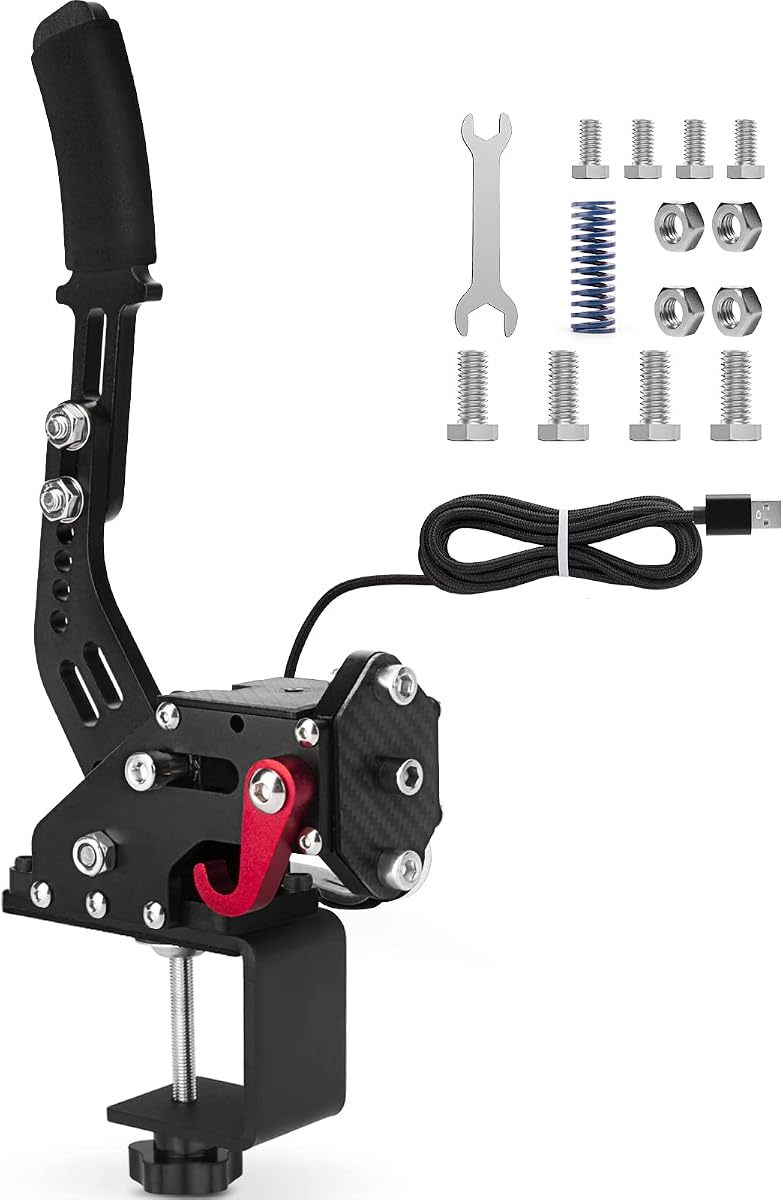
The aikeec 64-Bit PC Handbrake is a long-cable USB model built for PC sim racers who need flexibility in where the computer and handbrake are placed. Its supplied rating is 4.3, and its main distinguishing features include a 64-bit Hall sensor, a clamp, adjustable handle positioning, and a 78-inch USB lead.
We may earn a commission when you buy through this link, at no additional cost to you.
That generous cable length is useful for a full-size cockpit, a wheel placed on a raised platform, or a desktop where the tower sits across the room. The clamp offers a simpler alternative to permanent mounting hardware, while the non-contact Hall sensor and automatic calibration support repeatable progressive input.
Compatibility extends across common Logitech and Thrustmaster wheel families and a wide collection of Windows games. The list includes rally, truck, circuit, and open-world titles such as DiRT Rally 2, ETS2 and ATS, Assetto Corsa, WRC entries, and Forza Horizon. The exact control available in each game still depends on the title's settings.
The aikeec is well suited to large or flexible setups where cable reach matters. It may be unnecessary for a compact wheel stand, and its red design may not match every cockpit. It is also restricted to Windows PC. Despite those qualifications, it combines refined sensing, simple attachment, and practical compatibility in a solid package.
The 78-inch cable is among the most generous in the guide and gives the driver freedom to place the handbrake far from the computer. That is especially useful when the sim station has a separate electronics shelf or an elevated wheel platform.
The 64-bit Hall sensor provides fine position information, while the clamp simplifies physical installation. Together they offer a convenient balance for users who want quick setup and responsive proportional control.
We may earn a commission when you buy through this link, at no additional cost to you.
The SIMSONN HB Pro V2 is the most feature-rich handbrake in this guide and a natural choice for a premium racing cockpit. It uses a hydraulic mechanism, a four-chip processing system, direct PC or wheelbase connectivity, configurable RGB lighting, and an optional vibration-feedback module. No customer rating is supplied for this product.
We may earn a commission when you buy through this link, at no additional cost to you.
Its controller uses two independent 32-bit processors, a dedicated 16-bit high-resolution analog-to-digital converter, and a differential signal-amplification chip. Those components are designed to provide stable, low-latency, high-precision input. Windows HID controllers can represent analog axes with 16-bit values, which supports smooth and granular handbrake control.
The lever can be mounted horizontally or vertically, with three angle adjustments for different seating and cockpit positions. An extra 70HA rubber damper allows the driver to tune resistance, while SIMSONN Manager software provides dead-zone control and lighting synchronization. The standard 13-centimeter non-slip handle can be supplemented with an optional extended 20-centimeter handle.
This is the recommendation for an enthusiast who wants a dedicated, high-end handbrake and a permanent rig. It can connect directly to a PC through Type-C or to a compatible wheelbase through its CAN port. Buyers should verify wheelbase support, game input recognition, and software requirements before installation. The premium complexity is worthwhile for enthusiasts, but it is unnecessary for a casual PC racer.
The hydraulic system creates a more substantial lever feel than a basic digital e-brake. The included custom damper adds another layer of control, allowing the driver to tune resistance rather than accepting a fixed spring response.
The multi-chip controller is built for low latency, stable signal acquisition, and noise resistance. RGB pressure lighting provides an additional visual reference, and support for a vibration module can deepen the connection between the physical handbrake and the simulated car.
We may earn a commission when you buy through this link, at no additional cost to you.
The MOZA HBP Handbrake is a refined piece of cockpit hardware with a supplied rating of 4.7, the highest established rating among the products reviewed. Its CNC-machined aviation-grade aluminum body, anodized finish, and non-contact sensor make it especially attractive for drivers building a polished permanent setup.
We may earn a commission when you buy through this link, at no additional cost to you.
The sensor provides precise lever-angle information without physical contact, supporting a long maintenance-free service life. The lever may be mounted horizontally or vertically, with adjustable angles that allow it to imitate both road-car and race-car arrangements. This flexibility makes the handbrake suitable for varied cockpit designs and driving preferences.
Spring replacement, rebound-strength changes, brake-travel adjustments, and movable stop positioning allow the driver to tune the mechanical response. It can connect directly to a PC or to a compatible MOZA wheelbase through the handbrake port. The ergonomic lever and mounting design also make it straightforward to integrate with many racing rigs.
The MOZA HBP is a top recommendation for an enthusiast who wants refined materials, direct connectivity, and physical adjustment without moving into a hydraulic or software-managed system. It is less convenient for a console or an entirely wireless setup, and users should check game mapping and wheelbase compatibility. For a serious PC cockpit, however, it offers an excellent balance of precision and build quality.
The CNC-machined aluminum body and anodized surface give the handbrake a precise, durable appearance. More importantly, the solid construction helps create a stable base for consistent lever movement during vigorous driving.
Replaceable springs and adjustable travel let the driver shape rebound, resistance, and lever range. The movable stop adds another way to tailor the handbrake to a particular seat position and racing style.
We may earn a commission when you buy through this link, at no additional cost to you.
The PXN HB S USB Handbrake is an adaptable PC model with interchangeable spring and damper options, a switchable grip, and 16-bit Hall-effect sensing. Its supplied rating of 3.7 is the lowest in the guide, but the product still provides a substantial feature set for Windows racers who want physical tuning.
We may earn a commission when you buy through this link, at no additional cost to you.
Like the other PXN HB S model, it supports adjustment of force and stroke, with a default 16-millimeter travel that can be changed to 10 millimeters by replacing parts. The grip can operate horizontally or vertically, and the height and angle are adjustable. Those options are especially useful for adapting a handbrake to different wheelbases, brackets, and cockpits.
The 16-bit sensor uses automatic calibration, and a high-rigidity compression spring provides a buffered feel during movement. Direct USB operation removes the need for a separate driver. Compatible wheel families include PXN V99, V10, and V12 models along with several Logitech and Thrustmaster wheels on Windows.
This handbrake is a good option for a tuner who values the PXN platform and its dual-grip design but prefers a separate USB unit. The omitted fixing clip is an important detail for buyers with a cockpit that requires that accessory, and the low supplied rating suggests more uncertainty than for the higher-rated models. Check the rig, game mapping, and included hardware before ordering.
Interchangeable springs, shock-absorber rubbers, and travel parts let users tailor the lever's movement. That level of adjustment can help balance progressive technique and comfort across different games.
The horizontal grip is closer to many real cars, while the vertical arrangement can be more convenient in crowded sim setups. Switching between them also allows the user to compare handling styles without replacing the entire handbrake.
We may earn a commission when you buy through this link, at no additional cost to you.
The best sim handbrake depends on your PC, steering wheel, rig, and preferred genres. Sensor precision, mounting method, lever feel, adjustability, and game recognition deserve careful consideration before installation.
Every product in this guide is designed for Windows PC, so console and Mac users should not assume it will work with their hardware. The listed wheels from Logitech, Thrustmaster, PXN, and FANATEC provide a useful starting point, but the handbrake may connect as a separate USB controller rather than through the wheel itself. Confirm that the title supports a separate linear or progressive handbrake axis and that the game can recognize an additional controller.
Sensor resolution describes how finely the handbrake reports lever position. Options in this guide include 16-bit and 64-bit Hall-effect systems, while the MOZA description also refers to a high-precision angle sensor. Greater nominal resolution can support finer control, but practical feel depends on calibration, game mapping, spring design, and connection stability. A properly calibrated lower-resolution unit may still be more satisfying than a poorly configured higher-resolution model.
Clamp-mounted handbrakes are convenient because they can attach to a compatible rail or rig edge, but clamp dimensions and clearance must be checked. Fixed plates require suitable mounting points, while premium direct-connect models may be designed for a specific wheelbase ecosystem. Consider lever orientation, available side space, desk-edge thickness, and whether the computer sits above or below the wheel. A clean installation should not interfere with the wheel, seat, or shifting area.
A realistic handbrake should offer enough resistance to help the driver sense wheel lock while remaining progressive enough for controlled slides. Some products allow spring replacement, damping changes, travel adjustment, and stop repositioning. Others use a hydraulic system with a customizable damper. These controls are valuable when one simulator must handle precise road driving, rally braking, and aggressive drifting. Replacing a spring is a simple setup task, but hydraulic and software-managed systems require more care.
Horizontal and vertical levers suit different cockpits and personal habits. Horizontal levers resemble the handbrake in many road cars, while vertical arrangements are common in some rally and racing layouts. Dual-mode products allow the driver to switch without buying another unit. Drivers with a compact setup should also compare handle length, because an extended grip can alter leverage and may require more lateral clearance.
Aluminum alloy, CNC-machined aluminum, alloy steel, and low-carbon steel are common construction choices in this category. A metal chassis can resist flex and maintain sensor alignment, while a stable sensor mount is equally important. Cable length also affects the installation. Two-meter leads suit many desk rigs, while 63-inch and 78-inch cables offer more reach for larger cockpits. Choose the shortest practical length that still reaches without tension or awkward cable routing.
Most USB handbrakes in the guide work through plug-and-play operation, but the SIMSONN HB Pro V2 adds software-based dead-zone adjustment, lighting controls, and optional vibration feedback. MOZA models can connect directly to a PC or a compatible wheelbase, while other products use a standard USB connection. If you already use configuration software for your wheel or wheelbase, check that the handbrake can operate alongside it and that the selected game exposes the expected axis.
A digital or hydraulic handbrake cannot reproduce every sensation of a real vehicle, and the software interprets each movement according to its own settings. It can nevertheless provide far better modulation than a controller button, which is particularly valuable in games that use handbrake lock, grip, or progressive input. Begin with the manufacturer's recommended mapping, then adjust sensitivity, dead zone, travel, and resistance gradually while practicing in a safe environment.
Begin by securely attaching the handbrake to the wheelbase, clamp, plate, or racing rig. Confirm that the lever cannot shift during a hard pull and that it does not obstruct the wheel, seat, pedals, or desk edge. Connect the USB cable without strain, or use the specified CAN or Type-C connection on a direct-connect model, and allow the unit to complete its startup calibration before launching a game.
Open the game's controller or input settings, locate the handbrake or separate analog axis, and assign it to the appropriate braking function. Begin with a moderate sensitivity setting and the lever in its neutral position. Practice gradual pulls, sustained holds, and clean releases before increasing resistance or changing the travel. For models with adjustable springs, damping, grip orientation, or dead-zone controls, make one change at a time so the driver can understand its effect.
For care, keep the sensor, cable connections, and USB ports free from dust, oil, and debris. Avoid pulling the handbrake by its cable and do not exceed the lever's intended travel. Check clamp tightness, fasteners, and spring settings periodically, especially after a collision, a change of cockpit, or a forceful driving session. Software-connected models should be updated according to the manufacturer's instructions, while hydraulic or heavily tuned units should be adjusted only with the supplied components and guidance.
The handbrakes in this guide are specified for Windows PC, so they are not presented as compatible with PlayStation, Xbox, or Mac. Some may be detected by a console through a generic USB connection, but the supplied information does not confirm that behavior. PC use is the safest choice, and console owners should verify platform and game support with the manufacturer before buying.
Most products in this guide advertise driver-free plug-and-play operation. Windows should recognize the handbrake as a USB controller, after which the game must have an option to assign the handbrake axis. The SIMSONN HB Pro V2 is different because its software is used for settings such as dead zone and lighting, so its setup should follow the manufacturer's instructions.
Not necessarily. Higher sensor resolution can provide a more detailed position signal, but perceived quality also depends on calibration, mechanical play, spring resistance, connection stability, and game mapping. A well-configured 16-bit model may feel excellent, while a higher-resolution unit still requires sensible game settings and stable hardware to deliver its full benefit.
Horizontal levers resemble the layout in many road cars, while vertical levers can suit rally-inspired cockpits or compact sim stations. PXN models allow both orientations, and other products can be mounted at several angles. Consider your cockpit geometry, wheel position, preferred hand movement, and whether another accessory occupies the space beside the wheel.
It depends on the mounting hardware and the stand's construction. A clamp model may attach to a compatible rail or edge, while a fixed plate requires suitable holes or a secure alternative. Ensure the mounting surface is thick and rigid enough to resist the lever's pull, and never rely on adhesive pads or a lightweight shelf for a high-force setup.
The game may be reading the USB controller as a digital device or may not support a separate progressive handbrake axis. Check the controller mapping screen, update the game, and look for a linear, analog, or trigger-style axis. If the available option remains digital, the handbrake may not be usable as intended in that particular title.
Several products explicitly support Euro Truck Simulator 2, American Truck Simulator, and similar truck titles. The lever should register as a separate input axis, but the available handbrake function depends on the simulator and vehicle configuration. Truck games often use parking or trailer controls, so drivers should confirm that the game maps the handbrake axis to the action they want.
Keep the lever pivot, sensor area, fasteners, and electrical connections clean and dry. Inspect clamp or mounting hardware after forceful sessions, and avoid yanking the unit by its USB cable. Models with replaceable springs or dampers should be adjusted gradually, while hydraulic and software-managed systems should follow the manufacturer's servicing and software guidance.
The MOZA HBP Handbrake leads this guide for its strong supplied rating, CNC-machined aluminum construction, refined position sensing, and flexible mounting. The SIMSONN HB Pro V2 is the premium option for drivers who want hydraulic resistance, sophisticated electronics, software controls, and visual feedback, while the 64-Bit USB Sim Racing Handbrake offers a compelling balance of sensor detail, metal construction, and easy PC installation.
Prioritize platform and game compatibility first, then choose between simple USB convenience and a more advanced mechanical or hydraulic system. Existing wheel owners should confirm the listed wheel families, while rig builders should measure clamp clearance, mounting locations, lever orientation, and cable reach. Adjustable force, travel, and grip options are particularly useful for drivers who move between rally, drift, and road-car experiences.
Before purchasing, verify the current listing details, included mounting parts, and connection requirements, since retailer information and bundle contents can change. With those checks completed, the right handbrake can add a more controlled, authentic, and enjoyable dimension to PC racing sessions.