
PS5 Cooling and Charging Station
4.4Editor score
Cooling with adjustable fan
Dual controller charging
Three USB hub ports
Discover the best PS5 accessories for kids, comparing charging stations, cooling stands, controllers, skins, grips, and gaming headsets.
The best PS5 accessories for kids should make gaming more comfortable, organized, and easy to manage for younger players. Useful additions range from controller charging docks and cooling stands to ergonomic trigger extenders, grippy controller skins, personalized decals, and lightweight gaming headsets designed for shared family spaces.
This guide compares ten products across several important categories, weighing compatibility, charging performance, cooling features, installation requirements, comfort, storage, lighting, and suitability for different ages. The selections include both basic accessories that solve practical problems and multi-function stations designed to keep a PlayStation 5 setup neat and ready for the next session.
Each pick highlights a distinct benefit for kids and their families, from keeping controllers organized to improving trigger access or reducing cable clutter. Product details and ratings can change over time, and prices fluctuate frequently, so readers should verify current availability, compatibility, and cost before making a purchase.
4.4Editor score

4.7Editor score

4.7Editor score
The table below compares all ten accessories by their core purpose, compatibility, and most useful family-friendly features, helping families identify the right upgrade for their PlayStation 5 setup.


This multifunctional PS5 cooling and charging station holds a 4.4 rating and stands out as a substantial upgrade for a shared family gaming area. It is designed for PS5, PS5 Slim, and PS5 Pro consoles, including disc and digital configurations, while combining vertical support, active cooling, controller charging, and several connection options in one unit.
We may earn a commission when you buy through this link, at no additional cost to you.
Its strongest family-friendly benefit is the reduction of visual and charging clutter. The station can charge original DualSense and Edge controllers, includes an adjustable controller charging port, and offers three side-mounted USB hub ports for additional devices. The concealed cables and security screws are designed to create a stable setup, while the RGB lighting and integrated media remote slot help the area feel more like a finished gaming station.
The cooling system uses a three-level and automatic adjustment setup, with protection chips for overcharging, overcurrent, and overtemperature. A busy console generates more heat than an idle one, so the fan and safety controls are meaningful additions. The tradeoff is that this is a larger and more involved accessory than a simple dock, and young players may need help with the initial screw-and-cable installation.
This station is best for families that want one centralized accessory to organize the console, keep controllers ready, and add active cooling. It is particularly suitable for a bedroom or living-room setup used regularly by multiple children, provided an adult handles assembly and verifies that the console variant matches the product description.
Combining the vertical console support, charging cradle, USB hub, and media remote storage helps reduce the number of separate accessories occupying a child’s desk. A dedicated, organized station also makes it easier to establish a routine of returning controllers after each session.
The fan offers manual and automatic adjustment, allowing families to select a suitable cooling level while the intelligent system helps manage heat during extended play. Built-in protections add reassurance for a shared household device.
We may earn a commission when you buy through this link, at no additional cost to you.
The OIVO charging station earns a 4.7 rating by combining straightforward dual-controller charging with colorful lighting and a compact storage design. It supports both DualSense and Edge controllers, making it a useful choice for families whose children share different controller styles or keep spares nearby.
We may earn a commission when you buy through this link, at no additional cost to you.
Its stated two-hour charging time makes it appealing for busy schedules. Controllers can be placed directly onto the dock using the drop-to-charge design, while non-slip pads help keep them secure. Red and green status LEDs provide a clear indication of charging and full-charge or standby status, reducing the need for younger users to wonder whether a controller is ready.
The touch-controlled RGB system offers nine dynamic modes, including fast and slow flashing and single-color lighting. This gives kids a visually engaging setup without sacrificing the core charging function. The main drawback is that the station connects through a 34.8-inch USB cable rather than powering itself, and families without a convenient USB source may need to route the cable carefully.
This is an excellent general recommendation for kids who want their controllers organized and immediately available. It is easier to introduce than a full cooling station, supports two popular controller types, and adds personality through lighting. Parents looking for a focused, attractive charging solution should give it strong consideration.
The simple drop-in placement and two-color status lights make the routine easy for kids to manage independently. Two controllers can charge together, reducing delays when siblings are ready to play.
Nine selectable RGB modes let players coordinate the dock with a room or gaming style. Because the lighting is touch-controlled, changing the effect is fast and suitable for a frequently used family entertainment center.
We may earn a commission when you buy through this link, at no additional cost to you.
The NEWDERY charging station has a 4.7 rating and focuses on the core task kids need most: keeping two compatible controllers charged and organized. It supports DualSense and Edge controllers, while its compact four-slot dock design helps give the gaming area a cleaner appearance.
We may earn a commission when you buy through this link, at no additional cost to you.
A blue flashing LED indicates charging, and a steady light communicates a full-charge or standby condition. Four anti-slip mats keep the controllers from moving while they charge. The station is advertised as completing a full controller charge in approximately 2.5 hours, which is convenient for families rotating between two players.
The package includes a 3.3-foot Type-C charging cable and a user manual. A 5V/3A adapter is recommended for charging, and any controller skin or case should be removed first. That last requirement may be inconvenient for children whose controllers are routinely dressed in silicone covers, but it ensures the dock fits properly.
This station is a strong pick for parents who want a functional charging point without adding a large cooling station. Its restrained design, high rating, and dual-controller capacity make it especially useful for siblings who regularly play together. It is also a sensible gift for a child who is beginning to keep a tidy gaming space of their own.
Two charging positions and simultaneous support help siblings avoid waiting for one controller to finish before using the other. The dock doubles as a storage point, making it easier to return accessories consistently.
Anti-slip mats keep controllers positioned correctly, while the blue charging light and steady completion light communicate status at a glance. These details make the station approachable for younger players.
We may earn a commission when you buy through this link, at no additional cost to you.
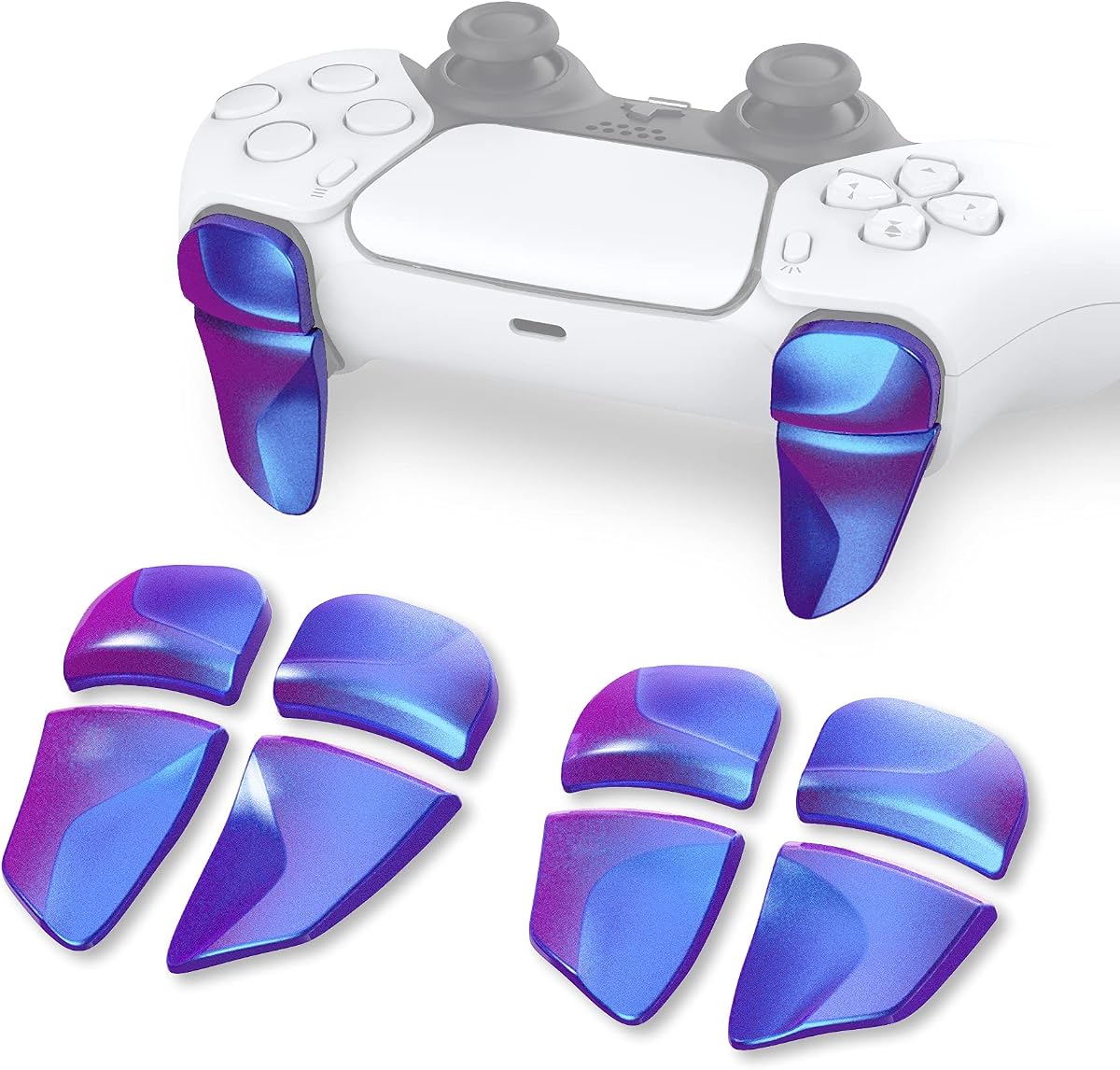
The PlayVital Blade 2 trigger extenders have a 4.4 rating and focus on a specific ergonomic problem: reaching the L1, R1, L2, and R2 shoulder buttons. They are compatible with the standard PS5 controller, the PS5 Edge controller, and the PS Portal Remote Player, giving the set broader relevance than a basic controller skin.
We may earn a commission when you buy through this link, at no additional cost to you.
The package includes two pairs of L1 and R1 bumper extenders and two pairs of L2 and R2 trigger extenders. Each L1 and R1 pair comes in two thicknesses, while the L2 and R2 pairs offer two lengths. Children with larger hands or those who struggle to comfortably wrap their fingers around the triggers can experiment with the option that feels best.
Installation uses adhesive stickers and a click-on extender mechanism. The manufacturer states that the pieces are designed to remain firm and stable, while also providing an online installation video for guidance. The main concern is that the accessory depends on proper placement, and younger users may need adult help to install it correctly.
This is a worthwhile pick for a child who plays action, racing, sports, or other games requiring frequent trigger use and who has shown signs of finger fatigue or difficulty reaching the shoulder controls. It is not essential for every child, but when the ergonomic fit of a standard controller is poor, these extenders may provide a noticeable improvement.
The extenders add leverage around the L1, R1, L2, and R2 controls, making them easier to press. This can improve comfort during long sessions and may help players react more quickly in trigger-dependent games.
Two thickness choices for L1 and R1 and two length choices for L2 and R2 let users tailor the setup. Trying the alternatives during short play sessions helps identify the most comfortable configuration.
We may earn a commission when you buy through this link, at no additional cost to you.
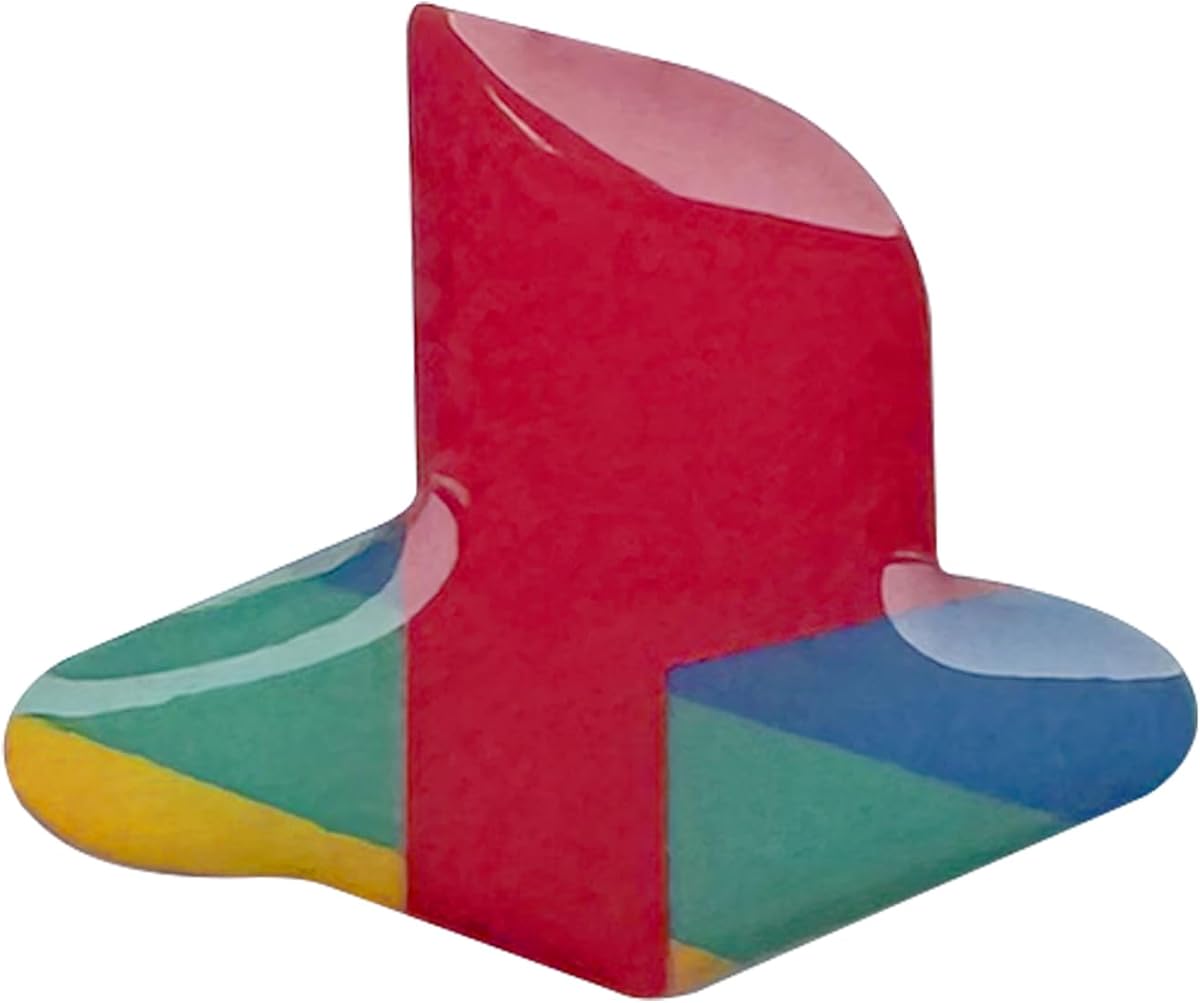
This retro-style logo decal set has a 4.7 rating and offers one of the simplest ways for a child to personalize a PlayStation 5 setup. It includes console underlay stickers for the PS5 Slim and PS5 Pro along with a PS logo vinyl decal intended for a DualSense controller.
We may earn a commission when you buy through this link, at no additional cost to you.
The raised, domed shape gives the logos a button-like appearance, while the classic retro color treatment changes the standard black look. That makes the accessory especially suitable for a child who wants to decorate the gaming area without replacing the console, controller, or major components.
The stickers use printed vinyl and are described as adhering securely while remaining easy to remove without leaving sticky residue. That reversibility matters in a child’s room because preferences can change quickly, and parents may not want a permanent alteration to frequently handled accessories.
Compatibility is the key limitation. The supplied information specifically identifies PS5 Slim and PS5 Pro consoles, not the original PS5, so buyers should confirm their model before ordering. It is best for families seeking a light-touch cosmetic upgrade rather than additional charging, cooling, or ergonomic functionality.
A decal set offers a low-commitment way to refresh a gaming space. Children can make the console feel more personal while retaining the recognizable PlayStation design and standard hardware.
Because the stickers are intended to peel away without leaving sticky residue, a child can experiment with a new look and remove it later. Careful surface cleaning before application supports a neater result.
We may earn a commission when you buy through this link, at no additional cost to you.
The Blue Fire full-body vinyl skin has a 3.8 rating and is designed for the PS5 Digital Edition console and two controllers. Its high-resolution blue fire artwork gives a family gaming area a much more distinctive appearance than a standard monochrome setup.
We may earn a commission when you buy through this link, at no additional cost to you.
Beyond decoration, the vinyl provides a layer of protection against scratches and dust. The package includes console and controller pieces, allowing the visual theme to carry across the main components of the system. Installation is described as straightforward: clean the surfaces, align the pieces, stick them down, and smooth them into place.
This is the least highly rated product in the guide, so buyers should consider the appearance and fit carefully before committing. The supplied information specifically identifies the Digital Edition, which means it is not the correct choice for a disc-drive console. The all-over styling may also be more intense than the understated appearance preferred by some children.
The skin is best for a child who strongly prefers a blue, energetic, personalized setup and owns a compatible Digital Edition console. Families can use it to make a new console feel more special while adding basic surface protection, although buying guides should place compatibility ahead of visual appeal.
Matching console and controller skins create a more cohesive appearance than adding a single accessory. This can make the entertainment center feel deliberately arranged rather than purely functional.
Vinyl coverage helps keep dust and minor scratches away from frequently touched surfaces. It is useful as a cosmetic layer, though it does not provide the impact protection of a dedicated hard case.
We may earn a commission when you buy through this link, at no additional cost to you.
The red and black studded controller skin has a 4.2 rating and is designed specifically for the PS5 Edge wireless controller. It wraps the controller in a soft silicone surface with a textured pattern designed to improve anti-slip performance and reduce the effect of sweaty hands during longer play sessions.
We may earn a commission when you buy through this link, at no additional cost to you.
The package includes one controller skin and three pairs of thumb grip caps. The thumb grips can increase analog-stick precision while adding another layer of contact and comfort. Precisely cut openings are intended to preserve access to buttons and controls, so the cover should add grip without requiring the child to learn a substantially different controller layout.
This accessory is less versatile because it is specified for the Edge controller rather than the standard DualSense. Its raised studded texture also creates a noticeably different feel, which some children may enjoy while others may find less familiar. Parents should inspect the fit before using the controller extensively.
This skin is best for a child who plays for long periods, tends to have sweaty hands, or wants the tactile benefit of a studded grip. The included thumb caps make it a convenient two-part grip package, and the red-black coloring gives the Edge controller a sportier appearance.
The studded silicone texture is intended to keep the controller steady when hands become damp. That can support control and reduce the need to reposition a slipping controller mid-game.
Three pairs of replacement-style thumb grip caps add texture around the analog sticks. They may improve grip and precision for children who tend to touch the sticks frequently.
We may earn a commission when you buy through this link, at no additional cost to you.
The Tatybo Gaming Headset has a 4.4 rating and offers a lightweight wired option for children who want to hear game audio clearly without disturbing others. It uses 50mm neodymium drivers and includes a flexible microphone intended to support communication with teammates or family members.
We may earn a commission when you buy through this link, at no additional cost to you.
Comfort is a major focus for kids. The headset weighs less than eight ounces and uses memory-protein earmuffs with an elastic head pad. A braided cable, aluminum headband, and reinforced construction are also designed to withstand regular handling, while RGB lighting adds a recognizable gaming appearance.
The connection uses a 3.5mm jack, allowing the headset to work with PS5, PC, Switch, and other compatible devices that use the same connection. The USB lead is only for LED power, not audio or microphone input. It is not designed for Xbox 360, and older PlayStation systems may require a 3.5mm adapter.
This headset is best for children who play in a shared room, need voice communication, or prefer a familiar wired setup. Its low weight is useful for younger players, but parents should check the correct audio connection and remind kids that the illuminated USB cable does not carry sound.
The large 50mm drivers are intended to make directional effects and game dialogue easier to distinguish. A wired 3.5mm connection removes charging requirements and works across several compatible gaming platforms.
The lightweight frame and cushioned ear pads are designed for longer periods of wear. Adjusting the flexible microphone boom and checking the fit before each session helps prevent the headset from shifting during play.
We may earn a commission when you buy through this link, at no additional cost to you.
The white anti-slip controller skin has a 4.6 rating and provides a soft, textured grip for the PS5 wireless controller. Its studded silicone construction is designed to feel secure, resist sweat, and improve stability when younger players have smaller or less consistent hand grip.
We may earn a commission when you buy through this link, at no additional cost to you.
Four pairs of thumb grip caps are included, adding texture and precision around the analog sticks. The controller openings are precisely cut to maintain access to the buttons, while the white-and-black color scheme creates a cleaner look than a fully dark controller skin.
As with any silicone cover, the extra material changes the standard controller feel. A child who prefers the original texture may need a short adjustment period, and the product should be matched carefully to the controller it is intended to fit. It also needs to be removed before using a charging dock designed for a bare controller.
This is an excellent choice for a child who struggles with grip, plays games requiring frequent analog-stick movement, or simply prefers a softer tactile surface. The strong rating and generous thumb grip set make it a particularly well-rounded controller accessory in this roundup.
The soft studded surface gives little hands more texture to hold onto. It can reduce slipping during energetic sessions without covering controls or changing the basic button arrangement.
Four pairs of thumb grips provide several options for individual fit and replacement. The added texture can help players maintain a consistent position during games that involve frequent movement.
We may earn a commission when you buy through this link, at no additional cost to you.
The Automatic Cooling Charging Stand has a 4.5 rating and combines vertical console support, adaptive cooling, dual-controller charging, and extensive storage. It is designed for the original PS5, PS5 Slim, and PS5 Pro in disc and digital editions, making it one of the broadest compatibility claims in the guide.
We may earn a commission when you buy through this link, at no additional cost to you.
Its standout technical feature is the temperature-sensing fan. In automatic mode, the fan operates at different speeds based on the console temperature, while a touchscreen also offers three-speed manual control. This approach aims to provide stronger airflow during demanding play and quieter operation at lower temperatures.
The stand also includes three charging connections, a headset holder, a media remote slot, a hard-drive slot, and storage for fourteen game cards. It can charge two controllers in about two hours, with red and green LEDs indicating charging and completion. A Type-C cable is included, and the system can be powered through a wall outlet or the console’s front port.
This is the strongest option for families who treat controller and game management as an ongoing challenge. The storage capacity and adjustable cooling are particularly valuable in a busy family room, although the larger footprint and setup make it less suitable for a minimal desk. An adult should complete installation and confirm the correct power connection.
The built-in sensor adjusts the fan according to measured console temperature. Users can also select one of three manual speeds through the touchscreen for a more hands-on setup.
Fourteen game-card spaces, a headset holder, a media remote slot, and a hard-drive slot keep frequently used components close at hand. This reduces the chance of accessories being scattered across the room.
We may earn a commission when you buy through this link, at no additional cost to you.
The right child-friendly PS5 accessory depends on the console model, controller type, available space, and the kind of problem a family wants to solve. Prioritizing accurate compatibility and straightforward use produces a better result than selecting an accessory solely for appearance.
Begin by identifying the exact console and controllers in use. Some accessories support the original PS5, PS5 Slim, and PS5 Pro, while others are limited to one model. Controller covers and charging docks also differ in their support for standard DualSense and Edge controllers. A product that looks attractive but does not match the family’s hardware will be frustrating to use, regardless of its other features.
A useful charging dock should support the controllers the family actually owns and indicate when charging is complete. Some stations charge two controllers simultaneously in about two hours, while others take approximately 2.5 hours. Check whether the dock needs a console connection, wall outlet, laptop, or separately specified adapter. Recommended wattage matters because using the wrong power source can prevent charging or reduce reliability.
An active cooling stand is useful when the console is positioned vertically and receives sustained play. Manual fan control offers direct adjustment, while temperature-based automatic control is convenient for families that do not want to manage settings. Buyers should also consider noise, airflow design, protective chips, and whether the cooling system operates safely when the console is off or idle.
Young players benefit from accessories that work without complicated menus, tiny switches, or frequent repositioning. Drop-in charging, visible LED indicators, non-slip surfaces, and simple touch controls make routines easier to understand. If installation involves adhesive parts, screws, or cable routing, an adult should handle the setup and show the child where each item belongs.
Families with several games and accessories may benefit more from an organizer than from another decorative item. Look for controller cradles, game-card storage, headset hooks, media remote slots, hard-drive compartments, concealed cable routing, and USB hub ports. The best layout keeps frequently used items accessible while preventing a child’s floor or desk from becoming a drop zone.
Comfort is especially important for smaller hands. Trigger extenders can make shoulder buttons easier to reach, while silicone skins and thumb grips add traction around the controller. Compare the thickness and length options carefully, and give a child time to adapt to a changed controller feel. Accessories should improve access rather than create new pressure points or interfere with buttons.
Decals, skins, RGB lighting, and coordinated colors can make a gaming area feel more personal for a child. Consider whether the effect is subtle enough for shared rooms and whether it can be removed without residue. Cosmetic accessories are most successful when the child genuinely likes the design rather than when they are selected simply because they are visually striking.
A headset can help children hear dialogue and directional effects more clearly while limiting disturbance to the household. Check the connection type, microphone layout, weight, ear cushion comfort, and platform support. Wired 3.5mm models provide broad compatibility, while wireless models eliminate cables but require charging and compatible hardware. In shared rooms, a microphone with a clear mute control is especially useful.
Before using any accessory, read the included instructions and confirm compatibility with the specific PS5 console or controller model. Clean the attachment surfaces with a soft, dry cloth, and keep liquids away from electrical ports. An adult should install stands, adapters, adhesive pieces, and security screws, then show the child how to connect, disconnect, and store each component safely.
For charging stations, connect the dock to the recommended power source and place controllers only when their cases or skins do not obstruct the fit. Use the status lights to determine whether charging is active. For cooling stands, follow the specified console placement and screw procedure, keep the intake and fan unobstructed, and avoid stacking objects around the ventilation area.
Controller skins, trigger extenders, and decals should be removed before charging when the charging accessory requires a bare controller. Replace thumb grips or adhesive pieces if they loosen, and clean silicone surfaces with a lightly damp cloth before allowing them to dry fully. Headset cables should be coiled rather than tightly wrapped, while RGB lighting and exposed USB connections should be kept away from spills.
A charging station, comfortable controller grips, and an organized console stand usually provide the greatest everyday value. A dual charging dock keeps controllers ready, while silicone skins or trigger extenders can improve handling for smaller hands. An organizer is especially helpful when games, headsets, and remotes otherwise accumulate around the television or desk.
It depends on the skin and charging dock. Some slim silicone covers may fit over a controller while it charges, but the NEWDERY station specifically instructs users to remove controller skins or cases. Other charging stations and shaped grips may not allow a covered controller to seat correctly, so always check the charging accessory instructions.
They are not required for every household, but they can be useful in a frequently used setup or when the console is kept vertically. Models with adjustable or temperature-sensing fans provide active airflow, while integrated charging and storage can also reduce clutter. Proper ventilation around the console remains important even when using a cooling station.
The OIVO station and NEWDERY station both list compatibility with DualSense and Edge controllers and can charge two controllers at once. The OIVO model emphasizes a two-hour charging time and RGB lighting, while the NEWDERY model states approximately 2.5 hours and includes a Type-C cable. Buyers should still verify the latest instructions and connector requirements.
They can make the L1, R1, L2, and R2 buttons easier to reach, particularly for children with larger hands or difficulty positioning their fingers. The PlayVital set offers different thickness and length options. Because the extenders change the controller feel, short practice sessions help children determine which configuration is most comfortable.
They can be, because applying or removing a decal gives children an easy way to personalize their space without replacing hardware. The logo underlay set is specified for the PS5 Slim and PS5 Pro, while the full-body Blue Fire skin targets the Digital Edition. Parents should confirm the model, clean the surface carefully, and supervise installation.
Weight, comfort, connection type, and microphone control should come first. The Tatybo headset is lightweight, uses a 3.5mm connection, and has a flexible noise-canceling microphone. Its USB connector supplies power for the lighting only, so the audio still relies on the 3.5mm plug. A child should test the fit and volume before a long session.
Assign a specific home for the controllers, game cards, headset, media remote, and charging cable. A multi-function stand can consolidate these items, while a smaller dock is enough when the main problem is loose controllers. Simple routines work best, such as returning everything to the same marked spot immediately after play.
The OIVO charging station is a balanced all-around choice with a strong customer rating, dual-controller support, clear status lights, and nine RGB modes. The NEWDERY dock offers a similarly practical approach with a simpler visual design, while the larger PS5 cooling and charging station stands out when a family wants active cooling, USB connectivity, controller charging, and console organization in one unit.
Prioritize the problem you need to solve rather than the number of features. Choose a charging dock when controllers are often left uncharged, a cooling stand when heat and setup organization are concerns, and grips or trigger extenders when comfort and control need improvement. Decals and skins are best for personalization, while a lightweight headset can improve private audio and communication in a shared room.
Finally, check the current product details, compatibility, customer feedback, and price before ordering. Accessories can be updated, naming can be inconsistent, and discounts change often. Confirm that the selected model fits the child’s actual console or controller and that the included cable or required adapter is appropriate for the intended setup.