
Canon MegaTank G3270
4.1Editor score
Wireless print, copy, scan
Up to 7,700 color pages
Clear 1.35-inch LCD
A printer with liquid ink can reduce interruptions, simplify refilling, and provide more consistent output for homes, classrooms, and busy offices. Unlike conventional cartridge models, these refillable tank printers hold larger supplies of liquid ink, making them especially useful for people who print documents, schoolwork, photos, or color projects regularly.
We compared ten refillable ink-tank printers from HP, Canon, and Epson, focusing on the information that affects everyday ownership: included page yields, wireless connectivity, copy and scan functions, display size, print speed, refill convenience, and output quality. The guide covers models positioned for value-conscious home users, general-purpose households, and higher-volume offices.
Each review explains the strongest reasons to consider the printer, along with practical limitations visible in the available specifications. The first three selections receive our Best Budget, Editor's Choice, and Best Premium labels, while the remaining models provide worthwhile alternatives for different needs. Product listings and prices can change, so confirm current details before purchasing.
4.1Editor score

4.2Editor score

4.0Editor score
As an Amazon Associate we earn from qualifying purchases.
This side-by-side comparison highlights each printer's core functions, supplied ink capacity, connectivity, and practical advantages, making it easier to identify the refillable ink-tank model that best matches your printing routine.





The HP Smart Tank 5003 combines a refillable liquid-ink system, wireless connectivity, and print-copy-scan functions in a broadly practical home-printer package. Its 3.9 rating places it behind the highest-rated models in this list, but the supplied features are well suited to households that want roomy ink tanks without buying individual cartridges. The included supply is advertised as supporting up to three years of use.
We may earn a commission when you buy through this link, at no additional cost to you.
Its strongest attraction is the combination of initial page capacity and refill convenience. HP states that the printer can produce up to 6,000 black or color pages from the included ink, depending on the color mix. Instead of squeezing ink into a small cartridge, users plug compatible bottles into the cartridge-free tanks and allow the liquid to drain. That design reduces handling complexity and helps make routine replenishment less intimidating.
The all-in-one feature set broadens its usefulness beyond ordinary documents. It can print, copy, and scan, while borderless printing suits photos and other graphics that need to reach the edge of supported paper. Wireless and mobile printing add convenience for people who work across a laptop, phone, or tablet. The trade-off is that the available product information does not identify a built-in display, so navigation and status checks may depend on the connected device or the printer's own controls.
This is an attractive recommendation for households that print a mixture of schoolwork, reports, recipes, photographs, and occasional color documents. Buyers prioritizing an included multiyear ink supply and straightforward refilling will find the feature set convincing. Those who need a large color screen or prefer the highest customer rating among the selections should compare it closely with the Canon G3270 and Epson ET-2803.
Overall, the HP Smart Tank 5003 is a well-balanced recommendation for people who want high-volume liquid ink, wireless access, and a multifunction device without committing to one of Epson's more specialized office-oriented models.
The advertised three years of included ink and up-to-6,000-page starting capacity reduce the likelihood of an immediate cartridge purchase. That makes the model useful for households and home offices that want productive output from the beginning.
HP's bottle-based system is designed for direct tank filling without squeezing. The straightforward process is especially helpful for anyone who wants to avoid handling small replaceable cartridges.
We may earn a commission when you buy through this link, at no additional cost to you.
The Canon MegaTank G3270 is a wireless all-in-one color printer built around refillable ink tanks, and its 4.1 rating gives it one of the stronger customer marks in this guide. It combines printing, copying, and scanning with a physical 1.35-inch square LCD, making it a particularly clear option for shoppers who want essential tank-printer functions without paying for a business-class model.
We may earn a commission when you buy through this link, at no additional cost to you.
The supplied specifications advertise up to 6,000 black-and-white pages or 7,700 color pages from one set of inks, making it the highest stated color-page capacity among these ten models. Ink for up to two years is also included according to the product information. That combination is particularly valuable for families that routinely print color worksheets, school projects, reports, and photographs without wanting to manage conventional cartridges.
Its small LCD provides a useful physical interface for selecting settings, navigating the scanner, and checking printer status without relying entirely on a connected device. Wireless printing adds flexibility for shared household or office use, and the all-in-one design means a separate scanner or copier is unnecessary. Canon describes the G3270 for users seeking a straightforward MegaTank experience with a moderate screen size.
The principal limitation stated in the specifications is that it supports single-sided printing only. If your workflow requires automatic duplex printing, this model may not meet that need, and you should verify the full configuration before buying. The product details also do not explicitly advertise borderless output, voice assistants, or a high print speed, so it is best viewed as a capable general-purpose model rather than a feature-loaded specialist.
For budget-conscious buyers, the G3270 offers a convincing combination of generous included ink, wireless operation, and an easy-to-read display. It is a strong recommendation for students, families, and home offices that prize capacity and straightforward controls, especially when single-sided output is sufficient.
Up to 7,700 color pages from the included set of inks is the strongest stated color yield in this comparison. It can reduce refill frequency for users who produce frequent mixed-color documents and images.
The 1.35-inch square LCD gives the G3270 a clear advantage over models whose controls are less visible in the supplied information. It offers an on-device point of reference for status and navigation.
We may earn a commission when you buy through this link, at no additional cost to you.
The Epson EcoTank Pro ET-5150 is the most explicitly business-oriented model in this guide, and its 4.0 rating reflects a balanced feature set. It offers wireless color all-in-one functions, high-yield refill bottles, and speeds of up to 17 black or 9.5 color ISO pages per minute. That performance makes it the strongest option here for offices that need to move between documents quickly and print in substantial volume.
We may earn a commission when you buy through this link, at no additional cost to you.
Epson describes the ET-5150 as an office printer using DURABrite ET pigment inks for crisp monochrome documents and vibrant color. Its PrecisionCore printhead is designed to remain with the printer for its working life, reducing one category of potential consumable concern. A replacement bottle set is advertised as providing enough liquid ink for up to 7,500 black pages or 6,000 color pages.
The cartridge-free format remains central to the value proposition. High-yield bottles make routine replenishment more practical than replacing small color cartridges, and Epson states that this approach can help reduce cartridge waste headed to landfills. The trade-off is that the ET-5150 is a business-class design rather than a minimalist home model, and its specialized positioning may offer little value if your printing needs are light.
The premium badge reflects the stronger speed specification, permanent printhead engineering, and high-volume ink architecture, not a claim that the printer is better in every setting. Users who need quick output, color documents, and dependable refill capacity will find those attributes compelling. A household with occasional printing may see more practical value in the ET-2803, ET-2903, Canon G3270, or an HP Smart Tank instead.
For a shared office, busy home business, or educational workspace that regularly produces color and monochrome paperwork, the ET-5150 is a persuasive liquid-ink choice. Its speed and refill economics are the clearest reasons to step up to this model.
Up to 17 black and 9.5 color ISO pages per minute gives the ET-5150 the strongest stated speed figures here. The difference becomes meaningful when multi-page proposals, invoices, or reports are printed routinely.
Each advertised replacement bottle set supports up to 7,500 black or 6,000 color pages. Refilling at this scale is well suited to offices trying to reduce cartridge replacements and interruptions.
We may earn a commission when you buy through this link, at no additional cost to you.
The Epson EcoTank ET-2803 earns the highest listed rating in this roundup at 4.2, making it a strong all-around choice for a home or small office. It combines a cartridge-free liquid-ink system with wireless printing, a high-resolution flatbed scanner, a color display, and support for both Apple AirPrint and the Epson Smart Panel app. The balance between usability and output capacity is particularly appealing.
We may earn a commission when you buy through this link, at no additional cost to you.
Epson states that the included ink can support up to 4,500 black pages or 7,500 color pages, with enough supply for up to two years. The EcoFit bottles are designed for high-capacity tanks and straightforward refilling. Epson also describes one bottle set as equivalent to approximately 80 individual cartridges, illustrating how the tank system changes the frequency of replacement.
Connectivity is a major strength. Users can print from smart devices with AirPrint or the Epson Smart Panel app, while voice-activated printing is also listed among the supported features. Sharp text and color photos and graphics are produced through Epson's Micro Piezo Heat Free technology, and the integrated scanner makes copying or document capture possible without another device.
The available details do not specify a precise screen size or print speed, so buyers needing to compare those points precisely should consult the current listing. Epson also recommends genuine ink because non-genuine ink could cause damage not covered by the limited warranty. That is an important consideration for a long-term owner who will refill the tanks multiple times.
The ET-2803 is recommended for buyers who want the guide's highest rating, generous color capacity, and flexible smart-device printing. It fits households that regularly create school projects, household documents, photos, and graphics, as well as small workspaces that value refill convenience over enterprise-level speed.
Support for AirPrint and Epson Smart Panel covers two common ways to print from compatible devices. Voice-activated printing adds another convenient route for selected everyday jobs.
Up to 7,500 color pages from a bottle set gives the model ample capacity for photographs, graphics, and schoolwork. Sharp text and rich color also suit mixed home-office documents.
We may earn a commission when you buy through this link, at no additional cost to you.
The Epson EcoTank ET-2800 is a wireless color all-in-one Supertank printer with a 4.0 rating and a useful 10-page-per-minute black ISO speed. It is positioned for reliable home printing, combining sharp documents and colorful output with a refillable system that can produce up to 4,500 black or 7,500 color pages from each bottle set.
We may earn a commission when you buy through this link, at no additional cost to you.
The model includes up to two years of ink according to Epson's product information. That larger starting allowance helps reduce the need to purchase replacement supplies immediately. One bottle set is described as equivalent to roughly 90 individual cartridges, while the cartridge-free approach is also presented as a way to reduce waste associated with discarded cartridges.
Its engineering emphasizes reliability. Epson says the Micro Piezo Heat Free technology creates vivid, detailed documents and images, while the all-in-one package provides printing, scanning, and copying in one unit. The 10 black ISO pages per minute rate is a meaningful specification for users who regularly print longer text-heavy jobs, although it is slower than the ET-5150's advertised 17 black pages per minute.
The main caveat is that the supplied information does not detail the display size or every modern mobile-printing method. It also notes Epson's recommendation to use genuine ink, since non-genuine ink could cause damage outside the limited warranty. Those points make careful review of the final listing important for buyers comparing it with the ET-2803.
The ET-2800 is a sound recommendation for households that need dependable wireless printing, refillable ink, and a scanner without prioritizing maximum office speed. Its generous color yield and all-in-one convenience make it particularly relevant to families and home workspaces with recurring document and image needs.
A stated 10 black ISO pages per minute gives the ET-2800 enough pace for routine reports, notes, and forms. It is a practical step above slower-feeling home workflows without approaching office-class speed.
The high-capacity tank and bottle refills mean users are not replacing four small cartridges whenever one color runs low. This makes replenishment more predictable and less frequent.
We may earn a commission when you buy through this link, at no additional cost to you.
The Epson EcoTank ET-4800 is a wireless color all-in-one Supertank with a 3.8 rating. Its strongest advertised qualities are high-capacity tanks, Micro Piezo Heat Free printing, a built-in high-resolution flatbed scanner, and a color display. It is a sensible option for creative households that want roomy ink reserves and strong handling of photos, graphics, and text.
We may earn a commission when you buy through this link, at no additional cost to you.
Epson's Micro Piezo Heat Free technology is designed to produce sharp text alongside colorful photos and graphics across a wide range of paper types. That makes the ET-4800 relevant to users who need more than basic school projects or office forms. The integrated scanner and copier extend its usefulness to document handling, while the color display provides on-device navigation.
The cartridge-free refill system is central to the value proposition. Rather than replacing small ink cartridges, users replenish the high-capacity tanks with Epson EcoFit bottles. Epson also highlights the reduction in cartridge waste associated with choosing a tank-based printer, a benefit for buyers who print frequently and want a more sustainable consumption model.
The supplied product data does not state a specific black or color page yield, a paper-tray capacity, or a print speed. It also does not specify the amount of ink included at purchase. That makes this model harder to recommend over the more fully quantified ET-2803, ET-2400, and ET-2903 without checking the live listing. Its 3.8 rating is also lower than several alternatives.
The ET-4800 is best suited to users who prioritize color quality, refillable ink, and an all-in-one scanner and copier over published speed figures. It remains a capable option for home creative work, but buyers should compare the current page-yield specifications with those of the newer EcoTank models in this guide.
Micro Piezo Heat Free technology is built for sharp lettering and rich color images. It is a useful pairing for scrapbooks, school projects, labels, and everyday photo printing.
A dedicated color display gives users an on-device way to navigate copying, scanning, and settings. This is convenient when the printer is shared and not everyone wants to use a phone or computer.
We may earn a commission when you buy through this link, at no additional cost to you.
The HP Smart Tank Plus 570 is an all-in-one wireless ink-tank printer with a 3.8 rating. Its headline advantage is the supplied page capacity: HP advertises up to 8,000 color pages or 6,000 black pages, plus as much as two years of Original HP Ink. That makes it one of the strongest choices in the guide for households expecting a substantial amount of color output.
We may earn a commission when you buy through this link, at no additional cost to you.
The printer supports printing, copying, scanning, borderless output, and wireless or mobile printing. These functions cover the common needs of family workspaces, shared offices, and students who need to reproduce notes, create projects, or print images. The ability to handle borderless prints is especially useful when photographs or graphics need a full-bleed appearance.
Its refill process follows the HP Smart Tank approach. Users plug ink bottles into the cartridge-free tanks and let the liquid drain, avoiding the squeezing and spilling associated with some manual refill systems. Combined with the large included allowance, this design is intended to keep printing active for longer and reduce interruptions caused by an empty color tank.
The rating of 3.8 is the joint second-lowest among the selections, and the supplied information does not identify a display size or exact print speed. Those omissions make it harder to distinguish the Smart Tank Plus 570 from the HP Smart Tank 5003 when both offer wireless all-in-one functions and bottle refilling. The stronger published color capacity is the most important point in its favor.
This printer is a good fit for a household that prints lots of photos, invitations, worksheets, or color documents and wants an extended included ink supply. Compare the final configuration and physical footprint with the standard HP Smart Tank 5003 before buying, but the Plus 570's 8,000-color-page claim gives it a clear capacity advantage.
Up to 8,000 color pages is the highest stated color yield among the models here. It is particularly relevant to families that print many photographs, craft projects, and color documents.
The tank accepts refill bottles without squeezing, while wireless and mobile printing keeps output flexible across connected devices. Together, these features support frequent use with fewer physical interruptions.
We may earn a commission when you buy through this link, at no additional cost to you.
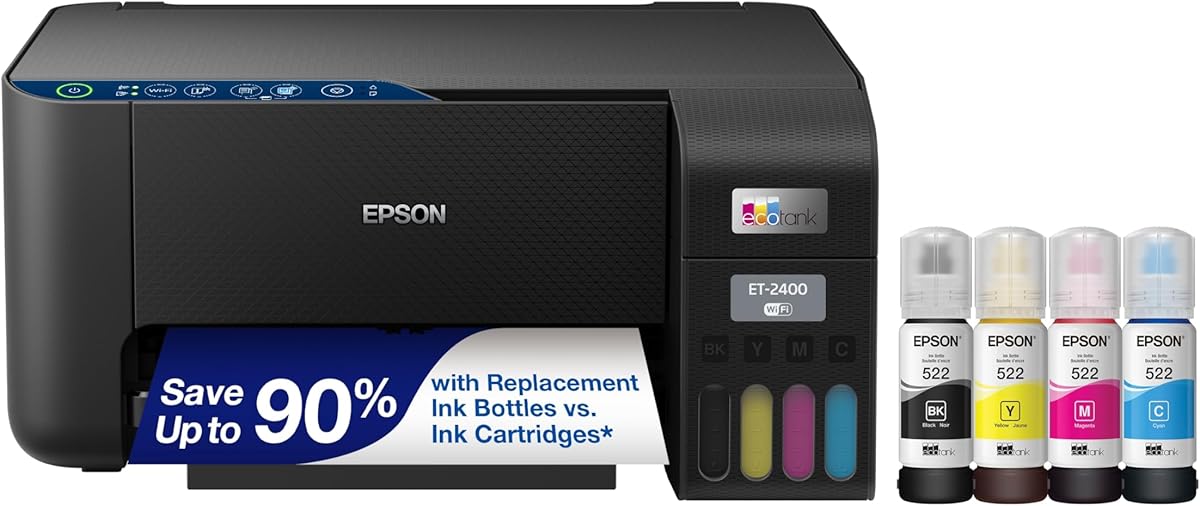
The Epson EcoTank ET-2400 is a wireless color all-in-one Supertank with a 4.0 rating. It combines refillable high-capacity ink tanks with printing, scanning, and copying, and Epson advertises up to 4,500 black-and-white pages or 7,200 color pages from one bottle set. That balance makes it a credible everyday choice for mixed document and color workloads.
We may earn a commission when you buy through this link, at no additional cost to you.
The included supply is stated to last up to two years, reducing the need to buy liquid ink immediately. EcoFit bottles and supersized tanks are designed to make the refill process easy and reduce the chance of ink bottle mix-ups. Epson says the cartridge-free configuration can also help reduce the volume of cartridge waste sent to landfills, which matters most to frequent printers.
Output quality is another strength. Micro Piezo Heat Free technology is described as producing sharp text plus colorful photos and graphics on virtually any paper type. Wireless operation allows the printer to serve users around a home or small office without a direct connection to each computer, while the built-in scanner and copier consolidate common document tasks.
The product information does not provide a screen size or ISO print speed, so comparisons with the ET-2803 and ET-2903 require attention to other details. A buyer who relies heavily on physical navigation may prefer a model with a clearly specified display, while a high-volume office may need more speed than the details here establish. Refill bottle cost and availability also remain important long-term considerations.
The ET-2400 is recommended for users who want wireless printing, generous color capacity, and refillable ink in a simple all-in-one package. It is especially suitable for families and home offices that regularly create color materials and want to avoid the repeated cartridge changes associated with smaller ink systems.
Up to 7,200 color pages makes the ET-2400 suitable for regular photo, chart, and school-project printing. The capacity is large enough to serve as a central household print device.
High-capacity tanks and Epson's EcoFit bottles keep the replenishment process visible and manageable. Users refill at the printer rather than replacing a separate cartridge for each color.
We may earn a commission when you buy through this link, at no additional cost to you.
This HP Smart Tank 5003 listing offers the same core hardware concept as the first-ranked model: an all-in-one refillable ink printer with wireless and mobile printing. It carries a 3.8 rating and advertises up to three years of included HP Ink, along with up to 6,000 black or color pages. The bottle-based system offers a familiar way to keep a household supplied with liquid ink.
We may earn a commission when you buy through this link, at no additional cost to you.
Printing, copying, and scanning are all supported, as are borderless prints and wireless connections. The physical design therefore covers more than text output: it can handle photographs, graphics, document reproduction, and mobile workflows. Refilling involves plugging bottles into the cartridge-free tanks and allowing them to drain, avoiding the need to squeeze liquid into a small reservoir.
Its advertised three-year allowance is the central selling point. For users who print regularly, starting with a substantial liquid-ink supply can make the printer more practical than a comparable cartridge model. The stated 6,000-page range offers reasonable capacity for mixed black and color workloads, while the included HP Ink is intended to simplify the initial setup.
The difficulty is distinguishing this listing from the other HP Smart Tank 5003 in the supplied data. Their core functions and page-yield claims are effectively the same, while the ratings differ. Buyers should review the current product configuration, included accessories, warranty terms, and seller listing to confirm that the variation they are considering provides the intended package.
This model is recommended for buyers who specifically want HP's mess-free tank system, borderless printing, and a generous initial ink allowance. If those priorities matter more than the highest customer rating or a larger physical display, it remains a capable home and small-office choice.
The advertised supply of up to three years and 6,000 pages reduces early refill pressure. It is a compelling reason to consider the printer for a home with recurring print demands.
Print, copy, scan, borderless output, and wireless functions cover a wide mix of household tasks. That consolidation reduces the need for separate peripherals in a shared workspace.
We may earn a commission when you buy through this link, at no additional cost to you.
The Epson EcoTank ET-2903 combines a 4.1 rating with a detailed set of home-productivity features, including 11 black and 6 color ISO pages per minute, a 100-sheet paper tray, a 1.44-inch color display, and a high-resolution flatbed scanner. It is one of the most thoroughly specified models in the guide and a particularly credible option for a busy family room or home office.
We may earn a commission when you buy through this link, at no additional cost to you.
The included liquid ink is advertised as sufficient for up to three years, with capacity to print up to 3,600 black or 6,500 color pages. Supersized tanks and uniquely keyed EcoFit bottles are designed to make refilling simple and prevent bottle mix-ups. Epson also states that each replacement set is equivalent to approximately 80 cartridges, demonstrating the lower replacement frequency of the tank system.
The printing specifications are comprehensive. A stated 5760 by 1440 resolution supports detailed photos and crisp text, while the color display and scanner improve on-device control. The 100-sheet tray is useful for families or small offices that do not want to reload paper constantly. Wireless and mobile printing work through the Epson Smart Panel app, Apple AirPrint, Mopria Print Service, and Mopria Scan.
Epson's Heat Free technology is described as using a permanent printhead intended to last for the printer's life. That is a notable ownership advantage for a high-volume buyer, although Epson still recommends genuine ink to maintain optimal quality and performance. The detailed specification set is excellent, but the model may be larger than a compact option, so desk or shelf space should be considered.
The ET-2903 is recommended for home users who want a large color screen, a useful paper tray, sophisticated wireless support, and a well-documented ink system. It bridges the gap between a straightforward family printer and a productivity-oriented office device, making it a versatile final recommendation in this guide.
The 1.44-inch color display is the largest explicitly stated screen among these selections. It supports convenient navigation and status checks for a shared household printer.
Stated speeds of 11 black and 6 color ISO pages per minute, with no warmup time, are useful for multi-page school projects, forms, and office documents.
We may earn a commission when you buy through this link, at no additional cost to you.
The right liquid-ink printer depends on how much you print, which functions you need, how you refill, and whether speed or a built-in screen matters most. Comparing the supplied specifications against your normal workflow is the best way to avoid paying for capabilities you will rarely use.
The amount of liquid ink supplied with a printer can determine how soon you need to buy replacement bottles. Canon advertises as many as 7,700 color pages from one set, while Epson models in the guide range from 6,500 to 7,500 color pages and HP's Smart Tank Plus 570 claims 8,000. These are maximum category figures rather than a promise of identical output in every document, so actual results will depend on what you print and the printer's settings.
A liquid-ink printer is only economical if refilling is manageable. HP Smart Tank models use plug-in bottles that drain into the tanks, while Epson EcoTank printers use keyed EcoFit bottles and high-capacity reservoirs. Canon MegaTank models also use refillable tanks. Look for a system that minimizes squeezing, reduces the chance of spills, and uses containers that are easy to identify by color.
Speed matters most when you print long reports, invoices, school assignments, or batches of forms. The Epson ET-5150 leads the listed models with up to 17 black and 9.5 color ISO pages per minute. The ET-2903 offers 11 black and 6 color pages per minute, while the ET-2800 is listed at 10 black ISO pages per minute. If you mostly print occasional notes, speed may matter less than refill cost and output quality.
All ten products in the guide support wireless use in some form. Epson models add app-based control and support for services such as AirPrint or Mopria, while HP models emphasize mobile and wireless printing. Wireless capability is particularly useful in shared homes, classrooms, and offices because the printer can accept jobs from several compatible devices without being physically connected to one computer.
Every model listed can print, copy, and scan, making a separate scanner unnecessary. The built-in flatbed scanner on the Epson models is useful for documents, photos, and reproductions. If your household only occasionally needs to copy or scan, the multi-function design still adds flexibility, but buyers should consider the controls, display, and document handling required for their usual tasks.
Epson highlights Micro Piezo Heat Free or heat-free technology for sharp text and colorful images, while the ET-2903 states a resolution of 5760 by 1440 dpi. HP promises sharper text and richer colors, and the Smart Tank Plus 570 supports borderless output. For photographs, compare resolution, borderless support, color display functionality, and the range of compatible media rather than relying on a single specification.
A built-in display can make copying, scanning, and setup easier for users who do not want to manage the printer from a phone or computer. The Canon G3270 has a 1.35-inch square LCD, and the Epson ET-2903 has a 1.44-inch color display. The Epson ET-4800 also includes a color display, although its exact size is not provided. Look for controls that are large enough for your intended users.
Paper tray size and printer footprint influence daily convenience. The Epson ET-2903 has a listed 100-sheet tray, which can reduce reloads for active homes and small offices. Other models do not provide tray capacity in the supplied information, so those details require verification. Measure the intended location, especially for a larger all-in-one, and consider how often you print multi-page documents or photos.
Begin by unboxing the printer, removing any packing material, filling each refillable tank with the correct liquid ink, and allowing the ink to reach the print mechanism as directed in the included guide. Match every bottle to its corresponding tank, keep the printhead area clear, and complete the setup process before placing the unit in its final position. Wireless models will also need a network connection and the appropriate printer software or app.
Use the printer's supported paper types and load the tray so the guides align correctly. For best results, select the appropriate media setting in the printing application, particularly for photographs or specialty paper. Clean the flatbed glass before copying or scanning, use the color display or app to preview pages when available, and allow scanned documents to finish before moving originals. The permanent or cartridge-free print systems reduce the need to replace the printhead itself.
Refill only when the tank level requires it, following the manufacturer's bottle and tank instructions. Epson explicitly recommends genuine Epson ink for optimal performance, while HP describes its Original HP Ink in the Smart Tank Plus 570 offering. Keep bottles sealed when not in use, wipe accidental spills promptly, and avoid leaving the print area exposed to dust. If output shows streaks, fading, or feeding problems, run the printer's cleaning and alignment utilities as directed and confirm that the tanks and nozzles are properly supplied.
A printer with liquid ink uses refillable tanks fed by ink bottles instead of small replaceable cartridges. The larger internal reservoirs allow users to print many pages before a refill is needed. These systems are especially useful for households, students, and offices that print regularly and want to avoid repeated cartridge changes.
They can be, particularly for frequent users, because high-volume bottle refills generally replace many small cartridges. Actual cost depends on the printer, the colors you use, page coverage, and the price of replacement liquid ink. Compare the manufacturer's stated page yields with the amount you realistically print rather than relying only on the cost of one bottle.
The included amounts vary by model. The guide includes claims of up to two years of ink for several Canon, Epson, and HP models and up to three years for the Epson ET-2903 and HP Smart Tank 5003 listings. Published page yields range from 3,600 to 8,000 color pages, depending on the printer. These are maximum estimates rather than guaranteed results for every print job.
Every model in this guide is described as supporting wireless printing. Some also emphasize app-based control, Apple AirPrint, Mopria, voice-activated printing, or mobile scanning. Check the current listing and your device ecosystem to confirm that the specific wireless functions you need are supported.
Yes, several models in this guide explicitly support strong color photos and graphics. The Epson ET-2903 states a 5760 by 1440 resolution, the ET-4800 and ET-2803 emphasize sharp text and impressive color output, and HP's Smart Tank Plus 570 supports borderless printing. For consistently accurate photos, use compatible photo paper and select the proper media setting.
Compatibility is not guaranteed, and Epson warns that non-genuine ink could cause damage not covered by its limited warranty. Using the manufacturer's recommended ink is the safest way to protect print quality, reliability, and warranty coverage. It also helps ensure that the refill bottles and tank system operate as designed.
The Epson EcoTank Pro ET-5150 is the strongest office-focused option in the guide because it lists speeds of up to 17 black and 9.5 color ISO pages per minute, high-yield bottle sets, and a permanent PrecisionCore printhead. Smaller offices may prefer the ET-2903 for its 100-sheet tray and 1.44-inch color display, while very light users can save complexity with a basic Smart Tank or MegaTank model.
A display-equipped model is generally easier for shared users, children, and anyone who wants to copy or scan without a phone. App-controlled models can provide broader mobile and wireless options, especially on Epson models with AirPrint and Mopria support. The best choice depends on the devices your household or office already uses and how often on-device controls will be needed.
The Canon MegaTank G3270 stands out as the Best Budget pick because it combines a generous stated color yield, wireless all-in-one functions, and a useful 1.35-inch LCD. The HP Smart Tank 5003 earns the Editor's Choice position for its three-year ink allowance, mess-free refills, borderless output, and balanced home-office functions. For users who need more speed and high-volume refills, the Epson EcoTank Pro ET-5150 is the Best Premium option.
Prioritize the factors that will affect your normal workload rather than choosing only on the largest page-yield claim. Regular color printers should examine included ink, refill-bottle convenience, borderless support, and wireless methods. Busy offices should also compare ISO print speeds, paper capacity, and the availability of an on-device display. Home users who rarely print can select a simpler all-in-one without sacrificing the long-term convenience of refillable tanks.
Before making a final decision, verify the current product configuration, included accessories, ink specifications, warranty terms, and replacement-bottle availability. Product listings, promotions, and prices change, so the final purchase page may differ from the information summarized in this November 2026 guide.