
atolla 7-Port USB 3.2 Hub
4.6Editor score
Seven 10Gbps data ports
Dedicated smart-charging port
Individual port power switches
USB-C and USB-A cable
Our Powered USB Hub guide compares ten options by data speed, port count, charging support, power delivery, controls, and compatibility.
A powered USB hub expands a computer's available connections while providing dedicated electrical support for demanding peripherals. The right model can simplify a crowded desk, support several storage devices, charge phones or tablets, and provide more control over connected equipment than an ordinary unpowered splitter.
This guide compares ten powered USB hubs based on the supplied specifications, including data-transfer generation, total and dedicated ports, included adapters, per-port controls, charging capabilities, operating-system support, and intended desktop or workstation use. It also highlights important limitations, particularly shared bandwidth and charging-port behavior.
Each review explains who the product is best suited for and where its design makes the most sense. The picks range from compact four-port models to broad ten-port workspaces and newer USB-C options. Product ratings and availability can change, as can marketplace pricing, so readers should verify current details before purchasing.
4.6Editor score
4.3Editor score

4.6Editor score
The table below compares all ten hubs by their core design, connection types, power provisions, and practical strengths, making it easier to identify the most suitable option for a compact desk, storage-heavy workstation, or charging-focused setup.


The TP-Link UH720 carries a 4.5 rating and offers one of the most balanced feature sets in this guide. Its principal attraction is the combination of seven USB 3.0 data ports and two additional smart-charging ports, giving users nine usable connections without relying on a laptop's increasingly limited built-in interfaces.
We may earn a commission when you buy through this link, at no additional cost to you.
Data transfer is specified at up to 5Gbps, making the hub appropriate for keyboards, mice, printers, card readers, and conventional external storage. The two charging ports can deliver up to 2.4A and use TP-Link's charging technology to identify connected devices. A 12V, 4A adapter supplies the hub, while the enclosure includes overheat, overload, overvoltage, and short-circuit protections.
Its trade-offs are mostly relevant to demanding buyers. The data side is limited to the USB 3.0 generation rather than the newer 10Gbps options, and it does not offer the per-port switches found on several competing products. The supplied information also notes that actual transmission speed depends on the connected device and its settings.
This is a strong general recommendation for a home or office setup that needs many dependable connections and a little charging flexibility. It is especially useful for older computers that benefit from a powered, backward-compatible expansion solution. Users who routinely move large files between 10Gbps drives or need granular port control should compare the faster atolla and intpw alternatives.
The mix of seven data ports and two charging ports is practical for workstations that need peripherals, storage, and a phone connected at once. The dedicated charging outputs also reduce pressure on the data-port count.
Multiple protection mechanisms and a surge protector support stable operation when several devices are attached. The supplied 12V, 4A adapter provides meaningful capacity for a hub of this size.
We may earn a commission when you buy through this link, at no additional cost to you.
This atolla hub has a 4.6 rating and combines seven USB 3.0 data connections with one dedicated charging port. It is a flexible choice for users who want more than a simple splitter without moving into the 10Gbps hub category.
We may earn a commission when you buy through this link, at no additional cost to you.
Individual on-and-off switches let users control data ports independently, reducing the need to disconnect peripherals physically. The dedicated charging output can supply up to 2.4A through the included 5V, 4A adapter. Data transfers reach up to 5Gbps, and compatibility extends across modern and legacy Windows versions, macOS, and Linux.
The main limitation is that only one charging port is available, so it cannot serve as a multi-device charging station. Its 5Gbps data specification also makes it less attractive for users who routinely operate multiple high-speed external drives. The 100-centimeter host cable and 120-centimeter power cord nevertheless provide useful placement flexibility.
This model is a strong fit for an organized desk where each connected device should have a dedicated physical control. It works well for creative offices, repair benches, and home setups where users regularly attach and detach drives, scanners, or input devices. For simultaneous high-speed storage, the newer atolla 7-Port USB 3.2 model offers a higher ceiling.
Separate switches make it easy to isolate one peripheral without disrupting the others. The design is especially helpful when troubleshooting a device or reducing unnecessary standby activity.
The lengthy host and power cables help position the hub near peripherals rather than forcing equipment to remain close to the computer. That can produce a cleaner, more accessible desktop.
We may earn a commission when you buy through this link, at no additional cost to you.
The SABRENT HB-UMP3 has a 4.5 rating and focuses on the essentials in a compact four-port format. It adds USB 3.0 data capacity to a compatible computer and gives each connection its own illuminated power switch.
We may earn a commission when you buy through this link, at no additional cost to you.
Transfer rates reach up to 5Gbps, while older USB 2.0 and USB 1.1 devices remain supported. The included 2.5A power adapter supplies dedicated power, and the hub supports plug-and-play setup, hot swapping, and backward compatibility. Its thin, lightweight enclosure is intended to save desk space and remain convenient for travel.
Unlike many competing models, it does not include a dedicated charging output. Consequently, this hub is best viewed as a data-focused peripheral expander rather than a combined charging and connectivity solution. With only four ports, it also serves a smaller collection of accessories than the ten-port and eleven-port alternatives.
Buyers should choose this model for a laptop that needs a few extra full-size USB connections or for a compact workspace where desk area matters. It is a particularly sensible travel companion for users who routinely need a mouse, keyboard, flash drive, and card reader. Those requiring phone charging or broader expansion should look toward the atolla four-port model.
The four-port format adds useful capacity without the visual and spatial bulk of a larger desktop hub. It suits travel and hot-desking as well as permanent desk use.
Each port's LED and switch make active connections easy to identify. This simplifies everyday use and can help narrow down a connectivity problem.
We may earn a commission when you buy through this link, at no additional cost to you.
The SABRENT HB-BU10 carries a 4.5 rating and is built for users who need more data ports than a typical laptop can provide. It expands one USB 3.0 connection into ten data ports and includes a substantial 60W, 12V, 5A adapter.
We may earn a commission when you buy through this link, at no additional cost to you.
Every port has an individual power switch and blue status LED. This makes it easy to see which devices are active and selectively power them down without removing cables. The hub supports up to 5Gbps data transfer, works with Windows, macOS, and Linux, and requires no driver installation. Backward compatibility allows older peripherals to remain connected.
The package includes the power adapter, a USB 3.0 cable, and a user manual, so the core setup is complete. A limitation is that the hub does not list a dedicated smart-charging port, and all ten data connections ultimately rely on one upstream USB 3.0 link. The wide port count can therefore look more impressive than sustained simultaneous throughput.
This is an appropriate choice for shared workstations, editing desks, and offices with numerous peripherals. It can accommodate keyboards, mice, printers, card readers, phones in data mode, and hard drives without continuously swapping connections. Buyers with intensive multi-drive workloads may prefer a newer 10Gbps hub, while mobile-device users may want a model with dedicated charging.
Ten ports provide room for a broad permanent accessory setup. The result is a more settled desktop with fewer repeated connection changes.
The listed 60W adapter offers meaningful headroom for numerous connected peripherals. Individual port controls also help avoid leaving unused equipment powered unnecessarily.
We may earn a commission when you buy through this link, at no additional cost to you.
This four-port atolla hub has a 4.6 rating and delivers a useful combination of data expansion, charging, and physical port controls. It expands one USB 3.0 connection into four data ports and adds a separate charging port capable of supplying up to 2.4A.
We may earn a commission when you buy through this link, at no additional cost to you.
Data transfers reach up to 5Gbps, making the hub suitable for typical external storage and everyday peripherals. Four illuminated on-and-off switches provide direct control of each data connection. The included 5V, 3A power adapter supports the hub, and the product supports plug-and-play operation, hot swapping, Windows, macOS, and Linux.
The compact glossy enclosure includes a 65-centimeter host cord, giving users more placement freedom than a very short fixed cable would. However, the 5Gbps generation means it cannot exploit the full speed of 10Gbps storage. Its four data ports also place a clear ceiling on how many accessories can remain attached.
This is the most balanced budget-oriented recommendation in the guide because it includes a charging function without sacrificing individual switches. It suits students, travelers, and home-office users who want a modest number of reliable ports. Users working with faster external SSDs should examine the 10Gbps atolla option instead.
A dedicated power-only output lets a phone or tablet charge while the remaining data ports continue handling peripherals. This is useful in mixed-use laptop setups.
Illuminated individual switches make port status visible and reduce unnecessary physical cable handling. The short, sturdy enclosure is easier to position on a smaller desk.
We may earn a commission when you buy through this link, at no additional cost to you.
The UGREEN 7-in-1 hub has a 4.1 rating and stands out for its mix of five USB-A and two USB-C data connections. It is designed for USB-A host computers and combines each port with an individual on-and-off switch.
We may earn a commission when you buy through this link, at no additional cost to you.
All seven data ports share one upstream connection with a maximum transfer rate of 5Gbps. A single active transfer can reach that ceiling, but simultaneous activity divides available bandwidth. The included 24W adapter helps maintain reliable operation with several peripherals, although available power and output per port can fall as more devices are connected.
A one-meter host cable provides practical positioning for desktop towers, laptop stands, and under-desk arrangements. The hub does not provide charging to the host laptop, and the listed specifications do not identify a dedicated phone-charging output. Its 4.1 rating is also lower than those of most alternatives in this comparison.
UGREEN's model is worth considering when USB-C peripherals are part of the setup but the computer still uses USB-A. It can connect keyboards, mice, printers, flash drives, solid-state drives, and hard drives. Buyers seeking the newest connector standard or faster sustained transfer should not mistake the two USB-C data ports for 10Gbps connections.
Two USB-C data ports reduce the need for adapters when using modern flash drives or other compact peripherals. Five USB-A ports preserve compatibility with the equipment most offices already uses.
The seven data ports do not each receive an independent 5Gbps channel. Heavy concurrent use will divide the upstream bandwidth, so the hub is best suited to varied but not extreme simultaneous workloads.
We may earn a commission when you buy through this link, at no additional cost to you.
The Wenter 11-port hub has a 4.4 rating and is built for users who want a very large collection of USB connections. Ten USB 3.0 data ports are joined by one dedicated smart-charging port, and every data connection has an LED and on-and-off switch.
We may earn a commission when you buy through this link, at no additional cost to you.
Data transfer is specified at up to 5Gbps. The included 12V, 3A power adapter and dedicated charging output can deliver up to 2.4A for a compatible phone or tablet. Plug-and-play operation, hot swapping, and support for Windows, macOS, Linux, and legacy USB devices broaden the hub's practical appeal.
Cable placement is another strength, with a listed three-foot host cable and power cord of roughly four or five feet depending on the package configuration described in the supplied listing. The broad port count can require a sizeable spot on a desk, however, and every data port still shares the host connection.
This hub is a practical choice for shared offices, laboratories, classrooms, and desks with several legacy peripherals. It handles a mixture of data and charging duties without requiring two separate boxes. Users who need maximum data speed should consider a 10Gbps design, while those with limited desk space may prefer a four- or seven-port model.
Ten data ports and a dedicated charging outlet support broad, permanent accessory arrangements. This reduces the frequency of unplugging and reconnecting equipment.
The combination of LEDs and individual switches makes active connections easy to review. It also allows users to shut down an unused port without disturbing the rest of the hub.
We may earn a commission when you buy through this link, at no additional cost to you.
The SABRENT HB-B7C3 has a 4.6 rating and offers one of the strongest combinations of data expansion and dedicated charging. Seven USB 3.0 data ports are supplemented by three charging ports within a 60W-powered enclosure.
We may earn a commission when you buy through this link, at no additional cost to you.
The data ports support transfer rates of up to 5Gbps, while each charging port can deliver up to 2.4A after auto-detecting the connected device. Every port has a power switch and LED indicator, making it possible to control connected equipment and check its status. The 60W, 12V, 5A adapter is designed to support a full complement of attached devices.
The hub works with Windows, macOS, and Linux without driver installation, and its mirrored enclosure is designed to fit a range of setups. Its limitations are the shared 5Gbps upstream connection and the fact that the three charging ports are not interchangeable with the seven data ports. It is also a large desktop object compared with the smaller four-port designs.
This SABRENT is a premium recommendation for users who routinely need both peripherals and mobile-device charging in one hub. It fits reception desks, creative workspaces, and shared offices particularly well. Buyers focused on maximum data throughput should compare the newer atolla 10Gbps hub, while travelers may prefer a more compact unit.
The three charging ports reduce clutter by keeping phone and tablet power connections together with data accessories. Smart detection helps deliver suitable output to connected devices.
Individual switches and status lights give a clear view across all ten connections. This is helpful in fixed setups where devices are added, removed, and diagnosed regularly.
We may earn a commission when you buy through this link, at no additional cost to you.
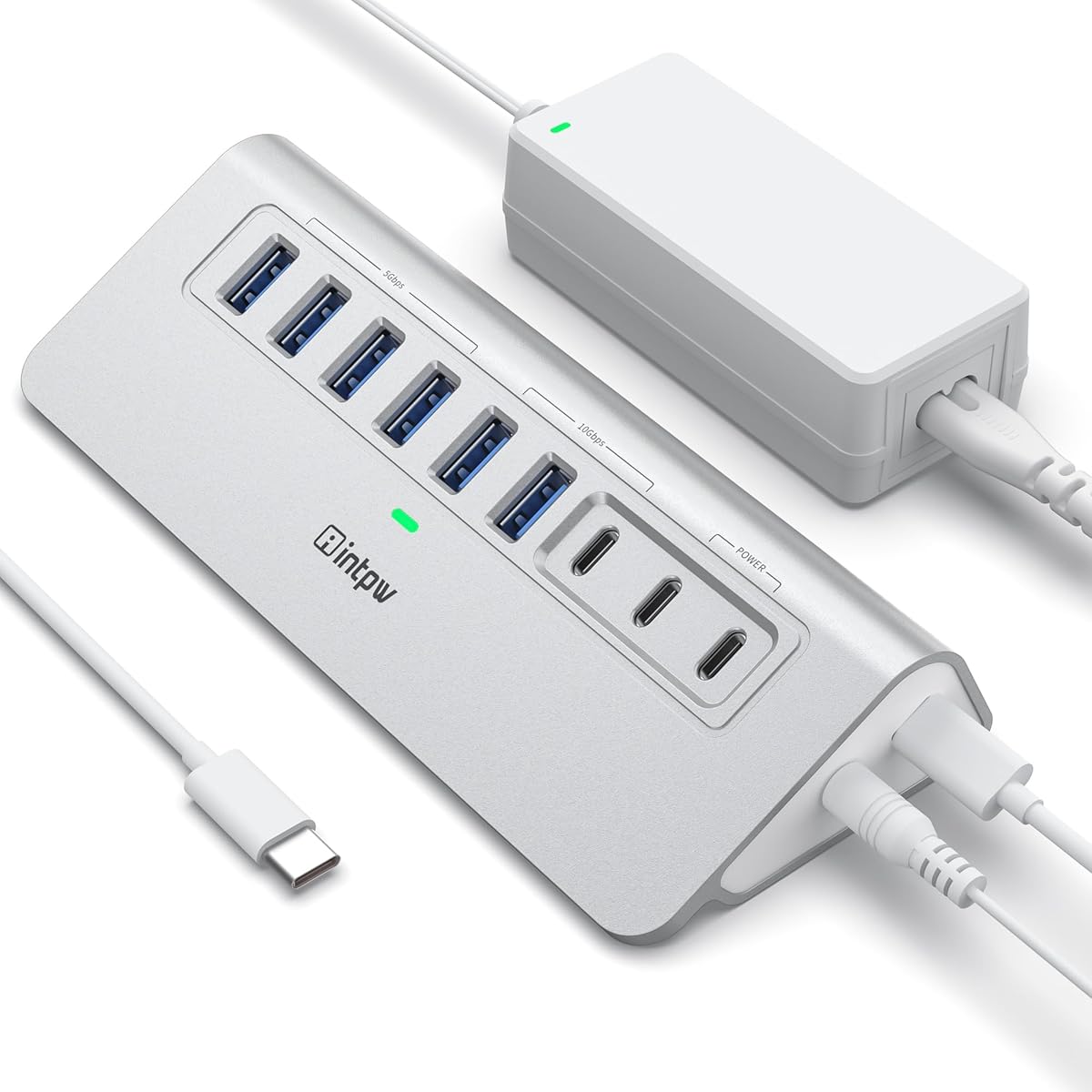
The intpw 9-port hub has a 4.3 rating and is the most varied connector design in the guide. It combines one USB-C 3.2 port and two USB-A 3.2 ports at 10Gbps with four USB-A 3.0 ports at 5Gbps, plus two USB-C Power Delivery charging ports.
We may earn a commission when you buy through this link, at no additional cost to you.
The data layout serves both modern and legacy peripherals while the 65W adapter supports stable operation. The two charging outputs are specified at 45W each for compatible USB-C devices, but they do not carry data. The included USB-C to USB-C cable supports direct connection to modern laptops and desktops, and the host is intended for USB-C computers.
Important restrictions apply. The hub does not support video output, is not recommended for charging computers or other high-power devices, and should not be used with multiple SSDs simultaneously. The product also advises against multiple removable drives at once. Its angled one-piece aluminum enclosure is designed to make plugging and unplugging easier, while a surge protector and safeguards against overload, overvoltage, overcurrent, short circuit, and overcharge are listed.
This is a strong recommendation for a USB-C workstation that needs a mixture of 10Gbps and 5Gbps peripherals alongside phone or tablet charging. It is less appropriate for display setups, laptop charging through the hub, or intensive multi-drive workflows. Buyers who only need simple data expansion can find a more straightforward five-generation design.
Three 10Gbps ports support fast external storage and demanding peripherals, while four 5Gbps ports handle conventional accessories. This mix offers flexibility without forcing every device onto one connection type.
Two dedicated USB-C charging ports can provide up to 45W to compatible devices. Because they do not support data transfer, they function as focused charging connections rather than universal USB-C ports.
The angled enclosure, included USB-C cable, and modern connector mix suit a contemporary desk. Compatibility still depends on the host having the appropriate USB-C connection and adequate power.
We may earn a commission when you buy through this link, at no additional cost to you.
The atolla 7-Port USB 3.2 has a 4.6 rating and distinguishes itself by assigning 10Gbps capability to all seven data ports. That consistency avoids mixing slower and faster data connections, making the model attractive for external SSDs, high-speed drives, and 4K webcams.
We may earn a commission when you buy through this link, at no additional cost to you.
A separate smart-charging port adds a convenient place to power a phone or tablet, while the included 20W adapter powers the full hub. Individual switches and bright LED indicators allow unused devices to be powered down without physical disconnection. Built-in overcurrent and surge protection is intended to improve reliability when multiple external drives are connected.
The built-in three-foot cable combines USB-C and USB-A connector options, reducing the need for a separate adapter when moving between modern laptops and older desktops. Even with 10Gbps ports, all seven data connections share the upstream host link, and the 20W power supply is less substantial than the adapters offered with several larger hubs. The listing also notes that an original device charger may charge faster.
This is a premium choice for a desk that repeatedly connects fast storage, webcams, and other high-bandwidth peripherals. Its uniform port speed is easier to plan around than a mixed layout. Users who routinely connect several power-hungry drives at once should review the intpw model's 65W adapter, while those seeking more charging outputs may favor the SABRENT three-charger hub.
Every data connection supports the same high-speed generation. Users can move between peripherals without checking which port offers the faster specification.
The integrated USB-C and USB-A host connector supports a wider range of computers. It is especially convenient for users who alternate between a current laptop and an older desktop.
Overcurrent and surge safeguards add reassurance in setups with multiple drives. The protective features are particularly relevant when several external devices draw power simultaneously.
We may earn a commission when you buy through this link, at no additional cost to you.
The right powered USB hub depends on the number and type of peripherals, the expected transfer workload, charging needs, available ports, and the amount of power your equipment draws.
Choose enough data ports for your normal workflow without paying for connections you will never use.
Match the hub generation to your storage and peripherals, not merely to the number printed on the box.
Evaluate simultaneous workloads, not just the speed printed beside one individual port.
Prioritize the charging protocol, output, and data status of each port before assuming a USB-C label guarantees universal use.
Use the specified power adapter and check its wattage and voltage against the hub requirements.
Individual switches are valuable for active desks and repair or testing environments.
Confirm the host connector and operating system before ordering, especially for older or specialized equipment.
Choose cable lengths that fit the desk layout without creating tangled or obstructive wiring.
Position the hub on a stable, ventilated surface and keep its power adapter connected to a suitable wall outlet. Connect the host cable to the computer first, then attach the power supply if the hub requires the adapter for stable operation. Once the system recognizes the hub, connect devices to the appropriate data or charging ports and use the individual switches to manage individual connections.
When transferring files, use a compatible device and a high-quality USB 3.0 or newer cable, particularly for 10Gbps hubs. Avoid exceeding the limits of the computer or storage device, and remember that concurrent transfers share available bandwidth. Do not use multiple SSDs or removable drives simultaneously on the intpw model, and do not attempt video output through a hub that does not support it.
To maintain reliable performance, keep the power adapter and hub away from moisture, excessive heat, and crowded cable pathways. Disconnect external drives safely through the operating system before removing them, and use the port switches to reduce active draw when equipment is idle. If a device behaves unusually, isolate it by turning off its port and test another cable or computer before assuming the hub has failed.
A powered hub is useful when a computer cannot supply enough current for several connected devices. Keyboards, mice, and many card readers generally have modest requirements, but multiple external drives, high-power charging, and numerous accessories are more likely to need dedicated power. Even a small hub can make a setup more reliable when its adapter is appropriately sized.
A 5Gbps hub belongs to the USB 3.0 or USB 3.2 Gen 1 class, while a 10Gbps hub uses USB 3.2 Gen 2. The faster option can reduce transfer times with compatible SSDs, webcams, and other high-bandwidth devices. Actual performance still depends on the host, storage, cables, and whether several ports are active at the same time.
On many hubs, all data ports share the single upstream connection to the computer. One transfer may approach the advertised maximum, but simultaneous transfers divide the available bandwidth. Some hubs mix generations across individual ports, so check the port-by-port specifications rather than assuming every connector offers the same rate.
It depends on the hub. Most models in this guide are designed to power peripherals and provide separate charging outputs, not charge a computer. The intpw model explicitly states that it is not recommended for charging computers or other high-power devices. A USB-C hub with 45W charging ports may charge compatible phones and tablets, but that is not the same as laptop charging.
No. The intpw hub's two 45W USB-C charging ports are power-only and do not support data transfer. Other hubs may use USB-C for both data and charging. Always check the listing, since connector shape alone does not reveal whether a port carries data, video, or only electrical power.
The products featured here are described as plug-and-play and do not require drivers for the listed operating systems. That includes Windows, macOS, and Linux, with several models also supporting older Windows releases. Operating-system support can change with product revisions, so verify the current packaging and listing when purchasing.
That depends on the hub and workload. General powered hubs can support multiple drives, but shared bandwidth and the included adapter affect performance and stability. The intpw 3.2 model specifically advises against using multiple SSDs simultaneously and cautions against multiple removable drives. Review the manufacturer's guidance before connecting several storage devices.
The best length depends on where the hub and computer are located.
A short cable is convenient for travel, while a longer lead makes under-desk and desktop-tower placement easier.
The included cables across these products range from compact options to longer power and host leads.
Choose enough reach to organize peripherals without creating excess cable clutter.
The intpw 9-Port USB 3.2 stands out for the richest modern feature set, with three 10Gbps data connections, four 5Gbps connections, two high-power USB-C charging ports, and a 65W adapter. The atolla 7-Port USB 3.2 is a premium alternative for buyers who want every data port rated at 10Gbps, while the atolla four-port USB 3.0 is the most straightforward budget pick for basic expansion and charging.
Prioritize the workload before the port count. Match the data generation to your storage, verify whether charging ports are dedicated or shared, and ensure the included adapter has adequate capacity. Individual switches are especially helpful on busy desks, while shared upstream bandwidth should be considered whenever multiple drives or high-speed peripherals operate simultaneously.
Ratings, product configurations, and marketplace prices can change over time. Before ordering, confirm the current listing, host compatibility, included accessories, warranty terms, and any manufacturer restrictions. Those checks are especially important for hubs with specialized USB-C charging, video limitations, or advice against using several storage devices simultaneously.