
BENFEI USB C Hub 5-in-1
4.6Editor score
90W laptop pass-through
4K HDMI display support
10Gbps USB-A transfer
Our Power Delivery Hub guide compares charging speeds, display support, port layouts, data rates, portability, and compatibility to help you choose with
A power delivery hub turns one USB-C connection into a more useful workstation, combining charging, data transfer, display output, and peripheral connections in a compact adapter. The best model depends on your devices, desk setup, and the mix of speed, flexibility, and portability you actually need.
We compared all ten featured hubs by examining their power-delivery capabilities, port counts, supported data speeds, display functions, physical design, compatibility claims, and practical limitations. The list includes travel-sized adapters, laptop docks, and larger powered hubs for demanding peripheral setups.
Each review highlights the type of user best served by the product, along with its most useful features and trade-offs. Product ratings and specifications can change over time, and current prices vary, so readers should verify the latest listing details before making a purchase.
4.6Editor score

4.4Editor score

4.5Editor score
The comparison below covers the essential differences among these ten hubs, including charging approach, display support, data speed, expansion options, and portability.



The UGREEN Revodok Pro 6-in-1 is a balanced power delivery hub for users who want a laptop to handle charging, an external display, and several fast peripherals through one adapter. Its 4.4 rating reflects a versatile feature set, and the combination of 4K 60Hz HDMI, 100W-class pass-through charging, and four 10Gbps data ports gives it unusually broad utility for a compact hub.
We may earn a commission when you buy through this link, at no additional cost to you.
The most appealing feature is the balance between media and data connections. It includes two USB-C 3.2 Gen 2 ports and two USB-A 3.2 Gen 2 ports, allowing external storage, flash drives, keyboards, mice, and other accessories to coexist with a display connection. The HDMI output supports 4K at 60Hz, which is a meaningful advantage over many travel adapters limited to 4K at 30Hz.
Power delivery is designed to keep the host computer operating while connected to a charger. The supplied information refers to a 100W USB-C PD port and up to 85W of pass-through power, so the amount available depends on the host, charger, and power requirements. The aluminum housing, four-layer safety features, and status indicator are useful additions, although video functionality still depends on DisplayPort Alt Mode support in the connected computer.
This is the strongest general recommendation for a desk that mixes charging, external-display work, and high-speed peripherals. Choose it when you want more capability than a basic three-port adapter but prefer a compact one-cable solution over a large powered desktop dock. Users who do not need HDMI can find simpler options elsewhere in this list, while those seeking a much larger port inventory should consider the Gitfos model.
Connecting a compatible charger through the hub can reduce cable clutter while keeping the host connected to storage, input devices, and an external display. The available charging rate varies with the computer and power adapter, so check both devices' USB-C power requirements before installation.
The four 10Gbps ports are particularly useful for fast SSDs, flash drives, and other storage devices that can benefit from higher transfer rates. Because several ports share the hub's overall capabilities, sustained high-bandwidth use may be less effective than with a dedicated multiport dock.
We may earn a commission when you buy through this link, at no additional cost to you.
The UGREEN USB C Hub 4 Ports is a compact choice for people who primarily need to charge a computer while connecting data accessories. It carries a 4.3 rating and uses a small aluminum body listed at 4.1 by 1.5 by 0.5 inches and 50 grams, making it easy to include in a laptop bag without adding much bulk.
We may earn a commission when you buy through this link, at no additional cost to you.
Its defining feature is the dedicated USB-C PD port, which can support up to 95W charging for a compatible host laptop, tablet, or smartphone. Separate USB-C data ports support rates up to 10Gbps, while plug-and-play operation is listed for major desktop, mobile, and tablet operating systems. The broad device list includes popular MacBook, iPad, Surface, XPS, Galaxy, and iPhone models.
There is an important limitation: the data ports do not provide video output or deliver power to peripherals. That means this is not a display adapter, even though the term USB-C hub can sometimes be used loosely. It also does not include a charger or charging cable, so users need to account for those accessories separately and confirm that the host computer supports the necessary USB-C functions.
The UGREEN is best for travelers, students, and office workers who want a minimalist way to add fast data ports while maintaining host charging. It is a less appropriate choice for anyone expecting HDMI output, broad USB-A connectivity, or a powered desktop station. Compared with the larger UGREEN Revodok Pro, it wins on simplicity and size but gives up display support and USB-A options.
The dedicated PD input makes this hub straightforward for a mobile desk where the main goal is keeping a compatible computer powered. It is especially useful for users who already carry a separate adapter and need a small data-expansion accessory rather than a full workstation.
At only 50 grams, the hub is easy to overlook in a sleeve or tech pouch until needed. Its compact dimensions also make it suitable for shared workspaces where a full-size dock would be excessive.
We may earn a commission when you buy through this link, at no additional cost to you.
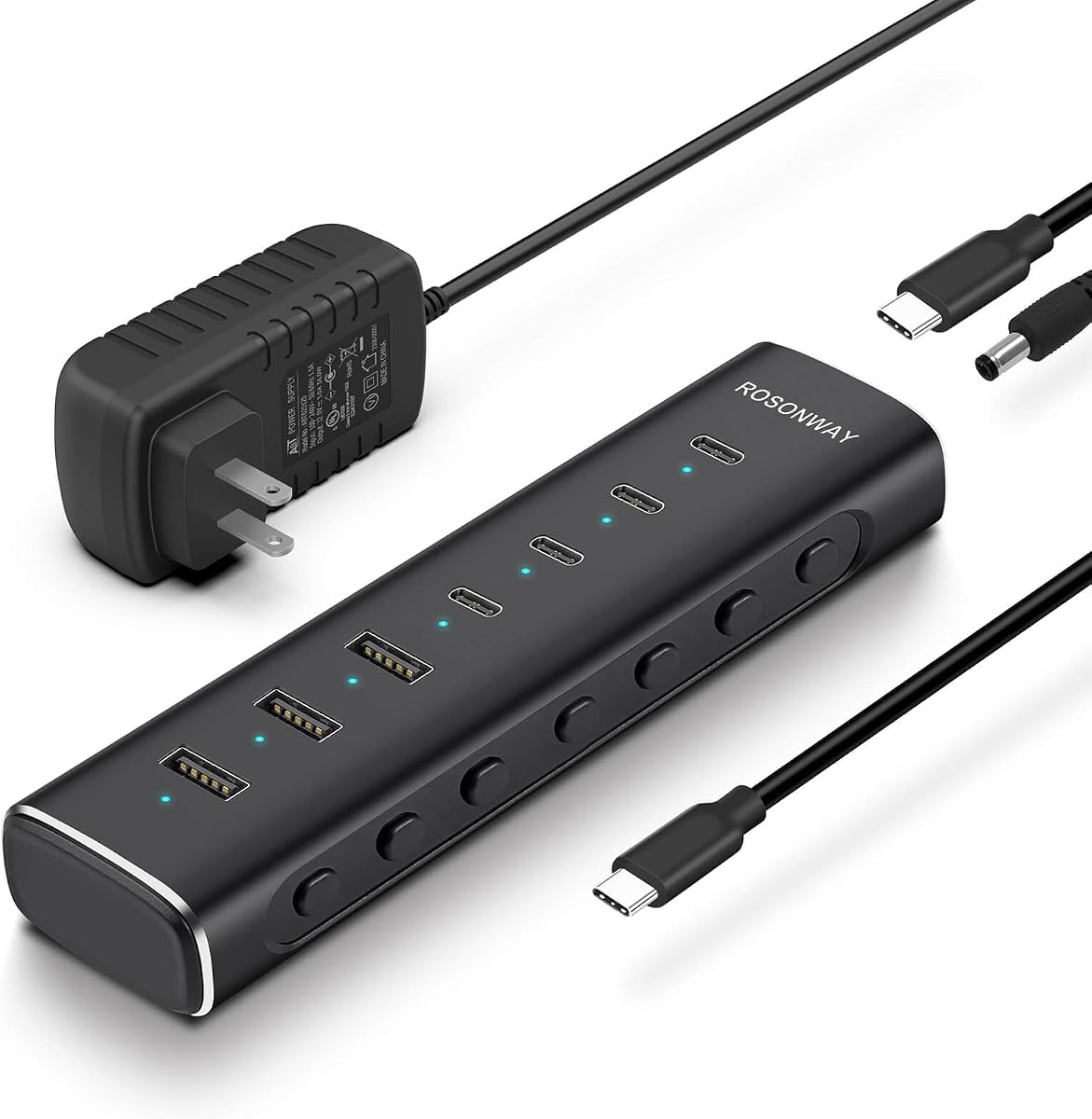
The Rosonway RSH-H7C4 is built for users who need to connect many data peripherals rather than simply add a display. Its 4.4 rating reflects a capable seven-port layout: four USB-C 3.2 ports and three USB-A 3.2 ports, all listed as supporting data rates up to 10Gbps. A 36W external adapter provides stable power for a mixed collection of devices.
We may earn a commission when you buy through this link, at no additional cost to you.
Individual electronic switches add unusual control for this category. Blue indicators show the operating status of each port, while a tap turns a port on and a two-second hold turns it off. That design can simplify power management when a user has several storage devices, controllers, adapters, or other peripherals connected and does not need every port active at once.
The hub is also thoughtfully arranged for portability. Its detachable 3.3-foot USB-C host cable can be removed for easier storage, and the aluminum construction is intended to help with heat dissipation. Built-in surge, over-voltage, and over-current protection adds reassurance. However, the USB-C ports provide data transfer and standard 1.5A charging only, while PD charging and DisplayPort Alt Mode are unsupported.
This model makes the most sense for a desktop with numerous data accessories or for a handheld gaming setup that benefits from dedicated port controls. It is less suitable for laptop charging or video expansion, and buyers may find a smaller unpowered hub more convenient for occasional use. Its main advantage is not raw port count alone, but the combination of per-port controls and included external power.
The per-port switches are valuable when a setup contains more devices than are needed at once. Turning off an unused drive or adapter can simplify reconnection and reduce unnecessary power draw without unplugging the entire hub.
Four USB-C and three USB-A ports accommodate both modern accessories and legacy peripherals. The mix is useful for desks where USB-A keyboards, receivers, and storage devices remain common alongside newer USB-C equipment.
We may earn a commission when you buy through this link, at no additional cost to you.
The Satechi 4-in-1 USB-C Hub is a refined, compact option for users who prefer an all-USB-C desk. Its 4.1 rating reflects a focused design with four USB-C 3.2 Gen 2 data ports, up to 100W power delivery, and a pocketable aluminum enclosure measuring 6 by 6 by 1.05 centimeters.
We may earn a commission when you buy through this link, at no additional cost to you.
Every data port supports rates up to 10Gbps, which makes the hub especially suitable for fast external storage and modern accessories that use USB-C. Pass-through charging provides up to 100W for the host device, helping maintain a stable connection during a workday. The enclosure has chamfered edges, while the braided cable and reinforced neck are designed for routine handling.
Compatibility is broad across MacBook, iPad, iMac, Lenovo Yoga, Microsoft Surface, Dell XPS, Pixelbook, HP Spectre, Razer Blade, and Huawei Matebook models, along with other USB-C devices. The trade-off is that the hub does not include a display output, and its four USB-C data ports may not suit a setup that still depends heavily on USB-A peripherals.
The Satechi is a strong recommendation for a polished, modern workspace built around USB-C storage, docks, and input devices. Buyers who need video should choose an HDMI model, while those who need a mix of legacy connectors should look for a USB-A option. Its premium appeal comes from the enclosure, compact proportions, high-speed ports, and two-year limited warranty rather than an unusually broad port selection.
Modern laptops and tablets increasingly use USB-C for data, charging, and docking, so an all-USB-C hub can create a cleaner setup. The four matching ports also reduce the need for separate adapters when most accessories share the same connector.
The small footprint and lightweight construction make the Satechi easy to move between a home office, meeting room, and shared workstation. The recessed cable connection helps maintain a tidy appearance when the hub is in use.
We may earn a commission when you buy through this link, at no additional cost to you.
The Belkin 100W 10Gbps Multiport USB-C Hub is a flexible four-port adapter for laptops, tablets, and PCs that need high-speed data expansion. It has a 4.2 rating, and its four USB-C 3.2 Gen 2 ports each support transfer speeds up to 10Gbps. Pass-through charging can deliver up to 100W to connected devices.
We may earn a commission when you buy through this link, at no additional cost to you.
A distinguishing capability is support for headphones, speakers, and audio interfaces through the USB-C hub connection. That makes it more appropriate for content creation, conferencing, and home production setups than hubs focused only on storage. It is also advertised for cameras, webcams, and video capture cards, with Fast Role Swap intended to reduce interruption or data loss when adding or removing a USB power source.
The slim, portable format keeps the hub practical for travel, and backward compatibility broadens the range of supported equipment. It does not offer HDMI, so users wanting to connect a monitor need to consider one of the display-equipped alternatives in this guide. The four identical USB-C ports also mean older USB-A accessories still require an adapter.
Belkin is a good match for users whose priorities are charging, fast data, and audio rather than video output. The 100W power delivery makes it suitable for many power-hungry laptops, although the host and charger must support the required USB-C power standard. Its feature set is less visually flexible than that of a multiport display dock, but it remains focused and useful for compatible USB-C peripherals.
Supporting headphones, speakers, and audio interfaces broadens the hub beyond basic storage expansion. This can reduce desk clutter for users who regularly handle calls, media playback, or lightweight production workflows.
Pass-through power allows the host computer to remain charged while peripherals are connected. Fast Role Swap is designed to make changes to the power connection more stable, which is useful when swapping equipment on a busy desk.
We may earn a commission when you buy through this link, at no additional cost to you.
The SABRENT HB-3A4C is a seven-port powered hub aimed at users who want broad peripheral expansion and individual control. Its 4.1 rating accompanies a layout of three USB-A and four USB-C ports, each supporting 5Gbps data as USB 3.2 Gen 1×1. A 48W power adapter is included for more stable operation with multiple devices.
We may earn a commission when you buy through this link, at no additional cost to you.
The most useful feature is the dedicated on/off switch and white LED indicator at every port. This gives users direct control over individual connections rather than requiring the entire hub to be disconnected. The hub is listed for compatibility with Mac, PC, Steam Deck, and ROG Ally, making it a plausible fit for gaming setups that need room for controllers, drives, and other accessories.
Three USB-C ports deliver 5V/900mA, while the fourth supports up to 20W PD for charging compatible accessories. This is useful for smaller devices, but it should not be confused with a full laptop power-delivery solution. The 5Gbps interface is adequate for many accessories and moderate storage use, though it is slower than the 10Gbps options elsewhere in the list.
Choose the SABRENT when port count, per-device control, and gaming-device compatibility matter most. It is less appropriate for large-file workflows that benefit from 10Gbps, and anyone wanting to charge a notebook while working should look for a model explicitly designed for host power delivery. The aluminum housing and included power supply make it better suited to a stationary desk than a minimal travel kit.
Individual switches make it easy to isolate one device without disrupting the rest of the setup. That is particularly handy for shared offices, gaming stations, and desks with frequently connected external drives.
The combination of three USB-A and four USB-C ports covers both current and legacy accessories. A powered architecture also helps maintain consistent operation when several devices draw power at the same time.
We may earn a commission when you buy through this link, at no additional cost to you.
The Gitfos 15-in-1 USB Hub is the largest and most versatile port expander in this guide. It carries a 4.4 rating and combines a 100W USB-C PD input, USB-C charging ports, several 10Gbps data connections, multiple 5Gbps USB-A data ports, and two USB-A ports that can also provide low-power charging.
We may earn a commission when you buy through this link, at no additional cost to you.
Its broad port inventory is intended to replace several adapters at once. The 100W USB-C PD connection can charge a compatible host while the hub operates, and the 10Gbps data ports are intended for fast storage transfers. Two additional USB-C charging ports can provide up to 45W individually or up to 20W when both are used, making the hub useful for phones, tablets, and other smaller devices.
This is a powered desktop hub rather than a travel adapter. The included 65W DC power adapter must be connected for operation, and the host cable is detachable. The angled trapezoidal aluminum body improves visibility and heat dissipation while non-slip feet help keep it stable. Users should note that the two USB-C charging ports are not recommended for computers and that no hub port supports video output.
The Gitfos is best for IT professionals, photographers, editors, remote workers, and students who want an expansive fixed-desk connection hub. It is less attractive for a minimalist laptop bag, and any user requiring an external monitor should choose an HDMI-equipped model. Its advantage is unmistakable: the highest number of connection positions in a housing designed to keep many devices organized.
Fifteen positions can consolidate storage, input devices, charging leads, and specialty peripherals that would otherwise occupy several adapters. The broad layout can save desk space, although the hub itself is better suited to a permanent setup than a minimalist mobile kit.
Separate host charging, USB-C charging, and USB-A charging options support several device types. The included 65W adapter is essential because the hub will not operate without it, so buyers should plan where it will sit and how its power cable will reach an outlet.
We may earn a commission when you buy through this link, at no additional cost to you.
The UGREEN USB C Hub 5-in-1 is a streamlined adapter for people who need an external display, charging, and a few USB-A accessories. It holds a 4.6 rating, one of the strongest in this collection, and its five-port arrangement includes 4K HDMI, a 100W USB-C PD port, one 5Gbps USB-A data port, and two 480Mbps USB-A ports.
We may earn a commission when you buy through this link, at no additional cost to you.
The high-speed USB-A port suits peripherals such as a fast external SSD or modern flash drive, while the two slower ports are better suited to keyboards, mice, and simple adapters. The 100W power-delivery connection is designed to keep a compatible laptop running while the display and peripherals are connected. This makes the hub a practical central point for a compact desk.
The main limitation is that it has no USB-C data port and lacks the 10Gbps transfer capability offered by several competing models. Users with USB-C storage or accessories may need an adapter, while those transferring very large files between modern drives may prefer a faster port. Display support also depends on the host computer's ability to output video through USB-C.
This UGREEN is a strong pick for a simple productivity setup requiring one monitor and several basic accessories. It avoids the complexity of a larger powered dock while still combining the essential functions of charging, display output, and peripheral expansion. It is less suitable for a multi-monitor workstation, high-end gaming setup, or a desk that depends entirely on USB-C accessories.
The combination of HDMI and 100W power delivery handles two major desk requirements in one adapter. It is particularly useful for extending a laptop to a single external display without dedicating separate charging and video adapters.
One 5Gbps port handles faster storage, while two 480Mbps ports are sufficient for common low-bandwidth accessories. Matching each device to the appropriate port avoids expecting maximum speed from every connection.
We may earn a commission when you buy through this link, at no additional cost to you.
The BENFEI USB C Hub 5-in-1 delivers the essential laptop-adapter functions in a compact package and carries a 4.6 rating. It includes a 4K HDMI output, USB-C pass-through charging, and three USB-A data ports. The 20-centimeter integrated cable uses a soft silicone-woven design intended to resist knots and withstand repeated bending.
We may earn a commission when you buy through this link, at no additional cost to you.
Its USB-C power-delivery connection can provide up to 90W to a compatible host while reserving 10W for hub operations. The HDMI output supports resolutions up to 4K at 30Hz, which is suitable for office documents, web content, and general media work. One USB-A 3.2 port supports transfer rates up to 10Gbps, while the other two are 480Mbps USB 2.0 ports.
This is an efficient pick for a laptop user who wants one adapter for charging, a single display, and several accessories. Its 18-month warranty and stated commitment to customer support add confidence. The trade-offs are the 30Hz refresh rate, which is less ideal for high-motion gaming, and the absence of a dedicated USB-C data port for modern accessories.
The BENFEI stands out as a value-focused general-purpose hub because it does not ask users to choose between charging, display output, and basic USB expansion. It is best for work, study, and general productivity rather than gaming, color-critical video workflows, or heavily shared multi-display desks. The host's USB-C port must support DisplayPort Alt Mode to use the HDMI output.
The hub combines three needs that commonly require separate accessories: host charging, external display output, and USB-A expansion. This makes it particularly convenient for students, travelers, and office workers who need a dependable one-cable solution.
The short silicone-woven cable is designed to bend without developing sharp kinks. Its compact integrated form also removes the need to manage a separate detachable host lead, though users with a protective case may need to check connector clearance.
We may earn a commission when you buy through this link, at no additional cost to you.
The Belkin USB-C Hub 5-Port is a well-rounded travel adapter for users who need fast data, 4K video, and host charging without carrying a full desktop dock. Its 4.5 rating reflects a capable five-port layout, and it includes HDMI 2.0 output at up to 4K 60Hz plus a dedicated USB-C port that can charge and transfer data at the same time.
We may earn a commission when you buy through this link, at no additional cost to you.
The hub's 100W power delivery is intended to keep a demanding laptop operating while the display and accessories remain connected. Data transfer reaches up to 10Gbps, which is useful for portable SSDs and moving large media files. Unlike older compact adapters limited to 4K 30Hz, the 60Hz capability is a meaningful improvement for a smoother desktop experience.
Its slim, lightweight construction suits travel, school, and shared work environments. The housing uses 75% post-consumer recycled materials, according to the supplied product information, and Belkin provides two-year coverage. Its five-point safety system addresses overload, overcurrent, over-temperature, short-circuit, and material-related risks. The dedicated USB-C port shares 12W among the hub's USB-C outputs.
The Belkin is a good choice for a modern all-USB-C mobile setup that mainly needs an external display and fast accessories. It is less appropriate for users with legacy USB-A peripherals because it lacks USB-A data ports, and any plan involving multiple USB-C charging devices should account for the shared 12W allocation. Overall, it balances portability, media quality, and charging better than a basic three-port adapter.
HDMI 2.0 and 4K 60Hz support make the hub suitable for a productive mobile workspace with an external monitor. The higher refresh rate also produces smoother movement than a 4K 30Hz connection.
A dedicated 2-in-1 USB-C connection can handle charging and data simultaneously, reducing the need for a separate data adapter. Its 12W shared output is modest, so it is best understood as an accessory connection rather than a multi-device charging station.
We may earn a commission when you buy through this link, at no additional cost to you.
The right power delivery hub depends on the ports your devices use, the charging and display functions you need, and whether portability or maximum expansion matters more. Reviewing these factors before buying can prevent an expensive compatibility mistake.
A useful power delivery hub should identify whether its charging input is intended for the computer, peripherals, or both. The featured products range from a 100W host connection on the UGREEN Revodok Pro to hubs with lower accessory charging levels, and some provide no host power delivery at all. Check the computer's power requirements, the wall adapter's output, and the cable used between the hub and host.
HDMI output turns a USB-C hub into a useful laptop display adapter, but the advertised resolution alone is not the whole story. UGREEN Revodok Pro and the Belkin 5-Port support 4K at 60Hz, while the BENFEI model supports 4K at 30Hz. Hosts also need compatible USB-C video functionality, commonly provided through DisplayPort Alt Mode.
Data speed matters most when moving files to external SSDs, flash drives, or card readers. Several models provide 10Gbps USB-C or USB-A ports, while the SABRENT uses 5Gbps throughout and the UGREEN 5-in-1 includes one 5Gbps port with two 480Mbps ports. A higher headline rate does not guarantee that every connected device will operate at that speed.
A large port count is not automatically better if the connectors do not match the user's equipment. The Gitfos offers 15 positions, the Rosonway and SABRENT provide seven each, and smaller hubs offer four or five. USB-A remains essential for many keyboards, mice, and legacy drives, while all-USB-C layouts suit newer laptops and compatible accessories.
Some hubs draw all necessary power from the host, while larger models require an included AC adapter. The Rosonway includes a 36W adapter, the SABRENT a 48W adapter, and the Gitfos a 65W adapter. The Gitfos will not operate without its power adapter. Powered designs can support more devices and sustained peripherals, but they take more desk space and are less convenient for travel.
Dedicated switches can be valuable when many devices are connected and only some are active. The Rosonway includes blue LED indicators with tap-on and hold-off controls, while the SABRENT offers individual on/off switches and white indicators. These features are helpful for managing external drives, power-sensitive accessories, and shared desks.
Compact dimensions and low weight are important for users who move between locations. The UGREEN 4-Port is listed at 50 grams, while the Satechi measures 6 by 6 centimeters. Larger powered hubs generally remain more stationary. Aluminum housings, reinforced cable connections, and non-slip feet can improve durability and stability, but size should be considered alongside the number of attached cables.
Begin by confirming that the host device has a compatible USB-C port and supports the functions you intend to use. For display output, verify DisplayPort Alt Mode; for charging, confirm the hub's input wattage and the wall adapter's output; and for data, check that the peripherals use compatible connectors and speed standards.
Connect the host cable first, followed by the power adapter if the hub requires one. Attach storage and input devices to the appropriate ports, then connect the display through HDMI. A powered hub must receive its external power before it will operate, and the host should be connected to the charging input using a cable suitable for the advertised power level.
To care for the hub, keep the aluminum housing away from prolonged moisture, dust, and extreme heat. Route the cable without creating tight bends, avoid hanging a connected device by the host cable, and disconnect external power before changing components if the manufacturer instructs you to do so. Clean the ports gently with a dry, soft material rather than inserting metal objects into connectors.
A power delivery hub is a USB-C adapter that adds charging, data ports, display output, or a combination of these functions. Some models draw power from the host, while others require a wall adapter. The best choice depends on the devices being connected and the functions the computer supports.
Yes, if the hub includes both a suitable power-delivery input and an HDMI or other display output. The host computer must also support USB-C DisplayPort Alt Mode for the video connection to work. Charging speed depends on the hub, wall adapter, host, and power-management capabilities.
No. A host must support the relevant USB-C Power Delivery profile, and its own charging system must accept the offered wattage. Some smaller devices draw less power, while demanding workstations may require more than a hub can provide. The wall charger and host cable also need to support the desired level.
The number represents the maximum theoretical transfer rate of a port. A 10Gbps port is better suited to fast external SSDs, flash drives, and large media transfers, while 5Gbps is usually adequate for peripherals and general file movement. The drive, cable, host controller, and other connected ports can limit actual speed.
External power provides more energy than the host can safely provide through its USB-C connection. It allows multiple high-draw devices to operate more consistently and may support charging functions that exceed host power limits. Some powered hubs, including the Gitfos, will not work at all unless their included adapter is connected.
Many of the listed products support compatible USB-C tablets and phones, but the available functions vary. Some support host charging and data, while others have ports dedicated to peripheral charging. Video output generally requires explicit host support, and smartphone compatibility may also depend on OTG behavior.
Mild warmth can occur while the hub transfers data, charges devices, or powers multiple peripherals. Models with aluminum housings are designed to dissipate heat, and the larger powered options are better suited to sustained workloads. Excessive heat, unusual odor, or inconsistent operation is not normal and should prompt the user to disconnect it.
Only if you want to connect an external display through a single USB-C adapter. If your setup already has a separate display connection, a more compact data hub with pass-through charging may be sufficient. Consider the number and type of peripherals, charging requirements, and whether you need 4K at 30Hz or 60Hz.
The UGREEN Revodok Pro 6-in-1 is the most balanced overall recommendation because it combines 100W-class charging, four 10Gbps ports, and 4K 60Hz display output in one compact hub. The BENFEI 5-in-1 stands out for value and a 4.6 rating, while the Belkin 5-Port offers a refined travel-oriented combination of 100W charging, 10Gbps data, and 4K 60Hz HDMI.
Prioritize host compatibility first, followed by the functions you genuinely need. A larger powered hub is preferable for numerous peripherals, while a compact adapter is better for travel. Users requiring video should choose an HDMI model, and those focused on data should look for 10Gbps ports rather than judging only by the total port count.
Ratings, firmware, device compatibility, and prices can change over time, so confirm the current product listing before purchasing. Also verify the host's charging profile, display capabilities, connector clearance, and the power requirements of every attached accessory to avoid a costly mismatch.
