
CloudValley Magnetic Laptop Phone Holder
4.3Editor score
Adjustable magnetic laptop mount
MagSafe and non-MagSafe support
Compact folding aluminum design
Phone Holder for MacBook guide comparing magnetic mounts, adjustment options, phone compatibility, portability, and installation methods.
A phone holder for MacBook can turn a compact workspace into a more practical dual-screen setup, keeping calls, messages, reference material, or video within reach of the main display. The best attachment depends on magnet strength, viewing-angle control, surface compatibility, portability, and how securely the mount integrates with your device.
This guide compares ten magnetic laptop phone holders and multifunction stands based on the supplied product information. It examines phone compatibility, mounting mechanisms, adjustability, materials, included accessories, intended use cases, and important installation limitations, with special attention to products designed for MacBook, laptops, monitors, iPads, and Tesla displays.
Each review identifies the standout reason to consider a particular model and also explains where it may be less suitable. The top picks highlight different priorities, including a budget-friendly side mount, a versatile adjustable magnetic holder, and a premium rotating option. Product availability and pricing can change, so confirm the current listing before purchasing.
4.3Editor score

4.5Editor score
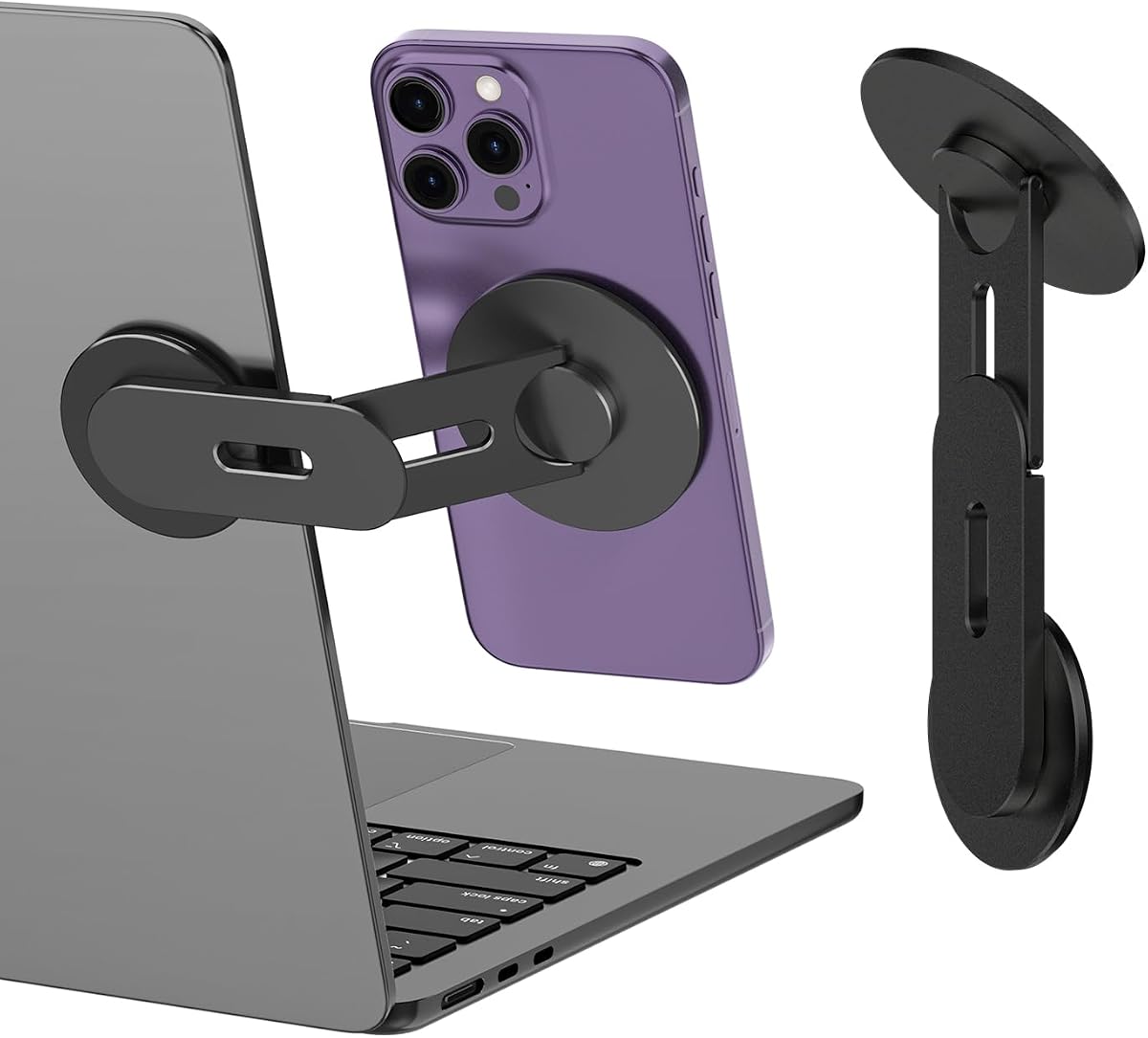
4.4Editor score
The comparison below organizes all ten products by their most important characteristics, including adjustment, magnetic compatibility, portability, mounting surface, and intended use. This makes it easier to distinguish a straightforward MacBook side mount from a rotating accessory or a multifunction laptop riser with a built-in phone holder.

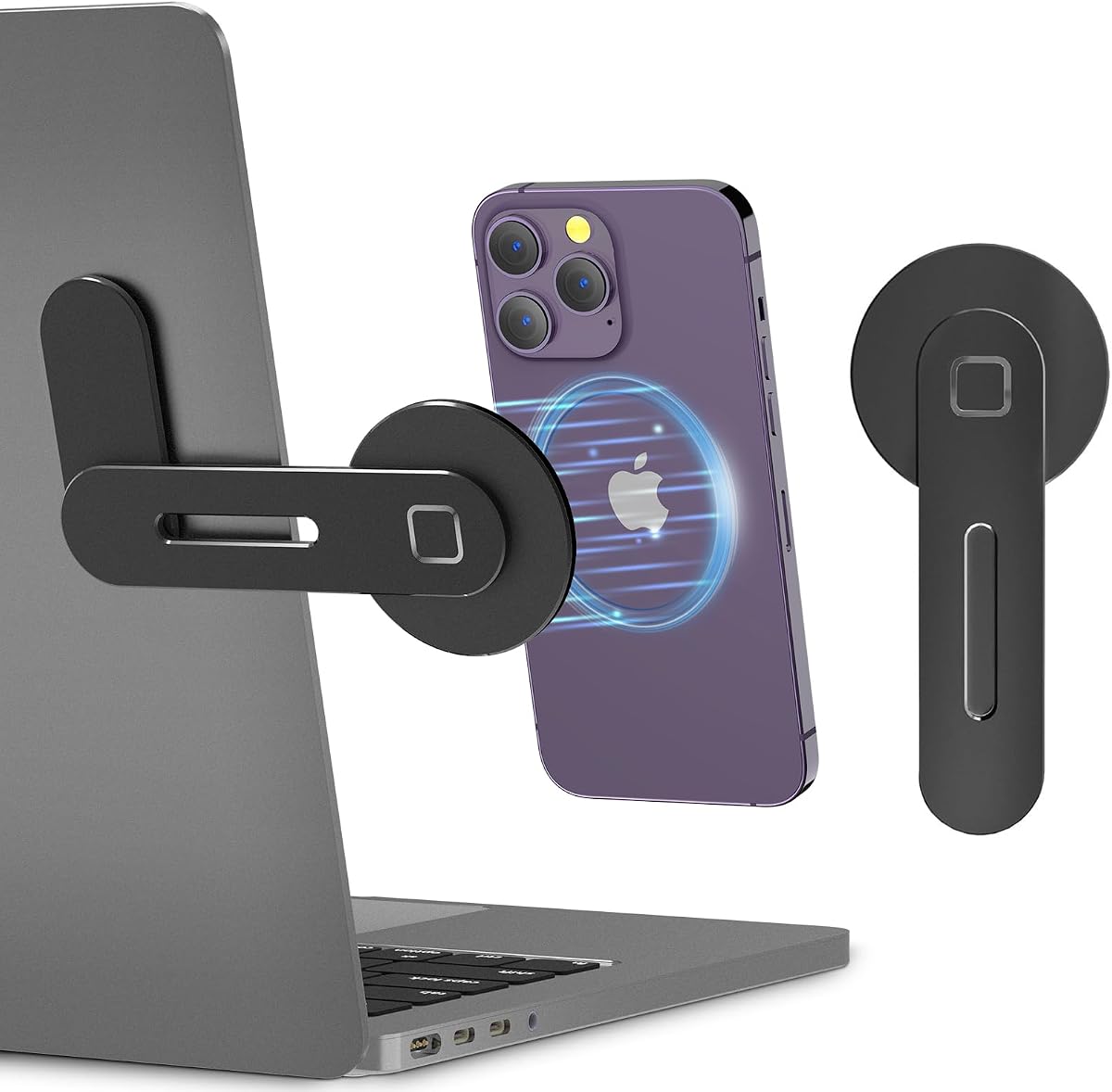


The CloudValley Magnetic Laptop Phone Holder is a compact side-mounted accessory designed to bring a phone beside a MacBook, laptop, desktop monitor, or iPad. It carries a 4.3 rating and stands out for its straightforward magnetic connection, adjustable arm, broad phone support, and light-folding aluminum construction. It is a practical choice for users who want a dedicated phone display without investing in a larger desk setup.
We may earn a commission when you buy through this link, at no additional cost to you.
The magnetic mount works directly with compatible MagSafe phones and can support non-MagSafe devices when the supplied secondary metal ring is installed. Its mounting base uses adhesive, so installation begins by removing the protective tape and attaching the base to a smooth, flat surface. The arm then rotates outward to reveal the magnetic phone platform, allowing the display to sit beside the computer instead of occupying valuable desk space.
The main limitation is that the adhesive base is intended for smooth surfaces and is not described as easily removable. The holder also depends on the magnetic connection remaining aligned with the phone or ring, so users should install it where there is enough clearance to attach and detach the device comfortably. Despite those limitations, the adjustable angle, compact profile, and included metal plates make this a capable budget-oriented choice.
This holder is best for students, office workers, and travelers who regularly want messages, timers, recipes, or a video call visible beside a MacBook. It suits anyone with a compatible phone who prefers a small accessory over a full laptop riser. For those prioritizing simple installation, compact storage, and dependable magnetic placement without paying for the larger feature set of a multifunction stand, it is a strong recommendation.
Positioning the phone beside the laptop creates a practical secondary display for incoming messages, reference material, call controls, or a timer. The adjustable angle helps keep the phone visible while maintaining a relatively compact footprint.
MagSafe-compatible phones can attach directly, while the included secondary metal ring expands support to non-MagSafe devices. The package also includes two metal plates and a cleaning kit for setup and maintenance.
We may earn a commission when you buy through this link, at no additional cost to you.
This Magnetic Phone Holder for Laptop combines multi-axis adjustment with broad device compatibility, earning a 4.5 rating and securing the Editor's Choice distinction. It is designed for MacBook laptops, desktop monitors, and Tesla Model 3, X, Y, or S screens. The rotating structure gives users more control over portrait or landscape positioning than a fixed-angle phone cradle.
We may earn a commission when you buy through this link, at no additional cost to you.
Compatibility extends across the listed iPhone 18, 17, 16, 15, 14, 13, and 12 series, including phones that use the MagSafe system and devices fitted with the included metal rings. It can also accommodate Android phones and other compatible devices. The aluminum alloy body keeps the accessory lightweight and visually consistent with a personal computer while preserving the foldable profile needed for travel and meetings.
Installation relies on strong 3M adhesive. The supplied instructions specify keeping the arrow facing upward and waiting 30 minutes after attaching the base. Because the pad can be difficult to remove, the correct surface should be selected carefully before installation. An extra adhesive pad is provided for reinstallation, although the accessory is intended to remain attached to one device rather than move frequently.
This is an excellent choice for users who switch between calls, messaging, browsing, and desktop work and want a single mount to handle several viewing angles. It is particularly useful for MacBook owners who also want compatibility with a Tesla display or other compatible monitor. If multi-axis control, broad phone support, and portable construction matter more than a removable base, this model offers one of the strongest combinations in the guide.
The multi-axis arm addresses the limitation of a mount that can only be moved through one direction. Users can reposition the phone to suit their seating, viewing angle, or task without continuously picking it up and finding a new angle.
Support for MacBook laptops, desktop monitors, and Tesla displays makes this useful for people who move between office, home, and vehicle. The included rings extend compatibility beyond MagSafe-equipped phones.
We may earn a commission when you buy through this link, at no additional cost to you.
The gray Magnetic Laptop Phone Mount offers 180-degree adjustment, N52 magnets, and a simple alignment system for keeping a phone attached beside a laptop or monitor. Its 4.3 rating reflects a balanced accessory that supports listed iPhone 18 through 12 models, MagSafe cases, and other phones fitted with the included magnetic ring.
We may earn a commission when you buy through this link, at no additional cost to you.
One particularly useful detail is the included alignment card, which helps position the magnetic ring correctly on the phone. This helps users avoid the common problem of an uneven magnetic connection that can allow the device to slip or sit at an awkward angle. The holder can be used on desktop monitors, laptop screens, and compatible Tesla displays, giving it useful appeal beyond a MacBook-only installation.
This model does not provide wireless charging, so buyers should not choose it for a powered desktop charging setup. The 3M adhesive is described as non-removable, and the instructions recommend waiting at least six hours before use. The arrow should point upward during installation because incorrect orientation can reduce the security of the magnetic attachment.
The product is well suited to users who want a simple magnetic display with clear setup guidance and consistent positioning. It is less appropriate for those who need charging or expect to move the base between devices frequently. For a straightforward 180-degree side mount with broad phone support and useful alignment assistance, it remains a practical option.
The supplied alignment card helps users line up the phone or magnetic ring with the mount. This reduces guesswork during setup and supports a more consistent attachment after the adhesive has fully set.
The magnetic platform supports bare compatible iPhones, MagSafe cases, and non-MagSafe phones using the included ring. It can also serve compatible Tesla screens, although it is not intended to provide vehicle charging.
We may earn a commission when you buy through this link, at no additional cost to you.
The CloudValley Adjustable Laptop Stand emphasizes refined metal construction and a strong magnetic connection. Rated 4.3, it is designed for laptops, desktop monitors, MacBook devices, iPads, and Tesla screens. Its CNC-machined aluminum alloy body, matte plating, and foldable side-mount format give it a more substantial appearance than a simple plastic clip.
We may earn a commission when you buy through this link, at no additional cost to you.
The upgraded magnetic attachment is described as having substantially increased holding strength. It works with the listed iPhone 18 through 12 series, including Pro Max and Mini versions, and includes two metal rings for non-Magnetic phones or cases. A ring-shaped heat-dissipation design is intended to reduce heat buildup and avoid signal interference while the phone remains attached.
Adjustment lets the phone move into a more useful viewing position for calls, messages, and dual-screen interaction. Installation uses 3M adhesive on a smooth surface, and the magnetic arm rotates outward from the folded body. As with other permanently attached designs, careful placement matters because the base is not presented as a frequently removable component.
This stand appeals to buyers who care about finish, compact construction, and broad compatibility. It is a good match for office or travel use where the phone must remain attached firmly beside the laptop. Users who prioritize a removable base, powered charging, or unrestricted angle movement may need to look elsewhere, but for a refined magnetic side mount, this model has several attractive qualities.
CNC machining and a matte-plated aluminum alloy body create a precise, durable-looking accessory. The finish is intended to resist scratches and wear while coordinating closely with a modern computer setup.
The upgraded magnet and ring-shaped thermal design support firm placement during ordinary use. Two included rings allow non-MagSafe phones and cases to benefit from the same magnetic mounting system.
We may earn a commission when you buy through this link, at no additional cost to you.
The Laptop Phone Holder Rotating Mount is built around portability and flexible viewing, with a 360-degree rotating head, a very slim folded body, and a magnetic platform. Its 3.9 rating is the lowest in this group, but the product offers a clear combination of rotation, compact storage, and broad phone compatibility that some alternatives do not match.
We may earn a commission when you buy through this link, at no additional cost to you.
Its N52 magnetic array is stated to provide 3.5 pounds of holding force. It works directly with MagSafe on the listed iPhone 12 through 17 models and can attach Samsung Galaxy, Google Pixel, OnePlus, older iPhones, and other phones using the supplied metal rings. The stated screen range covers devices from 4.0 to 6.9 inches, giving it broad everyday coverage.
The bracket folds to a thickness of 0.34 inches and weighs 2.4 ounces, making it especially easy to carry in a laptop sleeve. Installation requires cleaning the surface, applying the high-bond 3M pad, pressing for 15 seconds, and waiting six hours for maximum adhesion. The product description says it leaves no residue when removed, although the wait remains important for secure mounting.
This holder is ideal for travelers, students, and remote workers who frequently move between desks and want a phone display that can rotate between portrait and landscape. It also works with compatible Tesla screens and can function as a standalone desktop stand. Buyers should pay particular attention to the installation wait and confirm that their device and mounting surface are compatible.
The rotating head makes it easier to move between vertical messaging and horizontal video. That flexibility is useful for recipes, video calls, tutorials, and compact dashboards.
At just 0.34 inches thick in the supplied description, the folded holder takes up very little room. Its low weight and narrow profile suit commuters and anyone who wants to carry one adaptable setup.
We may earn a commission when you buy through this link, at no additional cost to you.
This black Magnetic Phone Holder is a 180-degree side mount built for MacBook laptops, desktop monitors, and Tesla screens. Its 4.3 rating places it among the stronger general-purpose choices, while its N52 magnet, alignment card, and support for MagSafe and non-MagSafe phones make it approachable for a broad range of users.
We may earn a commission when you buy through this link, at no additional cost to you.
The holder accommodates bare iPhones from the listed 12 through 18 series and phones placed in MagSafe cases. For devices without a magnetic system, the included metal ring provides a connection point. The alignment card helps position the ring accurately, which is valuable when the difference between a centered and off-center magnetic connection affects stability.
The advertised productivity benefits center on reducing the need to reposition a phone repeatedly during multitasking. While users should judge those claims according to their own workflow, the physical benefit is clear: the phone stays visible beside the laptop without occupying a separate stand. Its compact construction also supports a grab-and-go approach for travel, meetings, and business activities.
Wireless charging is not included, and the 3M adhesive base is non-removable. Users should also wait at least six hours before attaching the phone, and the arrow must face upward to avoid an incorrect setup. This product is a solid option for users who want broad compatibility and a clean 180-degree mount without paying for a powered or multifunction stand.
Keeping the phone beside the main display reduces the need to pick it up and search for it. This is particularly helpful during meetings, calls, and tasks that require frequent switching between laptop and phone content.
MagSafe phones connect directly, while the included ring supports non-MagSafe devices. The same compact mount can also be placed on a compatible Tesla screen for users who want one accessory across several environments.
We may earn a commission when you buy through this link, at no additional cost to you.
The Removable Magnetic Laptop Phone Holder stands apart with its detachable, double-sided base. Rated 4.4, it can be removed from the mounted location and flipped into a desktop phone stand or attached to a metal surface as a wall-mounted holder. That flexibility makes it more than a permanent MacBook accessory.
We may earn a commission when you buy through this link, at no additional cost to you.
Its N52 magnet secures compatible phones beside a monitor at a useful viewing height. The holder supports bare iPhones from the listed 12 through 17 series and phones fitted with MagSafe cases, while the included metal ring enables use with non-MagSafe devices. A concealed hinge lets the assembly fold down to a stated thickness of 0.67 inches for storage on the back of a MacBook or iMac.
The 360-degree adjustment makes it useful for video calls, live content, tutorials, and messages because the phone can move through a range of positions. The product is also described as an auxiliary mount for Tesla Model 3, Y, S, and X displays. Despite the detachable phone-side mechanism, the adhesive mounting sticker itself is described as non-removable.
This is the most interesting option for users who want to reuse the holder beyond a laptop or who dislike a permanently projecting side mount. It suits remote workers, students, and busy households that need one accessory in several positions. The six-hour installation wait and permanent sticker should be considered before purchase, but the removable base adds meaningful versatility.
The double-sided magnetic base can become a desktop stand or move to a metal surface for wall use. This makes the accessory useful for cooking, exercise, tutorials, and other situations where the laptop is not the primary screen.
The hinged arm folds against the computer or monitor, reducing visual clutter and making the holder easier to carry. Its stated 0.67-inch folded thickness supports storage in a laptop bag.
We may earn a commission when you buy through this link, at no additional cost to you.
The CloudValley Adjustable Magnetic Stand is a finely machined side-mount accessory for MacBook devices and other compatible screens. Its 4.3 rating and construction details position it as a refined option for users who want an aluminum finish, solid magnetic attachment, and dual-screen support without adding a full laptop riser.
We may earn a commission when you buy through this link, at no additional cost to you.
The high-hardness aluminum alloy is CNC precision machined and finished with a matte plating process intended to resist wear and scratches. The upgraded N52 magnet is described as offering substantially increased magnetic force, helping the phone remain secure during normal typing and screen-angle changes. An integrated ring-shaped heat-dissipation design is intended to limit overheating and signal interference.
Compatibility covers the listed iPhone 18 through 12 series, including Pro Max and Mini versions. Two metal rings extend support to non-Magnetic phones and cases. The package includes the stand, rings, a cleaning kit, and a 3M adhesive sticker, with the rings needing up to 24 hours after application for stable use according to the product information.
This model is best for users who value visual consistency and manufacturing detail as much as practical adjustment. It works well for office productivity, meetings, travel, and home workspaces, provided the user selects a smooth adhesive surface and allows the mounting materials to settle. It is less attractive for buyers who need a frequently removable base or an all-in-one laptop elevation stand.
CNC machining and matte plating give the holder a precise appearance that suits premium computer setups. The aluminum body is also described as wear-resistant and scratch-resistant for regular use.
The upgraded N52 magnet supports firm placement, while the ring-shaped thermal structure is intended to dissipate heat. Together, they distinguish the product from a basic adhesive phone cradle.
We may earn a commission when you buy through this link, at no additional cost to you.
The Portable Tablet Riser Phone Stand is the guide's most multifunctional option, combining a laptop riser, tablet easel, magnetic desk phone holder, and handheld vlogging selfie stick. Its 4.5 rating makes it an attractive alternative for users who want to improve their entire desk setup rather than add a small phone clip to one computer.
We may earn a commission when you buy through this link, at no additional cost to you.
Built from scratch-resistant aerospace aluminum alloy, the stand is designed to hold 15.6- to 17-inch gaming laptops and iPad Pro devices. Custom-tensioned hinges are intended to prevent sagging under load, while silicone pads protect devices from scratches. The open X-frame creates space for natural airflow, which can help reduce heat buildup around the computer.
The integrated N52 magnetic mount snaps onto listed iPhone 15, 14, 13, and 12 models and compatible MagSafe cases. Eight height settings elevate the screen as much as 5.5 inches, supporting a more natural line of sight. When folded, the accessory becomes a compact baton measuring 5.9 by 1.4 by 0.5 inches, and a microfiber travel pouch is included.
This is the best choice for users who want an elevated laptop and a dedicated phone position in one package. It can also function as a tablet stand or handheld support when the computer is not being raised. Compared with a small side mount, it occupies more space and requires more deliberate setup, so buyers should focus on whether the additional functions will genuinely be used.
Rather than raising only the phone, the stand elevates the laptop and adds a magnetic phone position. That can improve the organization of a desk while supporting a larger second-screen arrangement.
The frame collapses into a slim baton and includes a microfiber pouch. That portability makes it more useful than a fixed desktop riser for people who work in changing locations.
We may earn a commission when you buy through this link, at no additional cost to you.
The CloudValley Magnetic 360° Mount is a polished, adjustable side holder designed for MacBook devices, laptops, desktop monitors, and Tesla Model 3, X, Y, or S screens. Its 4.4 rating and premium badge reflect the combination of smooth rotation, broad phone support, lightweight aluminum construction, and a clean portable format.
We may earn a commission when you buy through this link, at no additional cost to you.
Compatibility covers the listed iPhone 18 through 12 series, including MagSafe-equipped phones and other phones fitted with the supplied metal rings. Android phones and other devices can also use the magnetic system. The 360-degree rotating structure allows the phone to move around the magnetic mount, making it easier to switch between viewing positions or orientations.
Installation involves attaching the phone first to verify clearance, removing the protective tape from the base, and attaching the base to the back of a laptop or monitor. The arm rotates to reveal the magnetic stand. The product advises waiting at least six hours before use, which gives the adhesive more time to stabilize before the phone's magnetic force is applied.
This mount is best for users who want a premium-feeling rotating accessory without the complexity of a powered phone dock. It is particularly attractive for calls, text monitoring, video viewing, and light dual-screen work. The permanent adhesive base is the main trade-off, so users should ensure the chosen laptop lid or monitor surface is suitable before installation.
The 360-degree mount allows the phone to move naturally around the connection point. This is useful when changing posture, switching between landscape and portrait use, or temporarily bringing the phone closer for an interaction.
Lightweight aluminum alloy construction gives the holder a refined appearance while keeping it easy to carry. Its compact profile suits business trips, meetings, and mobile work setups.
We may earn a commission when you buy through this link, at no additional cost to you.
The most useful MacBook phone holder balances secure placement, comfortable viewing, reliable attachment, and a mounting method that suits your actual workspace. Because these accessories vary considerably in angle control, portability, phone support, and adhesive design, the following factors deserve attention before choosing a model.
Magnetic attachment is the defining feature of most modern laptop phone holders in this guide. A strong magnet helps the device remain stable during typing, when the laptop screen moves, and whenever the user touches the phone. Some models specifically identify N52 magnets, while others describe upgraded magnetic force without assigning a magnet grade. Stronger attachment is particularly helpful when the phone is positioned beyond the edge of the display, where small movements can create leverage.
Compatibility depends on whether the phone has a built-in or case-based MagSafe system. Compatible MagSafe phones can usually attach directly, while Android users, older phones, and non-MagSafe cases may need one of the included metal rings. Placement also matters because a ring must be positioned where it can align with the magnetic platform without interfering with buttons, cameras, or the phone case. Always check the listed phone sizes and confirm that the included ring suits the device being used.
Adjustment determines how comfortably the phone can be viewed. A fixed mount may suit notifications, but rotating and multi-axis arms are more useful for video calls, recipes, dashboards, and landscape media. The guide includes products with 180-degree pivots, 360-degree rotating heads, and multi-axis arms. More movement offers flexibility, although it can also allow a phone to shift if the magnetic joint is not tightened or aligned properly.
A MacBook phone holder is normally fixed to the lid, the rear of the display, or another smooth surface using an adhesive base. Check the device dimensions, available clearance, and surface finish before installation. Some designs project from the side and may interfere with another monitor or accessories. A removable phone-side base is also different from a removable adhesive base: it may detach from the installed plate while the plate itself remains fixed.
Most models use 3M adhesive, and several describe the pad as non-removable or difficult to remove. Installation timing varies, with recommendations ranging from 30 minutes to six hours, while one CloudValley product allows up to 24 hours for its magnetic ring. Waiting the recommended period helps the bond stabilize before magnetic force is applied. Poor surface preparation, dirt, heat, or repeated movement can undermine adhesion.
Portability matters for people who work between home, office, café, and travel locations. Dedicated side mounts often fold into slim profiles, with stated thicknesses ranging from 0.34 to 0.67 inches for applicable products. The multifunction riser folds into a 5.9-by-1.4-by-0.5-inch baton and includes a travel pouch. Compare not only folded dimensions but also weight and whether the accessory can remain attached to the computer during transport.
A dedicated side mount is compact and focused on bringing the phone beside the display. A multifunction stand can also raise a laptop, support a tablet, or function as a handheld accessory. The best choice depends on available desk space and whether elevation would improve the user's setup. A larger riser may be more versatile, but it takes more room and may be unnecessary if the primary goal is a low-profile phone display.
Charging support is not universal among magnetic laptop phone holders. The 180-degree models explicitly listed here do not include wireless charging, and a magnetic attachment alone should not be treated as a charging solution. Some mounts can be removed and reused as a desktop or wall stand, while others double as standalone stands. Buyers who need continuous power should confirm charging support directly in the product listing rather than assuming that magnetic attachment provides it.
Before installation, identify a smooth, clean section of the MacBook lid or monitor and confirm that the phone can be attached without blocking the camera, vents, ports, or nearby objects. Clean the surface with the supplied cleaning material where available. Remove the phone temporarily if needed, peel the protective film from the adhesive base, and position the mount with the arrow facing upward as directed by the applicable instructions.
Press the adhesive pad firmly and allow the full recommended waiting time before applying the phone. For mounts with a magnetic ring, attach the ring to the phone or case in a position that centers it on the holder and avoids buttons or camera openings. Once bonded, place the phone on the magnetic platform and adjust the arm or rotating head to the desired portrait or landscape angle.
For care, keep the magnetic contact surfaces free of dust, metal fragments, and sticky residue. Lift the phone straight away rather than pulling it sideways across the magnet. Avoid pressing the adhesive base in ways that may twist the arm, and do not exceed the intended load. When removing the entire mount, follow the product instructions carefully because some adhesive pads are permanent or difficult to detach.
Most of these products use an adhesive side or rear mount rather than a model-specific expansion port. They can generally work across many MacBook sizes, but users should confirm that the attached holder does not block the camera, vents, ports, screen hinge, or another accessory. The adhesive surface must also be smooth, clean, and flat.
Not automatically. Magnetic attachment and wireless charging are separate functions, and two of the 180-degree models in this guide explicitly do not include wireless charging. If charging is important, check the current product listing for a powered charging feature rather than assuming that a magnetic connector can supply power.
Most can be used with Android devices when the supplied metal ring is attached to the phone or its case. The ring creates a magnetic contact point that aligns with the holder. Position the ring carefully so it does not cover buttons, interfere with camera placement, or prevent a compatible case from closing.
Waiting times vary by product and can range from 30 minutes to six hours, with one magnetic ring requiring up to 24 hours to stabilize. Follow the instructions for the exact model. Applying the phone before the adhesive or ring has settled can place additional force on the bond and reduce stability.
Some pads are described as permanent or difficult to remove, so there is a possibility of residue or surface marks. Install only on a clean, smooth area and check the removal instructions before pulling the mount away. Users who cannot accept permanent adhesive should look for a holder with a reusable or alternate mounting method.
Models with rotating or multi-axis joints generally support both orientations. The 360-degree products offer the broadest movement, while the 180-degree products are designed to pivot through a substantial range. Actual rotation may vary with the phone case and the position of the magnetic ring, so alignment should be checked after installation.
No. A detachable phone-side base can be removed from the adhesive installation while the adhesive plate remains attached to the computer. That design lets the phone holder become a desktop or wall stand. By contrast, many products use a single base that stays on the device until it is deliberately removed.
Many models in this guide are described as compatible with MacBook devices, other laptops, desktop monitors, iPads, and selected Tesla Model 3, X, Y, and S displays. The adhesive still needs to bond properly to the selected surface, and the phone must fit without blocking the display or interfering with the device's controls.
The CloudValley Magnetic Laptop Phone Holder is the budget pick for a compact folding side mount with MagSafe support, metal-ring compatibility, and adjustable viewing. The 360-degree adjustable model earns the Editor's Choice distinction for its multi-axis control, broad phone compatibility, and ability to work across laptops, monitors, and Tesla displays. The CloudValley Magnetic 360° Mount provides the premium option, emphasizing refined aluminum construction and fluid rotation.
Prioritize the features that affect your daily workflow rather than choosing only by mount size. Frequent video calls favor wide adjustment, non-MagSafe phones require the supplied ring, and users who move between locations need a genuinely portable design. Anyone wanting more than a phone clip should examine the multifunction riser, while buyers who require charging must verify powered functionality before buying.
Installation method and surface fit are just as important as the magnetic connection. Confirm the phone compatibility, read the waiting instructions, and check the available clearance around the MacBook. Product details, availability, and pricing can change over time, so review the current listing and recent customer feedback before making a final purchase.