
Martin Yale 1217A Automatic Paper Folder Machine
4.1Editor score
Up to 10,300 sheets hourly
Seven selectable fold types
250-sheet feed capacity
Wide document size range
A paper folding machine can turn time-consuming stack preparation into a consistent, efficient process. The right model depends on your document volume, supported paper sizes, required fold styles, available workspace, and whether you need automatic feeding, manual precision, or electric scoring and perforation.
This guide compares ten machines across productivity, paper capacity, fold versatility, control features, storage requirements, and finishing capabilities. It covers automatic folders for offices and mailrooms, compact manual feeders, precision scoring tools for craft work, and multifunction electric machines for documents, invitations, menus, and tickets.
Each numbered review explains the machine's strongest features, practical limitations, and ideal user profile. The top selections cover premium high-volume folding, feature-rich desktop automation, and a budget-friendly choice for routine jobs, while current listing details and availability may change over time.
4.1Editor score

4.1Editor score

2.9Editor score
As an Amazon Associate we earn from qualifying purchases.
The table below highlights each machine's core format, throughput, paper capacity, and defining feature so office, institutional, and craft buyers can compare the most important differences quickly.


The Martin Yale P7500 is an automatic tabletop folder aimed at offices, mailrooms, churches, and small business environments that need dependable production without the footprint or complexity of a larger institutional system. Its 3.9 rating reflects a generally capable machine, with the strongest appeal coming from automatic feeding, a stated throughput of up to 4,000 sheets per hour, and support for several widely used folds.
We may earn a commission when you buy through this link, at no additional cost to you.
Its feed tray accepts up to 50 sheets, while the stacking tray gathers completed documents for convenient removal. The machine handles letter and legal sizes, including 8.5 by 11-inch and 8.5 by 14-inch 20-pound bond paper, and offers letter, half, Z-fold, and double-parallel options. That combination is practical for mailing workflows, internal correspondence, statements, and mixed document batches.
The main compromise is capacity. A 50-sheet tray means more frequent loading than the 200- and 250-sheet models in this guide, and the 4,000-sheet-per-hour claim is below the output figures advertised by the Formax FD 300 and Martin Yale 1217A. Its 3.9 rating also trails the 4.1 ratings of the strongest alternatives, making it better viewed as a balanced midrange choice than an undisputed category leader.
Buy the P7500 when you want automatic folding in a relatively compact package and your daily volume does not justify a larger machine. It is especially attractive for small offices and mailrooms that value straightforward operation, a choice of common folds, and a smaller feed tray than full-capacity automatic folders. For heavier daily runs, one of the high-capacity models may offer better workflow efficiency.
Automatic feeding reduces the need to crease each sheet by hand, while the stacking tray keeps finished pieces together. This makes the P7500 useful for recurring batches in which consistency matters more than maximum throughput.
Support for letter and legal stock plus four common folding styles covers a broad range of correspondence and mailing tasks. Predefined formats also reduce the need to measure and crease individual documents.
We may earn a commission when you buy through this link, at no additional cost to you.
The Formax FD 300 combines a fast advertised output rate with the control and organization features expected from a modern desktop folder. Its 4.1 rating is among the strongest in this guide, and the LCD panel, resettable three-digit counter, adjustable output conveyor, and 200-sheet feed capacity distinguish it from basic manual-feed models.
We may earn a commission when you buy through this link, at no additional cost to you.
The drop-in top-feed system accepts squared stacks without paper fanning and can hold up to 200 sheets of 20-pound paper. It processes as many as 7,400 folded sheets per hour, handles sizes from 4 by 5 inches through 8.5 by 14 inches, and supports paper weights up to 30 pounds, or 112 gsm. Pre-marked guides allow operators to switch among C, Z, V, and double-parallel folds.
AutoBatch is particularly helpful when a job has a known quantity and the operator wants controlled pauses. The three-digit counter supports basic tracking, and the conveyor's adjustable stacker wheels promote orderly, sequential output. These features add useful control, although the machine remains more involved than a manual folder and does not offer the seven fold types or wider sheet range of the Martin Yale 1217A.
The FD 300 is the strongest general-purpose recommendation for a busy office, school, church, or mailroom that values speed, automation, and organized output without moving to a full premium platform. It is less appropriate for occasional home use, where its capacity and digital controls would be unnecessary. For organizations with moderate-to-high daily volume and several standard fold requirements, it offers an excellent balance of capability and manageability.
The 200-sheet tray and no-fan loading design reduce preparation time. A large batch can remain squared in the feed tray, making the machine suitable for repeated office mailing and document-processing runs.
The LCD interface, resettable counter, and AutoBatch function give operators a clear way to define quantities and monitor output. These controls are more useful for recurring jobs than a simple start-and-stop arrangement.
We may earn a commission when you buy through this link, at no additional cost to you.
The Martin Yale P6500 offers a relatively accessible way to automate common letter-folding tasks. Its 2.9 rating is the lowest among the ten products, so buyers should understand the trade-offs clearly: it prioritizes affordability, compactness, and straightforward operation over the capacity, paper range, and control depth offered by full automatic folders.
We may earn a commission when you buy through this link, at no additional cost to you.
The machine uses manual feed with automatic folding, meaning an operator places each document into position while the machine performs the fold. It handles 8.5 by 11-inch paper in half-fold and tri-fold formats and is advertised to process up to 1,800 sheets per hour. It can also accept stapled or unstapled documents, making it relevant for straightforward mailing and filing preparation.
Its desktop form factor is useful in offices, schools, churches, and mailrooms with limited space. Compared with the P7500, FD 300, F100A, and 1217A, however, the P6500 lacks a large hopper, automatic sheet-by-sheet feeding, multiple standard fold choices, and the same degree of collection control. Its strongest advantage is simplicity rather than maximum productivity.
Consider the P6500 if your workload consists mainly of letter-size documents, you want to avoid folding everything by hand, and you need a compact machine for occasional or moderate use. It may not satisfy a high-volume operation where an operator can feed many sheets simultaneously. For light mail preparation and basic document organization, it remains a functional budget-oriented option, but the lower rating argues for checking the current listing and warranty details before purchasing.
Manual loading is straightforward and keeps the machine compact. It suits users who prepare smaller batches and value direct control over each document over uninterrupted high-volume processing.
Half and tri folds cover common letter-folder and mailing formats. Support for stapled and unstapled documents also broadens its usefulness for mixed office paperwork.
We may earn a commission when you buy through this link, at no additional cost to you.
This 13.78-inch manual paper creaser is designed for professional-looking straight scores on cardstock, invitations, brochures, book covers, menus, and greeting cards. Its 4.1 rating is solid, and the combination of an extended positioning block, grooved platform, clear scale, and alloy blade makes it a more specialized tool than a conventional desktop letter folder.
We may earn a commission when you buy through this link, at no additional cost to you.
The positioning system is the machine's defining feature. By aligning the paper edge against an extended block, operators can place each score at a repeatable location. The grooved platform stabilizes the sheet and helps prevent movement, while the upgraded blade is specified to deliver clean fold lines with minimal deviation of 0.1 millimeter. These attributes are especially valuable for printed materials that need a polished appearance.
A widened handle with automatic rebound improves operating comfort and helps the blade return to its starting position after each press. The foldable working panel makes storage more convenient in home offices, DIY studios, or small print shops where permanent bench space is limited. In exchange, users must place and crease one sheet at a time, so this is not a substitute for an automatic high-volume folder.
Choose this creaser for craft and presentation work where a single clean score matters more than processing thousands of letters. It is a strong fit for handmade cards, menus, invitations, brochures, and book-cover projects. Buyers focused on routine bulk correspondence should instead consider an automatic document folder with a hopper, counter, and conveyor. For precision-oriented finishing, this manual option provides a more specialized and satisfying workflow.
The extended block, ruler, and grooved platform work together to keep paper aligned. Repeatable placement is particularly valuable when producing matching cards, menus, or folded brochures.
The foldable panel reduces storage space when the tool is not in use. A wider auto-rebound handle also makes repeated manual pressing more comfortable during a production session.
We may earn a commission when you buy through this link, at no additional cost to you.
The black Formax FD 300 offers the same productivity-oriented core specification as the standard FD 300 while providing an alternative finish for workspaces that prefer darker equipment. It carries a 4.1 rating and should be evaluated primarily on function: automatic feeding, a 200-sheet tray, a stated 7,400-sheet-per-hour output, and an organized conveyor system.
We may earn a commission when you buy through this link, at no additional cost to you.
Its drop-in top-feed design accepts squared stacks of up to 200 sheets of 20-pound paper without fanning. The machine accepts paper from 4 by 5 inches to 8.5 by 14 inches and weights up to 30 pounds, or 112 gsm. C, Z, V, and double-parallel folds are available through premarked guides, allowing operators to change formats without repeatedly measuring each stack.
The LCD panel includes a resettable three-digit counter and an AutoBatch function for defined batch sizes with pauses. An adjustable output conveyor uses stacker wheels to maintain sequential, tidy output. These features are useful in institutional environments, but they make the machine more complex than a manual or light-duty folder. As with the standard FD 300, users seeking many fold formats or oversized documents may prefer the 1217A.
This model suits offices, schools, mailrooms, and churches that regularly process sizeable stacks and want organized digital batch handling. The black finish may also coordinate better with certain professional environments. It is a strong high-throughput choice, though buyers should assess the four-fold limitation and overall counter size before committing. For standard business documents across a wide range of supported sizes, it remains a capable automatic folder.
A 200-sheet top tray supports longer runs than smaller automatic folders. The squared-stack loading method helps operators prepare paper quickly without manually separating or fanning every sheet.
AutoBatch, a resettable counter, and adjustable stacker wheels create a more controlled finishing process. This is valuable when output quantity and presentation both matter.
We may earn a commission when you buy through this link, at no additional cost to you.
The Portable Style Manual Paper Creaser is a workshop-oriented scoring tool with a 5.0 rating, the highest numeric rating in this guide. It is not designed to compete with automatic mail folders; instead, it focuses on repeated indentation, mechanical alignment, and the handling of model-making materials, cardstock, and corrugated board.
We may earn a commission when you buy through this link, at no additional cost to you.
Its heavy-duty alloy blades are specified to provide a precise 0.1-millimeter indentation alignment. A built-in structural guide and extended positioning block help stabilize the sheet, while the grooved platform reduces slipping. The wider handle uses an automatic rebound mechanism, returning the tool to a ready position after a press and providing mechanical feedback during repeated work.
Material capability is another major strength. The tool is described as suitable for solid cardstock below 300 grams per cubic meter and corrugated board under 5 millimeters, with a single-sheet indentation depth of 0.8 millimeters. These specifications make it interesting for laboratory models, packaging prototypes, visual aids, and technical training rather than ordinary correspondence.
The main limitation is workflow scale. Each sheet must be positioned and pressed, so production speed depends entirely on the operator. Buyers should also treat the stated material limits as important boundaries and verify that their intended stock falls within them. If you need repeatable technical scores and work with heavier specialty materials, this is one of the most compelling options in the guide.
The structural guide and extended positioning block work with the grooved platform to keep material from shifting. This is important when a precise score line is more valuable than processing speed.
The stated support for cardstock and corrugated board expands the tool beyond ordinary office paper. Corrugated board, in particular, is better suited to a firm mechanical creaser than to a lightweight hand crease.
We may earn a commission when you buy through this link, at no additional cost to you.
The United Office Products F100A is a high-speed automatic folder designed for offices, schools, churches, and mailrooms. No numeric customer rating is listed for this product, so its advertised specifications are the main basis for evaluating it. Those specifications include processing up to 156 sheets per minute, a 200-sheet hopper, and support for both letter and legal paper.
We may earn a commission when you buy through this link, at no additional cost to you.
Clearly marked fold settings make the machine relatively approachable despite its automatic design. It produces C, also called letter, Z or accordion, half, and double-parallel folds. These formats cover common uses such as invoices, statements, flyers, notices, and general correspondence, giving operators a versatile selection without moving between separate equipment.
An intuitive LCD panel and resettable three-digit counter help users select settings and track completed pieces. The integrated outfeed conveyor collects documents sequentially, supporting neat removal and reducing the chance of disorganized piles. Compared with the FD 300, however, the F100A's stated rate is expressed per minute rather than per hour, and no numeric customer rating is supplied, making independent comparison less straightforward.
This machine is a compelling option for institutional users who want a large hopper, rapid automatic processing, and straightforward output handling. It is less suitable for buyers who require a well-established rating history or very specific document dimensions beyond letter and legal sizes. Verify the current product details, operating requirements, and warranty information before purchase, then compare the fold and throughput specifications with your actual daily workload.
The stated 156-sheet-per-minute rate is the model's most prominent performance claim. Such throughput is attractive for schools and organizations that repeatedly process large mailing batches.
The integrated conveyor gathers folded pieces in order, while the counter helps operators monitor completed work. These features support a smoother end-to-end workflow from feeding to collection.
We may earn a commission when you buy through this link, at no additional cost to you.
The 13.78-inch Foldable Manual Creasing Machine is designed for home crafters, DIY studios, and small print shops that need a repeatable fold on invitations, menus, brochures, book covers, and cardstock. It has no numeric customer rating in the supplied listing data, so its construction details, material claims, and warranty are especially important when assessing it.
We may earn a commission when you buy through this link, at no additional cost to you.
Interlocking adjustable guide rails and an extended precision ruler work together to position the paper consistently. The stated deviation of no more than 0.1 millimeter suggests careful alignment, while an upgraded alloy blade is designed to create clean lines without tearing or cracking the stock. The tool handles cardstock up to 300 grams per square meter and does not require electrical power.
The reinforced metal frame and base help limit wobble during repeated use. A widened auto-return handle is intended to reduce hand fatigue, and the foldable panel makes the unit easier to store in apartments, on small desktops, or at shared workstations. Its limitations are inherent to manual scoring: sheets are processed one at a time, and it is intended for craft-scale work rather than bulk correspondence.
Choose this model if you create polished paper goods in a compact workspace and prefer full control over each score. The stated two-year warranty and factory inspection add reassurance for buyers who cannot consult an established customer-rating history. For offices needing letter or legal-size mail folders, use an automatic desktop model instead. For craft presentation quality, this folding creaser is a practical, portable specialist.
Manual operation makes the machine usable in virtually any workspace. Adjustable rails and a precision ruler support repeatability without electronic settings or a power connection.
The alloy blade and reinforced base are intended to produce clean folds while reducing movement. These features help handmade cards, menus, and covers achieve a polished appearance.
We may earn a commission when you buy through this link, at no additional cost to you.
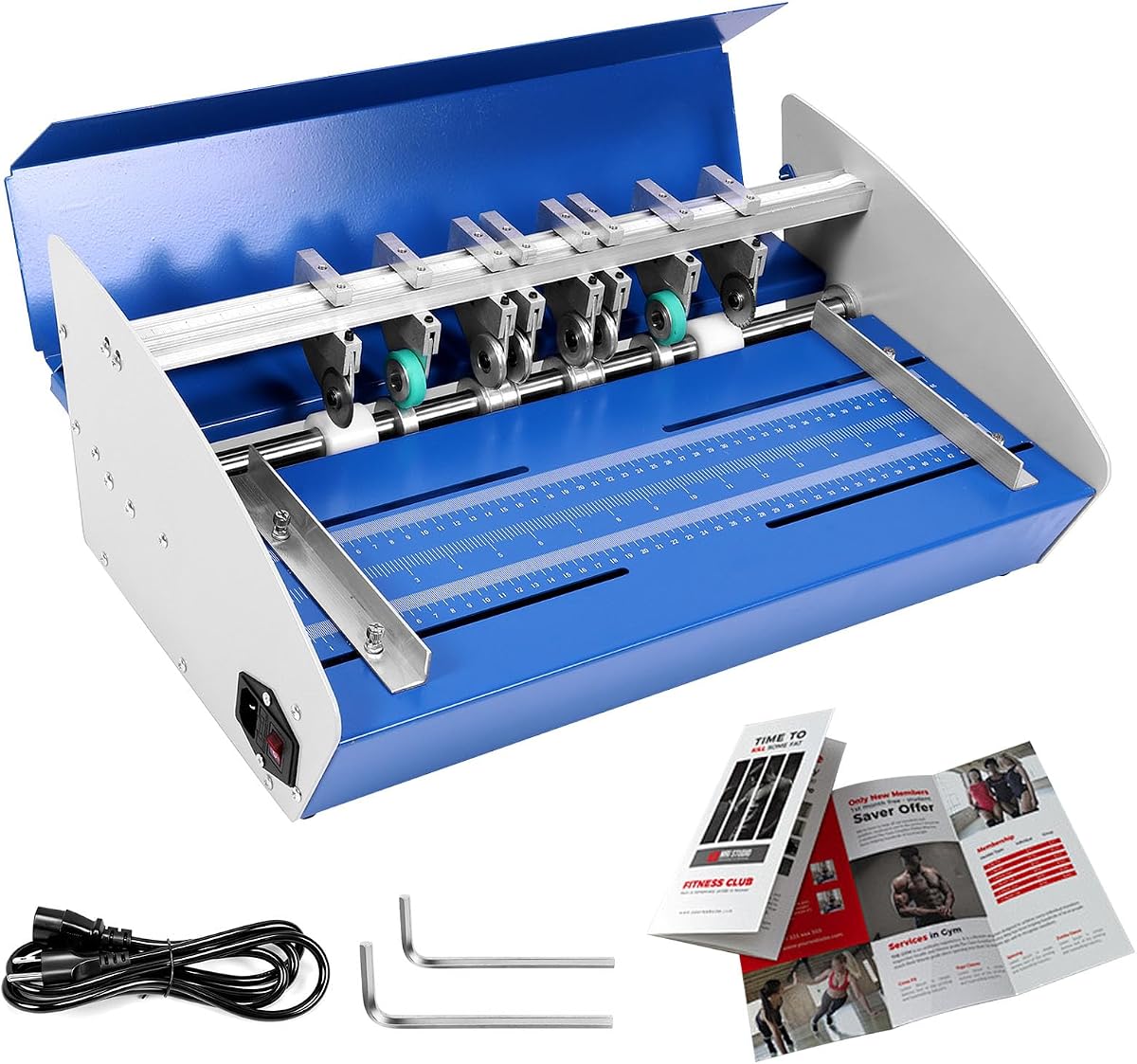
The 3-in-1 Electric Paper Creasing Machine is a multifunctional finishing device for offices, print shops, and professional craft rooms. Its 5.0 rating is the highest in the guide, and its appeal comes from combining creasing, scoring, and perforation in one electric machine rather than performing three separate tasks with separate tools.
We may earn a commission when you buy through this link, at no additional cost to you.
The feeding width of 460 millimeters, approximately 18 inches, accommodates standard documents, extended menus, and large book covers. Its multifunctional rollers are designed to create clean folds and tear-off lines without cracking the paper, while the built-in scale ruler supports measurement and alignment. The solid metal frame provides stability during repeated operation.
The machine operates on a standard 110-volt system and is positioned for business cards, invitations, photos, envelopes, bound documents, and tear-off tickets. That makes it more versatile than a plain letter folder, but it also means checking electrical compatibility, room for the rollers, and clearance around the feed area. It is a finishing tool for varied paper projects, not a high-speed automatic folder for routine correspondence.
This is an appealing selection for a print shop or craft room that performs repeated scoring and perforation as well as folding. Its wide format and multifunction design can reduce tool changes and improve consistency. If your only need is folding large stacks of letters, an automatic document folder is more direct. If presentation, precise lines, and tear-off features matter, this electric machine provides broader finishing capability.
Combining scoring, creasing, and perforation gives users a more complete finishing workflow. It is particularly useful when projects require both a fold line and a clean tear-off edge.
The 18-inch capacity handles materials beyond standard letter size, while the metal frame helps maintain stability. The scale ruler adds useful reference points for positioning large sheets.
We may earn a commission when you buy through this link, at no additional cost to you.
The Martin Yale 1217A is the premium high-volume recommendation in this guide. Its 4.1 rating, 250-sheet feed capacity, seven fold types, and advertised throughput of up to 10,300 sheets per hour make it the most capable option for organizations that regularly handle large quantities of mixed documents.
We may earn a commission when you buy through this link, at no additional cost to you.
The machine automatically feeds, folds, and collects paper from 4 by 4 inches to 12 by 18 inches. Two adjustable fold tables support customized folds, while the seven available configurations give operators more choices than the standard and institutional folder models elsewhere in the comparison. Large rubber folding rollers are designed to create consistent folds and smooth operation across the broad supported range.
A conveyor-belt exit handles the main output flow, and a manual bypass supports stapled or unstapled documents of up to five sheets. That bypass provides a practical route for short or irregular sets that might otherwise slow the automatic workflow. The included simplified folding chart assists with quick reference, while guides support accurate paper positioning through the machine.
Choose the 1217A when throughput, capacity, fold flexibility, and document-size range are the priority. It is particularly suitable for established offices, schools, mailrooms, and churches that have sustained daily volume and adequate workspace. Smaller organizations may find a desktop model easier to manage, but those handling serious batch work will benefit from the 250-sheet tray and broad automatic capabilities. Verify physical dimensions, power requirements, and current warranty details before installation.
The stated 10,300-sheet-per-hour rate leads the guide's throughput figures. Combined with a 250-sheet tray, it reduces reload frequency and supports sustained document-production schedules.
Seven fold types, two adjustable tables, and support from 4-by-4-inch media through 12-by-18-inch documents allow a broad range of workflows. A manual bypass further accommodates smaller mixed sets.
We may earn a commission when you buy through this link, at no additional cost to you.
Choosing a paper folding machine starts with workload realism: identify the papers used, required fold styles, typical batch size, acceptable level of manual effort, and the precision needed for finished documents.
An automatic folder is most valuable when the machine can feed a stack continuously. Models with 200- or 250-sheet hoppers reduce interruptions, while manual-feed designs keep the unit smaller and let the operator control each document. Manual scoring tools can provide excellent crease precision, but their production rate depends on the operator and the time spent positioning each sheet.
Advertised throughput indicates the maximum processing rate, while hopper capacity tells you how much paper can be loaded before reloading. These figures should be considered together. A fast machine with a small tray may still require frequent pauses, while a large tray is only useful if the workplace can prepare and collect stacks efficiently. Match expected daily volume rather than selecting solely by the highest published rate.
A machine that handles letter and legal paper covers common office correspondence, but specialized workflows may need smaller formats or documents as large as 12 by 18 inches. Weight limits matter too, particularly for heavier stock, envelopes, or bound paperwork. Check both dimensions and weight before buying, and confirm whether a claimed size refers to the feed tray, the usable folding area, or merely the output.
Common formats include C or letter folds, Z or accordion folds, half folds, tri-folds, V folds, and double-parallel folds. Some institutional machines offer seven configurations, while many desktop models provide four. Choose based on how recipients, postal rules, or internal filing conventions require documents to be presented rather than selecting the model with the largest number of options.
Presentation work demands clean, straight fold lines. Positioning blocks, guide rails, grooved platforms, scales, and calibrated blades are especially relevant for cards, menus, invitations, brochures, and book covers. Heavy paper and corrugated board require a sturdier creasing mechanism than standard correspondence. Automatic folders prioritize repeatable volume, while dedicated scorers often provide finer control for craft work.
LCD panels, resettable counters, and AutoBatch functions help operators monitor output and repeat defined quantities. They are useful in schools, churches, offices, and mailrooms where multiple operators need a repeatable process. A simple start-and-stop machine may be sufficient for occasional use, but digital job controls become more valuable as batch size and workflow complexity increase.
Conveyors, stacker wheels, and folding trays help keep finished documents sequential and easy to remove. Their usefulness increases with volume because scattered output can slow the next loading cycle. Also consider the machine's footprint, feed clearance, weight, noise level, electrical requirements, and storage position. A foldable manual creaser suits compact spaces, while a full automatic folder needs room for feed and collection.
Scoring, perforation, and electric rollers can broaden a machine's role beyond basic folding. Electric multifunction units are useful for tear-off tickets, menus, cards, photos, and bound documents, while manual creasers provide control without power. These are valuable when finishing variety matters, but they are usually less appropriate for folding thousands of routine letters.
Begin by reading the machine's current instructions and checking that the feed trays, fold guides, output area, and adjustment controls are clear. Place the unit on a stable surface with enough clearance to feed and collect documents. For electric models, confirm compatible voltage and use a grounded outlet. Select the required paper size and fold type before adding a batch, and test the setting with a few sheets to confirm the position and orientation.
Square the stack before loading an automatic folder. Align the edges, make sure staples or other obstructions are outside the folding path, and load only the paper types and weights allowed by the manufacturer. Manual-feed and scoring machines require careful alignment against the positioning block, ruler, or guide rails. Advance one sheet at a time, apply steady pressure where appropriate, and confirm that the crease is straight before completing the batch.
After use, remove remaining paper and turn off or unplug the machine according to its instructions. Gently wipe accessible rollers and feed surfaces with a dry, lint-free cloth, and never spray cleaner directly onto the equipment. Keep the guide area free of dust and scraps because small debris can cause jams or affect crease alignment. Periodically inspect the feed tray, fold guides, conveyor wheels, handle return, and output stacker, and follow the stated cleaning and maintenance schedule for lubrication or replacement parts.
A paper folder feeds and folds documents, often automatically, for mailing or filing. A paper creaser usually scores one sheet manually at a time using a blade and positioning system. Folders prioritize volume and common document formats, while creasers are better for precise presentation work, specialty materials, and small craft batches.
The Martin Yale 1217A stands out with a stated capacity of 250 sheets, seven fold types, and throughput of up to 10,300 sheets per hour. The Formax FD 300 is a strong desktop alternative with a 200-sheet tray and up to 7,400 sheets per hour. Actual results depend on paper, fold setup, operator workflow, and the machine's current condition.
Common choices include C or letter folds, Z or accordion folds, half folds, and double-parallel folds. More advanced machines may also provide V, tri-fold, and other customized configurations. Check the listed fold styles carefully, especially if recipients, postal services, or filing systems require a particular finished format.
Several models in this guide support 8.5 by 14-inch legal paper, including the Martin Yale P7500, both Formax FD 300 listings, and the United Office F100A. The Formax models also cover smaller documents down to 4 by 5 inches, while the Martin Yale 1217A supports a much broader range. Always verify dimensions and the actual usable feed area before loading a different size.
They can be well suited to professional-style card and invitation work when clean, repeatable fold lines matter. Positioning blocks, guide rails, rulers, grooved platforms, and alloy blades help maintain alignment. The trade-off is speed because every sheet must be positioned and pressed individually, so a manual creaser is generally better for controlled craft production than high-volume mailing.
The 3-in-1 Electric Paper Creasing Machine is specifically designed with multifunctional rollers for creasing, scoring, and perforation. This broadens its usefulness for tear-off tickets, menus, cards, and similar materials. Confirm the compatible stock and electrical requirements before use, and test on a spare sheet when working with unusual media.
Use only supported paper sizes and weights, remove staples and clips from the folding path, and keep the stack squared. Clean away scraps and dust from the feed area and rollers, and do not force paper that is not aligned correctly. If a jam occurs, stop the machine and follow the manufacturer's instructions rather than pulling a partially folded sheet forcefully through the rollers.
A small mailroom with occasional short batches may be well served by a compact manual-feed machine. A regular volume of letters, statements, or school notices benefits from an automatic model with at least a 50-sheet feed tray. Larger recurring runs justify a 200- or 250-sheet hopper, along with a conveyor or stacking system for orderly output.
The Formax FD 300 is the strongest general-purpose pick because it combines automatic feeding, a 200-sheet tray, a stated output of up to 7,400 sheets per hour, four common fold types, and useful batch controls. For the highest throughput, broad document handling, and the most fold configurations, the Martin Yale 1217A is the premium recommendation. The Martin Yale P6500 offers a more accessible way to automate basic letter folding.
Prioritize the workflow you actually have rather than the largest advertised specification. Choose automatic feeding and a large hopper for recurring batch work, manual positioning for occasional documents, and a precision scorer for cards, menus, invitations, or specialty materials. Also account for paper size, stock weight, fold requirements, collection method, available space, and electrical needs before making a final choice.
Product specifications, ratings, availability, and listing details can change, so review the current Amazon page and manufacturer guidance before ordering. Confirm the supported paper and fold formats, inspect the warranty information, and test a representative document batch. Those final checks will help ensure the chosen machine fits the intended task and provides a dependable workflow over time.