
MAYFLASH Arcade Stick F700
4.6Editor score
Extensive multi-platform compatibility
Sanwa-compatible parts supported
Three flexible connection methods
Discover the best Nintendo Switch arcade stick options, comparing wireless controls, compatibility, customization, portability, and features for every play
A Nintendo Switch arcade stick can make fighting games and classic arcade titles feel more tactile, consistent, and competitive than a standard controller. The right model should match your preferred connection method, support the games you play, and offer the control layout, customization, and build quality that suit your setup.
This guide compares ten Switch arcade sticks and mini arcade cabinets based on supplied compatibility information, control features, connection options, customization, portability, and intended use. It includes wireless fight sticks, wired modular sticks, and compact cabinet-style accessories for original Switch, Switch OLED, and Switch 2 systems.
Each review explains the strongest reasons to consider a particular model and the compromises worth checking before buying. Ratings reflect the available product data, while product features and availability can change. Current prices, package contents, and console support should always be verified on the listing before purchase.
4.6Editor score
4.7Editor score

4.9Editor score
The comparison below highlights the major differences in platform support, connection style, customization, and portability across all ten products, helping you identify the most suitable Switch arcade stick for fighting games, arcade classics, or a compact retro setup.



The 8Bitdo Arcade Stick for Switch and Windows combines a competitive-style layout with unusually broad customization, earning a 4.6 rating in the supplied data. It is designed for fighting games and arcade-style play while remaining equally useful on a Windows PC, giving it more flexibility than a single-console stick.
We may earn a commission when you buy through this link, at no additional cost to you.
Its standout feature is the dynamic button layout, which changes the visual arrangement when the controller switches between console and PC modes. That makes it easier to recognize the correct inputs without constantly consulting a reference. Ultimate Software also supports custom mapping, macros, and profiles, while the universal joystick mounting plate gives serious hobbyists the option of using a Sanwa arcade stick.
Connection flexibility is another major strength. Bluetooth, the included 2.4G receiver, and wired USB-C cover different priorities: convenient wireless play, a dedicated low-latency wireless link, or a stable wired connection. The receiver's hidden storage compartment is a thoughtful touch, although buyers who need explicit Switch 2 support should note that this particular listing does not mention it.
This is our overall recommendation for a player who wants one capable stick for Nintendo Switch and Windows without giving up wireless freedom or extensive tinkering. It balances accessible setup with features that can grow with the player's skills, and it is especially attractive for anyone who wants a Sanwa-compatible platform without committing to a fully custom build.
The changing visual layout reduces the confusion that can occur when one arcade layout has to represent both Nintendo and PC commands. Ultimate Software adds remapping, macros, and saved profiles, making it possible to prepare separate configurations for different fighting games.
The universal mounting plate supports Sanwa arcade sticks, opening the door to a future upgrade path. Combined with software customization, this makes the device suitable for both a first arcade stick and an enthusiast who gradually wants finer control hardware.
We may earn a commission when you buy through this link, at no additional cost to you.
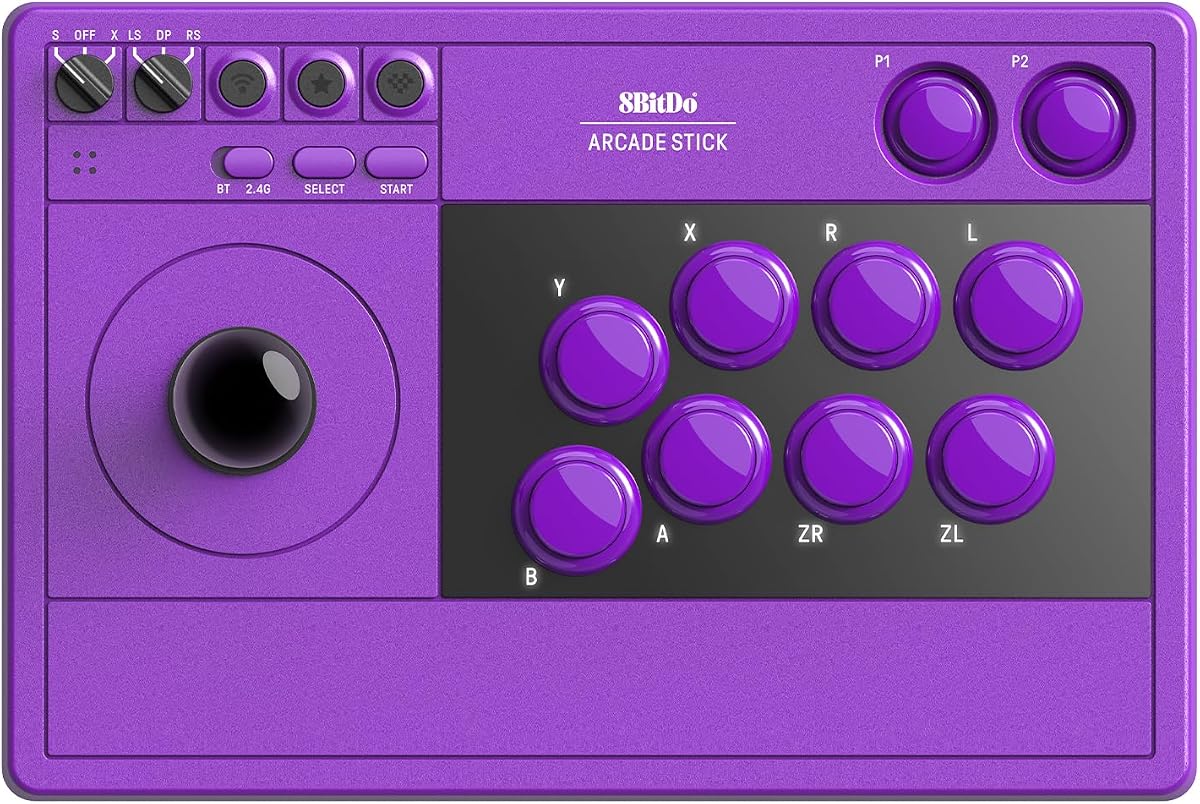
The purple 8Bitdo Arcade Stick is a strong all-round choice for Nintendo owners, particularly those who also use Windows. Its 4.7 rating is the highest among the 8Bitdo models in this guide, and the product information explicitly covers Switch, Switch 2, and PC compatibility.
We may earn a commission when you buy through this link, at no additional cost to you.
It retains the features that make the 8Bitdo range attractive: a dynamic visual layout, configurable mappings, macros, profiles, and dedicated P1 and P2 macro buttons. Two connection methods are wireless, while USB-C provides a wired option. A concealed compartment keeps the 2.4G adapter from getting lost, a particularly useful feature for anyone who travels with the controller.
The tempered glass faceplate adds a polished appearance and a smooth surface. It does not improve input performance directly, but it does help the product feel more like a dedicated arcade peripheral than a console accessory. Turbo functionality is also included for games where rapid repeated inputs can be useful.
Choose this model if you want current-generation console support, polished styling, and extensive customization in one package. It is especially practical for owners who move between Switch and PC and do not want separate sticks for each environment. As with any newly listed hardware, checking the current firmware instructions and package details is advisable.
Explicit Switch 2 compatibility makes this a straightforward option for current console owners. PC support broadens its usefulness, while the dynamic layout helps keep familiar commands visible when the underlying control mode changes.
Ultimate Software lets players assign commands, combine inputs into macros, and retain profiles for separate games. Dedicated P1 and P2 buttons make those profiles quicker to access during a session.
We may earn a commission when you buy through this link, at no additional cost to you.
The MAYFLASH Arcade Stick F700 is the premium enthusiast option in this guide, with a 4.6 rating and a broad list of supported systems. It is designed specifically for fighting games, which explains both its focus on competitive control and its deliberate lack of compatibility with Xbox consoles.
We may earn a commission when you buy through this link, at no additional cost to you.
The F700 supports PS5, PS4, PS3, Switch, Switch 2, Windows, Apple devices, Android, Steam Deck, Raspberry Pi, and several Sega and Neo Geo mini platforms. It can operate over Bluetooth, 2.4G, or a wired connection. The supplied 2.4G receiver stores in a concealed compartment, while wired headset support can provide background music and online chat on compatible PS and PC setups.
For physical customization, it supports Sanwa Denshi buttons and joysticks. That makes the platform attractive to players who intend to replace components over time. Turbo functions with several speed settings add another competitive-oriented feature, although the listing warns that the F700 should not be used for non-fighting game types.
This is the choice for a player with several systems who wants a serious, adaptable fight stick rather than a general-purpose controller. The lack of Xbox support is decisive, so Xbox Series or Xbox One owners should follow the listing's recommendation and consider the F700X instead. Within its intended ecosystem, however, the F700 offers exceptional platform reach and genuine enthusiast potential.
The unusually broad platform list reduces the need to replace a fight stick when moving between Nintendo, PlayStation, PC, mobile, and supported mini consoles. Firmware updating is required for Switch 2 operation over Bluetooth.
Compatibility with Sanwa Denshi buttons and joysticks allows owners to refine the feel of their controls over time. It is a meaningful advantage for players who care about lever response, button action, and personal control preferences.
We may earn a commission when you buy through this link, at no additional cost to you.
The 8Bitdo Retro Wireless Arcade Fight Stick is a particularly compelling choice for players who like both software and hardware customization. Its 4.6 rating reflects a well-rounded product with explicit support for interchangeable 30mm and 24mm arcade buttons and a universal joystick mounting plate.
We may earn a commission when you buy through this link, at no additional cost to you.
The mounting system is designed to accommodate a wide range of arcade components, including Sanwa JLF joysticks. That level of access makes it possible to tune the stick over time rather than accepting the factory configuration permanently. Ultimate Software adds mappings, macros, profiles, and two dedicated P1 and P2 macro buttons.
Connection and battery information are unusually clear. It supports Bluetooth, 2.4G, and wired USB-C, with the receiver stored in a hidden compartment. The supplied information states up to 40 hours over 2.4G and 30 hours over Bluetooth, with a four-hour charging time. Button swapping, joystick switching, turbo, and firmware updates are also listed.
This is a strong recommendation for a Nintendo Switch fighting-game player who anticipates changing buttons or joysticks and wants wireless operation at the same time. It is less suitable if you need a sealed product with no exposed parts to maintain, but for customization-minded buyers, the flexibility can outweigh that concern.
Replaceable 30mm and 24mm buttons and a universal joystick plate make the enclosure adaptable rather than fixed. Players can experiment with different sizes and compatible Sanwa JLF joysticks as their preferences develop.
The stated figures of 40 hours over 2.4G and 30 hours over Bluetooth help set realistic expectations. The wired USB-C option remains useful when a long session or uninterrupted connection takes priority.
We may earn a commission when you buy through this link, at no additional cost to you.
The purple 8Bitdo Retro Wireless Arcade Fight Stick combines a 4.6 rating with a distinctive visual design and the software tools expected from 8Bitdo. It supports Switch and Windows, with the product title also identifying Switch 2 as a target platform.
We may earn a commission when you buy through this link, at no additional cost to you.
Its dynamic button layout updates visually between Switch and PC X-Input modes, reducing the chance of confusing the two control schemes. Ultimate Software handles button mapping, macros, profiles, and dedicated P1 and P2 macro shortcuts. The result is a controller that can be adapted to different games without demanding constant manual changes.
The tempered glass faceplate gives this model a smoother and more premium-looking surface than a basic plastic panel. It also supports Bluetooth, 2.4G, and wired USB-C, while the 2.4G receiver has its own hidden storage area. Stated battery life reaches 40 hours on 2.4G and 30 hours on Bluetooth.
This stick is well suited to players who want a visually distinctive wireless controller with strong software customization and a more decorative finish. It may be ideal as a display-friendly option in a gaming room, but players focused on replacing physical components should compare it carefully with the more hardware-oriented Retro Wireless Fight Stick in this list.
The purple color and tempered glass faceplate give the controller a distinctive appearance among functional fight sticks. It is a useful consideration for setups where the hardware remains visible during play or streaming.
The changing visual layout makes transitions between Switch and PC modes easier to understand. Saved profiles and dedicated macro buttons further reduce setup time when moving between games.
We may earn a commission when you buy through this link, at no additional cost to you.
The 8Bitdo Arcade Stick V3 is a current-generation wireless option built around explicit support for Switch, Switch 2, and Windows. No customer rating is available in the supplied data, so its appeal should be assessed from its specifications rather than an established rating history.
We may earn a commission when you buy through this link, at no additional cost to you.
Its dynamic button layout changes when moving between Switch and PC X-Input modes, while 8Bitdo Ultimate Software provides mapping, macros, saved profiles, and dedicated P1 and P2 macro buttons. These are meaningful features for fighting games because they can reduce the time spent configuring inputs between sessions.
The V3 offers Bluetooth, 2.4G, and wired USB-C connections. Stated battery figures are 30 hours over Bluetooth and 40 hours over 2.4G. A 1000mAh rechargeable lithium-ion battery, tempered glass faceplate, turbo function, and stored 2.4G adapter complete the package.
This is a sensible choice for buyers who explicitly want Switch 2 support and value a polished, wireless design. The absence of a rating means there is no established user feedback in the information provided, so the free firmware updates, setup guidance, and support resources mentioned in the listing become particularly important parts of the ownership experience.
The stated compatibility includes both generations of the Switch, making the V3 a straightforward option for owners who do not want to replace a peripheral when moving to Switch 2. Windows support expands its usefulness for PC fighting games.
The 1000mAh battery and hidden receiver compartment simplify wireless use. A wired USB-C connection is still available for stationary play or when consistent responsiveness matters more than wireless freedom.
We may earn a commission when you buy through this link, at no additional cost to you.
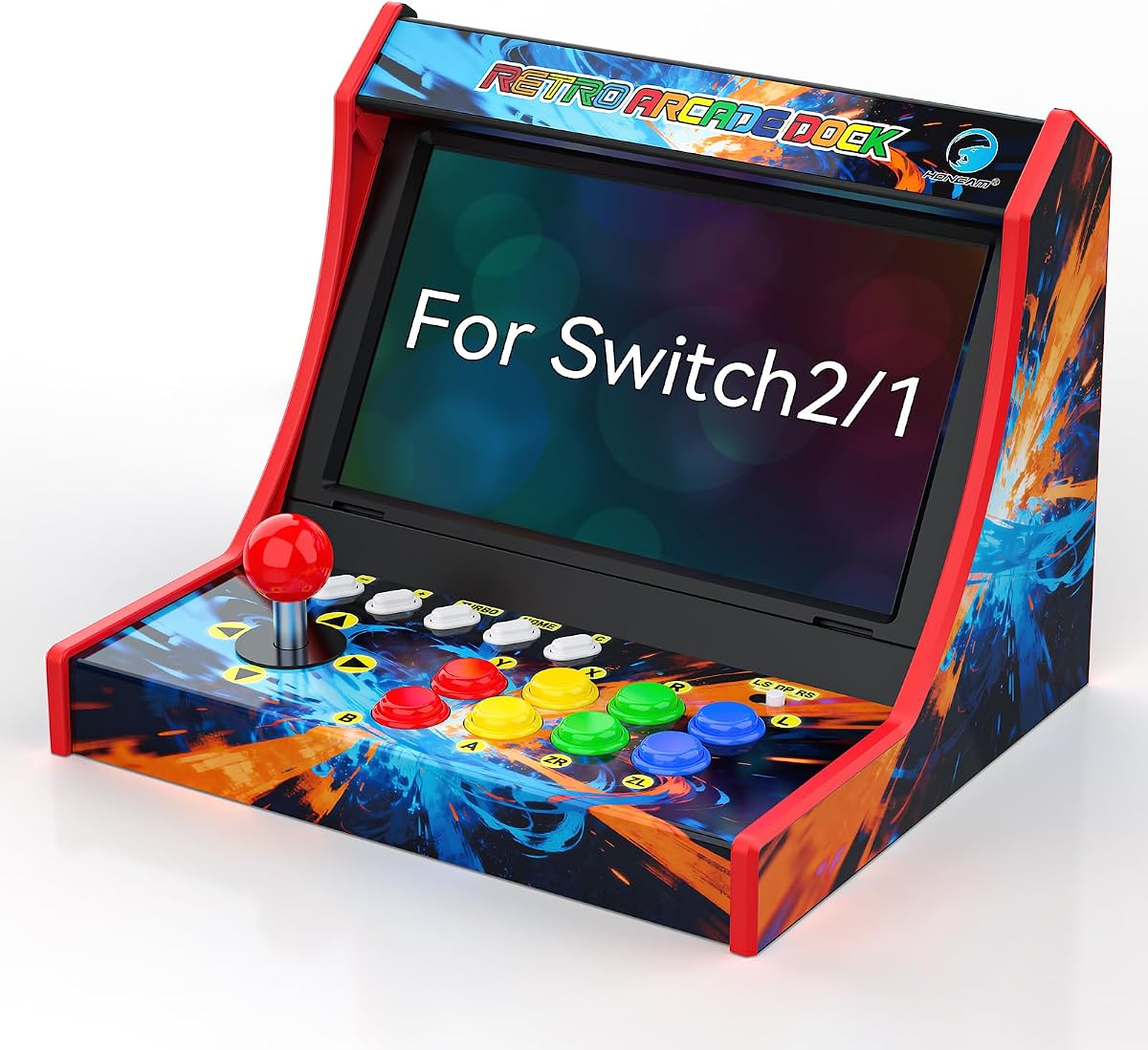
The Retro Arcade Stick Neon offers a different proposition from conventional desktop fight sticks. It is a compact mini arcade machine cabinet that works with Switch, Switch OLED, and Switch 2, and its 4.6 rating indicates a generally favorable reception.
We may earn a commission when you buy through this link, at no additional cost to you.
Its strongest practical feature is built-in storage for twelve game cards. That turns the accessory into a small, organized retro gaming station rather than merely a controller enclosure. The cabinet is also designed to be portable, making it suitable for parties, family gatherings, and trips where carrying a full-size arcade stick would be inconvenient.
Turbo support is available for a broad set of Switch buttons, including A, B, X, Y, R, L, ZR, and ZL. The Switch 2 C button is also supported for online communication functions. It is designed to be used while charging, which helps address the practical issue of extended play in a less conventional form factor.
This product appeals to someone who values the look and nostalgia of a small arcade cabinet more than the exacting physical customization of a high-end fight stick. It is also a useful choice for families or casual players. Competitive fighting enthusiasts should, however, treat it as a retro cabinet accessory rather than a specialized tournament stick.
Twelve dedicated game-card slots keep a small collection organized and close at hand. The design reduces the visual clutter that a separate case can create and reinforces the feeling of a self-contained arcade station.
Its compact construction is easier to carry than a conventional full-size fight stick. Support for charging during use is especially helpful for longer gatherings, although the physical footprint and console arrangement should be considered before purchase.
We may earn a commission when you buy through this link, at no additional cost to you.
The MAYFLASH F300 is an established multi-platform fight stick with a 4.5 rating and compatibility that extends across Nintendo, PlayStation, Xbox, PC, macOS, Steam Deck, and Android. That breadth makes it attractive to households that do not play exclusively on Nintendo hardware.
We may earn a commission when you buy through this link, at no additional cost to you.
Switch and Switch 2 support are explicitly listed, along with PS4, PS3, Xbox Series S/X, Xbox One, Xbox 360, Windows, macOS, Steam Deck, and Android. On PC, it supports both XInput and DInput, which improves its usefulness across different software environments. PS5 compatibility is possible through the specified MAYFLASH Magic-S Ultimate adapter or MagicBoots-S5 Converter.
Physical customization is another advantage because the F300 works with Sanwa Denshi buttons and joysticks. Turbo functions include different speed settings, giving players some flexibility for titles where repeated inputs are useful. Unlike the F700 in this guide, the F300's supplied compatibility list includes Xbox systems, making it a more family-friendly platform choice.
The F300 is a sensible pick for a player who wants a single fight stick across several console generations. Nintendo-focused buyers can use it directly on supported Switch systems, but those wanting straightforward PS5 or Switch 2 wireless behavior should verify the exact adapter and connection requirements before committing.
Support for Nintendo, PlayStation, Xbox, and major PC platforms reduces duplication. It is particularly useful for shared homes, event spaces, and players who regularly switch between console and computer games.
Sanwa Denshi compatibility gives owners a path to replace controls, while adjustable turbo speeds offer practical options for supported arcade and fighting titles. These features make the stick more than a basic shell.
We may earn a commission when you buy through this link, at no additional cost to you.
The APTGAME Voice Arcade Stick Cabinet is the most highly rated product in the supplied data, with a 4.9 rating. It is a compact cabinet-style accessory for Switch, Switch OLED, and Switch 2 that recreates the feel of a small traditional arcade machine without requiring a full-size cabinet.
We may earn a commission when you buy through this link, at no additional cost to you.
Its primary strength is a stable wired connection, described as producing zero input lag. The setup requires enabling the Switch's Pro Controller wired connection setting and removing the console case for a secure dock fit and proper connection. A reset button and simple five-step installation instructions support initial setup and troubleshooting.
The cabinet includes 12 game-card slots, turbo functionality, dedicated system controls, and an arcade-style joystick that can transition among Left Stick, D-pad, and Right Stick modes. Eight programmable buttons with LED indicators provide additional control options. Its stated dimensions are 8.66 by 7.48 by 6.81 inches, and it weighs 2.9 pounds.
This is the top budget-style recommendation for a buyer who wants a complete-looking arcade presentation and organized game storage. Its main limitation is obvious from the title: no screen is included, and the console must be placed in the cabinet. It is therefore a compact accessory rather than an all-in-one portable arcade system.
The wired approach removes wireless pairing from the equation and supports precise, consistent input. It is a good fit for players who value directness over cable-free operation.
The joystick, programmable buttons, system controls, and twelve game-card slots create a coherent mini-cabinet experience. The red-black styling reinforces the retro theme, while the compact dimensions make it easier to transport than a full arcade cabinet.
We may earn a commission when you buy through this link, at no additional cost to you.
The purple 8Bitdo Arcade Stick V3 combines a distinctive finish with current console support. It works with Switch, Switch 2, and Windows, but no customer rating is available in the supplied information, so prospective buyers should consider the detailed feature set and any available demonstrations or support documentation.
We may earn a commission when you buy through this link, at no additional cost to you.
The controller includes a dynamic button layout that updates when switching between Switch and PC X-Input modes. 8Bitdo Ultimate Software provides button mapping, macros, multiple saved profiles, and dedicated P1 and P2 buttons. This profile-focused design is particularly helpful for fighting-game players who play several characters or games with different input requirements.
Three connection options offer different levels of freedom and stability: Bluetooth, a 2.4G adapter, and wired USB-C. The stated battery life reaches 30 hours over Bluetooth and 40 hours over 2.4G, supported by a 1000mAh rechargeable battery. The 2.4G adapter fits into a hidden compartment, and the faceplate uses tempered glass.
This is an attractive recommendation for someone who wants a purple, wireless fight stick with clear Switch 2 support and substantial software customization. Because there is no rating history in the data, it is best considered alongside the closely related rated models, especially the purple 8Bitdo Arcade Stick and Retro Wireless Fight Stick.
The purple finish and tempered glass surface create a more decorative look than a purely utilitarian fight stick. It is a good match for a visible gaming setup where appearance matters alongside control features.
Dedicated macro buttons, saved profiles, and remapping options make it easier to maintain separate configurations for different fighting games. The dynamic layout helps preserve clarity when moving between Nintendo and PC input conventions.
We may earn a commission when you buy through this link, at no additional cost to you.
The right Nintendo Switch arcade stick depends on whether you prioritize competitive controls, wireless freedom, extensive customization, multi-platform use, or a compact retro-cabinet experience. Review compatibility, connection methods, physical layout, and software features before choosing.
Start by confirming that the arcade stick supports the exact Nintendo Switch model and games you own. Some listings explicitly include Switch 2, while others focus on Switch and Windows. Fighting-game support is usually clear, but certain products are not designed for general gaming. Also examine restrictions: the MAYFLASH F700, for example, is intended for fighting games and does not support Xbox consoles, while the F300 includes broad console support but requires an additional adapter for PS5.
Choose only a model whose confirmed platform list covers your actual gaming setup.
Wired USB-C generally offers the simplest and most consistent connection, making it attractive for competitive play and stationary setups. Bluetooth is convenient for couch gaming, while a dedicated 2.4G receiver often provides a stable dedicated wireless path. Several 8Bitdo models support all three methods, while the APTGAME cabinet is designed around a wired connection. Think about cable reach, console placement, and whether you regularly move the stick.
Prioritize wired or 2.4G control when consistency matters most; choose Bluetooth when convenience is the priority.
An arcade stick should place common commands where your hands can reach them without leaving the stick. Consider joystick lever feel, button spacing, and whether the overall size suits your play space. The compact cabinets provide a more decorative and portable form, while full-size sticks better match a traditional arcade setup. Pay attention to the difference between a mini cabinet and a dedicated fight stick rather than judging them by appearance alone.
Choose the physical format that matches your space, portability needs, and preferred control style.
Button remapping, macros, and saved profiles can make a stick much more useful across different games. 8Bitdo Ultimate Software is a major strength across the 8Bitdo range, allowing players to assign inputs, combine button sequences, and retain separate setups. The APTGAME cabinet also provides programmable buttons. Software flexibility is particularly valuable when one physical layout must accommodate several characters, games, or input conventions.
Prioritize remapping and profile support if you enjoy optimizing controls between matches.
Some arcade sticks can become much more personal through replaceable buttons and joysticks. The 8Bitdo Retro Wireless Fight Stick supports 30mm and 24mm arcade buttons and a universal mounting plate for Sanwa JLF hardware. The MAYFLASH F300 and F700 also support Sanwa Denshi components. Modifiability costs more time and may expose parts that require careful handling, so new players should consider whether they are ready for ongoing maintenance.
Select a modifiable model only if you value control refinement and are comfortable handling arcade parts.
A dynamic button layout changes the on-device labels to match the current mode, making it easier to see whether a command represents a Switch or PC input. This is particularly useful for a stick that moves between console and computer use. Some products also provide a button swap or joystick switch function. These aids reduce mental friction but do not guarantee identical control schemes across every game, so individual title compatibility should still be checked.
Choose dynamic layouts if you regularly switch platforms or play games with different input conventions.
A compact cabinet is easier to carry and may include built-in game-card storage, but it places the console inside a defined enclosure. Full-size wireless fight sticks are more suitable for a permanent gaming station and often provide a hidden compartment for the 2.4G receiver. Consider storage space, travel frequency, and whether your console can be docked or positioned securely in the product's design.
Favor a mini cabinet for gatherings and travel; favor a full-size stick for a fixed gaming setup.
Turbo functionality can be useful for games that benefit from rapid repeated inputs, and several products include adjustable speeds. Dedicated macro buttons provide a different route to repeatable actions and can be assigned through software. These features are not equally necessary for every player, and support can vary by title. Treat turbo as a convenience rather than a substitute for practicing the inputs manually.
Choose added turbo and macro features only when your supported games genuinely benefit from them.
Begin by charging a wireless model fully and installing any required firmware before a match. For 2.4G operation, connect the receiver to the console or computer and pair the arcade stick according to the manufacturer's instructions. Wired models should be connected through USB-C after enabling the appropriate Pro Controller wired setting on the Switch. If the console is being placed inside a cabinet, follow the listed removal, docking, and connection steps carefully.
Use 8Bitdo Ultimate Software or the applicable device software to create a layout before entering a serious game session. Assign the controls used by each character, save separate profiles for games with different requirements, and confirm that the on-device dynamic labels match the selected mode. Test a few motions and button combinations in a practice environment before relying on a macro or turbo function in competition.
For maintenance, disconnect cables and power the device down before changing buttons or joysticks. Keep the faceplate, controls, and connector free from dust, and avoid pulling the joystick sharply sideways when the device is not in use. Store the 2.4G receiver in its hidden compartment, allow the battery to discharge naturally over time, and update firmware when compatibility improvements are provided. Periodic checks help preserve smooth inputs and reliable connections.
Some models explicitly support Switch 2, including the 8Bitdo Arcade Stick Purple, the V3 editions, the Retro Wireless Fight Stick listed here, and the MAYFLASH F700. Other products are only confirmed for the original Switch. Always check the current listing and manufacturer instructions because platform support can differ by model and firmware version.
A wired stick generally offers the simplest setup and a consistent connection, which many competitive players prefer. Wireless options are more convenient for couch play and flexible room arrangements. Devices supporting Bluetooth, 2.4G, and USB-C let you choose the connection method that best suits each session.
Yes, provided the model lists Windows support. The 8Bitdo models in this guide can switch between Nintendo and PC X-Input modes, and their dynamic layouts change to reflect the active arrangement. The MAYFLASH F300 also supports both XInput and DInput on PC.
Mini cabinets emphasize portability, retro appearance, organized game-card storage, and a complete arcade-style presentation. Full-size fight sticks generally offer a more familiar competitive layout and are better suited to dedicated joystick and button customization. The best choice depends on whether display value and portability matter more than specialized fight-stick ergonomics.
A macro button performs a programmed sequence of inputs, while turbo repeats a selected input automatically. Macros are useful for complex or specific input sequences, whereas turbo is intended for games that benefit from rapid repetition. Both should be tested in a practice mode, and availability depends on the game and controller.
Not for every player. Replaceable Sanwa-compatible parts can let you fine-tune lever feel, button size, and response over time. They are most attractive to enthusiasts willing to open the enclosure and maintain the controls. Players seeking a simple setup should prioritize button layout, wireless options, and verified compatibility instead.
Create and save separate profiles where supported, then select the proper Nintendo or PC X-Input mode. The dynamic layout should update its visible labels after switching. Confirm the active mode in a practice environment and verify that game-specific commands behave as expected before beginning competitive play.
Check the exact console model, game support, connection method, physical dimensions, and whether the listing includes every required accessory. Review the stated button sizes and joystick compatibility if you intend to customize parts. Also confirm the current package contents, firmware instructions, return terms, and product rating before making a final decision.
The 8Bitdo Arcade Stick Purple is the most versatile all-round recommendation, offering explicit Switch 2 support, PC compatibility, three connection methods, and detailed software customization. The MAYFLASH F700 is the premium enthusiast choice for broad multi-platform use and Sanwa customization, while the APTGAME Voice Arcade Cabinet is the best budget option for a portable, organized, retro-style setup.
Prioritize the features you will actually use. Competitive players should consider reliable connections, familiar button layouts, remapping, and physical-part compatibility. Fans of retro presentation may prefer a compact cabinet with game-card storage, while multi-console households should focus on the complete platform list and any required adapters.
Finally, check current prices, package contents, compatibility details, and ratings before ordering. Product revisions, firmware updates, and listing information can change, so confirming the latest details on the Amazon page will help ensure that the selected Nintendo Switch arcade stick fits your console, games, space, and preferred play style.
