
Monzlteck Switch 2 Dock Bracket
4.8Editor score
Left-side television mounting
Durable matte-coated metal
Secure contoured dock cradle
This Nintendo Switch 2 Wall Mount guide compares ten top-rated mounts for charging, cooling, storage, compatibility, and easy installation.
A Nintendo Switch 2 wall mount can reclaim desk and entertainment-center space while keeping the console, dock, controllers, and game cards organized. The right model should fit your exact hardware, preserve cooling airflow, support accessories securely, and suit whether you want a simple bracket or a combined charging station.
We compared the ten options using the supplied product information, focusing on console and dock compatibility, mounting style, charging capabilities, ventilation, accessory storage, material, included hardware, and practical installation considerations. The guide covers dedicated Switch 2 mounts, multi-generation models, dock brackets, steel organizers, and charging-wall mounts.
Each pick highlights a different way to improve your setup: the top-ranked FASTSNAIL model offers extensive charging and storage, while simpler metal brackets suit buyers who already have a separate dock. Ratings and product details reflect the supplied listings, while availability and prices change over time.
4.8Editor score

4.8Editor score

4.1Editor score
The comparison below highlights each mount's console fit, core function, construction, and most useful feature, making it easier to match a wall mount to your hardware and entertainment setup.



The FASTSNAIL RGB Switch 2 Wall Mount Kit is an eight-in-one charging and storage solution rated 4.8. Its standout feature is the breadth of what it consolidates: a console charging position, four Joypad charging points, accessory slots, and room for game cards, wrist straps, and P-Controllers. This makes it much more than a basic bracket.
We may earn a commission when you buy through this link, at no additional cost to you.
The mount supports Switch 2, original Switch, and Switch OLED hardware. Orange LEDs indicate active charging, while blue signals a full charge or standby. The charging function can be switched off so the unit operates only as a stand. Two additional USB 2.0 ports are intended for low-current charging and data transfer, adding useful flexibility without changing the core installation.
Lighting is another defining feature. Seven monochrome modes and eight dynamic modes create a wide range of visual options, while a short press changes the effect and a three-second long press memorizes or turns off the lighting. For buyers who dislike illuminated accessories, that ability to disable the display is important. The package also includes mounting plates, a level, screws, fittings, and a Type-C cable.
This is the strongest all-in-one choice for a household that wants a charging base, game-card storage, controller parking, and wall-mounted console support in one unit. It is less attractive if you only need a minimal bracket, but for a shared gaming area or visible entertainment setup, its organization and versatility justify the larger footprint.
Four Joypad charging positions, two USB ports, and dedicated spaces for controllers, straps, and game cards turn the mount into a central station. The switchable charging mode also lets you use it as a clean display stand when the lights are not wanted.
Fifteen lighting modes let the unit function as an illuminated accent, while the included wall plate and anti-slip pads allow use behind a television or as a desktop organizer.
We may earn a commission when you buy through this link, at no additional cost to you.
This Metal Wall Mount for Nintendo Switch 2/1/OLED is rated 4.7 and offers a practical middle ground between a bare bracket and a charging organizer. Its powder-coated steel construction provides a more substantial structure than lightweight plastic while remaining focused on safely storing the console and frequently used accessories.
We may earn a commission when you buy through this link, at no additional cost to you.
The hollowed design is intended to promote heat dissipation and can be installed behind a television or positioned on a desktop. EVA strips help reduce shaking, which is especially useful when the console is being removed regularly. Storage includes four Joy-Con hanger positions and space for eight game cards, giving the mount a useful organizational role.
Unlike the FASTSNAIL, this model does not charge controllers or include lighting. Buyers who already own a separate charging solution may appreciate that simpler approach, while those wanting one device to handle every function may find the omissions limiting. A bubble level and included mounting plate, screws, and fittings support more accurate installation.
The mount is best for users who want broad compatibility across Switch 2, original Switch, and OLED hardware without adding decorative lighting to the room. It suits a tidy entertainment center where secure storage, cooling, and game-card access matter more than integrated charging.
The steel frame offers a rigid way to protect the console from accidental contact while keeping the mounted system visually understated behind or beside a television.
Four Joy-Con hangers and eight game-card positions turn otherwise empty mounting space into an organized gaming station rather than a single-purpose bracket.
We may earn a commission when you buy through this link, at no additional cost to you.
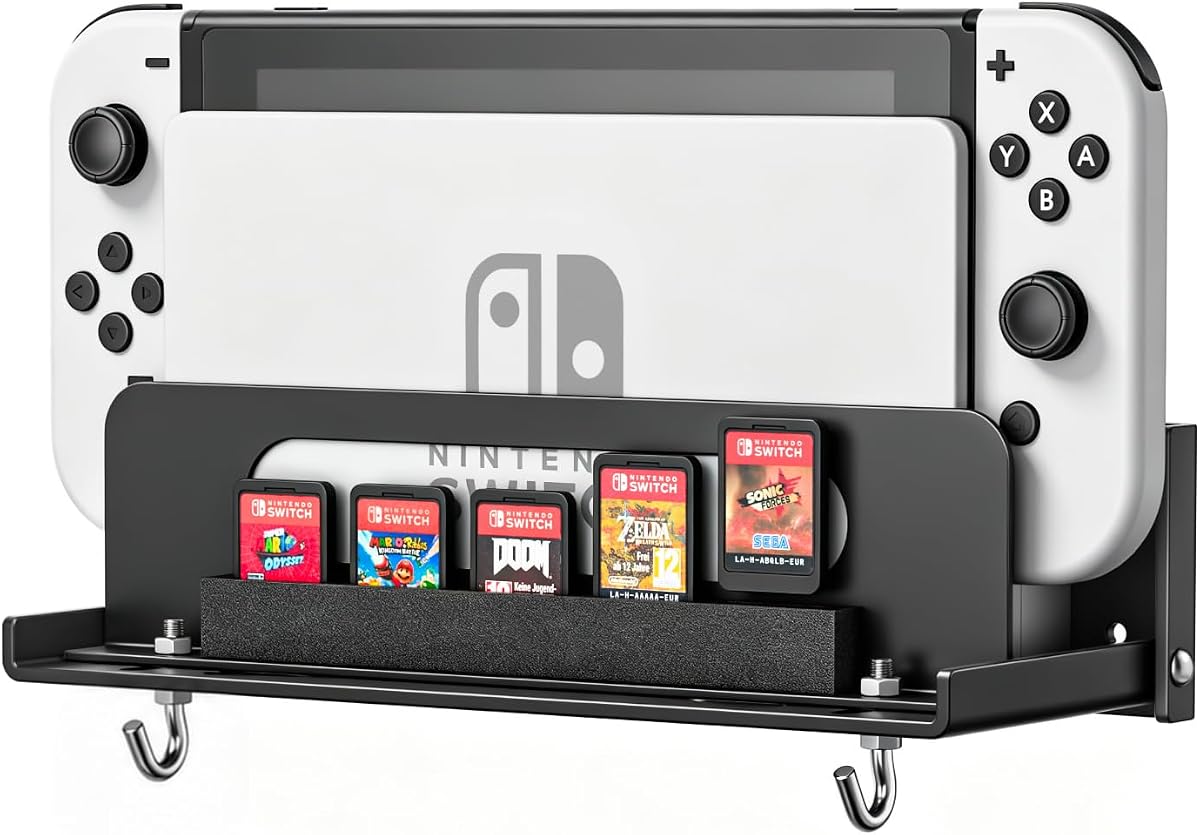
The Monzlteck Wall Mount Bracket is rated 4.8 and provides a focused solution for mounting a Nintendo Switch 2 dock on the left side of a television. Its clean, compact design makes it appealing when the priority is reclaiming space without introducing a large organizer or lighting system.
We may earn a commission when you buy through this link, at no additional cost to you.
Metal construction and a matte coating create a durable-looking bracket that is intended to resist scratches while blending with modern entertainment furniture. A contoured cradle holds the Switch 2 dock firmly, reducing the chance of accidental slipping or dropping. The left-side orientation also supports tidier cable placement behind the television.
Compatibility is the critical limitation. The listing explicitly states that this bracket is not compatible with the original Switch or Switch OLED, so it is only appropriate for a current Switch 2 dock. It also does not provide controller charging, game-card storage, or a place for the bare console, making it best for buyers whose dock is the primary hardware in use.
This is an excellent choice for a Switch 2 owner who wants a minimal dock mount beside a television. Choose it for focused space savings and stable support, but look for a multi-generation organizer if you maintain more than one console generation or want broader accessory storage.
The contoured cradle is shaped around the current dock rather than attempting to accommodate several console generations, producing a more focused and potentially more secure fit.
Positioning the dock on the left side keeps it close to the television and helps cables follow a more deliberate route instead of occupying the central entertainment area.
We may earn a commission when you buy through this link, at no additional cost to you.
The HIDEit Mounts Nintendo Switch 2 Wall Mount is rated 4.1 and is built around one clear purpose: holding a Switch 2 console and its dock securely in a premium steel cradle. The design is exclusive to Switch 2 and is not compatible with the original console.
We may earn a commission when you buy through this link, at no additional cost to you.
Heavy-gauge cold-rolled steel replaces plastic in the key support areas, while a reinforced cradle and anti-wobble locking points are intended to keep the hardware steady during docking and undocking. A powder-coated finish helps resist rust and protect the console from scratches, contributing to a durable appearance.
Ventilation is treated as a central requirement. The open design keeps vents unobstructed and is designed to reduce heat buildup without blocking ports or interfering with wireless connectivity. The mount does not add controller charging, lighting, or game-card storage, so it functions as a dedicated protection and ventilation solution.
Buyers who value material quality, a precise Switch 2 fit, and secure long-term storage will find this a strong premium option. It is less appropriate for multi-console households or anyone seeking an all-in-one charging organizer. Verify the console dimensions and mounting location before drilling.
Locking points and a strengthened cradle are designed to resist movement while the console is inserted, removed, or used in a docked configuration.
The open structure keeps airflow paths clear around the console, which is valuable in enclosed entertainment centers where heat can accumulate.
We may earn a commission when you buy through this link, at no additional cost to you.
This Wall Mount Compatible with Nintendo Switch 1/OLED/2 is rated 4.6 and emphasizes versatility across several console generations. It can hold a Switch 2, Switch OLED, or original Switch dock, making it a practical option for households that have upgraded without discarded older hardware.
We may earn a commission when you buy through this link, at no additional cost to you.
Beyond the dock position, the unit includes integrated storage for Joy-Con controllers and game cards. That makes it more useful than a simple bracket for keeping small accessories visible and accessible. A ventilated structure promotes airflow around the console and dock during longer gaming sessions.
The installation process is designed to be straightforward, with mounting hardware and simple instructions included. It can be placed on a wall or entertainment center, and the listing specifically identifies bedrooms, gaming rooms, dorms, and entertainment centers as suitable environments.
Its main limitation is the lack of charging and lighting. This is a sensible organizational choice for buyers who value cross-generation support and tidy storage more than dramatic presentation. It may also be less visually refined than models with lighting or integrated power controls.
Supporting original Switch, OLED, and Switch 2 docks reduces the need to replace a wall mount every time a console generation changes.
Built-in Joy-Con and game-card storage keeps frequently used pieces close to the mounted console and reduces clutter on the surrounding surface.
We may earn a commission when you buy through this link, at no additional cost to you.
The VIVO Black Wall Mount, model MOUNT-ALL02, is rated 4.6 and provides an adjustable open-frame solution for Nintendo Switch 1 and 2 setups. Its width can be adjusted from 1.9 to 3 inches, allowing users to find a snug fit for the console and dock arrangement.
We may earn a commission when you buy through this link, at no additional cost to you.
The steel construction gives the mount a rigid support structure without making it unnecessarily bulky. Its open frame is intended to provide cooling and airflow around the console, which can be beneficial for systems stored in enclosed entertainment cabinets.
Installation is straightforward because the hardware and instructions are included. The frame secures the Switch dock and removes it from surfaces where it could be touched, knocked, or surrounded by loose accessories. However, this is a focused mount with no built-in charging, lighting, or game-card organization.
The VIVO is a good choice for a simple, flexible setup that includes more than one supported console generation. Buyers should measure the dock and confirm the relevant dimensions before installation. It is most appropriate when a discreet frame and dependable open-air design matter more than integrated electronics.
The 1.9-to-3-inch adjustment range gives users some flexibility in how the Switch dock sits within the frame, useful when comparing different supported generations.
Leaving space around the console reduces the chance of a fully enclosed backing and supports cooling during extended docked use.
We may earn a commission when you buy through this link, at no additional cost to you.
The HIDEit Mounts Uni-SW is rated 4.7 and serves as more than a dedicated Switch holder. Its adjustable frame can accommodate Nintendo Switch 2 equipment as well as cable boxes, routers, media players, and other small devices, making it useful for a broader home-media setup.
We may earn a commission when you buy through this link, at no additional cost to you.
The listed adjustment ranges are three to nine inches high, four to 10 inches long, and 1.76 to 2.7 inches deep. Buyers should compare their device measurements with those figures to ensure a snug fit. A metal unit made from 16-gauge cold-rolled steel provides strength, while a powder-coat finish resists rust and chipping.
One particularly useful feature is support for both 75 mm and 100 mm VESA holes. This allows the mount to attach to the rear of a television or monitor, keeping cables and small devices hidden. The listing notes that infrared, radio-frequency, and Bluetooth signals can continue working when supported devices are mounted behind the display.
This mount is ideal for users who want one steel bracket to organize the Switch and other entertainment hardware. It lacks charging and accessory compartments, and its broad adjustability means careful measurement is essential. For a Switch 2 owner with a mixed-device media cabinet, however, that flexibility is a meaningful advantage.
The adjustable structure can serve the Switch 2 as well as routers, media players, and cable boxes, reducing the need for several unrelated brackets.
Integrated 75 mm and 100 mm VESA holes allow the unit to sit behind a compatible television or monitor, hiding equipment and helping organize cables.
We may earn a commission when you buy through this link, at no additional cost to you.
The Switch/OLED Wall Mount RGB Charging Dock is rated 4.7 and combines an illuminated charging station with extensive accessory storage. It is designed for the original Switch and Switch OLED models, not the Switch 2, making it most relevant to buyers who have not made that upgrade.
We may earn a commission when you buy through this link, at no additional cost to you.
Four Joy-Con charging positions use red indicators during charging and blue when fully charged. The unit can also switch into stand mode. Storage extends to Joy-Con controllers, game cards, wrist straps, Pro Controllers, and the console itself, while two extra USB ports support low-current charging and data transfer.
Fifteen lighting modes offer a range of monochrome and dynamic effects. Red, green, blue, and other colors let the station act as an accent light in a gaming room. Anti-slip pads help stabilize the desktop configuration, and the same unit can be mounted behind a television.
This is a capable organizer for original Switch and OLED owners who want controller charging without a separate dock. Its exclusion of Switch 2 compatibility is decisive: current Switch 2 buyers should choose the FASTSNAIL kit or a dedicated 2025 dock bracket instead.
Distinct red and blue indicators make it easier to see which Joy-Con positions are charging and which are ready, while stand mode provides a display option.
Dynamic lighting, compact accessory slots, and a wall mounting option create a more decorative centerpiece than a basic steel bracket.
We may earn a commission when you buy through this link, at no additional cost to you.
The Mcbazel Metal Bracket is rated 4.4 and is specifically shaped for the dock that shipped with the 2025 Nintendo Switch 2. That specificity is both its main advantage and its main limitation: it avoids attempting to fit the earlier Switch or OLED dock.
We may earn a commission when you buy through this link, at no additional cost to you.
The kit contains a large dock bracket measuring 19.5 by 6 by 5.6 centimeters and a smaller controller bracket that can be installed below or beside it. The smaller piece holds one Pro Controller and provides two hooks for detachable side controllers. Separating these functions prevents the dock and controller from competing for the same mounting point.
Powder-coated metal resists corrosion and chipping, while four-millimeter pads protect the dock's contact surfaces from rubbing. The large hollow running along the underside allows warm air to escape rather than trapping it against the wall, a particularly thoughtful detail for docked gaming sessions.
Four plugs and four screws are included, but the listing appropriately stresses the importance of measuring and installing correctly. This is a strong option for owners who know they have the newer dock and value a precise cradle, open underside, and separate accessory bracket. It is not a universal choice for earlier console hardware.
The unusually clear compatibility warning reduces the risk of purchasing a near-fit bracket that would not securely hold the newer console dock.
Giving the dock and Pro Controller different mounting points avoids interference and creates a more organized layout around the television.
We may earn a commission when you buy through this link, at no additional cost to you.
The Four-in-One Magnetic Joy-Con Charging Dock is rated 4.6 and concentrates on controller charging rather than holding the main console. It offers four dedicated magnetic positions for Switch 2 controllers and four additional positions for original Switch and OLED controllers.
We may earn a commission when you buy through this link, at no additional cost to you.
Bidirectional charging allows a Switch 2 controller to connect regardless of orientation, reducing the need to inspect contact alignment. The listing states that original Switch and Switch 2 controllers can charge in approximately 2.5 to 3 hours. Orange LEDs indicate charging, green indicates a full charge or standby, and a touch control turns off the light at night.
The station connects directly to a Switch dock using the included charging cable. Its hollowed lower structure is designed not to obstruct the Switch 2 cooling fan, and six RGB modes add a modest decorative effect. Installation is simply a matter of connecting the cable, plugging it into the dock, and placing controllers into their slots.
This product fills a different gap from the other entries: it is a controller charging hub rather than a console wall mount. It is useful for households with several controller types, but buyers searching specifically for a Nintendo Switch 2 wall mount should verify whether the intended use is charging only or full console storage.
Bidirectional magnetic contacts simplify placement and are intended to prevent charging failures caused by inserting a compatible controller in the wrong orientation.
Eight charging positions accommodate Switch 2, original Switch, and OLED controllers, making the unit practical for mixed-controller households.
We may earn a commission when you buy through this link, at no additional cost to you.
The right wall mount depends on your console generation, dock design, charging needs, available wall space, and preferred level of visual customization. Compatibility should be checked before any other feature.
Compatibility is more complicated than checking whether a listing says Nintendo Switch 2. The dimensions and shape of the 2025 Switch 2 dock differ from the original Switch and OLED docks, and several brackets are designed for only one version. Some mounts hold the console and dock together, others secure only the dock, and still others are charging stations for controllers rather than a mount for the main console. Confirm the exact model, dock generation, and intended component before purchasing.
Choose only a mount explicitly listed for your hardware. Do not assume that an adjustable Switch 1 bracket will fit the newer dock, or that a dock bracket will hold a standalone console.
A wall mount does not necessarily charge anything. Basic steel brackets simply secure the console or dock, while charging organizers add powered Joy-Con or Pro Controller positions, LED status lights, and sometimes extra USB ports. The FASTSNAIL kit supports four Joypad charging points and two USB 2.0 ports, while the Mcbazel-style controller hub emphasizes magnetic charging across several controller types.
Decide whether charging is essential or optional. Integrated charging is convenient, but it requires a suitable power source, cable routing, and enough clearance for controllers to be removed without pulling against their cords.
A mounted console needs room to dissipate heat. An open frame, hollow structure, and unobstructed underside allow air to move more freely than a fully enclosed shelf. This is especially relevant when the console is docked because the dock and console may operate together for long periods. Look for open vents, a hollow underside, or a design that explicitly keeps fan and vent paths clear.
Avoid blocking vents or pushing the console tightly against the wall. A cooling-conscious mount should support airflow without relying on a separate fan or other accessory that is not included.
Storage capacity determines whether the mount can also hold controllers, game cards, wrist straps, and Pro Controllers. Four Joy-Con hangers and eight game-card positions provide useful basic organization, while the FASTSNAIL covers a much broader range of accessories. A minimal bracket may suit a tidy household, but a multi-slot station is better when loose accessories are regularly used.
Count the controllers and cards you actually own. More storage is useful only if the compartments are accessible and positioned so items can be removed without disturbing the console.
Consider where the mount will go and how the console will be moved. Behind a television is common, but the mounting surface, television weight, cable locations, and access to power outlets all matter. A left-side dock bracket can preserve visibility of the screen and keep cables together, while a desktop configuration offers easy portability and fewer installation concerns.
Check whether the included hardware suits your wall type. Some products provide wall plugs, screws, and a level, but masonry, drywall, and other surfaces may require additional installation methods.
Steel is preferable when the mount must support a dock and resist repeated docking and undocking. Powder-coated steel offers a durable finish that resists scratching, rust, and chipping, while open plastic designs may be lighter but less rigid. Several products include anti-slip silicone pads or EVA strips to reduce movement and protect contact surfaces.
Prioritize rigidity, secure contours, and finish quality over decorative complexity. A stable cradle that keeps ports clear can be more valuable than a large organizer with convenient but less secure compartments.
RGB lighting can turn a functional station into an attractive gaming-room centerpiece. Models with multiple monochrome and dynamic effects provide more customization, while a six-mode controller dock offers a simpler accent. Look for a way to turn the lights off, since bright indicators can be distracting in a dark room. A product that works both as a wall mount and a desktop stand adds flexibility if your setup changes.
Treat lighting as a secondary benefit rather than a substitute for secure fit, ventilation, or appropriate storage. Confirm that desktop use is supported before drilling holes into a wall.
A complete package can make installation much easier. Look for a mounting plate, wall plugs or screw fittings, screws, and a small level. Some brackets also include a Type-C cable, although buyers should verify whether that cable powers the console, the charging accessories, or the entire unit. Clear instructions are another useful sign of a thoughtfully packaged mount.
Follow the supplied instructions and use suitable anchors for your wall. If the product is specifically shaped around the 2025 dock, confirm the fit before drilling rather than relying on visual similarity.
Before installation, identify the console generation and dock version, then compare both with the product's compatibility information. Assemble the mounting plate and accessory holders on a desk, attach the console or dock, and confirm that every port, vent, cable, and controller remains accessible. Use the included level to mark the final position before tightening any hardware.
Choose anchors appropriate for the wall surface and follow the provided instructions. For powered charging models, route the power cable without creating tension on the console or controller contacts. After mounting, slide the dock into its cradle rather than forcing it, and verify that anti-slip pads, straps, or hooks are holding accessories securely. Check that the console can be docked and undocked without contacting the wall.
For ongoing care, disconnect the power before repositioning the mount or removing a controller. Wipe the metal or plastic surfaces with a soft, dry cloth, and avoid allowing liquid or abrasive cleaners to enter charging contacts. Inspect screws and fittings periodically, particularly after moving the console, and remove accumulated dust from vents and surrounding surfaces to preserve airflow.
Not always. The 2025 Switch 2 dock has different dimensions from the original Switch and OLED docks, so a bracket made for an older dock may not fit securely. Look for explicit Nintendo Switch 2 compatibility, and confirm whether the mount holds the dock alone or the console while docked.
Mounting the dock is common when the console is played primarily on a television, while a console-and-dock holder is more convenient for mixed docked and handheld use. The correct choice depends on how frequently you undock the console and whether you need it stored while attached to the dock.
It can, provided the design leaves the console vents and the dock's underside unobstructed. Open frames, hollow cradles, and raised mounting positions encourage airflow. A solid shelf pressed tightly against the wall may trap heat rather than dissipate it.
No. Basic models generally hold the console or dock, while charging organizers include powered controller positions and LED indicators. The FASTSNAIL kit and the magnetic controller hub provide charging, whereas the steel brackets and VESA mounts focus on secure storage.
Many models are designed for that placement, but you must ensure the television does not press against the console vents or controller compartments. Check the mount's depth, cable clearance, and weight rating, and confirm that the television is positioned securely on its own stand or wall hardware.
A level helps keep the console and dock stable and prevents controllers from sliding out of their slots. Several products in this guide include one, including the FASTSNAIL and Metal Wall Mount kits. If a level is absent, a simple phone application or another bubble level can serve the same purpose.
Confirm the model, measure the available space, inspect the wall surface, and make sure cables can reach their destinations without strain. Mark and level the holes before installing anchors, and use fasteners appropriate for the wall material rather than assuming every included plug is suitable.
Usually not in the complete sense. A universal mount may accommodate several device categories and adjustable dimensions, but a close fit still depends on the exact measurements. For Nintendo Switch 2 hardware, prioritize explicit compatibility and confirm whether the newer dock shape is covered.
The FASTSNAIL RGB Wall Mount Kit is the most complete option because it combines Switch 2 charging, broad accessory storage, desktop flexibility, and fifteen lighting modes. The Monzlteck bracket is a focused choice for saving space beside a television, while the HIDEit Switch 2 mount offers premium steel construction and a ventilation-first design for buyers who want dedicated console protection.
Prioritize exact hardware compatibility before features such as RGB lighting, controller storage, or VESA support. Determine whether you need to mount the console, the dock, or only a controller charger, and check that vents, ports, cables, and controller slots remain accessible after installation. Open designs and rigid, accurately shaped cradles offer the best balance of cooling and security.
Ratings, product configurations, and availability can change, and prices also vary over time. Review the current listing and compatibility notes before purchasing, particularly if you own an older Switch or OLED dock or are unsure which dock revision came with your console.