
COOWPS Switch 2 Thumb Grips
4.4Editor score
Two cap styles
High-friction silicone texture
Switch 2 specific fit
Best Mouse Grip Adapter for Switch 2 guide compares ergonomic grips, magnetic straps, thumb grips, and keyboard-mouse converters for comfort and control.
A mouse grip adapter can change how a Nintendo Switch 2 feels in your hands, especially when mouse-style control, a steadier hold, or greater comfort matters. The right accessory should improve positioning without blocking buttons, interfering with the console, or introducing unnecessary setup complexity.
This guide compares ten accessories, including ergonomic shells, magnetic wrist straps, controller cases, thumb grips, and keyboard-and-mouse converters. We considered compatibility, control access, installation method, supported input types, platform limitations, and the practical value of each design.
The rankings show what every option is designed to accomplish, from a direct Switch 2 mouse accessory to broader multi-platform adapters. Product details and availability can change, and current prices should always be checked before purchasing.
4.4Editor score


4.2Editor score
This side-by-side comparison separates purpose-built Switch 2 grips from general controller accessories and keyboard-and-mouse converters, helping readers identify the option that best matches their preferred control method.


This purpose-built controller grip is designed specifically for Nintendo Switch 2 mouse-style play, and it is the most direct match for the keyword among the products reviewed. It does not have a published rating, so the decision should rely on its stated compatibility and focused design rather than customer feedback.
We may earn a commission when you buy through this link, at no additional cost to you.
Its strongest feature is explicit support for both the left and right controller sides. That matters because mouse-oriented play can involve repositioning the controls or using an accessory in different ways, and a symmetrical approach offers more flexibility than an adapter intended for only one position.
The main limitation is the amount of information available. The product description does not discuss material, button clearance, installation, dock compatibility, or adjustments. Those details should be checked with the seller before buying, particularly if precise trigger access or tabletop use is important.
This is the strongest recommendation for a shopper whose priority is a Switch 2 accessory explicitly labeled as a mouse-style grip. It is also the most relevant choice for mouse-control accessories, although readers who need verified ratings, broad platform support, or documented mapping features may prefer one of the more fully specified alternatives.
The product is explicitly labeled for Nintendo Switch 2 and includes both left and right mouse adapters. That focused compatibility makes it easier to shortlist than a general-purpose accessory with uncertain platform support.
Players who already use the console's mouse-oriented control style will find the concept more relevant than conventional controller cases or thumb caps. Confirm the fit and expected hand position with the seller's current images before ordering.
We may earn a commission when you buy through this link, at no additional cost to you.
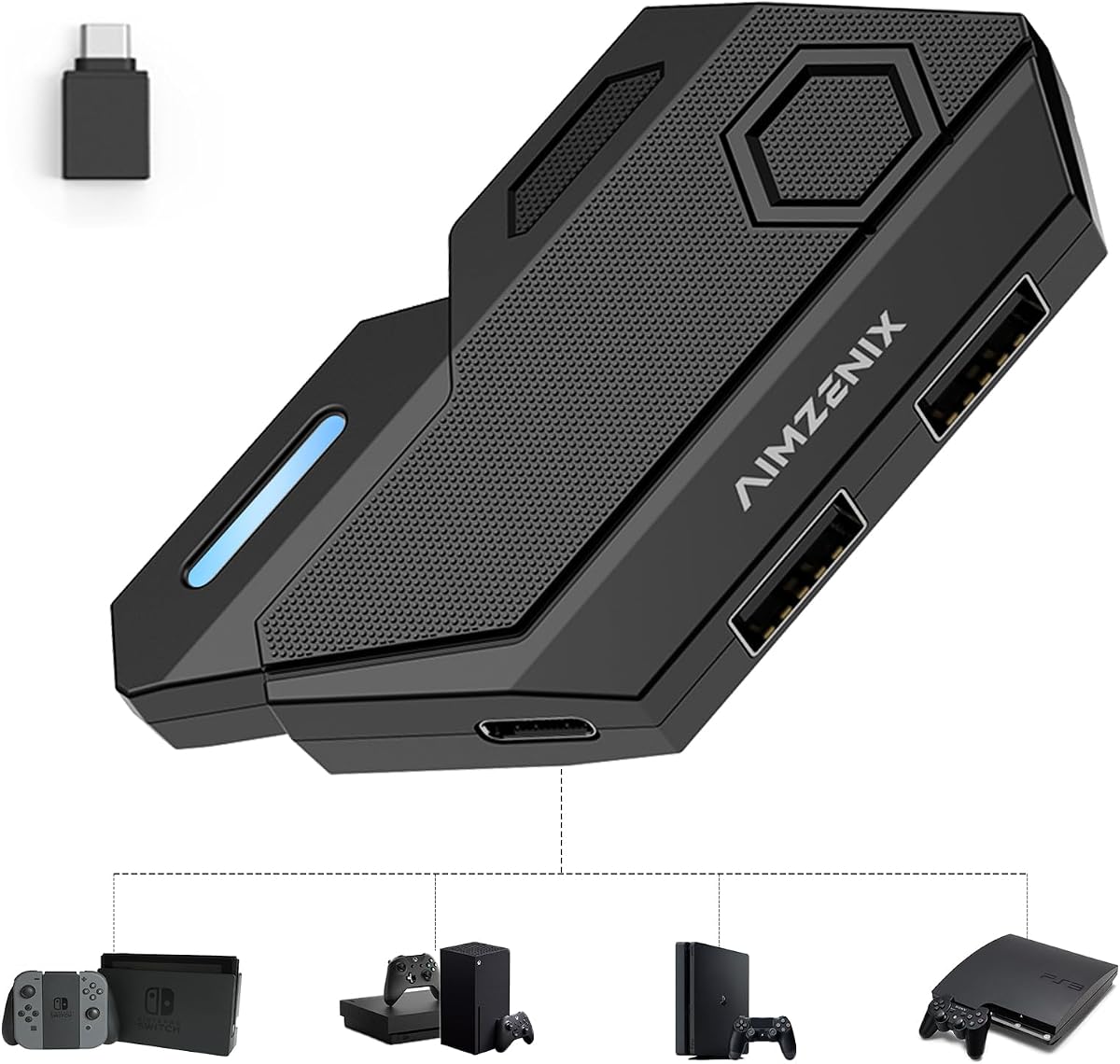
The AIMZENIX BLADER is a keyboard-and-mouse converter for Switch 2, Nintendo Switch, Xbox One, Xbox Series X/S, and PS4. With a 4.0 rating, it offers one of the stronger documented feature sets in this roundup and is aimed at players who want traditional pointing devices represented as controller inputs.
We may earn a commission when you buy through this link, at no additional cost to you.
Shortcut mapping and sensitivity adjustment make it more adaptable than a basic converter. The adapter translates keyboard and mouse activity into controller signals, which can be useful for shooters, third-person games, strategy titles, and role-playing games that reward deliberate cursor placement.
Several requirements deserve attention. Connecting to a console requires the corresponding original controller, third-party controllers are not supported, and mice requiring driver installation cannot be used. The adapter also causes the connected controller's 3.5 millimeter headphone jack to stop working.
It is a good choice for a multi-console setup where keyboard and mouse access is more important than a physical mouse-shaped grip. Buy it with the original controller and accept the headphone limitation. Those who need an accessory physically attached to the Joy-Con should look elsewhere.
The BLADER converts keyboard and mouse activity into signals that the console can interpret through the original controller. This makes familiar desktop-style controls possible without asking the console to recognize a mouse directly.
Built-in customization lets users adjust mouse sensitivity and assign shortcut keys. The manual or tutorial is necessary for editing mappings, so configuration should be planned before an important multiplayer session.
We may earn a commission when you buy through this link, at no additional cost to you.
The arVin Multi-Platform Adapter is a capable keyboard-and-mouse converter with a 4.0 rating, but it is not compatible with Nintendo Switch 2. It supports Nintendo Switch, Switch OLED, PS4, PS3, Xbox 360, and Xbox One systems, making it relevant to older multi-console libraries rather than this guide's central platform.
We may earn a commission when you buy through this link, at no additional cost to you.
Its standout feature is the ability to store up to eight different keyboard and mouse mapping sets. Users can move between profiles for different games using the stated F12 and F1 through F8 shortcut, while mouse sensitivity adjustment is available for supported Xbox systems.
The adapter accepts wired and 2.4 GHz wireless keyboards and mice and uses plug-and-play configuration without drivers. Bluetooth devices, PC use, Switch Lite, PS5, Xbox Series systems, and third-party controllers are excluded, making careful hardware verification essential.
This is a strong option for a household centered on older supported consoles, particularly when multiple saved mappings are valuable. It is not the right choice for a Switch 2 owner, and its long list of exclusions may make a simpler platform-specific adapter more convenient.
Storing up to eight mapping sets is unusually useful for players who move between genres. The direct profile-switch shortcut helps reduce the time spent changing controls between games.
The compatibility list includes several established console families, but Nintendo Switch 2 is notably absent. Verify every device in your setup before buying this adapter.
We may earn a commission when you buy through this link, at no additional cost to you.
The DSSWEN Ergonomic Mouse Grip Adapter is among the few products here that explicitly reshapes a Switch 2 controller into a mouse-like form. Its 1.9 rating is the lowest among the rated selections, so buyers should give its fit and finish close attention rather than assuming a universally comfortable experience.
We may earn a commission when you buy through this link, at no additional cost to you.
The main appeal is a vertically contoured, palm-oriented shape designed to reduce finger cramping and wrist strain during extended sessions. A guide-rail mechanism is intended to keep the controller stable without wobble, while precision openings preserve access to triggers, bumpers, face buttons, and analog sticks.
Its single-pack format means it accommodates one controller rather than a complete set. The description also calls it a dock attachment but does not provide detailed confirmation about every dock, case, or tabletop-mode combination, so compatibility should be checked against the user's exact setup.
This product makes sense for a player who prioritizes a traditional vertical mouse shape and open access to controls. However, the low rating and limited documentation argue for checking recent customer feedback. It is better suited to one-controller experimentation than as a universal two-sided solution.
The vertical layout places the hand closer to a conventional mouse grip. That can feel more familiar to desktop players who dislike the standard controller orientation.
A slide-in guide rail is intended to provide a snug, wobble-free connection. Users should inspect all edges and openings after fitting the controller to ensure nothing obstructs movement.
We may earn a commission when you buy through this link, at no additional cost to you.
This multi-platform keyboard-and-mouse adapter combines broad console support with RGB lighting and several adjustment options. Its 2.7 rating suggests mixed experiences, making the stated setup requirements especially important for anyone considering it for a Switch 2.
We may earn a commission when you buy through this link, at no additional cost to you.
Compatibility includes the Nintendo Switch, Switch OLED, Nintendo Switch 2, Xbox One, Xbox Series S, Xbox Series X, PS4, PS3, and their stated variants. The product supports wired and 2.4 GHz keyboards and mice, custom keyboard mappings, mouse and scope sensitivity, and deadzone adjustment.
Switch 2 users must connect through the console's Type-C interface, not a USB port, and the product does not support the Switch 2 C key or wake-up function. An original controller is needed for key mapping, and the product description advises reconnecting all devices if the connection does not work.
The three USB ports, one Type-C port, RGB lighting, and desktop base make this a feature-heavy converter. It is most suitable for users who value customization and appearance enough to accept setup limitations. Those wanting a straightforward Switch 2 mouse attachment should examine the simpler dedicated grip first.
Keyboard remapping, mouse sensitivity, scope sensitivity, and deadzone adjustment give this adapter more tuning options than many basic converters. These settings can materially improve aim and movement consistency.
Switch 2 operation depends on the console's Type-C interface. Loss of C-key and wake-up support may matter for normal system navigation, even though game controls can still be mapped.
We may earn a commission when you buy through this link, at no additional cost to you.
The Universal Keyboard Mouse Converter is a compact adapter designed to translate standard keyboard and mouse inputs into controller actions. It carries a 3.7 rating and supports the Nintendo Switch platform along with PS4, PS3, Xbox One, and Xbox 360 systems.
We may earn a commission when you buy through this link, at no additional cost to you.
Using an original controller as a guide, users can assign keyboard and mouse buttons to controller functions. The device is presented as driver-free and compatible with most keyboards, mice, and third-party wired game controllers, although a keyboard using a USB hub interface is not supported.
Nintendo Switch 2 is not explicitly named in the compatibility information, so buyers should not assume support based on the original Switch listing. The description mentions that future firmware updates are possible, but it provides no details about current features or release timing.
This converter is a practical choice for supported legacy systems where simple, broad input assignment matters more than a physically attached mouse-style grip. For a new Switch 2 setup, an explicitly compatible converter such as the RGB model or the AIMZENIX BLADER is a safer choice.
The original controller acts as a template for assigning keyboard and mouse buttons. This gives users a familiar reference point without requiring complex software installation.
The stated console list covers several older platforms but does not name Switch 2. Confirm the current product page and manual before assuming compatibility.
We may earn a commission when you buy through this link, at no additional cost to you.
The Arvytosty Magnetic Wrist Straps are specifically engineered for Switch 2 Joy-Con use in mouse mode. They attach magnetically, provide adjustable wrist retention, and include enlarged SL and SR buttons, making them one of the most purpose-focused options for active motion-oriented play.
We may earn a commission when you buy through this link, at no additional cost to you.
A key feature is the one-piece strap construction with an electroplated base intended to provide smoother movement while reducing wear on the controller's magnetic connection. The light guide plate shows connection status, while the larger SR and SL buttons are intended to improve tactility and accessibility.
The four-pack includes blue and red options, but it remains a strap system rather than a full ergonomic shell. The 3.0 rating indicates that some users may find the attachment, strap length, or button ergonomics less convincing than the product description suggests.
Choose these straps when security and quick removal matter more than a mouse-like silhouette. They are particularly appropriate for tennis, badminton, and other full-motion games where an ordinary Joy-Con could slip from the hand. For stationary desktop play, a full grip may provide more substantial hand support.
The plus and minus markings guide correct alignment, and the top presses down until it clicks. This makes installation quick while allowing the controller to be removed without disturbing the rest of the setup.
An adjustable wrist loop helps retain the controller during forceful swings and full-motion movement. It is a practical safety feature for active games where a loose controller could be hazardous.
We may earn a commission when you buy through this link, at no additional cost to you.
The Belkin Nintendo Switch 2 Grip Case is the most complete general-purpose grip in the list, combining a 4.2 rating with clearly described Switch 2 integration. It is not a mouse-input converter, but it provides the ergonomic foundation needed for comfortable, secure handheld or docked play.
We may earn a commission when you buy through this link, at no additional cost to you.
Its textured, non-slip surface supports long sessions and improves handling when hands become slippery. The design remains compatible with docking, and the quick-release feature allows the Joy-Cons to be removed without taking off the grip, making tabletop kickstand mode straightforward.
The case is made with at least 75 percent recycled plastic and includes two-year coverage. As a full enclosure, it may add some bulk compared with a minimal thumb grip or magnetic strap, and buyers should allow room for the Joy-Cons and charging setup.
This is the premium recommendation for a Switch 2 owner who values reliable grip, dock use, and flexible Joy-Con removal. It is less appropriate for someone specifically seeking mouse-style movement or keyboard-and-mouse translation. For those goals, the dedicated mouse grip or converter is a better fit.
Keeping the grip installed while docking preserves a consistent hand position. Quick Joy-Con release also allows the console to move cleanly into kickstand mode for tabletop play.
The textured shell improves stability and long-session comfort, but it does not translate mouse movements into game input. It is a physical grip accessory rather than a keyboard-and-mouse adapter.
We may earn a commission when you buy through this link, at no additional cost to you.
The arVin Keyboard Mouse Converter is a 3.8-rated option that supports wired and 2.4 GHz keyboards and mice across several console families. Its compatibility includes Nintendo Switch, Switch OLED, Switch Lite, Xbox 360, Xbox One variants, Xbox Series S and X, and PS3 and PS4 systems.
We may earn a commission when you buy through this link, at no additional cost to you.
It can store up to four keyboard and mouse mapping sets and provides a quick sensitivity adjustment using Ctrl with the mouse wheel. The plug-and-play arrangement removes the need for software installation, while three USB ports and one Type-C port offer convenient connection options.
Nintendo Switch 2 is not named, so it should not be selected as a confirmed Switch 2 accessory without checking the latest product information. Bluetooth peripherals are excluded, third-party controllers are not supported, and PS5 compatibility is limited to connecting a PS4 controller and playing PS4 games.
This converter works best for console owners who want mouse-style input across a mixed generation of supported hardware and do not need Bluetooth. Its four profiles and accessible sensitivity control make it practical for players who regularly switch between genres or games.
Four stored configurations let users retain distinct control arrangements for different games. This provides useful flexibility without requiring a new setup every time a title changes.
The adapter reaches back to older consoles and forward to Xbox Series systems, but important exclusions remain. Check Bluetooth requirements, controller type, and the target console before purchasing.
We may earn a commission when you buy through this link, at no additional cost to you.
The COOWPS Switch 2 Thumb Grips are compact stick caps designed for the Switch 2 Joy-Con and Switch 2 Pro Controller. Their 4.4 rating is the highest numerical rating among the listed products, making them a strong low-complexity accessory for players who want a firmer analog-stick grip.
We may earn a commission when you buy through this link, at no additional cost to you.
The high-friction textured material is intended to reduce slipping, particularly during intense play or when hands are sweaty. Added height and a broader motion range can improve control, while the soft silicone construction helps protect the joystick button from scratches and dirt.
Two shapes serve different preferences. The bottle-cap style is presented as suitable for everyday casual games, while the taller straw-hat design targets shooting games where a more pronounced grip may help. The product explicitly does not fit the original Nintendo Switch or OLED models.
These caps are an excellent choice for a simple, dedicated Switch 2 setup and can make analog aiming feel more secure. They do not create a mouse shape or add mouse input, so the benefit is focused on grip, texture, and stick protection rather than a complete ergonomic transformation.
The bottle-cap design provides a modest everyday profile, while the straw-hat cap adds height for focused shooting sessions. Trying both profiles is the easiest way to determine which feels better.
Textured silicone adds friction around the analog stick without enclosing the controller. It is a focused solution for slippage rather than a full ergonomic shell.
We may earn a commission when you buy through this link, at no additional cost to you.
The right choice depends on whether you want a physical mouse-style grip, safer wrist retention, better analog-stick traction, or keyboard-and-mouse translation. Compatibility and setup requirements should be evaluated before appearance.
A product that merely supports the original Nintendo Switch is not automatically compatible with the newer console. Switch 2 uses a different controller and accessory arrangement, and some converters require connection through the console's Type-C interface rather than a USB port. Look for Switch 2 wording in the product title, compatibility list, and setup instructions rather than relying on visual similarity.
Choose only an accessory that explicitly states Switch 2 compatibility when the console is your primary system.
Physical grip cases and mouse-shaped shells alter how the controller is held, while thumb grips improve contact around analog sticks. Magnetic wrist straps focus on security and active movement, and keyboard-and-mouse converters change input behavior entirely. The best choice is the one that addresses the specific problem you want to solve instead of combining unrelated functions.
Match the product format to your desired improvement before comparing extra features.
Converters differ in the peripherals they accept. Some support wired and 2.4 GHz wireless devices, while many exclude Bluetooth products or mice that require driver installation. Check both the input device and the console, and make sure the adapter includes the necessary OTG adapter or Type-C cable if one is required.
Verify peripheral type, connection method, and included cables before ordering.
Keyboard-and-mouse adapters translate desktop inputs into controller signals. The quality of that translation depends on mapping controls, sensitivity settings, and the original controller used as a guide. Several options require an original controller, and some support only a limited number of stored profiles or shortcut combinations.
Favor adapters with clear mapping instructions and the customization options your games require.
An ergonomic shell must leave triggers, bumpers, face buttons, analog sticks, and system controls accessible. Precise openings are preferable to a broad cutout that may compromise structure. For thumb caps, confirm the intended controller generation and consider whether the added height suits your thumb position.
A secure accessory should improve control without obstructing the functions you use most.
A full grip should not prevent the console from docking, and it should allow Joy-Cons to be removed if you want tabletop or kickstand play. Straps and small stick caps usually have fewer docking concerns, but they may not provide the same handheld stability. Review the supported modes and the arrangement of cables, controllers, and accessories.
Prioritize a design that remains practical in every mode you regularly use.
Terms such as ergonomic and premium do not guarantee comfort for every hand shape. Contours, grip texture, added height, and controller weight all affect fatigue. Look for adjustable wrist support or interchangeable profiles when possible, and consider whether a mouse-style orientation suits your natural hand position.
Comfort is personal, so prioritize adjustability and credible fit information.
Some Switch 2 converters disable the C key or wake-up function, while others stop the controller's headphone jack from working. Original-controller requirements and Bluetooth exclusions can also affect setup. These limitations may be acceptable in competitive games, but they are worth checking before committing if you rely on those features.
Read every stated exclusion and confirm that it will not disrupt normal console use.
Before installation, inspect the accessory and controller for damage, confirm that the product supports the exact console and controller being used, and read the included instructions. For converters, identify the required original controller, OTG adapter, Type-C cable, and input-device connection before starting. For physical grips, align the attachment points before applying force.
Install the accessory according to its design. Slide a controller into a rail-style grip until it seats securely, press a magnetic strap into the marked plus or minus position until it clicks, or fit the appropriate thumb caps over the sticks. With a converter, connect the console, original controller, keyboard, and mouse in the specified order, then open required settings such as Switch's Pro Controller Wired Connection option.
Remove the accessory before changing input modes or disconnecting essential cables. Clean removable parts with a soft, dry or lightly damp cloth, avoid harsh chemicals and excessive moisture, and inspect high-friction surfaces for debris. Replace stretched straps, worn caps, or loose fittings before they affect control or safety.
No. Some products explicitly support Switch 2, while others list only the original Nintendo Switch, Switch OLED, or Switch Lite. Check the current compatibility section rather than assuming that a Switch accessory fits the newer system. Also verify whether a mouse-style grip is intended for Switch 2 specifically or is being grouped with unrelated accessories.
No. A keyboard-and-mouse converter translates those input devices into controller signals, while a physical mouse grip changes how the controller rests in the hands. Some shoppers want both pointer precision and a more familiar grip, but those are separate benefits and may require two accessories.
That depends on the converter. The listed adapters that support wireless keyboards and mice generally specify 2.4 GHz wireless support, while several explicitly exclude Bluetooth devices. Check both the converter and mouse, and confirm that the mouse does not require driver installation before purchasing.
Most of the listed converters require the corresponding original console controller to guide the mapping process. The AIMZENIX BLADER expressly states that third-party controllers are not supported, while several arVin models similarly require an original controller. This requirement also affects the connection method and may disable a controller's headphone jack.
It depends on the design. The Belkin grip is explicitly dock-compatible and supports quick Joy-Con removal for kickstand mode. Other shells may fit handheld play but interfere with docking or make tabletop use awkward. Check the dimensions, Joy-Con removal method, cable clearance, and supported modes before buying.
A thumb grip improves traction and texture around the analog sticks but does not change the overall controller shape. A full mouse-style shell changes hand position and can reduce strain for players accustomed to a vertical mouse. The better choice depends on whether the main issue is stick slippage, wrist fatigue, or the desire for mouse-like handling.
The converter communicates with the console through the original controller and may route inputs differently, which can make features such as the controller headphone jack, C key, or wake-up function unavailable. These limitations come from the connection method rather than the grip itself, so players who rely on those functions should read the compatibility notes closely.
Use a soft microfiber cloth with a small amount of water if the manufacturer permits it, then let the accessory dry fully before attaching it. Avoid soaking openings, using abrasive pads, or applying cleaning fluid directly to buttons, rails, magnets, and electronic contacts. Frequent cleaning is especially important for high-friction caps and straps that collect skin oil and debris.
The dedicated NEW Game Controller Grip is the closest fit for shoppers specifically seeking a Switch 2 mouse accessory, while the COOWPS thumb grips offer the strongest published rating and a simple control-focused upgrade. The Belkin grip stands out as the most complete premium ergonomic option for normal handheld, docked, and tabletop use.
Prioritize exact platform support, the type of control improvement you need, and any system limitations. Dedicated grips suit physical comfort, thumb caps improve analog-stick traction, wrist straps protect against drops, and keyboard-and-mouse converters provide cursor precision. Those goals should guide the selection more than a shared label.
Finally, review the seller's latest compatibility notes, package contents, instructions, and current price before purchasing. Console accessories can change as platforms and firmware evolve, and confirming the exact controller and connection method can prevent an otherwise unsuitable purchase.
