
ASUS TUF Gaming B760-PLUS WiFi
4.5Editor score
Thunderbolt 4 header support
PCIe 5.0 graphics slot
Three M.2 storage slots
WiFi 6 networking
Realtek 2.5Gb Ethernet
Expert guide comparing 10 motherboards with Thunderbolt for Intel and AMD builds, covering USB4, ports, expansion, networking, features, and compatibility.
Motherboards with Thunderbolt combine high-speed USB4 connectivity, broad storage support, and the flexibility to connect demanding displays, docks, and accessories. A good board must also fit the chosen processor, provide adequate power delivery, offer useful networking, and include cooling suited to the intended workload.
This guide compares ten Thunderbolt-equipped options across Intel and AMD platforms, including full-size ATX boards, a Mini-ITX model, and a dedicated expansion card. The comparison considers processor support, the number and type of Thunderbolt connections, USB4 headers, M.2 storage, networking, power stages, cooling, and practical builder features.
The selections include boards for high-end Intel Core Ultra systems, LGA 1700 gaming and creator builds, AMD AM5 configurations, and compact systems. Ratings, specifications, and product details reflect the supplied listings, while prices and availability can change, so readers should confirm current listings before purchasing.
4.5Editor score
4.5Editor score

4.4Editor score
The comparison below places each motherboard, compact board, or expansion card side by side so readers can quickly evaluate processor support, Thunderbolt implementation, storage capacity, networking, and form factor.


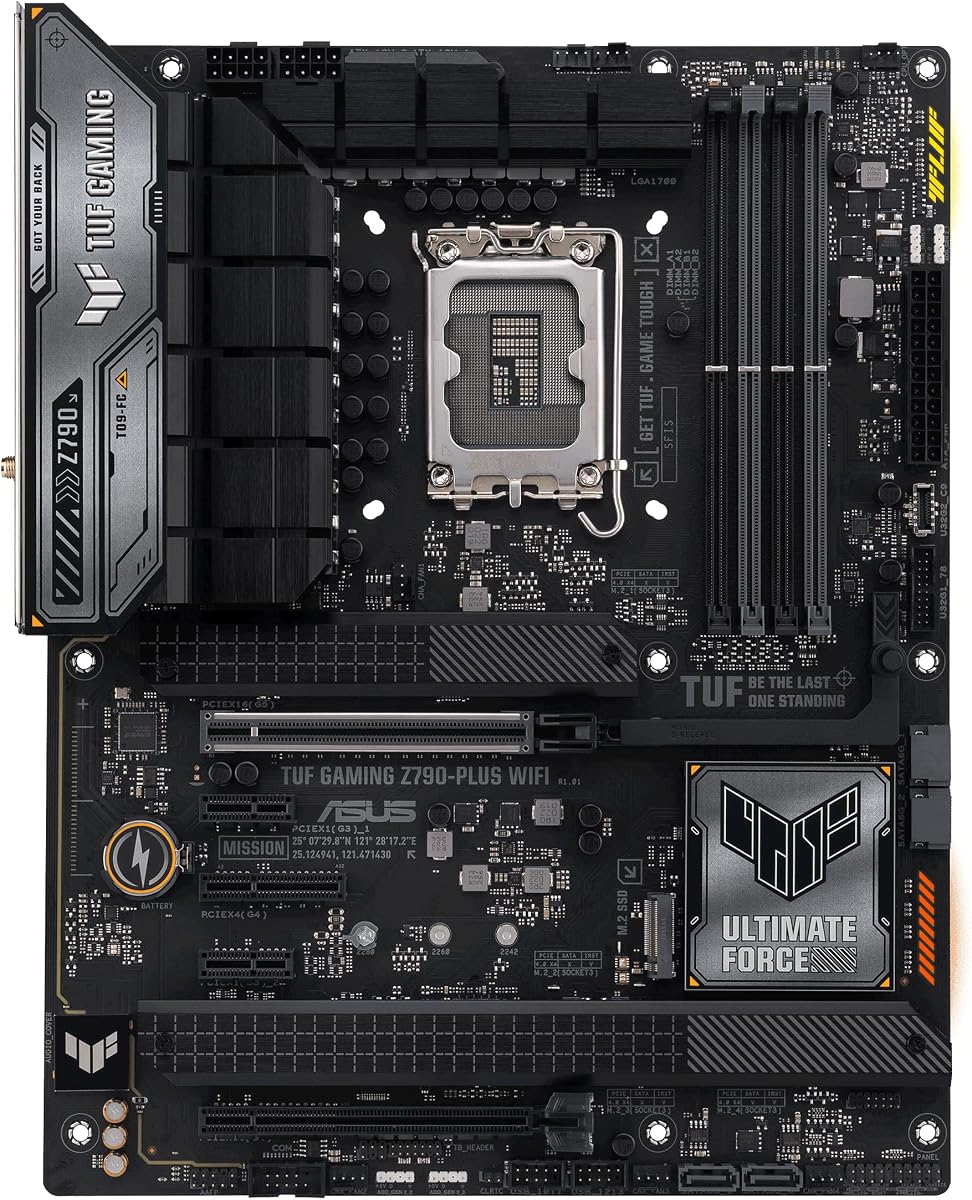
The ASUS TUF Gaming Z790-Plus WiFi is an ATX LGA 1700 motherboard that brings Thunderbolt 4 readiness to a well-balanced platform for Intel Core 12th, 13th, and 14th generation processors. Its 4.5 rating reflects a strong combination of expansion, networking, storage, power delivery, and cooling. The board is particularly appealing for builders who want modern high-speed connectivity without committing to a barebones or specialized workstation design.
We may earn a commission when you buy through this link, at no additional cost to you.
Its most important feature is the Thunderbolt 4 USB4 header, which allows a compatible Thunderbolt card or other internal USB4 device to be connected through the motherboard. The board also includes four M.2 slots, a PCIe 5.0 platform, DDR5 support, front USB 3.2 Gen 2 Type-C connectivity, WiFi 6, and Intel I225-V 2.5Gb LAN. A 16+1 DrMOS power solution, ProCool sockets, military-grade TUF components, and Digi+ VRM support stable operation and strong gaming performance.
The main compromise is that Thunderbolt 4 is provided as a header rather than a convenient rear USB-C port. That means the user may need an add-in card, a front-panel solution, or a compatible internal implementation. The board also remains tied to LGA 1700, so it does not provide a direct upgrade path to Intel's newer LGA 1851 platform. Despite those limitations, its broad storage support and mature feature set remain compelling.
This is the strongest general recommendation for an LGA 1700 gaming build that includes a future USB4 accessory. It suits users who want more M.2 expansion than entry-level boards, reliable 2.5Gb networking, and comprehensive cooling support. Buyers who require an immediately accessible rear Thunderbolt port may prefer a newer board, but for a header-based implementation, this TUF model offers an unusually balanced package.
The internal Thunderbolt 4 header creates a path to a broader USB4 ecosystem, including compatible docks, display adapters, and storage devices. It is especially useful in a polished case where a matching front-panel USB-C connector would be more convenient than a rear card.
Four M.2 slots provide room for a multi-drive gaming library, while PCIe 5.0 support and 16+1 DrMOS stages suit a modern graphics-heavy configuration. The combination makes the board more versatile than a basic entry-level alternative.
We may earn a commission when you buy through this link, at no additional cost to you.
The ASUS ROG Strix Z890-E Gaming WiFi is a feature-dense ATX motherboard for Intel Core Ultra Series 2 processors on LGA 1851. It carries a 4.4 rating and distinguishes itself through seven M.2 slots, extensive power stages, Thunderbolt 4, WiFi 7, and a collection of AI-oriented setup and monitoring features. It is designed for builders who want expansive storage and high-end platform capabilities.
We may earn a commission when you buy through this link, at no additional cost to you.
Its 18+2+1+2-stage power solution combines 110-amp, 90-amp, 90-amp, and 80-amp power stages with ProCool II connectors, MicroFine alloy chokes, and premium metallic capacitors. The board supports DDR5 through ASUS technologies such as DIMM Fit, DIMM Flex, and AEMP III. Its headline storage capacity is the seven M.2 positions, making it the strongest choice in this group for extensive NVMe configurations.
The board's AI tools include NPU Boost, ASUS AI Advisor, AI Overclocking, AI Cooling II, and AI Networking II. These features should be viewed as setup and management aids rather than automatic performance guarantees. As with any high-end motherboard, buyers may find that the extensive design, premium orientation, and feature set exceed what a conventional gaming PC actually needs.
The ROG Strix Z890-E makes the most sense for a high-end LGA 1851 workstation or enthusiast gaming system that will make use of several fast storage drives. It provides Thunderbolt 4 in a modern platform, abundant M.2 expansion, and robust networking. Users with a smaller budget or only a few drives can find more restrained boards that cover the essentials.
Seven M.2 positions are unusual and give this board an immediate advantage for users building around multiple NVMe SSDs. The available space permits extensive game libraries, scratch drives, media caches, or separate operating-system and project storage.
LGA 1851 support, WiFi 7, AI-oriented utilities, and an extensive power-delivery system position the board for Intel's newest desktop platform. It is aimed at users who want current platform features rather than an established older socket.
We may earn a commission when you buy through this link, at no additional cost to you.
The ASUS ProArt Z890-CREATOR WIFI is the premium selection in this guide, combining the most advanced Thunderbolt implementation with a creator-oriented set of networking and workflow features. Its 4.4 rating reflects a capable LGA 1851 platform with five M.2 slots, PCIe 5.0 support, WiFi 7, dual Thunderbolt 5 Type-C connections, an additional Thunderbolt 4 port, and 10Gb plus 2.5Gb Ethernet.
We may earn a commission when you buy through this link, at no additional cost to you.
The board's 16+2+1+2 teamed power stages use ProCool II connectors, alloy chokes, and durable capacitors. For storage, it offers one PCIe 5.0 M.2 slot, four PCIe 4.0 M.2 slots, and a USB 20Gbps front-panel header. Its creator-oriented software adds color management through ProArt Creator Hub and compatibility with Pantone utilities, while ASUS Control Center Express provides USB management, software blacklisting, and Regedit controls.
Installation convenience is another strength. PCIe Slot Q-Release Slim, SafeSlot, M.2 Q-Release, M.2 Q-Slide, M.2 Q-Latch, Q-Antenna, BIOS FlashBack, and Q-Connector reduce common assembly hassles. The trade-off is that this level of connectivity, software, and convenience carries a premium-product orientation, and buyers should confirm that the creator tools align with their actual workflow rather than paying for unused features.
For a high-end editing, development, or professional desktop built on LGA 1851, the ProArt Z890-CREATOR WIFI is an excellent choice. Thunderbolt 5 and Thunderbolt 4 provide unusually flexible high-speed connectivity, while 10Gb Ethernet can materially benefit workflows involving large files or shared storage. It is the clearest choice here for users whose priorities are fast ports, creator features, and a modern Intel platform.
Dual Thunderbolt 5 Type-C ports offer a direct path to high-bandwidth storage, docks, and displays, while the Thunderbolt 4 connection adds another option for peripherals. This makes the board especially compelling for desks with several fast external devices.
The inclusion of 10Gb and 2.5Gb Ethernet, five M.2 slots, and a 20Gbps front-panel header supports workflows that routinely move large files. Creator utilities add further value when color and production workflows are part of the intended system.
We may earn a commission when you buy through this link, at no additional cost to you.
The ASUS TUF Gaming B760-PLUS WiFi is the budget-focused recommendation for an LGA 1700 system that still wants Thunderbolt 4 header support. It has a 4.5 rating, supports 12th, 13th, and 14th generation Intel Core processors, and offers a practical combination of PCIe 5.0, DDR5, three M.2 slots, WiFi 6, and Realtek 2.5Gb Ethernet.
We may earn a commission when you buy through this link, at no additional cost to you.
Its 12+1 DrMOS design is supported by a six-layer PCB, eight-plus-four ProCool sockets, military-grade TUF components, and Digi+ VRM. Cooling provisions include enlarged VRM heatsinks, M.2 heatsinks, a PCH heatsink, hybrid fan headers, and Fan Xpert 4. The board also includes a PCIe 5.0 slot, rear USB 3.2 Gen 2×2 Type-C, and a front USB 3.2 Gen 2 Type-C header.
Thunderbolt and USB4 support arrives through the motherboard header rather than a rear port, so users should plan the appropriate card or internal connector. Compared with the Z790-Plus WiFi, this board offers fewer M.2 positions and a less elaborate power system. Those are sensible trade-offs for a value-oriented build, particularly when the rest of the platform meets the user's needs.
This TUF board is a strong choice for mainstream gaming, home computing, and productivity systems that need USB4 expansion. It gives builders a simpler route into Thunderbolt than a premium creator motherboard while retaining modern storage, fast wired networking, and wireless connectivity. Those prioritizing a native rear Thunderbolt port or extensive drive capacity should consider one of the more specialized alternatives.
The board covers the important everyday platform categories: DDR5 memory, a modern PCIe 5.0 graphics slot, multiple NVMe positions, WiFi 6, and 2.5Gb Ethernet. It avoids some of the cost and complexity associated with top-tier power delivery and creator-oriented software.
Thunderbolt 4 support through a header is useful when the system case supports a matching front USB-C panel. If the requirement is an immediately accessible rear port, buyers should examine a board that includes one rather than assuming every USB4-compatible board offers the same connection.
We may earn a commission when you buy through this link, at no additional cost to you.
The ASUS Z790-AYW WiFi W II is a refined LGA 1700 ATX board for 12th, 13th, and 14th generation Intel Core processors. It carries a 4.3 rating and combines DDR5, PCIe 5.0, three M.2 slots, WiFi 6, 2.5Gb LAN, multiple 10Gbps Type-C connections, and a Thunderbolt USB4 header. It is a versatile option for builders who prioritize clean digital connectivity.
We may earn a commission when you buy through this link, at no additional cost to you.
Power is supplied through a 12+1 DrMOS configuration with a six-layer PCB, ProCool connectors, alloy chokes, and durable capacitors. Large VRM heatsinks, M.2 heatsinks, a PCH heatsink, hybrid fan headers, and Fan Xpert 4 with AI Cooling II cover the board's thermal management. ASUS Enhanced Memory Profile II and OptiMem II add memory-oriented configuration features.
The rear USB 10Gbps Type-C and Type-A connections, front USB 10Gbps Type-C header, and USB4 header make this board well suited to compact desks and modern accessory ecosystems. As with the budget TUF B760-PLUS, however, Thunderbolt is not presented as a ready-to-use rear USB-C port. Its 4.3 rating also places it slightly behind the strongest-rated selections, although the difference should be considered alongside personal requirements.
This motherboard works well for an established LGA 1700 gaming or productivity build with several fast USB devices. It is particularly attractive to users who want 10Gbps Type-C on both the rear and front panel. For a new high-end workstation, the newer ProArt or ROG models offer more advanced Thunderbolt and storage options, but this board remains a capable mainstream choice.
Rear and front 10Gbps Type-C connections simplify the use of compatible external devices and reduce reliance on adapters. The USB4 header extends those capabilities for builders who want Thunderbolt-class connectivity in a modern case.
A 12+1 DrMOS design, large heatsinks, and established processor support make this a practical foundation for compatible Intel Core systems. Users with existing LGA 1700 components can benefit without needing to move to a newer platform.
We may earn a commission when you buy through this link, at no additional cost to you.
The MAG Z890 Tomahawk WiFi II is an ATX LGA 1851 motherboard for Intel Core Ultra Series 2 processors. Its 4.1 rating is the second-lowest among the motherboards in this guide, but the board offers a useful combination of a native rear Thunderbolt 4 Type-C port, four M.2 connectors, PCIe 5.0, WiFi 7, and 5Gb LAN.
We may earn a commission when you buy through this link, at no additional cost to you.
Storage is split between one PCIe Gen5 x4 M.2 slot and three PCIe Gen4 x4 slots. EZ M.2 Shield Frozr II covers thermal management, while EZ M.2 Clip II assists installation. The primary graphics slot is PCIe 5.0 x16 with Steel Armor II, and the four DDR5 DIMM slots use isolated Memory Boost circuitry with listed overclocking support of 9200+ MT/s.
The rear Thunderbolt 4 Type-C port is a meaningful practical advantage over motherboard listings that only provide an internal header. It makes docks, fast external storage, and compatible display equipment easier to connect without adding a card. The trade-offs include a 5Gb LAN rather than 10Gb Ethernet, a lower rating than most competing boards, and a more conventional feature set than the ProArt model.
This board is a sensible choice for an LGA 1851 builder who specifically wants a rear Thunderbolt 4 connection and does not need creator software or seven storage slots. Its cooling design, modern platform support, and straightforward connectivity make it appealing for gaming and performance systems. Buyers who place greater emphasis on networking speed or specialized professional features should compare the other Z890 alternatives.
A native rear Thunderbolt 4 Type-C connection is easier to use than an internal header. It allows compatible accessories to be attached directly to the case, avoiding the need to install a dedicated add-in card.
One Gen5 and three Gen4 M.2 slots cover a broad range of drive configurations, while double-sided Frozr II shielding supports heat management. A Steel Armor II PCIe 5.0 x16 slot is suited to a modern graphics card.
We may earn a commission when you buy through this link, at no additional cost to you.
The ASUS TUF Gaming Z890-PLUS WiFi combines the familiar TUF design language with Intel's newer LGA 1851 platform. It has a 4.2 rating, supports Core Ultra Series 2 processors, and offers a rear Thunderbolt 4 Type-C connection, four M.2 slots, WiFi 7, 2.5Gb Ethernet, DDR5, and PCIe 5.0.
We may earn a commission when you buy through this link, at no additional cost to you.
Its 16+1+2+1 80A DrMOS configuration is supported by ProCool power connectors, an eight-layer PCB, alloy chokes, and durable capacitors. Thermal provisions include large VRM heatsinks, M.2 and PCH heatsinks, hybrid fan headers, and Fan Xpert 4. AI Cooling II and AI Networking II add automated or guided assistance for those two areas, complementing the board's gaming-focused identity.
Compared with the ROG Strix Z890-E, this TUF board has fewer M.2 positions and a less elaborate feature set, but it retains a native Thunderbolt 4 Type-C port and modern wireless networking. Compared with the older Z790 TUF, it moves to LGA 1851 and WiFi 7. The 4.2 rating is respectable, although lower than the other ASUS boards in this list.
This motherboard is a good middle-ground recommendation for a new Intel gaming build that wants convenient Thunderbolt access without the extra cost or specialized tools associated with premium creator models. It should serve users who need several M.2 drives, modern wireless connectivity, and a robust power system. It is less compelling for creators who specifically require Thunderbolt 5 or 10Gb Ethernet.
The rear Thunderbolt 4 Type-C port supports straightforward use of compatible docks and high-speed accessories. WiFi 7 and 2.5Gb Ethernet give the board current networking options for both wireless and wired environments.
A multi-stage DrMOS power system, eight-layer PCB, and extensive VRM, M.2, and PCH cooling form the core of the board's durability-oriented design. The result is a well-equipped option for a gaming or productivity system.
We may earn a commission when you buy through this link, at no additional cost to you.
The ASUS TUF Gaming B850-PLUS WiFi is the principal AMD option in this guide. It carries a 4.4 rating and supports Ryzen 9000, 8000, and 7000 series desktop processors through AM5. Its headline connectivity includes WiFi 7, Realtek 2.5Gb Ethernet, PCIe 5.0, a rear 20Gbps USB Type-C port, and a Thunderbolt USB4 header.
We may earn a commission when you buy through this link, at no additional cost to you.
The board uses a 14+2+1 80A DrMOS power solution with an eight-layer PCB, eight-plus-eight ProCool connectors, alloy chokes, and durable capacitors. Storage consists of one onboard PCIe 5.0 M.2 slot and two PCIe 4.0 M.2 slots, all equipped with heatsinks. BIOS Flashback adds a convenient recovery option when the primary boot path is unavailable.
As with the older Intel TUF recommendations, Thunderbolt is implemented through a header rather than a native rear Type-C port. That distinction is important for buyers who want to connect a dock or fast device without installing an add-in card. The board otherwise has an attractive mix of display outputs, 10Gbps front Type-C, 20Gbps rear Type-C, modern wireless networking, and robust power delivery.
This is the right pick for an AMD builder who wants a modern AM5 board with broad high-speed connectivity and Thunderbolt expansion. It offers fewer storage positions than the seven-slot ROG Strix board, but it is also the only conventional motherboard here explicitly centered on the AMD platform. The older ASUS Z790-AYW and TUF B760-PLUS remain similar in overall connectivity while serving Intel LGA 1700 systems.
Thunderbolt support through a USB4 header brings the same general accessory ecosystem to an AMD AM5 system. It is particularly useful for builders who want a case-integrated front USB-C panel or an add-in Thunderbolt card.
WiFi 7, 2.5Gb Ethernet, a 20Gbps rear Type-C port, and a 10Gbps front Type-C connector cover modern peripheral needs. Covered M.2 slots and an 80A-based power design support the board's gaming focus.
We may earn a commission when you buy through this link, at no additional cost to you.
The ASRock Phantom Gaming B860I Lightning WiFi 6E is the compact Mini ITX option for an Intel Core Ultra Series 2 build. It supports LGA 1851 processors, two DDR5 DIMMs, a PCIe 5.0 x16 slot, and a rear Thunderbolt 4 Type-C port. Its 3.7 rating is the lowest among the motherboards in this guide, so buyers should assess its capabilities carefully against their requirements.
We may earn a commission when you buy through this link, at no additional cost to you.
Storage support consists of one Blazing M.2 PCIe Gen5 x4 slot and one Hyper M.2 PCIe Gen4 x4 slot. The board also includes three SATA3 connectors, Realtek 2.5Gb LAN, WiFi 6E with Bluetooth, and Realtek ALC1220 7.1-channel audio with Nahimic Audio. Memory can reach listed overclocked speeds of 9333+ MT/s with two DIMMs, and a 10+1+1+1+1 power phase includes a 110A SPS for VCore, GT, and SA.
Its chief advantage is the combination of a small form factor and a native rear Thunderbolt 4 port. The compromises are the limited number of M.2 slots, only two memory modules, and the absence of multi-gigabit networking beyond 2.5Gb. The listing also notes that it is not compatible with all built-in computers or systems, a reminder that compact boards require careful case and cooler planning.
This motherboard suits a compact LGA 1851 system where a rear Thunderbolt 4 port and Mini ITX dimensions matter more than extensive expansion. It can serve a focused gaming or productivity build with two fast drives. Users needing several storage devices, more memory flexibility, or 10Gb networking should consider a larger ATX board instead.
Mini ITX construction makes the board appropriate for smaller enclosures and tightly planned builds. Its limited slot count rewards careful selection of the graphics card, cooler, memory, and storage before assembly.
A native rear Thunderbolt 4 Type-C port adds valuable connectivity despite the board's compact size. Two M.2 slots and two DIMMs make it a focused rather than expandable platform.
We may earn a commission when you buy through this link, at no additional cost to you.
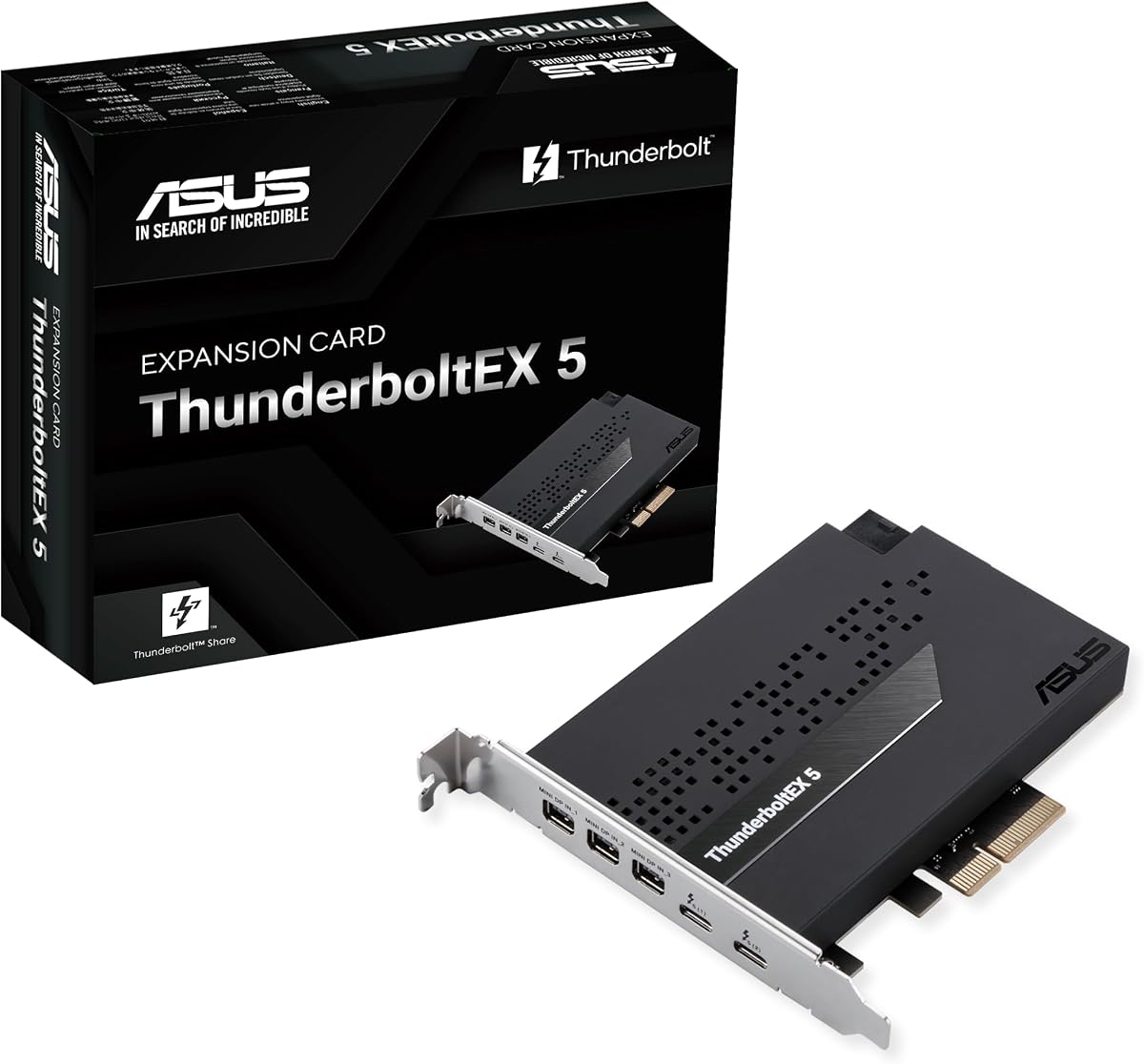
The ASUS ThunderboltEX 5 Expansion Card is an add-in rather than a motherboard, but it offers another way to build a system around Thunderbolt 5. The card carries a 3.2 rating and provides dual Thunderbolt 5 USB-C ports, up to 120Gbps of bandwidth, DisplayPort 2.1 output, a PCIe 4.0 x4 interface, and support for daisy-chaining as many as five Thunderbolt devices.
We may earn a commission when you buy through this link, at no additional cost to you.
Its USB-C ports support fast charging, with the supplied information noting up to 130 watts total and up to 96 watts for one device. The DisplayPort 2.1 output can support up to three 8K 60Hz displays with DSC. These features make the card interesting for high-speed storage, professional displays, docking, and multi-device workflows on compatible systems.
The key limitation is platform compatibility. The product information identifies compatibility with Intel 800-series motherboards, so buyers must verify their processor, chipset, motherboard, BIOS, slot availability, operating system, and device support. A PCIe 4.0 x4 slot, suitable power delivery, and an available physical space are also practical requirements. It should not be confused with a complete motherboard or treated as a universal upgrade.
For someone with a compatible Intel 800-series system, the ThunderboltEX 5 can provide a straightforward path to the newest connection standard without replacing the motherboard. It is best suited to a builder who already has the required platform and wants one or two high-speed ports. Those choosing a new motherboard should compare native Thunderbolt implementations and consider whether the add-in approach is more appropriate for their case and layout.
Compatible builders can add modern high-speed connectivity to an existing Intel 800-series platform. This can be useful when a motherboard offers only USB4 or when the system has a free slot and a compatible chassis layout.
DisplayPort 2.1 output can drive up to three 8K 60Hz displays with DSC, while the dual USB-C ports support high-bandwidth accessories. The five-device daisy-chain capability broadens the number of peripherals that can be coordinated.
We may earn a commission when you buy through this link, at no additional cost to you.
Choosing the right motherboard involves balancing the processor platform, exact Thunderbolt implementation, expansion needs, networking, cooling, and case compatibility. The most important distinction is whether Thunderbolt is available through a rear port, an internal header, or an add-in card.
Prioritize the connection type that matches your actual accessories and case. A rear port is convenient; a header may produce a cleaner front-panel installation; an expansion card can add flexibility to a compatible system.
Choose the socket first, then confirm processor, memory, cooler, and operating-system support. A newer platform does not automatically make every board better.
Choose Thunderbolt 5 for the newest high-bandwidth devices, and Thunderbolt 4 for established docks and accessories. Verify the port, not merely the marketing term.
Count your expected drives, then verify slot generations, cooling, and lane sharing. More M.2 slots help only when the board supports the drives properly.
Match the power stages and cooling to the processor and workload, not to the board's tier alone. Check case clearance and airflow as well.
Faster network hardware helps only when the rest of the network can support it. Choose 2.5Gb, 5Gb, or 10Gb according to actual workflow and infrastructure.
Confirm case support, socket clearance, card dimensions, and connector space. A smaller board is not automatically more flexible.
Match memory capacity and board layout to future plans, then focus on practical features. Extra software and tuning tools are most useful when they solve a real need.
Before assembly, verify the processor socket, memory type, supported CPU generation, operating system, case form factor, and the exact Thunderbolt implementation. Read the board manual and check the rear-panel diagram. If Thunderbolt appears only as a header, determine whether the case has a compatible front USB-C panel or whether a PCIe add-in card is required.
Build the system on a suitable surface, follow the manual's CPU and cooler installation sequence, install memory in the recommended slots, and connect the motherboard power connectors before adding expansion hardware. If using a Thunderbolt expansion card, observe the card's lane and slot requirements, ensure adequate case clearance, and connect any required auxiliary power. Update the system software and firmware through the official manufacturer process before installing all operating-system drivers.
After startup, confirm that the correct Thunderbolt or USB4 controller appears in the operating system. Test every port with compatible peripherals, monitor temperatures under sustained storage or display workloads, and verify that high-speed devices negotiate the expected connection. Keep dust away from heatsinks and connectors, maintain case airflow, and update motherboard software and firmware as new versions become available.
No. USB Type-C describes the physical connector, while Thunderbolt is a high-speed interface that can use USB-C connectors. A USB-C port may support only standard USB data rates, whereas a Thunderbolt port or USB4 header can provide substantially more bandwidth. Always check the specifications rather than assuming every USB-C connection supports Thunderbolt.
No. Some of the motherboards in this guide provide Thunderbolt 4 through an internal header, while others include a rear USB-C port. A header generally requires a compatible front-panel connector or an add-in card. Buyers who want immediate plug-and-play access should choose a model with a clearly identified rear port.
It may be possible if the system has a compatible PCIe slot, adequate power, the correct operating-system support, and a motherboard or chipset recognized by the expansion card. The ASUS ThunderboltEX 5 is specifically described as compatible with Intel 800-series motherboards. Check the full system requirements before purchasing an add-in solution.
It depends on the SSD and the rest of the system. A compatible Thunderbolt enclosure can deliver faster sustained performance than some ordinary USB connections, especially with large transfers. If an enclosure uses a USB 10Gbps or 20Gbps interface, the motherboard's port and controller determine the actual transfer rate. Confirm that the enclosure supports the specific Thunderbolt generation and connector on the board.
Thunderbolt 5 offers a higher maximum aggregate bandwidth than Thunderbolt 4, making it more appropriate for demanding docks, displays, and storage arrays. Thunderbolt 4 remains a capable option for many accessories. The newest standard does not guarantee better performance with every device because both the peripheral and host controller determine the negotiated link speed.
It can be, but the entire platform matters. Thunderbolt is only one feature among processor support, power delivery, graphics slots, memory, storage, networking, cooling, and case fit. The ASUS TUF B760-PLUS and ASUS Z790-AYW are practical for gaming builds that may use an internal header, while the ProArt offers the most advanced native high-speed connectivity.
Most gaming PCs can operate comfortably with one or two M.2 SSDs, while a library consisting of many large games may benefit from three or more. The five-slot ProArt and seven-slot ROG Strix models support extensive storage, whereas the Mini ITX ASRock board provides two. Choose based on the number of drives you expect to install rather than the maximum number alone.
It is rarely essential for online gaming because latency and network stability matter more than transfer bandwidth. It can be valuable for large downloads, local media, backups, and shared storage. The ASUS ProArt Z890-CREATOR WIFI includes both 10Gb and 2.5Gb Ethernet, while most of the gaming-oriented alternatives provide 2.5Gb LAN.
The ASUS TUF Gaming B760-PLUS WiFi is the most cost-conscious selection, the TUF Gaming Z790-Plus WiFi is the strongest all-around LGA 1700 recommendation, and the ProArt Z890-CREATOR WIFI is the premium choice with dual Thunderbolt 5, Thunderbolt 4, creator utilities, and 10Gb networking. The ROG Strix Z890-E stands out for its exceptional seven-slot storage capacity.
Prioritize the exact Thunderbolt connection rather than the generation alone. A rear port is the simplest option, while a header may be better for a matching front-panel design. Then confirm processor socket, M.2 count, networking speed, cooling, memory layout, and case fit. For compact systems, the ASRock B860I provides a rare combination of Mini ITX dimensions and a rear Thunderbolt 4 port.
Current prices, bundle contents, BIOS versions, and product availability can change, so check the latest listing and manufacturer documentation before buying. Compatibility between the processor, memory, cooler, case, Thunderbolt accessory, and operating system is just as important as the headline connection standard.