FMOUSE Ultra-Mini 2-in-1
4.2Editor score
Built-in TF card reader
Adjustable 800-1600 DPI
USB-C rechargeable battery
A mini travel mouse is designed to make computing more comfortable away from a full-size desk without taking up much room in a laptop bag, carry-on, or pocket. The strongest choices balance a genuinely compact shape with accurate tracking, straightforward controls, dependable connectivity, and enough comfort for regular use rather than occasional emergencies alone.
The products in this guide cover wired, 2.4 GHz wireless, Bluetooth, and multi-mode configurations. We compared their stated dimensions, connection methods, resolution, power requirements, compatibility, click design, and portability features, while also considering customer ratings and the practical compromises associated with each approach.
Each review identifies the qualities that make a particular model useful in a different travel situation, from simple plug-and-play operation to rechargeable multi-device connectivity. Product details and availability can change over time, so shoppers should confirm the current specifications, compatibility, and price on the linked listing before making a final purchase.
4.2Editor score

4.5Editor score

4.2Editor score
As an Amazon Associate we earn from qualifying purchases.
The comparison below highlights the most important differences among these compact mice, including connection style, tracking resolution, power design, portability, and intended compatibility.


The Logitech Wireless Mini Mouse M187 combines a pocket-ready body with a conventional three-button layout and a 4.5 customer rating. Its standout qualities are straightforward setup, freedom from a cable, and a compact shape that is easy to carry between a home desk, office, hotel room, and shared workspace.
We may earn a commission when you buy through this link, at no additional cost to you.
The M187 uses a USB nano receiver and offers 1000 DPI optical tracking, which is a practical level of sensitivity for everyday navigation, document work, and web browsing. The receiver is small enough to remain connected, and the product information notes that it can also be stored inside the mouse, reducing the chance of leaving it behind after a trip.
Compatibility is one of its strongest arguments. The listed requirements include Windows 10 or later, Windows 8, Windows 7, Mac OS X 10.10 or later, Chrome OS, Linux with kernel 2.6 or later, and a USB port. The trade-off is dependence on a receiver, while the small shape may also feel less substantial to users accustomed to full-size desktop mice.
This is the most balanced choice for a traveler who wants dependable wireless operation without an elaborate setup process. It suits students, office workers, and anyone who regularly moves between computers and prefers a recognizable three-button mouse with optical precision. For a compact option that prioritizes portability, convenience, and broad compatibility, the M187 is the strongest general recommendation.
The extra-small form is designed to fit into laptop bags, briefcases, and other compact spaces. Because it uses no cable, it also avoids the need to find a suitable surface or manage a cord while working temporarily away from a desk.
The nano receiver can stay in an available USB port or be stored inside the mouse when it is not needed. This design makes the package easier to pack and reduces the risk of disconnecting a tiny receiver during transit.
We may earn a commission when you buy through this link, at no additional cost to you.
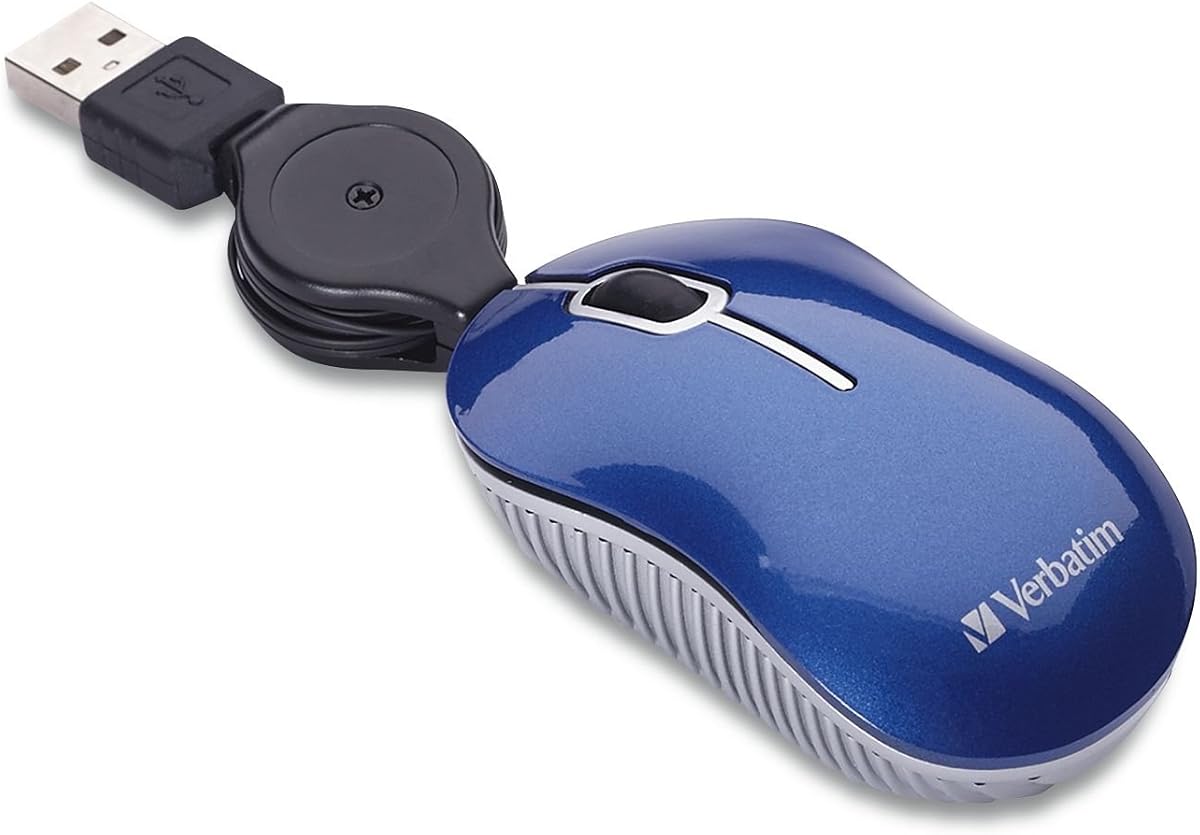
The Verbatim Mini Wired Mouse is a straightforward travel option with a 4.2 customer rating. It offers a compact optical design, a retractable 27-inch cable, and a wired USB-A connection, making it appealing to anyone who wants simple functionality without managing batteries or pairing a wireless device.
We may earn a commission when you buy through this link, at no additional cost to you.
Its retractable cord is particularly useful in a travel bag because it does not need to be wrapped around the mouse. When extended, the cable provides enough length to reach a computer from a reasonable position on a desk, while the optical sensor supports responsive cursor control for everyday notebook and laptop tasks.
The principal compromise is that a wired mouse is less flexible than a wireless model. It remains tethered to the USB port and cannot be used with a computer lacking a compatible USB connection. The listed compatibility includes Windows 2000 and Windows XP, so buyers using more recent systems should verify current device support before purchasing.
This mouse is a sensible choice for budget-conscious travelers who value reliability, minimal setup, and a compact footprint. It is particularly appropriate for short sessions, shared computers, and situations in which charging a battery or carrying a receiver would be inconvenient. For anyone wanting a dependable wired travel mouse, it offers a focused feature set without unnecessary complexity.
The retractable cable retracts into the mouse instead of remaining exposed. That makes the Verbatim easier to place in a slim laptop sleeve or organize in a crowded carry-on without wrapping the cord around the body.
A wired USB-A connection avoids charging, radio interference, and device-pairing steps. That simplicity can be valuable in offices, hotels, and shared spaces where reliable plug-and-play access is more important than wireless freedom.
We may earn a commission when you buy through this link, at no additional cost to you.
This Verbatim Mini Wired Mouse is another compact, cable-based option and carries a 4.2 customer rating. It uses an optical sensor and USB 2.0 connection, with support stated for USB 2.0 and USB 1.1 systems, making it a potential fit for travel kits that include older computer hardware.
We may earn a commission when you buy through this link, at no additional cost to you.
The 27-inch retractable USB cable is the defining convenience feature. It extends when the mouse is in use and disappears inside the housing during storage, helping prevent tangles and avoiding the need to coil a conventional cord. The mouse itself is designed to occupy minimal space in a briefcase, laptop bag, or other small compartment.
Like the preceding Verbatim option, this model is limited by the physical constraints of wired operation. Users must remain near the connected port, and it lacks the receiver-free portability of Bluetooth. The listed Windows 2000 and Windows XP support should also prompt careful checking when buying for a modern computer, despite the broader USB standard coverage.
It makes sense for buyers who specifically want a retractable USB cable and a simple optical mouse without battery management. It may also suit temporary use with compatible legacy equipment. For most modern travel setups, the standard USB-A version may offer the same core convenience with more direct system support, so buyers should compare the current listing details.
Support for both USB 2.0 and USB 1.1 gives the mouse a broader connection foundation than a design limited to a newer standard. This can be useful when assembling a travel kit that may encounter older accessories or systems.
Its small body and retractable cable make it convenient for briefcase-based work. The optical sensor provides enough control for routine document editing, browsing, and pointer navigation without adding a larger desktop mouse to the setup.
We may earn a commission when you buy through this link, at no additional cost to you.
This rechargeable mini mouse earns a 4.4 customer rating through its unusually broad set of connection options. It supports 2.4 GHz wireless plus Bluetooth 4.0 and Bluetooth 5.0, allowing it to work with a USB receiver, an older Bluetooth setup, or a newer Bluetooth device depending on the computer and user's needs.
We may earn a commission when you buy through this link, at no additional cost to you.
The mouse also stands out for quiet operation, a 1200 DPI optical sensor, and a compact shape described as suitable for small and medium-sized hands. Its charging light changes from red while charging to green when complete, and a sleep mode reduces power use when the mouse is left unattended. A protective case and magnetic receiver storage add to its travel orientation.
The complexity of three modes is the main trade-off. Bluetooth 4.0 and 5.0 are selected through separate long-press procedures and different indicator colors, while the product information notes that some desktops, Windows 7 systems, and computers without USB ports do not support every mode. A user switching among several devices should therefore plan which connection method to configure first.
This is a strong choice for a traveler who works across modern laptops, older Bluetooth computers, and USB-equipped systems. It is also appealing in quiet offices, libraries, conference rooms, and cafes because the silent buttons reduce click noise. Buyers who need broad connectivity and rechargeable convenience will get more flexibility than a single-mode mini mouse provides.
The 2.4 GHz receiver offers immediate plug-and-play operation, while Bluetooth 4.0 and 5.0 allow connection without occupying a USB port. This flexibility is useful when moving between a modern computer, a system with older Bluetooth support, and a setup with a free USB port.
Silent buttons help reduce distracting click noise in offices, meeting rooms, cafes, libraries, and bedrooms. The 1200 DPI sensor and rechargeable design preserve everyday performance while the mouse remains away from mains power.
We may earn a commission when you buy through this link, at no additional cost to you.
The Logitech M187 Wireless Mini Mouse is a compact, ambidextrous travel mouse with a 4.2 customer rating. Its appeal lies in a familiar three-button design, fast setup through a nano receiver, and an extra-small body intended to move easily between a laptop and a portable workspace.
We may earn a commission when you buy through this link, at no additional cost to you.
The product information emphasizes easy setup and a receiver that can remain in the USB port or be stored inside the mouse when removed. Its wireless format removes a trailing cable, making it easier to use on a café table, airplane tray table, or in a shared meeting room where usable space is limited.
As with other compact wireless mice, the trade-off is dependence on the receiver and the limited space offered by a very small body. It is intended for standard computing rather than specialized gaming controls, and buyers with larger hands may prefer a slightly more substantial design. The available product information does not state a specific DPI figure for this listing.
The M187 is a good fit for a traveler who recognizes the Logitech M187 format and values quick, uncomplicated wireless operation. It works well for everyday navigation, office applications, and short laptop sessions. Those who want the same core concept but a more explicitly stated optical resolution may wish to compare it with the closely related M187 listing.
Storing the nano receiver inside the mouse reduces the number of loose pieces that need to be tracked. The setup remains familiar: connect the receiver, place the mouse on a suitable surface, and begin using the standard left, right, and scroll controls.
The ambidextrous shape is intended to support either hand and offer a more natural grip than a touchpad. Although it is much smaller than a desktop mouse, it still provides physical buttons and a scroll wheel for routine productivity tasks.
We may earn a commission when you buy through this link, at no additional cost to you.
The Cute Mini Wireless Mouse is a small 2.4 GHz optical mouse with a 3.9 customer rating. It targets travelers, students, and gift buyers who want a lightweight three-button device that can fit into a pocket and work without driver installation.
We may earn a commission when you buy through this link, at no additional cost to you.
Its 1000 DPI optical sensor is appropriate for everyday positioning, while the smooth, curved body is marketed for small and medium-sized hands. The USB receiver attaches to the bottom of the mouse for storage, and the package includes a simple three-button layout with a scroll wheel. Plugging the receiver into a compatible USB port is all that is required to begin use.
The main concern is that it requires one AAA battery, which is not included. That adds a small ongoing task and a potential source of inconvenience during an extended trip unless a spare is packed. Its 3.9 rating is also the lowest among the products in this guide, so buyers should weigh the attractive appearance and compact design against a less emphatic customer consensus.
This mouse is best suited to light users, younger travelers, and anyone seeking a small, inexpensive-looking accessory for occasional laptop use. It may appeal as a gift because of its compact design and smooth finish. For higher-rated alternatives, the Logitech options offer similarly pocketable wireless operation with more established customer feedback.
The product is specifically positioned for users with medium and small hands. Its compact dimensions and rounded shape can make it useful for children, students, and anyone who finds a full-size mouse too bulky for a bag or temporary workspace.
Keeping the USB receiver on the underside of the mouse helps reduce loose pieces. One AAA battery powers the mouse, but the battery is not included, so travelers should account for carrying a spare if they expect to use it away from easy access to replacements.
We may earn a commission when you buy through this link, at no additional cost to you.
The Logitech M170 combines a compact ambidextrous shape with a 4.5 customer rating and a 2.4 GHz connection. It is less aggressively miniature than some entries in this guide, but its advertised 33-foot range makes it a practical choice for presentations, shared rooms, and positions farther from the computer.
We may earn a commission when you buy through this link, at no additional cost to you.
Setup is advertised as taking about three seconds through a USB receiver. Optical tracking and controlled line-by-line scrolling support smooth navigation, while auto sleep and a stated 12-month battery life reduce maintenance. Compatibility extends across Windows, macOS, Linux, Chrome OS, iPadOS, and Android.
The compromise is that the M170 is not as tiny as the M187, and it uses an AA battery rather than a rechargeable cell. Its stated range and broad compatibility are meaningful advantages, but a buyer seeking the smallest possible object in a pocket may find the shape less discreet. The product information also includes recycled-plastic and carbon-footprint details, though those do not directly affect performance.
The M170 is a good option for a traveler who needs more working distance than a standard compact wireless mouse provides. It suits students moving between classrooms, presenters controlling a distant computer, and users who value broad operating system support. It ranks among the strongest choices here for range, comfort, and established customer feedback.
A connection range of up to 33 feet lets the user stand or sit farther from the computer than a short USB cable permits. That can make the mouse more useful in larger rooms, presentations, and shared workspaces.
The advertised 12-month battery life reduces the likelihood of frequent replacements, while auto sleep helps conserve power during inactive periods. These features suit travelers who want to pack the mouse without maintaining a charging routine.
We may earn a commission when you buy through this link, at no additional cost to you.
The FMOUSE Ultra-Mini 2-in-1 is a distinctive compact mouse with a 4.2 customer rating. It combines a Bluetooth mouse with a microSD or TF card reader, while its 3.07-by-1.49-by-0.87-inch body and 30-gram weight place it among the most portable options in the guide.
We may earn a commission when you buy through this link, at no additional cost to you.
Its standout feature is the ability to use the mouse and card reader simultaneously without switching modes. The included 8GB TF card can be used immediately, and the reader supports cards up to 2TB. Three adjustable DPI levels—800, 1200, and 1600—allow the tracking sensitivity to be changed for different preferences and working conditions.
The 120mAh lithium battery supports USB-C charging and can be used while charging. The included USB-C cable doubles as a lanyard, while a USB-C-to-USB-A adapter supports older ports. The trade-off is that the card-reader function is specialized rather than universally useful, and buyers must manage the included cable, adapter, and storage card as part of the travel kit.
This is the premium pick for a traveler who values extreme compactness and wants more than a conventional pointing device. It is particularly useful for workflows involving portable storage, while the adjustable DPI, broad system compatibility, and two-year warranty strengthen its value proposition. Buyers who will never use a TF card may find a simpler mini mouse easier to justify.
The built-in TF card reader supports cards up to 2TB and can operate at the same time as the mouse. Including an 8GB card provides immediate storage capacity, reducing the need to carry a separate reader for supported workflows.
At 3.07 by 1.49 by 0.87 inches and 30 grams, the mouse is designed for minimal packing space. Its 120mAh battery can recharge through USB-C while in use, and the included adapter broadens compatibility with older USB-A systems.
We may earn a commission when you buy through this link, at no additional cost to you.
The Donut Pink Wireless Mouse has the highest customer rating in this selection at 4.7. It combines a playful pink design with dual-device connectivity, silent clicks, a 1200 DPI sensor, and a rechargeable internal battery, giving it a distinctive balance of style and practical travel features.
We may earn a commission when you buy through this link, at no additional cost to you.
Both Bluetooth and 2.4 GHz wireless modes are supported, and a single button allows the user to move between devices. The stated connection distance reaches 30 feet. Compatibility includes Windows, macOS, iOS, iPadOS, and Android, with no drivers required, which makes the mouse relevant to a broad mix of personal and work devices.
The rechargeable battery is stated to last up to 20 days, and the mouse can be used while charging. Its main trade-offs are aesthetic rather than technical: the pink design will not appeal to every shopper, and the listed 30-foot range is slightly shorter than the 33 feet stated for the Logitech M170. Its compact travel shape also needs to be judged for hand comfort.
This is an excellent choice for someone who wants a quiet, rechargeable mini mouse that moves between a laptop and another compatible device. It works well in cafes, offices, classrooms, and shared homes where silent clicks are appreciated. Its high rating and broad compatibility make it a particularly attractive pick within the guide.
Bluetooth and 2.4 GHz modes support different working arrangements, including a setup that uses a USB receiver or one that keeps the USB port free. The single-button switch makes it easier to move between a work computer and a personal device.
Silent clicks reduce noise in shared environments, while the built-in battery is stated to last up to 20 days. Charging while in use helps maintain access to the mouse when its battery needs replenishment.
We may earn a commission when you buy through this link, at no additional cost to you.
The EEEKit Ultra Compact is a 3-button wired mouse with a 4.2 customer rating. Its defining characteristic is the exceptionally small 3-by-1.57-by-0.98-inch body, which is designed to fit tight spaces and appeal to users who prioritize portability over full-size comfort.
We may earn a commission when you buy through this link, at no additional cost to you.
A fully retractable USB cable extends to approximately 31.4 inches and then disappears into the mouse, removing the need to wrap the cord for storage. The left button, right button, and scroll wheel provide the standard controls needed for text selection, navigation, and routine productivity work without charging or installing a driver.
The product information recommends comparing the size chart with a hand before buying, which is sensible because this model is smaller than many other travel mice. Its wired design also means it remains attached to the computer and cannot be used as a Bluetooth mouse with a tablet or phone. The listed support includes several Windows versions and Mac OS X, but current compatibility should be confirmed.
The EEEKit is a good choice for students, children, and frequent travelers who need something exceptionally small. It suits people who use a laptop in confined spaces, value a retractable cord, and want a mouse that works without batteries. Those with larger hands should pay particular attention to the dimensions before ordering.
The 3-inch length and 0.98-inch height make this one of the smallest options in the guide. That is useful for pocketable kits, but shoppers should visualize the mouse in their palm because a minimal footprint can also mean limited hand support.
The 31.4-inch cable retracts fully into the housing for storage. It requires no batteries, receiver, charging cable, or driver, making setup and packing among the least complicated in this comparison.
We may earn a commission when you buy through this link, at no additional cost to you.
The right mini travel mouse depends on how you move between computers, which devices you use, and how much space you have. These factors help narrow the choices without overlooking comfort, connectivity, and everyday usability.
Choose a wired design for simplicity, or a wireless model for greater freedom and compatibility with tablets. Check the ports and operating systems you expect to use before choosing.
Measure your available bag space and compare the listed dimensions before buying. The smallest model is not necessarily the most comfortable choice.
For ordinary productivity, 1000 or 1200 DPI is a sensible starting point. Adjustable DPI is useful when moving between different surfaces or devices.
Rechargeable models reduce disposable battery waste but require a charging cable. Wired models avoid both batteries and charging, while battery models should be packed with a spare.
List every device you expect to control, then confirm both the port type and operating system. Bluetooth support is not available on every computer.
Three basic controls cover most productivity needs. Verify extra buttons and shortcut behavior if your workflow depends on specialized commands.
Prioritize silent clicks when noise is a recurring concern. They are particularly helpful in shared offices, libraries, and online meetings.
Compare size guidance with your hand and intended session length. Compact travel is helpful, but a mouse that causes discomfort will quickly defeat its purpose.
Before first use, install the batteries or charge the internal battery if the model uses one. For a 2.4 GHz mouse, plug the receiver into a compatible USB port and move the mouse to wake it. Bluetooth models require selecting the mouse on the computer's Bluetooth device list. Wireless models with several modes may need a specific button press to activate the desired Bluetooth version.
Place the mouse on a flat, clean, lightly textured surface. Optical sensors work best when the underside is free of dust, crumbs, and sticky residue. Avoid dragging the mouse across rough fabric, abrasive tablet surfaces, or very glossy areas that may interfere with reliable pointer control.
Before packing, switch off a mouse that has a power control and disconnect or store its receiver. Retract wired cables fully, and place the mouse in a pouch or compartment where it will not be crushed. For rechargeable models, check the battery level before a trip and keep the appropriate charging cable accessible.
It can be, particularly for short work sessions, travel, and users who prefer a smaller grip. Some mini mice also provide an ambidextrous shape or curved surface intended to improve comfort. The smallest models may feel cramped for extended use, so buyers should compare dimensions and any stated hand-size guidance before ordering.
A wired mouse is ideal for simple setup because it needs no battery, charging, or pairing. Wireless models are better when you want to move freely or use devices without a USB-A port. Consider receiver storage, battery life, and the availability of a compatible USB port when making the choice.
It depends on the mouse and device. The FMOUSE lists macOS, Windows, Chrome OS, and Android, while the Donut Pink model also lists iOS and iPadOS. Wired USB mice require a compatible port and may need an adapter. Check both the operating system and connection type listed for the specific mouse.
That depends on the model. Wired mice such as the Verbatim and EEEKit options need no batteries. The Logitech M170 and Cute Mini Wireless Mouse use replaceable batteries, while the FMOUSE, Donut Pink, and 3-Mode models use rechargeable internal batteries. Check whether replacement batteries are included before packing a disposable-battery model.
A 1000 or 1200 DPI setting is suitable for most general productivity tasks. A higher setting can cover more screen space with a smaller hand movement, while a lower setting can provide finer control. The FMOUSE offers adjustable 800, 1200, and 1600 levels, making it easier to match the pointer response to your preference.
Silent switches are useful in offices, libraries, cafes, conference rooms, bedrooms, and shared workspaces. The 3-Mode rechargeable and Donut Pink models explicitly advertise quieter operation. They can reduce the distraction of repeated clicks, although silent buttons do not make every sound associated with computer use disappear.
Keep the receiver connected when practical or store it in the mouse if the design provides a dedicated compartment. The Logitech M187, Logitech M170, 3-Mode mouse, and Cute Mini model all describe receiver storage. A small labeled pouch can also help, but built-in storage is less likely to be forgotten during a hurried departure.
Confirm that the mouse works with the operating system and port available on your destination computer. Charge rechargeable models, pack a spare battery if required, and clean the sensor before packing. Keep any receiver with the mouse and verify that the cable length is sufficient for the intended setup.
The Logitech Wireless Mini Mouse M187 is the most balanced recommendation because it combines an extra-small wireless design, 1000 DPI optical tracking, simple setup, and broad system compatibility. The Verbatim Mini Wired Mouse is the budget-oriented choice for anyone who values a retractable cable and zero battery maintenance, while the FMOUSE Ultra-Mini 2-in-1 stands out for its card reader, adjustable DPI, and USB-C charging.
Prioritize the connection method and power system that match your devices. Use wired options when simplicity matters, 2.4 GHz when a dedicated receiver is acceptable, and Bluetooth or multi-mode designs when switching between computers and tablets. Also balance size against comfort, since the most pocketable model may not be the most comfortable choice for long sessions.
Product details, availability, and prices can change, so check the linked listing before buying. Confirm current compatibility, dimensions, included accessories, and battery requirements to ensure the selected mini travel mouse fits both your travel kit and your working habits.