
Newmen GM325Pro Mechanical Keyboard
4.2Editor score
Full-size metal top plate
Detachable USB cable
Red linear switches
Our Metal Mechanical Keyboards guide compares 10 top models for durability, switch feel, wireless support, customization, gaming features, and everyday use.
Metal mechanical keyboards pair the satisfying response of physical switches with rigid frames that feel stable, premium, and dependable. A quality metal plate can resist flex, preserve the intended switch feel, and give a keyboard the kind of substantial presence that suits both productive workspaces and competitive gaming setups.
The keyboards in this guide were compared using their supplied specifications, focusing on frame materials, switch choices, rollover, connection options, programmability, acoustics, layouts, and convenience features. The list covers full-size, tenkeyless, and compact models so readers can compare conventional office designs with wireless, hot-swappable, RGB, and enthusiast-oriented alternatives.
Each review identifies the strongest use case for that model while also noting meaningful trade-offs. Ratings and product details reflect the supplied information, but prices and availability change frequently, so readers should confirm current listings and feature details before making a final purchase.
4.2Editor score

4.8Editor score

4.6Editor score
The comparison below highlights the differences in layout, frame construction, connectivity, switch behavior, and extra features. It makes it easier to separate straightforward wired models from wireless, hot-swappable, and display-equipped premium choices.




The Newmen GM325Pro combines a full-size 104-key layout, a rugged metal top plate, and red linear switches in an approachable package. Its supplied rating is 4.2, and the most appealing elements are the broad function-key row, detachable cable, and combination of gaming-oriented rollover with practical office controls.
We may earn a commission when you buy through this link, at no additional cost to you.
The metal panel is intended to provide a more solid foundation and refined feel than an entirely plastic chassis. Smooth linear red switches favor quick, unobstructed movement, while full-key rollover is valuable when a game expects several commands to register at once. A detachable 1.8-meter USB cable also makes routing around a monitor, desk, or multi-computer setup easier.
RGB lighting is limited to the keyboard's side edges rather than each key, and the model offers wired connectivity only. These are meaningful compromises for buyers who prioritize per-key illumination or wireless flexibility. Even so, the detachable cable, function shortcuts, remapping, and macro recording make the GM325Pro more versatile than its straightforward appearance might suggest.
This is the best choice for shoppers who want a sturdy metal-topped mechanical keyboard with a number pad and useful gaming functions without moving into wireless or enthusiast-board complexity. It is particularly suitable for general gaming, everyday typing, and desk setups where full-size access matters more than an OLED screen or advanced open-source firmware.
The 104-key format keeps dedicated function, navigation, and number-pad keys in a familiar arrangement. That makes the GM325Pro easy to move from gaming to spreadsheets, shortcuts, and data entry without adapting to a compact layout.
Full-key rollover supports rapid multi-key commands, while FN shortcuts and customization software add media, calculator, remapping, and macro functions. The detachable cable adds everyday convenience without complicating wireless pairing.
We may earn a commission when you buy through this link, at no additional cost to you.
The KEMOVE K94 is the most feature-dense selection in this guide, combining 2.4GHz, Bluetooth, and USB-C connectivity with an LCD, metal knob, QMK/VIA support, and hot-swappable sockets. Its 4.8 supplied rating reflects a particularly strong feature set for a wireless mechanical keyboard.
We may earn a commission when you buy through this link, at no additional cost to you.
Its 8000mAh rechargeable battery supports extended wireless use, while the dedicated numpad preserves number entry without moving to a full 104-key footprint. The built-in LCD can show battery information or custom GIFs, and the metal knob provides a tactile way to make quick adjustments. Creamy switches, a gasket mount, and six layers of sound dampening aim for a smoother, fuller sound.
Enthusiasts will appreciate the QMK/VIA support because it opens the door to remapped keys, macros, and custom layers. VIA setup is available in USB wired mode, which is worth remembering if initial configuration does not cooperate with wireless connectivity. Its compact numpad also may feel different from a traditional full-size board, particularly for users who rely on the keypad constantly.
Choose the K94 when wireless flexibility, programmable controls, and enthusiast features matter more than a conventional full-size layout. It bridges casual productivity and serious custom-keyboard interest particularly well, making it our editorial choice for readers who want a metal knob, an information screen, and strong firmware support in one package.
The tri-mode design lets users move between low-latency 2.4GHz, Bluetooth, and a wired USB-C connection. This makes it suitable for changing desks, sharing a keyboard among devices, or reducing cable clutter.
QMK/VIA support, an LCD, configurable RGB, and a metal knob give the K94 multiple ways to tailor daily use. Hot-swappable sockets also let compatible switches be changed without soldering.
We may earn a commission when you buy through this link, at no additional cost to you.
The AULA F75 Pro stands out as a compact wireless mechanical keyboard with an 81-key, 75% layout, hot-swappable sockets, a multifunction knob, and a supplied rating of 4.6. It balances a smaller footprint with dedicated arrow keys and a numpad, offering a practical middle ground for gaming and productivity.
We may earn a commission when you buy through this link, at no additional cost to you.
Bluetooth 5.0, 2.4GHz wireless, and USB wired connectivity can accommodate PCs, laptops, tablets, phones, and console systems. The keyboard can connect with up to five devices, and a 4000mAh rechargeable battery supports extended use. A knob can handle lighting in gaming mode or volume and playback in office mode, while programmable macros support game or work shortcuts.
The supplied description emphasizes a layered internal structure, silicone padding, PCB single-key slotting, and five layers of filling designed to reduce cavity noise and improve stability. Pre-lubed LEOBOG Reaper switches and pre-lubed stabilizers should deliver smooth movement from the outset, while hot-swappable three-pin and five-pin sockets make later changes possible without soldering.
This model is best for buyers who want wireless freedom, a space-conscious layout, and extensive customization in a single keyboard. It is less ideal for someone wanting an unmodified, plain stock configuration, since the switches, lighting, and macro behavior are already tuned for customization. Within that context, the F75 Pro is one of the strongest all-round options here.
The 75% arrangement keeps dedicated arrow keys while reducing overall width compared with a conventional full-size model. That balance helps preserve desk space without removing the navigation controls frequently used in games and spreadsheets.
Extended silicone padding, PCB slotting, and five layers of filling target internal resonance and a cushioned response. Together with pre-lubed switches, these features support a smoother everyday feel.
We may earn a commission when you buy through this link, at no additional cost to you.
The Cherry KC 200 MX Silent Red is a straightforward wired office keyboard built around an anodized metal plate and CHERRY MX2A Silent Red switches. Its supplied rating is 4.5, and the primary appeal is a smooth, click-free mechanical feel suited to shared or quiet workspaces.
We may earn a commission when you buy through this link, at no additional cost to you.
Silent Red switches provide linear movement without the audible click associated with many mechanical keyboards. The keyboard also offers full N-key rollover, anti-ghosting, and practical status LEDs for Caps Lock, Scroll Lock, and Num Lock. Four additional shortcut keys provide quick access to the calculator and volume controls.
Its appeal is its restraint. There is no RGB lighting, wireless connection, display, or hot-swapping, so buyers seeking enthusiast features may want a more elaborate model. The wired design, molded keycaps, and abrasion-resistant laser-etched legends instead prioritize dependable daily operation, while sturdy non-slip fold-out feet help maintain a stable typing angle.
Choose this Cherry KC 200 variant for quiet typing in an office, home study, or shared environment where the user wants mechanical switch feel without a clicky acoustic signature. It is also a logical choice for anyone who prefers a conservative full-size design over extensive lighting and configuration software.
The Silent Red switch platform is the defining feature. It preserves the direct, linear response of a mechanical switch while reducing the sharp click produced during key travel and release.
An anodized metal plate, molded keycaps, laser-etched legends, and non-slip feet are all focused on regular use. The uncluttered layout avoids setup complexity and keeps useful controls close at hand.
We may earn a commission when you buy through this link, at no additional cost to you.
The Cherry KC 200 MX Brown offers a more pronounced tactile alternative to the Silent Red version of the same office-oriented keyboard. With an anodized metal plate and CHERRY MX2A Brown switches, it targets users who want clear feedback during typing without a clicky switch sound.
We may earn a commission when you buy through this link, at no additional cost to you.
Brown switches are described as providing a precise, noticeable tactile bump and no click. The keyboard supports full N-key rollover and anti-ghosting, helping preserve accurate input during fast typing or overlapping commands. White status LEDs indicate Caps Lock, Scroll Lock, and Num Lock, while four extra keys handle the calculator and volume.
As with other conventional office mechanical keyboards, the feature set is intentionally restrained. There is no per-key lighting, wireless connection, display, macro software, or switch replacement system. Buyers who equate mechanical keyboards with gaming aesthetics may find the presentation too plain, but the same simplicity benefits users who prioritize function and dependable construction.
This is a strong recommendation for typists who prefer tactile feedback over either silent linear movement or sharp clicky switches. It works especially well in an office or home workspace where a clear tactile cue is helpful, the sound should remain restrained, and a traditional full-size layout is preferred.
The tactile bump in the MX2A Brown switches makes each keystroke easier to register without producing a traditional click. This can be especially useful during long sessions when consistent input confirmation matters.
Full rollover, anti-ghosting, status lights, and office shortcuts create a functional foundation. The metal plate and abrasion-resistant lettering support regular long-term use.
We may earn a commission when you buy through this link, at no additional cost to you.
The Redragon K552 combines an 87-key tenkeyless layout, a sturdy metal top plate, and red linear switches in a gaming-focused design. Its supplied rating is 4.4, and it appeals to players who want more desk space than a full-size model without giving up a separate function row.
We may earn a commission when you buy through this link, at no additional cost to you.
The metal top plate and anti-slip feet help the keyboard remain stable during intensive sessions. Rainbow backlighting includes six preset modes such as breathing, wave, ripple, and reactive effects, with shortcut-based brightness adjustment. Companion drivers add key remapping and complex macro commands, expanding its utility beyond basic plug-and-play gaming.
The K552-KR version uses fixed lighting patterns rather than allowing software-based RGB customization. It is also wired, which can simplify setup and ensure a consistent connection. Its 87 keys include the navigation and function rows but omit the number pad, making mouse movement easier on compact desks.
Choose the K552 for a gaming setup that prioritizes fast red switches, a metal top plate, macro support, and a tenkeyless footprint. It is a practical option for competitive-style layouts and for users who want a full function row but do not need numeric entry on a dedicated keypad.
Removing the number pad makes the tenkeyless format useful for compact desks and low-sensitivity aiming. Dedicated arrow and function keys remain part of the layout for common navigation and shortcut needs.
Red switches support fast actuation, while anti-ghosting and full rollover improve confidence during multi-key commands. Software can assign macros and remap keys for a more personal setup.
We may earn a commission when you buy through this link, at no additional cost to you.
The Redragon K556 is a full-size 104-key mechanical keyboard built around a brushed aluminum board and supplied with Brown switches. Its 4.6 rating reflects a strong combination of rigid construction, hot-swappable sockets, RGB effects, and software customization at a competitive position in the category.
We may earn a commission when you buy through this link, at no additional cost to you.
The aluminum body is designed to minimize the wobble and flex commonly associated with plastic frames. The upgraded socket accepts almost any three-pin or five-pin mechanical switch, giving buyers room to change the feel and appearance without soldering. The included Brown switches offer a soft tactile bump suitable for both gaming and extended typing.
Twenty preset RGB modes cover different colors, effects, brightness levels, and flow speeds, while companion software expands control with custom lighting and programmable macros. The wired connection is described as plug-and-play across Windows and Mac, which keeps initial setup uncomplicated. A full-size frame does, however, require considerably more space than a compact board.
Buy the K556 if you want the rigid feel of an aluminum full-size keyboard plus hot-swapping and deep RGB customization. It is a particularly convincing option for gamers and keyboard hobbyists who want a number pad and familiar 104-key arrangement without giving up switch experimentation.
The brushed aluminum board is intended to keep the keyboard steady and reduce flex. That foundation can improve the coherence of keystrokes and gives the full-size design a notably substantial feel.
Support for three-pin and five-pin switches broadens the range of compatible switch families. Users can begin with the supplied Brown switches and experiment with linear, tactile, or clicky alternatives later.
We may earn a commission when you buy through this link, at no additional cost to you.
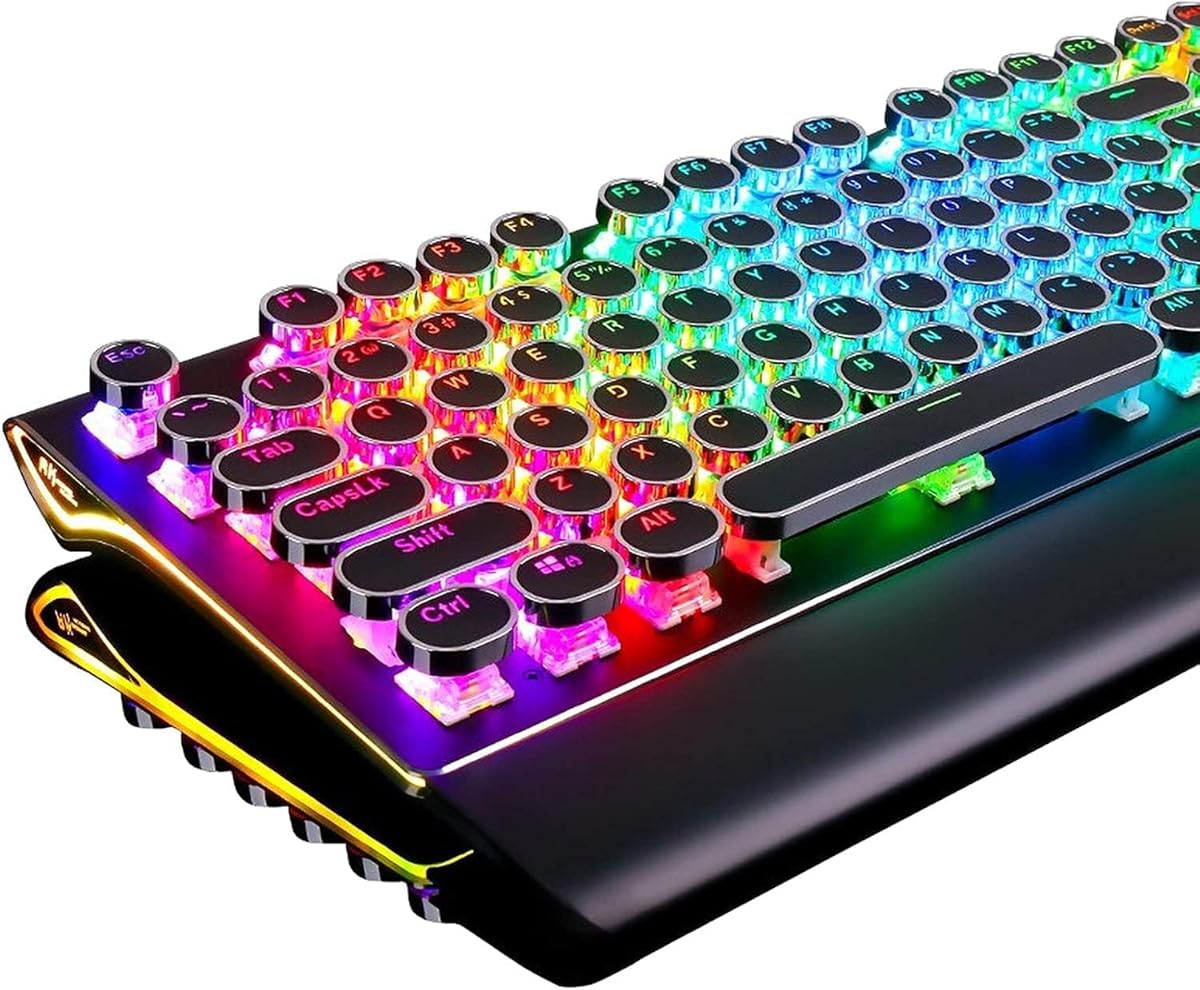
The RK ROYAL KLUDGE S108 takes a deliberately nostalgic approach with round keycaps, a typewriter silhouette, and blue mechanical switches. Its supplied rating is 4.6, while the aluminum alloy panel and detachable wrist rest give this expressive design a more substantial foundation than novelty keyboards often have.
We may earn a commission when you buy through this link, at no additional cost to you.
Blue switches provide medium resistance, tactile feedback, and an audible click, making the keyboard's character unmistakable. RGB illumination extends beyond conventional backlighting with per-key effects, a transparent sidelight, and up to 168 listed modes. Brightness and speed are adjustable, and the design also supports customized backlighting.
The detachable ABS palm rest is intended to reduce wrist pressure when the keyboard is elevated, while the matte aluminum alloy panel is described as sturdy and scratch resistant. The 108-key format provides a number pad and full non-conflict operation. However, clicky blue switches will be louder than silent, linear, or tactile alternatives, and round keycaps may require a different touch than standard profiles.
Choose the KLUDGE S108 when its typewriter appearance is central to the buying decision. It suits creative desks, retro gaming setups, and users who want a full-size mechanical board with distinctive visual character, wrist support, and layered lighting rather than a minimalist office appearance.
Round keycaps and Blue switches deliver a sensory experience quite different from a conventional office mechanical keyboard. The result is intentionally expressive, with tactile and audible feedback forming part of the design.
The detachable palm rest provides support for angled use, while the full-size layout retains a number pad. A sturdy aluminum panel helps the unusual design remain planted on the desk.
We may earn a commission when you buy through this link, at no additional cost to you.
The SteelSeries USB Apex 5 is a premium full-size gaming keyboard that combines an aircraft-grade aluminum alloy frame with an OLED smart display, dynamic per-key RGB, and a magnetic wrist rest. Its supplied rating is 4.6 reflects the appeal of a mature, feature-rich design built for gaming, streaming, and daily work.
We may earn a commission when you buy through this link, at no additional cost to you.
Its hybrid Blue switches combine a tactile mechanical bump with a smooth membrane feel and are rated for 20 million keypresses. The OLED can display GIFs, game information, Discord messages, and other content, adding a layer of feedback that a standard LED screen cannot provide. Per-key RGB offers individualized colors and reactive effects across the board.
Aircraft-grade aluminum gives the chassis its premium sturdiness, while the magnetic wrist rest supports full-palm positioning during long sessions. The trade-off is that the hybrid switch construction is not identical to a fully mechanical model, and the wired connection removes the freedom offered by a wireless alternative. Its dimensions also reflect a full-size footprint with a number pad.
This is the top pick for buyers who want an aluminum gaming keyboard with a genuinely useful display rather than ordinary RGB alone. It is especially suited to streamers and players who like visible system information at a glance, though those seeking fully mechanical switches or multi-device wireless freedom should choose accordingly.
The OLED can surface game details, messages, and custom GIFs, turning unused front-panel space into a functional status area. It offers more specific information than a row of indicator lights.
The aluminum alloy frame supplies a rigid foundation, and the magnetic wrist rest is designed to remain properly positioned. Dynamic per-key RGB adds vivid visual feedback without changing the core layout.
We may earn a commission when you buy through this link, at no additional cost to you.
The ASUS ROG Strix Scope II X is a 100% full-size gaming keyboard with an aluminum top plate, PBT doubleshot keycaps, hot-swappable ROG NX Snow V2 linear switches, and a supplied rating of 4.6. It brings together premium materials, acoustic tuning, and practical gaming controls in a substantial wired design.
We may earn a commission when you buy through this link, at no additional cost to you.
The included pre-lubed Snow V2 linear switches are described as smooth and thocky, while their LED lens structure supports stronger RGB illumination. Hot-swappable sockets allow compatible switches to be installed later. Integrated sound-dampening foam and switch pads help absorb pinging and echoes for a more controlled acoustic profile.
Pre-programmed F1-F5 hotkeys control Xbox Game Bar and recording functions, while a multifunction wheel handles media and lighting adjustments. All keys support macro programming. The detachable wrist rest and three angle adjustments are designed to improve comfort during long gaming, streaming, or work sessions, and the included puller and spare ROG spacebar help with customization.
Choose the Scope II X for a full-size gaming keyboard that does not treat acoustics as an afterthought. It is a strong fit for PC and Mac users who want tactile controls, a premium feel, and switch flexibility, though its wired design and substantial footprint make it less convenient for highly mobile setups.
Integrated foam and switch-dampening pads target the hollow pinging and echo often heard in mechanical boards. This attention to internal sound makes the keyboard more suitable for long sessions and shared rooms.
Hot-swappable sockets, macro-programmable keys, and the multifunction wheel offer several forms of control. A spare themed spacebar and included tools make it easier to personalize the board.
We may earn a commission when you buy through this link, at no additional cost to you.
The best metal mechanical keyboard depends on how you work, play, and organize your desk. Comparing the frame, switches, layout, connectivity, acoustics, and customization features is more useful than focusing on appearance alone.
A metal top plate or aluminum alloy frame can make a keyboard feel more stable by reducing chassis flex during forceful typing. Rigid construction also helps preserve a consistent sound profile and gives the product a premium visual character. The material should ideally support the mounting system rather than exist only as a thin decorative layer.
Look for a clearly described metal plate or aluminum body, along with stable feet or adjustable stands. A rigid frame is useful for gaming and heavy typing, but it should be paired with suitable switch and mount choices to avoid an overly hard feel.
Linear switches move smoothly without a tactile bump and suit fast gaming, while tactile switches provide clearer confirmation that a key has actuated. Clicky switches add an audible click and pronounced feedback, generally appealing to users who want the mechanical experience to be unmistakable. Silent variants reduce noise while preserving a mechanical structure.
Choose the switch family based on feedback preference rather than gaming reputation alone. A quieter office model may be better for shared rooms, while clicky or tactile switches can be satisfying for deliberate typists and players who value crisp input.
Full-size keyboards include a number pad and are useful for data entry, accounting, and shortcuts. Tenkeyless models remove the number pad to create more mouse room, while 75% and compact-numpad designs balance space savings with useful dedicated keys. Arrow-key access can be particularly important for gaming and navigation.
Choose the smallest layout you can comfortably use. A compact board can free meaningful desk space, but frequent number-pad users should not sacrifice that capability solely for aesthetics.
Wired keyboards provide a simple, consistent connection and avoid battery management. Wireless designs reduce cable clutter and can switch among computers or devices, while tri-mode models combine Bluetooth, 2.4GHz, and USB wired operation. Low-latency 2.4GHz is generally the most gaming-oriented wireless option because it avoids the latency associated with some Bluetooth connections.
Think about how often the keyboard travels and how many systems it must serve. Wired is the simplest choice for one fixed computer, whereas wireless or tri-mode connectivity is valuable for shared desks and changing workspaces.
Hot-swappable sockets let users replace compatible mechanical switches without soldering, making it easier to alter switch feel, sound, and appearance. QMK/VIA or other driver-based customization can add remapping, layers, and macros. These features are valuable for enthusiasts but may not be necessary for conventional office use.
Verify socket pin compatibility and whether the required configuration software is available for your operating system. Programmable controls should make repetitive work easier without interfering with essential system keys.
RGB lighting improves visual appeal and can help distinguish key groups, while side lighting offers a subtler effect at a lower feature level. An OLED or LCD can display battery status, game information, messages, or custom graphics. A rotary knob provides convenient access to volume, playback, lighting, or other assigned functions.
Decide whether these extras improve your regular routine. Displays and programmable knobs add convenience and personality, whereas fixed lighting patterns or basic shortcut controls may be sufficient for users who value simplicity.
Switch type is only one part of keyboard acoustics. Gasket mounting, internal foam, silicone pads, switch dampeners, and carefully fitted plates can reduce hollowness and unwanted resonance. Silent switches lower the volume of actuation, while clicky switches emphasize every keystroke. The right profile depends on whether the keyboard is primarily for gaming, shared offices, or focused typing.
Consider both switch sound and internal board noise. A model with dampening may produce a deeper, more controlled tone even when it uses a standard mechanical switch family.
A detachable or magnetic wrist rest can support the palms during long sessions, and adjustable feet or multiple typing angles can help maintain a comfortable posture. The ideal setup keeps the hands relaxed and the wrists neutral rather than forcing the keyboard into a high, steep position. Removable rests also make it easier to change desk arrangements.
Look for two or more angle options when possible, along with a stable base and non-slip contact points. A comfortable keyboard is one you can use consistently, not merely one with the most decorative features.
Begin by placing the keyboard on a clean, stable surface and select a typing angle that keeps the wrists relaxed. Connect the cable or establish the preferred wireless link, then update any required configuration software before assigning macros or lighting. If the model supports hot-swapping, power it down and consult the switch-removal instructions before attempting a replacement.
For daily care, disconnect the cable or switch the keyboard off before cleaning around the keys. Use a soft brush or compressed air to remove crumbs and dust, and wipe the frame with a lightly dampened microfiber cloth. Avoid spraying cleaner directly onto the keyboard, and do not use harsh chemicals that could damage the finish, keycaps, coating, or display.
Customize the keyboard gradually rather than changing every setting at once. Test the switch feel, rollover behavior, media controls, wireless switching, and programmed shortcuts in the applications you use most. Periodic software and firmware updates can improve compatibility, while periodic visual inspection helps identify loose keycaps, worn cables, or debris that may affect movement.
A metal top plate or frame generally reduces flex and gives the keyboard a steadier feel than a lightweight plastic chassis. It can also support a more consistent acoustic profile and contribute to a more premium appearance. The resulting sound still depends heavily on the switch, plate mounting, case materials, and internal dampening.
Linear switches are often favored for their smooth, unobstructed movement, while tactile switches provide a noticeable actuation cue. Clicky switches add the most audible feedback. The best choice depends on personal preference, and a hot-swappable model allows users to experiment with multiple switch types without soldering.
A full-size model is preferable when numeric entry, dedicated navigation keys, and maximum shortcut access are important. A tenkeyless model offers more desk space and can make mouse movement easier. Gamers should also check whether the arrow cluster and function row are positioned comfortably for the games they play.
Frame material is only one contributor to sound. Switch type, case construction, mounting, foam, silicone pads, and plate design can all affect the result. Some aluminum boards produce a deeper tone, while well-dampened models can remain comparatively controlled. Clicky switches will usually be louder than silent or tactile alternatives.
A display is not necessary for excellent typing or gaming, but it can provide useful status information, messages, game details, or custom visuals. It is most valuable for streamers and users who enjoy configurable desk setups. A straightforward mechanical model may offer better value when a display would not be used regularly.
Wireless mechanical keyboards can suit gaming when they use a low-latency connection such as 2.4GHz. Bluetooth may introduce more delay and is generally better for everyday portability or noncompetitive tasks. Wired mode remains a dependable fallback for users who prioritize an uninterrupted connection.
A hot-swappable keyboard has sockets that allow compatible switches to be removed and replaced without soldering to the PCB. Buyers should confirm the supported pin types and use compatible components. It makes it easier to experiment with switch feel, noise level, and appearance as preferences change.
Silent switches, internal foam, switch-dampening pads, and a well-tuned case can all reduce noise. O-rings or other aftermarket switch modifications may help further, but they require compatible parts and careful installation. A desk mat and a more deliberate typing style can also reduce impact noise without changing the keyboard.
The Newmen GM325Pro is the strongest budget-oriented choice, combining a full-size layout, metal top plate, red switches, and a detachable cable. The KEMOVE K94 takes the lead for feature-rich wireless use, while the SteelSeries USB Apex 5 stands out as the premium pick because of its aluminum frame, OLED display, and integrated wrist support.
Beyond those top recommendations, the AULA F75 Pro suits buyers who want a compact wireless board with hot-swapping, the Cherry KC 200 models serve quiet or tactile office typing, and the Redragon options cover tenkeyless and full-size gaming. The RK ROYAL KLUDGE S108 delivers retro styling, while the ASUS ROG Strix Scope II X focuses on full-size gaming, acoustics, and customization.
Prioritize the features you will actually use: switch feel for typing, layout for your work, wireless reliability for gaming, and metal construction for stability. Ratings and product features are useful starting points, but current prices, availability, software compatibility, and warranty details should be checked on the retailer listing before purchasing.