
VSD Mini Macro Pad
4.1Editor score
Six customizable LCD keys
Compact USB-powered design
Dual RGB light bars
Our Macro Pad for Streaming guide compares 10 programmable decks for OBS, Twitch, YouTube, audio control, customization, compatibility, and desk use.
A macro pad for streaming puts scene changes, sound effects, media controls, and repetitive editing commands within immediate reach. The most useful model is not simply the one with the most buttons, but the one that matches your software, setup, and preferred way of organizing a live production workflow.
We compared all 10 featured products by examining key count, LCD controls, macro capabilities, audio functions, RGB lighting, operating-system support, plugin ecosystems, and practical extras such as knobs, touchscreens, status displays, and USB hubs. The guide includes options ranging from compact six-key pads to full production consoles.
Each review explains the standout capabilities, practical trade-offs, and ideal user for the product. Ratings and specifications reflect the supplied product information, while availability, software behavior, and pricing can change. Always verify current details and compatibility before making a purchase.
4.1Editor score

4.9Editor score

4.8Editor score
This side-by-side comparison highlights the main differences in control surfaces, key capacity, macro depth, platform support, and specialized streaming features across all 10 macro pads.



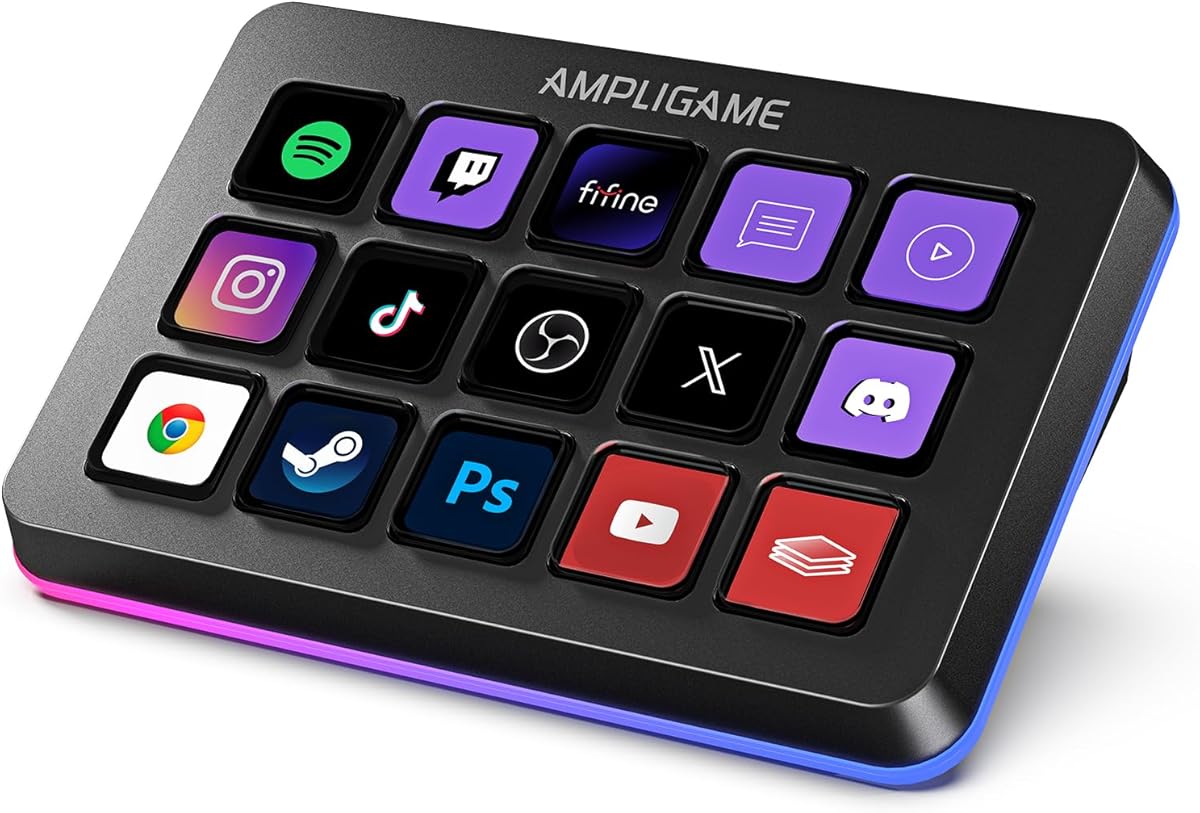


The VSD M18 Macro Pad combines 15 LCD visual keys with three physical buttons, giving creators 18 programmable controls in a compact streaming deck. Its 4.4 rating reflects a versatile feature set, and the large selection of LCD keys makes it practical for scene changes, media controls, application launches, text entry, and frequently repeated desktop actions.
We may earn a commission when you buy through this link, at no additional cost to you.
The Operation Follow function is the most interesting feature for advanced users. It can run multiple macro steps in a custom order or execute them simultaneously, making it possible to combine an OBS scene change, audio command, application launch, or other supported operation under one key. Each LCD key can also use JPG, PNG, or GIF artwork, so the interface can be divided visually by function rather than leaving every command as an abstract shortcut.
There are some limitations to consider. Linux users do not receive native plug-and-play support, although SDK development files are provided for custom integration. Custom RGB tones are also described as available through firmware upgrades rather than being presented as a universally simple software control. The product's value therefore rests on installing its software and accepting the stated platform boundaries.
This is an attractive choice for streamers who want many dedicated controls without moving to a knob-equipped production console. It works well for OBS, Streamlabs, YouTube, Twitch, Discord, Office applications, and Photoshop. Creators who regularly switch scenes, trigger media commands, and launch tools will probably get the greatest benefit from its 18-control layout.
Animated and static icons make it easier to separate live controls from editing shortcuts, games, and productivity tools. A creator can create visually distinct pages or clusters without relying entirely on memorizing every assigned function.
Ordered and simultaneous macro execution reduces the number of clicks required for multi-step workflows. This is particularly useful when a scene change must coincide with a media or application command.
We may earn a commission when you buy through this link, at no additional cost to you.
The Stream Dock N1 is a vertical macro pad with 15 customizable LCD keys and a 4.7 rating. Its defining distinction is the ability to operate in shortcut-key, calculator, and numeric-keypad modes, making it more than a conventional one-function streaming controller.
We may earn a commission when you buy through this link, at no additional cost to you.
The vertical format preserves desk space while placing a substantial control surface close to the user. In shortcut mode, files, browsers, applications, images, and videos can be assigned to LCD keys. Custom icons may use images, screenshots, or GIFs, while plugin support adds functions such as reminders, weather, calendars, and other productivity utilities. Compatibility includes OBS, PowerPoint, YouTube, Twitter, Discord, Excel, Word, Photoshop, and Adobe Premiere Pro.
The calculator and numeric modes are not central to live production, but they add value for streamers who also edit, work with spreadsheets, or use a compact tenkeyless keyboard. The mode changes may not suit every workstation, and the left-hand-oriented design may require some adjustment for creators who naturally place controls on the right. Buyers should consider their keyboard layout before committing.
This model is a strong pick for a user who values desk efficiency and wants a keypad that can do more than trigger OBS actions. Its 24-month warranty also adds reassurance. Overall, it combines streaming controls with practical numeric tools in a format that stands apart from conventional horizontal decks.
The upright enclosure takes less horizontal room than a wide controller, which is valuable when the mouse, keyboard, capture equipment, and other accessories already occupy the main work area.
Calculator and numeric modes can make the device useful outside a live show. One physical deck can therefore support scene control, data entry, and other recurring computer tasks.
We may earn a commission when you buy through this link, at no additional cost to you.
The VSD M18 Stream Controller offers 15 LCD keys and three additional buttons, all programmable for live streaming, gaming, editing, and productivity. Its 4.5 rating and extensive command support position it as a capable general-purpose controller rather than a narrowly specialized scene switcher.
We may earn a commission when you buy through this link, at no additional cost to you.
Single commands and multi-step sequences can be assigned directly, while the Operation Follow feature supports both ordered and simultaneous execution. The visual keys accept JPG, PNG, and GIF customization, helping users identify scene, media, and application commands quickly. Compatibility spans Windows 11 and later, macOS 11 and later, OBS, Streamlabs, YouTube, Twitch, Discord, Excel, Word, and Photoshop.
The surrounding RGB light ring supports automatic cycling and custom colors, adding atmosphere without changing the core workflow. Built-in clock, stopwatch, weather, calendar, and reminder plugins extend the device beyond production use. As with the other M18 model in this list, the host software and operating-system requirements deserve attention, especially for Linux users or creators with unusual software setups.
Choose this deck if you want a high density of directly accessible controls and frequently build multi-command workflows. It is particularly suitable for streamers who also edit video, produce music, handle photography, or use demanding desktop applications. The mix of customizable keys, macros, visuals, and utilities makes it a strong all-around streamer accessory.
Macro sequences reduce repetitive setup during a show. Creators can group compatible actions into a predictable sequence and trigger the complete workflow with one press.
Custom GIF and image icons improve recognition during a live production environment. A visually labeled command is easier to find than a grid of similarly styled blank keys.
We may earn a commission when you buy through this link, at no additional cost to you.
The VSD Mini Macro Pad is built for creators who want the most essential stream commands without dedicating a large portion of the desk. Its six fully customizable LCD keys can display JPG, PNG, or GIF images and accept single or serial shortcut commands, giving a compact unit more flexibility than a simple fixed keyboard.
We may earn a commission when you buy through this link, at no additional cost to you.
The device can switch OBS scenes, launch applications, open websites, enter text, control media, and execute game combinations. Two adjustable RGB light bars on the sides provide ambient lighting for nighttime streams or gaming sessions. Built-in tools include a clock, weather, calendar, and stopwatch, extending its usefulness beyond OBS.
The main compromise is capacity. Six keys can cover an essential live-control set, but they will feel restrictive for creators with multiple scenes, editing commands, and media actions. It also requires the exclusive VSD Craft software for full setup rather than offering simple plug-and-play operation. Linux users can pursue customization through the official open-source SDK, but the package is less straightforward than a standard desktop installation.
This is the most portable option in the guide and a sensible choice for a minimal streaming desk, travel setup, or beginner who only needs a handful of direct commands. Its 4.1 rating is the lowest of the group, but that should be interpreted in the context of a deliberately compact product with fewer controls.
Six keys are enough for a focused command set such as start or stop streaming, a favorite scene, microphone mute, media play, and a frequently used effect.
The small USB-powered enclosure is easy to pack and place near a laptop or compact production desk. It is also designed to run continuously without a battery.
We may earn a commission when you buy through this link, at no additional cost to you.
The VSD N4 Pro is a more elaborate streaming console, combining 10 fully customizable LCD keys, four RGB rotary knobs, and an interactive touch bar. Its 4.4 rating reflects a feature set aimed at content creators who need both immediate commands and continuous adjustment.
We may earn a commission when you buy through this link, at no additional cost to you.
The knobs can support volume, lighting, and other adjustable functions, while the LCD keys handle hotkeys, macros, application launches, and multi-step chained operations. Unlimited independent scene presets are described for streaming, editing, gaming, and office workflows. Custom PNG, JPG, and GIF icons help users identify commands at a glance.
Its soundboard function deserves a careful explanation. The N4 Pro sends supported audio control commands to the computer, but it does not contain built-in speakers for producing sound output. Its plugin ecosystem includes more than 500 official options, which is a major advantage for users willing to build a tailored setup. The built-in passive USB dock also provides extra ports for peripherals and storage.
A foldable 60-degree stand, dynamic RGB lighting, switchable haptic keys, and support for GIF, MP4, and MOV media make this visually oriented. It is best for streamers and editors who value fine control over a large number of actions, but a creator who only needs scene switching may find it unnecessarily elaborate.
Rotary controls make it easier to make continuous adjustments during a broadcast. They are particularly useful when the creator wants tactile feedback while monitoring levels or another adjustable value.
The large official plugin library gives the N4 Pro room to grow beyond basic macro functions. Users can assemble application controls, utilities, and production actions around their own software routine.
We may earn a commission when you buy through this link, at no additional cost to you.
The fifine D6 RGB combines 15 programmable macro keys with a visual touchscreen-style operating area. Its 4.6 rating makes it one of the stronger-rated options, particularly for streamers who want to see the current function and control the device without opening numerous separate application windows.
We may earn a commission when you buy through this link, at no additional cost to you.
The keys can launch applications, switch OBS scenes, and adjust audio levels. Support includes OBS Studio, Streamlabs, Twitch, YouTube, and other applications, with a large collection of downloadable plugins and icons. The visual interface provides feedback about assigned operations, while nine controllable RGB modes add lighting effects around the controller.
Users should update both firmware and software to their latest versions before initial setup. This recommendation matters because a controller's behavior can depend on both device firmware and its host configuration. The touchscreen-first presentation may also be less compelling for users who already understand the usual grid of labeled physical keys and want immediate tactile identification.
This is a strong general-purpose streaming pad for creators who work across live production, video editing, music creation, photography, graphics, and office applications. Folders can organize programs, and separate scenes can be processed independently, making it easy to keep unrelated workflows apart.
The visual operation keypad reduces the need to remember every icon or repeatedly check a computer window. It is especially helpful for workflows that change according to the current production stage.
Folder and scene organization lets a single controller support streaming, editing, music, or office tasks without forcing every action onto one crowded layout.
We may earn a commission when you buy through this link, at no additional cost to you.
The TreasLin VSDinside N1 combines 15 visual LCD buttons, two clickable buttons, and one rotary knob for 18 programmable controls. Its 4.4 rating reflects a versatile deck that can serve as a shortcut keyboard, calculator, or numeric keypad, with modes changed through the knob.
We may earn a commission when you buy through this link, at no additional cost to you.
VSD Craft software supports drag-and-drop icons, screenshots, custom images, and dynamic animated artwork. Scenario-based layouts can cover daily tasks, Photoshop, DAW, Premiere Pro, Blender, live streaming, and media playback. Automatic workflows can also run multiple tasks in a specified sequence, which helps simplify setup-heavy operations.
Compatibility includes Windows, macOS, OBS Studio, and Streamlabs, with a marketplace offering thousands of free and premium options, including more than 200 plugins, icons, and scenes. Some of the supplied description references an N3 when discussing dynamic icons, which is an inconsistency worth resolving with the seller or current documentation. Spotify integration also requires an active Premium account.
For a creator who wants many controls, a knob, multiple operating modes, and animated icons, this is a flexible choice. The mode-switching design makes it useful beyond live broadcasts, while the rotary knob offers precise adjustment when a workflow needs it. Buyers should verify the exact software and icon features supported by the current N1 package.
The shortcut, calculator, and numeric modes make the N1 relevant to office work, data entry, creative software, and streaming rather than limiting it to OBS.
Animated icons can communicate state or identify a function more vividly than static labels. They are particularly useful when a creator wants distinct pages for live, editing, and media control.
We may earn a commission when you buy through this link, at no additional cost to you.
The Streonor S15 distinguishes itself with 15 customizable LCD keys and three non-touch status display panels. Its 4.6 rating reflects a strong combination of programmable control and at-a-glance system information, giving creators useful feedback without occupying additional desktop windows.
We may earn a commission when you buy through this link, at no additional cost to you.
Those status panels can display supported information such as weather, time, CPU temperature, GPU status, memory usage, or system performance. Preset pages let users create separate layouts for streaming, editing, office work, and gaming. Action flows can trigger multiple commands through one key, and the software library includes more than 100 plugins, icon packs, GIF icons, scenes, tutorials, and custom layouts.
Setup requires Windows 10 64-bit or later or macOS Big Sur 11.0 or later. Linux is not supported, similar controller software should be uninstalled to avoid conflicts, and the latest STREONOR software should be obtained from the official website. Third-party connections may also depend on an active account, subscription, or membership.
This deck is a good match for creators who want monitoring information as well as commands. A streamer can see relevant system status while keeping OBS scenes and microphone functions close at hand, and an editor can create a separate page for timeline shortcuts, export commands, and applications.
The dedicated status panels can expose changing system information beside the controls. That is useful for monitoring performance or environmental details without adding another always-open utility window.
Dedicated streaming, editing, office, and gaming layouts keep unrelated commands apart. This makes the S15 easier to use across a full workday rather than only during a broadcast.
We may earn a commission when you buy through this link, at no additional cost to you.
The Streonor S10 is a full creator console with 10 customizable LCD keys, an integrated touchscreen, and four programmable rotary knobs. It carries a 4.9 rating, the highest in this comparison, and its combination of instant commands and continuous adjustment makes it one of the most complete options here.
We may earn a commission when you buy through this link, at no additional cost to you.
LCD keys can carry shortcuts, macros, and application actions, while the touchscreen provides access to supported information and controls. The four knobs can be assigned to volume, microphone levels, media playback, scrolling, zooming, or timeline adjustment. That range is particularly useful for streamers and editors because it handles both momentary commands and analog-style changes.
Multi-action workflows can run supported steps in sequence, allowing applications to launch, project folders to open, OBS scenes to change, or audio controls to adjust from a single key. Dedicated profiles support OBS Studio, Twitch, YouTube, Streamlabs, video editing, music control, office work, and gaming. More than 100 plugins, icon packs, GIF icons, scenes, tutorials, and layouts are available through the software store and Space forum.
The trade-offs are platform limitations and potential service requirements. Windows 10 64-bit or later and macOS Big Sur 11.0 or later are supported, but Linux is not. Similar controller software should be removed before setup, and some third-party services require active subscriptions. Subject to those conditions, the S10 is an excellent pick for a creator who wants a single detailed control surface.
The LCD keys and touchscreen handle immediate actions, while the knobs provide tactile control for values that benefit from gradual adjustment. This combination reduces the need to alternate between the controller and a software mixer.
Sequential actions can turn a repeated editing or production procedure into one trigger. The result is faster setup and a more consistent workflow across supported applications.
We may earn a commission when you buy through this link, at no additional cost to you.
The Elgato Stream Deck MK.2 Studio Controller offers 15 customizable LCD keys and a 4.8 rating. It is a recognizable choice for creators who want a straightforward, visually driven command surface for live production, editing, music, photography, and general computer control.
We may earn a commission when you buy through this link, at no additional cost to you.
Each key can trigger a single action or multiple actions, allowing a creator to launch social posts, adjust audio, mute a microphone, control lights, or combine commands under one press. Visual feedback confirms that a command has executed, which reduces uncertainty during a live production and is particularly useful when the controller sits away from the main display.
Its plugin support includes Elgato 4KCU, OBS, Twitch, YouTube, Twitter, Discord, Spotify, Philips Hue, and other options. Hotkey actions also support workflows such as film editing, music production, and photography. The supplied information is concise and does not describe the operating-system requirements or physical construction in detail, so buyers should check the current listing for those points.
This is a compelling premium choice for users who prioritize a mature plugin ecosystem and straightforward visual operation. Although some 18-key alternatives provide more raw controls, the MK.2 balances capacity with a familiar grid layout. It is well suited to a streamer who wants dependable access to widely supported applications without building a more specialized console.
The illuminated key display gives immediate confirmation that a command was accepted. This matters during a show, where uncertainty over whether a scene or audio action activated can interrupt the workflow.
Native-style integrations for major streaming, social, audio, lighting, and editing tools reduce the need to build unsupported workarounds. The broad plugin list also makes the controller useful outside a single broadcast application.
We may earn a commission when you buy through this link, at no additional cost to you.
The right macro pad depends on the number of actions you need, the software you use, and whether you prioritize compactness, precise adjustment, visual feedback, or a broad plugin library.
Start by listing the commands you actually use during a show. Common actions include switching OBS scenes, muting a microphone, playing a sound effect, launching a scene or browser source, controlling media, and starting or stopping a recording. A pad with 10 to 15 keys may cover a focused workflow, while an 18-control model can accommodate separate groups for scenes, media, communication, and editing. The VSD Mini's six keys are suitable for a deliberately minimal setup, but they offer less room for growth.
Buy for your current workflow without leaving no space for routine expansion. Count primary controls first, then reserve several keys for less frequent actions.
LCD macro keys are ideal for discrete commands, but some production tasks benefit from continuous adjustment. Rotary knobs provide a tactile way to manage volume, microphone level, media playback, scrolling, zooming, or timeline movement. A touchscreen adds another visual route to supported information and settings. The Streonor S10 combines all three approaches, while the VSD N4 Pro uses keys, knobs, and a touch bar.
Match the control style to the task. Use keys for one-time actions and knobs for values that change continuously.
Check the operating-system requirements as carefully as the applications you plan to control. Most featured products support Windows and macOS, but some specify minimum versions, while Linux support may be absent or offered only through an SDK. Confirm that the controller works with your exact OBS, editing, audio, or productivity software before buying. Setup can also require the removal of competing controller software.
Compatibility is not just a checkbox. A device can support Windows and still be awkward for a particular macOS workflow.
The plugin store can determine whether a controller becomes a daily productivity tool or remains limited to basic shortcuts. The Elgato Stream Deck MK.2 supports major streaming and creative applications, the VSD N4 Pro offers a large ecosystem of downloadable plugins, and the N1 devices provide marketplaces with numerous scenes and utilities. Compare available integrations, update frequency, setup difficulty, and whether important functions require paid services.
Prefer a broad ecosystem for long-term use, but confirm that the most important applications are supported natively.
A single action assigns one command to one key, while a multi-action macro can combine several supported steps. Some devices support ordered sequences, and the VSD M18 products can also execute certain operations simultaneously. These capabilities are useful for scene-plus-audio routines, but they should be tested with the creator's actual applications because timing and compatibility can vary. Simple fixed commands remain easier to troubleshoot.
Use sequences for repeatable procedures, not for critical controls that should always be individually available.
Custom JPG, PNG, and GIF icons make a controller easier to navigate at a glance. Animated images can indicate a live state, distinguish workflow groups, or simply make frequently used commands recognizable. The fifine D6 emphasizes visual operation, while several VSD and Streonor models support extensive icon customization. Look for a layout that can show enough detail without making the controls cluttered, and use clear color coding for scene, audio, and system actions.
Distinct visual groups are often more useful than elaborate graphics. Consistency and legibility matter most.
A full console can save time but occupy a substantial portion of the desk, while a compact keypad may be better for mobile or space-conscious setups. The Stream Dock N1 uses a vertical form factor specifically to preserve horizontal room. The VSD N4 Pro includes a foldable 60-degree stand, and other products may work best at a flatter angle. Consider mouse clearance, viewing distance, and whether left- or right-handed placement suits your normal posture.
Choose the footprint you will leave in place. A controller that crowds your mouse can reduce the benefit it provides.
Some macro pads can send supported play, pause, and audio-control commands to the computer, while others present themselves as sound decks. These controls are valuable for triggering music and sound effects, but they do not necessarily mean the device contains speakers. The VSD N4 Pro explicitly sends audio commands without offering built-in sound output. If audible playback itself is required, verify the specifications carefully rather than assuming a soundboard label provides it.
For most creators, command control is enough. Confirm your audio software and output path before choosing an audio-focused model.
Begin by installing the current software and updating the controller firmware where required. Connect the pad directly to the computer with the specified USB cable, then create a simple layout containing only your most important scene, audio, and communication commands. Test every key in the applications you use before building more complicated sequences, and remove similar controller software first if the manufacturer recommends doing so.
Organize the controls by task rather than by habit. Group live scene changes together, place sound and media controls in another area, and keep editing or productivity commands on separate pages or folders. Use clear labels, consistent colors, and icons that remain understandable at a glance. Test ordered macros in a noncritical setting and confirm that delays, application focus, and source behavior work as expected.
For care, keep the device away from drinks, excessive heat, dust, and direct moisture. Clean the LCD surfaces and keycaps with a soft, lightly dampened cloth, avoiding harsh liquids and aggressive scrubbing. Store foldable stands and removable cables carefully, inspect connectors for debris, and keep firmware and software current. Unplug the controller before changing its physical setup if the manual instructs you to do so.
A macro pad for streaming is a programmable desktop controller that turns one button press into a computer action or a sequence of actions. Creators can use it to switch OBS scenes, control media, launch applications, trigger sound commands, or manage editing tools. LCD keys and other visual controls help identify the assigned function without memorizing every shortcut.
A keyboard can handle many shortcuts, but a macro pad keeps commands organized, visible, and easy to trigger during a live show. It also provides room for app launches, multi-step operations, and dedicated audio or system controls. Creators who already manage their shortcuts efficiently may not need one, but most benefit from a dedicated production surface.
No. More keys are useful only when you have enough distinct commands to justify them. A six-key pad may be ideal for a compact setup with a small command set, while 15 or 18 keys benefit creators who separate scenes, media, editing, and productivity actions. The best layout is the one you can understand and use reliably during production.
Many supported macro pads can send playback, pause, volume, and sound-effect commands to compatible software on the computer. That does not always mean the controller itself produces sound, because some models lack built-in speakers. Check the specific model's audio specifications and confirm that your preferred software exposes the necessary control commands.
Every product featured in this guide lists OBS or OBS Studio among its supported or stated applications. Compatibility still depends on the host operating system, installed software, and whether a particular integration requires an account or subscription. Update the controller software and firmware, then test each assigned action before using it during a live production.
Most of the featured devices support macOS with specified minimum versions. Linux support varies: the VSD Mini offers an open-source SDK for personalization, while the VSD M18 has no native plug-and-play Linux support, and the Streonor models explicitly do not support Linux. Check the manufacturer's current documentation for detailed operating-system requirements.
Static icons are generally easier to interpret at a glance and work well for stable commands. Animated icons can be more engaging or can help indicate changing states and separate workflow groups. The most effective design uses both thoughtfully, with clear labels or color coding so visual decoration does not make the controls harder to understand.
Check that the target application still has focus, confirm the assigned action has not changed, and reconnect the USB cable. Update the controller firmware and software, and remove competing controller software if the manufacturer recommends it. If the problem occurs only within a multi-step macro, test each underlying action separately to identify the failing step.
The Streonor S10 stands out for streamers who want a complete control surface with 10 LCD keys, an integrated touchscreen, and four programmable knobs. The Elgato Stream Deck MK.2 offers a particularly broad and recognizable plugin ecosystem, while the VSD Mini Macro Pad is a compact and economical starting point for creators who need only a few essential commands.
Prioritize compatibility, visual organization, and the kinds of controls you use most often. A large key count is useful only if each key earns its place, and a knob is more valuable when you regularly adjust audio or other continuous settings. Before configuring complex macros, test the individual commands in a quiet test environment and build outward from a small, dependable layout.
Product availability, software compatibility, included accessories, and pricing can change, so review the current listing before ordering. Checking the manufacturer's setup notes and testing a simple scene switch first will provide the smoothest start to your new streaming workflow.