
CaseBuy Keyboard Cover Skin
4.4Editor score
Model-specific molded fit
Waterproof dust-resistant silicone
Washable for repeated use
A MacBook Neo keyboard cover can protect the keys from dust, crumbs, fingerprints, and minor spills while preserving the clean appearance of the computer. The right accessory should also fit precisely, avoid interfering with Touch ID, and maintain a comfortable typing experience. Material, thickness, layout compatibility, and transparency matter more than decorative color alone.
We compared ten keyboard covers using the supplied compatibility, material, thickness, protection, cleaning, and design information. The list includes options specifically molded for the 13-inch MacBook Neo as well as broader covers that also support several MacBook Pro and MacBook Air models. Every recommendation below is designed for the US layout unless its product information states otherwise.
The reviews explain which cover stands out for overall fit, which options provide the strongest value, and where a wider device range may be more useful. Specifications are based on the listed product data rather than personal testing. Prices and availability can change, so compare the current listing details, confirm your exact model number, and verify the keyboard layout before purchasing.
4.4Editor score

4.6Editor score

4.4Editor score
As an Amazon Associate we earn from qualifying purchases.
The table below compares all ten covers by their intended device fit, material, thickness, and practical protective features. It makes the key differences clear for shoppers who prioritize a model-specific fit, minimal visual impact, broader compatibility, or a washable design.

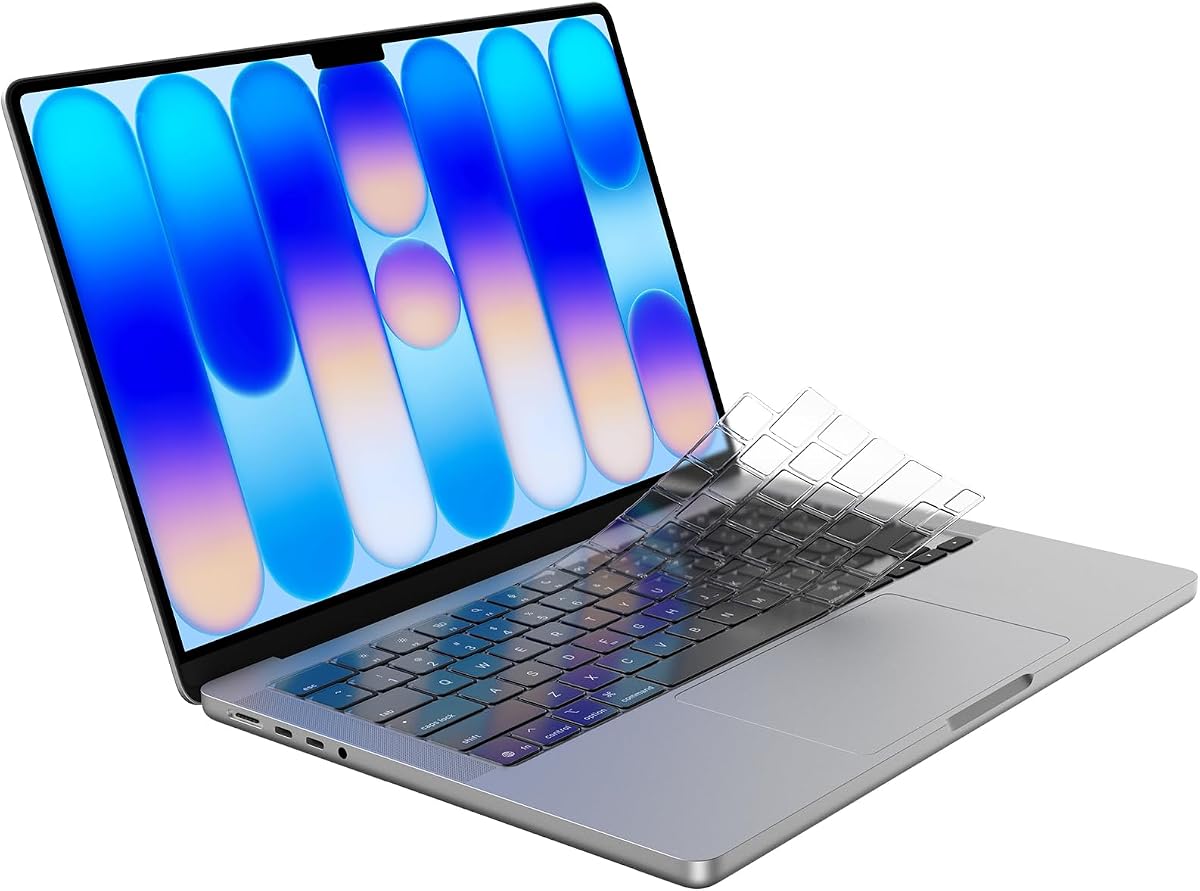


This GhostCover has a 4.4 rating and stands out as a premium choice for buyers who do not want to limit their keyboard-cover options to a single MacBook generation. It is listed for the 13-inch MacBook Neo with Touch ID, current Apple Silicon MacBook Pro 14-inch and 16-inch models, and 13-inch and 15-inch MacBook Air models. Its clear appearance keeps the computer's original visual character intact.
We may earn a commission when you buy through this link, at no additional cost to you.
The defining feature is the 0.12mm engineering-grade TPU construction. That very thin profile is intended to minimize interference while typing, and the clear material lets the keyboard backlight shine through. The product information also states that it was tested not to interfere with Touch ID, an important consideration for a cover intended to fit around the fingerprint sensor.
The trade-off is that this is a US ANSI layout cover rather than a universal international option. Its broad device compatibility is valuable, but the keyboard geometry still must match. Buyers should confirm the model and layout before ordering rather than relying only on screen size, since similarly named MacBook products can have different key arrangements.
This is a strong recommendation for a MacBook Neo owner who may later replace the computer with a compatible MacBook Pro or Air. It combines a discreet profile, washable construction, and wide compatibility in one package. The dedicated GhostCover option in this list may be a more focused choice, but this model wins when future-proofing across several Apple laptops is the priority.
At just 0.12mm thick, the cover is designed to preserve the feel of the keyboard rather than create a bulky layer over the keys. The flexible TPU material and high transparency also help maintain the laptop's minimalist appearance.
The compatibility list spans MacBook Neo, MacBook Pro, and MacBook Air models, making this practical for households or users who alternate between Apple laptops. Always verify the exact model and US layout before purchasing.
We may earn a commission when you buy through this link, at no additional cost to you.
The ProElife Ombre Blue cover is a 4.4-rated option created specifically for the 2026 13-inch MacBook Neo with the A18 Pro chip and A3404 model. It adds a light color accent without the stronger visual effect associated with a fully colored keyboard. For a buyer who wants a little personality without obscuring the laptop's overall design, that balance is its main appeal.
We may earn a commission when you buy through this link, at no additional cost to you.
The cover uses a 0.26mm engineering-grade silicone construction with specially molded keys. It is described as flexible, reusable, and easy to apply and remove for cleaning. Its protective purpose is practical: it helps guard the keyboard from liquid, dust, cigarette ash, and biscuit crumbs that might otherwise fall between or onto the keys.
Compared with the thinnest choices in this guide, 0.26mm may feel more noticeable during typing. The product data says the slim TPU skin is designed to make typing easier, but it does not offer the same ultra-thin profile as the 0.11mm, 0.12mm, or 0.13mm alternatives. The US-only requirement is another constraint for shoppers outside that market.
Choose this cover if the ombre blue finish appeals to you and the A3404 model designation matches your laptop. It is a straightforward, model-specific option with useful daily debris protection and cleanability. For the least visible profile, consider the 0.12mm GhostCover; for a bolder aesthetic, the Allinside Light Pink option offers a more pronounced gradient.
The ombre blue treatment gives the keyboard a personalized appearance while retaining a light, relatively understated look. It is an alternative for shoppers who find completely transparent covers too visually plain.
Because the flexible silicone can be removed, washed, and reused, owners can lift it away for routine cleaning and return it once dry. This makes accidental crumbs and dust easier to manage.
We may earn a commission when you buy through this link, at no additional cost to you.
This dedicated GhostCover for the 2026 MacBook Neo 13-inch A3404 has the highest rating in the group at 4.6, making it the strongest all-around recommendation in this guide. It is made for the US ANSI keyboard and includes a touch sensor area, avoiding the ambiguity that can accompany a broad multi-device cover.
We may earn a commission when you buy through this link, at no additional cost to you.
Its 0.12mm engineering-grade TPU profile is one of the strongest arguments for this pick. The cover is engineered to minimize typing interference while remaining almost invisible on the keyboard. Its high transparency allows the backlight to shine through, so users do not have to sacrifice the familiar appearance of the MacBook Neo for added protection.
The product information also states that the cover was tested not to interfere with Touch ID operation. It can be washed with soapy water and reused once dry. The principal limitation is compatibility: it is specifically listed for the US ANSI layout, and buyers with a different Enter-key shape or regional layout should not assume it will fit.
This is the most balanced choice for a US-layout MacBook Neo owner who values a nearly invisible design, a very thin typing layer, easy maintenance, and model-specific accuracy. It is more focused than the broader GhostCover, but for a Neo purchase that focus removes uncertainty. It is our Editor's Choice for the category.
The combination of transparency and a 0.12mm profile preserves the look and feel of the stock keyboard. It is a sensible choice for users who want spill and debris protection without a conspicuous skin.
Because the cover is listed specifically for the 2026 13-inch MacBook Neo A3404 with Touch ID and the US ANSI layout, it removes much of the guesswork involved in choosing a generic keyboard protector.
We may earn a commission when you buy through this link, at no additional cost to you.
The CaseBuy keyboard skin combines a 4.4 rating with a model-specific design for the 2026 MacBook Neo 13-inch A18 Pro A3404. It is a compelling budget-oriented choice for users who prioritize practical spill and dust protection over having the absolute thinnest possible layer over the keys.
We may earn a commission when you buy through this link, at no additional cost to you.
Its 0.3mm silicone construction is individually molded to the keys, with the symbols printed on clear silicone. The listed protection includes resistance to coffee, beer, milk, powder, crumbs, pet urine, dust, and other everyday contaminants. The cover can also be washed with soapy water and reused after it dries, which adds practical value for frequent travelers or shared workspaces.
The main compromise is thickness. At 0.3mm, it is one of the beefier profiles in this comparison and is twice the thickness of the 0.15mm-level ultra-thin options represented by 0.12mm and 0.13mm designs. The product description says it is designed to restore the original typing experience, but buyers who are especially sensitive to key feel should consider the slimmer alternatives.
This skin is best for a US-layout MacBook Neo owner who wants straightforward protection and easy cleaning. The rectangular Enter-key detail helps distinguish it from an EU layout, although the exact model should still be verified. It is our Best Budget pick because it focuses on the essentials without adding decoration or unnecessary complexity.
A molded silicone layer adds a useful barrier between the keyboard and common everyday messes. That makes it especially relevant for users who work in cafés, travel frequently, or share a desk with children and pets.
Soapy water and air drying make routine maintenance straightforward. Since the cover is reusable, cleaning it can restore the keyboard cover without the need to install a new skin.
We may earn a commission when you buy through this link, at no additional cost to you.
The Soonjet cover has a 4.4 rating and an exceptionally thin 0.11mm profile, making it a strong option for users who do not want a keyboard skin to change the tactile feel of their laptop. Its transparent construction preserves the keyboard backlight and the original visual appearance of the MacBook.
We may earn a commission when you buy through this link, at no additional cost to you.
The listed compatibility includes the 2026 MacBook Neo 13-inch, Apple Silicon MacBook Pro 14-inch and 16-inch models, and 13-inch and 15-inch MacBook Air models. The cover uses high-quality engineering-grade TPU, is described as soft and skin-friendly, and is designed not to interfere with Touch ID operations.
Its high-precision shaping is intended to fit the individual keys while protecting against spills, dust, and contaminants. It is also washable and reusable. The limitation is that broad compatibility does not eliminate the need to check the exact laptop model and the US keyboard layout before buying.
Choose the Soonjet cover if minimizing typing interference is your leading priority or if you want one discreet accessory that may also fit another compatible MacBook. Its 0.11mm construction is thinner than every other specified profile in this roundup, making it a compelling fit-focused alternative to the slightly thicker model-specific skins.
The 0.11mm TPU layer is designed to sit extremely close to the keycaps. It is a logical pick for people who are wary of adding a thick membrane over a keyboard they use for long typing sessions.
Compatibility with MacBook Neo, Pro, and Air models adds flexibility, although shoppers should still match the exact model and US layout. Multi-model support is useful but not equivalent to universal fit.
We may earn a commission when you buy through this link, at no additional cost to you.
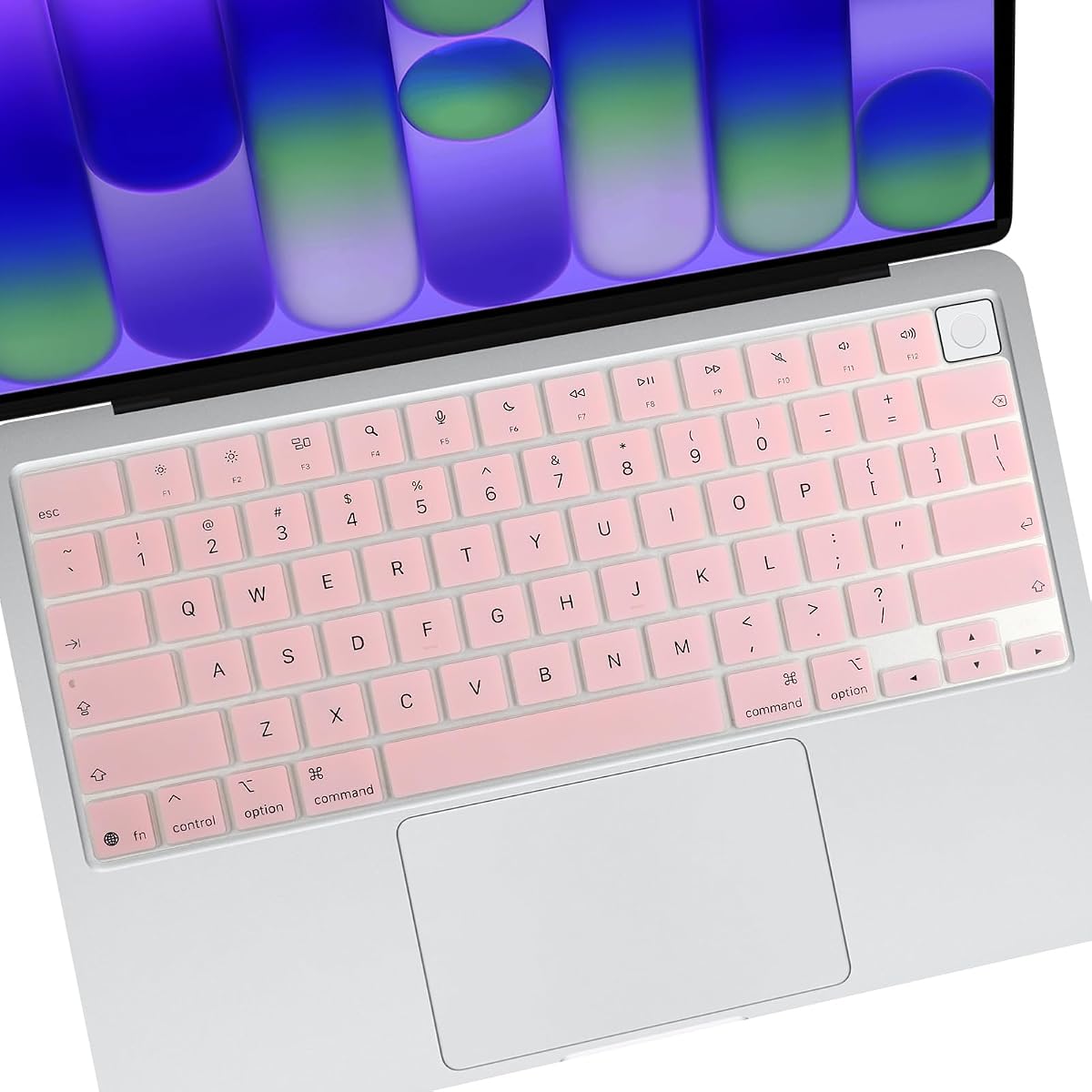
The Allinside Light Pink cover is for buyers who want a keyboard protector to contribute visibly to the appearance of their computer. Its 4.4-rated product information combines a gradient color design with a precise Mac-specific shape and a broad compatibility list for current 13-inch, 14-inch, and 16-inch Apple laptops.
We may earn a commission when you buy through this link, at no additional cost to you.
It is designed for the 2026 MacBook Neo 13-inch A3404, specified MacBook Air 13-inch and 15-inch models with the M5 chip, and several listed MacBook Pro 14-inch and 16-inch configurations with M5-family chips. It supports models with Touch ID but is explicitly not compatible with keyboards without Touch ID, making the model check especially important.
The flexible silicone layer is described as improving typing comfort, reducing noise, and protecting against dust, spills, grease, and fingerprints. It can be applied, removed, washed, and reused without deforming. The transparent keys and accurate cutouts preserve functionality while the light pink gradient adds personality.
This is the best option in the group for shoppers seeking a decorative upgrade rather than a completely invisible skin. The trade-off is that some users will prefer the understated look of a clear protector, and the extensive model list introduces more opportunity for an incorrect match. Confirm your model number, Touch ID configuration, and US layout before ordering.
The light pink gradient changes the visual character of the keyboard without relying on an opaque, heavily printed design. Transparent keys preserve the underlying MacBook look while adding a recognizable color accent.
The cover addresses dust, spills, grease, and fingerprints across several listed MacBook families. Its explicit exclusion of non-Touch ID keyboards makes model verification essential before purchase.
We may earn a commission when you buy through this link, at no additional cost to you.
This keyboard skin has a 4.4 rating and is specifically positioned for the 2026 MacBook Neo 13-inch with the A18 Pro chip and A3404 model. Its main selling point is straightforward protection: the product information highlights waterproofing, dust resistance, and abrasion resistance against common contaminants.
We may earn a commission when you buy through this link, at no additional cost to you.
Each key and symbol is individually molded and printed on elastic silicone. The resulting 0.3mm skin is described as soft, smooth, and thin enough to make typing easier. It is intended to guard against accidental coffee, beer, or milk spills as well as powder, dirty fingers, crumbs, and other everyday debris.
Its profile is thicker than the ultra-thin TPU options, so it may produce a more noticeable layer than a 0.11mm or 0.12mm cover. The product is washable and reusable, and it can be removed for cleaning or disinfecting. The main comparison issue is therefore less about functionality and more about the balance between protection and minimalism.
This is a sensible recommendation for users who want robust everyday defense and plan to wash the cover regularly. It is less suitable for someone whose priority is preserving the exact stock key feel. The dedicated GhostCover and Soonjet options are better aligned with ultra-thin typing priorities, while this skin focuses on a more substantial protective layer.
Waterproof and dust-proof claims make the skin useful in environments where drinks, snacks, and dust are likely. It reduces direct exposure to the keyboard without changing the computer's core hardware.
Removing the skin for washing allows it to be cleaned and returned for continued use. Users should let it dry sufficiently before reinstalling it over the keys.
We may earn a commission when you buy through this link, at no additional cost to you.
The Premium Ultra Thin Cover earns a 4.5 rating and focuses on a close-to-stock typing experience for the MacBook Neo 13-inch and MacBook Air 13-inch or 15-inch. Its 0.11mm soft TPU construction places it among the slimmest options in this guide, making it appealing to users who dislike the feel of a thick keyboard membrane.
We may earn a commission when you buy through this link, at no additional cost to you.
The product information highlights a slim, shallow-key design intended to retain original key travel and rebound feedback. Its transparent material keeps key characters clear, while precise molding around each key edge helps block dust, oil, crumbs, and minor spills. A specific Touch ID cutout is designed to support fingerprint verification without obstructing the sensor.
Compatibility is listed for the 2026 MacBook Neo 13-inch A3404 with Touch ID and 2022 or newer MacBook Air 13-inch and 15-inch models with M2, M3, M4, or M5 chips. The US layout is required, including the rectangular Enter-key shape. It is also stated that the cover does not affect normal laptop closing.
This is an excellent choice for a Neo owner who also uses a compatible MacBook Air and wants a nearly invisible protector. It may be less versatile than the multi-model GhostCover or Soonjet options because MacBook Pro is not listed, but it provides a focused combination of slim construction, key response, and precise Touch ID access.
The shallow-key TPU profile is designed to preserve travel and rebound rather than creating a pronounced cushion. This makes the cover more attractive for daily typing and extended writing sessions.
The precision opening around the fingerprint sensor is intended to allow direct use of Touch ID. That attention to the sensor area is an important fit detail for compatible MacBook Neo models.
We may earn a commission when you buy through this link, at no additional cost to you.
The CaseBuy Clear TPU Skin is a 4.4-rated option engineered for the 2026 MacBook Neo 13-inch A3404 with Touch ID. It closely resembles the dedicated GhostCover in its core design goals: a highly transparent TPU layer, an ultra-thin profile, and a model-specific fit that minimizes uncertainty.
We may earn a commission when you buy through this link, at no additional cost to you.
Its 0.12mm thickness is intended to minimize interference with typing, and the listing states that it will not affect opening and closing the MacBook. High transparency allows the keyboard backlight to remain visible. A precision cut around Touch ID supports fingerprint verification, while the snug fit is intended to protect against milk, stains, dust, and other contaminants.
The cover can be washed with soapy water, allowed to dry, and reused. The product information also mentions a risk-free replacement warranty from CaseBuy. Its limitations are similar to those of other model-specific options: it is for the US keyboard, and its compatibility does not extend to a broad range of MacBook Pro or Air configurations.
Choose this skin when you want a clear, thin protector designed specifically for the A3404 MacBook Neo. It is a close alternative to the dedicated GhostCover, so the decision can come down to current listing details and availability. It provides the core combination of fit, visibility, protection, and cleanability without decorative styling.
The 0.12mm material profile is designed to preserve a natural typing experience while remaining barely visible. Its light-transmitting construction also allows the keyboard backlight to shine through.
Model-specific engineering and a snug fit concentrate protection around the actual keyboard geometry. This can be preferable to a generic skin when the exact MacBook Neo model is known.
We may earn a commission when you buy through this link, at no additional cost to you.
This clear TPU protector has a 5.0 rating and serves a very specific audience: owners of the listed 2026 MacBook Neo 13-inch 256GB non-Touch ID release with the A18 Pro chip. It is not a general-purpose cover, and the unusually specific compatibility makes careful model verification essential.
We may earn a commission when you buy through this link, at no additional cost to you.
At 0.13mm, the cover is among the thinner options and uses premium engineering-grade TPU. Its high transparency is intended to minimize typing interference and allow the keyboard backlight to shine through in low-light conditions. The keys are molded to fit the original layout closely, and the cover is designed to reduce typing noise while remaining easy to apply and remove.
For protection, the product information lists coffee, water, dust, fingerprints, and normal wear. It is washable, reusable, flexible, and durable, and it allows the MacBook to close normally while installed. The US version has a rectangular Enter key, whereas an EU version has a different shape and is not supported.
This is a compelling choice only if the shopper owns the exact covered configuration. Its 5.0 rating and 0.13mm profile look attractive, but ratings and specifications do not overcome a compatibility mismatch. Check the Axxxx model number on the bottom of the laptop and confirm the Touch ID and storage configuration before ordering.
This protector is built for a specific 2026 13-inch 256GB non-Touch ID release. Confirming the model number on the bottom of the computer prevents the most important buying error: choosing a cover that looks similar but has the wrong keyboard or sensor arrangement.
The 0.13mm clear TPU layer protects against common contaminants while allowing the keyboard backlight to remain visible. It is a discreet option for owners of the covered configuration.
We may earn a commission when you buy through this link, at no additional cost to you.
The most important factors are exact model compatibility, keyboard layout, thickness, material, and the degree of protection you need. A cover that looks attractive but does not match the MacBook Neo's key geometry can obstruct the Touch ID sensor, prevent the lid from closing normally, or reduce typing comfort.
MacBook Neo compatibility should be checked against the full model designation rather than screen size alone. Most dedicated covers in this guide specify the 13-inch A3404 model with the A18 Pro chip, while one is limited to the listed 2026 256GB non-Touch ID configuration. Some broader products support MacBook Pro and MacBook Air models as well. Because the A3404 designation appears on several but not all products, look for the exact processor, Touch ID status, and model number on the bottom of the computer before making a selection.
Every option in this guide is intended for the US keyboard layout unless the product information states otherwise. The easiest visual identifier is the Enter key: the US version has a rectangular shape, while the EU version resembles a number seven. An incorrect choice may still appear to fit over part of the keyboard, which makes careful comparison especially important. Confirm both the printed symbols and the overall key geometry rather than assuming that all covers with the same model number are interchangeable.
The listed thicknesses range from 0.11mm to 0.3mm. Ultra-thin options at 0.11mm, 0.12mm, and 0.13mm are designed to minimize interference with key travel and rebound, making them strong choices for frequent typists. The 0.26mm ProElife cover and 0.3mm silicone skins may feel more substantial but offer a visibly protective layer. Personal preference matters, so consider how sensitive you are to a changed typing texture and whether maintaining the closest possible stock feel is your top priority.
The most transparent covers in this group use engineering-grade TPU, which is valued here for flexibility, a low profile, and light transmission. The silicone covers generally use a somewhat thicker skin, often with individually molded or printed keys. Both materials can be useful, but they present different visual and tactile results. TPU is the logical choice when preserving the laptop's original appearance is important, while a clear or colored silicone skin may be more satisfying for shoppers who prioritize a more defined key shape or decorative finish.
Touch ID requires the cover to avoid obstructing the fingerprint sensor. Several products explicitly state that they were tested or designed not to interfere, while others highlight precision Touch ID cutouts. A model-specific cover is generally easier to assess because its opening is made for the intended keyboard. Do not infer Touch ID compatibility solely from the product title. Check the product details, confirm whether your model includes Touch ID, and avoid using any cover that prevents direct access to the sensor.
The listed protection generally covers dust, crumbs, fingerprints, stains, and minor spills, with the most substantial silicone products also mentioning water, grease, pet urine, and other everyday contaminants. Completely clear options are best for preserving the stock appearance, whereas the ombre blue and light pink covers add visual character. Decide whether you want a protective layer you barely notice or one that acts as an intentional part of the laptop's appearance. Both approaches can provide daily protection when the cover fits correctly.
All of the featured covers are described as washable and reusable, which makes routine maintenance straightforward. Remove the cover before cleaning, wash it according to the listing's instructions, and let it dry sufficiently before reinstalling it. A removable cover also allows you to clean the keyboard itself more directly during occasional deep cleaning. Washable construction is especially helpful for owners who eat at their desk, work around pets, or regularly carry their MacBook into shared spaces.
A broad compatibility list can be valuable if you own more than one current MacBook or expect to change laptops in the future. The GhostCover Multi-Model, Soonjet, Allinside, and Premium Ultra Thin options support combinations of Neo, Pro, and Air models. However, a long compatibility list still depends on processor generation, Touch ID status, dimensions, and layout. A dedicated Neo-only cover may be more reliable for the buyer who has only one well-defined device, while a multi-model cover offers useful flexibility after checking the full specification.
Before installation, confirm that the MacBook model, Touch ID configuration, and keyboard layout match the cover's specifications. Power down the laptop, place it on a clean flat surface, and inspect the keys and fingerprint sensor for grit. Keeping the work area clean helps prevent small particles from being trapped beneath the cover.
Align the cover with the keyboard and individual keys, beginning at a corner and working gradually across the surface. Do not force the material around a key or the Touch ID area. Smooth the skin gently, check that every character and symbol remains visible, and confirm that the lid closes normally without pressing against the cover.
For cleaning, remove the cover carefully and wash it with soapy water as described in its product listing. Allow it to dry fully before placing it back on the keyboard, and avoid using it while it is damp. Periodically remove the cover to clean the keyboard itself, and check the edges for wear, lifting, or trapped debris.
Check the Axxxx model number printed on the bottom of your MacBook and compare it with the compatibility information in the product listing. Confirm whether your configuration includes Touch ID and whether it matches the 2026 13-inch A3404 model covered by most dedicated options. A separate product in this guide is limited to the listed 2026 256GB non-Touch ID release.
A properly matched cover should not block the fingerprint sensor. Several options in this guide are explicitly designed or tested for Touch ID, and some feature precision cutouts around the sensor. Compatibility still depends on using the correct model and layout, so check both the Touch ID status and the laptop model number before purchase.
A 0.11mm cover is designed to sit closer to the original keys and minimize interference with typing. A 0.3mm cover provides a more substantial silicone layer that may be easier to notice but remains focused on daily debris and spill protection. Your preferred typing feel and desired level of physical protection should guide the choice.
The products in this guide are specified for the US layout. The US keyboard has a rectangular Enter key, while the EU layout uses a differently shaped Enter key that resembles a number seven. Do not rely on general model compatibility alone; confirm the key shape and symbols to avoid a poor fit.
Yes. The featured covers are described as washable and reusable, with several listings specifically mentioning soapy water. Remove the cover, clean it according to its instructions, and let it dry completely before reinstalling it. Keeping the cover dry and the keyboard free of grit will help it sit correctly over the keys.
A thin, correctly fitted cover should not prevent normal closure. The GhostCover, CaseBuy, and non-Touch ID options include statements about not interfering with laptop closing, while the Premium Ultra Thin Cover also notes this feature. Correct installation is important, so never force the lid closed if the cover is caught or unevenly positioned.
The Soonjet and Premium Ultra Thin covers list a 0.11mm thickness, while the two focused GhostCover options and the clear CaseBuy TPU skin use 0.12mm. These profiles are designed to minimize typing interference and maintain the laptop's minimalist appearance. Actual key feel can vary, so carefully installed ultra-thin options are the best starting point for the least noticeable fit.
Choose a clear cover if you want the keyboard's original appearance to remain dominant or if you use your MacBook in professional settings where subtle styling is preferred. The ombre blue and light pink options are better choices if you want the keyboard cover to provide visible personality. Both clear and colored versions in this guide offer everyday protection and washable care.
The dedicated GhostCover for the 2026 MacBook Neo 13-inch A3404 is the strongest all-around pick because it combines a 4.6 rating, a 0.12mm clear TPU profile, model-specific fit, and explicit Touch ID consideration. The CaseBuy model-specific skin is the best budget option, while the multi-model GhostCover earns the premium award for users who want one discreet cover across several compatible MacBook families.
Prioritize exact model and layout compatibility above every other factor, because even a well-made cover cannot work properly with the wrong key geometry. Once compatibility is confirmed, choose the thinnest profile that satisfies your protection needs. Ultra-thin TPU designs suit frequent typists, while slightly thicker silicone options can suit buyers who prioritize a visible barrier and easy cleaning.
Finally, review the current listing, product details, and availability before ordering, since prices and seller information can change. Make sure the listing still identifies your exact MacBook Neo configuration, Touch ID arrangement, and US keyboard layout, then choose the cover that best balances protection, visibility, and the typing experience you prefer.