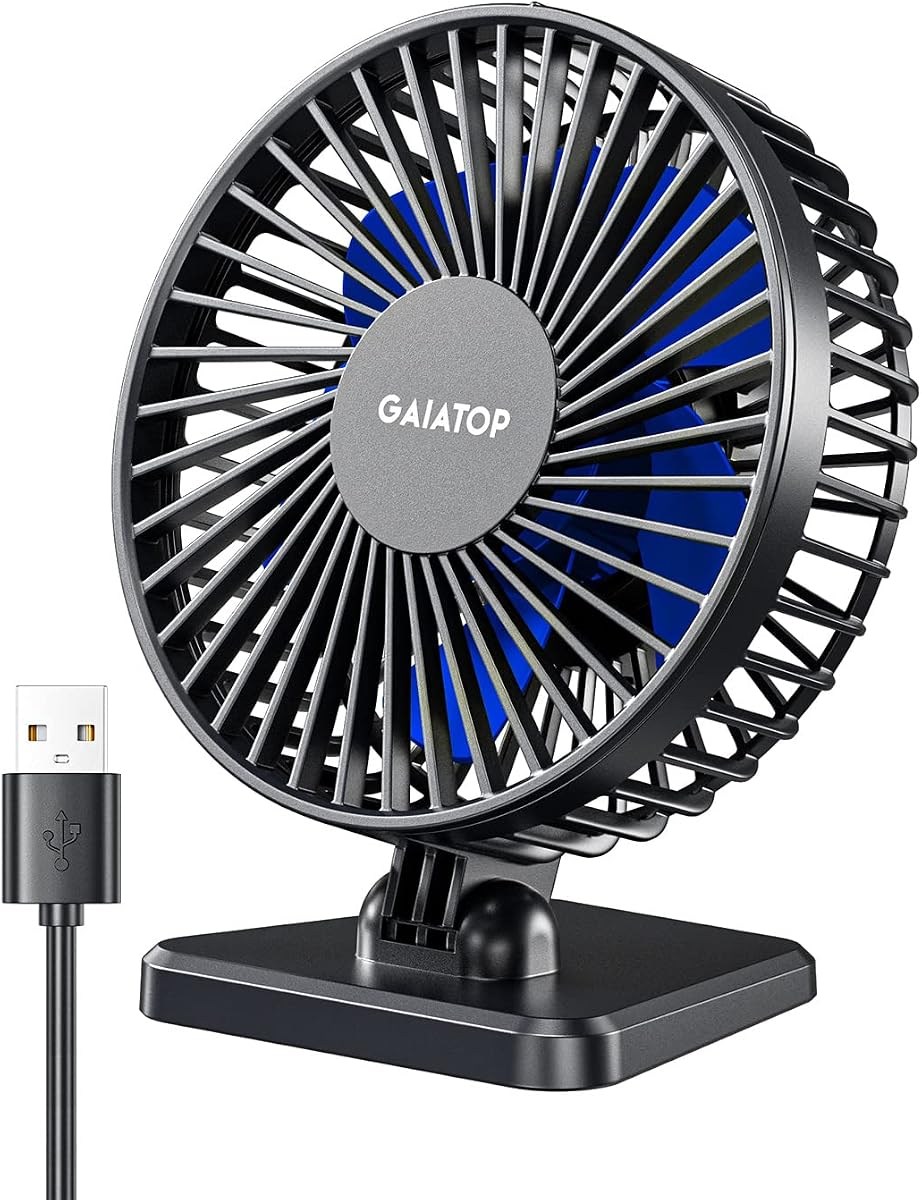
Gaiatop USB Desk Fan
4.5Editor score
Compact portable construction
Three adjustable speed settings
USB-powered compatibility
Vertically adjustable fan head
Discover the best low power use cooling fan options, comparing USB models, airflow, noise levels, controls, and device compatibility.
Low power use cooling fans are compact airflow devices designed to improve ventilation around computers, routers, receivers, game consoles, media boxes, and other heat-sensitive electronics. A useful model balances steady airflow, restrained noise, sensible power requirements, flexible placement, and compatibility with the equipment you already own.
The products in this guide range from small USB device-cooling fans to personal desk fans and larger room circulators. We compared stated airflow, noise, fan size, bearing design, speed controls, mounting options, power connections, and intended cooling applications, while separating equipment cooling from direct personal cooling.
Each review identifies the strongest use case and any practical compromises, so you can choose according to your available space, power source, and noise tolerance. Product configurations and current prices can change, so confirm the latest details and availability on the linked listing before purchasing.
4.5Editor score

4.3Editor score

4.6Editor score
This side-by-side overview compares ten cooling fans by purpose, power arrangement, airflow, noise, controls, and physical design, helping you identify the right model for electronics, a personal workspace, or whole-room airflow.




The X1 USB Cooling Fan is a 120mm device-cooling fan built for routers, receivers, amplifiers, DVRs, game consoles, mini PCs, Apple TV, and other AV equipment. Its 4.3 rating reflects a generally favorable reception, while the strongest selling points are its compact 120mm format, stated 55.8 CFM airflow, and exceptionally low stated noise level of 18dB(A)±10%.
We may earn a commission when you buy through this link, at no additional cost to you.
This model is especially appealing when the cooling target is close to a desk, entertainment unit, or network cabinet. The nine-blade fan operates at 850RPM±10% and is engineered to move air consistently across a small enclosure. A long integrated 530mm USB cable reduces the need for extension leads, while compatibility with chargers, power banks, and laptops makes the power arrangement straightforward. Four shock-absorbing pads help reduce vibration and protect the surface beneath the fan.
The main limitation is the absence of a multi-speed controller. This is useful when a dedicated, steady stream of air is preferable to manually adjusted output, but it can be less flexible in a mixed environment where nighttime silence and stronger daytime cooling are equally important. The stated 20% temperature reduction is a manufacturer claim, so actual results will depend on the device, enclosure, room temperature, and placement.
Overall, the X1 is a strong choice for targeted electronics cooling where quiet operation matters. It combines a useful airflow figure with a generous built-in cable, broad compatibility, and flexible positioning. It is less suitable for buyers seeking a personal fan, a visible speed selector, or an option to ventilate an entire room. For those priorities, the compact and quiet design remains one of its most convincing features.
Because the fan draws power through USB, it also suits users who want to avoid a dedicated wall outlet immediately beside the equipment. That makes setup particularly clean in entertainment centers and network cabinets where free AC outlets may be scarce.
The stated 18dB(A)±10% operation makes the X1 suitable for bedrooms, offices, and quiet media areas where a conventional case fan would be distracting. Its value is strongest when the fan can run continuously beside a router, receiver, or console.
The integrated 530mm cable reaches a laptop, charger, or power bank without requiring a separate lead. Flexible flat and upright placement makes it easy to aim the square frame into a narrow cabinet or toward the intake path of a device.
We may earn a commission when you buy through this link, at no additional cost to you.
The Quiet 80mm USB Fan is a compact three-speed cooling option for flat-panel Xbox consoles, DVRs, PlayStation systems, routers, televisions, receivers, and computer cabinets. Its 4.7 rating is the highest among the equipment-focused models in this guide and suggests a strong level of buyer satisfaction, although ratings should not be treated as a substitute for checking fit and noise tolerance.
We may earn a commission when you buy through this link, at no additional cost to you.
Seven blades and dual-ball bearings form the core of the design. The bearings are stated to last 65,000 hours, and the speed controller allows operation at low, medium, or high levels. Low gear is listed at 21dB, making this a sensible choice for a living room or bedroom where constant high output would be unwelcome. A metal grille on both sides helps protect fingers and reduces the chance of accidental contact with moving parts or the power cord.
Its 3.64-by-3.64-by-1.81-inch size is more portable and less visually imposing than a 120mm square fan. Shockproof foot pads allow it to lie flat or stand upright, and the USB plug can draw power from compatible AV equipment or a game console. That direct power relationship makes the fan convenient for temporary or permanent cabinet cooling.
The trade-off is its smaller frame, which may limit the volume of air it can move compared with 120mm models that publish substantial airflow figures. The product data does not provide a CFM rating, so buyers seeking a quantified cooling result may find a 120mm option easier to assess. It is also important to confirm that the selected device supplies suitable USB power.
For users who want more control than a fixed-speed fan offers, this is a compelling option. It is especially well suited to compact cabinets and gaming equipment where low-speed nighttime operation and stronger daytime cooling are both useful. The combination of a 4.7 rating, three settings, quiet low-gear operation, and protective grilles makes it an excellent general-purpose electronics fan.
The low, medium, and high settings let users match output to the room. Low gear's stated 21dB operation is useful at night, while higher settings can provide additional airflow during sustained equipment use.
The full iron grille adds a physical safety barrier around both sides of the fan. Small dimensions allow placement beside a console or receiver where a 120mm unit might crowd the available cabinet space.
We may earn a commission when you buy through this link, at no additional cost to you.
The Gaiatop USB Desk Fan is a lightweight personal fan for home, office, car, and travel. It weighs less than eight ounces and carries a 4.5 rating, balancing an approachable design with a strong overall rating. Its primary purpose is cooling people at a desk or table rather than ventilating a router, receiver, or computer case.
We may earn a commission when you buy through this link, at no additional cost to you.
The fan offers low, medium, and high speed settings, and its head tilts vertically from zero to 30 degrees. This adjustment is modest compared with highly flexible circulating fans, but it is enough to redirect the breeze toward a seated user. The stated noise level is below 50dB even when providing a strong wind, giving the product a clearer personal-cooling focus than the equipment-cooling models.
USB power makes it broadly compatible with computers, laptops, mobile power banks, AC adapters, car chargers, and other suitable power supplies. One important detail is that the third speed requires a 5V/1A source. Users who plan to run it continuously at maximum speed should therefore choose a capable charger rather than assuming every USB port can handle the highest setting.
The main limitation is purpose. Although its small size may allow it to sit near electronics, the product is not engineered around a stated equipment airflow specification or ventilation grille. It also has less directional control and room-level circulation capability than the DREO and Honeywell models. Its advantage is portability, straightforward operation, and a restrained footprint.
This is an attractive choice for a home office, bedside table, or travel setup where personal airflow is the objective. It offers enough control to move between low and high output without adding a large appliance. For dedicated electronics cooling, however, a purpose-built 80mm or 120mm USB fan is the more logical purchase.
The sub-eight-ounce design and USB power make this fan easy to move between a desk, nightstand, and car. A compatible power source is the only major requirement for operation.
The 0-to-30-degree vertical adjustment lets users aim the fan toward a face or upper body. Three speeds cover lighter background airflow and stronger cooling when desired.
We may earn a commission when you buy through this link, at no additional cost to you.
The Easy Cloud AC Computer Fan is a 120mm variable-speed axial fan intended for PCs, server cabinets, game consoles, receivers, routers, TVs, solar equipment, and other enclosed systems. Its 4.4 rating and unusually high listed airflow of 95.8±10% CFM position it as a performance-oriented choice for users who want more volume than a small cabinet fan typically provides.
We may earn a commission when you buy through this link, at no additional cost to you.
A multi-speed controller adjusts the fan between 700 and 2800 RPM, while the 12V fan is powered through a controller and an AC plug. This arrangement is useful where a nearby USB port would be inconvenient or where a dedicated outlet provides more dependable continuous power. Dual-ball bearings are rated for 50,000 hours, supporting regular operation in a cabinet or equipment enclosure.
Noise is listed below 41dB, which is considerably higher than the 18–21dB figures associated with the quietest compact models. However, raw noise figures are difficult to compare without distance and test conditions. Buyers should also recognize that the 3.3W power rating is still modest for the size and airflow, yet it is not directly equivalent to the power draw of USB models because the specifications are not presented on the same basis.
The product's complexity is its main drawback. It requires a controller, an AC connection, and a 12V fan, making it less tidy than an integrated-cable USB model. It also may be less appropriate for a quiet office or bedroom, particularly at higher speed settings. Users need to route the cable carefully and allow room for the controller.
For a server cabinet, workshop, greenhouse, or AV rack that needs substantial airflow, this fan makes a strong case. Its 120mm frame, high listed CFM, and wide RPM range offer useful scale, while the wall-powered arrangement avoids dependence on a nearby device's USB output. The trade-off is a larger installation footprint and more audible operation than the ultra-quiet alternatives.
The stated 95.8 CFM output is among the strongest figures in this guide. It suits users who prioritize heat removal in a server, media rack, or larger cabinet over minimal footprint.
The controller spans 700–2800 RPM, allowing a balance between stronger cooling and lower sound. AC-powered operation is dependable in installations where a nearby device does not provide a suitable USB port.
We may earn a commission when you buy through this link, at no additional cost to you.
The Easy Cloud USB Computer Fan is a 120mm, three-speed cooling fan designed for PC cases, cabinets, servers, receivers, routers, Xbox and PlayStation systems, TVs, DVRs, and greenhouses. Its 4.3 rating places it among the well-regarded equipment fans here, while the combination of a speed controller and flexible placement distinguishes it from fixed-speed alternatives.
We may earn a commission when you buy through this link, at no additional cost to you.
The maximum listed speed is 2000 RPM. Low mode is intended for quieter bedrooms and offices, while medium and high settings provide more aggressive cooling for warm equipment. The product data references dual-ball bearings for durability and quiet operation, although it does not provide a specific CFM figure or a precise decibel rating for users to compare quantitatively.
Eight anti-vibration feet help absorb movement and reduce noise when the fan is mounted horizontally or vertically. This makes the unit practical for cabinets where a hard plastic housing could otherwise transmit hum or rattling. USB power also keeps the installation straightforward: the controller can be connected to a suitable power source, and the fan can be positioned near the equipment that needs airflow.
The external controller and attached wiring make the setup less tidy than the X1's integrated cable. The 120mm body is also larger than an 80mm model, which may be consequential inside a tightly packed media cabinet. Users should confirm the free depth, because the square housing needs clearance for airflow and should not be forced into a confined area.
This fan is a balanced option for electronics owners who want variable output but do not require a wall outlet. It is especially helpful for creating a small cooling path in a cabinet, entertainment center, or server enclosure. The lack of a published CFM figure makes direct performance comparison harder, but the 2000 RPM maximum and three-speed design indicate a versatile unit with good application breadth.
Low mode supports quiet background operation, while medium and high settings provide stronger cooling for demanding use. The controller makes it possible to adapt the fan without unplugging it.
Eight anti-vibration feet help limit movement and transmitted sound. The housing can be placed flat or upright, providing flexibility within equipment cabinets and entertainment centers.
We may earn a commission when you buy through this link, at no additional cost to you.
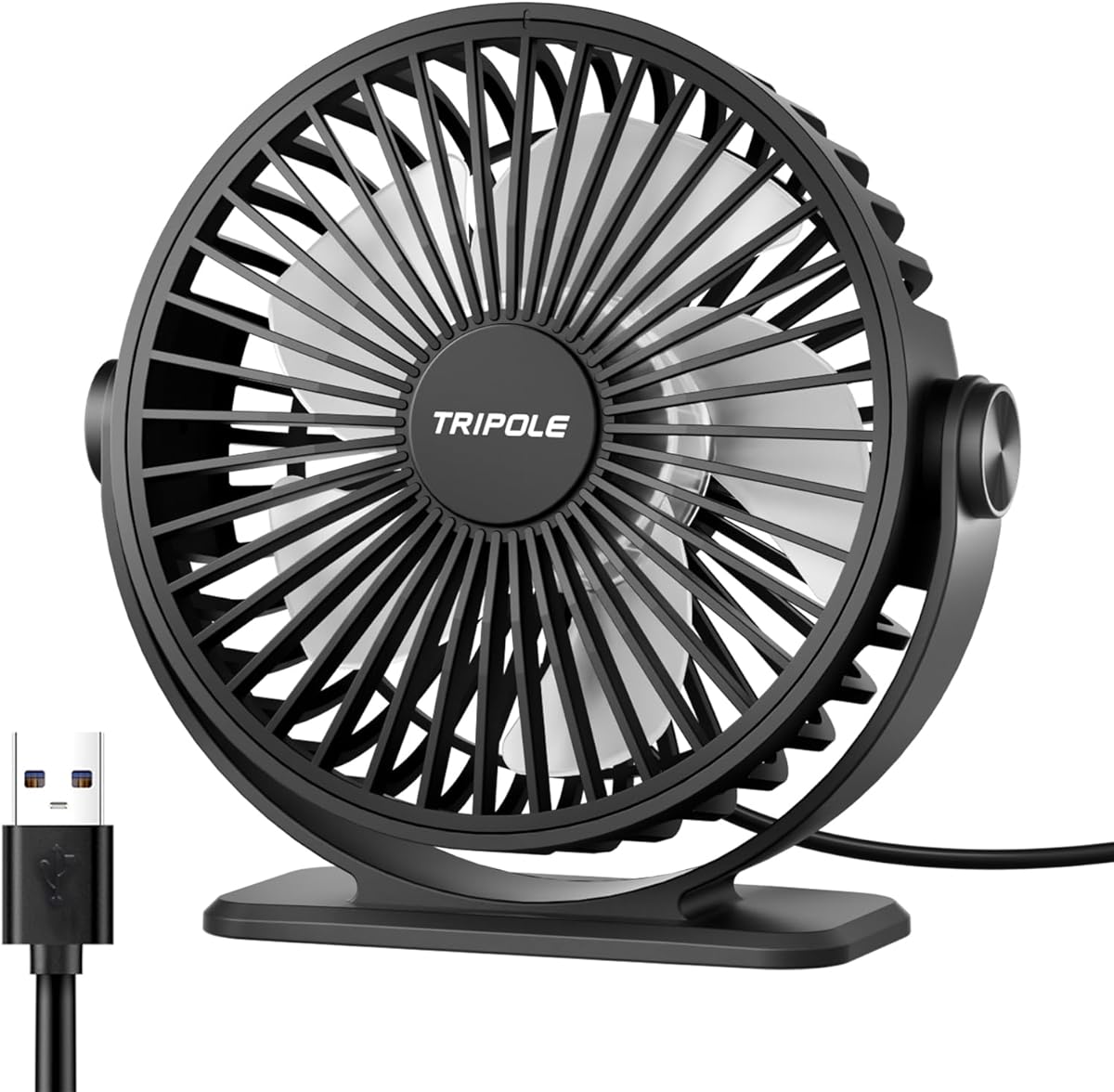
The TriPole USB Desk Fan is a compact personal fan with a 4.6 rating and an emphasis on flexible airflow direction. Its 4.5-inch diameter fits comfortably on a desk or nightstand, while the head rotates a full 360 degrees vertically, allowing the breeze to be aimed upward, downward, or across the room.
We may earn a commission when you buy through this link, at no additional cost to you.
Three speed modes are selected from the rear button, and the 4.9-foot cord provides enough reach for many desktop arrangements. USB-A power works with a wall charger, computer, or power bank. The product note specifies that the fan needs 0.8A while operating and recommends a 5V/1A charger if the third speed does not engage.
Its base is designed for stability, with a wide footprint and four silicone pads that reduce vibration and noise. The detachable cover is a practical maintenance feature because it allows the fan mask and blades to be cleaned more easily. Regular removal of dust helps maintain airflow and keeps the moving parts operating as intended.
Although the adjustable head sounds more versatile than it may initially appear, the fan still delivers a relatively focused personal breeze rather than the long, room-filling air path of a dedicated circulator. It also has no stated CFM or exact decibel specification, so its output is harder to compare numerically with the 120mm equipment fans. The requirement for a capable USB source should be considered before relying on the highest setting.
This is an excellent personal fan for a home office, bedside area, or travel-friendly workstation. It offers more directional control than many similarly compact models, a stable base, and a useful detachable cleaning feature. It is not the right choice for cooling a router or receiver, but for a person who wants a small, steerable breeze with straightforward USB power, it ranks among the strongest options here.
The 360-degree vertical rotation allows the head to point toward a user, upward, or across a surface. This makes the fan more adaptable to changing seating positions than a fixed-angle model.
The detachable front assembly makes routine cleaning of the mask and blades more accessible. Removing accumulated dust can support consistent airflow and a cleaner direct breeze.
We may earn a commission when you buy through this link, at no additional cost to you.
The AC Infinity MULTIFAN S5 is a dual 80mm USB cooling system designed for electronics and components. Its 4.6 rating reflects strong buyer approval, and the product stands apart through its UL-certified ultra-quiet design, 18dBA total noise, 52 CFM combined airflow, and a dedicated multi-speed controller.
We may earn a commission when you buy through this link, at no additional cost to you.
The two fans provide a greater total volume of airflow than a single compact 80mm model while retaining a relatively restrained footprint. Dual-ball bearings are stated to last 67,000 hours, and the units can be laid flat or positioned upright. That flexibility is useful in cabinets, entertainment centers, and near AV equipment where incoming and outgoing air paths can be arranged around obstructions.
USB power is another important advantage. The supplied plug can draw from a compatible port behind AV electronics or a game console, while the multi-speed controller lets users find an appropriate balance between noise and airflow. This makes the system practical for long-running cooling tasks without requiring a nearby wall outlet.
The main drawback is that two fans take up more space than a single 120mm or 80mm unit, and the premium positioning may be difficult to justify for a very small enclosure. Buyers should also confirm that the chosen USB port can handle sustained operation, especially if multiple components are already connected to the same source.
The MULTIFAN S5 is the premium choice in this guide for a reason: it combines low sound, substantial combined airflow, durable bearings, and granular speed control in a proven electronics-oriented format. It is best suited to users who want quiet, sustained ventilation around multiple heat-producing components and value adjustability over the smallest possible footprint.
The stated 18dBA total noise makes this system suitable for near-silent operation. That quiet profile is especially valuable beside computers, media equipment, and bedroom electronics.
A combined 52 CFM output and multi-speed controller let users move between minimal and stronger operation. The dual design can also create a more directed ventilation path than one small fan.
We may earn a commission when you buy through this link, at no additional cost to you.
The DREO 11-Inch Circulator is a tabletop air circulator built for homes, offices, and kitchens. Its 4.4 rating and combination of an 11-inch body, stated 800 CFM airflow, and 60-foot air reach distinguish it from the small fans intended to cool individual electronics. It is designed to move air across a room rather than provide a localized cabinet breeze.
We may earn a commission when you buy through this link, at no additional cost to you.
The turbine-inspired airflow design is claimed to circulate room air within three minutes. A manual tilt range of minus 30 to 90 degrees gives users a 120-degree adjustment, and the included handle supports wall mounting. These placement options make it possible to direct air across the body, toward the ceiling for room mixing, or from a higher position.
Noise is listed at 20dB, making the model competitive with the quietest equipment fans even though its scale and function are different. Three speeds are adjusted with a knob, moving from a light breeze to a stronger gust. The stated power-saving motivation is logical: a circulator can improve perceived cooling and air movement, potentially reducing the need to run a larger cooling system as often.
The trade-off is size and scope. The 11-inch housing is not appropriate for a small AV cabinet, and its room-scale output is excessive where only a gentle personal breeze is needed. The manufacturer also makes broader room-circulation claims, so real performance will depend on room dimensions, furniture, obstacles, and the location of the fan.
For users who want noticeable air movement in a bedroom, office, or kitchen without the visual bulk of a tower fan, this DREO is a strong compromise. The 20dB stated operation, wide tilt, strong airflow, and three-speed control make it particularly effective for quiet whole-room circulation.
The 800 CFM stated output and 60-foot reach create a more expansive breeze than a compact desk fan. Its low-profile tabletop form is easier to place in a bedroom or office than a full-size pedestal model.
A 120-degree tilt range and built-in handle support both floor-level and wall-mounted use. These options help direct airflow where people spend time or where room air needs to be mixed more effectively.
We may earn a commission when you buy through this link, at no additional cost to you.
The Honeywell TurboForce HT900 is a small air circulator designed for tables, desks, and wall mounting in home or office settings. It carries a 4.6 rating and uses a familiar turbo-style housing to move air across small to medium spaces. Unlike the equipment fans in this guide, it is intended primarily to improve personal comfort and room circulation.
We may earn a commission when you buy through this link, at no additional cost to you.
Three speed settings allow users to choose between lighter background airflow and a stronger breeze. The head pivots through 90 degrees, which is enough to redirect the fan toward a seated user or across a desk. Its compact proportions make it less visually dominant than a standing fan, while the wall-mount capability adds placement flexibility when floor or table space is limited.
Honeywell states that the TurboForce design can move air up to 25 feet and is 25% quieter than comparable fans. The product information also presents a practical energy-saving angle: improving air movement may allow an air conditioner to run less often. It is important to distinguish that general efficiency benefit from a specific power-draw claim, which the supplied specifications do not provide.
The main limitation is the lack of a published CFM or exact noise figure. Buyers therefore cannot compare its output directly with the quantified 800 CFM and 20dB specification of the 11-inch DREO circulator. It also lacks the very broad tilt range and wall-mount handle found on that model, although the 90-degree pivot still provides useful control.
The HT900 is a well-regarded choice for readers who recognize Honeywell's fan lineup and want a straightforward personal circulator. It suits desks, bedside tables, and home offices where three speeds, compact dimensions, and an adjustable head are more valuable than advanced room automation or a large standing footprint.
The small tabletop format can fit where larger fans would interfere with desk space. Its 25-foot stated reach makes it useful for moving air between a seated user and the surrounding room.
Three speeds cover quiet background use and stronger cooling. A 90-degree pivoting head lets users redirect the breeze without relocating the entire fan.
We may earn a commission when you buy through this link, at no additional cost to you.
The DREO Standing Oscillating Fan is the largest and most feature-rich model in this guide. Designed for bedrooms, living areas, and kitchens, it combines a stated 1000 CFM airflow, an 90-foot reach claim, eight manual speeds, automatic adjustment, oscillation, and an adjustable pedestal height.
We may earn a commission when you buy through this link, at no additional cost to you.
Its motor and blade design are intended to produce smooth, quiet airflow. The remote can mute operating beeps and provides access to an eight-hour timer, while auto mode increases the wind speed when the room temperature rises by two degrees. This automatic response may be convenient for users who want cooling to adjust without repeatedly operating the controls.
The fan offers 90-degree horizontal oscillation and a 105-degree pivoting head. Its height adjusts from 38 to 42 inches, allowing it to suit different users and room arrangements. A detachable blade, front grille, and rear grille simplify cleaning, and the built-in aroma pad offers an additional fragrance feature for users who want a more pleasant room scent.
Its main disadvantage is physical scale. A standing fan is not suitable for cooling a compact electronic enclosure and requires more floor space than every other product listed. It also includes more controls and mechanisms than a user may need, and the stated 1000 CFM and 90-foot reach should be considered manufacturer claims that depend on room conditions.
For a bedroom, living room, or kitchen where broad circulation and hands-off adjustment are priorities, this is the most capable option. It combines strong published airflow with quiet operation, a timer, oscillation, and flexible height adjustment. Buyers seeking a tiny, low-power USB cabinet fan should instead look to the equipment-focused selections earlier in the guide.
Auto mode raises the wind speed when the room temperature increases by two degrees. The remote, timer, and beep muting make the fan convenient to operate without frequent physical adjustments.
A 90-degree oscillation, 105-degree head pivot, and adjustable height let users direct airflow across a room. Detachable blade and grille components make periodic cleaning more manageable.
We may earn a commission when you buy through this link, at no additional cost to you.
The right cooling fan depends on whether you need to ventilate one electronic device, cool yourself at a desk, or circulate air throughout a room. Use power availability, physical fit, noise, airflow, and adjustment as the main decision points.
Equipment-cooling fans are designed to move air through or around a router, receiver, console, cabinet, server, or other compact electronics. Their square frames, square grilles, and USB connections are intended to direct airflow toward a device. Personal desk fans place a grille toward a user and offer adjustable heads or rotation instead. Room circulators use larger housings, stronger airflow, oscillation, and greater placement flexibility. Starting with the intended purpose prevents an attractive personal fan from being chosen for a technical ventilation task.
Choose an equipment model for a device that develops heat, and choose a personal or room model for human comfort.
USB fans are convenient because they can draw power from computers, game consoles, AV equipment, chargers, or power banks. However, some high settings require more current than a basic port can supply. The Gaiatop specifies a 5V/1A source for its third speed, while the TriPole recommends a 5V/1A charger if its third speed does not operate. AC-powered models avoid dependence on nearby USB capacity but introduce a controller, outlet, and additional cable. Consider both the source and the number of devices already connected.
Confirm voltage, current, and connector requirements before ordering, especially when planning to use the highest setting.
A 120mm fan generally offers a larger frame and greater potential airflow than an 80mm unit, making it more suitable for cabinets, servers, and larger electronics. Compact 80mm models fit crowded entertainment centers and smaller network cabinets. Published airflow figures are most useful when they use the same CFM measure, though actual movement also depends on blade design, RPM, and obstructions. For personal and room cooling, consider the stated reach and circulation method rather than treating the fan as a replacement for equipment airflow specifications.
Match fan diameter to the available space and cooling target, then compare airflow specifications where available.
Noise becomes especially important in bedrooms, offices, recording spaces, and living rooms. The X1 and AC Infinity list 18dB or 18dBA, while the 80mm Quiet USB Fan states 21dB on low gear. Larger circulators may still operate quietly at lower settings, but their maximum output can be more noticeable. Published decibel figures may use different distances and conditions, so treat them as comparative guidance. If continuous operation is planned, favor a model with multiple speeds and use the lowest setting that provides adequate cooling.
For quiet spaces, choose a model with a documented low-noise setting rather than judging only its maximum output.
A fixed-speed fan is simple and consistent, but a controller allows output to match changing heat, ambient temperature, and activity levels. Three speeds are common among the compact models, while the DREO standing fan offers eight speeds and an automatic mode. Personal fans benefit from a tilting or rotating head, and room circulators benefit from oscillation. Equipment fans require less directional freedom but should be easy to place flat or upright near the relevant intake or exhaust path.
Use controls to match output to the moment, and use physical adjustment to direct airflow where it is needed.
Dual-ball or double-ball bearings are featured in most of the equipment-oriented models, with stated service lives ranging from 50,000 to 67,000 hours. Bearings contribute to smooth operation and durability, but construction details such as anti-vibration feet and protective grilles also influence everyday usability. The 80mm Quiet USB Fan uses iron grilles on both sides, and the Easy Cloud USB model includes eight anti-vibration feet. For a fan placed inside a cabinet, vibration control and safe positioning can matter as much as headline noise.
Look for durable bearings, vibration isolation, and protective grilles when the fan will operate unattended near equipment.
Look beyond the fan itself and consider the space needed for its housing, cable, controller, and intake path. Integrated-cable models create cleaner installations, while controller-based systems offer more control. Personal fans with detachable covers, such as the TriPole, make routine blade and grille cleaning easier. Dust can reduce airflow and create imbalance, so equipment fans should also be positioned where they can be inspected and cleaned without disturbing connections. Avoid pushing a square fan tightly against a wall or blocking its grille.
Allow room for airflow and routine cleaning, and choose a cable and controller arrangement that you can manage safely.
Begin by identifying the heat source and the path the air should follow. For electronics, place the fan near an intake, exhaust, or vent opening without blocking any grille, and orient the airflow so it carries heat away from the equipment. For personal cooling, set the fan on a stable surface and tilt or rotate the head toward the intended area. Connect the specified USB or AC power source before selecting a speed, and begin with the lowest setting to evaluate noise and airflow.
Use the lowest practical speed when the device or room is already cool, and increase output when temperatures or workload rise. Do not obstruct the fan grille, place the motor in direct contact with moisture, or route a cable where it can be pinched. For AC-powered models, keep the controller and connections dry and follow the included power instructions. Users who rely on a computer, console, or router should account for the additional load placed on that device's USB power supply.
Inspect the blades and grille regularly, particularly in dusty environments. Unplug the fan before cleaning, and use a soft brush or suitable dry method rather than forcing liquid into the motor. The TriPole's detachable cover makes this process especially accessible. Recheck placement after dust removal, confirm that vibration pads remain secure, and inspect cords for bending or damage. Periodic care helps maintain smooth rotation, consistent airflow, and safer operation.
The X1 USB Cooling Fan and AC Infinity MULTIFAN S5 both list 18dB or 18dBA operation, making them leading choices in the supplied specifications. The Quiet 80mm USB Fan also offers a stated 21dB at its low setting. Actual sound can vary with mounting, airflow obstruction, room acoustics, and speed, so compare low-speed noise for the most relevant result in a quiet room.
A USB cooling fan can run from a router if the router provides a suitable USB port and enough current for the selected speed. Some routers offer only standard USB charging output, while the fan's third setting may require a stronger 5V/1A source. Check the router documentation and the fan instructions, and use a separate charger or power bank if the device cannot support the fan reliably.
A 120mm fan is generally better when you have room for it and need to move more air around a cabinet, server, or larger electronic device. An 80mm fan is useful in tighter spaces and often fits personal cooling or compact AV cabinets more easily. The right choice depends on available dimensions, noise requirements, power access, and the amount of airflow the equipment needs.
Start with the lowest speed and increase it only as needed. Place vibration-absorbing pads beneath the fan, ensure the grille is not touching a metal surface, and avoid loose cables that can knock against the housing. If vibration persists, reposition the fan slightly or use a larger isolation pad. Running the fan at a lower setting is usually the most effective way to reduce sound without losing all cooling.
A personal fan can move some air near a device, but it is not optimized for equipment cooling. Equipment models are generally built with square frames and grilles that can be aimed into a cabinet or toward a vent, and they may publish airflow specifications. For a hot router, receiver, console, or computer, choose a purpose-built USB equipment fan rather than relying on a personal breeze.
The connected port may not provide enough current for the highest setting. The Gaiatop notes that its third speed needs a 5V/1A source, and the TriPole similarly recommends a 5V/1A charger if its third speed does not operate. Try a direct connection to a suitable wall adapter or power bank, and check that the cable and port are functioning correctly.
A small cooling fan generally should not be treated as a substitute for an air conditioner because it circulates existing air rather than lowering the room's temperature or removing heat from the entire space. It can improve comfort by increasing air movement and may help a larger system operate less frequently. Fans focused on equipment ventilation serve an entirely different purpose by moving heat away from a specific device.
Place it where it can draw cool air from an open section of the cabinet and direct moving air toward the device's intake or through its exhaust path. Do not block the fan grille or crowd the square housing against a wall. Leave enough room for the cable and controller, and periodically check for dust, vibration, and unstable placement.
The X1 USB Cooling Fan is the strongest all-around choice for quiet, targeted equipment cooling, combining a 120mm frame, stated 18dB operation, useful airflow, and an integrated USB cable. The Gaiatop USB Desk Fan serves a different but equally valid role as a compact personal fan, while the AC Infinity MULTIFAN S5 is the premium pick for buyers who want refined speed control, dual-fan output, and exceptionally low stated noise.
Prioritize the application before comparing specifications. Choose a square 80mm or 120mm fan for routers, receivers, consoles, and cabinets; choose an adjustable compact fan for personal cooling; and select a circulator when the goal is moving air throughout a room. Within each category, noise, power access, available space, and maintenance should determine which model fits your setup best.
Ratings and published specifications provide a useful starting point, but they do not guarantee identical results in every home or installation. Check current product details, accessories, voltage requirements, dimensions, and availability on the retailer listing before buying. Prices and promotions change, so compare the current cost together with the features that matter most to your cooling needs.