
ASUS NUC 14 Pro Mini Desktop Computer Linux
Intel Core Ultra 7 155H
64GB DDR5 memory
2TB PCIe SSD
Linux Mint preinstalled
Our Linux Mini Pcs guide compares ten compact systems by processor, memory, storage, displays, connectivity, Linux readiness, and value for home and office use.
Linux Mini Pcs combine a remarkably small footprint with the flexibility, stability, and open-source freedom of Linux. A capable mini PC can replace a traditional tower for office work, programming, media playback, home-server duties, and network infrastructure. The strongest choices balance efficient processors, adequate memory, fast storage, useful connectivity, and dependable cooling.
We compared all ten systems using their published specifications and stated capabilities, focusing on processor architecture, memory, storage expansion, display support, networking, operating-system readiness, and intended workload. The list covers explicit Linux installations, adaptable general-purpose mini PCs, and network-focused systems that can run Linux distributions or server software.
Each review explains who the mini PC suits, which strengths matter most, and where limitations may affect your plans. Ratings reflect the supplied marketplace information, while systems without a numerical score are shown without a star value. Product configurations and prices can change, so confirm the current listing and exact hardware before purchasing.


4.6Editor score
This side-by-side comparison organizes the ten mini PCs by their most important Linux-relevant characteristics, including processor class, memory, storage, display capability, and networking.


The TK Node Mini PC is the most straightforward option for someone who wants a compact Linux computer without assembling an operating system or searching for compatible drivers. It ships with Zorin OS Core Linux, an Ubuntu-based desktop designed to offer a familiar transition from Windows while preserving an open-source environment. No numerical marketplace rating was supplied, so the evaluation focuses on its documented configuration. The listed Ryzen R2314 processor has four cores and four threads, while the selected configuration includes 8GB of RAM and a 512GB SSD.
We may earn a commission when you buy through this link, at no additional cost to you.
Its strongest feature is the combination of preinstalled Linux and deployment-oriented hardware. The product is built and quality-checked in Texas and includes a two-year US-based limited warranty, adding reassurance for buyers who value local support. Its 5-inch by 5-inch by 1.7-inch enclosure is genuinely compact, yet the stated connectivity includes Gigabit Ethernet, Wi-Fi, Bluetooth, and dense I/O. The system is also designed for continuous workloads involving virtualization, automation, containers, and storage, making it relevant to Linux users who want more than a simple desktop.
There are important qualifications. The installed 8GB of memory is modest by modern standards, although the dual SO-DIMM design supports up to 64GB, allowing a higher-memory configuration. The R2314 is an efficient four-core chip rather than a high-performance processor, so demanding compilation, intensive data analysis, or heavy graphics work may expose its limits. Users seeking a workstation-class machine with abundant memory and a more powerful CPU should consider the ASUS NUC 14 Pro instead.
This is a strong recommendation for Linux beginners, home labs, kiosk-style deployments, and users who value a ready-to-use system with a local warranty. It is particularly attractive when the buyer does not want to install Linux manually or troubleshoot initial hardware compatibility. Choose it for simplicity and flexibility, verify the selected memory and storage configuration, and confirm that the included Zorin OS edition aligns with your preferred applications.
Zorin OS Core provides a conventional desktop experience on an Ubuntu foundation, reducing the learning curve for new Linux users. It also leaves the operating system open to customization, package management, and server-oriented tasks.
Dual SO-DIMM slots and two NVMe positions make this more adaptable than many fixed-memory mini PCs. A Linux administrator can increase memory or total storage as container, virtualization, and automation projects expand.
We may earn a commission when you buy through this link, at no additional cost to you.
The Beelink SER3 is a proven compact desktop with a 4.3 rating and a configuration that remains well suited to Linux. Its AMD Ryzen 3 3200U processor provides two cores and four threads, operating at a base frequency of 2.6GHz and a maximum turbo frequency of 3.5GHz. With 16GB of DDR4 memory and a 500GB M.2 PCIe 3.0 SSD, it offers a familiar balance for web browsing, office productivity, development, and lightweight server applications. It does not come with Linux preinstalled according to the supplied information, so buyers should plan to install their preferred distribution.
We may earn a commission when you buy through this link, at no additional cost to you.
The SER3's principal appeal is its straightforward combination of memory, storage, and connectivity. The 16GB of DDR4 memory is much more comfortable for Linux multitasking than an 8GB configuration, particularly when several browser tabs, containers, or background services are running. Its M.2 drive provides a responsive base for the operating system and applications, while Gigabit Ethernet supports stable wired networking. Dual-band Wi-Fi, Bluetooth, four USB 3.2 ports, and two HDMI outputs make it versatile for a desk, media area, or lightweight home office.
The processor is the main limitation. A two-core design with four threads can handle routine Linux work, but it is not ideal for intensive compilation, large local virtual machines, complex 3D work, or competitive gaming. Integrated Radeon Vega 3 graphics can handle video playback and light visual tasks, but the system is better understood as an efficient productivity computer than a gaming machine. Its support for two screens is useful, yet it cannot match the three- and four-display flexibility offered by several newer alternatives in this guide.
The SER3 suits cost-conscious users who want a dependable Linux desktop with adequate memory and a fast SSD without moving to a high-end platform. It may also work well as a lightweight file server, classroom system, or dedicated development station. Choose it when everyday responsiveness matters more than maximum core count, and verify the current operating-system options before purchase because the standard configuration may require a fresh Linux installation.
Sixteen gigabytes gives Linux users comfortable room for a browser, communication tools, editors, and background processes. The listed memory can also be expanded to 32GB with two 16GB modules, adding longevity for more demanding workflows.
Gigabit Ethernet is especially useful for a permanently placed Linux desktop or small server. Dual-band Wi-Fi and Bluetooth provide flexibility when a wired connection is inconvenient.
We may earn a commission when you buy through this link, at no additional cost to you.
The ASUS NUC 14 Pro is the premium selection in this roundup and the most ambitious Linux configuration. It comes with Linux Mint preinstalled, Intel Core Ultra 7 155H processing with 16 cores and 22 threads, up to 4.8GHz boost performance, 64GB of DDR5 memory, and a 2TB M.2 PCIe Gen4 x4 SSD. No numerical rating was supplied, but the documented configuration clearly targets developers, creators, AI researchers, and professional users who need substantially more capacity than a conventional office mini PC.
We may earn a commission when you buy through this link, at no additional cost to you.
Its specification sheet explains why it occupies the premium tier. The processor has enough parallel performance for heavy compilation, large development environments, AI inference tasks, big-data workflows, and demanding multi-application sessions. Intel Arc graphics add a meaningful capability for visual work and multiple displays, while the 64GB memory configuration allows developers to run sizable virtual machines, containers, data tools, and applications without immediately approaching a memory ceiling. The supplied information also notes expansion to 96GB and optional SATA storage sold separately.
Connectivity and cooling are equally serious. The stated port selection includes USB 3.2 Gen2 Type-A and Type-C, HDMI 2.1, Thunderbolt 4, 2.5GbE Ethernet, Wi-Fi 6E, and Bluetooth 5.3. It supports up to 8K output or four 4K HDR displays, an especially useful feature for analysts, creators, and trading or control-room environments. An aluminum fin design, dual copper heat pipes, and optimized airflow are intended to support quiet, efficient 24/7 operation under intensive workloads.
This NUC is the right recommendation for professionals who want Linux ready to use and need substantial performance without building a conventional tower. It is also a strong option for organizations standardizing on Linux Mint, especially where virtualized development, continuous workloads, and multi-monitor productivity are priorities. The trade-off is the much higher cost compared with every entry-level option here. For those who need a smaller or less expensive system, this premium capacity may be unnecessary.
The combination of 16 processor cores and 64GB of memory is especially useful for multiple virtual machines, container environments, large repositories, and data-intensive workflows. It provides headroom that ordinary 8GB and 16GB mini PCs cannot match.
Four-display support makes the NUC practical for code, documentation, research, financial monitoring, and creative review. Thunderbolt 4 and USB-C expand the connection options for specialized docks and storage.
We may earn a commission when you buy through this link, at no additional cost to you.
The Beelink Mini S12 Pro combines a 4.6 rating with one of the most useful configurations for a first Linux desktop. Its Intel N100 is a four-core, four-thread processor with a maximum turbo clock of 3.4GHz and a standard six-watt thermal design. The system includes 16GB of DDR4 memory and a 500GB SSD. These specifications make it a convincing Linux option for office work, browsing, media, light development, a home server, and other tasks that do not require heavy graphics or a large number of CPU cores.
We may earn a commission when you buy through this link, at no additional cost to you.
The supplied information highlights a six-watt processor, 24 execution units for Intel UHD graphics, and an improved cooling arrangement consisting of a larger silent fan, copper heat sink, and dedicated SSD cooling shield. It supports two 4K displays at 60Hz through two HDMI 2.0 ports and includes AV1 decoding. For connectivity, it offers Gigabit Ethernet, Wi-Fi 6, Bluetooth 5.2, four 10Gbps USB 3.2 Type-A ports, and a 3.5mm audio connection.
Storage expandability is a notable strength. The main M.2 2280 position supports a SATA SSD up to 2TB, and an additional SATA 3 interface can accept a 2.5-inch drive up to 2TB. This makes the Mini S12 Pro more flexible for a Linux NAS or a system with separate boot and data drives. The limitation is its single SO-DIMM slot, which supports up to 16GB and cannot offer the straightforward memory expansion available on dual-SODIMM competitors.
The Mini S12 Pro is a strong budget recommendation for students, home-office users, and builders of a modest Linux server. Its efficient processor and 16GB memory cover common desktop tasks while its clean connectivity avoids obvious bottlenecks. It is less suitable for demanding gaming, intensive 3D rendering, or large-scale virtualization, but those are not its stated ambitions. Verify the storage type and included accessories in the current listing, and consider adding a larger drive if you plan to retain extensive media or backups.
The six-watt N100 is well suited to low-power Linux deployments such as lightweight servers, office endpoints, and remote access machines. Its modest thermal target also helps keep fan noise and heat manageable.
Separate M.2 and 2.5-inch drive options allow a Linux user to build a dedicated storage setup. One drive can hold the operating system while another stores shared files, media, or backups.
We may earn a commission when you buy through this link, at no additional cost to you.
The KAMRUI Pinova P2 sits near the center of the roundup, offering a four-core, eight-thread AMD Ryzen 7 7330U with a maximum clock of 4.3GHz, 16GB of LPDDR4X memory, and a 256GB M.2 SSD. It carries a 4.4 rating. The processor is built on Zen 3 architecture with an eight-megabyte L3 cache and a 15-watt thermal design, giving Linux users a capable combination of multithreaded performance and efficient operation for productivity, development, media work, and light content creation.
We may earn a commission when you buy through this link, at no additional cost to you.
One of its most attractive features for a Linux workstation is display flexibility. The system can drive three independent 4K monitors at 60Hz through HDMI 2.0, DisplayPort 1.4, and a USB-C port with DisplayPort Alternate Mode. Two USB 3.2 Gen2 Type-A ports support data transfer rates up to 10Gbps, while the full-function USB-C port handles both data and video. Gigabit Ethernet, Wi-Fi, and Bluetooth cover everyday networking, making this suitable for a developer desk, analyst, or creative professional who uses several windows.
The supplied information emphasizes the 7330U's improvements over older and entry-level alternatives, including substantially stronger multithread performance than the Ryzen 3 4300U and an eight-megabyte cache. That extra capacity helps when compiling projects, running containers, or keeping several browser-based development tools open. The trade-off is storage: 256GB fills quickly with operating-system files, development packages, and media. Two M.2 expansion positions are listed, including a PCIe 3.0 slot and a SATA slot, with total capacity stated up to 4TB.
Another limitation is the soldered LPDDR4X memory, which cannot be replaced with conventional SO-DIMM modules. The 16GB allocation is sufficient for many users but less future-proof than a system with expandable DIMMs. Overall, the Pinova P2 is a strong recommendation for someone who values processor efficiency, triple-monitor support, and a compact design more than large initial storage or unrestricted memory upgrades.
The three-output arrangement is unusual in a compact Linux mini PC and valuable for code review, research, spreadsheet analysis, or creative work. DisplayPort Alt Mode over USB-C simplifies cable choices while retaining high data bandwidth.
The Zen 3 processor provides four cores and eight threads, making concurrent background tasks more manageable. Its 15-watt design is especially appealing for always-on development or office use.
We may earn a commission when you buy through this link, at no additional cost to you.
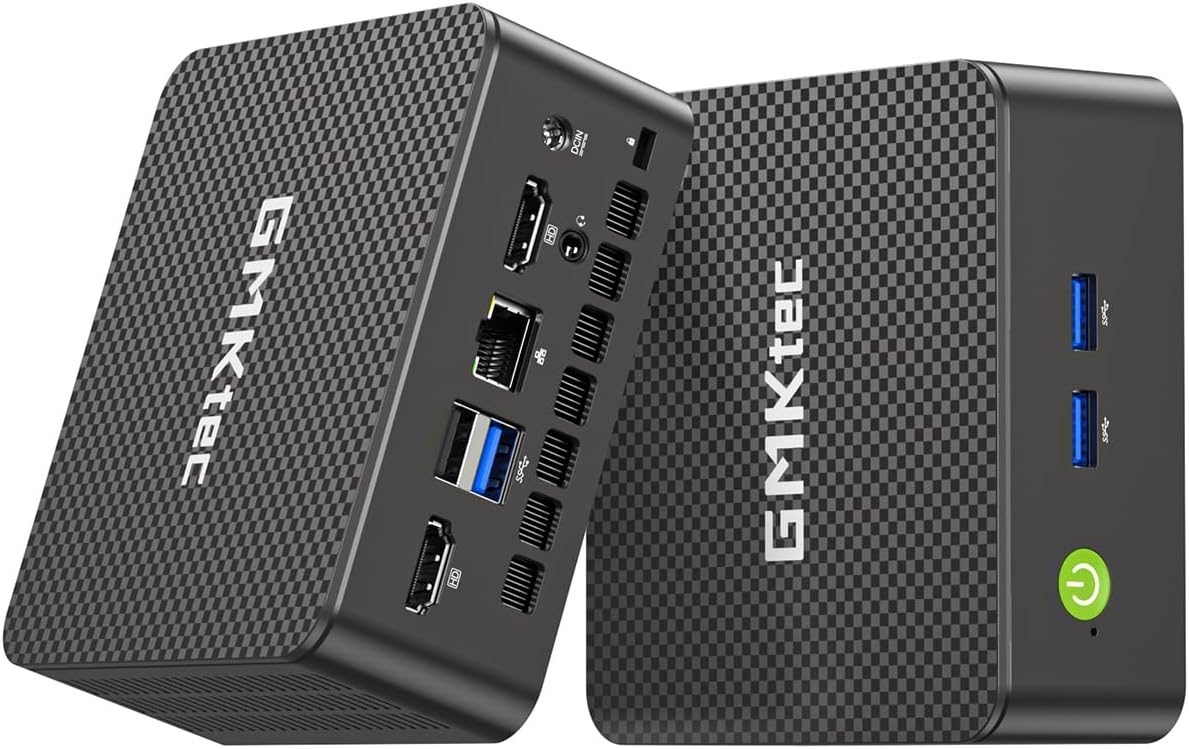
The GMKtec G11 is built around the AMD Ryzen Embedded R2514, a processor intended for continuous operation in commercial, industrial, and professional environments. It offers four cores and eight threads based on Zen+ architecture, with the supplied description emphasizing performance above the Intel N150 and Ryzen 3 4300U. There is no numerical marketplace rating, so its value is better judged by its networking, memory architecture, and suitability for Linux infrastructure. The standard configuration includes 16GB of dual-channel DDR4 memory.
We may earn a commission when you buy through this link, at no additional cost to you.
Its networking is the defining feature. Two 2.5GbE Ethernet ports make it well suited to pfSense or OPNsense firewall duties, VPN hosting, isolated IoT networks, a high-speed NAS, virtual machines, or containers running through Proxmox. A Linux user can use one port for a management network and another for a workload or uplink, avoiding the limitations of a single-port home server. Wi-Fi 6E and Bluetooth 5.2 add wireless flexibility, while USB 3.2 and USB-C connections support external storage, cameras, and peripherals.
The integrated Radeon GPU is specified at 1.2GHz and can drive three independent 4K displays at 60Hz through two HDMI 2.0 outputs and USB-C DisplayPort Alternate Mode. The product description also notes support for H.265/HEVC, DirectX 12, and Vulkan. Dual-channel memory is important for the graphics subsystem and for applications that benefit from wider data bandwidth, while the processor's embedded orientation supports the stated continuous-operation use case.
The GMKtec G11 is an excellent choice for a Linux enthusiast building a home lab, secure router, or compact server who also wants a usable graphical desktop. It may be less compelling for a buyer focused solely on gaming or general office productivity because the integrated graphics are not intended for demanding modern titles. Verify the exact storage configuration and Linux hardware support before deployment, but for network-heavy use, the dual 2.5GbE design and server potential make this an editor's choice.
Dual 2.5GbE interfaces exceed the needs of a typical connected desktop and create a strong foundation for routing, VPN, NAS, and virtualization tasks. They are particularly valuable for users familiar with Linux networking tools.
The R2514 is intended for embedded and sustained workloads, aligning with always-on server roles. That focus makes the G11 more interesting for infrastructure than many general-purpose mini PCs in the roundup.
We may earn a commission when you buy through this link, at no additional cost to you.
The CyberGeek Mini PC combines a preloaded Ubuntu Linux environment with an 11th-generation Intel Core i9-11900H processor, 32GB of DDR4 memory, and a 1TB PCIe NVMe SSD. It has a 4.0 rating. With eight processor cores, 16 threads, and speeds reaching 4.9GHz, it offers considerably more computational muscle than the entry-level choices, making it suitable for development, parallel processing, content production, and a compact Linux workstation.
We may earn a commission when you buy through this link, at no additional cost to you.
Connectivity is unusually generous. The system has six USB ports, dual LAN ports, Wi-Fi 6, Bluetooth 5.2, and display outputs using DisplayPort, HDMI, and USB-C. It supports up to three 4K displays simultaneously. Dual Ethernet can be valuable for a Linux server, virtualized environment, or network experiment where separate management and data paths are useful. The storage capacity is also more generous than many competitors, with a full 1TB NVMe drive providing room for development tools, containers, projects, and media.
The major caveat is graphics. Despite the gaming-oriented product description, the stated configuration uses Intel UHD Graphics rather than a discrete GPU. Linux users seeking modern 3D gaming or GPU-accelerated rendering should not interpret the i9 processor as evidence of high-end gaming capability. Integrated graphics can still handle office graphics, video playback, remote desktops, and some lighter games, but demanding titles will be constrained by the graphics hardware.
The CyberGeek is a good match for a Linux developer or power user who wants desktop-class CPU performance in a small enclosure. Ubuntu is preloaded, reducing setup time and making the system approachable for users seeking a ready-made Linux environment. Choose it when processor speed, memory, networking, and storage matter more than modern gaming performance, and verify the exact LAN port speeds and included accessories in the current listing.
Ubuntu provides a widely supported environment for programming, command-line work, containers, and general productivity. Preinstallation lets users begin exploring Linux without creating installation media first.
Eight cores and 16 threads provide useful parallelism for builds, test environments, and background services. The 32GB memory allowance also gives Linux a comfortable working space for heavier multitasking.
We may earn a commission when you buy through this link, at no additional cost to you.
The BOSGAME E5 is a well-rounded Linux mini PC with a 4.6 rating. Its AMD Ryzen 3 5300U processor has four cores and eight threads and can reach 3.8GHz, while 16GB of DDR4 memory and a 512GB M.2 2280 NVMe PCIe 3.0 SSD provide a capable everyday foundation. The supplied information explicitly positions the system for business software, spreadsheets, online classes, and network server applications rather than demanding professional 3D rendering or intensive gaming.
We may earn a commission when you buy through this link, at no additional cost to you.
Its expansion path sets it apart from many similarly compact systems. Dual SO-DIMM slots support memory upgrades as high as 64GB, and an additional empty M.2 2280 NVMe PCIe 3.0 position allows a second NVMe drive without removing the original system disk. That makes the E5 a practical candidate for a Linux desktop that will grow into a development machine, a lightweight virtualization host, or a larger storage-focused server.
Networking and display support are also excellent for the size. Two Realtek RTL8125 2.5GbE RJ45 ports create a strong foundation for pfSense, OPNsense, a NAS, or virtual machines, while Wi-Fi 5 provides a wireless alternative. Integrated Radeon graphics can drive three independent 4K monitors at 60Hz through HDMI 2.0, DisplayPort, and a full-function USB-C port. USB-C also supports data transfer and Power Delivery 3.0, and the cooling system uses an optimized fan and copper heat pipes.
The E5 is a compelling recommendation for Linux users who want a balanced everyday system with room to expand. It suits home offices, development labs, media servers, and multi-screen productivity setups. The trade-off is that its Ryzen 3 tier is not intended for the most demanding professional graphics or modern high-demand games. Users who need more compute power can step up to an eight-core system, while this model prioritizes everyday utility, networking, and flexibility.
Upgradable memory and a second NVMe slot make the E5 easier to extend than a compact PC with soldered components. This is valuable for Linux users whose workloads evolve over time.
Two 2.5GbE ports are useful for separating networks or connecting a server directly to storage. They provide a noticeable capability advantage over basic single-Gigabit mini PCs.
We may earn a commission when you buy through this link, at no additional cost to you.
The BOSGAME E4 Air is a basic Linux desktop with a 4.2 rating, an AMD Ryzen 5 3500U processor, 8GB of DDR4 memory, and a 256GB SATA SSD. The processor provides four cores and eight threads at speeds up to 3.7GHz, while Radeon Vega 8 integrated graphics handle video playback and ordinary visual tasks. That makes the E4 Air a sensible choice for browsing, office documents, spreadsheet work, video calls, and other routine tasks that do not require a high-end processor.
We may earn a commission when you buy through this link, at no additional cost to you.
Despite its entry-level memory and storage, the E4 Air offers useful expansion in the areas that matter for a small Linux machine. The supplied specifications list three 4K outputs through HDMI, DisplayPort, and USB-C, enabling multi-window productivity or a media setup. Dual RJ45 Ethernet ports, dual-band Wi-Fi 5, and Bluetooth 5.0 provide flexible connectivity. USB 3.2 supports faster transfers to external drives and peripherals, while the small enclosure can be tucked behind a display or positioned near a television.
The 8GB memory allocation is the most significant constraint for a modern Linux system. It can handle ordinary productivity well, but heavy browser use, multiple development tools, local virtual machines, and server services may quickly pressure the available memory. The 256GB SATA SSD is also small by current standards and offers less headroom than NVMe configurations elsewhere in the list. A larger and faster drive can help, although the supplied data does not specify a separate upgrade slot, so buyers should check the exact internal layout and Linux compatibility of any replacement drive.
The E4 Air is a good choice for a secondary Linux computer, learning platform, lightweight media endpoint, or simple office machine. Its four-core processor and triple-display support offer more flexibility than the memory allocation initially suggests. Choose it when affordability and compactness are the priorities, then plan to use it primarily for focused tasks. Users intending to run many services or large development projects should select a system with at least 16GB of memory and more storage.
Three display outputs are unusually helpful for a basic compact system. They let users keep reference material, communication, and active work visible across separate screens.
Dual RJ45 ports offer more choice than a standard desktop connection. A Linux user can connect the computer to separate networks or retain a wired link while using Wi-Fi elsewhere.
We may earn a commission when you buy through this link, at no additional cost to you.
The GMKtec G3S is a straightforward entry point for Linux beginners and light users. It carries a 4.4 rating and pairs a 12th-generation Intel N95 processor with 8GB of DDR4 memory and a 256GB M.2 SSD. The processor has four cores, four threads, 6MB of cache, and a burst frequency of up to 3.4GHz. These specifications support routine office tasks, browsing, digital media, and a lightweight Linux desktop, though they are not intended for intensive computational work.
We may earn a commission when you buy through this link, at no additional cost to you.
Its dual-display capability makes it more useful for a small workspace than many basic mini PCs. Two HDMI 2.0 ports can each drive a 4K display at 60Hz, while upgraded Intel UHD Graphics running at up to 1000MHz support 4K playback and AV1 decoding. USB 3.2 offers data transfer rates up to 10Gbps, and the system includes a 3.5mm audio jack, Gigabit Ethernet, Wi-Fi 5, and Bluetooth 5.0. This is a versatile set of connections for a compact office, media computer, or Linux learning platform.
Its main constraints are memory and storage. Eight gigabytes of RAM is adequate for a clean desktop with a modest number of applications, but Linux users who keep many browser tabs, development environments, or background services will feel the limitation. The 256GB SSD leaves less room after installing the operating system, applications, and personal files. The supplied information does not list a maximum memory amount or detailed internal expansion options, so buyers should verify the motherboard configuration and potential upgrade path before ordering.
The G3S is recommended for a first Linux installation, a secondary office endpoint, a media station, or a lightweight home server that will not run memory-intensive services. It is less suitable than the 16GB alternatives for sustained development, virtualization, or a busy shared workstation. Its value lies in combining a modern efficient processor, useful display support, and straightforward connectivity in a small package. Confirm the available Linux distribution support, upgradeability, and included wall adapter before making the final choice.
The N95 handles routine office, browsing, and media tasks without demanding a large desktop chassis. Its efficient design also suits a small, quiet, and unobtrusive workstation.
Dual 4K output and AV1 decoding make the G3S a capable endpoint for media playback and focused multi-screen work. The pair of HDMI ports simplifies setup compared with systems requiring adapters.
We may earn a commission when you buy through this link, at no additional cost to you.
A useful Linux mini PC should match the processor, memory, storage, connectivity, and operating-system needs of its owner. Consider Linux support and the intended role before comparing compact size or processor generations.
The processor determines how comfortably the system handles parallel tasks, compilation, browser workloads, containers, and background services. A modern desktop-class processor with eight or more cores offers strong headroom for developers, while efficient four-core chips are generally sufficient for browsing, office applications, media playback, and lightweight administration. Low-power embedded and N-series processors are particularly attractive when energy use, quiet operation, and always-on service matter more than demanding graphics performance.
Memory is often more important to sustained Linux comfort than a premium processor alone. An 8GB installation can work for lightweight use, but 16GB is a more practical baseline for extensive browsing, office multitasking, development tools, and several background services. 32GB or more is preferable for virtual machines, local containers, large data workflows, and professional applications. Dual-SODIMM systems offer easier future expansion, while soldered LPDDR memory is more efficient but usually cannot be upgraded later.
Linux benefits from fast storage because the operating system, browser profiles, development tools, and containers all generate regular input demand. NVMe SSDs are preferred for responsiveness, while SATA SSDs remain usable for secondary storage. Consider both the included capacity and available expansion. A 256GB drive may fill quickly, whereas 512GB or 1TB provides a better starting point. Servers can benefit from separate boot and data drives, and users with large media libraries may need a secondary hard drive or network-attached storage.
A preinstalled Linux distribution saves considerable setup time, but the exact edition should still match your preferences. Zorin OS Core and Linux Mint emphasize approachable desktops, while Ubuntu is widely used for development and administration. Some listings are general-purpose mini PCs that ship without an operating system, requiring installation media and a bootable USB drive. Before buying, check the manufacturer's compatibility information, Wi-Fi and Bluetooth device support, display output behavior, and whether the installed system has the applications and updates you require.
Display support should be evaluated by the number of monitors, maximum resolution, refresh rate, and available connector types. Two independent 4K outputs are useful for productive dual-screen arrangements, while three or four outputs benefit analysts, programmers, and creators. USB-C with DisplayPort Alternate Mode can simplify cabling but requires compatible monitors and cables. Integrated graphics are suitable for office work and media; demanding 3D applications, professional rendering, and modern high-end games generally require stronger graphics hardware.
A Gigabit Ethernet port is standard for a reliable Linux desktop, but dual 2.5GbE interfaces are much more compelling for home labs, firewalls, VPN hosts, virtual machines, and NAS systems. Two ports can separate management traffic from data or client traffic. Wi-Fi 6 or 6E adds flexibility but should not be treated as a replacement for stable wired networking in critical server roles. Bluetooth 5.x is useful for peripherals, while USB ports and USB-C determine how easily external storage, docks, and network adapters can be added.
Compact mini PCs generate heat because their components operate in a restricted enclosure. A capable cooling system with a larger fan, heat pipes, and dedicated storage cooling is especially valuable for sustained workloads. Low-power processors can reduce both noise and heat, making them appropriate for bedrooms, offices, and living spaces. For a machine expected to run services continuously, favor components and platform designs intended for sustained operation, and maintain open space around the enclosure so intake and exhaust airflow are not obstructed.
Begin by confirming the operating system and hardware configuration, then connect the power adapter, display, keyboard, mouse, and network before switching on a new Linux mini PC. If Linux is preinstalled, complete the initial account setup, connect to the network, and install system updates. For a blank system, create a bootable installation USB drive and verify the correct boot menu key. A separate wired connection during installation can make driver and network troubleshooting simpler.
After setup, use the package manager provided by the distribution, install only the software needed for the intended role, and enable automatic security updates. For a desktop, configure power management, display sleep, and file indexing to match your workflow. For a server, enable a firewall, use SSH keys, change default credentials, and restrict unnecessary services. Keep the system physically clear of vents, use stable Ethernet connections where appropriate, and avoid placing the enclosure inside a closed cabinet.
Maintain the system by clearing temporary files, checking available storage, monitoring temperatures, and updating the Linux kernel and applications on a regular schedule. Back up important data to an external drive, NAS, or separate system, especially when using RAID, firewall, or virtualization software. If you expand memory or storage, confirm compatibility and follow the manufacturer's guidance. Routine cleaning should involve powered-off equipment, gentle airflow, and no liquid near the chassis.
The Beelink Mini S12 Pro and Beelink SER3 are strong candidates for ordinary productivity. The Mini S12 Pro offers a more efficient N100 processor and newer connectivity, while the SER3 provides 16GB of memory and a familiar Ryzen platform. Choose based on current component availability, storage needs, and the applications you actually intend to run.
For basic browsing and light office use, 8GB can be sufficient if the distribution and applications are kept modest. For development, many browser tabs, containers, or multiple services, 16GB is the more comfortable baseline. Virtual machines and data-heavy applications may require 32GB or more, so memory expandability is worth checking before purchase.
Mini PCs can be excellent Linux servers because they are compact, efficient, easy to power, and simple to connect to home networks. The GMKtec G11 and BOSGAME E5 are particularly compelling due to their dual 2.5GbE networking. Ensure your chosen model has suitable storage, cooling, and the networking features required by the services you plan to run.
A Ryzen 3 system can be sufficient for code editing, scripting, web development, and moderate compilation, especially with 16GB of memory. Heavy parallel builds, containers, large local databases, and multiple virtual machines benefit from more cores and memory. Developers should also consider whether Linux hardware support and the required development tools work smoothly on the selected system.
Yes, if the processor and outputs support the desired display arrangement. Models in this roundup range from dual 4K support to three or four independent high-resolution displays. Verify the connector type, maximum resolution, refresh rate, and whether USB-C supports DisplayPort Alternate Mode before buying additional monitors.
Linux Mint and Zorin OS are approachable choices with familiar desktops and strong community resources. Ubuntu is also widely documented and frequently used for development, servers, and cloud-oriented work. The best distribution still depends on your software, hardware, and comfort with command-line tools, so read current community guidance for the specific model.
Yes. Even efficient processors need room to move air through the chassis, especially during sustained workloads. Keep vents unobstructed, avoid placing the unit inside a fully enclosed cabinet, and monitor temperatures during demanding tasks. A cooling design with a larger fan and heat pipes can provide more headroom for long-running services.
NVMe is generally preferable for the operating system, applications, development projects, and frequently used files because of its higher throughput and lower latency. SATA storage remains useful for inexpensive secondary drives, backups, and bulk media. If the mini PC supports both, one fast NVMe system drive and one larger secondary drive is a versatile arrangement.
The ASUS NUC 14 Pro is the standout premium option, combining Linux Mint, a 16-core Intel processor, 64GB of DDR5 memory, a 2TB SSD, and extensive display and port support. The GMKtec G11 is the most compelling network specialist thanks to dual 2.5GbE Ethernet, while the Beelink Mini S12 Pro represents the best budget balance of efficiency, memory, storage, and everyday usability.
Prioritize the workload you will actually run rather than selecting solely on size or processor branding. General users should balance at least 16GB of memory, a 512GB-class SSD, and the required display outputs. Developers and administrators should examine processor threads, memory expansion, cooling, networking, and virtual-machine support. Server users should give special attention to dual Ethernet, storage layout, remote-management features, and continuous-operation support.
Finally, verify the current listing before buying because mini PC configurations, included accessories, operating-system options, and prices can change. Check the exact ASIN and hardware revision, read recent customer feedback, and confirm Linux compatibility for Wi-Fi, Bluetooth, audio, and display adapters. With those details validated, one of these compact systems can provide an efficient, flexible, and enjoyable Linux computing platform.