
Ordilend Keyboard Cleaner & Laptop Cleaning Kit
4.6Editor score
Wide range of cleaning accessories
Tools for screens and keyboards
Portable for travel and dorms
Discover the best Laptop Fan Cleaning Kit options, comparing airflow, brush kits, attachments, portability, and precision for safer laptop maintenance at home.
A laptop fan cleaning kit should remove dust without forcing it deeper into the machine or leaving liquid where it does not belong. The most useful tools combine controlled airflow, soft brushes, narrow attachments, and enough reach to clean keyboard gaps, cooling vents, ports, and other confined spaces safely.
The ten products in this guide cover three practical approaches: rechargeable electric air dusters for moving loose debris, manual brush-and-swab kits for detailed work, and combined cleaning sets for screens, keyboards, and delicate surfaces. We compared their stated airflow, attachments, adjustability, portability, and intended cleaning tasks.
Each review explains where the product is strongest, what trade-offs to consider, and which type of user may benefit most. Award labels appear only for the top three selections. Product details and availability can change, and current prices should always be checked on the linked Amazon listing before purchasing.
4.6Editor score

4.9Editor score

4.6Editor score
The comparison below highlights each kit's cleaning method, attachment selection, power source, and most useful application, helping you distinguish detailed manual tools from rechargeable powered dusters.
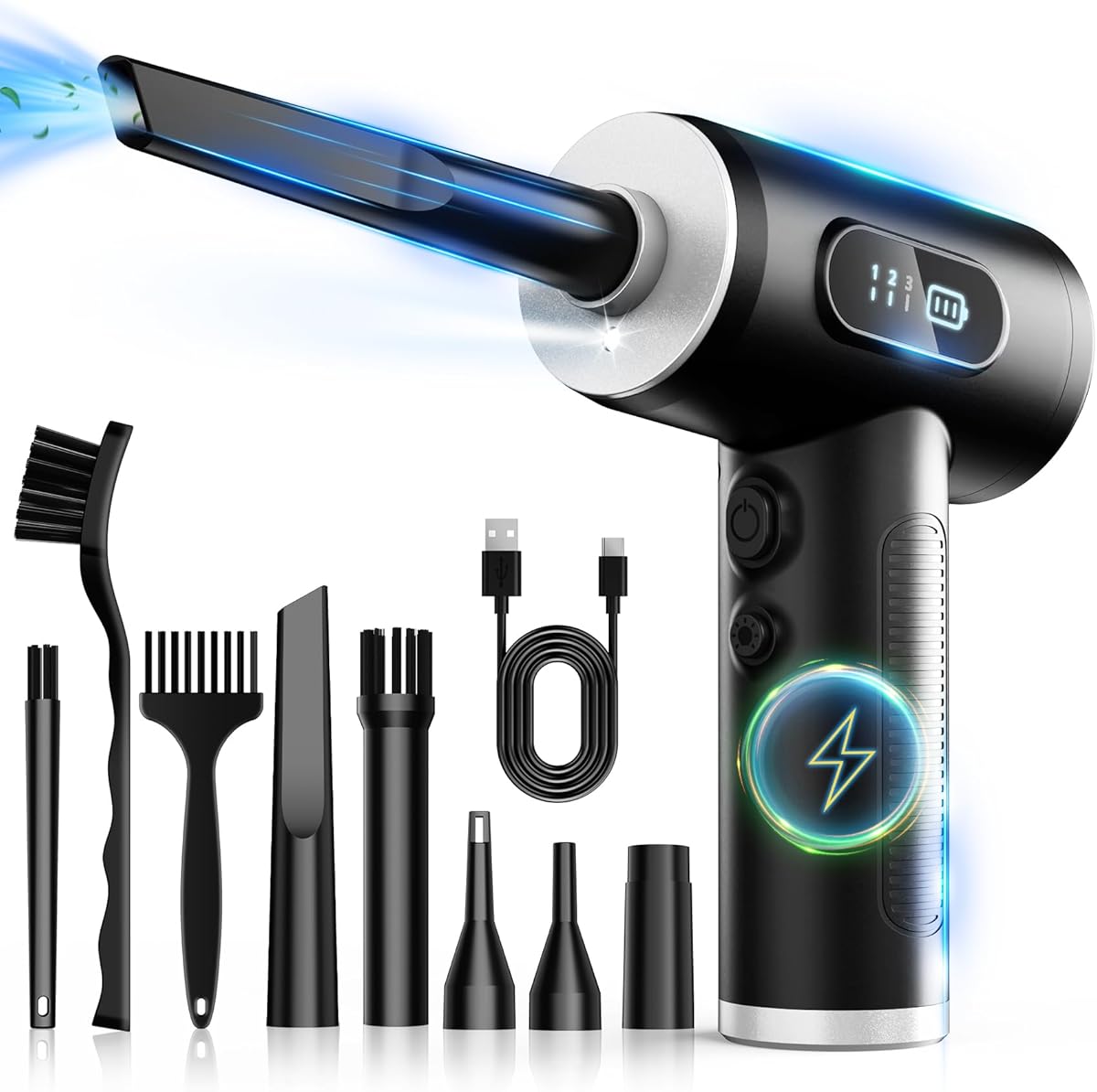




The FRESMOL Compressed Air Duster is a rechargeable electric blower with a 4.4 rating and a strong all-around feature set. It suits users who want one tool for laptop vents, keyboard gaps, PC fans, car interiors, and household dust without repeatedly purchasing disposable compressed-air cans. The cordless format also makes it convenient to move between a desk, workbench, and vehicle.
We may earn a commission when you buy through this link, at no additional cost to you.
Its 100,000 RPM motor provides meaningful airflow for loose dust, while three adjustable speeds let the user move from gentle surface cleaning to more forceful work in confined openings. Five nozzles and three brushes broaden the range of tasks. A narrow attachment can approach a fan grille, while a brush can loosen dust before air removes it. The LED display indicates the selected mode and remaining battery, and a built-in light helps reveal dust in dark laptop vents.
The main limitation is that a powered blower cannot provide the same tactile precision as a dedicated brush, swab, or pick. Users should also avoid directing excessive force into a fan or holding the tool against delicate components. As with any rechargeable appliance, runtime depends on the selected speed, and the battery must be charged before demanding cleaning sessions.
This is an especially strong choice for routine maintenance by students, office workers, gamers, and mobile users. It balances adjustable performance, portability, and a generous accessory package without requiring separate tools for common household tasks. For laptop-fan cleaning specifically, it is a practical all-purpose pick, although a precision kit may be preferable when residue or debris must be removed manually.
Three speed settings make it possible to begin with the gentlest airflow and increase it only when debris is tightly packed. This control is useful around keyboard gaps, camera gear, and cooling openings where a single aggressive setting can be unnecessary.
The built-in LED light helps expose dust that would otherwise remain hidden inside a grille or port. Combined with the included nozzles and brushes, it supports both initial dust detection and more precise removal.
We may earn a commission when you buy through this link, at no additional cost to you.
The iFixit Laptop Cleaning Kit has a 4.9 rating, the highest among the products in this guide, and it provides one of the most thoughtfully rounded manual cleaning packages. It is designed for laptop owners who want to clean screens, keyboards, cooling fans, ports, and exterior surfaces without relying on a powered blower.
We may earn a commission when you buy through this link, at no additional cost to you.
The contents cover several distinct jobs. A dust blower clears debris from keyboards and cooling fans, while an anti-static brush tackles stubborn grime and dust around delicate components. Screen-protective accessories and microfiber cloths support display care, and alcohol wipes help refresh suitable surfaces. Specialized swabs, picks, and brushes extend the kit into narrow or hard-to-reach areas. Everything fits into the included compact pouch.
Its primary trade-off is that it does not provide motorized airflow. Dense dust lodged deep in a fan may require multiple passes with brushes, swabs, and the blower. Users must also distinguish between screen-safe and general-purpose cleaning materials and confirm that a surface is compatible with alcohol wipes before application.
This kit is a particularly good choice for careful, regular maintenance and for people who want a single organized set for laptop and small-device care. Its extensive accessory list, strong rating, and emphasis on delicate cleaning make it the most complete manual option here, while avoiding the charging and bulk associated with an electric duster.
The combination of blower, anti-static brush, microfiber cloths, wipes, swabs, picks, and a screen protector removes the need to assemble several unrelated cleaning tools for routine laptop upkeep.
Small brushes and swabs are better suited than a broad brush when dust is visible around individual fan blades or confined inside a narrow exhaust opening. The manual approach allows careful control over every movement.
We may earn a commission when you buy through this link, at no additional cost to you.
The MiaEpic Z3 Electric Air Duster is built around a brushless motor advertised at up to 280,000 RPM. Its 4.5 rating reflects strong performance for PC components, electronics, keyboards, consoles, and general debris removal. It is a more forceful option than many compact dusters and includes an LCD screen that displays battery status and speed level.
We may earn a commission when you buy through this link, at no additional cost to you.
Four speed settings allow users to adapt the airflow to the task, while the LED light illuminates dust inside dark cases and narrow gaps. The accessory package includes four precision nozzles and two cleaning brushes, giving enough flexibility for vents, ports, keyboards, camera equipment, and vehicle surfaces. A rechargeable high-capacity battery and Type-C charging add convenience for repeated use.
The extremely high advertised motor speed calls for restraint near delicate laptop internals. Users should work from a safe distance, avoid touching fan blades, and never spin a powered fan at full intensity simply to test the tool. The four-nozzle-and-two-brush bundle is also less extensive than the accessory counts offered by some competing electric dusters.
The Z3 fits users who want strong, sustained airflow and clear speed visibility for cleaning larger electronics or household spaces. It may be overkill for a routine keyboard wipe, but it is a practical option when dust is substantial and a compact manual brush cannot dislodge it easily.
The range of speed levels lets users reserve maximum power for stubborn debris while using lower settings for keyboards, ports, and sensitive equipment. This makes the tool adaptable across light and intensive cleaning jobs.
The LCD provides immediate information about the current speed and battery, reducing uncertainty during longer cleaning sessions. Type-C charging and a stated runtime of 90 to 150 minutes support portable use.
We may earn a commission when you buy through this link, at no additional cost to you.
The WOLFBOX MegaFlow 50 combines a 110,000 RPM turbo fan with a 4.6 rating and a particularly portable design. At 0.45 lb, it is easy to carry between a laptop, desktop computer, keyboard, vehicle, and other household surfaces, making it suitable for users who clean in several locations.
We may earn a commission when you buy through this link, at no additional cost to you.
Three adjustable speed settings offer useful control. The manufacturer states that the battery can deliver up to 240 minutes on the lowest setting, which is a notable advantage for routine maintenance. Four included nozzles support different airflow patterns, while the lanyard improves handling. Type-C charging takes approximately 3.5 hours, and the battery should be fully charged before use according to the stated guidance.
The main compromise is the charging time. Users planning to clean several devices in one session should account for that delay, and the stated maximum runtime applies specifically to the lowest setting. It also produces less advertised peak speed than the MiaEpic Z3, so exceptionally dense or deeply embedded debris may require a separate brush.
This is a strong premium choice for frequent, portable cleaning that emphasizes endurance and handling. It works particularly well for owners with multiple computers or a home-and-vehicle maintenance routine, while the three-speed setup provides enough control for laptop-fan and keyboard care.
A stated 240-minute runtime on the lowest setting reduces the need for frequent charging during light cleaning. It is especially convenient for users who perform weekly or monthly care across several devices.
The 0.45-pound body and included lanyard make the MegaFlow 50 easy to carry and handle. Its cordless construction removes the restriction of staying near a power outlet while cleaning a laptop or vehicle.
We may earn a commission when you buy through this link, at no additional cost to you.
The Ordilend Keyboard Cleaner & Laptop Cleaning Kit is a 4.6-rated manual set built for broad coverage of keyboards, laptop screens, and other electronics. Its assortment includes a retractable large brush, a thin soft brush, a keycap puller, a metal pen tip, multiple cloths, a flocking sponge, and a soft plastic lens-cleaning pen.
We may earn a commission when you buy through this link, at no additional cost to you.
The keycap puller and differently sized brushes distinguish it from a simple dust-removal set. Mechanical-keyboard users can lift selected keycaps for a more thorough cleaning, while the thin brush reaches between flatter laptop keys. The cleaning pen and cloths support screen maintenance, and the flocking sponge is intended for delicate spaces such as earbud charging cases.
Because the kit contains metal and specialized implements, care is needed around delicate surfaces. Users should not assume every included accessory is appropriate for a display coating, and the keycap puller should be used only on compatible removable keys. It also lacks the rapid debris movement of an electric blower.
The Ordilend kit is best for students, travelers, and owners of mixed electronic devices who want a broad manual toolkit at an accessible tier. Its range of accessories and portable design make it particularly useful for dorm rooms, office drawers, and carry-on bags.
A thin, soft brush can work between closely spaced laptop keys where a full-size brush cannot fit. Combining the retractable brush with the dense detail brush allows the user to move from broad debris to smaller crevices.
The angled polishing cloth is shaped to fit screen corners more closely, while the soft plastic cleaning pen and sponge support other delicate surfaces. Each tool should be tested on a discreet area first.
We may earn a commission when you buy through this link, at no additional cost to you.
The 130,000 RPM Electric Air Duster is a 4.6-rated blower whose strongest distinguishing feature is its extensive collection of attachments. It includes six nozzles and ten detail brushes, allowing users to vary airflow and contact based on the surface, component, and type of debris.
We may earn a commission when you buy through this link, at no additional cost to you.
Four speed gears cover gentle dusting, precision work, routine cleaning, and heavy-duty removal. A long-press storm mode provides an additional burst for stubborn debris. The brushless motor is advertised to move air at 52 meters per second, while the 8000mAh battery is stated to provide 120 minutes on the first speed. Type-C charging takes approximately 2.5 hours, and the upgraded control chip includes overcharge and overheat protection.
Its attachment abundance can make initial setup less intuitive than a simpler kit, and users should choose tools deliberately rather than leaving everything attached. The highest airflow and storm mode should be directed cautiously around laptop fans, loose laptop components, and other delicate electronics. The storage bag is useful because the numerous accessories are otherwise easy to misplace.
This is a compelling option for users who clean keyboards, laptops, cars, cameras, and household equipment with one powered tool. It is particularly attractive when a broad brush selection matters, offering more ways to reach narrow spaces than the simpler electric dusters in this comparison.
Six nozzles offer different airflow approaches, while ten brushes cover delicate, narrow, and broader surfaces. This makes it easier to avoid using one aggressive attachment where a soft, precise brush would be safer.
The 8000mAh battery, stated low-speed runtime, and 2.5-hour charging cycle reduce downtime. Overcharge and overheat protections add safeguards for routine use, although sensible speed selection remains essential.
We may earn a commission when you buy through this link, at no additional cost to you.
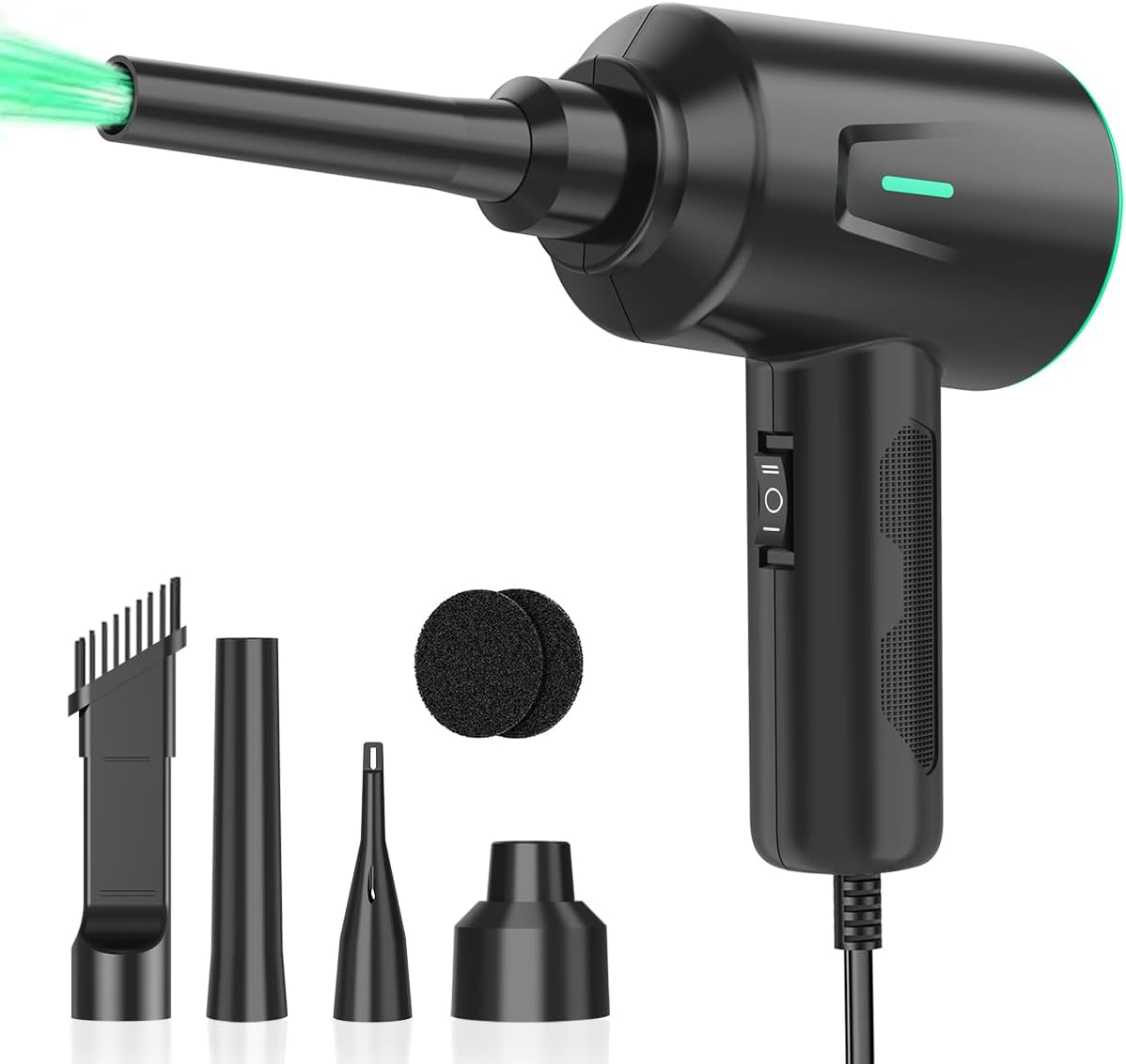
The Meudeen Air Duster is a corded electric blower that provides continuous power without a charging cycle. It has a 4.5 rating and is aimed at computer, laptop, keyboard, camera, vehicle, copier, model, and blind-cleaning tasks. Its 500W motor produces airflow up to 50 meters per second on the stated high setting.
We may earn a commission when you buy through this link, at no additional cost to you.
Two speeds offer a practical division between lower-speed cleaning at 100,000 RPM and higher-speed cleaning at 200,000 RPM. The included package adds four brushes and two sponge filters, making it more versatile than a bare blower. An 8.2-foot cord gives reasonable freedom around a desk or work area, and the upgraded air duct is described as low-noise and comfortable to operate.
Its wired design is the defining trade-off. Users must remain within reach of an outlet, and the tool is less suitable for travel, fieldwork, or cleaning a vehicle away from home. It also cannot be positioned in a laptop bag or drawer as a ready-to-use portable option.
Meudeen is a good fit for a permanent desk or workshop where continuous airflow and zero battery downtime matter more than cordless freedom. It offers strong cleaning capability and useful attachments, making it a sensible electric alternative for detailed laptop maintenance at a fixed workstation.
Because it runs directly from mains power, the Meudeen can maintain a consistent working rhythm during long cleaning sessions. There is no battery capacity to monitor and no charging delay between devices.
The lower setting supports routine cleaning, while the stronger setting helps dislodge stubborn debris. Starting conservatively reduces the need for maximum airflow around sensitive laptop components.
We may earn a commission when you buy through this link, at no additional cost to you.
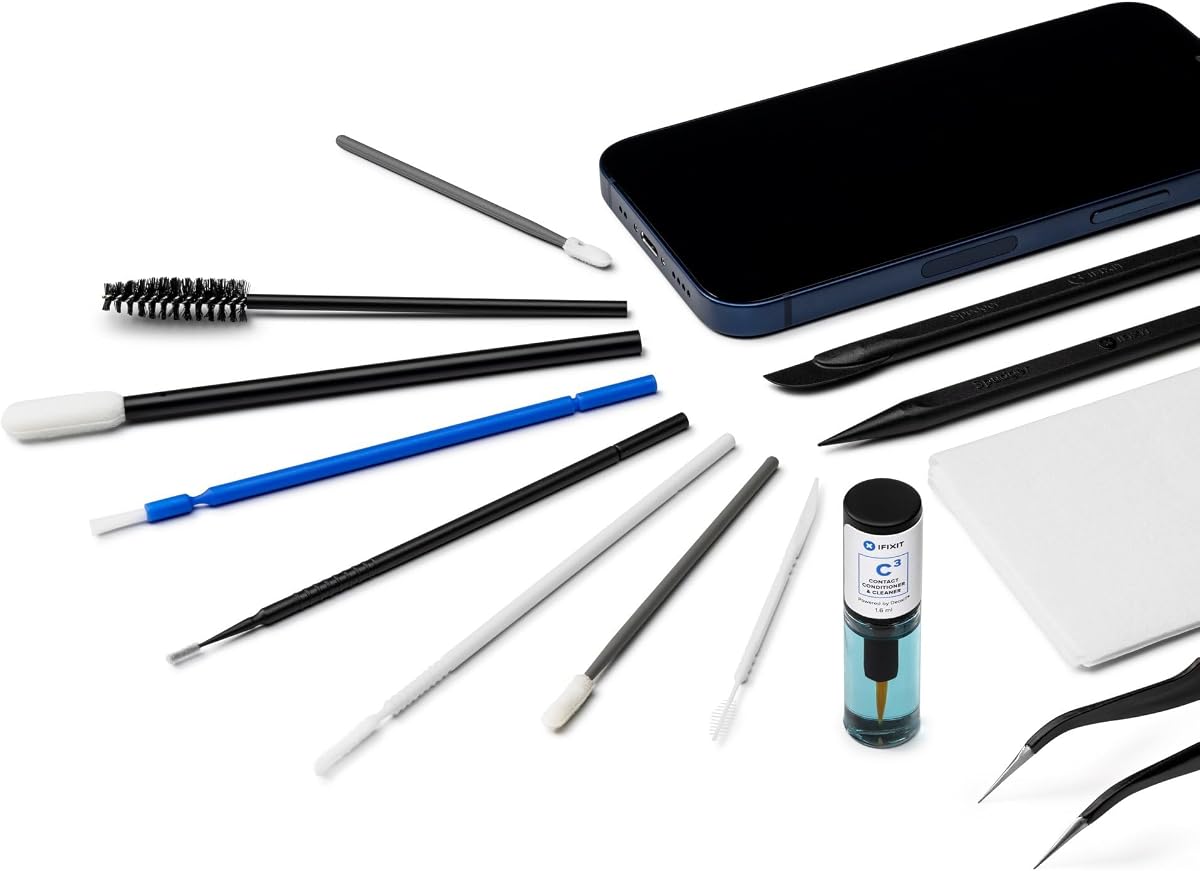
The iFixit Precision Cleaning Kit is designed for detailed work on phones, laptops, tablets, and other electronics. It earns a 4.3 rating and focuses less on bulk dust removal than on reaching small, difficult areas where a broad brush or standard air duster cannot work effectively.
We may earn a commission when you buy through this link, at no additional cost to you.
The set contains a spudger, halberd spudger, angled tweezers, DeoxIT D100L, a cylindrical brush, medium and precision foam-tipped swabs, precision-tipped micro brushes, a small detailing brush, a plastic pick-and-brush combination, and lint-free cleanroom wipes. This mix supports disassembly, residue handling, scraping, brushing, and controlled application of cleaning material.
This is not the right tool for rapidly clearing a loose blanket of dust from a keyboard or exhaust grille. Its strengths appear when the task involves a narrow port, a small screw recess, a hinge gap, or residue around an electronic component. The picks and tweezers should be used carefully so they do not scratch or puncture anything.
The kit is most useful for experienced users comfortable working around electronics and for repair-minded owners who need to clean with a fine-toothed tool. For straightforward external laptop-fan maintenance, it is more specialized than necessary, but it provides the precision required for deeper, detail-oriented cleaning.
Angled tweezers, micro brushes, foam swabs, and narrow picks can reach areas that general-purpose tools cannot. They are especially useful around ports, small recesses, and tightly packed internal components.
The included tools are intended to be reused, so they should be cleaned and stored carefully between projects. Keeping the set organized also helps prevent a fine tip from being lost or damaged.
We may earn a commission when you buy through this link, at no additional cost to you.
The 10-Piece Anti-Static Brush Kit is a straightforward manual solution for keyboards, computer fans, motherboard areas, camera equipment, car vents, window tracks, and other narrow spaces. Its 4.4 rating reflects a practical assortment of brush sizes, with seven hard and three soft bristle designs included.
We may earn a commission when you buy through this link, at no additional cost to you.
The variety of shapes and sizes allows users to match a tool to the opening being cleaned. Hard brushes work better for stubborn debris and deeper gaps, while the yellow and blue soft-bristle brushes are intended for delicate surfaces such as monitors, vehicle screens, and camera lenses. Most of the nylon brushes are described as anti-static, which is helpful around sensitive electronic components.
The important exception is that the yellow bristle brush is not anti-static, so it should not be treated as the safest option for exposed circuitry. Manual brushing also tends to leave some loose dust behind rather than carrying it away, and the set does not include cloths, wipes, swabs, or a powered blower for a complete maintenance session.
This kit is a good choice for quick, low-commitment cleaning and for users who prefer simple tools with no charging or batteries. It is particularly effective as a companion to an electric duster: brushes dislodge stubborn material, while airflow removes what has been loosened.
Ten different sizes help users navigate between keys, around fan hubs, and into narrow vents. The range reduces the need to force a bulky brush into a confined space.
The yellow and blue brushes offer a gentler option for screens, lenses, and other sensitive areas. Users should still test a brush on an inconspicuous region and avoid vigorous scrubbing.
We may earn a commission when you buy through this link, at no additional cost to you.
The Cordless Electric Air Duster is a versatile 110,000-RPM blower designed for laptops, keyboards, cameras, car vents, sofas, window tracks, and other dust-prone locations. It has a 4.4 rating and includes a useful combination of five nozzles and four brushes, allowing both airflow and gentle contact cleaning.
We may earn a commission when you buy through this link, at no additional cost to you.
Three adjustable speed levels provide sufficient control for different debris and surfaces. The cordless body has an ergonomic grip, while a Type-C charging system supports convenient recharging. An LED light illuminates narrow and dark spaces, and the product can also handle household tasks such as clearing crumbs or inflating balloons and air mattresses.
Unlike some competing blowers, it does not list a separate storm or maximum burst mode, so users wanting extreme airflow may find the stated peak less forceful. Runtime naturally varies with the selected speed, and users should let the battery cool appropriately if it becomes warm during intensive use.
This is a balanced selection for a student, traveler, gamer, or vehicle owner who wants one portable blower for several cleaning categories. Its versatility and cordless freedom make it more useful across a household than a dedicated manual brush set, while the included brushes help with surfaces that should not receive powerful airflow alone.
The compact rechargeable design can move from a laptop to a game console, vehicle, sofa, or window track without needing a nearby outlet. That flexibility makes routine cleaning easier to maintain.
A brush can dislodge clinging debris, and a nozzle can carry it away. Using the correct combination reduces reliance on high airflow around delicate surfaces and improves control in confined areas.
We may earn a commission when you buy through this link, at no additional cost to you.
The right choice depends on the kind of debris involved, how much airflow the laptop requires, and whether you also need screen-cleaning or repair tools. Consider the following factors before choosing a manual kit, rechargeable blower, or combined system.
Electric dusters are most effective when loose dust needs to travel out of a grille, keyboard, or fan opening. Their motorized airflow can clear debris faster and across broader areas than a hand brush. Manual kits excel at residue, trapped particles, ports, and individual fan components because the user controls each stroke. Many owners ultimately benefit from combining a blower with at least one small anti-static brush.
Choose airflow for bulk removal and precision for detailed work. Manual-only kits are quieter and simpler, while powered blowers demand attention to speed, fan clearance, and battery management.
A higher stated RPM figure indicates a more powerful motor, but control matters more than maximum output for delicate laptop work. Multiple speed settings allow a user to begin gently, observe how dust responds, and increase airflow only where appropriate. A specific storm mode is unnecessary for routine maintenance and should not be used near loose fan blades.
Prioritize adjustable output over an extreme headline speed. Starting at the lowest setting is generally the safer method for laptop vents and keyboard gaps.
Long, narrow nozzles are useful for ports, exhaust openings, and gaps between keys, while broader nozzles move air across a larger surface. Brushes loosen dust that resists airflow and offer gentler contact for screens and delicate components. The best kits include several shapes rather than relying on one universal attachment.
Check whether the included nozzles can physically fit your laptop's openings and whether there are both soft and firm brush options. More accessories are helpful only when each has a clear purpose.
Cordless tools provide freedom around the home, office, and vehicle, but their usable runtime depends on motor speed, battery capacity, and the age of the battery. Type-C charging is convenient because the same cable type is widely used. A long charging time can be inconvenient if the duster is the only cleaning tool and the battery has not been charged in advance.
For occasional cleaning, charging ahead of time is usually sufficient. For frequent or intensive sessions, compare stated low-speed runtime and charging duration rather than relying on a single maximum-use estimate.
Anti-static nylon brushes are preferable around exposed electronic components because they are designed to reduce the risk of electrostatic discharge. Soft bristles are better for screens, camera lenses, and finished surfaces. Some kits include alcohol wipes or cleaning compound, but users must confirm that each product is compatible with the surface before applying it.
Look for clearly identified soft and anti-static tools. Avoid using a yellow non-anti-static brush on exposed circuitry, and test any cleaning liquid in a hidden area.
A laptop fan cleaning kit may be used only inside vents, but many buyers also want to wipe the screen and clean around the keyboard. Dedicated microfiber cloths, screen-safe cleaning tools, and gap brushes improve the overall maintenance experience. Keycap pullers are relevant for removable mechanical-keyboard keys but should not be forced on fixed laptop keys.
Choose a kit with a dust blower, narrow brush, microfiber cloth, and storage pouch if you want one package for common care tasks. Separate screen and fan-cleaning needs may still require separate products.
A compact, organized kit is easier to use regularly and less likely to lose small swabs, picks, or brush heads. Pouches and cases are especially useful for travel, dorm rooms, and shared workspaces. Cordless blowers add portability but require enough room for the device and attachments, while corded models trade freedom for uninterrupted operation.
Consider where the kit will live and how often it will travel. A lightweight pouch with separately stored attachments is often more useful than a larger collection kept loosely in a drawer.
Some tools are narrowly intended for computer internals, while others also clean car vents, camera equipment, consoles, household surfaces, or inflatable items. A broader product can justify its size and battery if the buyer owns several devices. A precise electronics kit may be more appropriate for a single laptop and occasional repair work.
Match the included features to your actual maintenance routine. Avoid paying for specialized inflation or household functions if they will never be used, and look for focused precision tools when those functions are unnecessary.
Begin by shutting down the laptop and disconnecting it from power. Before opening the case, consult the manufacturer’s service guidance, note any warranty conditions, and work on a clean, well-lit surface. Avoid blowing dust inward through a blocked exhaust, because that can push debris deeper into the chassis and make the blockage worse.
Use a soft brush to dislodge visible dust from vents, fan grilles, and keyboard gaps. Hold a fan blade gently so it does not spin from the airflow, then use a blower at a controlled distance with the lowest effective speed. Work in short bursts and move the nozzle rather than holding it directly against a spinning component. Finish exterior screens with a separate screen-safe cloth and cleaning solution.
After use, unplug the electric blower and wipe its exterior with a dry cloth. Keep battery tools charged according to the manufacturer’s instructions and allow hot components to cool before storage. Wash or replace dirty microfiber cloths, clean reusable swabs and brushes, and return every attachment to its case so small parts remain organized and do not contaminate later cleaning jobs.
Yes, you can often remove loose surface dust from an external exhaust grille with a soft brush and a controlled burst of air. Do not push a vacuum, compressed-air can, or brush deeply into a blocked opening. If the fan is noisy, the exhaust feels weak, or debris is visible inside the case, a technician or guided disassembly process is safer.
A reusable electric duster avoids liquid propellants and the condensation or freezing concerns associated with some traditional cans. Dry, controlled airflow can be effective for loose dust, but safety still depends on power selection and technique. Never use excessive airflow against a spinning fan or allow debris to travel deeper into the laptop.
Usually not. Start with a low or medium setting, hold the fan blade if it is exposed, and increase the airflow only if gentle blowing cannot remove the debris. Maximum settings are more appropriate for robust, non-delicate surfaces or stubborn external dust than for internal laptop cleaning.
For occasional exterior cleaning, either may be sufficient. A brush kit provides better control around residue, narrow openings, and delicate parts, while an electric blower clears loose debris more quickly. A combined setup is often the most practical because a brush loosens material and the blower removes it.
Only use screen-cleaning accessories that are explicitly suitable for displays. Microfiber cloths and dry detailing brushes are generally the safest starting point. Alcohol wipes or sprays should only be used if the display manufacturer permits them, because incompatible liquid can damage coatings or encourage liquid to enter the bezel.
Cleaning frequency depends on the environment, workload, and visible dust accumulation. Desks near construction, pet hair, smoke, or heavy use may require more frequent maintenance than a clean office. Inspect the vents periodically and clean when airflow is restricted or buildup becomes visible rather than following a rigid schedule.
A soft brush can remove dust from accessible fan blades or grilles when the laptop is shut down and disconnected. Avoid forcing the brush against the fan hub, snagging the bristles, or rotating the blade aggressively. A brush cannot remove compacted residue and should not be used while the computer is running.
Cleaning tools cannot repair a cracked blade, worn bearing, broken connector, or fan that rattles. Continuing to power such a fan may create additional damage. If cleaning does not restore normal airflow or noise levels, stop using the affected cooling system and seek qualified laptop repair assistance.
The FRESMOL Compressed Air Duster offers the strongest general-purpose balance of adjustable airflow, portability, lighting, and attachments. The iFixit Laptop Cleaning Kit stands out for comprehensive manual care and precise tools, while the WOLFBOX MegaFlow 50 emphasizes long low-speed runtime and easy portability. Each serves a different maintenance style without requiring disposable compressed-air cans.
Prioritize the type of work you actually need. Choose a rechargeable blower for fast removal of loose dust, a precision brush and swab set for narrow or contaminated areas, and a comprehensive manual kit when screen care and organization matter as much as fan maintenance. Adjustable speeds, soft and anti-static brushes, and appropriately narrow nozzles are especially valuable for laptop safety.
Before buying, verify the laptop manufacturer’s cleaning guidance, confirm that any included liquids are safe for the surfaces involved, and check the current listing for the latest specifications and price. Product features, accessory bundles, and availability can change over time, so the linked Amazon page is the best source for current details.