
Redragon K556 Desing Wish Keyboard Cover
4.7Editor score
Precise Redragon K556 fit
Rigid clear acrylic construction
Resists cat hair and dust
Keyboard covers for PC range from stretch fabric sleeves that shield dust from 75% and 80% layouts to thin silicone skins that sit over individual keys. The right choice depends on keyboard dimensions, switch type, environmental risks, and whether you prefer an invisible protector or a rigid cover that can also withstand impacts.
This guide compares ten keyboard covers using the information supplied for each product, focusing on stated dimensions, materials, compatibility, cleaning methods, and protective features. It includes universal models, full-size designs, gaming-keyboard covers, and model-specific silicone skins without suggesting that every option will fit the same PC keyboard.
Each review explains who the cover suits best, where it is less convenient, and the details that should be checked before ordering. The top three picks represent a close-fitting gaming cover, a versatile stretch sleeve, and a moisture-resistant vinyl option. Product specifications, availability, and shopping conditions can change, so confirm the current listing and keyboard dimensions before buying.
4.7Editor score

4.4Editor score

4.4Editor score
As an Amazon Associate we earn from qualifying purchases.
The table below compares every keyboard cover by construction, fit, compatibility, and protection, making it easier to distinguish fabric sleeves, silicone key skins, flat waterproof membranes, and rigid acrylic covers.


This stretch-fabric keyboard sleeve earns the Editor's Choice distinction because it balances broad compatibility with a simple protective design. Its 4.4 rating reflects a well-regarded option for PC owners who want to keep dust, hair, dirt, and scratches away from a keyboard without committing to a rigid enclosure. The cover can stretch from 14.9 by 5.9 by 1.57 inches to 19.5 by 7.5 by 1.57 inches, giving it enough flexibility for compact, tenkeyless, 75%, 80%, 96%, and many full-size arrangements.
We may earn a commission when you buy through this link, at no additional cost to you.
The fabric is described as super soft, lightweight, and stretchable, which helps it sit neatly over a keyboard without the hard edges associated with molded plastic. It can protect against scratches, dust, mist, hair, and ordinary dirt while remaining light enough not to crush the keys. A particularly useful detail is that the cover can be washed and folded for convenient cleaning and storage, allowing it to serve as an ongoing dust barrier rather than a permanently fitted accessory.
The principal limitation is that this is a fabric sleeve rather than a sealed waterproof membrane. It should not be treated as protection from a substantial liquid spill, and its soft construction will not offer meaningful protection if a heavy object is dropped onto the keyboard. Fit also depends on the dimensions of the actual board. Although the listing names several compatible models and a broad size range, measuring the keyboard and comparing its layout with the product images remains the sensible approach.
This is a strong recommendation for home offices, shared desks, gaming setups, and any PC where airborne dust, pet hair, or surface scratches are the main concern. It is especially attractive for users who want one flexible cover that can accommodate several keyboard sizes. Buyers seeking spill-proofing or impact protection should choose a silicone skin, waterproof cap, or rigid acrylic cover instead, but for broad everyday coverage this sleeve is the most versatile selection in the guide.
The broad stretch range is the central advantage. It can cover 75%, 80%, 96%, and full-size keyboards when their measurements fall within the stated limits, making it useful for owners who upgrade boards without wanting to replace the cover each time.
Because the fabric is washable and foldable, routine care is straightforward. Cleaning and storing the cover when it is not needed helps keep dust from accumulating on the keyboard during periods of infrequent use.
We may earn a commission when you buy through this link, at no additional cost to you.
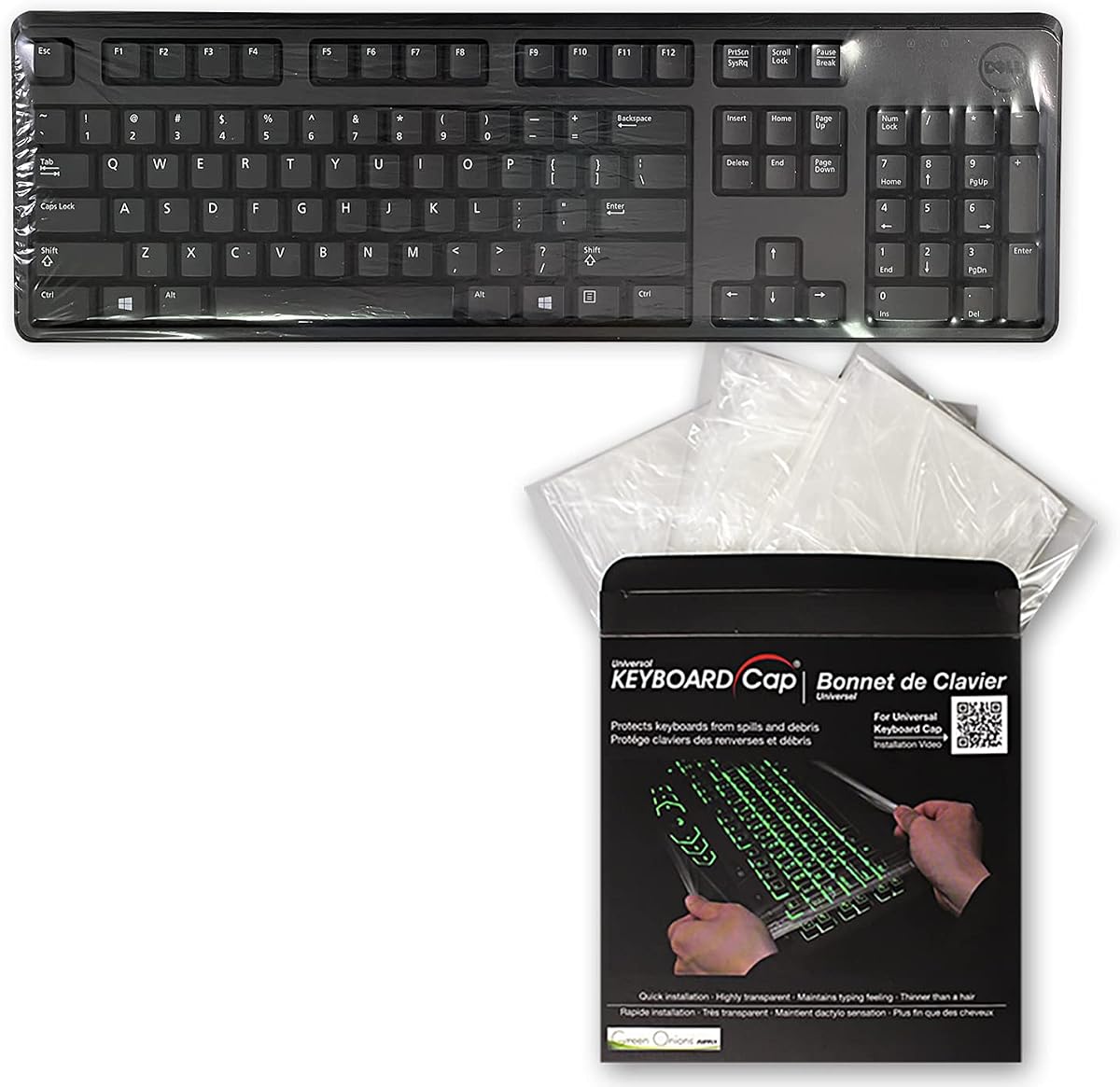
This three-pack of flat keyboard caps provides a different approach from fitted silicone skins and boxed acrylic covers. With a 4.1 rating, it is a practical choice for clinics, hospitals, foodservice environments, manufacturing clean rooms, and busy offices where keeping contaminants away from a desktop keyboard is the priority. The cover fully covers the keyboard and creates a wipeable barrier against dust and common liquid spills.
We may earn a commission when you buy through this link, at no additional cost to you.
Its defining feature is the extremely thin 0.025mm construction, designed to preserve tactile feedback while the keyboard remains in use. The stated fit range is 15.75 to 19.69 inches wide and 6 to 8 inches deep, giving it broad compatibility across many desktop keyboards with numeric keypads. Because the style is flat, the keyboard is converted into a covered work surface that can be wiped down as part of a more rigorous cleaning routine.
There are practical trade-offs. A flat cover does not provide a raised protective shell, so it cannot meaningfully defend the keyboard from being struck by a hard object. The fit depends on accurate width and depth measurements, and the 4.1 rating suggests that some buyers may find the flat design less accommodating than a dimensional fabric sleeve. Heat can also be a consideration in a tightly enclosed cover because the keyboard is described as fully covered.
The product is best suited to organizations that regularly clean shared or sensitive equipment and want a thin barrier without removing the keyboard from the desktop. It is less appropriate for users who need impact resistance, need to type continuously with the cover installed, or own a keyboard that falls outside the stated dimensions. For those who prioritize spill isolation and wipeable sanitation over physical impact protection, this remains one of the more purpose-built options in the roundup.
The fully covered, waterproof design is especially relevant in shared clinical, dental, foodservice, and industrial settings. It creates a flat surface that can be wiped while helping prevent drinks, dust, and other contaminants from reaching the keys.
At 0.025mm, the material is designed to remain thin enough for continued typing. That makes the cover more practical than a rigid enclosure, although periodic removal and cleaning may still be necessary to avoid heat buildup.
We may earn a commission when you buy through this link, at no additional cost to you.
This larger vinyl keyboard cover combines practical protection with a more finished appearance than a basic disposable dust sheet. Its 4.4 rating places it among the strongest options in the roundup. The stated 18-inch width, 2-inch height, and 7-inch depth make it most suitable for standard-size PC keyboards, especially full-size boards that need more room around the edges and numeric keypad.
We may earn a commission when you buy through this link, at no additional cost to you.
Unlike a thin keycap skin, this is a dimensional cover that slips over the entire keyboard. Its antistatic copolymer is described as pliable, silky smooth, and moisture resistant, so it can help keep dust, moisture, and static away while preserving the appearance of the equipment. The translucent coconut cream color and medium blue trim also make the cover less visually intrusive, which can be important in a professional workspace.
Fit remains the biggest consideration. This larger model is not likely to accommodate compact boards, elevated gaming keyboards, or unusual layouts that exceed the stated dimensions. It is also a flexible cover rather than a rigid shell, so it offers much less protection from impacts. While the material resists moisture, that characteristic should not be interpreted as a guarantee against every possible spill or prolonged exposure.
For a standard desktop keyboard that needs dust, static, and light moisture protection, this is an attractive and versatile choice. It suits offices, reception desks, home workstations, and shared computers where appearance matters. Buyers should measure width, depth, and height before ordering, especially if their keyboard includes a raised frame, an unusually tall rear section, or a nonstandard number pad.
The translucent cream finish allows the keyboard to remain visually present while it is covered. That balance of visibility and protection makes the sleeve useful in offices where a large opaque plastic case would dominate the workspace.
The antistatic copolymer helps guard against static as well as dust and moisture. For frequently used desktop systems, that combination can help preserve a clean working area and reduce the contaminants that would otherwise settle into key gaps.
We may earn a commission when you buy through this link, at no additional cost to you.
This clear silicone skin is aimed at owners of conventional 104- or 107-key desktop keyboards who want to reduce dust, everyday wear, and contamination without hiding the board. Its 4.1 rating reflects a straightforward protective product, and the removable design lets users wash the skin when it becomes dirty. At 0.3mm, it is thin enough to preserve a relatively natural typing experience.
We may earn a commission when you buy through this link, at no additional cost to you.
The protector is valued in offices and shared computing environments where food residue, dust, and frequent handling can age the printed legends on a standard keyboard. Because it is clear, the keyboard remains visible and recognizable. The listing specifically notes that it is not intended for mechanical keyboards, gaming keyboards, or wave-style key layouts, making the compatibility warning a central part of the purchase decision.
The product's dimensions are 17.59 by 5.1 inches, so even a keyboard described as standard size may need to be measured before purchase. A silicone skin is also less protective than a hard case because it will not shield the keyboard from a dropped object or a heavy impact. Its waterproof and anti-dust benefits depend on an accurate fit and on the film remaining properly seated around each key.
This cover is a sensible choice for a home office, school, reception desk, or other conventional PC setup with a 104/107-key membrane keyboard. Its removable, washable construction makes routine maintenance simple. It is not the right choice for a mechanical or gaming board, and buyers should compare the layout image and measure the keyboard before ordering to avoid an incompatible fit.
A fitted silicone skin creates another barrier between frequently used keys and dust, food residue, and ordinary wear. That can help preserve the visibility of the printed characters without adding a bulky enclosure.
The cover is removable and washable, making it easier to clean away accumulated debris. Once the keyboard itself is switched off, the film can be lifted away, washed, dried, and carefully aligned back over the keys.
We may earn a commission when you buy through this link, at no additional cost to you.
This model-specific silicone cover is intended for users of several common Logitech desktop and wireless keyboards, including the MK295, MK275, MK270, K200, K260, K270, K275, K295, MK200, and MK260. Its 4.3 rating indicates a well-received option for owners who know their exact keyboard model. Rather than trying to cover a range of shapes, the molded design concentrates on compatibility with the listed US layouts.
We may earn a commission when you buy through this link, at no additional cost to you.
The skin is thin and designed to fit closely around the keys. It helps prevent dust, food residue, and other debris from reaching the small spaces around keycaps, while also reducing surface wear on high-frequency positions. Because it integrates closely with the original key structure, the manufacturer states that it can also reduce the sound produced while typing. That makes it appealing in shared rooms, studios, offices, and late-night workspaces.
The most important caveat is the US-layout restriction. The product uses a rectangular Enter key, while European and Japanese versions may have a differently shaped Return key. The listing's explanation is clear: a Return key resembling the Arabic numeral 7 indicates a layout that is not suitable. A buyer who relies only on the general keyboard model without checking the layout could end up with a cover that does not align.
This is a good choice for compatible Logitech owners who value a colorful, washable skin that can remain on the keyboard during use. It provides less physical impact protection than a rigid acrylic cover and no sealed spill barrier. Check the keyboard model, compare the layout image, and verify the Enter key shape before purchase; if the fit is correct, it is a neat way to reduce dirt and noise.
A model-specific cover can look and feel more intentional than a loose universal sheet. The listed Logitech models give buyers a defined compatibility target, provided the board has the expected US layout and rectangular Enter key.
The thin silicone sits closely over the keycaps, which the manufacturer says helps reduce typing volume. This can be beneficial in shared offices or quiet homes where the sharp sound of a membrane keyboard would otherwise be distracting.
We may earn a commission when you buy through this link, at no additional cost to you.
The ZIYOU LANG KC04 is a rigid, transparent acrylic enclosure for standard 98-key keyboards. Its 4.1 rating reflects a useful mix of visibility, protection, and easy maintenance. The rectangular cover measures 17.4 by 6.5 by 1.89 inches and is designed for 98-key mechanical, membrane, or other keyboards that are at least one inch smaller in each relevant dimension.
We may earn a commission when you buy through this link, at no additional cost to you.
Unlike a flexible dust sleeve, the acrylic shell can offer a stronger barrier against dust, water, and pet activity while the keyboard is not being used. Its transparent construction keeps the keyboard visible and allows the form of the cover to double as a storage enclosure. Rounded edges produced through full-surface hot bending are intended to make the shell more comfortable to handle and less likely to have sharp corners.
Compatibility is the main limitation. The cover cannot fit a full-size keyboard or any board equal to or larger than its stated dimensions, and a much smaller keyboard may move around inside the extra space. It also cannot accommodate the unusual dimensions of many gaming keyboards with raised frames or substantial wrist rests. The user should measure height as well as width and depth rather than relying only on the number of keys.
This is a strong option for a 98-key desktop keyboard that is used intermittently in a shared room, a reception area, a home office, or a pet household. It is particularly useful when the user wants a clear, wipeable shell that provides more structural protection than fabric or silicone. The product is best treated as a fitted cover for one compatible board rather than a universal desktop accessory.
The clear acrylic allows the keyboard to remain recognizable while providing a defined physical boundary around it. That is useful when dust, pet activity, or accidental contact is a concern but the user does not want an opaque case dominating the desk.
The 98-key description is only a starting point. Width, depth, and height must all leave sufficient clearance, and the keyboard should be at least one inch smaller than the cover's listed dimensions for a practical fit.
We may earn a commission when you buy through this link, at no additional cost to you.
This two-pack of universal clear silicone skins is designed for standard 104/107-key desktop keyboards. Its 3.9 rating is the lowest among the selected products, but the basic proposition remains useful: a thin, transparent layer that protects against dust, water, coffee, and accidental spills while minimizing interference with typing. Two covers provide the convenience of keeping a replacement available or rotating between two keyboards.
We may earn a commission when you buy through this link, at no additional cost to you.
The silicone is described as engineering grade, durable, non-toxic, and finished with an anti-fading coating print. At a listed thickness of 0.01 inches, the cover is designed to be soft, tough, and quiet under the fingers. Its high transparency also allows keyboard illumination to shine through, a useful feature for backlit standard boards even though the product is not intended for mechanical or gaming models.
The fit is narrow despite the use of the word universal. The stated dimensions are 17.59 by 5.1 inches, and the cover is limited to 104/107-key desktop layouts. Mechanical keyboards, gaming keyboards, wave keys, and other unusual shapes are expressly excluded. Buyers should check the layout image before ordering, because a visually similar board can have a different key arrangement or height.
This set is most appropriate for standard membrane keyboards in offices, schools, and home setups where a discreet washable barrier is useful. It does not provide the rigidity needed to withstand a dropped object, but it can remain on the board for normal use without the bulk of a hard shell. Its two-cover format adds convenience, while the lower rating makes checking the fit and materials especially important.
The two-pack format is useful for users who maintain more than one conventional keyboard or who want a clean spare ready for replacement. Rotation can also make it easier to remove a skin for washing without leaving the keyboard unprotected for long.
The stated 0.01-inch construction is intended to limit typing interference and provide a soft, quiet surface. Transparency preserves the appearance and visible lighting of a backlit keyboard while the skin is installed.
We may earn a commission when you buy through this link, at no additional cost to you.
This universal transparent silicone skin is a simple daily protector for standard PC desktop keyboards. Its 4.0 rating reflects a balanced product designed to address ordinary workplace hazards without adding a bulky enclosure. The cover measures 17.52 by 5.51 inches, so it is best considered a fit-based option rather than a guaranteed solution for every desktop keyboard.
We may earn a commission when you buy through this link, at no additional cost to you.
The ultra-thin, high-transparency design is intended not to change the typing experience. It can remain over the keys while protecting against a range of common accidents, including coffee, beer, milk, crumbs, powder, liquid, and pet urination. Because the cover is washable and removable, it can be cleaned or disinfected and returned to the keyboard when regular use resumes.
Its silicone construction is described as soft, flexible, durable, and environmentally friendly. That combination makes the skin more comfortable to handle than a rigid plastic case and allows it to sit closely against the keycaps. As with other fitted skins, however, it offers little protection from a heavy impact, and the protective benefits depend on the cover fitting each key and the perimeter without gaps.
This is a good general option for a conventional office or home keyboard that receives frequent use and occasional spills. The high transparency preserves the original appearance, while the low profile keeps the cover relatively discreet. Confirm the keyboard's measurements and compare its key layout before purchasing, particularly if it is a compact, mechanical, gaming, or wave-key design.
A clear, thin skin preserves the visible design of the keyboard while adding a layer against dust and minor liquids. It is a practical choice when the goal is cleaner keys rather than a prominent protective enclosure.
Removing, washing, and reinstalling the cover makes maintenance manageable. Users who work around food or frequently handle drinks can incorporate keyboard cleaning into a regular desk hygiene routine.
We may earn a commission when you buy through this link, at no additional cost to you.
This precisely fitted acrylic cover is the standout pick for owners of the Redragon K556, earning the highest listed rating in the guide at 4.7. It is specifically designed for that 104-key mechanical gaming keyboard rather than pretending to be universal. The internal available dimensions are 16.9 by 4.7 by 0.6 inches, and precision cutting creates a close fit that makes the product feel purpose-built.
We may earn a commission when you buy through this link, at no additional cost to you.
The cover adds several protections that a thin skin cannot. Its acrylic construction is described as sturdy and stable, and it can help guard against hard or heavy objects striking the keyboard. It is also water resistant, reduces the accumulation of cat hair and dust, and keeps stains from collecting around the key apertures. Side bulges make the cover easier to lift, which is useful because it is intended to be placed over the keyboard when it is not being used.
A transparent design allows the keyboard's lighting to remain visible while protected, preserving the visual appeal of a gaming setup. The cover is half-covered rather than a full enclosure, and it remains model-specific, so it will not fit a standard 104/107-key desktop board, another Redragon model, or a compact keyboard. The listed K556 specification and layout should therefore be verified before purchase.
This is the best choice for a Redragon K556 owner who wants a close-fitting, impact-resistant cover and lives with pets or other sources of hair and dust. It combines a tailored appearance with the strongest listed user rating in the roundup. For anyone without that exact keyboard, one of the dimension-checked universal or standard-layout covers will be a more sensible purchase.
Precision cutting is the defining advantage over universal covers. The close fit follows the K556's shape and internal dimensions, making it a more natural choice for protecting that particular gaming keyboard.
The rigid acrylic shell helps resist impacts as well as dust, stains, cat hair, and light moisture. That makes it useful when the keyboard sits in a shared room or a home with active pets.
We may earn a commission when you buy through this link, at no additional cost to you.
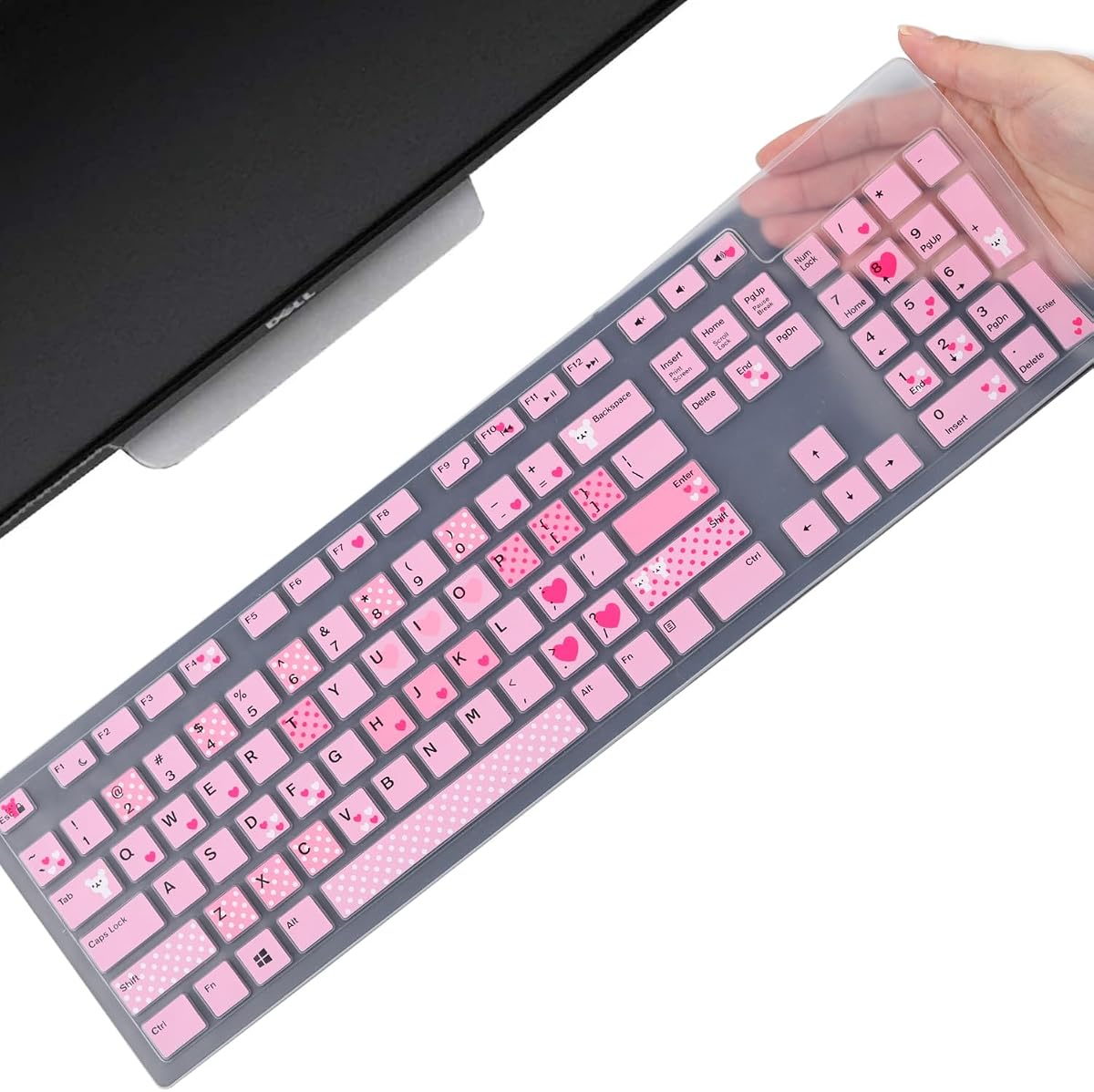
This molded silicone skin is tailored to a long list of Dell keyboards and desktop systems, including the KM636, KB216 family, several Optiplex models, and specified Inspiron all-in-one desktops. Its 4.4 rating makes it one of the better-rated model-specific options in the guide. Each key shape is molded to encourage a close fit, and the design is intended specifically for US layouts.
We may earn a commission when you buy through this link, at no additional cost to you.
The cover is made from durable, non-toxic silicone with an anti-fading coating print. At 0.3mm, it is thin enough to minimize interference with typing while adding a barrier against dust, water, coffee, and accidental spills. It can be removed and washed, making it a maintainable option for office PCs, home systems, and shared Dell workstations that see frequent use.
The extensive compatibility list should not be treated as a blanket guarantee for every Dell keyboard. Buyers need to check the layout image, identify the exact model, and verify the US layout because a similarly named or visually related model may have different key shapes. This is especially important for all-in-one systems, whose bundled keyboards can vary. It also provides no rigid shell against impacts.
This skin is an excellent match for owners of one of the supported Dell models who want a discreet, close-fitting protector without removing the keyboard from daily service. Its molded construction should be more orderly than a loose universal sheet, and the washable design supports regular maintenance. Confirm the model and Enter key layout before ordering to secure the correct fit.
The individually molded key shapes create a more complete barrier around the keycaps and small openings. That can help prevent everyday dust and residue from reaching the mechanisms beneath the keys.
The listing names many Dell models, but compatibility still depends on the precise board and its US layout. Checking the model number and comparing the layout image is essential before placing an order.
We may earn a commission when you buy through this link, at no additional cost to you.
The right keyboard cover depends on your board's shape, where you use it, and the threats you most want to control. Measure first, then compare the cover's construction, compatibility, cleaning method, and protection level.
Start with the outer dimensions of the keyboard, including its height and any raised rear section. A cover may be described as universal while still being limited to a particular key count, width range, or height range. Measure the board at its widest and deepest points, then compare those measurements with the product specifications. For silicone skins, also check the layout image and the shape of the Enter or Return key, since similarly sized boards can have incompatible key arrangements.
Different covers solve different problems. Stretch sleeves and dimensional vinyl cases are convenient barriers against dust and hair. Thin silicone skins reduce contamination around individual keys and can remain installed while typing. Flat waterproof caps create a wipeable work surface, while rigid acrylic shells add structural protection from impacts and objects. Choose the construction that addresses the actual risk in your workspace rather than assuming the most enclosed option is always necessary.
Compatibility is more than overall size. Standard 104/107-key membrane keyboards, 98-key boards, compact layouts, gaming models, and all-in-one desktop keyboards can have different dimensions and key shapes. Mechanical and gaming keyboards may also have elevated profiles or branded keycaps that prevent a thin skin from seating properly. Model-specific covers generally offer a cleaner fit, while universal options require more careful measurement and visual comparison.
Soft stretch fabric is lightweight, washable, and easy to fold, but it is not a sealed barrier against liquid. Silicone is thin, flexible, cleanable, and suitable for close-fitting key protection. Vinyl sleeves provide more dimensional coverage and moisture resistance while remaining pliable. Acrylic offers rigidity and impact resistance but adds weight, may show scratches, and must fit the keyboard precisely. The most useful material is the one that meets your protection needs without interfering with normal use.
A cover designed to remain on the keys should be thin, quiet, and comfortable to type through. The Green Onions Supply flat cap and the silicone skins emphasize low-profile use, while the acrylic covers are better suited to periods when the keyboard is not in use. If you will type for long hours, pay particular attention to the stated thickness, edge design, and whether the product is intended for continuous contact with the keys.
A washable cover is easier to maintain than one that merely traps contaminants. Silicone skins can be removed, washed, dried, and reinstalled, while fabric sleeves and vinyl covers can also be cleaned according to their material. Flat waterproof caps are intended to create a surface that can be wiped as part of a broader workplace hygiene routine. Always switch off and disconnect the keyboard before cleaning it, and allow a fitted skin to dry fully before reinstalling it.
Clear silicone and acrylic covers preserve the look of the keyboard, which is especially useful for gaming setups and professional desks. Colored films can add personality or help identify a shared workstation. Translucent vinyl combines visibility with a finished look, while fabric sleeves usually hide the board completely. Consider how the cover will appear when in use, whether the keyboard's lighting should remain visible, and whether the design suits the surrounding workspace.
Look for materials that resist fading, tearing, and repeated washing. A cover that flexes without adding bulk is useful for frequent use, while a rigid shell should have stable edges and a close internal fit. Model-specific products may last longer in service because they do not have to stretch or adapt to different shapes. Whichever construction you choose, avoid forcing the cover over a keyboard and replace it if the material tears or permanently loses its shape.
Before installing any cover, switch off and disconnect the keyboard, then clean both the keyboard and the new cover. Confirm that the model, dimensions, and key layout match. For a fabric sleeve or vinyl case, align the front edge and slide or stretch the cover over the keyboard gradually, working from the largest section toward the controls. For a silicone skin, begin at one edge and work across the keys, pressing each key position into place without using excessive force.
Use the cover according to its design. A dimensional sleeve, rigid shell, or flat cap works best when the keyboard is not being actively typed on, while a thin silicone skin is intended to remain installed during normal use. If moisture reaches the cover, disconnect the keyboard and dry both the keyboard and protector before continuing. Do not leave a sealed cover over a warm keyboard for long periods unless the manufacturer specifically permits that use.
For routine care, disconnect the keyboard before wiping or washing the protector. Use mild soapy water for removable silicone skins, follow the fabric or vinyl manufacturer's cleaning guidance, and wipe acrylic covers with a soft cloth. Let every part dry completely before reconnecting the keyboard or reinstalling a skin. Replace the cover when it becomes torn, badly discolored, loose, or difficult to clean.
No, even covers labeled universal have dimensional and layout restrictions. A typical universal silicone skin may fit only 104/107-key desktop boards within a specific width and depth, while rigid cases may be designed for one key count or a narrower range. Measure the keyboard's width, depth, and height, then check the number of keys and compare the layout image before ordering. Always verify the Enter or Return key shape when a cover is designed for a US layout.
It depends on the construction. Thin silicone skins and ultra-thin flat caps are designed to remain on the keys while the keyboard is in use, with their listed thicknesses intended to minimize interference. Fabric sleeves and dimensional vinyl covers are usually more appropriate when the keyboard is idle. Rigid acrylic lids protect the board from impacts but are best reserved for periods when the keyboard will not be used.
Many silicone skins in this roundup are explicitly described as removable and washable, and the stretch-fabric sleeve can also be cleaned and folded for storage. Vinyl and acrylic covers can generally be wiped down, but buyers should follow the specific product instructions and avoid harsh chemicals. Always disconnect the keyboard, dry it completely, and let a fitted skin dry before reinstalling it to prevent moisture problems.
A fitted silicone skin or flat waterproof cap can reduce the chance that a small spill reaches the key openings, but no cover should be treated as spill-proof without a specific manufacturer claim. A fitted skin must seat correctly around every key, while a flat cap is better suited to an idle keyboard that can be covered after use. For major spills, switch off and disconnect the keyboard immediately rather than relying on the protector.
Clear silicone skins and transparent acrylic covers are intended to preserve the visible appearance of a keyboard, and the two-pack clear skin specifically states that keyboard lighting can shine through. A transparent rigid cover may also leave illumination visible. The cover should never be placed over a hot or excessively warm keyboard, and users should follow the manufacturer's operating guidance.
Yes, a fitted cover can create a physical barrier between fur and the key openings. The Redragon K556 cover is specifically designed for that purpose and also provides rigid impact protection, while a fabric sleeve can protect a wider range of compatible keyboards. The cover should still be cleaned periodically, since hair can accumulate on its outer surface and eventually be transferred back toward the keys.
A skin fits closely over the individual keys and is usually thin enough to type through, while a case encloses the keyboard as a larger dimensional object. Cases generally provide more protection from dust, objects, and occasional moisture, but they are bulkier and usually removed during active use. The right choice depends on whether continuous protection, everyday spill resistance, or impact protection matters more to you.
Check the stated thickness, material, and intended use. Products specifically described as ultra-thin or designed for typing may remain installed, while fabric sleeves and rigid covers are normally used when the keyboard is idle. A correctly sized flexible skin should lie flat around each key without lifting at the edges. If the cover bunches, catches on a keycap, or requires force to install, it is not a suitable fit.
The best overall choice is the stretch-fabric cover for 75%, 80%, 96%, and compatible full-size keyboards because it combines a broad fit range with soft, washable protection. The Redragon K556 acrylic cover is the premium pick for its exact gaming model, clear construction, cat-hair protection, and rigid structure. For a standard desktop that needs moisture-resistant coverage with a finished appearance, the antistatic vinyl sleeve is the strongest budget-oriented alternative.
Prioritize the cover that matches the real threat in your environment. Choose a thin silicone skin for a conventional keyboard that stays in service, a waterproof flat cap for a wipeable shared workstation, a stretch sleeve for flexible dust and hair protection, or a rigid acrylic cover when impact resistance matters. Whatever the format, measure the full keyboard, verify the key layout, check the Enter key shape, and consider whether the product is intended to remain on during typing.
Finally, review the current product listing before making a decision, because specifications, compatibility details, imagery, and shopping conditions can change. The comparison and reviews summarize the supplied features, but the live listing and manufacturer guidance remain the final reference. A careful fit check is the most important step in choosing a keyboard cover that works well without interfering with your PC setup.