
PXN 2113PRO
3.6Editor score
Four-axis flight control
Twelve programmable buttons
Vibration and hat switch
Suction-cup desk stability
Discover the best joysticks for Windows 11, comparing flight sticks, HOTAS controls, gamepads, buttons, axes, software, and compatibility.
A good joystick can make supported Windows 11 games feel more precise, immersive, and enjoyable, especially when movement, camera control, or realistic physical input matters. The right device depends on whether you fly aircraft, operate farm machinery, fight in arcade-style games, or want more tactile controls than a standard gamepad provides.
This guide compares ten joysticks and joystick-style controllers for Windows 11 using the supplied specifications, compatibility information, control layouts, and customer ratings. It covers dedicated flight sticks, combined joystick-and-throttle systems, multifunction farming controls, and conventional wired gamepads that can broaden your options.
The first three recommendations highlight the strongest choices for different needs, including a budget flight controller, a highly configurable flight setup, and a premium HOTAS system. Each review explains the standouts, limitations, and ideal user, while current availability and pricing should be checked before purchasing because both can change.
3.6Editor score

4.4Editor score

4.0Editor score
This side-by-side comparison covers dedicated flight controls, multifunction simulator hardware, and wired gamepad-style alternatives, with emphasis on Windows 11 compatibility, control depth, adjustability, and the kinds of games each device is designed to support.




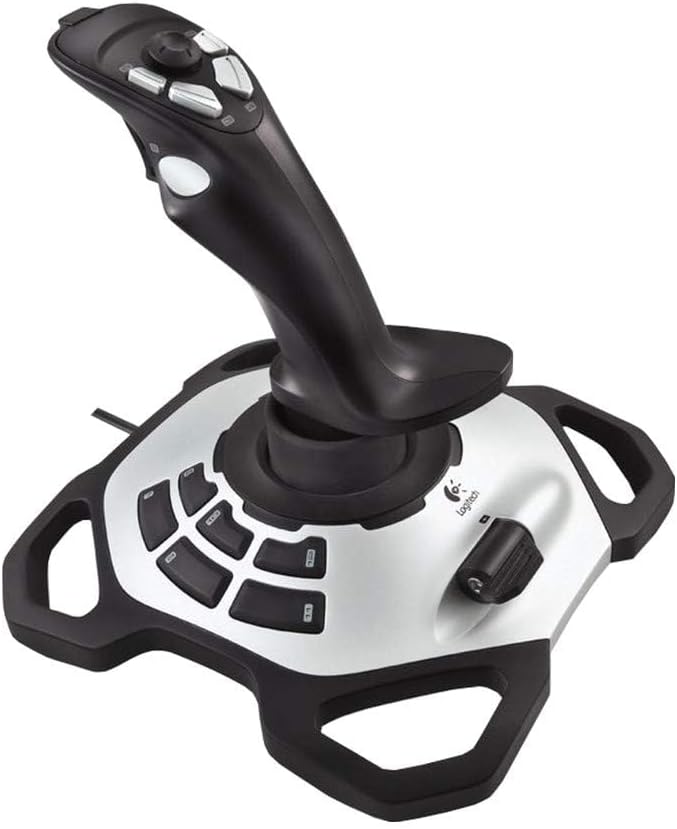


The PXN 2113PRO is a budget-oriented flight stick for Windows computers, combining four-axis movement, a rapid-fire trigger, an eight-way hat switch, and 12 programmable buttons. Its 3.6 customer rating is the lowest in this list, but the supplied specifications show a substantial control set for entry-level flight simulation and compatible PC action games.
We may earn a commission when you buy through this link, at no additional cost to you.
Its most useful features are adjustable vibration, programmable keyboard mapping, and support for games including Microsoft Flight Simulator, X Plane 10, World of Tanks, World of Warplanes, War Thunder, and Assault Horizon. Four suction cups help hold the stick to a smooth desktop, while the single-hand layout provides access to the main controls without requiring a separate throttle.
There are important limits. The device is exclusively for PCs running Windows 7, 8, 10, or 11, with no support for Mac, Apple devices, PlayStation, Xbox, or Switch. Force feedback, Minecraft, Asphalt 8, and Ace Combat 7 are also unsupported, and the vibration setting is described as difficult to perceive below 20 percent. The stick may also require a manual or software-based calibration for best results.
This is a sensible choice for a Windows 11 user who wants a genuine joystick for compatible flight games without moving to a premium cockpit setup. It is less attractive for console cross-play, advanced force-feedback simulation, or users who prioritize polished customer feedback. Within the budget-oriented portion of the category, however, its number of axes, buttons, and setup features remain unusually substantial.
Four axes, a trigger, an eight-way hat, and 12 programmable buttons provide more control than a basic three-axis stick. Custom adjustments and keyboard mapping make it possible to adapt the layout to different Windows flight games.
The four suction cups can fix the controller firmly to a smooth table, reducing the chance that it will drift while you work the stick. The grip is described as solid, smooth, and comfortable during single-handed flight.
We may earn a commission when you buy through this link, at no additional cost to you.
The Thrustmaster T-Flight Hotas One combines a flight stick with a detachable throttle, earning a 4.4 rating that places it among the strongest options here. The design targets hands-on flight simulation and gives Windows 11 users a more complete setup than a simple stick without requiring a full professional cockpit.
We may earn a commission when you buy through this link, at no additional cost to you.
Adjustable stick resistance, a responsive trigger, a hat switch, and multiple programmable buttons support takeoff, landing, and combat maneuvers. Because the throttle detaches, it can sit beside the stick on a desk or be placed separately on your lap, offering flexibility for different cockpit layouts and desk sizes.
The package is not entirely self-contained, since Thrustmaster TFRP rudder pedals are sold separately. It also carries Xbox support, but the product's broader promise of console compatibility should be checked against the current game in use. For Windows flight simulation, its USB connection and plug-and-play approach simplify initial setup.
Choose the T-Flight Hotas One when you want a joystick and throttle as one coordinated purchase, particularly for combat, helicopter, or commercial aviation simulations. It is a better fit than a stick-only option for engines that need independent power management, while remaining less complex and less demanding than a full HOTAS system.
The detachable throttle can be arranged to suit your available space and preferred hand placement. This makes the system practical for both a dedicated desk setup and a more casual flight-simulator arrangement.
Adjustable resistance lets you tune the stick feel to the aircraft and simulation style. The range of controls supports different categories of aircraft, including commercial planes, combat jets, and helicopters.
We may earn a commission when you buy through this link, at no additional cost to you.
The V-one Wired Gamepad is a conventional gamepad rather than a flight-oriented joystick, but it expands the category by supporting Windows XP through Windows 11, Steam, compatible Android devices, and PS3. Its 4.2 rating and multi-mode design make it a practical option for players who want one wired controller across several gaming environments.
We may earn a commission when you buy through this link, at no additional cost to you.
It supports XInput, DirectInput, Android, and PS3 modes, along with vibration feedback, a turbo function, and a joystick switch. Modern Windows users can plug it in without installing a driver, although Windows XP is the stated exception. Android compatibility requires an OTG adapter or cable for devices with Type-C or micro-USB connections.
Compatibility is narrower than the broad platform list can initially suggest. The gamepad does not work with Xbox 360 or Xbox One consoles, Mac OS, or PS4, and only games that support the appropriate input mode will recognize it. It should therefore be judged as a PC-oriented wired gamepad with certain extra compatibility, not as a universal controller.
For someone seeking an affordable, reliable wired pad for Windows 11 and Steam, the V-one is a credible pick. It is especially relevant for supported arcade, action, and Android titles. Players who need advanced flight axes, a separate throttle, or broad modern-console support should look toward the dedicated flight sticks included in this guide.
XInput, DirectInput, Android, and PS3 modes let one controller cover several categories of compatible games. Mode selection expands usability beyond a single Windows library.
The controller can be used directly on supported modern Windows systems without a driver installation. Its wired connection also removes battery management from the setup.
We may earn a commission when you buy through this link, at no additional cost to you.
The Thrustmaster USB Joystick is a straightforward three-axis Windows controller with a 3.9 customer rating. Its defining feature is a dedicated Point-of-View button, which the supplied information describes as an entry-level standout for easy camera control and improved immersion.
We may earn a commission when you buy through this link, at no additional cost to you.
The control layout includes three axes, four buttons, and one trigger. An ergonomic handle with an enlarged rest is intended to improve comfort over extended gaming sessions, while USB connectivity keeps the physical setup simple for a Windows 11 PC.
Compared with the PXN 2113PRO, T.16000M FCS, and X56, this controller offers fewer inputs and does not advertise extensive programmability, adjustable resistance, or a detachable throttle. That simplicity can be an advantage for a new pilot, but it limits fine-grained configuration for advanced simulators or games requiring many commands.
This is a good match for Windows users who want a comfortable joystick with straightforward camera switching and do not need a large programmable button set. It is less appropriate for a dedicated flight-simulator cockpit, for users seeking realistic throttle control, or for anyone who expects extensive software customization.
The Point-of-View button makes it easier to look around or change views without confusing camera commands with ordinary face buttons. That focused feature gives the simple control layout a clear purpose.
The ergonomic grip and enlarged palm rest are designed to support longer sessions. The result is a more comfortable stick for players who want a familiar gamepad-like experience in compatible PC games.
We may earn a commission when you buy through this link, at no additional cost to you.
The Microsoft Sidewinder Precision 2 Joystick combines a rotating handle with 16 programmable functions, including eight buttons and an eight-direction hat. Its 4.0 rating reflects a capable legacy design with a particularly distinctive approach to rudder input.
We may earn a commission when you buy through this link, at no additional cost to you.
The rotating grip translates handle twist into precise rudder control, offering a different technique from twist axes available on some newer sticks. A 146-degree throttle range provides extensive control input, while the ability to save and download programmed commands into game-specific profiles supports tailored setups across different simulations.
The product is clearly an older design and the supplied details do not explicitly list Windows 11 compatibility. It also does not advertise adjustable spring force, hall-effect sensing, or modern software features. Buyers should therefore verify the device's current driver and game support on their Windows 11 system before committing.
It is most attractive to a flight-simulator enthusiast who values a rotating rudder handle, extensive button mapping, and game-specific profiles. It can serve as a specialized controller alongside another modern stick or throttle, but for a brand-new Windows 11 setup, one of the explicitly contemporary PC-compatible models is a safer choice.
The rotating handle provides a tactile way to control yaw or rudder input. This can feel natural for pilots who prefer steering with the grip rather than a separate pedal mechanism.
Programmed commands can be stored and downloaded into controller profiles for individual games. This reduces repeated setup when moving between simulations with different control requirements.
We may earn a commission when you buy through this link, at no additional cost to you.
The Logitech Extreme 3D Pro Precision Fightstick is a recognizable joystick aimed at players who prefer a focused, gamepad-like control arrangement. Its 4.2 rating is solid, although the supplied product information is limited to the model name rather than a detailed feature list.
We may earn a commission when you buy through this link, at no additional cost to you.
The fightstick format is associated with precise, arcade-oriented input and a compact desk footprint. It can complement a Windows 11 gaming setup when a game benefits from a physical stick and trigger arrangement, particularly for compatible flight, action, and arcade titles that expose traditional joystick controls.
Because the supplied data does not state the exact axis count, button count, force-feedback capabilities, or explicit Windows 11 support, those details should be confirmed in the game's settings and the product listing before purchase. It is also not a combined throttle-and-stick system, so pilots seeking independent engine control may need additional hardware.
The Extreme 3D Pro is best for a gamer who values a familiar precision fightstick shape and wants a straightforward physical alternative to keyboard and mouse controls. Those seeking documented programmability, modern hall-effect axes, or a complete flight-control package should examine the T.16000M FCS or X56 instead.
The fightstick format places familiar directional and action controls within easy reach. This makes it approachable for compatible arcade and action games that support conventional joystick input.
A compact joystick can fill a useful role without occupying the desk space required by a full HOTAS arrangement. It can also serve alongside a wheel in a mixed simulator setup.
We may earn a commission when you buy through this link, at no additional cost to you.
The VOYEE Wired PC Controller is a budget gamepad-style option with an Xbox 360-inspired layout and explicit support for Windows 11, 10, 8.1, 8, and 7. Its 4.3 rating makes it one of the stronger-rated entries, even though it should be categorized as a general PC controller rather than a dedicated flight joystick.
We may earn a commission when you buy through this link, at no additional cost to you.
Upgraded left and right triggers, sensitive analog sticks, and responsive buttons are the main selling points. Rumble can respond to in-game events, and the contoured grips are intended to remain comfortable during longer sessions. The 7.2-foot cable gives some freedom from the desk position without introducing wireless complexity.
The most notable limitation is the explicit statement that the controller is not for FPS games. It also does not reveal a traditional joystick axis count, independent throttle, rudder control, or detailed button-mapping software. Those omissions make it less suitable for realistic flight simulation even though the Windows 11 compatibility is clearly stated.
Buy the VOYEE controller for non-FPS Windows games, arcade titles, and general gamepad use where a familiar layout and vibration are desired. It is a practical backup controller or shared-console-style accessory, but serious pilots should choose hardware built around stick axes, throttles, and simulator customization.
More sensitive joysticks and buttons are intended to make commands register consistently. The familiar arrangement should reduce the learning curve for most PC gamepad users.
The controller can provide automatic vibration feedback according to supported game events. This adds impact without requiring a separate wireless connection or battery charging.
We may earn a commission when you buy through this link, at no additional cost to you.
The Thrustmaster SimTask FarmStick is a purpose-built controller for Farming Simulator 25 and other heavy-machinery simulations. Its 4.3 rating is strong, while the specialized design gives it a clear identity among the general-purpose joysticks and gamepads in this list.
We may earn a commission when you buy through this link, at no additional cost to you.
A realistic three-axis joystick is paired with up to 33 programmable inputs across buttons, a thumbwheel, mini-stick, triggers, and rocker switches. Hall-effect magnetic sensors are intended to provide accurate, durable input while reducing drift and wear. The ambidextrous arrangement also supports a single-stick setup, two FarmSticks, or pairing with a racing wheel.
This is not a stand-alone flight stick or general gamepad. A racing wheel is required in conjunction with the FarmStick, and the Xbox compatibility is limited to Farming Simulator 25. Its value comes from concentrating many machinery commands into a task-specific controller rather than offering broad functionality for unrelated genres.
Choose the FarmStick if your main goal is immersive tractor, loader, and construction-equipment operation in Farming Simulator 25. It is an excellent specialist option for that audience, but it would be an odd choice for flight simulation, traditional PC games, or a user seeking one controller for every category.
Rocker switches, triggers, a thumbwheel, mini-stick, and multiple buttons let players operate complex machinery without constantly reaching for a keyboard. The large input count is the central advantage over a generic gamepad.
Hall-effect magnetic sensors are designed to resist the drift and wear associated with simpler contact-based mechanisms. That makes the controller well suited to precise, repeated simulator inputs.
We may earn a commission when you buy through this link, at no additional cost to you.
The Logitech G X56 H.O.T.A.S is a premium, multifunction flight controller that combines a joystick, twin throttles, numerous programmable inputs, and RGB lighting. Its 4.0 rating is solid, and the extensive control set makes it the clear choice for Windows 11 users building a substantial flight-simulator station.
We may earn a commission when you buy through this link, at no additional cost to you.
The supplied title highlights more than 189 programmable controls, and the listed features include a four-spring system, hall-effect sensing, a mini analog stick, and twin throttles with a friction adjuster and throttle lock. Accurate 16-bit aileron and elevator axes are joined by a separate mini-stick for weapons or other independently controlled systems.
The complexity is the main trade-off. The X56 occupies more desk space, requires two USB 2.0 ports, and takes more time to configure than a basic stick. A new pilot may find the abundance of switches and axes intimidating, while software-based customization may also require additional setup time.
The X56 is best for dedicated flight simulation enthusiasts, especially those operating jets, spacecraft, or VR-compatible setups and wanting every major control within reach. It is less suitable for general gaming or a casual user who only needs a handful of axes. For the target audience, however, its breadth and adjustability are difficult to match.
The Advanced 4-Spring System lets you change stick resistance to suit your preferences. Hall-effect sensors support precise 16-bit aileron and elevator readings for detailed simulation work.
Twin throttles, a mini stick, numerous switches, and more than 189 programmable controls keep flight and auxiliary functions close at hand. The control arrangement is also positioned to work naturally in VR, where visual reference is limited.
We may earn a commission when you buy through this link, at no additional cost to you.
The Thrustmaster T.16000M FCS combines a 4.4 customer rating with a mature precision-flight layout, making it the strongest all-around recommendation in this guide. Four independent axes, 16 action buttons, and an eight-way Point-of-View hat provide substantial control for simulators and compatible action games.
We may earn a commission when you buy through this link, at no additional cost to you.
The joystick uses Thrustmaster's H.E.A.R.T technology, which the product information associates with precision that does not diminish over time. Three removable components allow the grip, stick, and hat to be configured for either left- or right-handed operation, while the T.A.R.G.E.T. software supports custom mapping profiles for each game.
The principal compatibility concern is the supplied list, which names Windows 10, 8, and 7 rather than explicitly including Windows 11. Since Windows 11 uses backward-compatible USB and driver foundations, the hardware may work, but the listing does not directly guarantee it, so current manufacturer documentation and user reports should be checked before purchase. A throttle is also not included.
This is an excellent choice for a pilot who wants a single adaptable stick for multiple games, particularly if precise axes, a large button map, and software profiles matter. It suits experienced players better than absolute beginners, while the ambidextrous construction makes it a strong long-term desktop flight controller.
Four axes support more complete directional movement than a conventional gamepad, while twist-rudder control adds another layer of input. The 16-button layout and eight-way hat offer ample room for essential simulator commands.
Three removable components let you tailor the stick's physical arrangement for right- or left-handed use. This flexibility is valuable in cramped desks and shared gaming spaces.
We may earn a commission when you buy through this link, at no additional cost to you.
The best joystick depends on the games you play, the controls they demand, and the amount of desk space and setup effort you are willing to devote. Axis count, trigger design, software support, and platform compatibility should be evaluated before making a choice.
Begin with the games in your library rather than treating every joystick as interchangeable. Flight simulators benefit from multiple independent axes, a trigger, camera controls, and often a separate throttle. Farming simulations may need many labeled switches and a mini-stick, while action and arcade games may be better served by a conventional gamepad with two analog sticks. The FarmStick is purpose-built for Farming Simulator 25, and the X56 is aimed at advanced flight and space simulation.
Choose hardware that matches the commands your software actually exposes. A large specialist controller is not automatically better than a simpler stick if your games require only a few inputs.
Explicit Windows 11 support is the safest starting point. The PXN 2113PRO, VOYEE, and Logitech X56 list Windows 11 compatibility directly. The T.16000M FCS is documented for Windows 10, 8, and 7, while some older products are identified primarily as Windows controllers, so drivers and current user reports should be checked.
USB connectivity is widely used throughout the category, but physical connection alone does not guarantee game recognition. Confirm the required input mode, driver availability, and title-specific support before buying.
Axes determine how many independent directions of movement a controller can report. A three-axis stick covers the fundamentals, while four axes add another movement dimension often used for rudder or twist. Buttons matter just as much: the PXN provides 12 programmable buttons, the Sidewinder Precision 2 offers 16 programmable functions, and the X56 goes far beyond a conventional gamepad with more than 189 programmable controls.
Match the number of inputs to your simulation's complexity. Extra controls are useful only when they can be assigned and remain easy to reach.
A joystick controls orientation, while a throttle manages power and often other flight functions. The T-Flight Hotas One includes a detachable throttle, making it a convenient one-purchase flight setup. The T.16000M FCS focuses on the stick and does not include a throttle, while the X56 supplies twin throttles with friction adjustment and locking. Rudder pedals add another layer of realism and can connect with compatible Thrustmaster equipment.
Decide whether you want a complete coordinated system or plan to add missing components gradually. Check the desk layout and ensure the extra hardware will not crowd your mouse or keyboard.
Adjustable resistance, vibration, and programmable mapping can make a controller feel more natural and reduce repetitive configuration work. The T-Flight Hotas One has adjustable stick resistance, the PXN includes vibration and keyboard mapping, and the X56 offers four spring settings, RGB lighting, and extensive software control. Force feedback is explicitly unsupported on the PXN, so buyers seeking stronger physical feedback should not assume all joysticks provide it.
Prioritize the adjustments you will actually use. A meaningful calibration mode, stable axes, and usable profiles generally add more value than decorative extras.
A stick that stays where you put it and responds consistently is important during long sessions. The PXN uses four suction cups for stability on a smooth desk. The X56 and FarmStick use hall-effect magnetic sensors intended to resist drift and wear, while the T.16000M FCS uses H.E.A.R.T technology for sustained precision. Rubberized grips, wrist rests, and removable components also influence comfort.
Look for stability, smooth movement, and the sensor technology that matches your precision expectations rather than assuming every controller uses the same internal mechanism.
Software turns a generic control layout into a useful simulator setup. The T.16000M FCS can load and create profiles for individual games through T.A.R.G.E.T. The Sidewinder Precision 2 can store programmed commands in game-specific profiles, while the PXN supports custom adjustments and keyboard mapping. Greater complexity also means more initial setup, so assess how much configuration you are comfortable managing.
Profiles are especially valuable for pilots who switch between aircraft, spacecraft, or civilian and combat simulations. If you only play one simple arcade title, extensive software may add little value.
A controller should fit your grip, hand preference, and available desk area. The T.16000M FCS uses three removable components for ambidextrous positioning. The Hotas One separates its throttle so each piece can be positioned separately, while the X56 consolidates many controls in a large footprint. The V-one and VOYEE use conventional two-stick layouts familiar to most players, but they are not substitutes for a dedicated flight axis controller.
Think about mouse placement, chair position, and whether you will use a wheel or pedals. A controller that feels crowded or requires an awkward reach can be less effective than a simpler model with well-placed inputs.
Connect the controller to an available USB port before launching the game, then follow the manufacturer's setup guidance. Windows may recognize it automatically, while some flight products require calibration or a software profile. Open the game's controller options, select the detected joystick rather than keyboard and mouse mode, and assign axes, buttons, hat inputs, triggers, and throttles one function at a time.
Begin with an uncomplicated aircraft or vehicle and learn the neutral position of every axis. Check for drift, inverted movement, and accidental trigger activation, then make small calibration adjustments. For a HOTAS or multifunction controller, memorize a few essential controls before changing every input, and save separate profiles for games with different command layouts.
Keep the controller stable on a clean, dry surface and avoid pulling the cable at an angle. Update any required drivers or mapping software, and use a gentle, device-appropriate cleaning method. Store removable grips and components in a protected case, inspect the base and cable periodically, and avoid leaving the controller in direct sunlight or extreme heat.
No. The PXN 2113PRO, VOYEE controller, and Logitech X56 explicitly list Windows 11 support, while other models are described for earlier Windows versions or simply as Windows products. The T.16000M FCS lists Windows 10, 8, and 7, and the Sidewinder Precision 2 has no explicit Windows 11 statement. Check the current manufacturer documentation, driver status, and game compatibility before purchasing any older model.
It depends on the game and controller. The Thrustmaster T-Flight Hotas One includes a detachable throttle, while the X56 includes twin throttles. The PXN 2113PRO, Thrustmaster USB Joystick, Sidewinder Precision 2, and T.16000M FCS are stick-focused options without a bundled throttle in the supplied information. Even a stick-only setup can function in many simulations, but independent power control may require an additional throttle.
A flight joystick usually offers a moving stick with multiple axes, a trigger, and a hat switch designed for aircraft-style movement. A conventional gamepad uses two fixed analog sticks, directional controls, face buttons, and shoulder triggers. The V-one and VOYEE are gamepad-style options in this guide, while the other products emphasize dedicated flight, machinery, or fightstick control.
A HOTAS system is better when you want a stick, throttle, buttons, and auxiliary controls in one compact unit. The Logitech X56 provides a highly adjustable implementation with twin throttles, extensive programmability, and hall-effect axes. A simpler stick is easier to learn and usually sufficient for a new player or a game that exposes only basic flight commands, so complexity should match your experience.
Look for enough inputs to operate your game without constantly reaching for the keyboard. Three axes cover basic directional movement, while four axes can add twist-rudder or another movement dimension. Button needs vary greatly: the PXN has 12 programmable buttons, the T.16000M FCS has 16 action buttons, and the X56 supports more than 189 programmable controls. The best number is the one you can comfortably learn and use.
It depends on the model and software. The PXN can be used directly, with a driver available for additional customization and calibration, while the V-one generally works without a modern driver installation. The T.16000M FCS uses T.A.R.G.E.T. for profiles and likely requires its software for full setup. Follow the manufacturer's instructions and install any current mapping or calibration software needed to access every control.
That depends on the controller and the game. The Thrustmaster FarmStick is explicitly designed to be combined with a racing wheel, and the X56 can complement a broader flight-simulator setup. A general gamepad may support menus or auxiliary functions but will not automatically replace wheel and pedal controls. Check the simulation's device support and ensure the devices expose separate inputs rather than competing for the same axis.
Open the game's control settings and use the controller's calibration or test page to establish the neutral position for each axis. If a flight control is inverted, change the corresponding software setting rather than physically moving the stick. Persistent drift can indicate a loose grip component, an uncalibrated controller, or an old driver, so reconnect the device, update its software, and inspect the base before returning it.
The Thrustmaster T.16000M FCS stands out as the most balanced all-purpose flight stick, offering four axes, 16 buttons, ambidextrous construction, and per-game profiles. The Logitech X56 is the premium choice for users who want twin throttles, extensive programmability, and adjustable flight feel, while the PXN 2113PRO provides the most feature-rich entry-level flight option in the list.
Your game should determine the priority. Choose a dedicated flight stick for accurate directional control, the FarmStick for Farming Simulator 25 and heavy machinery, or a conventional wired gamepad for broader arcade use. Before buying, verify Windows 11 support, required input modes, included components, desk space, and whether you will need a separate throttle or rudder pedals.
Ratings, software compatibility, product availability, and pricing can change over time. Review the current listing and manufacturer documentation before checkout, especially for older joystick models, and confirm that your intended Windows 11 title recognizes the exact controller and its control layout.