
TP-Link AC600 USB WiFi Adapter
4.4Editor score
Dual-band AC600 wireless
Adjustable high-gain antenna
Broad Windows compatibility
Compare 10 of the best High Gain USB WiFi Adapter options for long range, fast speeds, security, compatibility, and easy desktop Wi-Fi setup.
A high gain USB WiFi adapter can give an older desktop stronger reception, more flexible antenna placement, and access to newer wireless standards without replacing the entire computer. The best model depends on your router, operating system, USB ports, distance, and the kinds of online activities that matter most to you.
We compared all ten adapters by wireless generation, stated band speeds, antenna design, radio features, USB interface, security support, operating-system compatibility, and installation method. The list includes AC and AX dual-band models, one AX900 option, and several tri-band Wi-Fi 7 adapters for newer networks.
Each review explains the adapter's strongest benefits, practical limitations, and ideal user, helping you narrow the field before purchasing. Product availability and pricing can change, so check the latest listing details and current cost when you buy.
4.4Editor score

4.1Editor score

4.4Editor score
This side-by-side comparison highlights each adapter's wireless standard, antenna configuration, interface, and system support, making it easier to identify the model that matches your router and desktop.


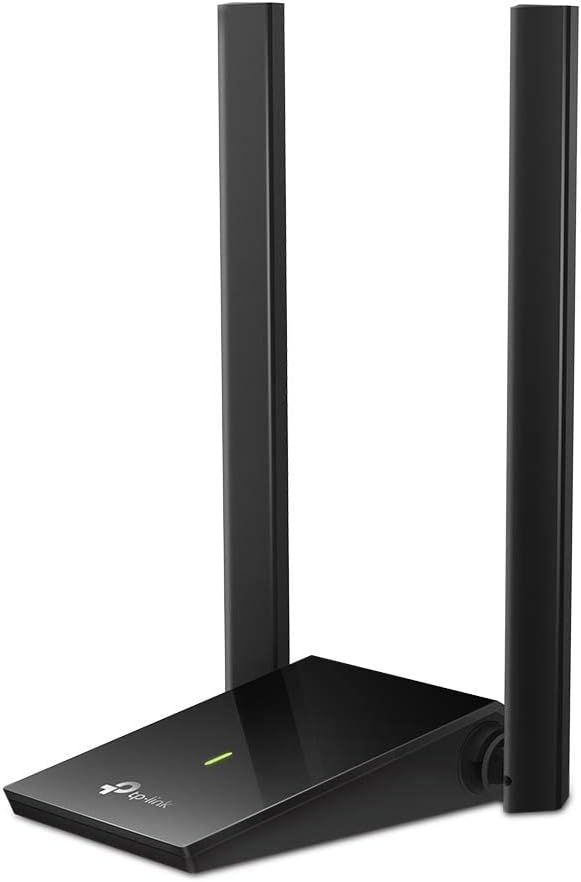

The TP-Link AC600 USB WiFi Adapter is an approachable option for adding dual-band wireless to a desktop without investing in a Wi-Fi 6 or Wi-Fi 7 model. Its 4.4 rating reflects a generally positive user response, and the defining feature is the adjustable 5 dBi high-gain antenna, which offers more placement freedom than a typical compact dongle.
We may earn a commission when you buy through this link, at no additional cost to you.
The adapter supports speeds of up to 433 Mbps on the 5 GHz band and 200 Mbps on the 2.4 GHz band. That is sufficient for browsing, video calls, HD streaming, and moderate gaming when the connected router and internet service can supply comparable speeds. Dual-band operation lets you keep the 5 GHz band for nearby high-bandwidth devices and use 2.4 GHz for greater reach.
Its main limitation is age. AC600 sits well below the AX and BE classes in this roundup, while the adapter is limited to Windows versions and requires a driver download from TP-Link's download center. It also lacks the faster USB 3.0 interface, MU-MIMO, OFDMA, WPA3, and hotspot functionality found on more modern alternatives.
This is a sensible choice for an older Windows desktop on a budget, especially if stronger reception matters more than maximum throughput. It is less suitable for a modern Wi-Fi 6 network, a Mac, or a user who expects to connect multiple high-speed devices through one adapter.
The multi-directional antenna can be rotated toward the router, making it easier to optimize reception when the USB port sits behind a desktop or near metal components.
Use 5 GHz for nearby bandwidth-intensive traffic and 2.4 GHz when distance or walls make the faster band less reliable.
We may earn a commission when you buy through this link, at no additional cost to you.
The TP-Link Archer TX20U Plus combines Wi-Fi 6, two adjustable high-gain antennas, and a one-meter USB 3.0 cable in one of the most balanced packages here. Its 4.1 rating makes it a credible all-around recommendation for Windows desktops that need modern wireless performance without the complexity or requirements of a Wi-Fi 7 adapter.
We may earn a commission when you buy through this link, at no additional cost to you.
Maximum theoretical throughput reaches 1201 Mbps on 5 GHz and 574 Mbps on 2.4 GHz. MU-MIMO and OFDMA improve efficiency in busy networks, while WPA3 provides newer protection for compatible wireless connections. The detachable cable gives users a practical way to move the radio body away from a crowded USB port or place its antennas closer to a router.
Real-world throughput will be limited by the router, internet connection, obstacles, and distance, so the advertised figures should be treated as link-speed ceilings rather than guaranteed application rates. Compatibility is narrower than that of the AC1300 models because this adapter supports only Windows 11 and Windows 10, not Linux or Mac.
It is a strong recommendation for a modern Windows desktop connected to a Wi-Fi 6 router, especially one located behind a desk or in another room. Buyers with older operating systems should choose a more broadly compatible AC model instead.
MU-MIMO and OFDMA are particularly useful when several devices share the same router, helping the adapter manage simultaneous traffic more efficiently.
The one-meter USB 3.0 cable separates the adapter body from the computer, allowing antennas to sit in a better position without forcing a USB extension.
We may earn a commission when you buy through this link, at no additional cost to you.
The TP-Link AC1300 USB WiFi Adapter stands out for delivering a useful balance of speed, antenna adjustability, and operating-system support. Its 4.4 rating indicates strong customer reception, while AC1300 throughput of 867 Mbps on 5 GHz and 400 Mbps on 2.4 GHz gives it useful headroom for streaming, downloads, and gaming.
We may earn a commission when you buy through this link, at no additional cost to you.
Two external high-gain antennas can be rotated toward the router to improve reception and transmission. The adapter supports MU-MIMO for better handling of multiple simultaneous streams, and dual-band operation gives users a practical choice between faster short-range links and more robust longer-range connections.
Its limitation is that it remains a Wi-Fi 5 device rather than a Wi-Fi 6 option. It also lists compatibility with Windows 11, 10, 8.1, 8, 7, XP, and macOS 10.9 through 10.15, which is broad by modern standards but does not cover current Linux or recent Mac releases. Actual speed also cannot exceed the router's capability.
Choose this adapter for a mixed Windows-and-Mac setup that needs better range and dual-band performance without moving to Wi-Fi 6. It is less compelling when your router supports Wi-Fi 6 and you want to take full advantage of that generation.
Support for numerous Windows versions and listed macOS releases makes the adapter practical for older and mixed-computer households.
Independent rotation lets users aim both antennas toward the router and experiment with placement without moving the desktop.
We may earn a commission when you buy through this link, at no additional cost to you.
The TP-Link TX30U Plus is designed for users who want a modern Wi-Fi 6 desktop connection without a complicated setup process. Its 4.2 rating indicates a positive reception, and the preloaded internal driver simplifies what would otherwise be a potential installation obstacle.
We may earn a commission when you buy through this link, at no additional cost to you.
The adapter reaches up to 1201 Mbps on 5 GHz and 574 Mbps on 2.4 GHz. Two high-gain dual-band antennas work with beamforming to improve directionality and coverage, while MU-MIMO and OFDMA support efficient traffic handling. WPA3 encryption adds current security support for compatible networks.
Its compact, foldable antennas make it easier to store and reposition than a large desktop adapter. On the other hand, USB 3.0 is not explicitly identified in the supplied specifications, and compatibility is limited to Windows 11 and Windows 10. The advertised speeds remain conditional on the router, distance, and physical environment.
This is a good match for a current Windows desktop that needs straightforward Wi-Fi 6 and stronger reception. It is less suitable for a Mac, Linux machine, or older Windows system, and users should not choose it solely on its headline speed if their router is limited to Wi-Fi 5.
The internal driver allows the adapter to install quickly after connection, reducing the need to locate and install a separate driver package.
Beamforming directs a more focused signal toward the router, which can improve reception in rooms separated by walls or floors.
We may earn a commission when you buy through this link, at no additional cost to you.
The TP-Link BE6200 tri-band USB adapter is the premium choice in this roundup, offering the most advanced wireless features for a compatible Wi-Fi 7 setup. Its 4.4 rating suggests strong customer satisfaction, and the inclusion of 6 GHz support distinguishes it from the dual-band AX models.
We may earn a commission when you buy through this link, at no additional cost to you.
The listed maximum speeds are 2,882 Mbps on 6 GHz, 2,594 Mbps on 5 GHz, and 688 Mbps on 2.4 GHz. When paired with a suitable tri-band Wi-Fi 7 router, features such as 160 MHz channels, Multi-RU, and 4K-QAM can support demanding streaming, gaming, and large transfers. MU-MIMO and OFDMA are also included.
Two high-gain antennas and a detachable cradle with a 3.9-foot cable provide unusually flexible placement. Beamforming is intended to improve stability at long distances. The trade-off is that these benefits depend heavily on a Wi-Fi 7 router; older Wi-Fi 6 or Wi-Fi 6E equipment will not unlock the same capability. Compatibility is restricted to Windows 11 and Windows 10.
Buy this adapter if you already own a suitable tri-band router and want the highest ceiling in this list. For most users on Wi-Fi 6 networks, the AX1800 options offer a more proportionate and economical upgrade.
The 6 GHz band provides additional spectrum that can reduce congestion and deliver high throughput when the router and environment support it.
The detachable cradle and extended cable allow the adapter to sit outside a crowded desk area and closer to a clear line toward the router.
We may earn a commission when you buy through this link, at no additional cost to you.
This AX1800 USB 3.0 adapter offers a straightforward way to add Wi-Fi 6 to a compatible Windows 10 or 11 computer. Its 5.0 rating is the highest among the listed products, although ratings alone do not guarantee performance in every home or office.
We may earn a commission when you buy through this link, at no additional cost to you.
The adapter provides stated speeds of 1200 Mbps on 5 GHz and 576 Mbps on 2.4 GHz. Its 90-degree rotatable 7 dBi antenna is among the most prominent high-gain designs in the roundup and should help improve transmission and reception. USB 3.0 also avoids the interface bottleneck associated with many older USB wireless dongles.
Installation is a major strength: the supplied description says Windows detects and installs the driver automatically when the adapter is connected. Compatibility is limited to Windows 10 and 11, and the listing explicitly excludes Windows 7 and Mac systems. WPA3, WPA2, WPA, and WEP support gives the adapter flexibility with different router configurations.
This model is a practical choice for users who value simple setup, a conspicuous high-gain antenna, and a USB 3.0 connection. It is best for current Windows systems and Wi-Fi 6 networks; it is not a universal solution for older or non-Windows computers.
The driver is handled through Windows after connection, reducing setup steps for users who are comfortable with standard operating-system prompts.
The larger advertised antenna gain can help preserve a usable connection in rooms where a compact internal-style dongle struggles.
We may earn a commission when you buy through this link, at no additional cost to you.
The BrosTrend AX1800 is built around flexible placement, using two 5 dBi high-gain antennas and a 3.3-foot USB 3.0 extension cable. Its 4.1 rating indicates positive overall reception, while the desktop-oriented design gives users more freedom than a small direct-connect dongle.
We may earn a commission when you buy through this link, at no additional cost to you.
Stated dual-band speeds reach 1201 Mbps on 5 GHz and 574 Mbps on 2.4 GHz. Beamforming is used to direct signal toward the router, and OFDMA along with uplink and downlink MU-MIMO improves efficiency in multi-device networks. The extension cable makes it possible to place the adapter body away from metal desk structures and obstructions.
The preloaded driver removes the need for a CD-ROM, but operating-system support is limited to Windows 11 and Windows 10, and Linux is explicitly unsupported. The advertised comparison with AC1300 adapters is a product claim rather than an independently verified result, and actual performance remains dependent on the router and environment.
Choose this adapter when your Windows desktop is poorly connected because of its USB position or nearby obstructions. If cross-platform support matters more, consider the TP-Link AC1300 models, or if 6 GHz access matters, look toward a Wi-Fi 7 option.
A short desktop adapter can be placed near a window or above equipment, giving its antennas a clearer path toward the router.
Two independently positionable 5 dBi antennas help maintain signal quality through multiple walls and floors when placement is optimized.
We may earn a commission when you buy through this link, at no additional cost to you.
The WAVLINK BE6500 combines tri-band Wi-Fi 7 with an unusually rich set of physical and software features. Its 4.4 rating is strong, and the four foldable 5 dBi antennas give it a distinctive profile among the desktop-oriented adapters in this guide.
We may earn a commission when you buy through this link, at no additional cost to you.
Maximum stated rates are 688 Mbps on 2.4 GHz and 2882 Mbps on both the 5 GHz and 6 GHz bands. Wi-Fi 7 technologies including Multi-Link Operation and Multi-RU can improve latency and stability in crowded networks. Unlike many alternatives, it supports both receive mode and hotspot mode for sharing a computer's internet connection.
A multicolor LED provides visible status feedback, while a responsive touch switch controls the lighting. The USB 3.0 interface reduces potential data-transfer bottlenecks, and ventilation slots help with heat dissipation. The built-in driver usually starts automatically, although manual installation may still be required in some cases.
The trade-offs are size and complexity. Four antennas and ventilation openings create a larger desktop footprint than a compact Wi-Fi 6 dongle. The adapter also cannot strengthen an existing router signal, and performance on Wi-Fi 6 or Wi-Fi 6E routers will be limited. It suits Windows 11 or 10 users with a compatible Wi-Fi 7 router who value flexibility and status controls.
Hotspot mode lets a compatible PC share its internet connection with phones, tablets, laptops, and other nearby wireless devices.
The foldable five-decibel antennas can be adjusted individually, helping users tune reception across desks, rooms, and multi-level homes.
We may earn a commission when you buy through this link, at no additional cost to you.
The TP-Link AC1300 USB adapter combines a fast USB 3.0 interface with dual high-gain antennas, offering a balanced option for desktop users on Wi-Fi 5 networks. Its 4.1 rating reflects a generally favorable response, and the 867 Mbps 5 GHz and 400 Mbps 2.4 GHz rates remain useful for many activities.
We may earn a commission when you buy through this link, at no additional cost to you.
Two high-gain antennas support improved range, signal quality, and transmission performance. Their adjustable, multi-directional design allows the radio to be aimed toward the router. USB 3.0 provides a faster connection to the computer than USB 2.0 and helps prevent the interface from becoming a significant bottleneck.
Compatibility is listed for Windows 11 and 10 and macOS X 10.9 through 10.14, which means the Mac support applies to older listed releases rather than every modern Mac. It also lacks Wi-Fi 6 features such as OFDMA and WPA3, and its dual-band design cannot access the 6 GHz spectrum.
This adapter makes the most sense for a desktop that needs a faster USB connection and flexible antennas without requiring Wi-Fi 6. Users with a recent Mac, a Wi-Fi 6 router, or a need for the newest security standards should examine one of the AX1800 options instead.
The faster interface helps the computer process adapter data efficiently, especially when using the 5 GHz band.
Adjustable multi-directional antennas make it easier to find a stable orientation when the computer sits behind a monitor or cabinet.
We may earn a commission when you buy through this link, at no additional cost to you.
The Tenda AX900 USB adapter provides Wi-Fi 6 in a comparatively compact form, with a single 6 dBi omnidirectional high-gain antenna. Its 4.3 rating indicates positive customer reception, while built-in driver support and broad listed Windows compatibility make it an approachable option for straightforward upgrades.
We may earn a commission when you buy through this link, at no additional cost to you.
Tenda states that the adapter can deliver faster 5 GHz and 2.4 GHz performance than standard AC600 adapters, making it a meaningful step into Wi-Fi 6. MU-MIMO allows simultaneous communication with multiple devices, and AP mode can turn the PC into a Wi-Fi hotspot for up to eight devices on the 5 GHz band.
The 6 dBi antenna is designed for strong reception in areas affected by interference and should generally outperform a small internal antenna. The trade-off is that AX900 is a lower aggregate class than the AX1800 products in this roundup, so it is best suited to light-to-moderate broadband tasks rather than the highest possible throughput.
Choose the Tenda when you want Wi-Fi 6, easy installation, and a stronger external antenna without a large multi-antenna desktop unit. It supports listed Windows 7, 10, and 11 systems on X86 or X64 processors, making it a potentially useful bridge for an older Windows desktop.
The adapter can be connected and installed directly, avoiding a separate driver download for supported Windows systems.
Its broad radiation pattern reduces the need for precise antenna orientation, while 6 dBi gain helps preserve signal strength.
We may earn a commission when you buy through this link, at no additional cost to you.
The most useful adapter is not simply the one with the largest printed speed. Match the wireless generation, antenna design, USB connection, security features, and operating-system support to your router and computer before considering any purchase.
A high gain antenna cannot make a basic router perform like a newer one. AC600 and AC1300 adapters are designed for Wi-Fi 5 routers, AX900 and AX1800 models require Wi-Fi 6 for their full benefits, and the BE6200 and BE6500 options depend on Wi-Fi 7 equipment for their headline capabilities. If your router only supports one older band or a limited wireless class, the adapter's maximum speed will not be reached.
Dual-band adapters combine 2.4 GHz and 5 GHz, while tri-band models add 6 GHz. The 2.4 GHz band generally offers better reach through walls, whereas 5 GHz provides more capacity over shorter distances. The 6 GHz band can add clean, high-bandwidth spectrum in compatible Wi-Fi 7 networks. Antenna gain can improve signal strength, but it does not eliminate congestion or interference.
High-gain antennas come in several forms: a single rotating antenna, two independently adjustable antennas, or four foldable antennas on a large desktop body. External antennas are especially useful when a computer sits behind a monitor, beneath a desk, or in a room with walls between it and the router. A longer USB cable or detachable cradle is often more useful than additional advertised gain because placement determines real-world results.
USB 3.0 is preferable for modern high-speed adapters because it reduces interface overhead compared with USB 2.0. It does not determine the final internet speed by itself, since the router and network remain the limiting factors. Check whether the computer has a free USB port near the intended antenna position. If not, an adapter with an extension cable can prevent the antenna from being blocked by the computer case.
Compatibility varies sharply across this category. Some adapters support numerous Windows releases and selected macOS versions, while others work only with Windows 10 or Windows 11. The WAVLINK is Windows 11 or 10, and several TP-Link Wi-Fi 6 and Wi-Fi 7 models are similarly restricted. Confirm your exact operating system and version before buying rather than assuming that all USB Wi-Fi adapters work interchangeably.
WPA3 support offers newer protection for compatible networks, while WPA2 and WPA remain common. MU-MIMO can improve efficiency when several wireless clients are active, and OFDMA divides channel resources efficiently among clients. These features are most relevant on compatible Wi-Fi 6 or Wi-Fi 7 routers. Hotspot or AP mode is useful for sharing an internet connection, but it is not a substitute for a range extender.
A built-in or preloaded driver can make setup noticeably easier, especially on a new Windows installation. Some products still require confirmation or a manual driver downloaded from the manufacturer's support page. Check whether installation needs administrator access and whether the system automatically recognizes the device. Because Windows support ranges from very old versions to only the newest releases, installation convenience should be evaluated alongside compatibility.
Everyday browsing and video calls may be well served by a dual-band AC or AX900 adapter. Larger families, active downloads, gaming, and high-resolution streaming benefit from AX1800 throughput. Wi-Fi 7 tri-band models make the most sense for users who already own a suitable router and need the 6 GHz band, Multi-Link Operation, or greater capacity. Buying beyond your network's capability adds cost without a corresponding improvement.
Begin by confirming that the adapter supports your operating system and that your router uses a compatible standard. Connect the adapter to a USB port, install any required driver, and follow the manufacturer's instructions. For adapters with an extension cable, separate the antenna body from the computer and place it on a desk, shelf, or stand with minimal obstruction.
Join the router's 2.4 GHz or 5 GHz network, and use the 6 GHz band only when both the adapter and router support it. After connecting, rotate or position the antennas toward the router. Try the adapter in several locations, especially if the computer is behind a metal cabinet or on a different floor, and compare signal quality and transfer performance before settling on a final position.
Keep the adapter away from heat sources, liquids, and crowded USB ports, and avoid repeatedly bending cables or antennas at their joints. Use the supplied or manufacturer's current driver, update the adapter's firmware when prompted, and change the router's Wi-Fi password to a strong WPA2 or WPA3 passphrase. Do not expect a USB adapter to extend the router's range; improving the PC's own reception is its purpose.
It can improve the speed your computer receives when weak reception, interference, or poor internal antenna placement is the limiting factor. It cannot exceed the maximum speed of your router or internet service. A newer adapter also cannot fully exploit Wi-Fi 6 or Wi-Fi 7 features unless the router supports the same standard and nearby conditions permit the advertised link rates.
No. Antenna gain is only one part of signal performance, and placement, interference, distance, and the router's own antennas all matter. A well-positioned 5 dBi antenna can outperform a poorly positioned 7 dBi antenna. The best option is the one that can be placed in a clear, unobstructed position and aimed toward the router.
Most models work with either form factor as long as the operating system and USB port are compatible. Desktop users often benefit more from external placement because a tower or monitor may leave the built-in Wi-Fi antenna behind obstacles. Laptops already have integrated antennas, so an adapter is most useful when the built-in wireless hardware is outdated, damaged, or poorly positioned.
A standard USB adapter adds or upgrades wireless connectivity on the computer, but it is not a range extender, repeater, or mesh node. Its antennas improve the computer's ability to receive and transmit with the router. If you need to expand Wi-Fi coverage throughout a home, a dedicated range extender or mesh system is the appropriate solution.
USB 3.0 is the better choice whenever the adapter offers it, particularly for Wi-Fi 6 and Wi-Fi 7 models. It provides more interface bandwidth and can avoid bottlenecks during high-speed wireless transfers. The computer must also have an available USB 3.0 port, and some adapters maintain backward compatibility with USB 2.0 at reduced interface performance.
Usually not. A Wi-Fi 7 adapter can connect to a Wi-Fi 6 router, but it will operate within the capabilities of that router and may not offer the full benefit of its tri-band design. For most Wi-Fi 6 networks, an AX1800 adapter is a more balanced match. Wi-Fi 7 makes the most sense when the router is tri-band and supports the 6 GHz band.
Advertised figures are maximum theoretical link rates rather than guaranteed application speeds. Your internet plan, router capability, signal distance, walls, interference, USB placement, and the band you select can all reduce the result. Test on 5 GHz or 6 GHz near the router, reposition the antennas, and compare performance before assuming the adapter is defective.
Some models support AP or hotspot mode, including the Tenda AX900 and WAVLINK BE6500. Check the product listing and router configuration because not every adapter supports this function. Hotspot mode shares the computer's existing internet connection; it does not increase the speed or coverage of the original router.
The TP-Link AC600 is the practical budget option, while the TP-Link Archer TX20U Plus stands out as the most balanced general choice with Wi-Fi 6, dual antennas, WPA3, and flexible USB cable placement. The TP-Link BE6200 is the premium selection for a compatible Wi-Fi 7 network that can use the 6 GHz band.
For most buyers, prioritize router compatibility, adjustable antenna placement, a USB 3.0 connection, and operating-system support before chasing the highest printed speed. A well-positioned AC1300 model may satisfy ordinary browsing and streaming better than a premium adapter restricted by an older router or limited driver support.
Before purchasing, confirm the current listing, included cable, driver requirements, security options, and warranty information. Prices and product details can change, so compare the latest offer rather than relying on an earlier article or remembered specification.