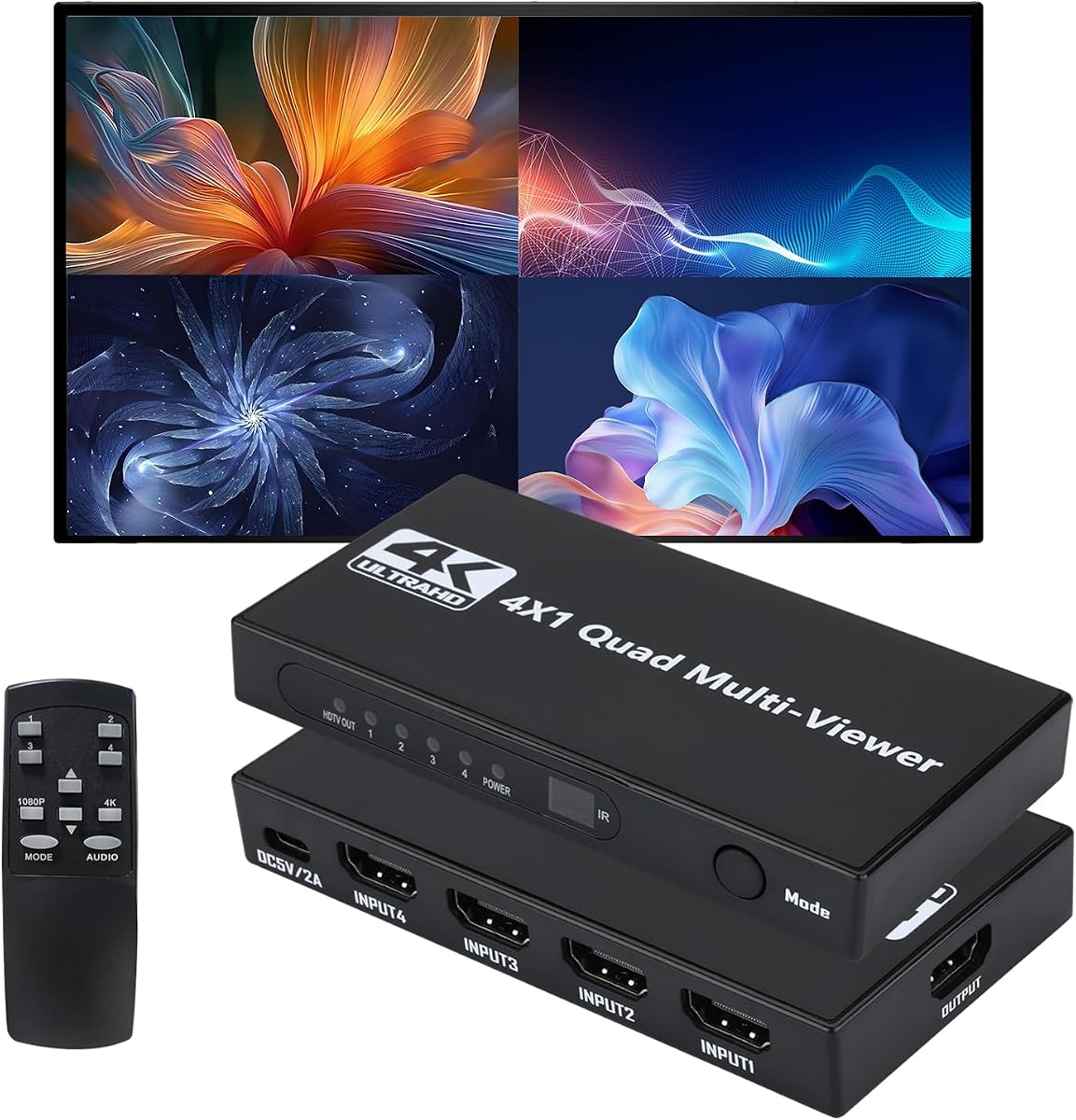
HDMI Multiviewer Switch 4×1
4.8Editor score
Twelve multiview screen layouts
4K30 full-screen output
1080p60 quad viewing
IR and panel control
Driver-free device support
Our HDMI Multiviewer guide compares ten models for resolution, display modes, audio, control options, compatibility, and installation needs today.
An HDMI multiviewer combines multiple video sources on one display, making it useful for control rooms, gaming setups, surveillance monitoring, presentations, and demanding home media installations. A capable unit should make source selection intuitive, maintain stable video, and provide layouts suited to the task rather than forcing every workflow into one fixed arrangement.
The ten products in this guide were compared using the supplied specifications, focusing on input and output counts, supported resolutions, viewing layouts, audio extraction, control methods, and included accessories. The list covers compact four-input devices, dual-output installations, professional matrix systems, and models designed for both everyday use and structured control environments.
Each review identifies the product's strongest applications and its practical limitations, while the comparison table makes the main differences easier to scan. Ratings reflect the information available for each listing and can change over time. Product prices and promotions also fluctuate, so check the current listing before making a purchase.
4.8Editor score
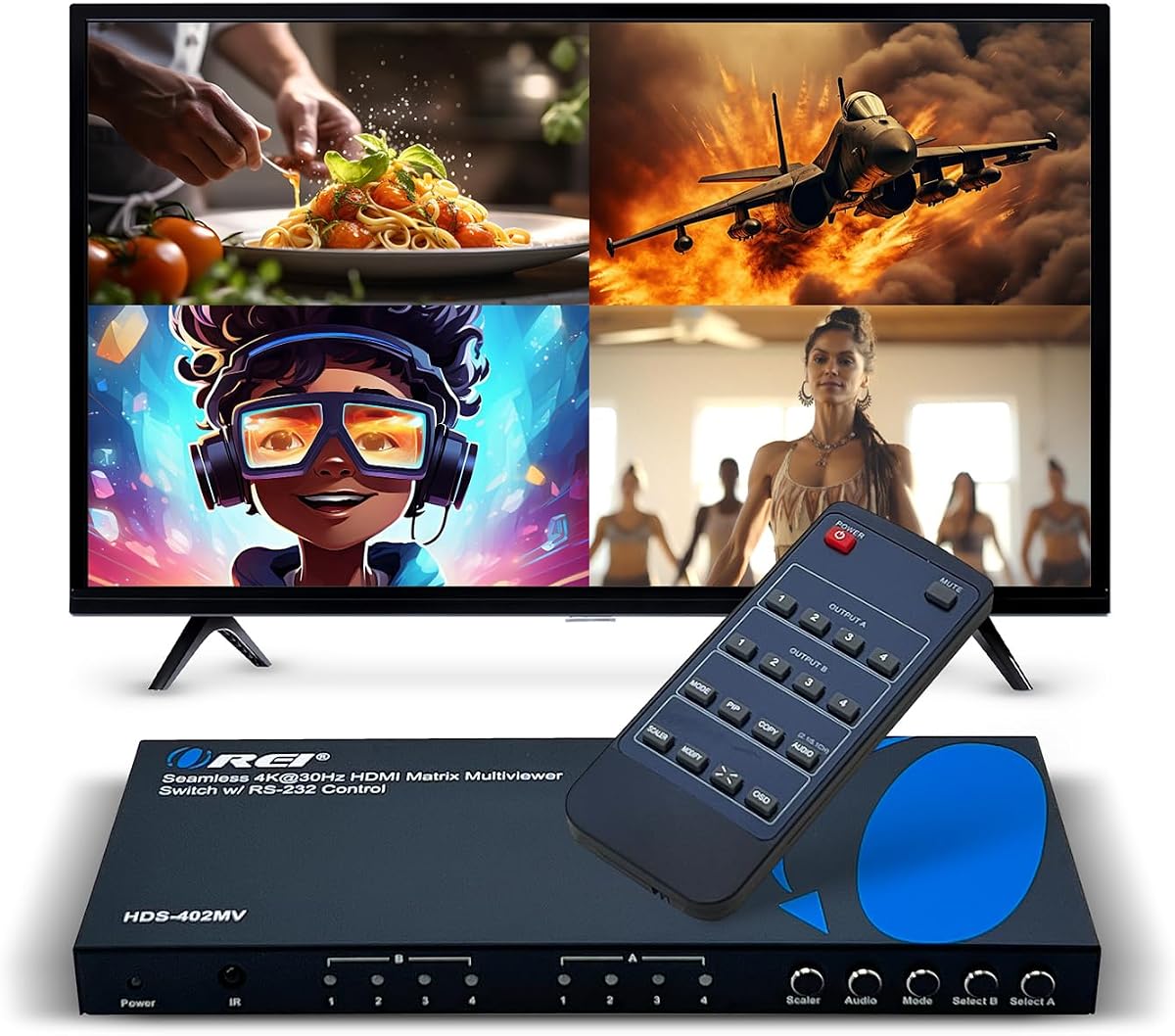
4.7Editor score

4.2Editor score
This side-by-side comparison highlights the main distinctions among the ten HDMI multiviewers, including their channel configurations, maximum resolutions, viewing layouts, audio options, and control capabilities.


The PORTTA 4×1 HDMI Multiviewer is a four-input, one-output unit built for users who want several sources visible on one television or monitor. It carries a 4.3 rating and stands out for six viewing modes, including equal quad screens, side-by-side and stacked pairs, picture-in-picture, full screen, and one-large-three-small layouts. That range covers gaming, monitoring, presentations, and general media use without requiring a complex matrix system.
We may earn a commission when you buy through this link, at no additional cost to you.
Its 4-port seamless switching function is particularly useful when one source needs to occupy the entire display. Source changes are designed to occur smoothly and without the delay associated with less capable switching equipment. The inclusion of both IR remote and RS-232 control also makes the unit approachable at a desk and more practical in a semi-professional control environment. Toslink and 3.5mm audio outputs provide options for sending selected sound to external equipment.
The central compromise is resolution. The multiviewer supports up to 1080p at 60Hz and offers scaling for 1080p and 720p, which is adequate for many HD screens but falls short of 4K requirements. It also has only one main output, so users needing identical or independent content on two displays must look to a dual-output model. HDCP 1.4 and HDCP 1.3 support covers many common source devices, though newer protected content may present compatibility questions.
This is a compelling option for a gamer, operator, or homeowner who wants meaningful layout choice and convenient audio extraction without moving to a professional matrix controller. The included power adapter, USB-A to USB-C power cable, IR remote, manual, two-year warranty, and lifetime technical support add practical value. Choose it when four-source visibility and flexible layouts matter more than 4K output.
Six modes make it easy to move between monitoring all four feeds, emphasizing two sources, or giving one source the full screen. The one-large-three-small arrangement is especially useful when a primary feed needs more attention than the others.
IR control is convenient for everyday use, while RS-232 provides a path toward integrated or automated control. Using both options means the multiviewer can sit behind equipment or inside a more structured installation.
We may earn a commission when you buy through this link, at no additional cost to you.
The OREI 4×1 Out Quad Screen Multiviewer is a straightforward HD solution for combining up to four HDMI sources on a single display. Its 4.3 rating reflects a well-liked product with a clear purpose: fast, smooth switching and multiview operation at resolutions up to 1080p. The inclusion of a VGA output broadens display compatibility, making it useful with older monitors as well as modern televisions.
We may earn a commission when you buy through this link, at no additional cost to you.
Five display modes give users a practical selection of arrangements, while the IR remote and front-panel buttons make source selection straightforward. The device can be approached as a standard 4-in-1-out switch when one source should fill the screen, or as a quad viewer when the user needs situational awareness. The supplied power supply, remote, and user manual make the package relatively complete for immediate setup.
Its main limitation is video standard. A 1080p ceiling may be entirely adequate for surveillance, classroom monitoring, or a secondary display, but it cannot meet the needs of a 4K television used primarily at native resolution. Although the listing describes compatibility with applications calling for a 4K-compatible multiviewer, the stated output support remains 1080p, so buyers should judge capability by the actual specification rather than the search terminology.
This model is best for users who prioritize uncomplicated switching, familiar front-panel access, and a lower-complexity alternative to higher-resolution professional units. It is less suitable for demanding installations where 4K, network control, advanced audio formats, or multiple output destinations are important. For those needs, one of the newer OREI models offers a more appropriate specification set.
The switcher can present all connected sources together or place one source in the foreground. Front-panel controls keep routine changes simple, while the remote is useful when the device is positioned away from the display.
The VGA output is valuable for installers working with computer monitors or display equipment that lacks modern HDMI connectivity. It adds flexibility without changing the underlying four-input HDMI design.
We may earn a commission when you buy through this link, at no additional cost to you.
The OREI 4×1 Multiviewer Switch is a well-rounded option for users who need more than 1080p and want to separate audio from video. It has a 4.3 rating and supports up to 4K at 30Hz or 2K at 60Hz. Four HDMI inputs feed one HD television or monitor, and a VGA output offers an additional display connection for compatible equipment.
We may earn a commission when you buy through this link, at no additional cost to you.
Its standout feature is the integrated audio converter. The unit supports DTS Digital, Dolby Digital, LPCM, Dolby TrueHD, Master Audio, and two-channel pass-through, while allowing simultaneous digital and analog audio output. Five display modes, PIP, EDID support, and both IR and RS-232 control make it suitable for structured monitoring and switching. A universal power supply and included international adapter also improve installation flexibility.
The most important limitation is the 30Hz ceiling for 4K. That is useful for many displays and computer workflows, but it does not provide the fluid 60Hz output sought by demanding gamers, high-end control rooms, or modern professional displays. A single selected audio source and one main output also mean this is not a complete matrix distribution system, despite its ability to serve as a splitter in some applications.
Choose this OREI model when 4K30, rich audio extraction, and RS-232 integration matter. It is especially attractive for a mixed media room, a monitoring station with external sound, or an installation where future audio flexibility is more important than 4K60. Buyers whose priority is higher refresh rates should examine the 4K60 OREI and J-Tech models in this guide.
Digital and analog outputs allow the selected source to feed an amplifier, soundbar, or recording chain without relying solely on the display. Simultaneous output is a useful feature in rooms where local and distributed audio are both needed.
The remote and front-panel buttons cover convenient operation, while RS-232 supports more formal control systems. EDID support helps connected sources negotiate display capabilities more consistently.
We may earn a commission when you buy through this link, at no additional cost to you.
The OREI 4×2 Quad Multi HDMI Viewer stands out as the most flexible option in this group for dual-display installations. It combines four HDMI inputs with two HDMI outputs, carries a 4.7 rating, and supports fast, seamless switching up to 4K at 30Hz. This makes it well suited to operators who want one display for detailed monitoring and another for an overview or presentation.
We may earn a commission when you buy through this link, at no additional cost to you.
Five display modes and advanced PIP add useful layout control. The picture-in-picture window can be positioned in any corner, and an on-screen display assists setup. Sources can be selected with the IR remote, front-panel buttons, or RS-232 interface. Audio can leave the unit through optical or left-right analog outputs, with support for LPCM and AC3/DTS formats. A broad range of game consoles, streaming devices, disc players, and set-top boxes is supported.
As with the other OREI models in the 4K class, 4K is capped at 30Hz. The device also handles 1080p at 50Hz or 60Hz, 720p at 50Hz or 60Hz, and 480p. Users who require full 4K60 should select a model explicitly designed for that rate. The larger capability comes with added setup complexity, so deciding how the two outputs should be used is important before installation.
This is a strong recommendation for a professional-looking control station, gaming command center, or dual-screen media setup. The included mounting brackets, power supply, remote, manual, one-year warranty, and lifetime technical support support a serious installation. It offers an excellent balance of channel count, output flexibility, audio capability, and controllable layouts.
Dual HDMI outputs allow a multiview layout on one screen while another display handles a selected full-screen source. That separation can reduce the need to keep changing layouts when presenting or monitoring in depth.
Corner positioning gives the smaller source useful flexibility, while the OSD helps make on-screen changes manageable. Combined with RS-232, the device can fit into a more formal control workflow.
We may earn a commission when you buy through this link, at no additional cost to you.
The OREI 4×1 Multi HDMI Viewer Quad is intended for users who want four sources, high-resolution switching, and advanced audio handling in a single device. It has a 4.0 rating and supports 4K at 60Hz as well as 2K at 60Hz. The 4-in-1-out configuration remains simple, but the processing and connectivity are considerably more advanced than a basic four-way switch.
We may earn a commission when you buy through this link, at no additional cost to you.
Five display modes cover common multiview arrangements, while optical and left-right analog audio outputs provide routes to external sound systems. DTS Digital, Dolby Digital, LPCM, Dolby TrueHD, and Master Audio are supported with two-channel pass-through. The integrated converter enables simultaneous digital and analog output across audio channels, although only one source can output audio at a time. EDID and HDCP 2.2 support help with display negotiation and protected content.
A key limitation is the single audio source selected at any one time, even though multiple output formats are available. If the task requires independent audio from each video feed, a more specialized system is necessary. The single video output also means users cannot distribute different source combinations to two screens. In addition, 4K60 multiviewing may involve downscaling depending on the selected layout, so the individual source and display capabilities should be checked.
The OREI model is a strong option for high-end gaming, media rooms, and professional monitoring screens that benefit from 4K60 full-screen switching. It combines a familiar four-port layout with useful audio extraction and robust control options. Choose it when high refresh rate and sound compatibility matter more than multi-output routing or video-wall control.
The 4K60 capability makes this a more natural fit for modern gaming displays and high-resolution televisions. It is also useful when a full-screen source needs to retain a smoother motion presentation.
Optical and analog outputs let the selected source connect to different sound systems. The integrated converter is useful, but the one-audio-source limit should guide expectations for multi-feed monitoring.
We may earn a commission when you buy through this link, at no additional cost to you.
The 4K60 HDMI Multiviewer 4 in 1 Out combines a familiar four-input switcher with eight viewing modes and picture-in-picture. Its 3.9 rating is the lowest among the OREI products in this guide, but the specification set remains relevant for users who prioritize resolution, layout choice, and straightforward operation.
We may earn a commission when you buy through this link, at no additional cost to you.
Full-screen, side-by-side, top-and-bottom, PIP, four-equal-screen, and one-large-three-small options provide meaningful flexibility. In full-screen mode, the unit acts like a conventional four-input switcher and changes sources smoothly. It supports 4K at 60Hz, 4K at 30Hz, and 1080p, with backward compatibility for HDCP 2.2, HDCP 2.0, and HDCP 1.4. That combination is particularly relevant to game consoles, Blu-ray players, security cameras, and mixed source installations.
The remote and onboard buttons cover the two basic control methods, which keeps setup approachable. However, the product does not list RS-232, network control, or advanced EDID management. It also does not advertise extracted analog or digital audio outputs, so the installation may depend on audio embedded in the HDMI stream or the connected display. Its lower aggregate rating may reflect a less established feature set compared with the OREI alternatives.
This multiviewer is a good fit for a home gaming display, a small surveillance wall, or a general media setup where 4K60 and several layouts matter. It is less suitable for a professional control room that needs serial control, network management, or independent audio extraction. For those requirements, the OREI 4×1 or J-Tech Digital model offers a more advanced path.
The ability to work as a full-screen switcher or a simultaneous multiviewer makes the product adaptable to both focused viewing and broad monitoring. Users can change modes as the task changes.
HDCP 2.2, 2.0, and 1.4 support broadens the range of source devices likely to work with the unit. That matters in a mixed setup where newer streaming hardware and older playback equipment share the same display.
We may earn a commission when you buy through this link, at no additional cost to you.
The Four-Input Quad Multiviewer Switch offers an unusually broad set of layouts for a compact four-in, one-out device. Its 4.8 rating is the highest among the ten products here, and its twelve screen-switching modes give users more presentation choices than most competing units. It supports 4K at 30Hz in full-screen mode and 1080p at 60Hz when dividing the display into multiple views.
We may earn a commission when you buy through this link, at no additional cost to you.
One large and three small, equal quad views, PIP, and other segmentation arrangements are available through the panel buttons or IR remote. The image scale can be stretched from 16:9 to 4:3 in multiview mode, which can help match sources with different aspect ratios. It works with Windows, Linux, Unix, Mac OS, and other modern operating systems without requiring driver installation, making it practical for computers as well as media devices.
The included IR remote requires an AAA battery, and the battery is not supplied. The unit otherwise includes the multiviewer, a Type-C power cable, remote, and manual. The 4K30 full-screen limit is another qualification, while the 1080p60 multiview ceiling means buyers should not mistake the 4K label for 4K quad-screen output. Resolution support is divided by operating mode, so the intended use should be checked before purchase.
This is a strong budget-oriented recommendation for gamers, surveillance users, conference rooms, and small business operators who want many layouts without a complex matrix controller. The 4.8 rating and broad operating-system support strengthen its appeal, although the missing remote battery and mode-dependent resolution deserve attention. It is particularly attractive when a user values layout choice over network control or extracted audio.
The large number of layouts allows a user to move from equal monitoring to a dominant main source and smaller secondary windows. That makes the device adaptable to changing priorities without adding another switcher.
Driver-free operation across major desktop and server operating systems reduces setup friction. The multiviewer can therefore serve as a general presentation tool as easily as a dedicated entertainment device.
We may earn a commission when you buy through this link, at no additional cost to you.
The J-Tech Digital MV41A is a 4-in-1-out multiviewer and seamless switcher designed for users who want detailed control over their display arrangement. It supports 4K at 60Hz and provides eight viewing modes, including PIP, picture-by-picture, and quad-view layouts. Its 3.6 rating is the lowest in the group, so buyers should weigh the feature set carefully against the available feedback.
We may earn a commission when you buy through this link, at no additional cost to you.
The clearest distinction is PC software control alongside the on-screen display. Users can rearrange sources, adjust PIP size and location, and alter aspect ratios to reduce image stretching. This level of adjustment is useful when different sources have different frame shapes or when a particular screen area must remain clear. Zero-latency seamless switching is also valuable for live monitoring and presentation tasks.
Audio extraction is another strength. RCA and optical Toslink outputs can feed an amplifier or a larger sound system, and the listed format support includes Dolby Digital, DTS-HD, and up to 7.1 channels. Mounting ears and machine screws support a permanent installation. The tradeoff is complexity: software-based control may be unnecessary for a simple home setup, and the lower rating makes independent product research and warranty awareness particularly important.
This model suits a professional control room, production workspace, or advanced home command center where layout precision matters. It is less compelling for a basic user who only needs four equal screens and a remote. Consider it when 4K60, software control, flexible PIP, and separate audio outputs form a clearer priority than simple ownership.
The PC software enables source placement, PIP resizing, and aspect-ratio changes that are difficult to achieve on basic panel-based devices. It adds useful precision for professional screens and mixed-resolution sources.
RCA and Toslink outputs let the installation move sound beyond the connected display. Broad format support is advantageous for home theaters and systems with external amplifiers.
We may earn a commission when you buy through this link, at no additional cost to you.
The OREI HD-401MV is a practical quad-screen multiviewer for installations where 1080p and 2K at 60Hz are sufficient. It has a 4.4 rating, slightly higher than the other 1080p OREI model in this list. Four HDMI sources can be shown on one display with fast, seamless switching, while a VGA output provides compatibility with additional types of monitors.
We may earn a commission when you buy through this link, at no additional cost to you.
Five display modes and front-panel buttons support routine source selection, and the included IR remote allows operation from across a room. PCM 2.0 stereo audio can be extracted through HDMI or a 3.5mm connection. Compatibility extends across PlayStation, Xbox One, Nintendo, Roku, DVD, Blu-ray, Amazon Fire TV, cable boxes, and Chromecast devices, making it a versatile center for a mixed media setup.
The decisive limitation is the lack of 4K output. Users with a 4K television may find the multiviewer unsuitable as a permanent central switching hub, especially if the connected source content exceeds 1080p. There is also only one primary display output, so separate destinations require additional equipment. The stated compatibility with an HDMI matrix switch should not be interpreted as equivalent to a dedicated four-by-four matrix controller.
Choose this model for an HD control display, secondary monitor, classroom, or compact gaming station. Its higher rating, seamless switching, broad source compatibility, stereo extraction, and universal power supply make it a well-rounded 1080p option. Buyers should select a 4K30 or 4K60 model when native high-resolution viewing is important.
Fast, seamless switching helps when moving among consoles, streaming boxes, or disc players. Front-panel buttons keep immediate changes accessible, while the remote handles installations where the device is not near the screen.
The 3.5mm output provides a simple way to send stereo sound to speakers or headphones. HDMI audio remains available for installations that prefer to keep the connection count minimal.
We may earn a commission when you buy through this link, at no additional cost to you.
The J-Tech Digital VWM04 is the most capable professional system in this guide. It combines a four-by-four HDMI matrix, a multiviewer, and a video wall controller in one enclosure. It accepts 4K at 60Hz with 4:2:0 chroma and outputs up to 4K at 30Hz, along with selectable 1080p, 720p, 2560 by 1440, 1920 by 1200, and 1360 by 768 modes. Its 4.2 rating reflects a capable specialist product rather than a simple consumer switcher.
We may earn a commission when you buy through this link, at no additional cost to you.
Any of four HDMI inputs can be routed to any combination of four outputs with seamless switching. Ten video wall configurations include 2-by-2, 1-by-4, and 4-by-1 arrangements, and built-in 180-degree rotation supports different display orientations. The multiview function provides five presets, including 2-by-2, three-plus-one horizontal and vertical arrangements, one-by-four, and four-by-one. This range makes the controller useful for command centers, live production, retail displays, and commercial monitoring.
Professional integration is the defining advantage. RS-232, LAN, and web control permit remote configuration, while HDCP support addresses protected content. The trade-offs are complexity and the 30Hz ceiling for 4K output. A simple four-input viewer would be easier to install, and a buyer expecting 4K60 at the final display should choose a model with that output specification.
For an installer or organization that needs matrix routing, video walls, and multiviewing in one platform, the VWM04 is the strongest choice in this roundup. It includes a one-year manufacturer replacement warranty and free lifetime technical support, with stated support hours on weekdays. It is best reserved for installations where the greater routing and control power will actually be used.
Four inputs and four outputs allow content to be distributed to multiple screens rather than combined onto only one display. That makes the controller valuable for larger spaces with changing presentation or monitoring needs.
Ten layouts and 180-degree rotation provide the core tools for assembling commercial displays. LAN and web control make configuration more practical in an office or permanently installed system.
We may earn a commission when you buy through this link, at no additional cost to you.
Choosing an HDMI multiviewer requires balancing input count, output routing, display resolution, layout options, audio needs, control methods, and the physical demands of the intended installation. The most important step is to define how the sources will be displayed rather than choosing solely by headline resolution.
A 4×1 device accepts four sources and sends the selected arrangement to one display. A 4×2 model adds a second output for overview and detail screens, while a 4×4 matrix can route sources independently across several destinations. Count both the sources you have today and any likely additions, because a full matrix can eliminate the need for separate distribution hardware.
Choose the channel configuration that matches the actual destinations. A 4×1 is sufficient for one monitor, while dual-output and matrix designs are more useful when separate screens need different content.
Resolution claims should be separated into input and output specifications. Some products accept 4K but downscale a multiview layout to 1080p, while others output 4K in full-screen mode and use a lower resolution when four sources are visible. Refresh rate matters too: 4K at 30Hz is adequate for many monitoring applications, but 4K at 60Hz is preferable for gaming, motion, and high-end presentations.
Check the resolution in the exact mode you intend to use. A model advertised as 4K may still show a quad arrangement at 1080p.
Equal quadrants are useful for surveillance, while PIP, one-large-three-small, side-by-side, and stacked views support presentations and gaming. More modes provide flexibility, but advanced positioning, resizing, and aspect-ratio adjustment can be even more valuable than the raw number of presets. Remote and panel controls suit ordinary rooms, while OSD and software tools help with precise professional layouts.
Prioritize the layouts your workflow actually uses. Ensure the preferred source can become full screen and that smaller windows can be positioned without obscuring important content.
Multiviewing a video does not automatically create independent audio for every source. Many devices extract the selected source to analog or digital output, and some allow only one audio source at a time. Supported formats also vary, with basic units commonly providing stereo while more advanced products list Dolby, DTS, TrueHD, and multichannel formats.
Decide whether audio must follow the main source, remain embedded in HDMI, or be separated into independent channels. Choose the extraction format that matches your amplifier, soundbar, or recording equipment.
IR remote and front-panel controls are convenient for standalone use. RS-232 enables serial automation and is common in installed systems, while LAN and web control make configuration easier over a network. Software control can provide fine layout editing but may also introduce setup complexity that a basic user does not need.
Match the control method to the environment. Choose a simple remote for a living room, but consider serial or network control for a control room, studio, or managed corporate installation.
HDMI version, HDCP support, EDID behavior, refresh rates, and chroma formats determine whether a source will negotiate the intended output. The target display and cables must also support the selected resolution and refresh rate. Products commonly list compatibility with game consoles, streaming devices, disc players, computers, televisions, and projectors, but those claims should be checked against the specific equipment in the installation.
Verify the major source brands, protected-content requirements, and display connectors before buying. Legacy VGA output can be valuable for an older monitor, while optical audio may be necessary for an external sound system.
A basic multiviewer combines sources on one screen. A matrix switcher can route sources to multiple outputs, and a video wall controller can divide outputs into larger arrangements. Features such as rotation, selectable output resolutions, and preset wall layouts can turn several ordinary displays into a coherent visual system. These capabilities matter in retail, live production, command centers, and commercial displays.
Choose a matrix or video wall model only when independent routing and multi-screen layouts are required. For a single gaming or monitoring display, the additional complexity may offer little practical benefit.
A reliable power supply, remote, mounting brackets, and international power adapter can make setup smoother. A one-year or two-year warranty and technical support are useful safeguards, while RS-232 documentation or network software can be important in a professional installation. Also consider the physical space behind a television or inside a rack, the reach of the IR remote, and whether the unit must be mounted out of sight.
Review the included accessories before ordering. Confirm the required power connection, control cable, mounting hardware, and remote battery situation so the product can be installed without avoidable delays.
Begin by identifying each source and the display or displays that will receive its image. Connect the HDMI cables from the source devices to the multiviewer, connect the appropriate output to the display, and attach the supplied power cable. Before tightening any connections, verify that the power adapter is disconnected. Power the sources first, followed by the multiviewer and display, so the equipment can negotiate a stable signal.
Use the front buttons or remote to select an input and enter a multiview layout. If the picture appears stretched, adjust the aspect ratio through the available OSD or software controls. For audio, connect the desired analog, optical, or RCA output to the sound system and select the appropriate source. In RS-232 installations, configure the command set, baud rate, and address according to the supplied manual rather than assuming the controls behave like the remote.
For care, keep the unit ventilated and away from enclosed spaces that trap heat. Dust the exterior with a dry, soft cloth, and avoid spraying cleaner directly onto vents or connectors. Route cables so that connectors are not strained, and do not hot-plug equipment unless the manufacturer explicitly permits it. Periodically check the lock, power supply, remote, and control connections, especially in installations where the system operates unattended for long periods.
An HDMI multiviewer combines several HDMI source signals on one display. Depending on the selected mode, the screen may show equal quadrants, two sources side by side, a large source with smaller picture-in-picture windows, or one source in full screen. It can also act as a conventional HDMI switch when a single source needs to occupy the entire display.
That depends on the specific device and the selected viewing mode. Some multiviewers accept a 4K signal and show it in full screen while downscalling the multiview output to 1080p. A unit that supports 4K60 output does not necessarily output 4K in every four-screen layout, so buyers should check the resolution for their intended mode.
Not necessarily. A 4×1 multiviewer combines four inputs for display on one output, while a matrix switcher can independently route inputs to multiple outputs. Some products combine both functions, but a basic 4×1 is intended primarily for one screen rather than flexible distribution across several displays.
Usually not. Many extract audio from the currently selected source to an analog or digital output, and only one source can be heard at a time. More advanced video processors can separate multiple audio channels, but that capability must be confirmed in the specifications because it is not inherent to every multiviewer.
RS-232 is common in fixed control rooms, while LAN and web control are more convenient for remote configuration across a network. A simple IR remote remains useful for local operation and troubleshooting. The best choice depends on the existing control system, the distance to the equipment, and how much layout adjustment the installation requires.
Each additional source divides the available display pixels, and many devices downscale the entire multiview canvas to keep the layout stable. A source can therefore support 4K while its contribution in a four-way layout appears at a lower resolution. Check the listed multiview output resolution separately from the full-screen specification.
Yes, as long as the computer and multiviewer support a compatible HDMI resolution and the operating system does not require special drivers. Several models explicitly support Windows, macOS, Linux, and Unix. EDID handling and HDCP support can also affect how the computer negotiates its output, so current firmware and source settings may be worth checking.
You will need one HDMI cable for each connected source, an appropriate cable to the display, and the specified power adapter. If the device is mounted behind a screen or in a rack, an IR receiver extension, RS-232 cable, network connection, or mounting hardware may also be needed. Review the package contents because a remote control may require a battery that is not included.
The Four-Input Quad Multiviewer stands out for its 4.8 rating, twelve layouts, and accessible operation, making it a practical budget choice for flexible four-source viewing. The OREI 4×2 Quad Multi HDMI Viewer earned the Editor's Choice position because four inputs, two outputs, movable PIP, RS-232, and extracted audio support a broader professional workflow. For installations requiring independent routing and video walls, the J-Tech Digital VWM04 provides the most extensive matrix and control capabilities.
Start with the number of real destinations, then verify resolution and refresh rate in the mode you plan to use. Add audio extraction when sound will flow beyond the display, and choose RS-232 or network control only when the installation will benefit from it. A simpler four-input device is usually easier to operate, while a dual-output or matrix system offers more freedom for control rooms, studios, retail displays, and multi-screen workspaces.
Product specifications and promotions can change, so review the current listing, package contents, warranty, and compatibility notes before ordering. Check the display, source devices, cables, and control system together, because a multiviewer is only as effective as the complete signal chain it manages.