
Cable Matters 4K HDMI Keystone Jack
4.6Editor score
Two keystone inserts
4K feature compatibility
ARC and CEC support
Tool-free installation
Our HDMI Junction Box guide compares ten wall plates, keystone couplers, bulkheads, and switchers for 4K, 8K, ARC, clean installs, and more today.
An HDMI junction box creates a permanent connection point for cables running through walls, furniture, or installation panels. A useful model should match your display capabilities, fit the available opening, support the required audio and video features, and provide a clean way to connect source devices without leaving vulnerable HDMI plugs exposed.
This guide compares ten HDMI junction boxes, keystone couplers, panel-mount bulkheads, wall plates, and closely related signal-management options. The evaluation considers resolution support, bandwidth, ARC or eARC capability, installation style, connector protection, number of ports, compatibility with common equipment, and the practical needs of home theater, office, and gaming installations.
The list includes dedicated pass-through products for permanent installations as well as switcher-converter combinations for setups with multiple consoles and legacy video sources. Each review explains the most appropriate use, important limitations, and the reasons it earned its place. Product availability, features, ratings, and prices can change over time, so confirm current details before purchasing.
4.6Editor score

4.3Editor score
3.9Editor score
This side-by-side comparison highlights each product's connection style, resolution support, key HDMI features, and most suitable installation environment. While several entries are purpose-built pass-through hardware, the final two also provide source switching and legacy AV conversion for more complex entertainment systems.




The TNP 2 Port HDMI Wall Plate is a versatile in-wall connection solution for home theaters, game rooms, and dedicated display locations. Its 4.3 rating reflects a solid balance of useful HDMI features, straightforward installation, and the flexibility of providing two pass-through connections. The white faceplate is designed to blend into a standard wall installation rather than remain as an exposed cable connection.
We may earn a commission when you buy through this link, at no additional cost to you.
Each front-facing female port links to an attached rear pigtail, making it possible to terminate an in-wall cable run without soldering. The plate supports resolutions up to 4K UHD, 18 Gbps bandwidth, 48-bit color, 32-channel audio, ARC or eARC, HEC, and major surround-sound formats. Those capabilities align well with many 4K televisions, projectors, receivers, Blu-ray players, and game systems.
Its main limitation is that the bandwidth is intended for 4K rather than the 48 Gbps commonly associated with the latest HDMI 2.1 equipment. It is also a wall plate rather than a freestanding coupler, so a standard one-gang low-voltage bracket or an appropriate existing opening is needed. The included mounting hardware and simple two-piece design reduce installation complexity.
This is a strong general recommendation for a homeowner who wants two permanent HDMI points, especially in a theater where cables already run inside the wall. Choose it when the connected equipment is 4K-oriented, ARC or eARC audio is useful, and a polished finish matters more than having the latest gaming bandwidth.
The rear pigtails connect to cables running inside the wall, while the front sockets provide accessible connection points beside a television or projector. This arrangement keeps long cables and vulnerable plugs out of view and reduces accidental movement around frequently used equipment.
Support for ARC, eARC, HEC, high-resolution audio, and 4K UHD makes the plate practical for modern entertainment systems. The stated 18 Gbps bandwidth aligns with the needs of many mainstream 4K sources without claiming support for higher-resolution 8K workflows.
We may earn a commission when you buy through this link, at no additional cost to you.
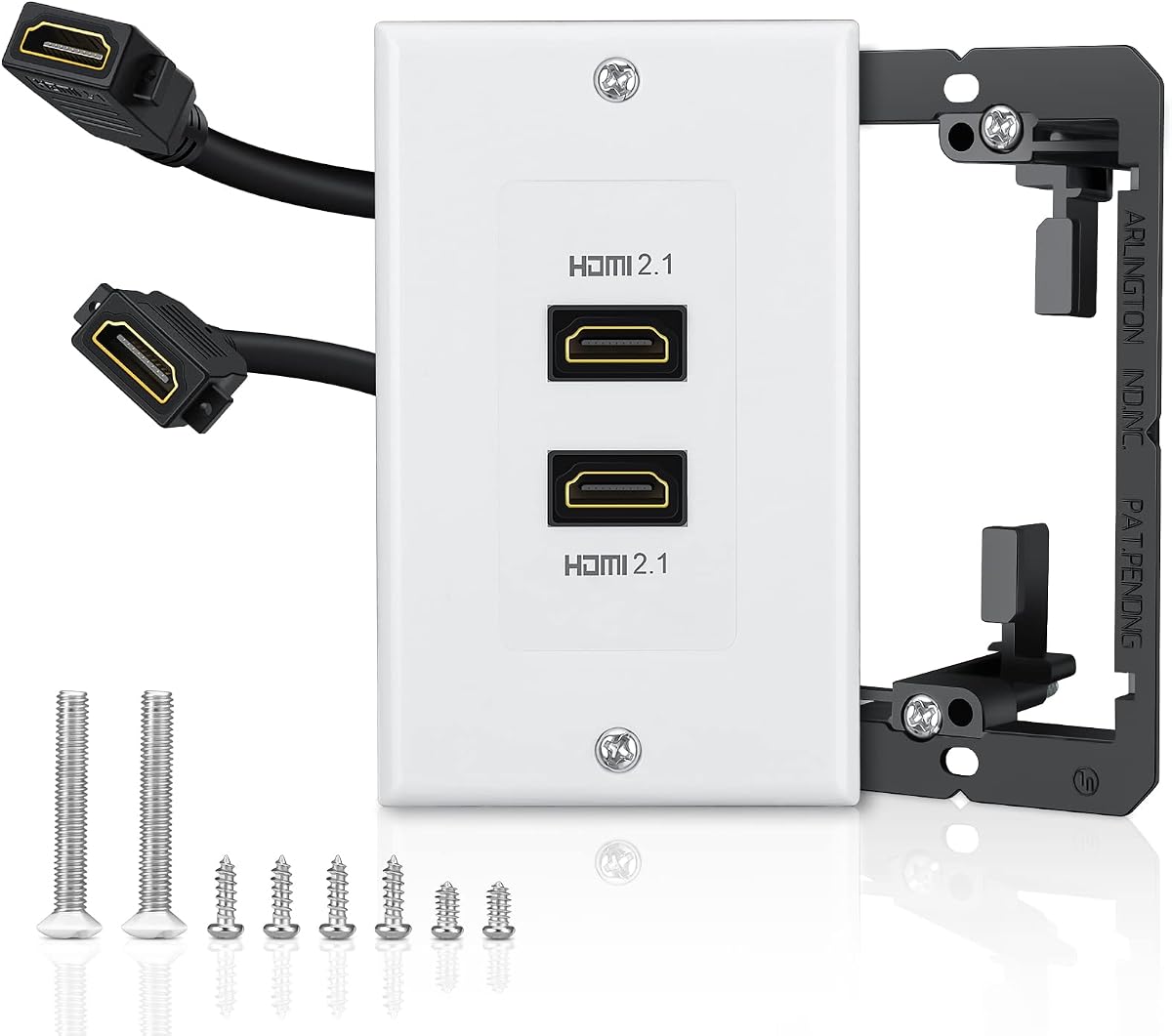
The ELECTOP HDMI 2.1 Wall Plate is the feature-forward option in this guide, carrying a 3.9 rating and specifications aimed at high-end displays, gaming systems, and home theaters. It provides two pass-through HDMI ports, an included low-voltage metal bracket, and a detachable rear extension cable for each connection. The result is a clean installation point for newer HDMI equipment.
We may earn a commission when you buy through this link, at no additional cost to you.
Its headline capability is 48 Gbps bandwidth, with listed support for 8K UHD at 60Hz and 4K UHD at high refresh rates. The plate also lists ALLM, VRR, eARC, HEC, 48-bit color, 32-channel audio, HDR, and 3D. These features make it more relevant to current gaming displays and high-bandwidth source devices than a conventional 4K-only wall plate.
The trade-off is that the most advanced specifications are only useful when the television, source, cable, receiver, and game console also support them. Its 3.9 rating is lower than those of several alternative products, so buyers should examine current customer feedback carefully. It also requires a compatible one-gang low-voltage mounting location rather than functioning as a loose panel adapter.
Pick this model for a new installation intended to remain relevant through several hardware generations, particularly if variable refresh rate, auto low-latency mode, 4K high-refresh gaming, or possible 8K use matters. For ordinary 1080p or 4K television viewing, a less advanced keystone insert may provide a simpler and more economical solution.
ALLM and VRR support distinguish this plate from basic pass-through hardware. They become useful when the connected television, console, and signal chain support the same features, allowing the installation to take advantage of modern gaming standards.
The included one-gang low-voltage metal bracket and detachable 0.66-foot HDMI extensions simplify construction of a permanent wall connection. The package also includes screws, making it a more complete starting point than a loose keystone insert.
We may earn a commission when you buy through this link, at no additional cost to you.
This HDMI 4K D-Type female-to-female panel coupler is a compact choice for builders who already have a D-type opening or need a pass-through connection inside a junction box. It has a 4.5 rating and supports 4K at 60Hz, 3D, 18 Gbps bandwidth, ARC, and HEC, covering a broad range of conventional home theater and desktop requirements.
We may earn a commission when you buy through this link, at no additional cost to you.
Its primary benefit is flexibility. The adapter can join two HDMI cables to extend a connection, and it can serve as a neat feed-through point in walls, junction boxes, or equipment panels. Placing the connection away from the display's exposed HDMI socket can also reduce wear from repeated plugging and unplugging.
Unlike a complete wall plate, this is a single panel component that must be installed into a compatible opening. It does not include the decorative plate, low-voltage bracket, or complete housing. It also lacks 8K bandwidth, VRR, and ALLM, making it better suited to established 4K systems than current high-end gaming installations.
This coupler is most appropriate for an installer, technician, or technically confident homeowner who wants a tidy inline connection without buying a full decorative kit. Choose it for 4K displays, computers, Blu-ray players, projectors, and conventional HDTVs where a standard D-panel opening is already available.
Keeping the HDMI plug seated in a panel-mounted coupler can reduce bending and movement at the source or display connector. This is particularly useful in installations where the attached cable has little strain relief or where equipment is moved less often.
The 18 Gbps bandwidth, 60-frame-per-second support, ARC, HEC, and 3D capability cover common 4K use cases. It is a straightforward coupling solution without active switching, scaling, or conversion.
We may earn a commission when you buy through this link, at no additional cost to you.
The Cable Matters 2-Pack 8K HDMI Keystone Jack is a modular alternative to a fixed wall plate. It carries a 4.5 rating and provides two vertically oriented female-to-female HDMI 2.1 inserts. Because they use a standard keystone format, they can be installed in compatible decorative wall plates or patch panels.
We may earn a commission when you buy through this link, at no additional cost to you.
The inserts support 8K at 60Hz and 4K at 120Hz, along with eARC, ALLM, VRR, 5.1 and 7.1 surround sound, and object-based audio. The 2.1 specification gives this option a modern feature set for wall-mounted televisions, projectors, and high-performance gaming installations.
The two-pack is useful because most rooms that conceal HDMI cables tend to need more than one connection. Inserts can be relocated as equipment changes, and compatibility with 90- or 270-degree adapters helps route cables in tight spaces. The principal limitation is that the wall plate or patch panel is not included, adding another component to the installation.
This is an attractive pick for custom installers and homeowners who want a professional, flexible layout. It is particularly compelling when the decorative wall plate already contains standard keystone openings or when two nearby display connections are required. Confirm that the chosen faceplate provides suitable cutouts before ordering.
Two inserts in one pack reduce the need to source matching keystone parts separately. They can support separate cables, provide pass-through points, or be positioned in adjacent openings for a cleaner multi-device installation.
The support for 8K, 4K high refresh, eARC, VRR, and ALLM brings current HDMI capabilities into a standard wall-plate format. Actual feature availability still depends on the connected source, display, cables, and any intervening electronics.
We may earn a commission when you buy through this link, at no additional cost to you.
The PENGLIN 2-Pack Waterproof HDMI Panel Mount Coupler is built for harsher installation environments and earns a 4.9 rating, the highest among the listed products. It provides two HDMI 2.0 bulkhead connectors with reinforced PA6BG33 construction and an IP67 waterproof rating. Those qualities make it especially relevant to outdoor cabinets, workshop equipment, and protected technical installations.
We may earn a commission when you buy through this link, at no additional cost to you.
Each coupler can join two HDMI cables or provide a panel-mounted pass-through connection. The standard round mounting hole allows the hardware to be fixed directly into a prepared panel, while the product also offers the option of using it without that fixed mounting method. It is compatible with HDTVs, projectors, monitors, game consoles, Blu-ray players, PCs, and streaming devices.
The tradeoff is that the specifications focus on 4K video and uncompressed stereo sound rather than the advanced feature set of HDMI 2.1. It does not list VRR, ALLM, eARC, or 8K support. In addition, installers must prepare a suitably sized round panel opening and make sure the mating cables and equipment respect the stated bandwidth and environmental conditions.
Choose this option when physical durability and moisture resistance matter more than next-generation gaming features. It is a strong candidate for a protected outdoor media area, an equipment cabinet, or a custom enclosure where a conventional decorative wall plate would be unsuitable.
The reinforced housing and IP67 designation make the couplers better suited to exposed or variable environments than a basic indoor wall insert. This makes them useful where dust, moisture, or frequent maintenance could shorten the life of a conventional connector.
The standard round opening supports direct panel installation, and the two-piece pack offers more than one connection point. The couplers can also be used as inline joins when a permanent panel mount is not required.
We may earn a commission when you buy through this link, at no additional cost to you.
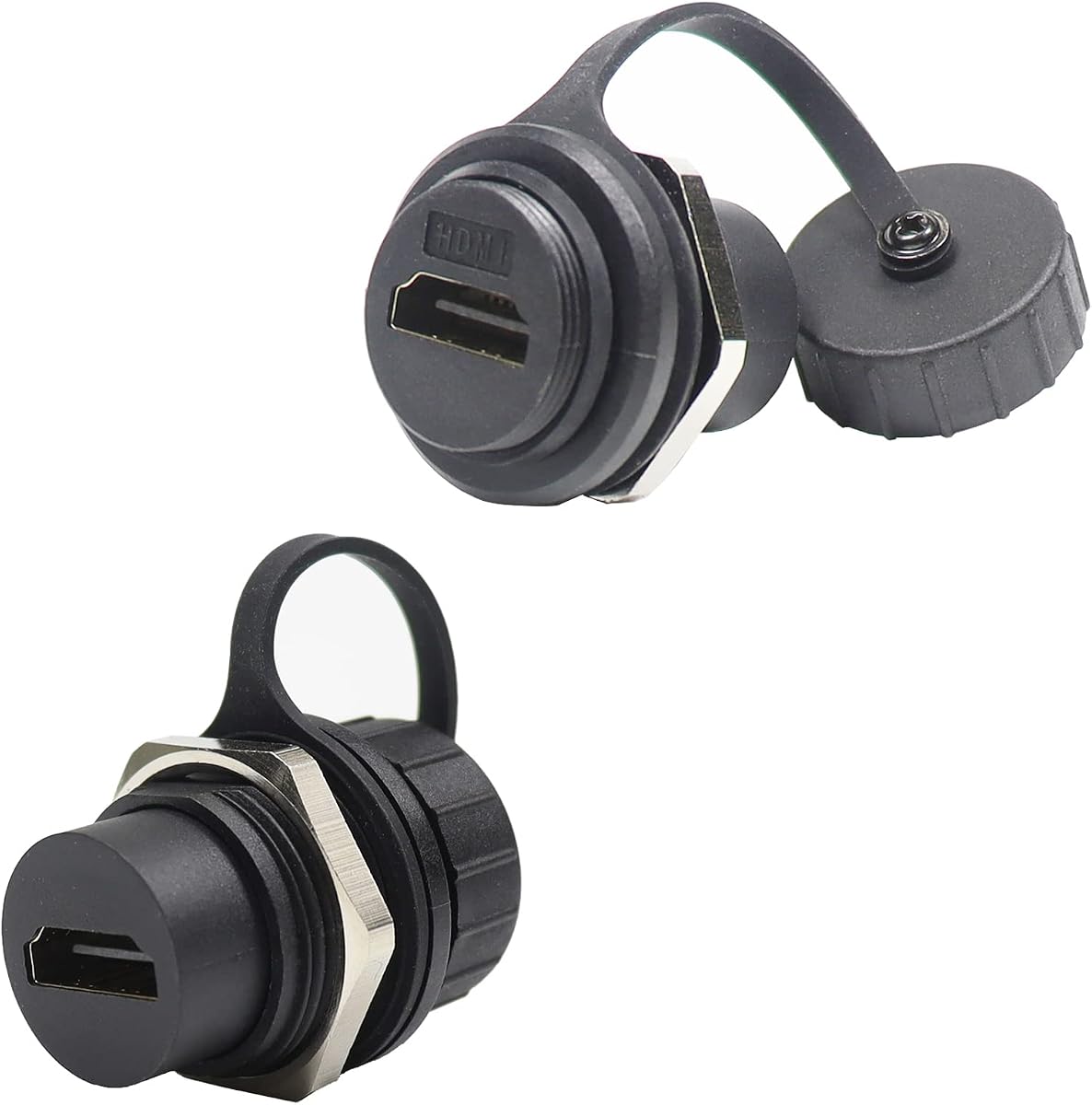
The M25 Waterproof HDMI Bulkhead is a rugged female-to-female panel connector for technical installations that need a secure metal housing. Its 4.4 rating reflects a durable design with an 18 Gbps bandwidth level, support for 4K HDR and 1080p at 60 frames per second, and an included water-and-dust cap.
We may earn a commission when you buy through this link, at no additional cost to you.
The shell is made from zinc die-cast material described as flame retardant, ultraviolet resistant, and resistant to aging. Its phosphor-bronze contacts receive a 7-micrometer gold plating, which supports reliable contact and corrosion resistance. Installation is field-friendly because the connector is designed for standard panel mounting without soldering.
The main constraint is the need to create the correct M25 panel opening. It is also limited to HDMI 2.0-era performance rather than 8K, VRR, or ALLM. While the protective cap adds environmental resistance, the connected equipment and cable run still need to support the intended resolution and refresh rate.
This bulkhead is ideal for an enclosure, cabinet, control room, or outdoor entertainment installation where a standard indoor keystone jack would be too exposed. It is a better fit for technical builders than for someone wanting a decorative wall plate, and the two included connectors allow a room or cabinet to have more than one protected connection.
The die-cast shell is designed for a more rugged installation than a lightweight plastic keystone insert. Gold-plated contacts help maintain conductivity and resist corrosion, supporting repeated connections in a permanent installation.
Once the M25 panel hole has been made, the female-to-female bulkhead can be fixed and connected without soldering. This reduces installation complexity for technicians building custom cabinets, racks, or weather-resistant media points.
We may earn a commission when you buy through this link, at no additional cost to you.
The Cable Matters 2-Pack 4K HDMI Keystone Jack is an economical way to create permanent HDMI pass-through points. Its 4.6 rating is among the strongest in the guide, and the two-pack provides enough inserts to handle a television and a nearby streaming device, a projector and a game console, or a pair of display locations.
We may earn a commission when you buy through this link, at no additional cost to you.
These vertically oriented female-to-female inserts snap into standard keystone openings and support HDMI features including 4K, 3D, ARC, CEC, and Ethernet when the connected cable and equipment support them. Gold-plated contacts are intended to support signal transmission and resist corrosion. Installation is quick and does not require permanently fixing the insert in place.
The tradeoff is that the decorative wall plate or patch panel is sold separately. These are also 4K-era inserts rather than full HDMI 2.1 components, so buyers should not expect listed support for 8K, VRR, ALLM, or eARC. Compatibility with 90- or 270-degree adapters helps in tight locations, but those adapters are also separate accessories.
For a straightforward 4K home theater, office, or conference room, this is a practical recommendation. It combines broad everyday feature support with reusable installation and a strong customer rating. Choose it when you need standard keystone compatibility and dependable 4K pass-through rather than premium next-generation bandwidth.
A keystone insert creates a polished cable-management point that blends into a matching decorative wall plate. The unobtrusive design is especially valuable in finished rooms where exposed HDMI leads would be visually distracting.
The snap-in construction supports quick placement and removal without a permanent fastening process. This makes the inserts convenient when equipment is upgraded, cables are rerouted, or the room layout changes.
We may earn a commission when you buy through this link, at no additional cost to you.
The Two-Port HDMI Wall Plate provides a direct solution for concealing HDMI cables and reducing clutter around a wall-mounted television. It has a 4.4 rating and includes two front-facing female connections with corresponding rear connections, allowing source equipment to be located elsewhere in the room.
We may earn a commission when you buy through this link, at no additional cost to you.
The plate supports 4K, HDR, UHD, 3D, ARC, and Ethernet, and is described as backward compatible with HDMI 2.0, 1.4, 1.3b, and 1.3a. Its screw-free rear connector is intended to reduce installation damage and simplify attachment. The white faceplate is designed to coordinate with common room finishes.
The main drawback is that the product does not advertise the same extensive bandwidth list found on HDMI 2.1-focused models. It also provides less detail about bracket inclusion, exact pigtail construction, and advanced gaming features. Buyers seeking VRR, ALLM, eARC, or 8K should choose hardware that explicitly lists those capabilities.
This plate is a good fit for a conventional living room, game room, or home theater where 4K video and ARC are the main requirements. It is particularly attractive to someone who values a simple two-port layout, concealed wiring, and minimal visible hardware over advanced high-refresh features.
Routing the permanent cable run inside the wall leaves only the front sockets visible beside the display. This creates a cleaner appearance and makes it easier to connect a source without unplugging equipment positioned on a stand.
Support for 4K, HDR, 3D, ARC, and Ethernet covers common home entertainment expectations. The listed backward compatibility also makes it relevant for rooms containing a mixture of newer and older HDMI equipment.
We may earn a commission when you buy through this link, at no additional cost to you.
The Y.D.F 3-Way HDMI Switcher is not a traditional in-wall junction box, but it is a valuable alternative for installations with several source devices. Its 4.5 rating, three HDMI 2.0 inputs, and two-way RCA-to-HDMI conversion make it suitable for combining modern consoles and streaming devices with older composite AV equipment.
We may earn a commission when you buy through this link, at no additional cost to you.
The HDMI section supports current devices such as PCs, Blu-ray players, Apple TV, Fire TV, Roku, Switch, and multiple Xbox and PlayStation generations. The converter section handles systems including Sega, Nintendo 64, GameCube, SNES, PlayStation 1 through 3, Xbox, set-top boxes, VHS, and VCR equipment. Switching between 4:3 and 16:9 formats helps legacy content fit modern displays appropriately.
Its important limitation is cable length. The product guidance states that the combined input and output HDMI cable length should remain within 10 feet to reach 4K at 60Hz. It is also a desktop signal-management device rather than a plate or keystone for concealing cables in a wall, so it solves source selection and conversion rather than neat in-wall termination.
Choose this unit for a gaming room that mixes modern HDMI consoles with retro hardware or composite video sources. It is less appropriate for a long concealed cable run or an installation that needs 8K, VRR, or eARC.
The combination of three HDMI inputs and two RCA-to-HDMI conversion paths reduces the number of separate devices required in a mixed gaming room. Users can move between contemporary consoles and older composite systems without reconnecting equipment behind the television.
A one-key switch and plug-and-play design keep source changes straightforward. The aluminum housing and signal-processing design are intended to support consistent use in a dedicated entertainment setup.
We may earn a commission when you buy through this link, at no additional cost to you.
The Y.D.F 4-Way HDMI Switcher is the broadest source-management option in this guide. It has a 4.6 rating and combines four HDMI 2.0 inputs with a four-way RCA composite-to-HDMI converter. That makes it particularly appropriate for a game room containing several current consoles, streaming devices, and retro systems.
We may earn a commission when you buy through this link, at no additional cost to you.
Modern source support includes PCs, Macs, Xbox 360, Xbox One, PS4, PS5, Blu-ray and DVD equipment, Chromecast, Switch, Apple TV, Fire Stick, and Roku. The conversion side supports Sega, Nintendo Wii, Nintendo 64, GameCube, SNES, PlayStation generations 1 through 3, Xbox, set-top boxes, VHS, VCR, and DVD players. Outputs can feed HD-ready or full-HD televisions, projectors, and monitors.
As with the smaller three-way model, this device is a signal hub rather than an in-wall junction box. It also notes that combined input and output HDMI cable length should stay within 10 feet for 4K at 60Hz. It does not list 8K, eARC, VRR, or ALLM, making it a practical mixed-source solution rather than a premium high-refresh gaming interface.
This pick is best for a collector or family with several consoles and legacy AV devices that need to be consolidated. It offers more input selection than the three-way version and a strong rating, but buyers who need concealed wiring should use an in-wall plate or keystone coupler instead.
Four HDMI inputs provide more capacity for a room with several consoles, streaming boxes, or disc players. The four conversion channels expand that flexibility to include a substantial collection of older composite-based systems.
Combining modern HDMI and legacy AV conversion in one enclosure reduces visual clutter around a display. One-key switching and selectable aspect ratios make the hub practical for casual users as well as dedicated retro-gaming setups.
We may earn a commission when you buy through this link, at no additional cost to you.
The right HDMI junction box depends on your display, source equipment, installation environment, and desired level of cable concealment. Start with the ports and features you need, then verify that the physical mounting system matches the wall, cabinet, panel, or junction box where it will be installed.
Choose a junction box that supports the highest resolution and refresh rate you actually intend to use. A 4K-capable unit may be sufficient for a 4K television, while an 8K television paired with a high-end console or computer may call for HDMI 2.1 hardware with 48 Gbps bandwidth. Also consider 4K high-refresh gaming: support for 4K at 120Hz or 144Hz is more relevant than a basic 4K-at-60Hz label.
ARC can return television audio to a soundbar or receiver, while eARC is designed for more advanced audio formats and object-based sound. Gaming installations may benefit from VRR for smoother frame pacing and ALLM for automatic low-latency mode. Verify that every component in the chain supports the feature; a junction box cannot create VRR, eARC, or surround audio that the source and display do not provide.
Wall plates usually include a faceplate and may include a low-voltage bracket, while keystone inserts require a separate decorative plate or patch panel with compatible openings. Panel-mount couplers need a correctly sized hole in a cabinet, enclosure, or custom panel. Bulkhead products are designed for rugged equipment housings, and waterproof versions suit protected or exposed installations. Confirm the opening dimensions and included hardware before ordering.
A junction box is useful only when cables can reach it without being bent sharply, overloaded, or forced through an opening. In-wall installations generally perform best with properly routed cable, secure connections, and no excess strain on the HDMI plugs. For a long run, use an HDMI cable appropriate for the length and avoid sharp bends. For signal hubs such as the Y.D.F switchers, observe the stated 10-foot combined cable guidance for 4K at 60Hz.
A pass-through junction box provides a permanent connection point and does not choose among sources. A switcher adds source selection and may include converters for legacy audio-video equipment. If all sources already reach the display through one routed cable, a simple plate or keystone is usually more appropriate. If several consoles and older composite devices need frequent selection, a multi-input switcher may offer a more convenient solution.
A white wall plate is designed to blend with common interior finishes, while a keystone insert can be placed in a decorative plate chosen to match the room. A low-profile insert avoids visible cable loops but may require more careful routing behind the wall. Rugged bulkheads prioritize protection and serviceability over decorative appearance. The best choice depends on whether the connector will be seen daily, mounted out of sight, or exposed to dust and moisture.
Look for female-to-female construction, solid mounting hardware, durable contact materials, and a housing suited to the installation location. Gold-plated contacts can support corrosion resistance in frequently connected ports. Metal or reinforced plastic housings are useful in equipment rooms and outdoor cabinets, while standard wall plates are generally intended for protected interiors. The number of included pieces also matters when a wall plate requires separate inserts or mounting hardware.
A panel or wall-mounted connection point can reduce repeated plugging and unplugging at the television or source's native HDMI socket. That benefit matters in public rooms, conference spaces, and home theaters where cables are connected frequently. It does not remove the need to support the cables properly, and the junction box itself should not be treated as a substitute for strain relief or strain-free cable routing.
Begin by identifying the source, display, and any receiver or converter that will sit between them. Connect the appropriate HDMI cable to the rear of the wall plate or keystone insert, route it through the approved opening, and connect the front cable to the display or equipment. With a switcher, connect modern sources to the HDMI inputs and older composite equipment to the RCA conversion inputs before selecting a source.
Install the junction box only after confirming its dimensions and connector orientation. Secure the bracket or panel opening, avoid overtightening screws, and ensure the HDMI plugs insert fully without forcing them at an angle. Keep cables supported on both sides of the connection so their weight does not pull directly against the receptacle. A small amount of strain relief can protect a frequently used junction point.
For cleaning, disconnect power from connected equipment and gently wipe the exterior with a dry or lightly damp cloth. Do not push moisture, cleaning fluid, or debris into the female sockets. Outdoor or damp-location bulkheads should have their protective caps closed when not connected. Periodically check the tightness of mounting hardware and inspect cables for pinching, sharp bends, or damaged connectors.
An HDMI junction box is a connection point that lets an HDMI cable terminate inside a wall, cabinet, panel, or other enclosure. It can provide a neat front-facing socket while a rear pigtail, coupler, or fixed cable continues the connection to a display or source. The exact construction may be a wall plate, keystone insert, bulkhead connector, switcher, or a combination of these formats.
Not always. A 4K television operating at 60Hz can work with a compliant HDMI 2.0-style junction box rated for 18 Gbps. HDMI 2.1 becomes more important for 4K at 120Hz or higher, 8K video, VRR, and ALLM. You also need compatible source equipment, cables, and a television that can actually use those features.
Some models do, but the product specification must specifically mention ARC or eARC. The connected television, soundbar, receiver, and source also need compatible HDMI audio support. A basic coupler passes the cable connection through, while ARC and eARC behavior depends on the complete device chain.
No. A keystone jack is a modular insert that snaps into a compatible opening in a decorative wall plate or patch panel. A complete HDMI wall plate usually includes the faceplate, insert, pigtail, and sometimes a low-voltage mounting bracket. If a keystone product is sold without a plate, plan to purchase a compatible plate separately.
Yes, although its protective construction may be unnecessary in a dry living room. A bulkhead is especially useful in outdoor cabinets, workshops, garages, and equipment enclosures where dust or moisture may be present. The installation still needs a correctly sized panel opening, secure mounting, and compatible HDMI cables.
It can be a clean and practical solution when cables are routed properly and the in-wall run does not exceed the capabilities of the cable and junction hardware. Avoid sharp bends, damaged insulation, and connectors under strain. For very long runs or complex installations, ask a qualified installer to evaluate the complete signal path before work begins.
Standard wall plates and keystone couplers are pass-through devices and do not switch sources. A dedicated HDMI switcher is required when several consoles share one display connection. Some switchers also include RCA-to-HDMI conversion for retro consoles, although those products generally target 4K at 60Hz rather than advanced HDMI 2.1 gaming features.
Support the cable on both sides of the connection and avoid placing tension directly on the HDMI plug. In-wall installations should use appropriate cable restraints and smooth routing paths. A panel-mounted junction point can protect the display's native socket, but it still needs properly seated plugs and stable support to remain reliable.
The TNP 2 Port HDMI Wall Plate is the most versatile all-around choice, combining two permanent connection points with broad 4K, ARC, and eARC support. The Cable Matters 4K Keystone Jack offers the strongest budget-oriented package for modular installations, while the ELECTOP HDMI 2.1 Wall Plate is the premium choice for 8K potential, high-refresh gaming, VRR, and ALLM.
Prioritize the features your system will actually use rather than choosing on bandwidth alone. Confirm the wall opening, included bracket, cable length, environmental requirements, and whether you need a pass-through connection or active source switching. Rugged bulkheads suit protected technical installations, while decorative plates and keystone inserts are better suited to finished home interiors.
Finally, check the current product listing, customer feedback, compatibility details, and price before ordering. HDMI standards, supported refresh rates, and accessory bundles can change, and a careful comparison at the time of purchase will help ensure that the selected HDMI junction box integrates cleanly with your display, sources, cables, and room.