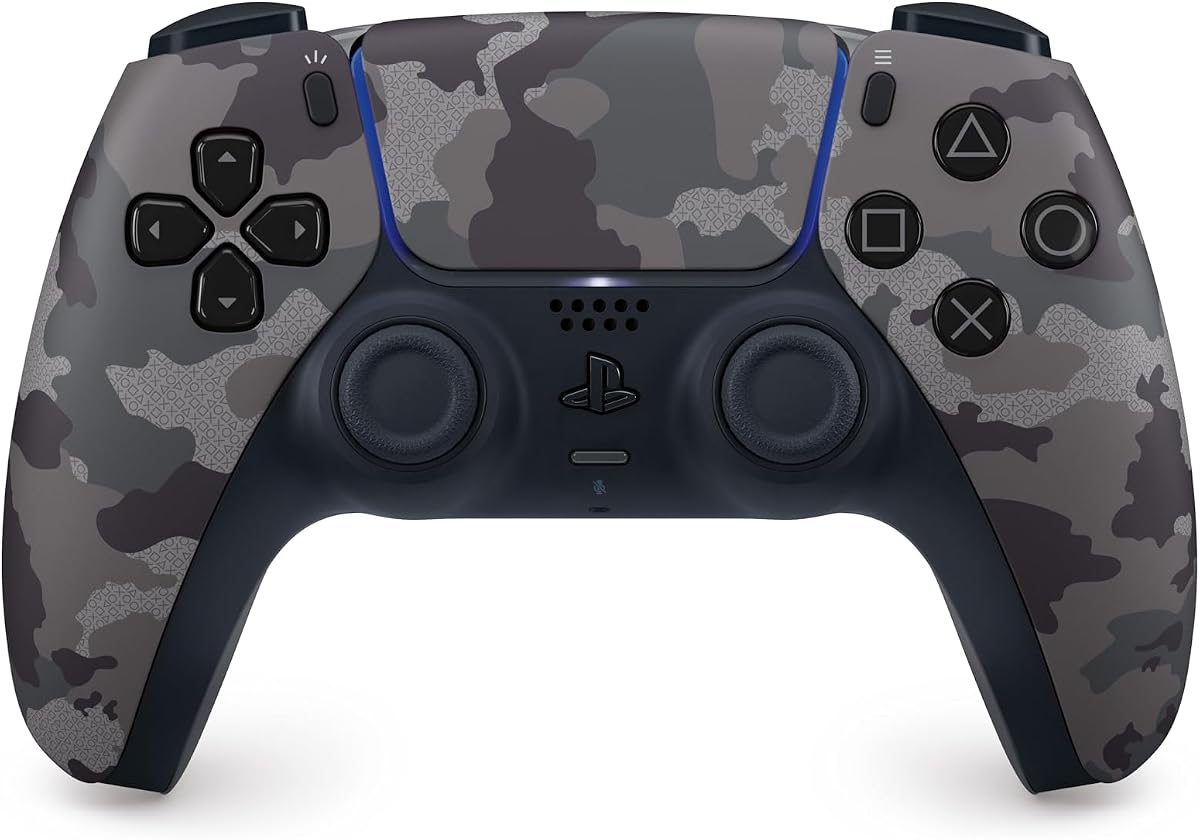
PlayStation DualSense Gray Camouflage
4.6Editor score
Responsive haptic feedback
Adaptive trigger tension
Built-in microphone and mute
Gta 6 PS5 Controller guide comparing ten official, Hall Effect, RGB, wireless, and PC-compatible pads for feedback, features, battery life, and setup tips.
A great PS5 controller can make an open-world driving game feel more immediate, responsive, and comfortable. The right pad should suit the way you play, whether that means navigating crowded streets, managing sensitive vehicle controls, or spending long sessions in action sequences and online competition.
This guide compares ten controllers selected for PS5 and Grand Theft Auto VI players, including official DualSense models and third-party alternatives with Hall Effect sticks, adaptive features, RGB lighting, motion sensors, macros, and multi-platform support. Feature details come from the supplied product information rather than personal testing.
Each pick highlights its strongest qualities and important limitations, helping you narrow the field before making a purchase. Ratings, feature availability, firmware behavior, and bundle details can change over time, while prices also fluctuate, so check the current listing and compatibility details before ordering.
4.6Editor score


3.7Editor score
The table below compares the ten shortlisted pads across official design, stick technology, feedback, connectivity, lighting, battery capacity, and platform support. It is a quick way to identify the most relevant controller before reading the detailed reviews and compatibility notes.




The DualSense Wireless Controller Grand Theft Auto VI White Limited Edition is the most thematically appropriate controller in this guide. Its white appearance is explicitly designed for players visiting the sun-soaked Vice City setting, making it a natural choice for someone who wants the hardware and the game to share a consistent visual identity. No numerical customer rating was supplied, so the evaluation here focuses on documented functionality rather than an invented score.
We may earn a commission when you buy through this link, at no additional cost to you.
Its standout qualities are the standard DualSense combination of haptic feedback, adaptive triggers, and flexible connectivity. Haptic feedback is intended to simulate in-game actions and environmental effects, while adaptive triggers provide varying force and tension at the fingertips. Those qualities can be especially useful for fine vehicle inputs, actions that require a held trigger, and environmental interactions that benefit from a greater sense of physical response.
The trade-offs are mostly about specialization rather than basic performance. This is an officially themed controller, but the supplied feature information does not mention Hall Effect sticks, programmable rear paddles, macro recording, RGB lighting, or an adjustable battery specification. Buyers who prioritize competitive shortcuts or customizable controls over the official theme may find a more specialized third-party option more practical.
This is the best overall recommendation for a Grand Theft Auto VI enthusiast who values authentic presentation and proven DualSense feedback. It is especially attractive as a display-friendly centerpiece, a new controller for the launch collection, or a gift tied directly to the game. Confirm current availability, warranty terms, and console compatibility on the listing before purchasing, particularly if you are choosing between a themed edition and a feature-focused alternative.
The white limited-edition theme gives this controller a direct connection to the Vice City setting. More importantly, it retains the recognizable DualSense arrangement, so players moving from another official controller should not have to relearn the location of standard buttons, triggers, and sticks.
Haptic feedback and adaptive triggers add physical information that visual and audio cues alone cannot communicate. The result is potentially more engaging during driving, combat, and environmental interactions, provided the game and console translate those effects as intended.
We may earn a commission when you buy through this link, at no additional cost to you.
This Hall Effect anti-drift controller combines several features that serious PS5 players often prioritize: magnetic analog sticks, programmable rear paddles, macros, turbo controls, motion sensing, RGB lighting, and dual vibration. It is designed for PS5, PS5 Slim, PS5 Pro, and Windows PC, making it a broad option for players who alternate between console and computer gaming.
We may earn a commission when you buy through this link, at no additional cost to you.
Hall Effect sticks are the central selling point because they are designed to minimize analog drift while maintaining precise deadzone control. The two rear paddles can be assigned to actions that would otherwise require awkward combinations, while the macro system can record and replay sequences. The 6-axis gyroscope adds motion input, and the 1000mAh rechargeable battery is suitable for extended wireless sessions.
The product information includes an important firmware notice: recent PS5 system updates may create temporary vibration and audio compatibility problems, and a firmware package and instructions are available through the user guide. Buyers should therefore treat firmware maintenance as part of ownership rather than assuming every third-party feature will always behave identically after a console update.
This controller is a strong alternative for players who want more customization than an official DualSense offers. It is less compelling for someone who values minimalist design above all else, but the programmable controls and anti-drift sticks can be useful in demanding driving, action, and competitive sessions. Install the firmware and read the setup guide before first use.
Rear paddles, button remapping, and macro recording can reduce repetitive inputs or place useful actions closer to the player's thumbs. These functions require setup, but they offer more flexibility than a standard controller layout for players who develop specific routines.
Hall Effect sensing addresses a common concern with analog sticks: input drift. The advertised benefit is more consistent movement and cleaner deadzone behavior, although software, deadzone settings, and maintenance habits still influence the overall experience.
We may earn a commission when you buy through this link, at no additional cost to you.
The NBCP Wireless Controller is a balanced third-party option with a 4.5 customer rating, dual vibration motors, a 6-axis gyroscope, programmable macros, adjustable turbo, LED lighting, and support for PS5, PS5 Pro, PS5 Slim, and Windows PC. It does not attempt to compete by adding every possible control, instead focusing on the features that many console players use most often.
We may earn a commission when you buy through this link, at no additional cost to you.
Its strongest benefits are accessible rather than extreme. One-click wake-up helps shorten the time between sitting down and starting a session. The macro and turbo functions support repeatable actions, while the gyro adds motion input for compatible games. A built-in speaker and 3.5mm audio jack provide private audio options, and the ergonomic grip is intended to remain comfortable during longer sessions.
The main compromise is that the supplied specifications do not identify the stick sensors as Hall Effect components, so buyers focused specifically on long-term drift resistance should investigate that feature separately. There is also a firmware notice explaining that recent PS5 updates may temporarily affect vibration and audio. Updating through the product's user guide is the responsible way to ensure the advertised functions work correctly.
The NBCP controller works well for PS5 players who want wireless convenience, flexible macros, motion control, and a well-rounded feature set without relying on a specialized theme. It is also a practical choice for PC gaming. Confirm the current platform list, update instructions, and headset requirements before buying, particularly if your setup depends on the 3.5mm connection.
The one-click wake-up function reduces friction at the start of a session. An ergonomic grip structure also makes the controller more practical for long play periods, where hand comfort can become as important as raw input speed.
Programmable macros and adjustable turbo can help players streamline repeated sequences. They are optional tools rather than mandatory features, so users who prefer a standard control scheme can simply ignore them.
We may earn a commission when you buy through this link, at no additional cost to you.
The BETMI Wireless Controller stands out as a budget-focused alternative that still includes Hall Effect joysticks, 6-axis motion sensing, a multi-color light bar, linear triggers, turbo, vibration, and an 800mAh rechargeable battery. Its 3.7 customer rating is lower than the strongest alternatives, but the documented feature set is substantial for the category.
We may earn a commission when you buy through this link, at no additional cost to you.
Compatibility covers PS5, PS5 Pro, PS5 Slim, and Windows 8, 10, and 11, with both Bluetooth 5.3 and wired connection modes. Hall Effect sticks are advertised to last up to five million cycles while providing precise, responsive input. The listed battery can support up to eight hours of play, and the controller works with the original charging station while supporting USB-C charging.
There are two notable limitations. The controller has a speaker but no microphone, so voice communication requires an external headset. In addition, first-time Bluetooth pairing with the PS5 requires a USB-C data cable and a press of the Home button. These are understandable setup steps, but they are less convenient than simply using a controller that was designed and bundled with the console.
This is a sensible recommendation for a player who wants anti-drift sticks and broad features without choosing an official premium controller. It is particularly suitable for PS5 owners who also use Windows PC and want one controller for both environments. Read the pairing instructions before first use, check the headset arrangement you need, and compare the current listing if stick feel is your top priority.
The main reason to shortlist this controller is its use of Hall Effect joysticks. That technology is intended to resist drift and preserve accurate movement, making the pad appealing to players who have had trouble with conventional analog sticks.
Bluetooth 5.3 and wired modes give players a choice between cable-free convenience and a stable physical connection. The 800mAh battery and advertised eight-hour runtime are also useful for extended sessions away from a charger.
We may earn a commission when you buy through this link, at no additional cost to you.
The Akalyptra Wireless Controller combines Hall Effect joysticks and triggers with two rear paddles, remapping, a 10-hertz turbo mode, eight RGB lighting modes, dual vibration, and a 3.5mm jack. Its 4.0 rating suggests a generally positive reception, while its platform list extends beyond the usual PS5-and-PC combination to include Steam Deck.
We may earn a commission when you buy through this link, at no additional cost to you.
The remappable paddles are the defining feature. They allow complex actions to be bound without taking both thumbs away from the sticks, which can be useful in action sequences or games where rapid combinations matter. Hall Effect components on both sticks and triggers seek accurate input and fast response, while the RGB system offers either a steady color or a changing rainbow appearance.
The product information includes a caution that the speaker may not work and directs buyers to an upgrade tutorial and support package if that occurs. The initial PS5 connection process also requires a USB cable, followed by pressing Home to power on and reconnect wirelessly. These caveats mean the controller demands a little setup attention before it is ready for normal use.
This is a good match for players who enjoy configuring their equipment or who want the option to use the same controller on a PS5, PC, or Steam Deck. It is less suitable for someone expecting a completely hands-off setup, particularly if dependable onboard speaker audio is important. Follow the supplied pairing procedure and confirm that the current firmware or upgrade guidance covers your console software.
The two rear buttons can be programmed or mapped to useful actions, offering additional input without cluttering the face of the controller. This flexibility is particularly valuable for players who want to build a more efficient control scheme over time.
Eight RGB modes let the controller match different moods or setups, while Steam Deck support expands its potential use. Confirm the exact controls and platform behavior you need before purchasing, since device-specific settings can differ.
We may earn a commission when you buy through this link, at no additional cost to you.
The Nonbliep LED Wireless Controller is a white third-party pad with a 4.2 rating, customizable lighting, dual vibration, a 6-axis gyroscope, macro and turbo functions, a built-in speaker, and a 3.5mm TRRS headphone jack. It supports PS5 and Windows, making it a straightforward option for players who want a familiar modern console layout with personalized illumination.
We may earn a commission when you buy through this link, at no additional cost to you.
Lighting is the defining feature. A dedicated lighting button switches between colors and effects, and a color memory function restores the preferred setting when the controller is used again. The upgraded joysticks are advertised to reduce deadzone behavior and extend service life, while the gyro and vibration motors support more immersive compatible experiences.
Firmware is the most important caveat. The listing states that some controller functions may stop working after official console updates and provides a short URL for obtaining firmware updates. The controller also includes a speaker but no microphone, and the TRRS jack is not compatible with Apple headphones. These limitations should be considered if private chat or a specific headset connection is central to your setup.
This controller suits players who want the aesthetics of a white pad, persistent RGB preferences, and standard PS5 functions in a single device. It is less compelling for buyers specifically seeking Hall Effect anti-drift components or onboard voice chat. Update the firmware as directed and use a compatible wired headset if communication is required.
The color memory function avoids the need to reset illumination after every power cycle. For players who use the controller in different sessions, this small convenience makes the visual customization more useful.
Upgraded sticks with a reduced deadzone should support more immediate directional responses. Combined with dual vibration and motion sensing, the controller covers several of the feedback features players expect from a modern PS5 pad.
We may earn a commission when you buy through this link, at no additional cost to you.
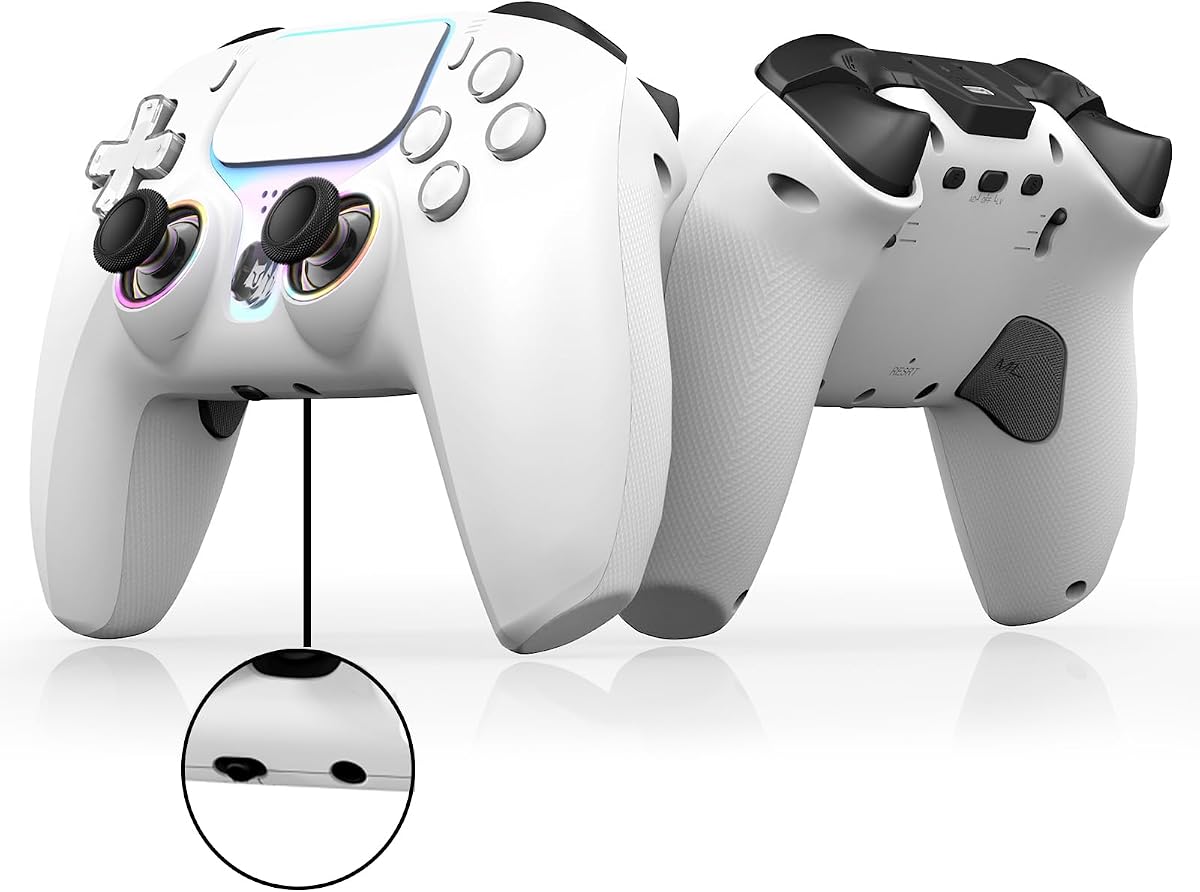
The NBCP Hall Effect Controller combines magnetic sticks and triggers with two programmable rear paddles, macro functions, RGB joystick rings, crystal-style face buttons, dual vibration, and a 6-axis gyroscope. It is compatible with PS5, PS5 Pro, PS5 Slim, Windows PC, Android, and iOS, subject to the setup guide.
We may earn a commission when you buy through this link, at no additional cost to you.
Its most significant technical feature is the use of Hall Effect sticks and triggers, which the product information presents as a way to avoid drift and improve input precision. The rear paddles can bind complex combos and quick actions, while macro recording can automate sequences. RGB rings make the sticks easier to identify in a dim room, and the transparent face buttons give the controller a distinctive appearance.
Bluetooth 5.0 supports low-latency wireless use on Android and PC, while USB-C provides a wired alternative for stable play. The 1000mAh rechargeable battery is designed for extended sessions, and the 3.5mm jack supports private headset audio. As with many third-party pads, the exact mobile behavior and configuration steps matter, so the setup guide should be consulted before switching platforms.
This is a strong pick for a player who wants anti-drift components and visual customization in the same controller. It may be less appropriate if understated styling is the priority or if you require a published customer rating to guide the decision. Its broad feature set makes it a credible choice for a PS5-centered setup with occasional PC or mobile use.
Extending Hall Effect sensing to the triggers makes this controller more comprehensive than options limited to the analog sticks. The intended result is more consistent input and reduced dependence on deadzone corrections.
Programmable rear paddles and stored macros offer two ways to streamline repeated inputs. Players can start with a simple assignment and expand their setup only as their routines become more defined.
We may earn a commission when you buy through this link, at no additional cost to you.
The Xexvyrin LED Wireless Controller is a programmable PS5 pad with a 4.1 rating, dual vibration, macro and turbo functions, a 6-axis sensor, a 1000mAh battery, a built-in speaker, and a 3.5mm jack. It supports PS5, PS5 Pro, PS5 Slim, and Windows PC, while clearly excluding PS4 compatibility.
We may earn a commission when you buy through this link, at no additional cost to you.
Its strongest differentiator is the ability to program as many as 16 keys and select a turbo setting that operates ten times per second. Those options are aimed at players who want to create custom control sequences. The controller also includes an ergonomic form, balanced weight, soft-touch materials, and a non-slip surface intended to remain stable even when hands become sweaty during long sessions.
The setup requirements deserve careful attention. The listing instructs buyers to follow an update guide and watch a tutorial so vibration, speaker, and headphone-jack functions operate correctly. First use also requires connecting through the included or original USB-C data cable and pressing Home. The controller provides a speaker but no microphone, and its TRRS headphone connection is not compatible with Apple headphones.
This controller makes the most sense for players who actively tune their setup and do not mind a more involved installation process. The customizability could be valuable for repetitive actions, while the lighting memory and one-click wake-up help offset some of the setup work. It is a less natural choice for buyers seeking a completely plug-and-play experience.
Supporting up to 16 keys gives players considerable room to create macros. The 10-times-per-second turbo setting offers a quick way to automate repeated presses, though competitive rules and individual game policies should always be considered.
The form-fitting shape, balanced weight, soft-touch materials, and non-slip surface are designed to reduce movement during intense sessions. These physical details can be just as important as electronic features when a controller is used for hours.
We may earn a commission when you buy through this link, at no additional cost to you.
The linhugame Wireless Controller is a camo red PS5 pad with a 4.0 rating, Hall Effect joysticks, 6-axis motion sensing, adjustable vibration, turbo controls, an 800mAh battery, and Bluetooth 5.3 connectivity. Compatibility covers PS5, PS5 Pro, PS5 Slim, and Windows PC, and the controller can be used with the original charging dock.
We may earn a commission when you buy through this link, at no additional cost to you.
Its visual identity is immediately distinctive, while its technical foundation focuses on familiar essentials. Hall Effect sticks are advertised to last up to five million cycles and provide precise movement, and the linear triggers offer a responsive alternative for acceleration and shooting actions. Vibration motors sit in the side handles, with adjustable intensity allowing the user to tune the feedback to a preferred level.
There are a few setup caveats. The first charge may require pressing the reset button, and some console versions may need a headset connected to activate vibration, microphone, or speaker behavior. The product information also notes that joystick caps can appear slightly raised after shipping and should be pressed down firmly. A reset button is available as a troubleshooting step for charging or connection issues.
This is a good pick for someone who wants an anti-drift controller with a more rugged, military-inspired appearance. It offers enough adjustability for regular PS5 play while remaining compatible with PC. Follow the initial charging and pairing instructions closely, and check whether your console and preferred headset setup require any of the listed troubleshooting steps.
The stated five-million-cycle life for the Hall Effect sticks makes this option appealing for frequent players. Compatibility with the original charging station also avoids the need to replace one of the console's familiar accessories.
Adjustable vibration lets players tailor the physical response to their setup. The camo red finish gives the controller a distinct look that stands apart from both standard official models and heavily illuminated alternatives.
We may earn a commission when you buy through this link, at no additional cost to you.
The PlayStation DualSense Wireless Controller in Gray Camouflage has the highest listed customer rating among the controllers reviewed here, at 4.6. It offers an official design, haptic feedback, adaptive triggers, a built-in microphone, a dedicated mute button, a 3.5mm headset jack, and connectivity across PS5, Windows PC, Mac computers, Android, and iOS mobile phones.
We may earn a commission when you buy through this link, at no additional cost to you.
Its cross-device support is the defining practical advantage. USB Type-C or Bluetooth connections make it convenient to move between a console and other compatible hardware without changing controllers. The built-in microphone and mute control also provide a more complete communication setup than many third-party alternatives whose onboard speaker is accompanied by no microphone.
The trade-off is that the official design does not offer the supplied advanced features found in some third-party options. There is no listed Hall Effect stick system, programmable rear paddles, macro recording, or adjustable turbo in the product information. It also follows a familiar layout rather than creating a controller with specialized shortcuts, which may disappoint buyers seeking maximum customization.
This DualSense is an excellent general-purpose choice and a strong alternative for players who value platform consistency, polished feedback, voice communication, and broad device support more than specialized controls. It works especially well as a primary PS5 controller, while the 4.6 rating provides useful reassurance from the supplied customer feedback.
Compatibility with PS5, Windows, Mac, Android, and iOS gives the Gray Camouflage DualSense unusually broad utility. That makes it easier to maintain a consistent control experience when gaming on different devices.
The integrated microphone, dedicated mute button, and 3.5mm headset connection cover several communication needs. This is a meaningful advantage over third-party controllers that include a speaker but require an external headset for chat.
We may earn a commission when you buy through this link, at no additional cost to you.
The best controller for Grand Theft Auto VI depends on whether you prioritize official design, reliable input, programmable shortcuts, long wireless sessions, or use across several devices. These factors help separate the most important differences among the ten shortlisted models.
An officially themed controller can feel like part of the gaming setup rather than a generic replacement. The DualSense Grand Theft Auto VI White Limited Edition is explicitly tied to Vice City, while the Gray Camouflage DualSense offers a subtler official appearance. If visual authenticity, familiar control placement, and a straightforward PlayStation experience matter most, an official DualSense is the safest place to start. A themed finish may also be especially satisfying as a gift or display piece, although availability can be limited compared with general-purpose controllers.
Choose an official design when aesthetics and platform consistency outweigh advanced shortcuts. Choose a third-party model when anti-drift sticks, rear paddles, macros, RGB lighting, or a different visual style are more important.
Analog drift can create unwanted camera movement or character movement, which is particularly disruptive when steering a vehicle or navigating an open world. Hall Effect joysticks are designed to reduce this problem through magnetic sensing rather than the potentiometer mechanism used in conventional sticks. The BETMI, Akalyptra, NBCP Hall Effect, and linhugame controllers all advertise Hall Effect sticks, while the second NBCP model extends the claim to its triggers.
Prioritize Hall Effect sticks if you have experienced drift or want a controller marketed for long-term durability. If you prefer the established feel of an official DualSense, accept that no supplied model guarantees the same sensor specification.
Haptic feedback communicates actions and environmental events through touch, while adaptive triggers add variable resistance under the fingers. These official DualSense features can make driving, shooting, and environmental interactions feel more tactile. Every third-party controller in the list offers dual vibration, and most add a 6-axis gyroscope for motion input. Gyroscope controls only provide an advantage in games that support them and are used with suitable aiming or movement settings.
Choose an official DualSense for the most clearly documented adaptive-trigger experience. Choose a third-party pad when vibration, programmable turbo, or motion input matters more than trigger resistance.
Rear paddles place additional actions near the player's thumbs, while macros can automate longer sequences. These features are useful for players who build repeatable routines or want more buttons without changing the basic face-button layout. The Hall Effect Anti-Drift Pad, Akalyptra, NBCP Hall Effect, and Xexvyrin provide programmable rear controls or macros to varying degrees. Xexvyrin supports up to 16 programmed keys and a 10-times-per-second turbo option, while Akalyptra also specifies a 10-hertz turbo rate.
Choose programmable controls if you actively customize your setup. Avoid them if you want zero configuration and prefer every input to work immediately. Always review game rules before using automation in competitive settings.
Battery life determines how comfortably the controller supports long sessions. The BETMI and linhugame models use 800mAh rechargeable batteries and list up to eight hours of playtime. The Hall Effect Anti-Drift Pad, NBCP Hall Effect model, and Xexvyrin use 1000mAh batteries. BETMI and linhugame also work with the original charging station, which can be convenient for owners of a complete PS5 setup. Some product information does not provide a comparable battery specification, so buyers should investigate runtime and charging support before selecting one of those models.
Choose a higher-capacity battery for frequent wireless use, and favor original-dock compatibility if you already own that ecosystem. Confirm the controller supports the charging method and dock you plan to use.
Most controllers support PS5, PS5 Slim, PS5 Pro, and Windows PC. Some extend support to Steam Deck, Android, or iOS, although setup and controls may differ. Every controller requires the appropriate platform software, and several third-party models need an initial USB-C data-cable connection before pairing wirelessly. The DualSense and NBCP Hall Effect controller also support mobile devices according to their product information, but official features can vary by software version and connection method.
Check the full platform list, not just the word wireless. Plan to complete the first-time pairing procedure before your first gaming session and keep the required data cable nearby.
A 3.5mm jack is not the same as a complete communication solution. The Nonbliep and Xexvyrin controllers include speakers but no microphone, and both state that their TRRS connections are not compatible with Apple headphones. The official Gray Camouflage DualSense includes a built-in microphone, mute button, and 3.5mm jack, making it more self-contained for voice chat. The Hall Effect Anti-Drift Pad also includes a 3.5mm audio jack, but its microphone arrangement should be checked in the current listing.
Choose a model with a built-in microphone if you want the fewest headset dependencies. If you already use a wired headset, a speaker-equipped third-party controller may offer better value for your setup.
RGB lighting and customizable color effects improve visual customization but are not indicators of better input quality. Controllers with multiple light modes include Nonbliep, Akalyptra, Xexvyrin, and the two Hall Effect-focused NBCP options. Firmware matters just as much: the Hall Effect Anti-Drift Pad, NBCP Wireless Controller, Nonbliep, and Xexvyrin include notices explaining that firmware updates may be necessary for vibration, audio, or other functions after console system updates.
Choose a controller whose lighting and update process fit your routine. For any firmware-dependent model, read the guide, install the current package, and avoid buying an older unit without understanding its update path.
Begin by fully charging the controller with the specified USB-C cable and reviewing its compatibility and firmware instructions. For third-party PS5 controllers, the usual first-time process is to connect the controller to the console with a data cable, press Home, select the user profile, and then disconnect the cable. Do this before starting a game so that pairing, wake-up, vibration, speaker, and audio functions can be confirmed without time pressure.
Pair the controller and test every important input. Move both analog sticks through their full range, check the face buttons and triggers, confirm the gyroscope in a supported title, and adjust vibration intensity or lighting effects as desired. If you use macros or turbo, begin with a simple assignment and test it in a noncompetitive environment. Programmable functions are useful only when they remain predictable and comply with the rules of the game being played.
For care, keep the controller away from moisture, excessive heat, and heavy impact. Clean the shell and buttons with a soft, dry or lightly damp cloth, avoiding liquid poured into the ports. Do not push the sticks sideways or leave them under constant stress, because pressure can affect the feel over time. Check the joystick caps for shipping compression, keep contacts clean, and use the reset button only as a troubleshooting step when the manufacturer recommends it.
The supplied information does not state that Grand Theft Auto VI requires a special controller model. A standard compatible DualSense or one of the listed third-party PS5 controllers should be more than adequate for the core functions. The limited-edition white DualSense is mainly the most directly themed option, while the gray camouflage DualSense provides a subtler official choice. Always check the final game requirements and current console guidance when they become available.
A Hall Effect controller may be appealing if drift is a problem for you or you want a stick system marketed for long-term durability. It can support more consistent directional input, which is useful in vehicles and open-world navigation. It is not automatically better in every category, however, because official DualSense models also provide mature haptic feedback and adaptive triggers that some third-party products do not duplicate.
Most of the listed third-party controllers explicitly support PS5 Slim and PS5 Pro. Compatibility does not guarantee that every function remains unchanged after console software updates, which is why several listings provide firmware instructions. Complete the first USB-C pairing process, install any required firmware, and test vibration, audio, buttons, and wireless wake-up before relying on the controller for an extended session.
Many of the listed models support Windows PC, and the Akalyptra controller explicitly includes Steam Deck compatibility. Bluetooth or USB-C connections provide the usual routes, although button labels and platform-specific functions can differ. Read the setup guide for the particular controller and confirm that your preferred games support the gamepad natively or through an appropriate input layer.
No universal answer applies because rules vary by title and mode. Macros and rapid-fire functions may be useful in single-player games but can be prohibited in competitive online play. Check the rules of the specific game before using automated inputs, and use the programmable features only where they are permitted.
The initial wired connection establishes the controller with the console and user profile before wireless pairing is used. Several models instruct buyers to use the included data cable or an original data cable, press Home, and then disconnect it. A charge-only cable may not carry the required data signal, so using the specified cable helps prevent connection problems.
Not necessarily. The Nonbliep and Xexvyrin controllers are specifically described as having a speaker but no microphone, so an external headset is required for microphone use. The official Gray Camouflage DualSense includes a built-in microphone, a dedicated mute button, and a 3.5mm jack, making its communication setup more complete.
Yes, when the manufacturer provides firmware or an update guide. The relevant product information says that console system updates may interrupt vibration, speaker, headphone-jack, or other controller functions until the controller firmware is updated. Follow the seller's current instructions, use the required data cable, and test each function after completing the installation.
The DualSense Grand Theft Auto VI White Limited Edition is the strongest thematic choice, combining an official Vice City-inspired design with haptic feedback, adaptive triggers, and broad device connectivity. The Gray Camouflage DualSense is the premium all-rounder for players who value communication features and cross-device use, while the BETMI Wireless Controller offers the strongest budget path to Hall Effect sticks, wireless connectivity, and a long listed runtime.
Prioritize the feature you will actually use. Choose anti-drift sticks if input consistency is your main concern, programmable paddles and macros if you enjoy a customized layout, and official hardware if adaptive triggers, built-in communication, and familiar design matter most. Read the pairing guide, update firmware where required, and verify that the controller supports both your console version and any secondary device you intend to use.
Prices and availability can change, as can product ratings and firmware behavior. Review the latest listing, warranty information, and compatibility notes before ordering, and compare the current cost against the features you value most rather than choosing solely by appearance or the number of functions advertised.