
gogofree Black Glass Mousepad
4.6Editor score
Tempered glass construction
Frosted tracking surface
Large 15.7-inch dimensions
A glass mouse pad provides a firm, low-friction surface that can improve mouse responsiveness and maintain consistent tracking during gaming, design work, and everyday computing. Unlike fabric or rubber mats, tempered glass resists compression, stains, and scratches, but its hard edges, weight, and movement can affect comfort and desk compatibility.
This guide compares ten glass mouse pads across the factors that matter most: surface texture, glide characteristics, dimensions, thickness, stability, edge treatment, cleaning requirements, and included accessories. The selection includes large esports models, decorated tempered-glass designs, a compact option, and a premium Razer mat with a highly refined finish.
Each review highlights the strongest qualities and the most relevant trade-offs based on the supplied product information. Ratings reflect the listed customer feedback, while the practical advantages described in this guide should be checked against your own mouse, desk, and play style. Prices and product details can change, so confirm the current listing before purchasing.
4.6Editor score

4.7Editor score

4.7Editor score
As an Amazon Associate we earn from qualifying purchases.
The following comparison highlights the dimensions, construction, surface treatment, and practical features that distinguish each glass mouse pad, from compact and budget-oriented options to premium, accessory-rich gaming surfaces.


This black tempered-glass mouse pad combines a generous 15.7-by-11.8-inch footprint with an ultra-smooth, micro-etched surface. Its 4.7 rating reflects strong customer satisfaction, and the supplied information particularly emphasizes accurate positioning, rapid gliding, and suitability for FPS and RTS gaming as well as office and creative work.
We may earn a commission when you buy through this link, at no additional cost to you.
The three-millimeter glass body provides a stable, rigid platform for fast corrective movements. Its treated surface is designed to reduce resistance while maintaining control, and the product description reports quieter swipes than typical glass mats. The hard construction also resists scratches, grime, and the compression that can develop in conventional fabric surfaces over time.
The main trade-off is the nature of glass itself. It is less forgiving than cloth or rubber, so some users may need time to adapt to abrupt direction changes. A hard edge can also catch a cable, and a rigid pad may feel less comfortable during very long sessions. Even so, the large area, easy maintenance, and controlled low-friction glide make these concerns manageable.
This is a strong all-around recommendation for gamers, designers, students, and office users who want a large, consistent tracking surface without excessive upkeep. It is especially appealing for players who make broad mouse movements and want a surface that can be wiped clean quickly. For buyers seeking a versatile glass pad without moving into the premium tier, it is a particularly balanced choice.
The micro-etched hard surface is intended to balance quick gliding with accurate tracking rather than relying on a loose cloth-like feel. That makes the mat suitable for games requiring fast target acquisition, measured corrections, and frequent changes of direction.
Tempered glass, a three-millimeter profile, and a surface described as scratch and dirt resistant create a practical platform for long-term use. Oil marks and grime can be wiped away, reducing the need for repeated deep cleaning.
We may earn a commission when you buy through this link, at no additional cost to you.
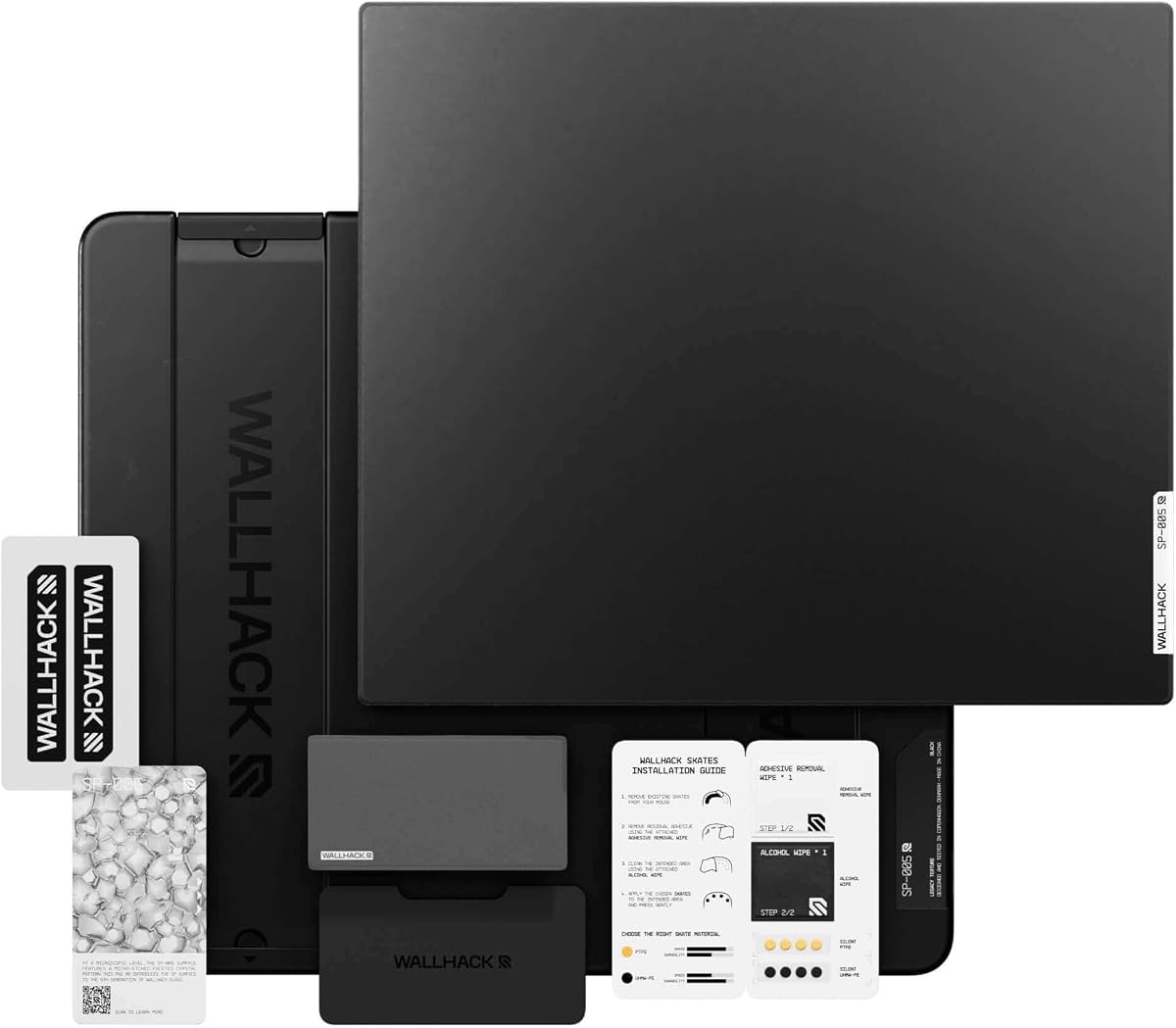
The Wallhack SP-005 is a 4.6-rated glass mouse pad built around speed, refinement, and a complete accessory package. Its faceted crystal micro-pattern is designed to lower surface resistance for fluid movement, while the 510-by-440-millimeter dimensions give players and professionals a generous area for unrestricted mouse travel.
We may earn a commission when you buy through this link, at no additional cost to you.
A slim 2.5-millimeter tempered-glass profile keeps the pad visually and physically streamlined, and a tapered edge is intended to stay out of the way. Beneath it, a redesigned silicone base uses concave grip zones to improve stability and reduce drift. The package also includes a custom EVA-lined protective case, PTFE and UHMW-PE silent skates, and a microfiber maintenance kit.
Its most notable trade-off is that the complete bundle does not make the base itself especially heavy. Although the silicone grip zones should help hold it in place, a user who pushes aggressively may still need to reposition it. The broad dimensions may also occupy more desk space than a conventional compact mouse pad. The supplied listing nonetheless makes the accessory set a clear advantage for travel and maintenance.
This model is best for competitive gamers who value rapid glide characteristics and want replacement skates and a protective case ready at hand. It also suits users who switch between gaming and precision work because the large surface and low-friction texture offer room for both. Buyers should simply ensure that their desk can accommodate the generous footprint.
The faceted micro-pattern is the defining feature of this pad. It is intended to create low resistance and fluid movement, making the model a practical choice for fast aiming, aim corrections, and tracking-heavy games.
The protective case, silent replacement skates, and microfiber maintenance kit distinguish this model from simpler glass pads. Those additions make it easier to protect, transport, maintain, and personalize the gaming setup.
We may earn a commission when you buy through this link, at no additional cost to you.
The gogofree Black Glass Mousepad delivers a large, durable work area at a value-focused level. Its 4.6 rating indicates solid customer reception, and the supplied features center on smooth tracking, a frosted control surface, and a 15.7-by-11.8-inch size that accommodates both gaming movements and everyday productivity.
We may earn a commission when you buy through this link, at no additional cost to you.
The three-millimeter tempered-glass body remains rigid rather than developing a depressed patch beneath the mouse. A frosted top face is intended to support precise control, while the reverse side accepts the included anti-slip stickers. The result should appeal to users who want fast response without the feel of a completely slick, glass-like desktop.
The separate anti-slip system is the clearest compromise. Stickers can make the underside secure, but they are less integrated than a molded base and may make the pad slightly easier to move during vigorous play. As with other glass surfaces, the texture can feel firm to people accustomed to fabric. Neither issue undermines the broad appeal of a large, easy-clean surface at a practical price.
This is a compelling choice for budget-conscious gamers, designers, students, and office workers. It offers the essential benefits of a glass mouse pad—smooth motion, stable geometry, scratch resistance, and simple cleaning—without moving into the premium accessory tier. It is especially well suited to users who want a generous surface but do not need replacement skates or a carrying case.
The frosted finish offers a practical middle ground between slow fabric movement and completely frictionless glass. It is intended to provide quick glides while preserving the feedback needed for controlled aiming and cursor placement.
The 15.7-by-11.8-inch area supplies ample room for broad movement. Its value comes from delivering this generous tempered-glass format and straightforward maintenance without adding specialized accessories or a carrying case.
We may earn a commission when you buy through this link, at no additional cost to you.
This white version of the large tempered-glass gaming pad offers the same 15.7-by-11.8-inch dimensions and micro-etched performance focus as the leading black model. Its 4.7 rating places it among the strongest customer-rated options, while the light finish gives the setup a cleaner, more understated visual character.
We may earn a commission when you buy through this link, at no additional cost to you.
Its treated hard surface is designed for smooth and rapid cursor movement, particularly for FPS, RTS, graphic design, and office tasks. The three-millimeter tempered-glass build maintains a stable surface, and the product information highlights scratch resistance, dirt resistance, quieter swipes, and a surface that can be wiped clean after extended use.
A light-colored pad can reveal fingerprints, dust, and smudges more readily than a dark one, even when the material itself is easy to clean. The hard platform also provides no soft compression, so users transitioning from cloth may notice every directional change. Neither issue affects the core tracking performance, but both are worth considering for appearance and comfort.
This model is a strong fit for users who want a large, fast glass surface with a light visual style. It works well for minimalist desks, bright workspaces, and setups where a pale mat coordinates better than a dark accessory. For those priorities, it combines a highly rated foundation with practical everyday versatility.
The white finish differentiates this model without changing its core performance layout. It is a practical choice for light or mixed-material workspaces where a black mat would appear visually heavy.
The micro-etched treatment is intended to reduce resistance and support accurate target acquisition. Its large dimensions also leave room to reposition the mouse without constantly changing the contact zone.
We may earn a commission when you buy through this link, at no additional cost to you.
The XVX Black Spider Webs mat is an extra-large 16.2-by-12.2-inch glass surface with a 4.5 rating. Its defining visual feature is the spider web pattern printed on the backside, allowing the active surface to remain uninterrupted while giving the setup a distinctive gaming-oriented look.
We may earn a commission when you buy through this link, at no additional cost to you.
A 3.2-millimeter tempered-glass body provides rigidity and impact resistance, while rounded edges help reduce the harshness associated with a square glass panel. The micro-etched surface is advertised as having ultra-low static and dynamic friction, supporting rapid, fluid movement while retaining precision. The included non-slip foot stickers help keep the large panel stable on a desk.
Its generous dimensions are both its main attraction and its main limitation. A user with a compact desk may find that it crowds keyboard space, while the separate adhesive feet can be less refined than a molded silicone base. It also lacks the replacement skates included with another option in this list. Nevertheless, the surface, edge treatment, and roomy format are strong for gaming and productivity.
This model suits players and creators who want maximum elbow and wrist room and appreciate decorative tempered-glass construction. It is best placed on a broad, uncluttered desk, where the full tracking area can be used without obstruction. Buyers should consider the footprint and stability system before choosing it over a smaller design.
The 16.2-by-12.2-inch footprint reduces the need to lift or reposition the mouse during large sweeps. It is especially useful in games and workflows that involve frequent changes between long reaches and compact adjustments.
The spider web graphic is UV-printed on the backside rather than the active face. This preserves the intended low-friction surface while giving the mat a more personal appearance than a plain black panel.
We may earn a commission when you buy through this link, at no additional cost to you.
The XVX Black Kanagawa combines a large gaming surface with decorative Japanese-style artwork printed on the rear. It measures 16.2 by 12.2 inches and has a 4.5 rating, placing it among the well-regarded options in the XVX range while giving it a more personalized appearance.
We may earn a commission when you buy through this link, at no additional cost to you.
Its 3.2-millimeter tempered-glass construction is designed to resist impact and scratches, and the rounded edges soften contact with a wrist or forearm. The micro-etched top surface uses low static and dynamic friction to encourage quick, precise gliding. A set of non-slip foot stickers is included to help anchor the pad.
The broad format will not suit every workstation, especially one where the keyboard already fills most of the available space. The detachable feet are also less integrated than a silicone underside, and the hard surface may initially feel unforgiving to someone accustomed to textile mats. These are manageable trade-offs for buyers who value the size and graphic treatment.
This is a good recommendation for gamers and desktop enthusiasts who want an expansive, patterned glass mat rather than a conventional black rectangle. It is particularly suitable for a setup with enough free space to appreciate the full 16.2-by-12.2-inch footprint. For those who want both function and visual character, it offers a balanced combination.
Printing the Kanagawa motif on the underside keeps the tracking face visually clean. It offers a decorative gaming accessory without sacrificing the continuous low-friction surface required for mouse movement.
Scratch-resistant tempered glass and rounded milling are useful qualities for a frequently handled object. The surface can also be wiped clean, making it practical for office, study, and gaming environments.
We may earn a commission when you buy through this link, at no additional cost to you.
The XVX Cherry Blossom mat pairs a large esports-style glass surface with a set of mouse skates in the package. Its 410-by-310-millimeter dimensions and 3.2-millimeter thickness align with the established XVX format, while the cherry blossom artwork gives the otherwise technical product a distinctive visual identity.
We may earn a commission when you buy through this link, at no additional cost to you.
The micro-etched surface is designed to provide rapid, accurate movement with low static and dynamic friction. Tempered glass improves wear resistance, and rounded edges create a less hazardous profile around the perimeter. The included skates are especially useful for gamers who customize their mouse feet or may want a ready-made replacement option.
It does not include the EVA-lined case offered with the Wallhack SP-005, so the accessory advantage is narrower. Its sizable footprint also demands desk space, and the anti-slip stickers remain separate from the glass body. As with every hard mouse pad, the experience may feel less forgiving than fabric until the user becomes accustomed to its immediate response.
This model is best for a gaming setup that values a large tempered surface, a smooth tracking finish, and at least one pair of replacement skates. It also appeals to buyers who prefer a floral design over an industrial or purely monochrome appearance. It is a versatile recommendation for play, schoolwork, and general desktop use.
Including mouse skates adds practical value for players who maintain or customize their mouse. It is a simple addition, but one that can appeal more than a standard glass pad with no replacement components.
The cherry blossom motif brings a softer visual style to a competitive accessory. Because the artwork is printed on the reverse, the top remains a clean, continuous tracking surface.
We may earn a commission when you buy through this link, at no additional cost to you.
The XVX White Kanagawa is the light-finished counterpart to the black Kanagawa design, with the same 16.2-by-12.2-inch dimensions and 3.2-millimeter tempered-glass build. Its 4.5 rating reflects solid feedback, and the rear-side artwork gives a light desk setup more personality than a plain surface would.
We may earn a commission when you buy through this link, at no additional cost to you.
A micro-etched top is intended to support low static and dynamic friction, producing quick movement with precise tracking. The impact- and scratch-resistant glass is milled with rounded edges for smoother interaction, while the UV-printed artwork remains on the back. Anti-slip foot stickers are included to improve desk grip.
The most obvious practical drawback is visibility. Fingerprints, dust, and oily marks can be more noticeable against a pale background, although the surface is easy to wipe down. The wide footprint may also crowd a compact workstation. As with the other XVX options, the hard feel and detachable base should be considered if you regularly use the pad on a soft or uneven surface.
This model suits users who want a large, performance-focused glass pad with a light decorative style. It works especially well for bright, minimalist setups or as a coordinated desk accessory. Those willing to provide ample desk space and perform routine wipe cleaning will get a durable and visually appealing glass surface.
The white finish can complement light desks, neutral accessories, and uncluttered room designs. It provides the same large tracking area as the darker model while producing a noticeably different visual effect.
Keeping the decorative print away from the tracking face helps maintain consistent friction across the usable area. The result is a mat that looks personalized without interrupting mouse movement.
We may earn a commission when you buy through this link, at no additional cost to you.
This compact glass mouse pad measures 11.8 by 9.8 inches, making it the smallest model in the roundup while retaining the core benefits of a rigid tracking surface. It has a 4.5 rating and uses two-micron micro-etching intended to reduce cursor drift and improve tracking for mice above 3,500 DPI.
We may earn a commission when you buy through this link, at no additional cost to you.
The 3.05-millimeter tempered-glass construction is described as impact and scratch resistant, with seamless cutting and rounded corners for safer everyday handling. Ultra-low static and dynamic friction support quick cursor movement, while the UV-printed decoration is placed on the underside. The surface resists oil smudges, sweat, dust, and stains, all of which can be wiped away quickly.
Its main limitation is available movement space. While 11.8 by 9.8 inches is sufficient for standard office work and many games, it offers less room for broad arm movements than the 15.7-by-11.8-inch and 16.2-by-12.2-inch alternatives. The hard surface also cannot provide the soft cushioning of fabric, and no premium case or replacement skate set is included.
This is a strong option for desks where a large mat is impractical, or for users who keep their mouse movements relatively compact. It is also useful for travel and secondary workstations because of its smaller footprint. Gamers, designers, and office workers who prioritize precision and easy cleaning without needing a vast surface can find it especially practical.
The compact dimensions conserve desk space while still providing enough room for ordinary cursor movement. That balance makes it useful for smaller work areas and setups that already have limited open space.
The treated glass is designed to remain presentable despite dust, oil, and hand sweat. A quick wipe restores the tracking surface without the labor-intensive cleaning often associated with fabric mats.
We may earn a commission when you buy through this link, at no additional cost to you.
The Razer Atlas is the premium, brand-focused option in this guide, carrying a 4.7 rating. It combines CNC-milled tempered glass, rounded edges, and a claimed hardness above seven on the Mohs scale, positioning it as a durable surface for demanding gaming and high-pressure computer use.
We may earn a commission when you buy through this link, at no additional cost to you.
Its two-micron texturing is designed to work with optical sensors and is especially suited to the Razer Focus Pro 30K Optical Sensor, according to the supplied information. Low static and dynamic friction encourage fast, precise movement, while a protective coating helps resist dirt and scratches. The surface is also specially treated to produce quieter mouse swipes than average glass mats.
As the most premium selection, its principal disadvantage is cost. The Razer name and advanced finishing do not automatically make it necessary for every user, and some mouse feet may feel less smooth than they would on fabric. The glass remains rigid and offers no ergonomic cushioning, so comfort-sensitive users should consider that before choosing it.
The Razer Atlas is best for serious gamers who value a refined surface, strong optical-sensor tracking, and a durable premium finish. It is also a natural choice for an existing Razer setup using the specified 30K optical sensor. Buyers who do not need that level of refinement may find a less expensive micro-etched model more practical, but this pad leads on material and surface sophistication.
Two-micron texturing provides a controlled compromise between smoothness and grip. The surface is specifically designed to support high-resolution optical sensors, including the Razer Focus Pro 30K model named in the product information.
CNC milling, rounded edges, tempered construction, and a protective coating all support long-term use. The surface is built to resist scratches and grime while maintaining a refined, quiet glide.
We may earn a commission when you buy through this link, at no additional cost to you.
A useful glass mouse pad should match your available space, mouse sensor, and preferred level of feedback. Compare surface texture, dimensions, base stability, edge profile, durability, and maintenance before choosing a model.
Surface texture is the most important factor because it determines how freely the mouse moves and how predictably the sensor reads. Micro-etched surfaces offer a controlled low-friction glide, while frosted or faceted patterns can provide a different balance of speed, grip, and feedback. The Wallhack SP-005 uses a faceted crystal pattern, the Razer Atlas uses two-micron texturing, and several XVX models use micro-etched finishes. Your preferred mouse feet and sensitivity settings also influence how each texture feels.
Dimensions affect both freedom of movement and available desk area. The 15.7-by-11.8-inch models offer a generous workspace, the 16.2-by-12.2-inch XVX mats are larger still, and the 11.8-by-9.8-inch model suits compact desks. Measure the open area beside your keyboard and consider whether your normal mouse movement requires broad arm sweeps or stays within a smaller zone. A large mat can improve consistency, but it may crowd a minimalist workstation.
A glass mouse pad needs enough friction to remain under control, particularly during fast gaming movements. Some products use a molded silicone base with contoured grip zones, while others include separate anti-slip foot stickers. A full-width base may be more integrated, but adhesive feet can still provide effective grip on a clean, flat desk. Avoid placing any pad on fabric, uneven surfaces, or a dusty desktop, because these conditions can cause sliding and interfere with sensor tracking.
Thickness contributes to rigidity and the consistency of the tracking plane. Products in this roundup range from 2.5 to 3.2 millimeters, with most clustering near three millimeters. Thicker glass generally feels more substantial and is less likely to flex, while a slimmer profile may integrate more discreetly into a desk arrangement. Exact handling and weight can vary, so inspect the product's edges and fit before committing to a large model.
Rounded or milled edges reduce the chance that a sharp corner will catch a forearm, cable, or sleeve. Several XVX products explicitly mention rounded edges, and the Razer Atlas uses CNC-milled rounded edging. Edge treatment cannot remove the overall rigidity of glass, but it can make the pad more comfortable to brush against. Position the mat so the active area remains flat and avoid pressing down sharply near an edge.
Tempered glass is attractive for long-term use because it resists the compression, staining, and surface degradation associated with fabric. A protective coating, as offered on the Razer Atlas, may add another layer of resistance. Most listed models can be wiped clean after oil or dirt accumulates. Use a soft microfiber cloth, avoid abrasive tools, and follow the manufacturer's cleaning instructions to preserve the surface and any coatings.
Glass surfaces are particularly well suited to optical mice because the sensor reads accurately across a uniform, hard surface. The Razer Atlas is specifically optimized for the Razer Focus Pro 30K Optical Sensor, while the compact model targets mice above 3,500 DPI. Higher sensor specifications do not automatically guarantee a better experience, but they make careful surface selection more relevant because dense micro-texturing must remain consistent under the lens.
Accessories can improve long-term convenience. The Wallhack SP-005 includes a protective EVA-lined case, PTFE and UHMW-PE silent skates, and a microfiber maintenance kit, while the XVX Cherry Blossom includes replacement skates. These extras are useful if you travel, maintain a valued mouse, or want a protected storage option. A simpler pad may still be the better choice if you keep it permanently on one desk and do not need replacement parts.
Place the pad on a clean, flat, hard desk with the entire surface supported. Remove dust, crumbs, and adhesive residue from the desktop before positioning the glass, then apply the supplied non-slip feet or silicone base evenly. If a cable approaches the mat, route it around the side rather than across the active area to reduce snagging.
Begin with your normal mouse sensitivity and allow the pad to establish a consistent tracking area. Because glass offers less resistance and compression than fabric, small changes in movement may feel more immediate. Avoid placing the pad on a sofa, bed, or other soft surface because the glass can tip, slide, or press against uneven material. Do not drag the pad across the desk while the mouse is active.
For routine care, unplug accessories and wipe the surface with a soft microfiber cloth, slightly dampened if the manufacturer allows it. Dry the glass fully before reconnecting replacement skates or using the mouse. Avoid abrasive pads, harsh chemicals, and scraping objects across the surface. If the mouse moves irregularly, inspect for dust or residue and confirm that the sensor is not obstructed.
Glass mouse pads generally provide a more rigid and consistent tracking surface than fabric or rubber. They tend to resist compression, stains, and scratches, while their low-friction finish can support fast movement. The best choice depends on your preferences: glass favors speed and easy cleaning, whereas fabric offers more grip and cushioning, and rubber often provides a softer, more controlled experience.
Glass pads are generally compatible with optical and laser gaming mice, although the final experience depends on mouse feet, sensor performance, and surface texture. The Razer Atlas is specifically described as optimized for the Razer Focus Pro 30K Optical Sensor. Users with very old or unusual tracking systems should verify compatibility and test the pad before committing to a large purchase.
Glass can feel less comfortable than cloth because it does not compress under the wrist and provides no soft cushioning. Rounded edges can reduce discomfort, and a lower profile may help during long sessions. Players often adapt quickly, but wrist support remains important; a hard glass surface should not be treated as a replacement for an ergonomic wrist rest.
Use a soft, lint-free or microfiber cloth and wipe away dust and smudges gently. If the manufacturer permits a damp cloth, use only a small amount of water and dry the surface completely. Avoid abrasive cleaners, sharp tools, and aggressive solvents that could damage coatings or the etched texture.
Glass provides a harder, more uniform, and often lower-resistance surface than fabric, so the mouse may require less force to move and respond more immediately. First rule out dust, oil, or damaged mouse feet, then allow time to adapt to the new texture. Small sensitivity changes may help if the movement feels too fast or too slow.
A larger pad is useful when you make wide arm movements or need a consistent tracking area during rapid repositioning. The 15.7-by-11.8-inch and 16.2-by-12.2-inch options in this guide provide ample space, while the 11.8-by-9.8-inch model is better for compact desks. The ideal size depends more on available desk space and movement style than on a universal rule.
A glass mouse pad can scratch a desk if it is dragged while grit is trapped underneath or if the base is uneven. Keep the desktop clean, place the pad carefully, and use its supplied anti-slip system. Do not slide the glass across the desk, and take care when lifting or repositioning it.
They can, particularly on light-colored surfaces, although most listed products are designed so marks can be wiped away quickly. Dark models may hide minor smudges better, while a microfiber cloth makes routine maintenance simple. Keeping the surface clean is also important because particles beneath the mouse can disrupt smooth tracking.
The Glass Gaming Mouse Pad Black stands out as the most balanced overall choice, combining a large 15.7-by-11.8-inch surface, micro-etched tracking, tempered construction, and easy maintenance. The gogofree Black Glass Mousepad delivers similar core functionality at a value-focused level, while the Razer Atlas is the premium selection for refined micro-texturing, sensor-focused performance, and sophisticated finishing.
Prioritize the features that match your setup: choose a broad mat for expansive movement, a compact model for limited space, a molded or well-applied base for stability, and the surface texture that matches your preferred speed and control. Accessory bundles are useful for travel and mouse maintenance, but they should not outweigh comfort, desk fit, and tracking quality.
Ratings, product details, and prices can change, so review the current listing before buying. Check dimensions against your available desk area, confirm mouse-sensor compatibility, and read recent customer feedback for information not covered in the original specifications. With those checks completed, the right glass mouse pad can provide a fast, precise, and durable home for your mouse.