Redragon K556 Wired RGB Mechanical Gaming Keyboard
4.6Editor score
Brushed aluminum full-size board
Hot-swappable switch sockets
Customizable RGB effects
Full Metal Keyboard guide comparing 10 sturdy models for gaming, typing, wireless use, custom switches, RGB lighting, comfort, and everyday productivity in
A full metal keyboard can provide a noticeably more substantial feel than an all-plastic model, especially when the case, internal plate, and structural components work together to resist flex. The best options also balance weight, stability, switch feel, acoustics, connectivity, and practical features such as RGB lighting, media controls, and programmable keys.
The keyboards in this guide were compared using their supplied specifications, layouts, switch types, connectivity options, mounting or construction details, programmability, and intended uses. They span wired and wireless models, standard full-size and compact layouts, conventional mechanical switches, and magnetic Hall Effect switches for unusually fine control.
Each review highlights the strongest reason to consider that model, along with practical trade-offs. The selections show that a metal keyboard can suit competitive gaming, office work, content creation, or a mixed desk setup, while current prices and availability can change after publication.
4.6Editor score

4.6Editor score

4.2Editor score
This side-by-side comparison covers ten metal-focused keyboards with different layouts, switch technologies, lighting systems, connectivity options, and programmability. The specifications make it easier to identify the model that best matches your desk, typing habits, and gaming priorities.




The SteelSeries USB Apex 5 Hybrid combines a 4.6 rating with one of the most complete feature sets in this roundup. Its aircraft-grade aluminum alloy frame gives it the substantial construction associated with a premium gaming keyboard, while the OLED smart display, dynamic per-key RGB lighting, and included magnetic wrist rest create a polished desk centerpiece.
We may earn a commission when you buy through this link, at no additional cost to you.
The hybrid Blue mechanical switch is the model's defining element. It combines a tactile click associated with Blue mechanical switches with a smooth membrane feel, and the switches are specified for up to 20 million keypresses. That distinctive feedback may appeal to gamers who want a noticeable bump and audible response without moving to a pure mechanical design.
The aluminum frame supports a stable, sturdy foundation, and the 900 by 300 by 4 millimeter dimensions describe a conventional full-size footprint. The OLED can display custom GIFs, game information, Discord messages, and other content, while reactive RGB effects add further customization. The supplied wrist rest is also useful for users who want more full-palm support during extended sessions.
Its wired design means it will serve a fixed workstation better than a portable setup, and users who strongly prefer conventional Blue or Brown mechanical switches may not find the hybrid action ideal. Even so, the combination of metal construction, useful display technology, per-key lighting, and comfort accessories makes this a strong all-around recommendation for a gaming desk.
The OLED smart display does more than provide a decorative accent. It can present game information, Discord messages, custom graphics, and animated GIFs, making it useful for keeping relevant status details visible while the main keys remain occupied.
The aluminum alloy frame supplies the structural weight and rigidity, while dynamic per-key RGB illumination gives each key its own lighting behavior. Together, they balance a serious physical build with the vivid appearance expected from a modern gaming keyboard.
We may earn a commission when you buy through this link, at no additional cost to you.
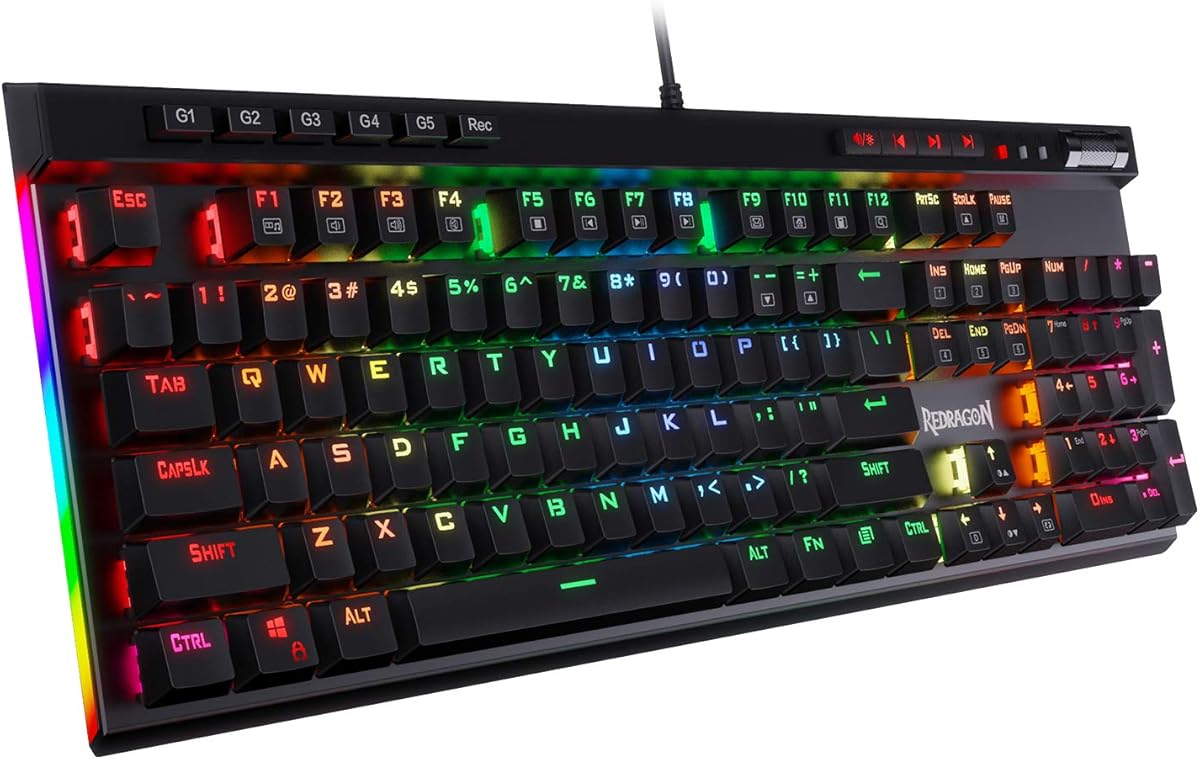
The Redragon K556 earns a 4.6 rating and stands out as a value-oriented full-size metal keyboard with a brushed aluminum body. It avoids the usual compromises of entry-level gaming models by combining a stable frame, hot-swappable sockets, anti-ghosting, broad compatibility, and a useful companion software package.
We may earn a commission when you buy through this link, at no additional cost to you.
Its upgraded socket accepts almost any 3-pin or 5-pin mechanical switch, while the stock Brown switches offer a soft tactile bump suited to extended typing. Switch flexibility allows owners to tune the feel and sound later without soldering, making the board appealing to newcomers who are unsure which switch type suits them.
Lighting options include 20 presets with adjustable brightness and flow speed. The companion software goes further by supporting custom RGB effects and programmable macros. For everyday use, the wired connection works across Windows and Mac without requiring drivers, and the 104 keys are designed to register accurately during fast combinations.
The K580 is limited to a stationary setup because it is wired, and it does not include a screen or dedicated rotary control. Even so, the sturdy aluminum construction, anti-ghosting performance, switch customization, and software support make it an unusually complete choice for gamers building a capable setup without moving into the premium tier.
Hot-swappable sockets are especially useful for mechanical keyboard newcomers. The broad 3-pin and 5-pin compatibility lets you try different switch families later, while the supplied Brown switches provide a tactile starting point for both gaming and everyday typing.
The K556 supports twenty onboard lighting presets for quick configuration and companion software for custom effects and macros. Plug-and-play operation across Windows and Mac means advanced tools are optional rather than required for basic daily use.
We may earn a commission when you buy through this link, at no additional cost to you.
The Cherry KC 200 MX is a 4.2-rated full-size keyboard designed for office use, with an anodized metal plate and Cherry's own MX2A Brown switches. It offers a restrained, professional approach that focuses on typing quality, accurate multi-key input, and long-term keycap durability rather than flashy gaming features.
We may earn a commission when you buy through this link, at no additional cost to you.
The Brown switches provide a precise, noticeable tactile bump without the audible click associated with clicky switch types. They are rated for more than 100 million actuations per key, making the board well suited to people who spend long periods typing documents, answering messages, entering data, or moving between general office tasks.
Full N-key rollover and anti-ghosting ensure simultaneous inputs are recognized accurately. Status lights for Caps Lock, Scroll Lock, and Num Lock are discreet, while four additional keys provide quick access to the calculator and volume controls. Laser-etched, abrasion-resistant molded keycaps are designed to keep their legends legible over years of use.
This is not the right choice for someone seeking RGB lighting, wireless freedom, or extensive gaming macros. Its strengths are the refined tactile feel, sturdy plate, practical controls, and dependable construction. For an office keyboard where performance and longevity matter more than decorative effects, the KC 200 MX is a particularly polished metal-plate option.
MX2A Brown switches offer a clear tactile event without a click. The result is a controlled typing experience that can remain comfortable through long work sessions and still feels distinctly mechanical compared with a membrane keyboard.
The KC 200 MX avoids unnecessary visual noise with white status LEDs and includes dedicated calculator and volume shortcuts. Full N-key rollover and anti-ghosting also make it reliable for demanding typing tasks, not merely basic office documents.
We may earn a commission when you buy through this link, at no additional cost to you.
The Keychron K10 HE combines a 4.3 rating with a full-size layout, wireless connectivity, and magnetic Hall Effect switches. Unlike a conventional mechanical switch that registers through physical contact, the magnetic system detects movement and allows users to tune actuation, rapid trigger, and snap action behavior.
We may earn a commission when you buy through this link, at no additional cost to you.
Sensitivity is specified at 0.1 millimeter, with an adjustable actuation range from 0.2 to 3.8 millimeters. The switches are hot-swappable, which adds another layer of flexibility. The Keychron Launcher supports remapping, macros, and switch-behavior settings, although the supplied instructions advise clearing browser data and cache before using it.
Tri-mode connectivity includes Bluetooth 5.2, 2.4 GHz wireless, and Type-C wired operation. Up to three devices can be paired, and the keyboard is designed for macOS and Windows with dedicated media keys and extra keycaps. Remapping also allows it to adapt to Linux workflows.
The K10 HE is ideal for a user who wants precise magnetic control without giving up a number pad or wireless flexibility. Its rosewood-style accents and non-shine-through PBT keycaps suit a mixed office and gaming environment, although the warm wood detailing may not match a stark monochrome setup. Software setup also takes slightly more effort than plug-and-play use.
Hall Effect magnetic switches measure movement rather than relying on physical contact. The 0.1 millimeter sensitivity and broad 0.2 to 3.8 millimeter adjustment range let you choose a light, immediate press or a more deliberate travel based on your preferences.
Bluetooth 5.2, 2.4 GHz wireless, and Type-C wired modes make the K10 HE useful across a laptop-centered desk, a gaming station, and a fixed workstation. Switching between as many as three paired devices adds convenience without abandoning the full-size layout.
We may earn a commission when you buy through this link, at no additional cost to you.
The Corsair Vanguard 96 delivers a dense assortment of gaming features in a layout described as roughly the size of a TKL. Its 4.4 rating is supported by a 1.9-inch color LCD, rotary dial, six programmable G-keys, MLX Plasma linear switches, and an 8000Hz polling rate.
We may earn a commission when you buy through this link, at no additional cost to you.
The 96% arrangement retains arrow keys and a tenkey pad while reducing the overall footprint. The LCD can show custom animations, images, and system specifications, giving the board more informational value than a standard LED indicator panel. Its rotary dial provides another direct control for frequently used functions.
For competitive gaming, the 8000Hz hyper-polling rate and linear switches are the central attractions. The G-keys can be mapped to Elgato Virtual Stream Deck functions and custom shortcuts, making the keyboard useful for both streaming workflows and in-game commands. FlashTap SOCD provides control over how simultaneous opposite-direction inputs are resolved.
This is a feature-heavy wired board, so it is less attractive to someone who needs Bluetooth or a portable setup. Linear switches may also feel less pronounced than tactile or clicky alternatives. Within gaming-oriented full-metal designs, however, the Vanguard 96 stands out for packing extensive controls and information into a space-conscious package.
The 8000Hz polling rate places the Vanguard 96 among the most aggressively specified options in this guide. Paired with MLX Plasma linear switches, it targets fast input and minimal perceived delay during rapid competitive actions.
The integrated LCD, rotary dial, and programmable G-keys do more than decorate the keyboard. Virtual Stream Deck integration can turn the G-keys into direct shortcuts for streaming controls, applications, and repeated commands.
We may earn a commission when you buy through this link, at no additional cost to you.
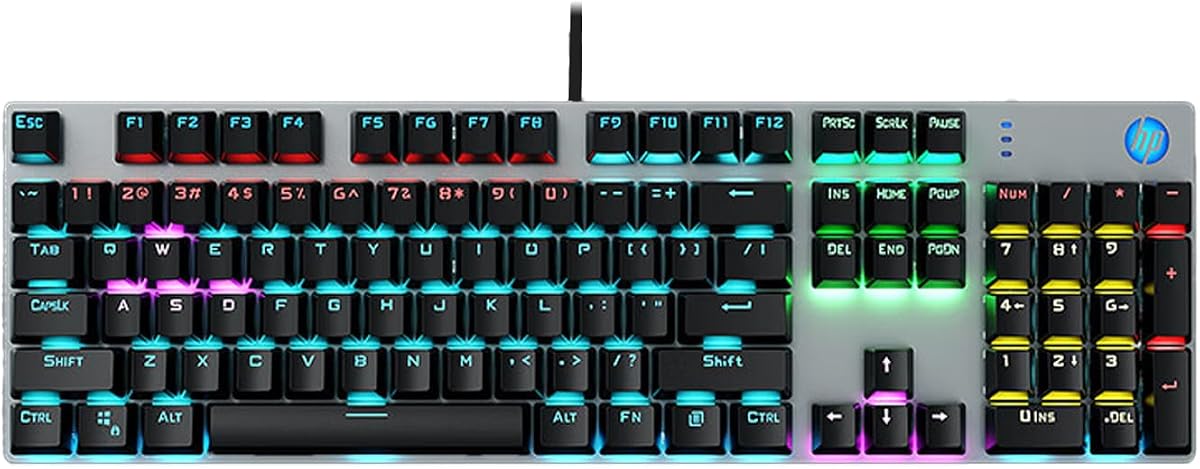
The HP GK400F is a 4.2-rated 104-key keyboard designed explicitly for both business and gaming. Its sturdy metal panel and Brown mechanical switches provide a durable, familiar foundation, while a single-color backlight and simple wired connection keep the focus on practical everyday performance.
We may earn a commission when you buy through this link, at no additional cost to you.
Brown switches deliver a crisp tactile response without the stronger click of a clicky mechanism. Full N-key rollover and the stated 26PN design support accurate input during complex office typing and fast gaming sequences. The wired USB connection is designed for stable transmission and simple plug-and-play setup.
Its ice-blue backlight includes 20 customizable effects, which can improve visibility in low-light conditions and add atmosphere to a gaming desk. Double-shot molded ABS keycaps are described as wear-resistant, resistant to oil, and capable of retaining clear lettering over time. Two-stage adjustable feet and base anti-slip pads help maintain a stable typing angle.
The absence of hot-swappable sockets means the switch layout is less flexible than that of several other selections. The one-color backlight also offers less visual variety than full RGB. Even so, the GK400F is a practical metal-panel option for buyers who want one straightforward keyboard for office work and gaming without extensive configuration software.
The GK400F's Brown switches, full-size layout, and tactile feedback translate well from document work to general gaming. A 104-key design preserves the number pad and function row, while the backlight adds atmosphere without turning every key into a different color.
A wired USB connection removes charging and wireless-pairing concerns from the setup. Adjustable feet and anti-slip pads help keep the metal-panel board steady while its full N-key rollover supports accurate simultaneous inputs.
We may earn a commission when you buy through this link, at no additional cost to you.
The Keychron Q6 Pro is a 4.1-rated full-metal custom keyboard that combines a 6063 aluminum body, wireless connectivity, QMK and VIA support, and a full-size layout. It is aimed at users who want extensive control over key assignments, macros, switch behavior, lighting, and acoustic behavior.
We may earn a commission when you buy through this link, at no additional cost to you.
Its double-gasket design combines plate gaskets with silicone pads between the upper and lower cases. The intent is to reduce resonance between the metal components and soften the overall acoustic character. PCB-mounted screw-in stabilizers are fitted for smoother operation on larger keys such as Space, Shift, Enter, and Delete.
The supplied K Pro Brown switches provide a tactile feel and are rated for up to 50 million keystrokes. Almost all 3-pin and 5-pin MX-style switches can be installed without soldering, including switches from Cherry, Gateron, Kailh, and Panda. KSA-profile double-shot PBT keycaps resist shine and oil, and 22 RGB modes can be adjusted in detail.
Setting up QMK and VIA requires importing the appropriate keymap file and enabling the Design tab, so it is less approachable than a plug-and-play board. Its 1000 Hz wired polling rate also falls below the headline rate of the magnetic gaming models, and wireless mode is specified at 90 Hz. Even so, few keyboards combine this level of metal customization with a full number pad and wireless freedom.
The double-gasket structure adds silicone isolation between major metal sections. This is intended to reduce the hollow resonance that can occur in rigid cases while preserving the solid visual and physical character of an aluminum keyboard.
QMK and VIA support allows extensive remapping, macros, and shortcut creation. Combined with hot-swappable sockets, adjustable RGB, and user-replaceable stabilizers, the Q6 Pro is built for owners who expect to revise the keyboard as their workflow changes.
We may earn a commission when you buy through this link, at no additional cost to you.
The Logitech G413 SE is a 4.5-rated full-size mechanical gaming keyboard with a classic, restrained design. Its black-brushed aluminum-magnesium alloy top case provides a sturdy backbone and minimal flex, while white LED lighting gives it a clean appearance that can suit both gaming and office environments.
We may earn a commission when you buy through this link, at no additional cost to you.
Heat- and wear-resistant PBT keycaps are a major strength because they are less prone to developing a glossy surface than some lower-cost alternatives. The tactile mechanical switches deliver a defined feel, and the keyboard's six-key rollover anti-ghosting system supports reliable input during ordinary gaming combinations.
Twelve function keys can be controlled through the FN layer, including volume, playback, mute, lighting, and Windows-lock functions. The full-size format retains a number pad, while the supplied specifications also note that a separate tenkeyless version is available for buyers who want a smaller footprint.
The absence of full RGB means the lighting cannot display the same range of colors and effects as the RGB-equipped alternatives. There is also no dedicated rotary control or screen. Nevertheless, the G413 SE remains a straightforward, durable metal keyboard for users who prioritize build quality, keycaps, and dependable tactile input over elaborate software features.
The black-brushed alloy top case gives the G413 SE a restrained gaming appearance without relying on elaborate RGB effects. White LED illumination adds visibility and a clean visual accent that can integrate easily with a mixed-use desk.
PBT keycaps are valued for their resistance to heat and wear. They are a particularly relevant feature on a mechanical keyboard because the caps remain part of the tactile and visual experience long after the initial setup period.
We may earn a commission when you buy through this link, at no additional cost to you.
The OOCTPK Chilkey SF60 has the highest listed rating in the guide at 4.8 and takes an unusually ambitious approach to the full-metal concept. Its 60% layout combines a CNC-machined 6063 aluminum case with all-metal keycaps, magnetic Hall Effect switches, a gasket mount, and an acoustic structure designed for a deep, crisp sound.
We may earn a commission when you buy through this link, at no additional cost to you.
The WS Flux Poseidon magnetic switches are rated for 100 million keystrokes and use a hollowed-out magnetic design. Users can adjust the trigger behavior and use rapid trigger or snap action through the keyboard's configuration environment. The supplied specifications also describe automatic calibration for mixed-switch setups and an AI-driven operating system with over-the-air updates.
Rapid Trigger precision is specified at 0.001 millimeter, with an 8000Hz polling rate and 256K scanning rate. The complete 64-key layout is compatible with GH60, uses south-facing RGB with 16.8 million colors, and includes a 6.5-degree typing angle. A genuine gasket mount and five-layer acoustic filling are intended to soften resonance.
The SF60 is best suited to users who prioritize a compact aluminum footprint, metal keycaps, and magnetic-switch control over a number pad. Its specialized software and elaborate feature set may feel excessive for basic office work. Even so, it offers the most distinct combination of all-metal keycaps, compact construction, and performance-oriented specifications in the roundup.
Most keyboards use metal in the outer structure but retain plastic keycaps. The SF60 extends the metal treatment across the keycaps themselves, creating a distinctive acoustic profile and a noticeably different visual and tactile experience.
The 64-key design saves substantial desk space while retaining essential typing controls. An 8000Hz polling rate, 256K scan rate, rapid trigger, and snap action give the compact board performance characteristics aimed at competitive gaming.
We may earn a commission when you buy through this link, at no additional cost to you.
The Redragon K580 combines a 4.6 rating with a full-size aluminum-oriented gaming design, five dedicated macro keys, and an RGB media wheel. It focuses on giving players direct access to complex commands without requiring the companion software for every routine task.
We may earn a commission when you buy through this link, at no additional cost to you.
The G1 through G5 macro keys can store combos or shortcuts directly on the keyboard, while nearby media controls cover playback functions. The stock Blue switches deliver a distinct tactile bump and audible click, and the upgraded socket accepts nearly any mechanical switch. That makes it possible to change the feel and sound later without soldering.
Full anti-ghosting allows the 104 keys to register accurately during rapid combinations, which is important in fast-paced games. Double-shot keycaps are designed to resist fading, and the switches are rated for 50 million keystrokes. Companion software remains available for advanced RGB effects and deeper macro profiles, but it is not required for everyday operation.
The K580 is a wired board, and Blue switches can be louder than Brown or tactile alternatives. Its large full-size footprint also takes more room than a compact gaming model. However, the onboard macro controls, media wheel, switch customization, anti-ghosting, and durable keycaps make it a practical choice for gamers who want dedicated commands close at hand.
Five dedicated G keys let users store complex combinations directly on the keyboard. This provides fast access to repeated actions while leaving companion software optional for more detailed lighting and macro management.
The 104-key layout retains a number pad and function row, while a dedicated media wheel provides quick playback control. Full anti-ghosting helps preserve accurate inputs during the rapid combinations common in gaming.
We may earn a commission when you buy through this link, at no additional cost to you.
The best full metal keyboard is not determined by the case alone. Layout, switch technology, mounting, acoustics, connectivity, programmability, and ergonomics all shape how the keyboard feels and performs, so it is important to match those features to the way you work and play.
Metal construction can refer to the outer case, an internal plate, individual keycaps, or several elements used together. The SteelSeries Apex 5 uses an aircraft-grade aluminum alloy frame, the Redragon K556 and Logitech G413 SE use metal top structures, the Cherry KC 200 MX has an anodized metal plate, and the Chilkey SF60 extends metal construction to its keycaps. A model with a metal case generally feels sturdy, while an internal metal plate can influence flex, consistency, and the acoustic character.
Choose the construction that matches your priorities. A rigid aluminum case and plate suit gamers who value a solid foundation, while a metal-plate office model may prioritize restrained appearance and reliable typing. All-metal keycaps are a distinct design choice rather than a universal requirement.
Full-size layouts include a number pad and are useful for spreadsheets, accounting, data entry, and gaming shortcuts. The Cherry KC 200 MX, HP GK400F, Redragon K556, and Redragon K580 all follow this approach. The Keychron K10 HE and Keychron Q6 Pro also retain full-size layouts while offering more advanced connectivity or programmability. The Corsair Vanguard 96 condenses the design into a 96% layout, and the Chilkey SF60 uses a more compact 60% arrangement without a number pad.
Choose full size for maximum key availability, 96% for a balance of function and space, and 60% when desk efficiency matters most. Remember that a compact layout may require a separate number pad for frequent numeric work.
Brown and tactile switches offer a noticeable bump without a click, making them versatile for gaming and typing. Linear switches move smoothly without a distinct tactile event, which can suit fast gaming and users who prefer less resistance during a long press. Clicky Blue switches add a stronger bump and audible click. Magnetic Hall Effect switches detect movement through sensors and allow actuation points, rapid trigger, and snap action to be adjusted.
Choose tactile switches for a balanced mechanical experience, linear switches for smooth and rapid travel, and clicky switches when audible feedback is a priority. Magnetic switches offer the most customization but require compatible software and configuration. Check the stated switch options and socket support before buying.
Anti-ghosting and rollover determine how accurately a keyboard records simultaneous inputs. Full N-key rollover is especially useful for demanding office typing and complex gaming commands. High polling rates are another consideration: the Corsair Vanguard 96 and Chilkey SF60 specify 8000Hz, while the Keychron K10 HE supports rapid trigger and the Keychron Q6 Pro provides up to 1000Hz in wired mode. Features such as SOCD handling, G-keys, and programmable macros can also improve workflow efficiency.
Prioritize accurate rollover for reliable commands, then consider polling rate, programmable controls, and switch behavior. A high polling number matters most in competitive settings, but software features, macros, and stable construction can be more valuable for everyday gaming.
Wired keyboards offer a simple, consistent connection and avoid charging, pairing, and wireless-latency concerns. The SteelSeries Apex 5, Redragon K556, Cherry KC 200 MX, HP GK400F, Corsair Vanguard 96, Logitech G413 SE, Chilkey SF60, and Redragon K580 are wired. The Keychron K10 HE and Q6 Pro support wireless operation, with the K10 HE adding 2.4 GHz and Bluetooth and the Q6 Pro combining Bluetooth with Type-C wired use.
Choose wired for a fixed gaming or office station. Choose wireless when you want to move between devices, reduce desk clutter, or work from a laptop at varying positions. Check battery requirements, wireless polling rates, and available connection modes before deciding.
Programmable keys can make a keyboard more productive, but they also add complexity. The Redragon K580 stores macros on five dedicated G keys, the Corsair Vanguard 96 includes six programmable G keys and Virtual Stream Deck integration, and the Keychron models support extensive remapping through their respective software. Advanced lighting configuration may also require software, while onboard modes provide a quicker starting point.
Choose dedicated controls if you repeat the same actions in games, streams, or productivity software. If you want total layout freedom, prioritize QMK, VIA, or a capable graphical configurator. Make sure the required software supports your operating system and that you are comfortable importing keymaps or adjusting advanced settings.
A rigid metal case can produce a bright, crisp, or hollow acoustic profile unless additional design elements control resonance. The Keychron Q6 Pro uses a double-gasket design and silicone pads to reduce resonance between metal sections, while the Chilkey SF60 combines a gasket mount, acoustic filling, and an FR4 plate. Switch family also shapes the sound: tactile Brown switches are moderate, Blue switches are clickier, and linear switches tend to sound smoother on the way down.
Consider the sound profile you prefer before choosing a board. A work-focused keyboard benefits from a controlled, relatively quiet feel, while competitive gaming can justify louder clicky switches. Mixed mounting, damping, and switch choices are often more influential than the fact that the case is metal.
A sturdy keyboard is not automatically comfortable. The SteelSeries Apex 5 includes a premium magnetic wrist rest, while the HP GK400F provides two-stage adjustable feet and anti-slip pads. The Keychron Q6 Pro uses screw-in stabilizers to reduce wobble on larger keys, and the Keychron K10 HE includes a 6.5-degree typing angle and double-shot PBT keycaps. Dedicated media controls, rotary dials, LCDs, and programmable keys can also improve daily usability.
Look for support features that match your session length and work style. Check wrist-rest compatibility, desk space, keycap profile, stabilization, and the usefulness of included controls. The best extras are those that remove friction from your normal routine rather than simply adding more features.
Begin by choosing a stable desk position with enough clearance for the keyboard's footprint and the angle you prefer. Connect a wired model directly or configure the requested wireless connection, then update its software and apply the recommended keymap. For models with adjustable actuation, rapid trigger, snap action, or RGB controls, begin with moderate settings and adjust them gradually rather than changing every option at once.
Use the appropriate mounting and stabilizer features when one is provided. Keep the feet stable, maintain the supplied wrist-rest position if included, and avoid repeatedly lifting the keyboard by its cable. When changing hot-swappable switches, remove the keycap carefully, align the replacement switch with the socket, and press it straight into place. If the model has a puller tool, use it to reduce the risk of damaging the keycap or switch housing.
Clean the case with a soft, lightly dampened cloth and avoid spraying liquid directly onto the keyboard. Remove loose dust from between keys with compressed air or a soft brush, and clean keycap surfaces with a suitable material that will not damage the legends or coating. Keep food and drinks away from the switches, and check the product documentation for any manufacturer-specific cleaning or firmware instructions.
A full metal keyboard is not automatically better for every user. Metal construction can provide rigidity, reduce case flex, and create a more substantial feel, but switch feel, acoustics, layout, and comfort ultimately influence daily experience. Compare the complete construction and mounting design rather than judging a model by one metal component.
Metal construction can help a gaming keyboard feel stable and avoid distracting flex during intense sessions. Competitive performance also depends on rollover, polling rate, switch response, and programmability. Models such as the Corsair Vanguard 96 and Chilkey SF60 emphasize high polling rates, while the Redragon K556 and K580 focus on anti-ghosting, RGB, and macro controls.
A metal case forms the keyboard's visible outer housing and contributes to overall rigidity. A metal plate sits beneath the switches and influences how the keyboard feels and sounds during travel. The Cherry KC 200 MX has an anodized metal plate, whereas several gaming models use a metal top case as part of a broader multi-material construction.
Metal keycaps provide a distinctive appearance, feel, and acoustic profile, but they are less conventional than PBT or ABS plastic. The Chilkey SF60 is the clearest example in this guide, using all-metal caps with magnetic switches. Buyers should consider weight, sound preference, and keycap profile before choosing a metal-cap design.
Tactile Brown switches are a versatile middle ground with a noticeable bump and no loud click. Linear switches are smooth and often preferred for rapid gaming actions, while clicky Blue switches provide pronounced tactile and audible feedback. Your preferred sound and the tasks you perform should guide the choice more than the keyboard's case material.
Hall Effect keyboards can offer adjustable actuation, rapid trigger, snap action, and very fine control because magnetic sensors measure movement rather than relying on physical contact. They can suit competitive gaming, but they require appropriate software and offer less conventional feedback than standard mechanical switches. The Keychron K10 HE and Chilkey SF60 show two different approaches to magnetic control.
You need a number pad if you regularly enter large amounts of numerical data, work with spreadsheets, or prefer dedicated navigation and arithmetic keys. A 96% or 60% layout saves desk space and may feel more comfortable for gaming. The Corsair Vanguard 96 retains a tenkey pad in a smaller frame, while the Chilkey SF60 omits it entirely.
Keep food and drinks away from the switches, clean the surface with a soft lightly dampened cloth, and use a brush or compressed air to remove loose dust. Do not spray cleaner directly onto the case. When changing hot-swappable switches, unplug the keyboard and use the supplied puller and straight, even pressure to protect the caps and sockets.
The SteelSeries USB Apex 5 Hybrid stands out as the most well-rounded recommendation because it combines an aluminum alloy frame, an OLED display, dynamic per-key RGB lighting, and a magnetic wrist rest. For a capable metal keyboard without premium-tier complexity, the Redragon K556 offers a strong aluminum body, hot-swappable sockets, RGB presets, and macro software. The Cherry KC 200 MX is the refined metal-plate choice for office-focused typing.
Your priorities should determine the rest of the list. Competitive gamers may prefer the Corsair Vanguard 96 or Chilkey SF60 for high polling rates and magnetic-switch control, while Keychron users can prioritize the K10 HE's adjustable Hall Effect switches or the Q6 Pro's extensive customization. The Logitech G413 SE and HP GK400F suit buyers seeking straightforward full-size designs, and the Redragon K580 is ideal for dedicated onboard macro controls.
Before making a final choice, verify the current specifications, operating-system support, software requirements, and desk compatibility. Prices and product availability can change, so check the latest listing and current customer feedback when you are ready to buy. The most suitable full metal keyboard is the one whose construction, layout, switch feel, and features align with your own daily routine.