
GIGABYTE RTX 5080 Gaming OC
4.6Editor score
Blackwell architecture with DLSS 4
16GB GDDR7 with 256-bit interface
WINDFORCE three-fan cooling system
Explore the best Flagship Graphics Cards with our expert guide comparing NVIDIA and AMD models, memory, cooling, power, and performance.
Flagship graphics cards combine high-end rendering power, generous memory, advanced cooling, and premium features for demanding gaming, creative work, and specialized workloads. The strongest choice depends on resolution, software, case clearance, power supply capacity, and whether priority is placed on raw performance, efficiency, or expandability.
This guide compares ten flagship-class models from NVIDIA, AMD, ASUS, GIGABYTE, MSI, and VIPERA using the supplied specifications. We examine processor generation, graphics memory, boost clocks, cooling architecture, dimensions, power requirements, display support, and useful board-level features.
Each review identifies the strongest reasons to consider a particular card, along with practical trade-offs and the type of buyer it suits best. Specifications and availability can change over time, so readers should confirm current product details and prices with the retailer before making a final purchase.
4.6Editor score

4.6Editor score

4.4Editor score
This side-by-side overview compares the core processor, memory, clock, cooling, and physical characteristics of all ten flagship graphics cards. It is designed to make architecture, capacity, clearance, and power requirements easier to assess before deeper individual reviews.


The GIGABYTE GeForce RTX 5080 Gaming OC 16G is a capable flagship option built around NVIDIA Blackwell architecture and DLSS 4. It carries a 4.6 rating and pairs the RTX 5080 with 16GB of 256-bit GDDR7 memory. For buyers seeking high-end GeForce capability without moving directly to the most premium board designs, this model offers a focused balance of core hardware and cooling.
We may earn a commission when you buy through this link, at no additional cost to you.
Its most important advantages begin with the dedicated GDDR7 allocation and wide 256-bit memory interface. That combination is well suited to high-resolution gaming, texture-heavy scenes, content creation, and workloads that benefit from substantial memory bandwidth. The WINDFORCE cooling system is designed to manage the heat produced by a powerful GPU, while PCIe 5.0 support places the card on a current-generation platform.
The main trade-off is that the supplied information does not provide exact dimensions, power consumption, connector requirements, or fan details for this specific GIGABYTE model. Those omissions matter because flagship cards are rarely small and can demand a capable power supply. Buyers should also compare its physical fit and cooling design with the more extensively documented ASUS and MSI alternatives in this guide.
This card is best for a gamer or creator who wants RTX 5080-class features, 16GB GDDR7, and DLSS 4 without necessarily prioritizing elaborate software or a specialized compact design. It is also a sensible top-three choice because it covers the central performance tier of the list. Confirm case clearance and power-supply requirements before ordering, and treat it as the balanced flagship pick for this roundup.
The combination of 16GB GDDR7 and a 256-bit interface gives the card a modern memory foundation. It is particularly relevant for high-detail gaming, large creative scenes, and applications that benefit from a larger working set than entry-level graphics products can provide.
Blackwell architecture and DLSS 4 place this model among the most current options in the guide. These features can help supported games balance image quality and frame rate, while the broader generation is intended for demanding gaming and accelerated computing workloads.
We may earn a commission when you buy through this link, at no additional cost to you.
The ASUS TUF Gaming GeForce RTX 5070 Ti 16GB GDDR7 OC Edition stands out with a 4.8 rating, the highest listed score in this guide. It combines NVIDIA Blackwell architecture, DLSS 4, 16GB of GDDR7, and an overclocked boost clock of 2610MHz. The emphasis is not simply peak gaming performance, but a durable board design intended to handle sustained enthusiast use.
We may earn a commission when you buy through this link, at no additional cost to you.
Three Axial-tech fans move air through a large fin array, while a phase-change GPU thermal pad is included to support heat transfer under heavy loads. ASUS also adds military-grade components, protective PCB coating, and its Auto-Extreme automated manufacturing process. GPU Tweak III adds performance tuning, thermal controls, and monitoring, making the card appealing to buyers who want more control than a basic card provides.
The practical compromise is power and clearance. ASUS specifies a minimum 850W power supply and a 16-pin 12V-2×6, also identified as 12VHPWR, connector. The 3.125-slot design also requires enough room in a large chassis. These are meaningful constraints, so the card should not be chosen without checking the case, power supply, and connector arrangement.
The TUF RTX 5070 Ti is well suited to high-end gamers and creators who value durability, 16GB memory, thermal engineering, and tuning software. It is a particularly strong choice when the RTX 5080 or RTX 5090 is beyond the required performance tier. For compatible systems, its combination of features and strong customer rating makes it one of the most balanced recommendations here.
The three-fan Axial-tech cooler and phase-change thermal pad form a robust cooling package. These details are important for a high-power card expected to run demanding games, rendering workloads, and compute applications for extended periods.
GPU Tweak III provides a clear control panel for clock adjustments, thermal settings, and monitoring. It suits users who want to inspect operating behavior and tune the card rather than rely exclusively on automatic settings.
We may earn a commission when you buy through this link, at no additional cost to you.
The VIPERA NVIDIA GeForce RTX 4090 Founders Edition remains a formidable flagship card, carrying a 4.6 rating and an impressive 16,384 CUDA cores. Its most compelling specification is raw compute scale, supplemented by third-generation RT cores, fourth-generation Tensor cores, and NVIDIA DLSS 3. The card is aimed at buyers who prioritize an established high-end platform over the newest architecture.
We may earn a commission when you buy through this link, at no additional cost to you.
Display capabilities are equally notable. The specification supports 4K at 120Hz with HDR, 8K at 60Hz with HDR, and variable refresh rate through HDMI 2.1a. NVIDIA Reflex reduces input latency, while the dedicated NVIDIA Encoder makes the card relevant to livestreaming. Its combination of rendering, ray tracing, AI, and media features supports gaming as well as creator workflows.
The difficult comparison is generational positioning. Blackwell models in this guide add newer architecture and DLSS 4 support, while this card uses DLSS 3. Its 16GB of memory may also be less generous than the 32GB configuration offered by the ASUS TUF RTX 5090. The RTX 4090 is therefore most compelling for buyers who specifically want its CUDA count, established platform, or display capabilities.
This card is a strong recommendation for high-resolution gaming, GPU-accelerated creative work, and livestreaming on a system prepared for a flagship installation. It should be chosen over newer cards only when its specific strengths align with the buyer’s priorities. Verify case clearance and power demands, and compare current availability against the RTX 5080 and RTX 5090 options.
The 16,384 CUDA cores provide substantial parallel computing capacity. That scale is valuable for demanding games, GPU-accelerated applications, rendering, and other workloads that benefit from broad parallel throughput.
Support for 4K 120Hz HDR and 8K 60Hz HDR makes the card relevant to high-end monitors and televisions. Variable refresh rate support and NVIDIA Reflex further improve the appeal for competitive and latency-sensitive displays.
We may earn a commission when you buy through this link, at no additional cost to you.
The ASUS TUF Gaming GeForce RTX 5080 16GB GDDR7 OC Edition is the most comprehensively documented flagship in this guide. It has a 4.6 rating, a 2730MHz overclocked boost clock, 16GB of GDDR7, and a three-fan thermal design. It also provides detailed power and dimensional requirements, allowing buyers to assess compatibility before purchasing.
We may earn a commission when you buy through this link, at no additional cost to you.
The cooler uses a massive fin array, three Axial-tech fans, and a phase-change GPU thermal pad. A protective PCB coating helps guard against moisture, dust, and debris, while military-grade components support durability. The 2700MHz default boost clock and 2730MHz OC mode give users both conventional operation and additional headroom through the factory overclock.
Its largest compromise is physical size. ASUS lists the card at 348mm long, 3.6 slots wide, and 4.3 pounds. It also requires a minimum 850W PSU and a 16-pin 12V-2×6 connector. A large chassis, appropriate power supply, and careful connector routing are therefore essential. Despite these demands, the design gives the card a substantial, enthusiast-focused feature set.
This is the roundup’s Editor’s Choice because it combines the RTX 5080’s current-generation platform with a mature board philosophy, robust thermal engineering, useful monitoring software, and clearly stated installation requirements. It is a strong all-around recommendation for high-end gamers, creators, and enthusiasts who have a large case and an appropriate power supply.
A large fin array, three Axial-tech fans, and a phase-change GPU thermal pad provide a well-specified approach to sustained performance. The phase-change material is designed to maintain effective heat transfer and longevity under demanding workloads.
The 2730MHz OC mode adds performance over the 2700MHz default boost clock. GPU Tweak III gives users the tools to monitor temperatures and adjust settings, while Auto-Extreme manufacturing is intended to improve assembly consistency.
We may earn a commission when you buy through this link, at no additional cost to you.
The GIGABYTE Radeon RX 9070 XT Gaming OC 16G offers an alternative to the GeForce-heavy selection in this roundup. It has a 4.7 rating, 16GB of GDDR6 memory, PCIe 5.0 support, and a WINDFORCE cooling system. For builders interested in AMD’s flagship graphics ecosystem, it combines modern memory capacity with a recognizable enthusiast thermal design.
We may earn a commission when you buy through this link, at no additional cost to you.
The cooling package includes Hawk Fan technology and server-grade thermal conductive gel. These features are intended to transfer heat away from the GPU and support stable operation. RGB lighting adds a customizable visual element for builds where the card is visible through a side panel, while the Gaming OC branding indicates that this is a factory-overclocked board rather than a basic reference design.
The supplied specifications do not list boost or game clocks, exact dimensions, connector requirements, or recommended PSU wattage. As a result, buyers cannot rely on the product data alone to confirm fit and power compatibility. They should consult the manufacturer listing and their system documentation before choosing it, particularly if the case is compact or the power supply is already heavily loaded.
The card is a solid recommendation for gamers who want a high-capacity AMD flagship, prefer the Radeon platform, or want a visually distinctive option with modern PCIe support. It is not a universal replacement for every NVIDIA choice, because feature support varies across games and applications. Its 4.7 rating and 16GB configuration make it one of the strongest AMD entries in the guide.
A 16GB graphics memory allocation provides room for demanding textures, high-resolution output, and creative workloads. It is a particularly useful trait for an AMD flagship where memory capacity can influence future flexibility.
Hawk fans and server-grade thermal conductive gel support the card’s cooling approach, while RGB lighting differentiates its appearance. The combination is aimed at enthusiasts who value both practical thermals and a coordinated gaming build.
We may earn a commission when you buy through this link, at no additional cost to you.
The ASUS Dual GeForce RTX 5060 Ti 16GB GDDR7 OC Edition is a compelling compact flagship option, earning a 4.7 rating. It combines Blackwell architecture, DLSS 4, 16GB of GDDR7, and an overclocked boost clock of 2632MHz. Its 2.5-slot format also gives it a notably friendlier physical profile than the larger three-slot TUF models in the guide.
We may earn a commission when you buy through this link, at no additional cost to you.
The axial-tech fan design uses a smaller hub to accommodate longer blades and a barrier ring for increased downward air pressure. Dual BIOS profiles let users switch between Quiet and Performance modes, while 0dB technology allows the card to remain quiet under light gaming conditions. Dual-ball fan bearings are rated to last up to twice as long as sleeve-bearing designs.
As a 5060 Ti model, it occupies a lower position in the RTX hierarchy than the 5070, 5080, and 5090. The supplied data also does not include exact dimensions, power requirements, or a recommended PSU. While 16GB of GDDR7 is generous for its class, buyers seeking maximum raster performance or the most advanced GPU compute tier may prefer a higher numbered model.
This card is an excellent fit for a builder who wants new-generation GeForce features and 16GB of memory without accepting a huge three-slot design. It is especially appealing for mixed gaming and light productivity systems where quiet operation and compatibility matter. Confirm physical clearance and power needs, but the stated 2.5-slot construction makes it one of the most versatile picks.
The 2.5-slot design seeks to preserve cooling performance while improving fit within smaller or crowded cases. It provides a useful middle ground between compact dual-fan cards and much thicker enthusiast models.
The dual BIOS setup allows a quick transition between Quiet and Performance profiles. Combined with 0dB behavior, this is useful for systems that alternate between everyday tasks, light gaming, and sustained demanding workloads.
We may earn a commission when you buy through this link, at no additional cost to you.
The ASUS TUF Gaming GeForce RTX 5090 32GB GDDR7 OC Edition represents the most ambitious configuration in the guide. It combines the highest GeForce tier, 32GB of GDDR7, 772 AI TOPS, and Blackwell architecture with DLSS 4. Its 4.4 rating is the lowest listed, but the underlying specification set makes it the clear premium choice for memory-heavy buyers.
We may earn a commission when you buy through this link, at no additional cost to you.
Unlike many oversized flagship cards, this TUF model is described as SFF-ready and uses a 2.5-slot design. Axial-tech fans, a smaller hub, longer blades, and a barrier ring support airflow, while dual-ball fan bearings are claimed to last up to twice as long as standard sleeve bearings. A dual BIOS switch provides Quiet and Performance profiles, and 0dB technology supports quiet light gaming.
The unavoidable trade-off is that 32GB will not automatically improve every game. Traditional raster performance can still be constrained by processor behavior, game engine limits, and the specific workload, while higher-tier cards can demand more power and system support. The lower 4.4 rating also suggests more customer sentiment variability, although the data does not identify why individual reviews varied.
The RTX 5090 is best for creators, simulation users, AI developers, and high-end gamers who need exceptional memory capacity or want a top-tier GPU without accepting a very thick board. It is the premium pick because it offers the largest memory allocation in the roundup. Confirm power, case fit, and application requirements before purchasing.
The 32GB allocation is the model’s defining advantage. It offers additional room for large scenes, complex textures, simulation data, and AI workflows that can benefit from a broad GPU memory working set.
The SFF-ready, 2.5-slot design is unusually useful for a card in the RTX 5090 class. It broadens the potential audience by accommodating builders who want top-tier hardware without moving directly to a multi-slot cooler.
We may earn a commission when you buy through this link, at no additional cost to you.
The ASUS Prime Radeon RX 9070 XT 16GB GDDR6 OC Edition brings flagship AMD specifications to a relatively restrained 2.5-slot design. It carries a 4.6 rating and offers 16GB of memory, an overclocked boost clock of 3030MHz, dual BIOS profiles, and a phase-change thermal pad. It is a strong option for buyers who prefer Radeon but want to avoid an oversized enclosure.
We may earn a commission when you buy through this link, at no additional cost to you.
Axial-tech fans use smaller hubs, longer blades, and barrier rings to improve downward air pressure. The thermal pad supports heat transfer and aims to lower GPU temperatures, while dual-ball fan bearings offer improved longevity compared with conventional sleeve bearings. The 0dB feature allows quiet behavior during light workloads, and the Quiet and Performance BIOS profiles make it easy to prioritize acoustics or throughput.
Compared with the GIGABYTE RX 9070 XT, the ASUS Prime has more detailed clock information and a clearly stated 2.5-slot layout. However, the supplied data does not list dimensions, power consumption, connector requirements, or display outputs. Those are important details to verify, and they may influence the final decision more than the shared processor and memory capacity.
This card is recommended for high-resolution gamers, AMD-platform enthusiasts, and builders seeking a flagship with a manageable thickness. Its 3030MHz OC mode, phase-change thermal pad, and dual BIOS offer meaningful practical benefits. It earns a strong place in the guide as the compact, feature-rich AMD alternative.
The card can reach 3030MHz boost in OC mode through GPU Tweak III, compared with 3010MHz in default mode. Users can move between performance and quiet profiles according to the demands of their system.
The phase-change thermal pad, dual-ball bearings, and 2.5-slot design create a useful balance of endurance and compatibility. These details make the card more approachable for a broad range of enthusiast builds.
We may earn a commission when you buy through this link, at no additional cost to you.
The ASUS TUF Gaming GeForce RTX 5070 12GB GDDR7 OC Edition offers a rugged route into high-end GeForce ownership. It has a 4.7 rating, a 2640MHz OC boost clock, 12GB of GDDR7, and a three-fan TUF cooler. Although it sits below the 5070 Ti and 5080 in the product hierarchy, its durable construction and high clock are appealing.
We may earn a commission when you buy through this link, at no additional cost to you.
The board uses military-grade components, protective PCB coating, and a phase-change thermal pad. Three Axial-tech fans support a large fin array, while ASUS GPU Guard and the included bracket help secure the card and reduce mounting risk. Auto-Extreme manufacturing is intended to improve reliability, and GPU Tweak III provides performance, thermal, and monitoring controls.
The most important limitation is the 12GB memory allocation. It is less generous than the 16GB offered by several other models in the guide, including the ASUS TUF RTX 5070 Ti. Buyers creating large textures, editing high-resolution media, or running memory-heavy applications may find that capacity more relevant than the extra clock speed. Power and exact physical measurements are also absent from the supplied data.
This card suits a gamer who values a robust, tunable RTX 5070 more than maximum capacity or top-tier performance. It is also a good step-up option when a higher-numbered Ti model is unnecessary. Check dimensions and power requirements carefully, but its strong rating and long list of board protections make it a well-rounded enthusiast recommendation.
Military-grade components, protective PCB coating, and ASUS GPU Guard reflect a focus on durability. The secure bracket system is particularly useful in large cases where heavy cards can place stress on mounting points.
The 2640MHz OC mode gives the card additional clock headroom over its 2610MHz default mode. GPU Tweak III lets users monitor the result and adjust thermal and performance settings when the system permits it.
We may earn a commission when you buy through this link, at no additional cost to you.
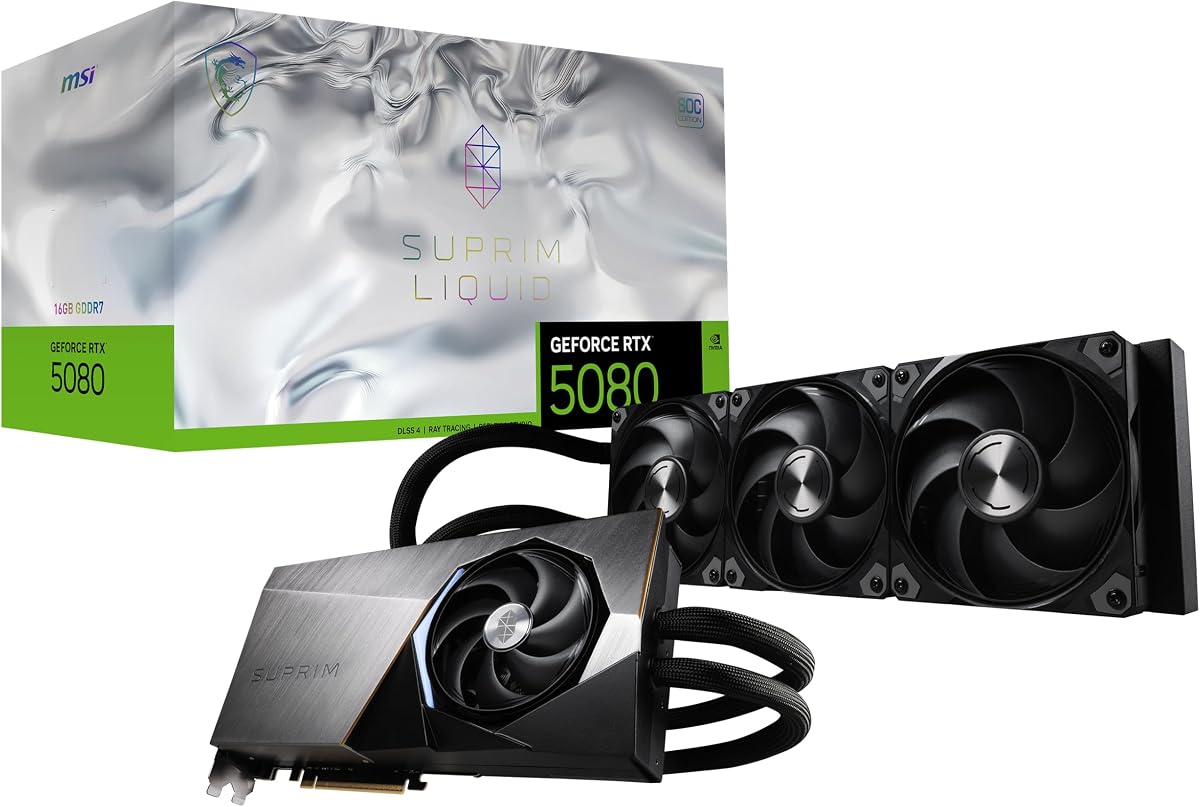
The MSI Gaming RTX 5080 16G SUPRIM Liquid SOC stands apart through its liquid-cooling implementation, high 2760MHz extreme-performance clock, and comprehensive display configuration. It has a 4.7 rating and uses the NVIDIA GeForce RTX 5080 with 16GB of 256-bit GDDR7 memory. The result is a premium RTX 5080 option for builders prepared to manage an advanced cooling solution.
We may earn a commission when you buy through this link, at no additional cost to you.
Its standout specification is the extreme clock, which is positioned as the card’s performance-oriented selling point. The liquid system is designed to manage the substantial heat output associated with a high-end GPU, potentially giving the board more thermal headroom. It is an appealing choice for a carefully planned, high-airflow enclosure where extra cooling hardware will not crowd other components.
The trade-off is installation complexity. A liquid-cooling card requires a compatible cooling solution, proper tubing or radiator arrangement, and enough chassis space. The product data does not provide exact card dimensions, radiator specifications, connector requirements, or recommended PSU wattage, so buyers need to verify the complete installation before ordering. Display versatility is excellent, with three DisplayPort 2.1a outputs and HDMI 2.1b.
This is a strong recommendation for a high-end gaming system, enthusiast workstation, or multi-monitor builder who wants a liquid-cooled flagship and extensive display connectivity. Support for a maximum digital resolution of 7680 by 4320 also makes it suitable for an 8K workflow. It is the specialized premium cooling choice in this roundup rather than the simplest installation.
The liquid-cooling system is the card’s defining physical feature. It is intended to manage heat from the RTX 5080 while supporting the aggressive 2760MHz extreme-performance profile.
Three DisplayPort 2.1a connections and one HDMI 2.1b output provide ample options for multiple displays. The listed 7680 by 4320 maximum digital resolution supports high-end monitors and 8K-oriented configurations.
We may earn a commission when you buy through this link, at no additional cost to you.
A flagship graphics card purchase should be based on workload, compatibility, and feature support rather than model name alone. Memory capacity, thermal design, power requirements, physical dimensions, and the software ecosystem all influence whether an expensive card will be satisfying in your particular system.
The processor generation determines the feature set available to a card. NVIDIA Blackwell models in this guide support DLSS 4, while the RTX 4090 uses DLSS 3. AMD Radeon models provide an alternative ecosystem that may be preferable for particular games, drivers, or workflows. Check whether the applications you use support the desired upscaling, ray tracing, encoding, and productivity features before selecting a model.
Choose the architecture that best matches your software, not simply the newest generation. Feature availability can vary by game and application.
Memory capacity affects texture quality, scene complexity, creative applications, and the ability to work with large data sets. Most of the selected cards provide 16GB, while the ASUS TUF RTX 5090 stands alone with 32GB and the ASUS TUF RTX 5070 carries 12GB. The 5090 is the strongest choice for memory-heavy professional and experimental workloads, while 16GB offers a broad balance for high-end gaming and creation.
Prioritize at least 16GB for a modern flagship purchase. Choose 32GB only when your software or data set clearly benefits from it.
A flagship card is most meaningful when paired with a display capable of exposing its capabilities. The VIPERA RTX 4090 lists support for 4K 120Hz HDR and 8K 60Hz HDR through HDMI 2.1a. The MSI RTX 5080 SUPRIM Liquid also supports 7680 by 4320 digital output. For a 144Hz or faster high-resolution monitor, frame rate, upscaling support, and latency features become as important as raw specifications.
Match the card to your monitor rather than choosing for a resolution you do not own. High refresh rates can also make low-latency features more valuable.
Flagship coolers can be both long and thick. The ASUS TUF RTX 5080 is listed at 348mm long and 3.6 slots wide, while several ASUS cards use 2.5-slot designs. The difference may determine whether a card fits without reducing the number of usable expansion slots. Measure the available space from the rear case panel and account for the front of adjacent drives, radiators, and other components.
Treat the manufacturer’s maximum dimensions as a minimum planning requirement. Leave additional room for power cables and airflow.
High-end graphics cards place substantial demands on a power supply, and the supplied specifications reveal only some requirements. The ASUS TUF RTX 5070 Ti and RTX 5080 both specify a minimum 850W PSU and a 16-pin 12V-2×6 connector, also called 12VHPWR. A high-quality unit with adequate capacity and correctly routed cables is important. Never assume that a wattage figure alone guarantees compatibility with every board.
Confirm the PSU model, connector type, and available cable paths. Check the manufacturer’s full power guidance before assembly.
Cooling is central to sustained performance, particularly under rendering or compute loads. Three-fan TUF designs use large fin arrays and phase-change thermal pads, while the MSI SUPRIM Liquid employs liquid cooling. Compact ASUS cards use axial-tech fans, 0dB behavior, and Quiet or Performance BIOS profiles. Cooling needs also depend on case airflow and ambient conditions, so a quiet card in a poorly ventilated enclosure may not remain quiet.
Prioritize a thermal design that matches the chassis. Pay attention to fan behavior, airflow, and the workload you expect to sustain.
Several ASUS cards include GPU Tweak III, which provides performance tweaking, thermal controls, and system monitoring. Factory OC modes offer additional clock potential without requiring manual tuning. These tools are useful for enthusiasts, but they also require stable power delivery, sensible temperatures, and enough case clearance. Beginners can use them to inspect behavior while leaving most settings at their defaults.
Tuning software is useful but not a substitute for adequate cooling and power. Make small, controlled changes and monitor stability.
Some flagship cards distinguish themselves through convenience rather than headline performance. ASUS GPU Guard and secure brackets help with mounting, dual BIOS switches make it easier to change between quiet and performance modes, and 0dB technology supports low-noise operation. The MSI model’s liquid cooler and extensive display outputs target particular enthusiasts. These features are most valuable when they match your priorities, such as a compact build, quiet workspace, or multi-screen setup.
Choose extra features only when they solve a real problem for your system. Core compatibility and workload fit should come first.
Before installation, confirm that the case has enough clearance, the power supply meets the manufacturer’s requirements, and every required cable is available. Install the card with the system powered off, connect the appropriate power cable securely, and route cables so they do not obstruct fans or press against connectors. For liquid-cooled models, follow the cooling system’s mounting and leak-testing instructions carefully.
After the first boot, install the latest operating system and graphics drivers, then update the board’s firmware or software if the manufacturer recommends it. Use the supplied monitoring utilities to check clocks, temperatures, fan behavior, and memory use. Avoid immediately applying aggressive overclocking; first establish a stable baseline under the workloads you actually intend to run.
Keep the card’s intake area clear of dust and ensure that the case supplies enough cool air. Monitor unusual noise, flickering, crashes, or sudden performance changes, and investigate them before increasing settings. Periodic cleaning with compressed air and careful checks of power connections can help preserve performance and extend the useful life of a high-end graphics card.
For most modern high-end gaming systems, 16GB is a strong and generally practical capacity. It provides room for detailed textures and demanding rendering, although exceptionally high-resolution texture packs and future titles can place more pressure on memory. Builders focused on production work, large datasets, or AI experimentation should consider the 32GB option instead.
Usually not. A 32GB card can provide additional flexibility in content creation, simulation, and AI workloads, but it does not guarantee higher frame rates in every game. The larger allocation is most valuable when a specific application needs a broad working set or when future-proofing is a higher priority than immediate gaming value.
At minimum, follow the exact manufacturer guidance for the specific card. The ASUS TUF RTX 5070 Ti and RTX 5080 in this guide each specify a minimum 850W PSU and a 16-pin 12V-2×6 connector. A suitable unit should also provide the required connections and enough headroom for the rest of the system.
A larger cooler can provide more room for fans, heatsinks, heat pipes, and airflow, but thickness alone does not guarantee superior thermals. Cooler quality, fan design, power limits, case airflow, and workload all matter. The 2.5-slot ASUS designs in this guide demonstrate that a thinner flagship can still include sophisticated cooling and dual BIOS profiles.
The decision depends on game support, preferred software, desired features, and the rest of your system. NVIDIA models in the guide emphasize DLSS, Reflex, ray tracing, and encoder features, while the Radeon RX 9070 XT options provide 16GB configurations and an AMD ecosystem. Review current application and game support before deciding.
No. DLSS 4 is available only in supported games and applications, and the available modes can vary. It generally works best when the game provides appropriate support and the selected quality, frame generation, and resolution settings suit the display. Native rendering remains an important part of the final visual experience.
A dual BIOS setup provides separate configuration profiles that can be selected with a physical switch. ASUS describes these cards as using the profiles for Quiet and Performance modes. The feature is useful when a user wants easier switching between low-noise operation and settings intended for more demanding workloads.
Only if the card’s exact dimensions and cooling requirements fit. Some 2.5-slot models are more suitable than 3.6-slot designs, but length, thickness, power cables, and cooler accessories still matter. Measure the available area and check the manufacturer’s dimensional guidance before purchasing.
The GIGABYTE RTX 5080 Gaming OC, ASUS TUF RTX 5080, and ASUS TUF RTX 5090 form the strongest top three in this guide. The GIGABYTE model provides a balanced route into RTX 5080 ownership, the ASUS TUF version adds extensive cooling, mounting, and software features, and the TUF RTX 5090 leads with exceptional 32GB memory capacity.
When choosing, prioritize workload requirements first. AMD buyers have well-specified 16GB Radeon RX 9070 XT options, while NVIDIA shoppers can move between the RTX 5070, 5070 Ti, 5080, 5090, and the still-capable RTX 4090. Case dimensions, power supply capacity, cooling architecture, and application support should narrow the decision before considering factory clocks or extra software.
Finally, check current prices, availability, and detailed manufacturer specifications before ordering. Graphics-card listings and component configurations can change, and a purchasing decision based on outdated fit or power information may lead to compatibility problems. Use this guide to establish the right feature set, then confirm the exact card and system requirements at the retailer.