
Cooling Fan for Nintendo Switch 1/2
4.6Editor score
Adjustable 510–6000 RPM
Temperature and speed display
Three-button fan control
Micro-USB powered design
Discover the best external cooling fan Nintendo Switch Dock options, comparing cooling design, compatibility, controls, setup, and everyday performance.
An external cooling fan can help a Nintendo Switch dock maintain steadier airflow during extended gaming sessions, particularly when the console is docked, charging, and running demanding software. The most useful accessories balance effective ventilation with quiet operation, secure placement, straightforward power connections, and compatibility with the correct dock model.
This guide compares ten external cooling fan and cooling-dock options based on the supplied specifications, including fan count, adjustable speeds, temperature displays, game-card storage, USB connectivity, installation method, and model compatibility. It covers replacement fans for original and OLED docks, multifunction stations, and fanless stands designed to improve circulation around a Switch 2 dock.
Each pick highlights the features that distinguish it from the alternatives, along with practical trade-offs to consider before buying. The numbered recommendations follow the supplied ranking, while the top selections emphasize value, feature richness, and understated cooling design. Product availability and prices can change, so readers should verify current details before purchasing.
4.6Editor score

4.8Editor score

4.0Editor score
The comparison below places every product by cooling approach, console compatibility, controls, and practical extras. Because these accessories range from simple replacement fans to complete multifunction stations, the best option depends on the dock model, available ports, and how much storage or connectivity the player needs.


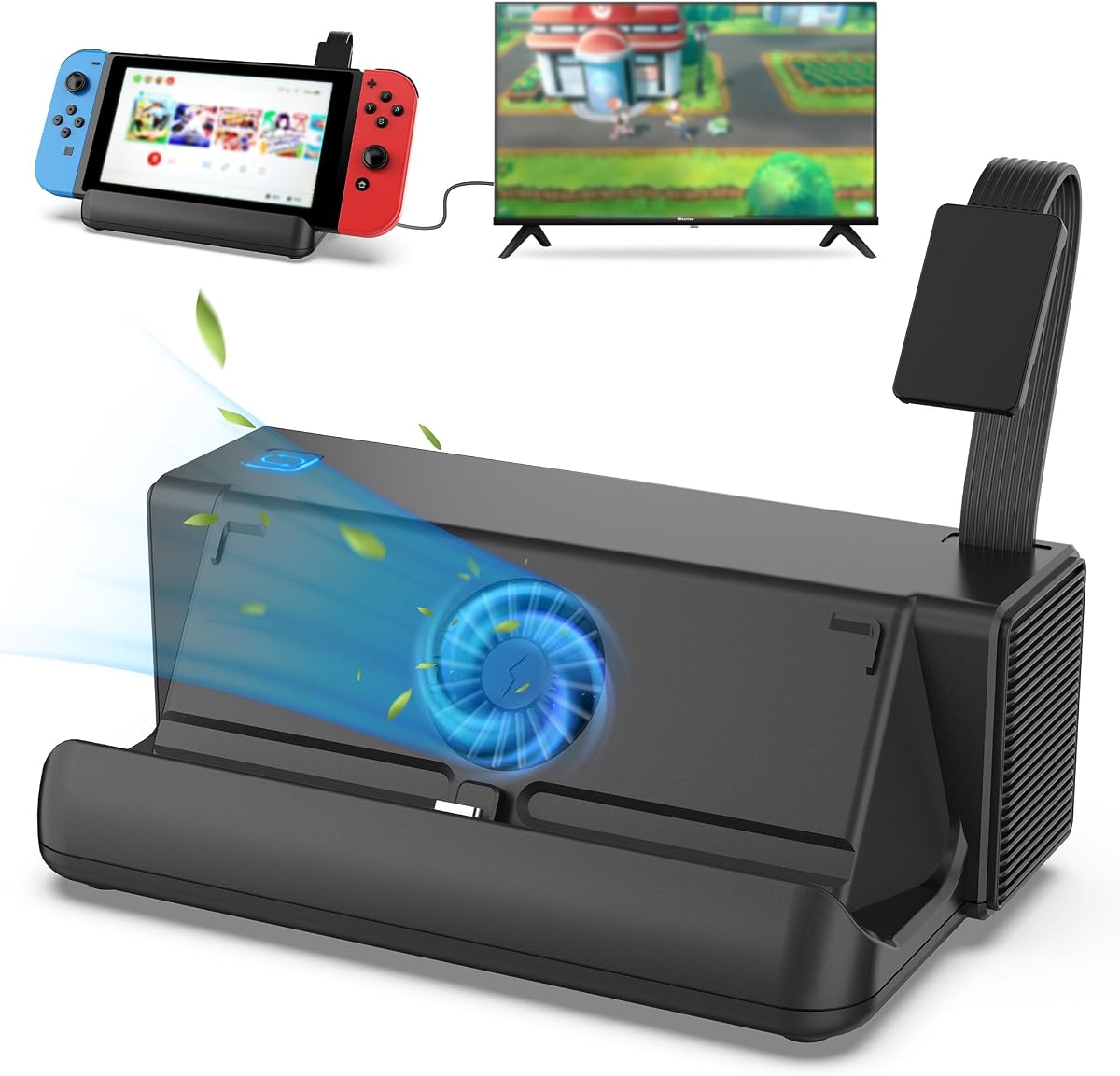


This replacement cooling fan combines a broad 510–6000 RPM speed range with an LED display that reports both current fan speed and exhaust temperature. Its 4.6 rating reflects a favorable balance of useful controls, straightforward installation, and a design intended to reduce heat around compatible Nintendo Switch 1 and Switch 2 setups.
We may earn a commission when you buy through this link, at no additional cost to you.
The most appealing feature is the combination of fine speed adjustment and live environmental information. Three dedicated buttons handle power, faster speed, and slower speed, while the display helps the player judge whether the dock is producing meaningful airflow. The manufacturer notes that operation below 2400 RPM is nearly silent, making a lower setting practical for casual gaming or when fan noise would be distracting.
Installation requires more attention than simply placing a stand beneath the dock. The included fixed pad is positioned between the console and docking base, and two joystick caps accompany it. A Micro-USB cable connects to the back of the console stand between the HDMI and power connections, so users should check that their available port arrangement accommodates the supplied cable.
This is the strongest budget-oriented choice for players who want direct control, visible operating data, and a broad speed range without buying a complete replacement dock. It is especially useful for original-dock owners who want to retain an existing setup. Those who prefer a cleaner installation, more game-card storage, or automatic operation may find one of the multifunction or Switch 2-specific alternatives easier to live with.
The LED screen provides more than a basic power indicator by showing live RPM and exhaust temperature. Those readings make it easier to select a setting that balances cooling demand with the noise level appropriate to the game.
A range beginning at 510 RPM allows for gentle circulation, while speeds up to 6000 RPM provide stronger ventilation for demanding sessions. The three-button layout makes adjustments straightforward without navigating a menu.
We may earn a commission when you buy through this link, at no additional cost to you.
The TNP Cooling Fan for Nintendo Switch Original Dock uses three high-speed fans to move air through the original dock. Its 3.9 rating places it among the more affordable, straightforward cooling options, particularly for users who do not need a display, elaborate controls, or additional connectivity.
We may earn a commission when you buy through this link, at no additional cost to you.
Three fans are the central selling point. Rather than relying on a single concentrated airflow path, the accessory distributes ventilation across a wider area. The player can select Turbo or Normal mode and switch the unit off, allowing the cooling level to be matched to the intensity of the session and the sensitivity of the surrounding space to fan noise.
The installation process is uncomplicated because the cooler attaches to the back of the original dock and draws power from a dock USB port. No tools are required, and its compact profile is intended to preserve space around a television stand or entertainment cabinet. The trade-off is a more specialized design that focuses on the original dock rather than newer hardware.
This cooler makes sense for original-dock owners seeking multiple fans and a direct rear-mounted solution. It is less compelling for Switch 2 or OLED users, and players who want visible temperature information may prefer a model with an LED display. Its lower rating also warrants checking recent customer feedback for details not captured in the core specifications.
Three separate fans can create a broader cooling pattern than a single-fan replacement. That distribution may be useful when the dock has multiple intake and exhaust areas that need consistent airflow.
Rear attachment and USB power keep the setup relatively clean. Players should still confirm the placement of their dock ports and leave enough space for the attached housing.
We may earn a commission when you buy through this link, at no additional cost to you.
The NEWDERY Cooling Fan for Nintendo Switch 2 Dock is a multifunction charging and cooling station aimed specifically at the newer console. Its 4.0 rating reflects a capable combination of dual-fan ventilation, three cooling levels, game-card storage, USB expansion, and programmable RGB lighting.
We may earn a commission when you buy through this link, at no additional cost to you.
When connected to the Switch 2 charging dock, the cooling fan is described as operating at full speed, while a button allows selection among three cooling levels. Two fans promote heat dissipation, and the vertical station also stores up to six game cards. That makes it a more useful upgrade for owners who want organization and connectivity without using several separate accessories.
Connectivity includes two USB-A output ports and one USB-C output port for accessories such as controllers, phones, or headsets. Nine RGB lighting modes provide visual customization, and a press-and-hold action turns the lighting off. This makes the station more versatile than a simple replacement fan, although the expanded design may take up more room than a compact add-on.
This is the top premium pick for a Switch 2 owner who values a complete station rather than the smallest possible cooling accessory. It offers the broadest connectivity and storage in the list. Players seeking a minimalist and completely silent option should instead consider the fanless Switch 2 cooling stand, while original-dock users will find its platform-specific design unsuitable.
Six game-card slots and three accessory outputs turn the dock into a small entertainment hub. It is especially practical for players who keep several games and charging devices within reach of the television.
Nine RGB modes let the station match a gaming setup, while the ability to switch the lights off keeps it visually restrained when a simpler appearance is preferred.
We may earn a commission when you buy through this link, at no additional cost to you.
The Bewinner USB Cooling Fan Base Stand Dock is a compact three-fan accessory designed to dissipate heat while a compatible game console is being used. Its 4.1 rating indicates a generally positive reception, and its appeal lies in combining multiple fans with a small, uncomplicated desktop format.
We may earn a commission when you buy through this link, at no additional cost to you.
Three internal fans provide ventilation across the base, while a side control allows the player to choose Turbo, Normal, or off. The control placement makes the unit easy to adjust without opening an app or navigating console settings. Its USB-powered design also supports a broad range of entertainment-center arrangements, depending on the available USB connection.
The compact construction is a meaningful advantage for setups with limited shelf space. At the same time, the description does not tie the base to a specific Switch 2, original Switch, or OLED fit, so compatibility should be confirmed through the listing and product dimensions before ordering. It also lacks the temperature display, game-card slots, and extra ports found in more specialized models.
This base is a practical choice for a player who values a small footprint and several fans but does not need a full docking station. It may work particularly well as a general console-cooling accessory, provided the physical fit is suitable. Those seeking guaranteed model-specific compatibility or integrated storage should choose one of the clearly identified original-dock, OLED, or Switch 2 products instead.
The base's compact proportions make it less visually dominant than a multifunction station. It is useful where cooling is desired without adding substantial shelf height or a large collection of accessories.
A side-mounted control provides direct access to Turbo, Normal, and off positions. This keeps cooling adjustments quick and reduces the need to move the console.
We may earn a commission when you buy through this link, at no additional cost to you.
The ZMBESUP Switch Dock Station is more than an external fan: it combines a cooling system, game-card management, wired-controller connectivity, and desktop or television display support. Its 4.4 rating is among the stronger results in the group, reflecting a broad set of functions in one unit.
We may earn a commission when you buy through this link, at no additional cost to you.
A one-key card-switching system is the standout feature. Players can move between four active game cards without repeatedly physically removing them, while four additional storage positions bring the total to eight slots. The integrated fan supports extended gaming, and separate switches allow the cooling system and card reader to be turned off independently during quieter periods.
The station provides three USB ports, one HDMI output, and one Type-C power input. Desktop mode offers a built-in stand for portable play, while TV mode supports 1080P HDMI output. It is compatible with Switch and Switch OLED systems, but the original Switch AC adapter is required for power, so current owners should verify that they have the appropriate charger and cable.
This is the most complete alternative for a player who wants to replace the official dock and reduce accessory clutter at the same time. Its advantages are strongest for owners with several game cards or a preference for fast card access. The cooling system is only one part of the package, however, so a dedicated replacement fan may be preferable when preserving the original dock is important.
The ability to select among four active cards with one button reduces repetitive physical card changes. Four spare storage positions keep the collection organized and accessible.
Separate cooling and card-reader switches let users reduce noise and energy use when those functions are unnecessary. That control is useful in mixed-use rooms and during lighter gaming sessions.
We may earn a commission when you buy through this link, at no additional cost to you.
The GLDRAM Cooling Fan for Nintendo Switch OLED Dock is built for the 2021 OLED dock model identified as HEG-007. It combines an inward-blowing fan, integrated blue lighting, and fourteen game-card slots, giving it a 4.4 rating and a distinct focus on both cooling and media organization.
We may earn a commission when you buy through this link, at no additional cost to you.
Rather than moving air away from the console, the fan directs airflow inward toward the surface of the OLED base. The manufacturer describes this arrangement as accelerating internal air circulation and helping the base dissipate heat. A control button operates the fan and its synchronized blue light, while a Type-C power interface and included cable keep the connection simple.
Its most noticeable secondary feature is the storage area for fourteen game cards. This is more capacity than most competing coolers offer and keeps frequently used titles visible from above. The shell is made from ABS material, described as lightweight, compact, hard, and durable, which should make the unit easier to position than a bulky desktop station.
This cooler is a good match for an OLED-dock owner who values easy card access and model-specific fit. It is not suitable for the original Switch dock, and the single-fan layout may be less appealing to buyers who prioritize maximum airflow. Buyers should also note that the console and dock are not included, as stated in the supplied product information.
The generous card capacity reduces the need to keep a separate case near the television. Rapid access to a larger library is especially useful for players who switch between several games.
Designing the accessory around the HEG-007 dock helps avoid ambiguity about placement. It is a better choice for a confirmed OLED model than a generic base that may leave ventilation paths obstructed.
We may earn a commission when you buy through this link, at no additional cost to you.
The Dobe Switch OLED Cooling Fan is a simple, visually clean replacement accessory for the OLED dock. Its 4.1 rating reflects a positive reception for a focused design that uses one high-speed fan, Type-C power, and a synchronized blue LED without adding complicated controls or storage features.
We may earn a commission when you buy through this link, at no additional cost to you.
The fan is designed to increase air circulation inside the base of the host console. It installs on the Switch OLED model in the specified orientation, and a physical switch turns both the fan and lighting on or off together. The supplied Type-C power-supply cable connects to the appropriate input on the accessory or the OLED base, depending on the selected setup.
The minimalist feature set is both a strength and a limitation. There is one speed mode, no temperature display, and no integrated card storage, but the reduced control complexity makes the product easy to operate. Its white finish and blue illumination are intended to coordinate with the appearance of the OLED dock rather than dominate the entertainment center.
This is a suitable choice for an OLED owner who wants a straightforward cooling fan with a clean appearance. It may be especially attractive to users who do not need adjustable RPM, automatic shutdown, or a larger multi-fan array. Original-dock and Switch 2 users should choose a product explicitly designed for their hardware.
The white housing and internal blue LED create a coordinated look for an OLED setup. Because the light and fan share one switch, the accessory remains easy to control during daily use.
A single high-speed fan targets circulation within the dock base. This keeps the design compact while concentrating airflow where the console can benefit from it.
We may earn a commission when you buy through this link, at no additional cost to you.
The 3 Speed Cooling Fan for Switch 2 is designed around automatic operation and precise alignment with the console's air inlet. Its 4.0 rating reflects a useful combination of three speed settings, a vertical duct, and synchronized startup and shutdown for a relatively hands-free experience.
We may earn a commission when you buy through this link, at no additional cost to you.
The turbine fan measures 45 millimeters and operates at 4000, 5000, or up to 6000 RPM. The vertical air duct is intended to align with the Switch 2 console inlet so airflow reaches the intended region. Its blade structure is also designed to reduce operating noise while maintaining stronger cooling performance.
A particularly convenient feature is automatic on-and-off behavior. The fan starts and stops with the Switch 2, so it does not need to be switched manually for every session. Installation can use residue-free nano tape for stability, while the wide base also permits placement directly on the dock for users who reposition it frequently.
This product is best for a Switch 2 owner who prioritizes automation and a compact, modern appearance. The relatively high minimum speed may be less suitable for extremely quiet environments, and the narrow platform focus rules it out for original or OLED docks. It is a more specialized choice than a universal three-fan base, but its automatic behavior makes daily use less demanding.
Starting and stopping with the console removes one more manual task from the gaming routine. The result is useful for players who dock and undock the system frequently.
The vertical duct is shaped to match the console's inlet position. This targeted alignment distinguishes the accessory from a general-purpose fan placed nearby without a carefully considered mounting position.
We may earn a commission when you buy through this link, at no additional cost to you.
The Cooling Stand for Switch 2 Dock takes a different approach from conventional powered fans. Its 4.8 rating is the highest in the group, and the design uses elevation, hollowed-out structure, and improved circulation around the dock rather than a motor-driven fan. It is therefore completely silent and requires no power.
We may earn a commission when you buy through this link, at no additional cost to you.
The stand is tailored for the Switch 2 Dock and is designed to leave its ventilation channels unobstructed. Raising the dock creates space for air to move around the base, while the hollowed structure promotes circulation. The approach is restrained and visually clean, particularly for players who prefer not to add electronic accessories or cables to the television area.
Stability is handled through black acrylic construction and non-slip silicone pads. The pads help keep the dock from sliding and protect surfaces from scratches. Installation requires no tools: the dock is simply placed onto the elevated platform, making this one of the least complicated products in the guide to set up and reposition.
This is the leading recommendation for users who prioritize silence, simplicity, and a tidy setup. It is not an active cooler, so it should not be expected to match a dedicated fan's forced-air output. Instead, it offers a passive means of improving circulation around a compatible Switch 2 dock. Players seeking aggressive cooling, live temperature readings, or automatic speed control should choose a powered model.
Because the stand contains no motor, it produces no fan noise and needs no power connection. It is an attractive option for bedrooms, shared spaces, and displays where electronic hum would be noticeable.
Silicone pads add grip and reduce the risk of scratches. The acrylic platform also keeps the dock visibly organized rather than leaving it directly on a cabinet or entertainment unit.
We may earn a commission when you buy through this link, at no additional cost to you.
The Switch Bottom Cooling Stand combines bottom cooling with a vertical stand, adjustable fan speed, and an LED operating display. It is described as compatible with the original Switch dock station and also lists Switch OLED and Steam Deck compatibility, giving it broader potential use than the more narrowly specified replacement coolers.
We may earn a commission when you buy through this link, at no additional cost to you.
Its display reports real-time RPM and exhaust temperature, while three physical buttons handle power and speed changes. The fan can run from 510 to 6000 RPM and is described as nearly silent below 2400 RPM. These controls make it possible to move between gentle circulation and stronger cooling depending on the game and room environment.
The included Micro-USB cable, stabilizing pad, and joystick caps support a more complete installation. The padded material is intended to prevent slipping and scratching. Because the product description references both original-dock fit and broader device compatibility, users should examine the dimensions and included components carefully to confirm the arrangement they need.
This accessory is appealing to players who want visible temperature information and broad manual speed adjustment without moving to a complete docking station. The absence of a published rating means there is no supplied rating to support a comparative quality judgment, so checking current customer feedback is especially important. Its feature set closely resembles the rank-one fan, but the bottom-and-vertical approach may suit different dock arrangements.
Showing both RPM and exhaust temperature gives users immediate feedback about the cooler's operation. That visibility is particularly helpful when adjusting settings during long sessions.
A low-to-high range accommodates different levels of background noise and cooling demand. Physical buttons also keep adjustments direct and independent of the console's software interface.
We may earn a commission when you buy through this link, at no additional cost to you.
The right cooling accessory depends on the exact console and dock, the amount of ventilation you need, and whether storage, lighting, or extra ports are priorities. Compatibility, airflow design, controls, and installation method should be evaluated before considering any one product.
Nintendo Switch accessories are not interchangeable across every generation. The original Switch dock, the Switch OLED dock identified here as HEG-007, and the Nintendo Switch 2 Dock have different dimensions, port arrangements, and ventilation paths. A cooler explicitly designed for the original dock should not be assumed to fit the OLED or Switch 2 model, even when both products use a similar dock shape.
Some listings describe broader compatibility for a particular use case, while others are tightly model-specific. Check the exact model names, the placement of the USB or Type-C connection, and whether the accessory blocks any vents. For a complete replacement station, also confirm whether an original Switch power adapter is required.
Active coolers use one or more powered fans to move air across or into the dock. They can provide stronger, more targeted ventilation and often include speed controls, displays, lighting, or automatic operation. Passive stands rely on elevation and open space to improve natural circulation, producing no fan noise and requiring no power connection.
Choose active cooling when long sessions, heavy use, or a desire for measurable operating information are priorities. Choose a passive stand when silence, minimal visual clutter, and effortless setup matter more. A passive product should not be judged as though it contains a fan, and an active product should be evaluated partly on whether its noise is acceptable in the intended room.
More fans do not automatically mean a better cooling experience, but multiple smaller fans can distribute airflow over a wider area. A single large or turbine-style fan may provide focused airflow if its duct aligns with the console's intake. The direction of the airflow also matters: inward-blowing, outward-exhausting, and vertically aligned designs serve different dock layouts.
Look for a design that matches the console's intake and exhaust locations rather than simply selecting the largest fan count. Adjustable RPM can also be more useful than a single aggressive setting, because it allows the user to reduce noise during quiet games or lighter tasks.
Physical buttons are fast to operate and work even when the console is not fully booted. Speed controls help users find a balance between cooling and noise, while automatic on-and-off behavior is convenient for frequent docking and removal. An LED display showing fan RPM and exhaust temperature gives the clearest picture of how the accessory is performing.
A display is not essential for every setup, but it can be valuable for diagnosing whether heat management is working. Automatic operation is useful when a player does not want to manage the fan manually. In contrast, a simple on-and-off switch may be sufficient for a user who prefers uncomplicated controls.
Cooling performance is only one part of the experience. Fans that provide strong circulation may be audible in a living room, particularly at their highest settings, and sustained noise can be distracting during quiet games or late-night sessions. Lower-speed modes, targeted ducting, and passive stands are common ways to reduce this issue.
Look for descriptions that distinguish quieter low settings from higher-speed operation. Consider the room in which the console will be used, how far the player sits from the television, and whether background media is normally playing. A modest airflow improvement with a quiet design can be more pleasant than a louder accessory that offers more aggressive cooling.
Some cooling accessories are also organizers or replacement docks. Game-card slots from four to fourteen are available in this group, while one-button card switching can reduce repeated physical card movement. USB ports can support controllers, headsets, phones, or other peripherals, but they should complement rather than replace a player's existing connection needs.
A larger multifunction station may reduce clutter, yet it will take up more space and require an appropriate power supply. A simple replacement fan preserves the current dock arrangement and usually integrates more easily. Choose extra storage and ports when they solve a genuine organizational problem rather than simply adding features.
The easiest accessories either place beneath the dock or attach directly to a compatible port. Replacement coolers may require a stabilizing pad, controller caps, or a specific cable route, while complete docks can require additional setup and a separate power adapter. Tool-free installation is convenient, but correct orientation and unobstructed ports remain important.
Consider how often the dock will be moved. Fans that use adhesive or nano tape should be installed on a clean surface, and removable tape can help reposition the accessory. Active fans also need unobstructed airflow and occasional attention to dust, while a passive acrylic stand can be cleaned with little effort.
Blue or RGB lighting can create a coordinated gaming-center look, but it is an aesthetic choice rather than a cooling feature. Some products synchronize the light with the fan, while others allow the lighting to be switched off. Fanless acrylic stands often integrate more discreetly into an entertainment cabinet because they omit powered components and light effects.
Think about whether the dock is visible from the seating area and whether the product should coordinate with other accessories. Lighting is especially useful for players who enjoy a display-focused setup, but it offers no direct performance advantage and may be distracting in a dark room.
Before installation, identify the console and dock model, read the included instructions, and compare the accessory with the dock's ports, vents, and power input. Clean both the dock and the contact surfaces before mounting the cooling unit. Confirm that the console can be fully seated, that no cable is bent sharply, and that the fan has an unobstructed path for incoming or outgoing air.
Connect the specified Micro-USB, USB-C, or other power cable only after the cooling accessory is correctly positioned. Turn the fan on and select the lowest setting first, then increase the speed if additional cooling is desired. If the accessory includes a display, check the RPM and temperature readout, and if it has a dock power switch, use that switch during periods when the console is not in use.
For upkeep, disconnect power before moving the unit. Keep intake and exhaust openings free of dust, and avoid pushing debris into the fan. Wipe hard surfaces with a dry or lightly damp cloth rather than allowing liquid to enter the housing. Check that pads remain stable, cables are undamaged, and adhesive mounts have not shifted, particularly if the dock is moved often.
A cooling accessory can be useful during extended docked sessions, particularly when the console is charging or running demanding games. However, ventilation needs vary by room temperature, game, dock position, and surrounding furniture. A fanless stand may be sufficient for some setups, while active cooling offers more targeted airflow for longer or more intensive use.
A properly fitted accessory should not damage the console, but incorrect installation can obstruct vents or place stress on ports and buttons. Follow the supplied instructions, avoid forcing connectors, and confirm that the dock remains stable. Users should also keep the console and dock vents clear of fabric, dust, and other obstructions.
Do not assume that a cooler for the original dock will fit the OLED dock. The supplied listings identify several replacement fans as specific to the original Switch or the OLED HEG-007 dock. Compare the product's stated model, dimensions, cable arrangement, and installation method with the dock in hand before ordering.
A fanless stand does not produce forced airflow, but elevation and open space can improve natural circulation around the dock. Products in this category use hollowed structures intended to keep ventilation channels clear. They are best suited to buyers who value silence, simple setup, and a tidy appearance rather than aggressive cooling.
A temperature display lets the user see the reported exhaust temperature and determine whether a higher fan setting is making a meaningful difference. RPM information also makes speed adjustments easier to understand. The display is not an independent laboratory measurement, but it provides useful feedback during regular use.
A replacement fan is usually the most direct way to add cooling while preserving the current dock. A complete station is more useful when you also want game-card storage, fast card switching, additional USB ports, or a different desktop and television setup. Complete stations generally require more space and may need a separate compatible power adapter.
Noise depends on fan design and speed. Products such as the rank-one fan are described as nearly silent below 2400 RPM, while higher settings become more audible. Three smaller fans, a single turbine fan, and a passive stand can each produce different sound profiles, so the listed mode structure and intended room should guide the choice.
It is generally better to turn the accessory off when the console is not in use, particularly if it has a manual power control. Automatic models can reduce this task by switching with the console. Following the product instructions also helps prevent unnecessary wear and keeps the installation ready for the next session.
The Cooling Stand for Switch 2 Dock stands out for silent operation, tool-free installation, and a clean elevated design, while the Cooling Fan for Nintendo Switch 1/2 offers the strongest balance of adjustable cooling, visible data, and budget-oriented practicality. The NEWDERY Switch 2 Dock earns the premium selection for dual fans, game-card storage, USB expansion, and RGB lighting.
The right choice for the remaining players depends on their exact hardware and priorities. Original-dock owners may favor a rear-mounted three-fan cooler or a model with a temperature display, while OLED users should choose a confirmed HEG-007-compatible design. A complete multifunction station makes sense when storage and connectivity matter as much as cooling, and a fanless stand is ideal for users who prioritize silence.
Before making a final decision, verify the current model compatibility, included power cable, physical dimensions, port access, and installation requirements. Product listings and prices can change, as can customer feedback, so checking the latest availability, rating trends, and current product details is advisable before purchasing.