
Thermal Grizzly Delid-Die-Mate
4.5Editor score
Designed for Intel 12th and 13th gen
Red and black anodized aluminum
Supports direct-die cooling work
Our 2026 guide compares the best delidding kits for CPUs, PlayStation 3 GPUs, and precision chip repair by compatibility, precision, durability, and ease of
Delidding kits provide the controlled access needed to remove integrated heatspreaders, stubborn adhesive, or component lids from processors and other sensitive electronics. A purpose-built tool is more dependable than improvised knives, heat guns, or prying tools because it can place force where it is intended and reduce the chance of damaging delicate circuitry.
The products in this guide were compared using the information supplied for each listing, including intended applications, supported devices, material, blade or tool design, user ratings, and stated safety considerations. The list covers CPU delidding tools, PlayStation 3 GPU tools, precision scrapers, broader chip-repair kits, and an adhesive-heating separator rather than treating every product as the same type of device.
Each review explains the product's strongest use case, practical limitations, and compatibility considerations so the right kit is chosen for the actual repair. Ratings and product details can change, and marketplace prices fluctuate frequently, so readers should verify the current listing, included components, and fit before ordering.
4.5Editor score

4.1Editor score

4.8Editor score
This side-by-side comparison organizes the ten products by the job each performs, from processor heatspreader removal to console-GPU access and delicate board cleaning.




The Delid Tool V3 is a purpose-designed PlayStation 3 delidding tool with a 4.6 rating. Its strongest qualities are the thin, durable blade, replaceable construction, and clear focus on console repair. Rather than asking users to repurpose a general craft knife, it offers a controlled tool intended to address the process of opening the relevant console lid with less risk than an improvised approach.
We may earn a commission when you buy through this link, at no additional cost to you.
The package includes three blades, and version 3 is described as using a sharper, more flexible blade intended to improve durability and longevity. That combination is important in delidding because a blade that bends, dulls, or drags can leave a less clean separation around the lid. The thin edge can reach into a tighter working area than a thick general-purpose utility blade, while the replacement blades help keep the tool useful over repeated jobs.
Its main limitation is specialization. This is not presented as a broad CPU delidding set or a general circuit-board repair kit, and its compatibility is specifically stated for PlayStation 3 systems. Buyers working on desktop processors, phones, or unrelated components should not interpret the inclusion of three blades as evidence that the tool is intended for every electronic package.
Choose this kit when the job specifically involves a compatible PlayStation 3 and the goal is a dedicated opening tool rather than a broad hobby set. The product rating, replaceable blade system, and three-blade package make it a focused recommendation for console repairers who value having fresh cutting edges available.
The defining advantage is specialization. A purpose-built blade and handle reduce the need to improvise with a knife that may be too thick, rigid, or awkward around a console lid. The approach still demands care, but it gives the user a more suitable tool for the procedure.
Having three blades provides useful redundancy for a consumable cutting edge. Instead of abandoning the tool as soon as one blade loses its clean cutting performance, the user can switch blades and keep the main handle in service.
We may earn a commission when you buy through this link, at no additional cost to you.
The der8auer Delid-Die-Mate X is an integrated heatspreader removal tool for Intel Skylake-X and Kaby Lake-X processors using socket 2066. It carries a 4.1 rating and stands out for a focused, processor-specific design. Its 145 by 95 by 20 millimeter body uses aluminum and stainless steel, with an anodized black finish that suits a professional repair bench.
We may earn a commission when you buy through this link, at no additional cost to you.
The integrated approach is valuable because heatspreader removal is not just a matter of finding a sharp edge. The tool is intended to work as a coordinated mechanism around the processor package, helping users gain access to the heatspreader and underlying die. That specificity distinguishes it from general-purpose knives, thin scrapers, and multi-blade repair sets whose cutting angles and handling were not designed around processor lids.
Compatibility is the decisive trade-off. The listing states that removing the integrated heatspreader invalidates the manufacturer's warranty, and the lower mounting height created by a bare die can prevent coolers with fixed mounting positions from being installed. A cooler with adjustable mounting height may be necessary, so the tool should be selected together with the intended cooling arrangement rather than in isolation.
This is the strongest overall recommendation for a user whose processor is explicitly supported and whose objective is serious direct-die work. It is not a universal Intel tool, and even a well-matched product can expose the user to warranty loss and cooler-clearance issues. Those limitations are inherent to the process rather than defects in the tool, but they must be considered before disassembly.
The tool is built around a single specialized operation instead of asking a user to improvise a cutting and prying sequence. For a repairer who understands processor handling, that integrated design can make the procedure more methodical and repeatable.
Removing an integrated heatspreader reduces the stack height available to the cooler. Confirm that the chosen mounting hardware can reach lower before ordering the tool, especially if it uses a fixed-height or non-adjustable design.
We may earn a commission when you buy through this link, at no additional cost to you.
This Knife Repair Kit is a general precision set for removing BGA chips, cutting glued components, scraping CPU adhesive, and working on circuit boards. Its 3.6 rating is lower than those of the more specialized choices, but the 0.38 millimeter blades and dual cutting functions make it relevant to repairers who handle several kinds of small electronics rather than one specific processor family.
We may earn a commission when you buy through this link, at no additional cost to you.
The ultra-thin profile allows the blade to move between chips and baseplates, which is useful when the objective is to separate a component or cut adhesive without placing a thick edge against sensitive solder points. The blades are described as SK5 steel with a stated heat tolerance of 287°C, while the ergonomic handle is designed to provide a secure grip during detailed work.
As a general-purpose kit, it is less compelling when a dedicated CPU delid tool is available for the exact processor. A 0.38 millimeter edge and a specialized package-removal mechanism are not equivalent things, and the broad range of claimed tasks does not guarantee a controlled integrated-heatspreader procedure. The lower rating reinforces the importance of comparing specifications with the actual repair before selecting it.
The kit makes the most sense for a technician who needs a thin blade for board-level work, BGA removal, or adhesive cutting and values having several application types in one set. It is less suitable as a first-choice dedicated desktop CPU delidding solution. A careful user should work slowly, keep the blade away from underlying components, and use cleaning wipes as directed between jobs.
The stated 0.38 millimeter profile is the key feature for repair work where a thick blade may strike a neighboring part before the desired cut is complete. It allows the working edge to enter narrow spaces with less interference.
This set is useful when the work includes glued strips, power-supply components, and BGA packages. Its value comes from versatility, although that breadth means it is not automatically the safest choice for every heatspreader-removal task.
We may earn a commission when you buy through this link, at no additional cost to you.
The Thermal Grizzly Delid-Die-Mate is a dedicated CPU heatspreader removal tool for 12th and 13th generation Intel Core processors. Developed by Roman Hartung, it combines a 4.5 rating with a polished black-and-red anodized aluminum design. Its defining advantage is platform-specific intent: it is built to remove the heatspreader and enable more direct contact between the CPU die and a suitable cooling solution.
We may earn a commission when you buy through this link, at no additional cost to you.
The listing states that removing the heatspreader can reduce temperatures by 10 to 20°C through direct-die cooling, while the tool itself is described as supporting easier, more efficient heat dissipation and straightforward installation. These benefits depend on a complete cooling setup, careful surface preparation, appropriate thermal-interface material, and secure mounting. A delidding tool opens the processor; it does not by itself guarantee a particular thermal outcome.
The trade-off is compatibility. This is a specialized Intel tool rather than a universal set for desktop processors, laptops, or console GPUs. It should be matched carefully to the target generation and package. Direct-die work also demands a higher level of care than a simple external cleaning job because the exposed silicon and surrounding package are sensitive to pressure, contamination, and mounting mistakes.
For a knowledgeable enthusiast or technician working with a supported 12th or 13th generation Intel Core processor, this is the premium pick in the guide. The dedicated construction, attractive finish, and clear cooling rationale justify its position for the right platform. Buyers should verify the exact processor model and plan their cooling solution before beginning.
This is not a generic lid lifter. The tool is made to support direct-die cooling by removing the integrated heatspreader so that the die can be paired with an appropriate cooler and thermal interface.
The black-and-red anodized aluminum body gives the tool a precise, professional appearance. More importantly for the workflow, the dedicated mechanism keeps the operation aligned with a defined processor task instead of a broad cutting job.
We may earn a commission when you buy through this link, at no additional cost to you.
The Thermal Grizzly TG Scraper is a three-pack of acrylic precision scrapers with the highest listed rating in this guide at 4.8. It is not a complete delidding mechanism; instead, it fills an important supporting role after a processor lid has been removed. Its narrow tip is designed for silicone adhesive and indium solder residue left on delidded processors.
We may earn a commission when you buy through this link, at no additional cost to you.
Acrylic construction offers a useful balance for delicate scraping. According to the supplied information, it is intended to reduce the risk of scratching or damaging CPU packages when used carefully, and the narrow profile allows the user to work around small features with more control. The ergonomic shape also supports a steady grip, which matters when the difference between productive residue removal and an accidental scratch is tiny.
The limitation is its narrow role. It cannot remove an integrated heatspreader by itself, and careless pressure can still mark a surface. Likewise, three units are useful for keeping work areas separate or replacing a marked tool, but the number of scrapers does not increase the cutting capability of the product.
This is the best budget recommendation for users who already have a compatible delidding tool and need a controlled way to clean the exposed package. It is also worthwhile for technicians who perform repeated CPU work and want dedicated cleanup implements. For a first delidding project, purchase it as a companion rather than treating it as a complete kit.
A narrow scraper targets the residue that remains after a lid has been removed. That is a different job from separating the lid itself, and the dedicated tip allows the user to work close to package edges and small components.
Having three identical scrapers makes it easy to dedicate one to adhesive, one to solder residue, and another to a different repair category. It also provides a spare when a tip becomes marked or damaged.
We may earn a commission when you buy through this link, at no additional cost to you.
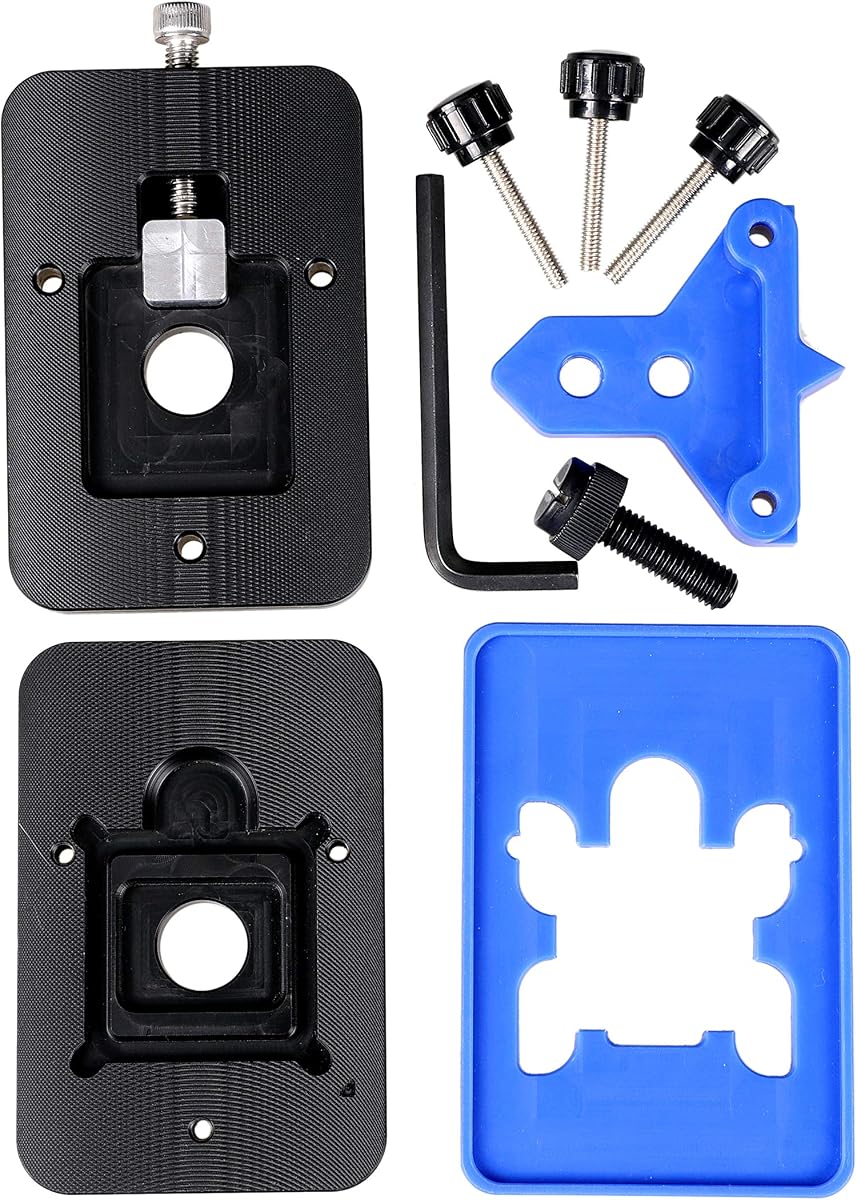
The EG Starts Kaby Intel CPU Delid and Relid tool supports a range of Intel LGA platforms and carries a 4.6 rating. Its compatibility covers LGA 1150, 1151, and 1155, with the listing also identifying support for Kaby Lake and Coffee Lake processors. For an enthusiast working with one of these platforms, it offers both opening and lid-replacement capability in a specialized design.
We may earn a commission when you buy through this link, at no additional cost to you.
The product description emphasizes control: the square aluminum block should sit below the plastic plane so that it does not damage the CPU board. That instruction illustrates why a dedicated opener can be safer than a knife. A broad, flat tool applies force in a controlled area, while the user avoids placing the block where it could contact or damage the board.
The main concern is platform age and exact fit. A title that lists many processor families does not remove the need to identify the socket and compare the physical package. The product is also more useful to users who may need to restore an integrated heatspreader later. A one-way removal tool may better suit someone committed to a permanent direct-die configuration.
This is a compelling choice for supported older Intel builds, particularly when relid capability is important. Its 4.6 rating and broad socket coverage distinguish it from generic repair knives. The block must be oriented correctly, and the processor must be fully supported, but for a matching system it is a well-targeted delidding solution.
The ability to remove and replace a heatspreader is useful for maintenance, experimentation, and temporary changes to a cooling setup. It provides more flexibility than a tool intended only for permanent bare-die operation.
The most important operational detail is keeping the square aluminum block below the plastic plane. Correct placement focuses the tool's action on the lid and reduces the risk of damaging the CPU board.
We may earn a commission when you buy through this link, at no additional cost to you.
The QianLi ToolPlus 009 is a 12-in-1 handle metal craft-knife set for electronics repair. No user rating is supplied for the listing, so it is difficult to place it confidently against the rated products using customer feedback. Its defining advantage is instead the range of blade profiles, which allows the user to move between fine scraping, angled cutting, prying, and adhesive removal without depending on a single edge shape.
We may earn a commission when you buy through this link, at no additional cost to you.
The tool is described as useful for lifting chips, cleaning solder pads, cutting tough board glue, and preparing surfaces for rework. It is also specifically presented for iPhone CPU work, including A8 and A9 delidding and refurbishment, as well as general BGA and PCB maintenance. The metal handle is positioned for balance and a non-slip grip, reducing hand fatigue during extended sessions.
Its limitation is that it is a general precision knife system rather than a dedicated integrated-heatspreader opener. Different blade shapes give flexibility, but they do not guarantee the same controlled package alignment offered by a platform-specific CPU tool. Users must also judge the correct blade carefully, because an aggressive or poorly positioned edge can damage the sensitive area beneath a component.
For a repair technician who works across phones, motherboards, and BGA components, the broad blade selection can reduce the need for several separate implements. It is a strong all-purpose companion kit, but buyers who only need to open one supported CPU may find a dedicated tool more appropriate. Lack of a listed rating means the product's physical design and stated functions deserve extra attention before purchase.
Fine points, angled edges, and other included profiles make the set adaptable to different stages of a repair. Swapping blades allows a technician to select a tool that matches the cut instead of forcing one edge into every task.
The metal handle is designed to offer balance and a secure grip. That control is especially valuable when the blade must slide beneath a chip, where a sudden shift can contact nearby pads or components.
We may earn a commission when you buy through this link, at no additional cost to you.
The RSX GPU Delid Tool is a specialized accessory for the RSX graphics processor found in Fat and Slim PlayStation 3 models. No user rating is listed. Its strongest feature is precision targeting: the design is intended to help keep the working edge away from the main board while removing the RSX integrated heatspreader during console repair or thermal-paste maintenance.
We may earn a commission when you buy through this link, at no additional cost to you.
Opening the RSX lid gives access to the thermal interface material between the chip and its cover. That makes the tool relevant when aged paste or another interface material needs to be serviced. The stated design goal of reducing board contact is important in a console, where an uncontrolled lever or blade can mark nearby circuitry or stress the package.
Compatibility is narrow and must be respected. The tool does not support PlayStation 3 Super Slim models because those systems do not use an RSX lid. It is also intended only for the RSX or GPU, not the CELL processor's integrated heatspreader. A buyer who owns multiple PS3 variants should confirm which board is present rather than assuming every console is interchangeable.
Choose this tool for a compatible Fat or Slim console when the actual task is RSX thermal-paste replacement. It is not a general CPU kit, and delidding still carries a risk of chip or console damage. Used with appropriate care and established repair procedures, however, it offers a focused alternative to improvising around the RSX cover.
The tool is designed around a specific console component and the task of exposing the RSX thermal interface. That focus makes it easier to select than a general kit when the intended repair is already known.
Fat and Slim models are supported, while Super Slim systems are excluded because they do not use the same RSX lid. The CELL processor is also outside the tool's scope, so a PS3 repair should begin with board identification.
We may earn a commission when you buy through this link, at no additional cost to you.
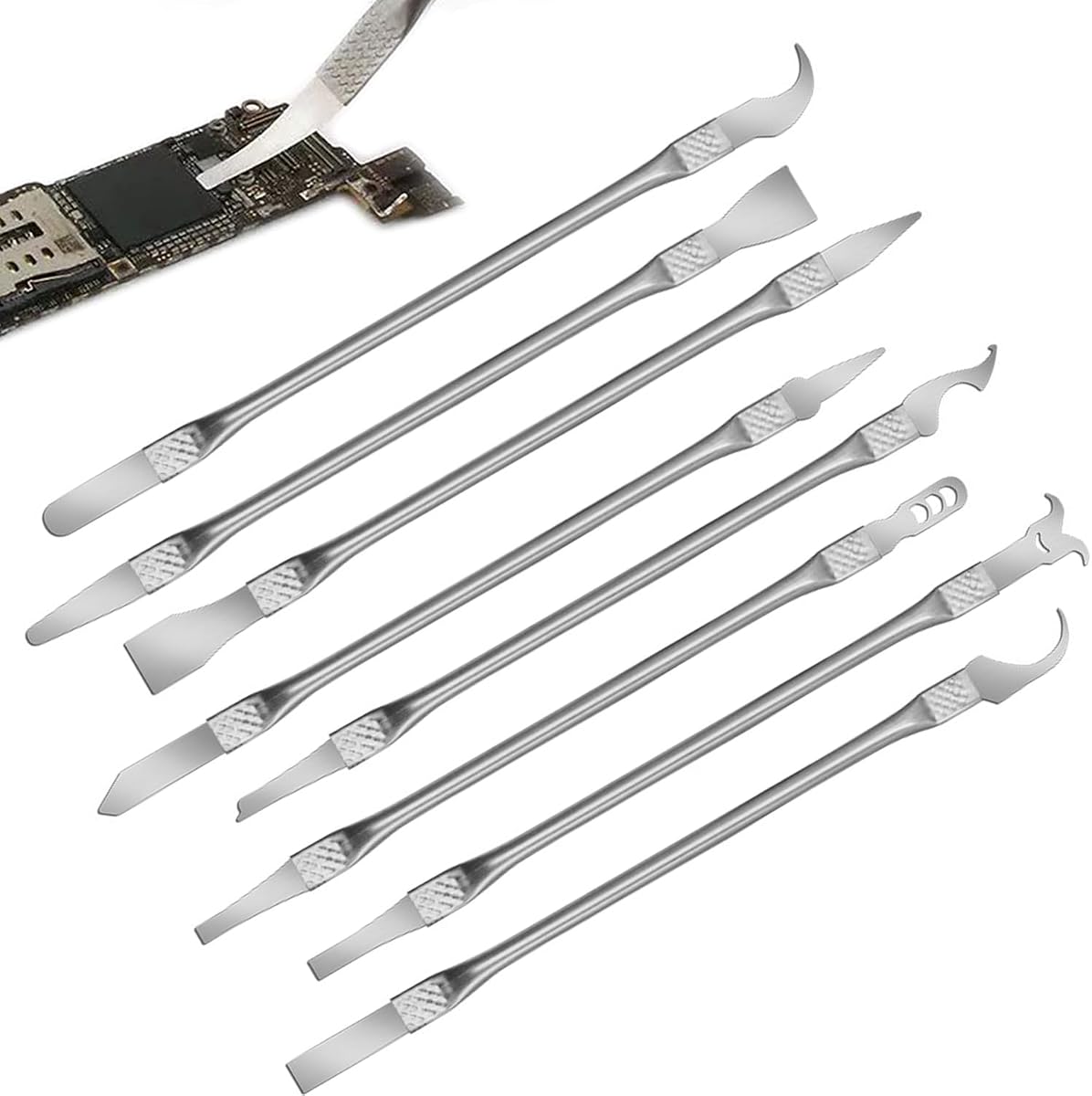
The 8 Piece Multi-Function CPU Removal Tool Set is a general repair kit for smartphones, motherboards, BGA chips, and other small components. It has a 4.0 rating. Its appeal lies in versatility and accessibility: the set provides several implements for maneuvering between chips and boards, and the integrated blade-and-handle design avoids assembly before use.
We may earn a commission when you buy through this link, at no additional cost to you.
The tools use ultra-thin profiles intended to move between small components with less obstruction. The listing describes the material as corrosion-resistant alloy designed to resist corrosion and bending. Ergonomic shaping is also emphasized, which can reduce fatigue during longer repair sessions and help maintain a controlled grip.
The tradeoff is that this is not a dedicated CPU delidding system. Although some products use the broad terms CPU removal and delidding, the listed use cases emphasize general board-level work. Users should not assume that every included blade has the geometry, edge control, or platform-specific alignment required to remove a modern processor integrated heatspreader safely.
This set is a practical choice for a hobbyist who wants basic access to small components across several devices. It can be especially useful for smartphone and motherboard tasks where multiple tip shapes are valuable. For a single supported desktop CPU, choosing a dedicated platform tool is likely to offer a more controlled workflow and clearer compatibility information.
The combination of thin implements and an integrated handle makes the set approachable for common electronics repairs. It provides a useful range of options without requiring the user to assemble a separate multi-knife system.
A small blade can fit around a component, but fit alone does not make it a complete CPU opener. Use a dedicated tool when processor-specific geometry and integrated force control are required.
We may earn a commission when you buy through this link, at no additional cost to you.
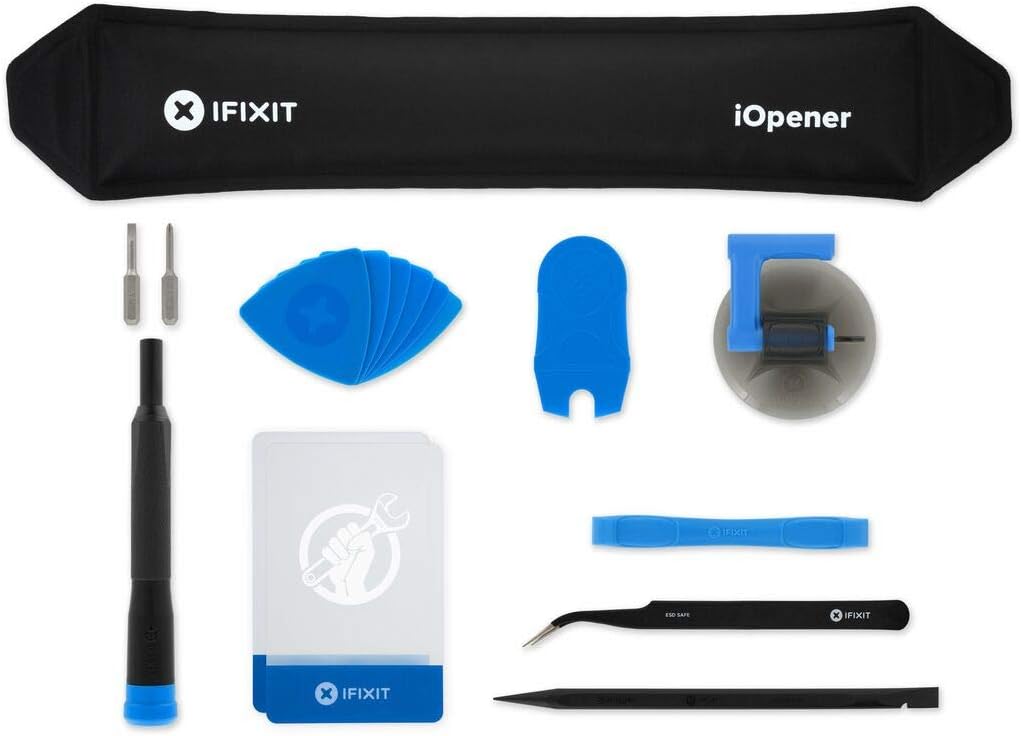
The iFixit iOpener is a heated separator designed to loosen adhesive before screens or other parts are opened. It has a 4.5 rating and serves a different role from the cutting tools in this guide. Rather than slicing through an integrated heatspreader, it applies controlled heat to soften adhesive and reduce the force required during disassembly.
We may earn a commission when you buy through this link, at no additional cost to you.
Even heat application is its main advantage. The tool can be used on iPads, many tablets, iPhones, Android phones, PC laptops, and other electronics that benefit from warming before opening. The included repair tools cover common items used with the iOpener, giving users a more complete setup than a standalone heat source. Its construction is described as non-toxic and food-safe.
It is not a delidding kit in the narrow sense, and it cannot remove a processor lid or cut board adhesive by itself. Heat also demands appropriate caution: users should follow the guidance associated with their device, keep moisture away, avoid overheating, and be mindful of nearby batteries or heat-sensitive materials. The iOpener is best used to make a subsequent opening step safer and more controlled.
For phone, tablet, and laptop work involving stubborn display adhesive, this is a highly useful companion tool. It does not belong in a shortlist of direct CPU heatspreader openers, but it demonstrates why a broader repair toolkit can include heat as well as blades. It is most valuable when the user wants to loosen adhesive methodically before lifting a component.
Softening adhesive first can make a display or cover easier to separate. This reduces the amount of pulling and levering required, which can help protect fragile parts and adhesive-dependent assemblies.
The iOpener's broad compatibility makes it useful across phones, tablets, and laptops. A repairer working on multiple device categories can use a familiar heating method instead of treating every adhesive with purely mechanical force.
We may earn a commission when you buy through this link, at no additional cost to you.
The right delidding kit depends on the component, platform, cooling plan, and repair experience. Compatibility and control matter more than the number of pieces or the breadth of advertised uses.
In short, match the tool to the exact target before considering any other feature.
Prefer a dedicated mechanism when the package is expensive or the geometry is complex.
Plan the complete cooler and thermal-interface setup before changing the processor package.
Match edge shape and tip size to the component and the material being separated.
Look for a durable body, an appropriate working surface, and replaceable consumables where repeated use is expected.
Choose a handle that feels stable and allows precise movement without hand fatigue.
Separate the opening, cleanup, and adhesive-softening stages when deciding what the kit must accomplish.
Treat warranty loss and component damage as real consequences, and follow every product-specific safety instruction.
Before opening anything, identify the exact processor, console, or board and compare it with the tool's compatibility notes. Disconnect power, remove the device from its normal operating environment, and prepare a clean, well-lit work area with a container for removed fasteners and lids. For heated tools, keep the area dry and follow the manufacturer's temperature and handling instructions. Never rely on a close visual match when the listing provides a specific platform list.
Use the tool in the manner shown in its instructions. A dedicated CPU or console opener should be aligned according to the specified block, blade, or contact area before force is applied. For a precision scraper, work with the narrow tip at a shallow angle and remove small amounts of residue rather than trying to cut through everything at once. Keep the working edge away from the substrate, copper lands, solder points, and nearby components. The user should stop if resistance changes unexpectedly rather than forcing the tool.
After the job, remove debris and clean the implement according to its instructions. The Knife Repair Kit listing mentions alcohol wipes for cleaning between repairs, while replacement blades and scraping tools should be protected from impacts and stored dry. Replace a blade when it becomes dull, bent, or contaminated, and keep precision tips away from hard surfaces. A dedicated tool should be returned to its case or a protected organizer so that the working edge does not contact tools that could damage it.
No. Compatibility is product-specific. The der8auer Delid-Die-Mate X is listed for Intel Skylake-X and Kaby Lake-X processors on socket 2066, while the Thermal Grizzly Delid-Die-Mate targets 12th and 13th generation Intel Core processors. Other kits focus on mobile CPUs, BGA chips, PlayStation 3 components, or general circuit-board repair. Always verify the exact processor or device before ordering.
A delidding tool is designed to separate an integrated heatspreader or component lid, often using a controlled mechanism and a broad support surface. A precision scraper removes residue left after the lid has been opened. The Thermal Grizzly TG Scraper, for example, targets silicone adhesive and indium solder residue. These tools can complement each other, but a scraper alone is not a complete CPU opener.
Only if its listing specifically supports the console model and component you intend to service. The Delid Tool V3 is compatible with PlayStation 3 systems, while the RSX GPU Delid Tool supports Fat and Slim models but not Super Slim systems. The RSX tool is also limited to the GPU lid and does not remove the CELL processor's integrated heatspreader.
It depends on whether you may need to restore the original heatspreader. A tool with relid capability can be useful for maintenance, experimentation, or temporary changes to a cooling configuration. For a permanent direct-die setup, a specialized opener may be sufficient, but you still need a compatible cooler, suitable thermal-interface material, and a safe mounting arrangement.
It can, because the Thermal Grizzly listing describes a potential 10 to 20°C reduction through direct-die cooling. The actual result depends on the processor, cooler, thermal interface, mounting pressure, room conditions, and system configuration. A delidding tool does not guarantee a specific temperature improvement, and improper handling can permanently damage the silicon or package.
A thin knife may be useful for delicate scraping or some nonstandard repair tasks, but it does not automatically match the control of a dedicated opener. Heatspreader removal involves force around a fragile package, so a purpose-built tool with defined contact points is generally preferable. Generic blades are better viewed as supplementary implements unless the manufacturer specifically approves the application.
It can. The der8auer Delid-Die-Mate X listing explicitly states that removing the CPU heatspreader invalidates the manufacturer's guarantee. Warranty policies vary by seller and manufacturer, and opening the package may also affect return eligibility or create additional risks. Review the applicable policy and understand the consequences before modifying an expensive processor or console.
Use a narrow precision scraper designed for the residue rather than a thick blade. The Thermal Grizzly TG Scraper is specifically intended to remove silicone adhesive and indium solder residue from delidded processors. Work carefully around the package, keep the tip controlled, and avoid scraping areas where substrate, pads, or delicate components could be damaged.
The best choice depends on the job: the der8auer Delid-Die-Mate X is the leading specialized pick for supported Intel socket 2066 processors, the Thermal Grizzly Delid-Die-Mate is the premium option for 12th and 13th generation Intel Core systems, and the Thermal Grizzly TG Scraper is the budget-friendly companion for precise residue cleanup. Each addresses a different part of the delidding workflow rather than offering interchangeable functions.
Prioritize exact compatibility, controlled force, and a clear understanding of the final cooling arrangement. A dedicated opener is usually more appropriate than a general blade for separating a processor lid, while a narrow scraper is valuable for finishing the package and a heating tool can help with display adhesive. Wider multi-tool kits can serve general board repair, but more pieces do not automatically make every operation safer or more precise.
Finally, review the current listing before buying. Product contents, ratings, supported platforms, and marketplace prices can change, and accessories may vary between versions. Confirm the exact target device, check the product's current instructions, and evaluate your repair experience before beginning. That final compatibility check can prevent the most common and avoidable delidding mistake.