
Zalman CUBIX-G Micro-ATX
4.4Editor score
Three RGB fans included
Supports 280mm graphics cards
Compact Micro-ATX design
USB Type-C connectivity
Our expert guide compares 10 cube shaped PC cases, covering cooling, motherboard support, graphics clearance, connectivity, aesthetics, and build ease.
A cube shaped PC case turns a practical computer enclosure into a striking centerpiece for a gaming desk. The best models balance a compact footprint with enough airflow, component clearance, cable space, and front connectivity for a comfortable build, while showcasing the hardware through glass panels and integrated lighting.
We compared all ten cases by examining motherboard support, graphics card dimensions, CPU cooler limits, included fans, radiator options, storage capacity, dust filtration, and everyday I/O. The list covers mini-ITX, Micro-ATX, and ATX configurations, from highly compact models to spacious premium enclosures.
Each review identifies the strongest use for that particular case and explains any compromises. Ratings reflect the supplied customer feedback, while specifications come from the listed product information. Product prices and availability can change, so check the current listing before choosing.
4.4Editor score
4.7Editor score
4.4Editor score
The comparison below places every cube-style enclosure side by side, highlighting supported hardware, cooling provisions, included fans, and distinctive design features so you can quickly identify the right fit for your build.



The Yeah Magic Cube combines a striking 270-degree glass presentation with a practical 28.5-liter layout, earning a 4.7 customer rating. Its pillar-less design opens multiple viewing angles, allowing the motherboard, graphics card, power supply area, and RGB lighting to become central parts of the desk setup rather than hidden inside a conventional tower.
We may earn a commission when you buy through this link, at no additional cost to you.
The enclosure supports Mini-ITX and Micro-ATX motherboards, graphics cards as long as 325mm, and CPU air coolers up to 155mm. Three 120mm ARGB fans come pre-installed, while the cooling layout can accept up to five 120mm fans. A 240mm side-mounted liquid cooler is also supported, giving builders a useful combination of air and liquid-cooling options.
Construction combines SPCC steel, tempered glass, and ABS components, while a PSU shroud conceals excess wiring. The front I/O panel provides USB 3.0, USB 2.0, and audio connections. The main compromises are the lack of full ATX support and the position of the optional 240mm radiator, which may make airflow planning more important than it would be in a wide mid-tower.
This is an excellent choice for a compact showcase build using Mini-ITX or Micro-ATX hardware, particularly when visual impact matters as much as efficient component support. It also works well for creators who want their illuminated system to remain visible from several directions. For builders using full-size ATX boards or unusually long graphics cards, one of the larger cube alternatives is the safer option.
Three tempered glass panels and the pillar-less frame create a more open appearance than a single-window tower. The 270-degree presentation makes the included ARGB fans and internal component layout visible from the front, side, and rear, giving a compact build a much larger visual presence.
Supporting a 325mm graphics card and 155mm CPU cooler makes this enclosure more accommodating than many miniature cases. The 28.5-liter footprint still preserves desk space, while dedicated cable routing and a PSU shroud help maintain a clean interior even with a moderately powerful system.
We may earn a commission when you buy through this link, at no additional cost to you.
The Cooler Master QUBE 540 offers the broadest platform support in this guide, with compatibility for ITX, ATX, and large E-ATX motherboards up to 11 inches wide. Its 4.4 customer rating reflects a versatile package that combines a compact ATX footprint with unusually generous room for modern graphics hardware.
We may earn a commission when you buy through this link, at no additional cost to you.
A major advantage is the case's flexible orientation. The reversible I/O panel and movable handles allow it to function in horizontal or vertical positions, making it adaptable to different desk layouts and room arrangements. This is particularly useful when the traditional tower orientation would consume too much floor space or interfere with a display setup.
Graphics card clearance reaches 415mm when the front fan is not installed, allowing support for full-size cards such as the RTX 5090 and RX 9070 XT. The full front mesh panel promotes ventilation, and a SickleFlow 120mm fan is included. Front connectivity includes two USB 3.2 Gen1 ports and one USB 3.2 Gen2 Type-C port.
The QUBE 540 is best for builders who want broad component freedom without abandoning the distinctive cube silhouette. Its orientation flexibility is especially appealing for desktop-focused systems. The trade-off is that only one fan is supplied, and the case's larger ATX proportions may be less suitable when absolute compactness is the primary requirement.
The stated 415mm graphics clearance is among the most generous figures in this comparison and supports demanding cards that can be difficult to accommodate in miniature cases. Builders should still plan fan placement carefully because the maximum clearance figure applies when the front fan is removed.
Horizontal placement can fit beneath or beside a monitor, while vertical positioning suits a traditional desktop presentation. The reversible I/O panel and movable handles make repositioning practical, especially for LAN parties, compact workstations, and systems that move between locations.
We may earn a commission when you buy through this link, at no additional cost to you.
The Apevia Prism-WH is a dual-chamber gaming cube aimed at builders who want extensive lighting and a generous cooling package without moving to a full-size tower. It carries a 4.2 customer rating, with five pre-installed 120mm ARGB PWM fans serving as its most immediately visible feature.
We may earn a commission when you buy through this link, at no additional cost to you.
The case supports Micro-ATX motherboards, graphics cards up to 340mm, and CPU coolers up to 155mm. A 240mm water-cooling option is available, while a ventilated metal side panel adds another air path. The dual-chamber arrangement separates the cable-management area from the main hardware chamber, helping keep the glass-sided interior more orderly.
The fans provide 366 lighting modes through the top light button and can be switched into motherboard synchronization mode, although synchronization requires a compatible ARGB motherboard. Top I/O includes USB 3.0, two USB 2.0 ports, power and LED buttons, drive and power indicators, and HD audio. A magnetic top filter can be removed for cleaning.
The Prism-WH is a strong option for a colorful Micro-ATX gaming build, particularly for users who want many illuminated fans already installed. It also provides more drive options than most compact cases, including combinations of 3.5-inch and 2.5-inch drives. Its main limitation is platform flexibility: full ATX motherboards and some synchronization features are outside its scope.
Five ARGB fans remove much of the cost and configuration associated with building a luminous system. The included controls offer multiple lighting modes, while motherboard sync can coordinate the enclosure with compatible hardware and software.
The dual-chamber design gives cables their own space behind the main component area. This improves the glass-panel presentation and makes it easier to keep the PSU area neat without requiring a larger case or sacrificing valuable component space.
We may earn a commission when you buy through this link, at no additional cost to you.
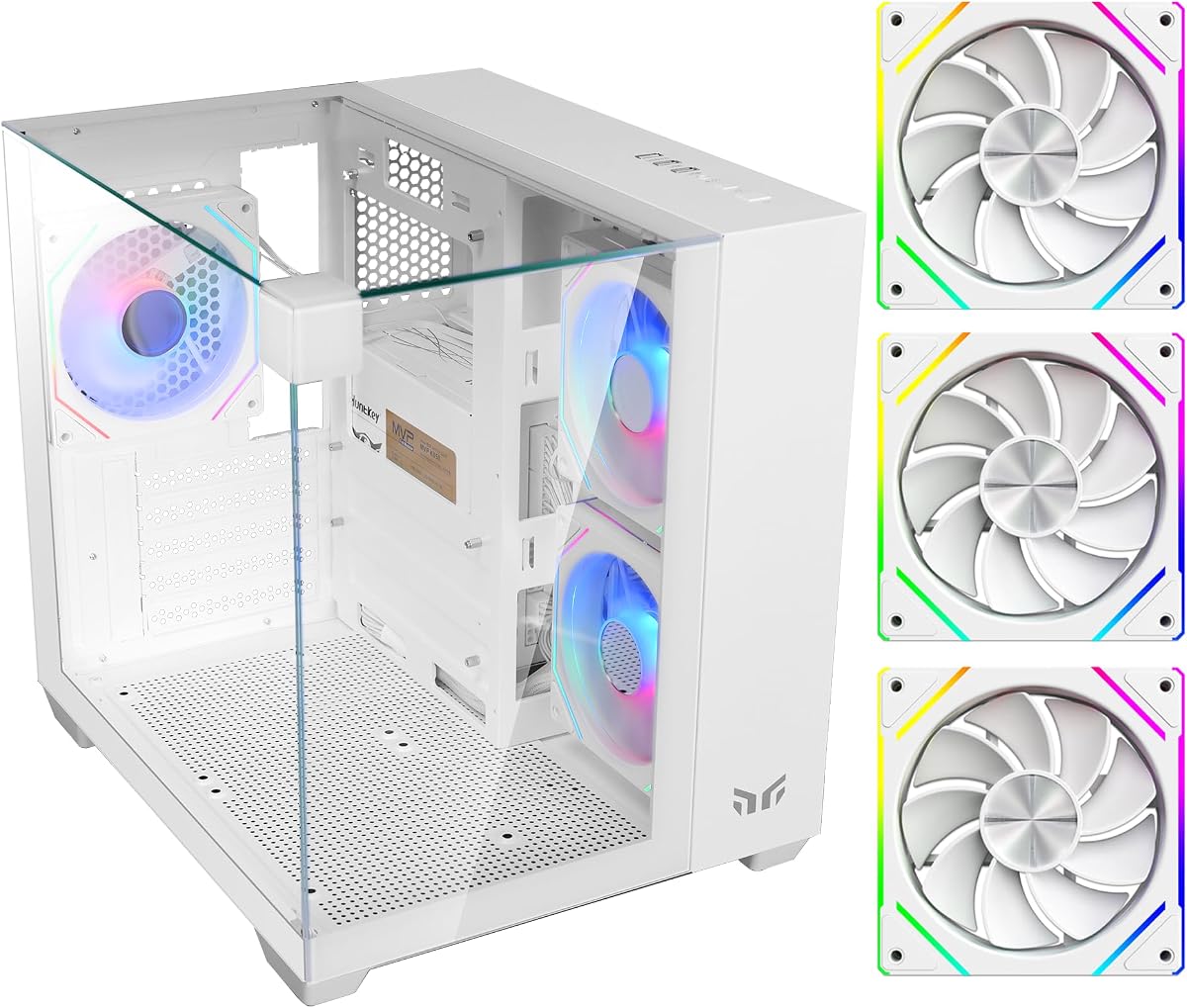
The Zalman CUBIX-G delivers a compact Micro-ATX design with three pre-installed fixed-RGB fans and a 4.4 customer rating. Its black-and-white panda appearance gives it a distinctive identity, while the smaller footprint targets budget gaming systems and clean desktop arrangements where every bit of space matters.
We may earn a commission when you buy through this link, at no additional cost to you.
Component support includes graphics cards up to 280mm, ATX power supplies up to 140mm, and CPU air coolers up to 155mm. The enclosure can hold three 2.5-inch hard drives or one 2.5-inch drive plus a 3.5-inch drive. Front I/O includes USB Type-C and USB 3.0, adding useful device connectivity despite the compact body.
The three included fans combine fixed RGB illumination with airflow, so there is no need to source basic cooling and lighting separately. That makes the CUBIX-G especially convenient for first-time builders. The trade-off is that the 3-pin lighting cannot provide the motherboard synchronization and software controls available from ARGB-equipped alternatives.
This case is a sensible choice for a smaller gaming PC that still wants a coordinated illuminated appearance and useful front Type-C connectivity. It works well for standard gaming components rather than oversized graphics cards or elaborate cooling systems. Buyers seeking customizable lighting and maximum GPU clearance should choose a larger ARGB model.
Three illuminated fans, a compact Micro-ATX frame, and modern front connectivity create a ready-made foundation for a budget gaming build. This reduces both component planning and the number of separate purchases required for basic airflow and visual customization.
Although the case is small, it supports up to three 2.5-inch drives or a mixed 2.5-inch and 3.5-inch arrangement. That gives compact-system builders room for a boot drive, game library, and additional storage without immediately requiring an external enclosure.
We may earn a commission when you buy through this link, at no additional cost to you.
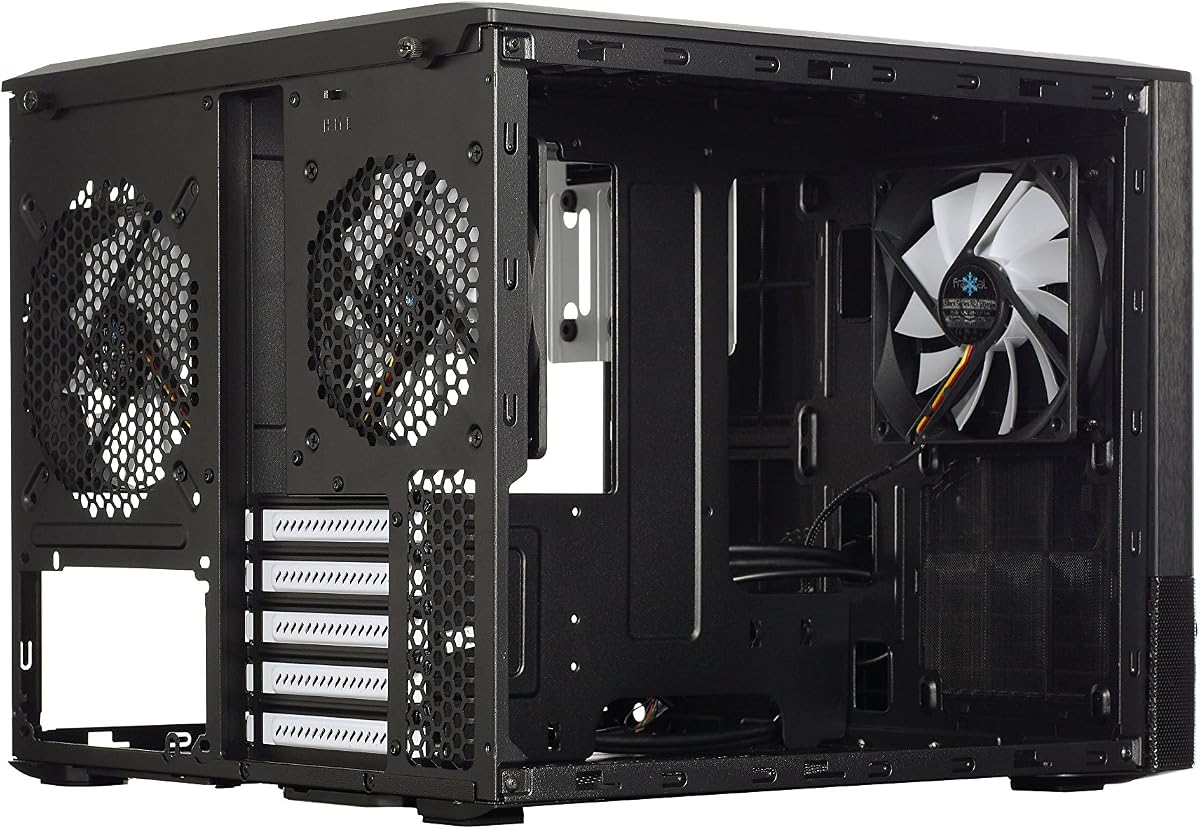
The Fractal Design Node 804 remains distinctive for its dual-chamber layout, elegant brushed-aluminum front, and exceptional storage capacity. Its 4.7 rating is among the strongest in this guide, and the enclosure is especially appealing when a compact system still needs to hold numerous hard drives or solid-state drives.
We may earn a commission when you buy through this link, at no additional cost to you.
The modular drive system supports configurations of up to eight 3.5-inch drives, four 2.5-inch drives, or up to ten 3.5-inch and two 2.5-inch drives. This makes the Node 804 useful for game libraries, archival storage, servers, and workstation-style projects. The separate chamber helps isolate cables and storage from the airflow path serving the main components.
Three Fractal Design Silent Series R2 120mm fans are included, with space for seven additional fans. The case can also accommodate up to four radiators simultaneously, making it unusually flexible for custom liquid-cooling loops. Removable dust filters at all intake positions help maintain cleaner airflow over time.
The Node 804 is best for builders who value storage, modularity, and quiet cooling more than the latest connector selection or a small footprint. It handles Micro-ATX and Mini-ITX systems and provides ample room for a mature internal layout. Those seeking a newer Type-C-equipped, lighter, or more portable enclosure may prefer one of the more recent designs.
The unique hard-drive mounting system is the defining feature. Its numerous drive positions make the Node 804 rare among cube cases, allowing builders to retain plenty of locally installed storage while keeping the main chamber organized.
The three included Silent R2 fans provide a calmer starting point than a typical all-lighting package. Seven additional fan positions and support for four radiators give experienced builders considerable freedom to tune airflow and develop a custom water-cooling arrangement.
We may earn a commission when you buy through this link, at no additional cost to you.
The Apevia Prism-Elite-BK is the most aggressively equipped cube in the lineup, combining a dual-chamber ATX layout with seven pre-installed 120mm ARGB PWM fans. Its 4.0 rating places it behind several alternatives, but the extensive hardware support and factory-installed cooling make it worth considering for a dramatic gaming build.
We may earn a commission when you buy through this link, at no additional cost to you.
Graphics cards up to 400mm are supported, along with CPU coolers up to 165mm. Because it accepts full ATX boards, it is more versatile than the smaller Micro-ATX cubes. Rear radiator support covers 120mm sizes, while top and side positions accept 240mm, 280mm, and 360mm radiators, providing a broad foundation for liquid cooling.
The seven fans use ARGB lighting and four-pin PWM connections, allowing motherboard control of fan speed. They can also be switched into synchronization mode when paired with a compatible ARGB motherboard. Top I/O includes USB Type-C, USB 3.0, USB 2.0, and HD audio. A large magnetic top filter is removable and washable.
This model is best for builders who want a visually dramatic, fully equipped ATX system with many lights already in place. It offers more preinstalled cooling than any other product here and accommodates long modern graphics cards. The drawback is that seven illuminated fans can make the interior visually busy, and the lower rating suggests some buyers may have encountered build or quality concerns.
Seven ARGB PWM fans cover numerous positions from the start, reducing the need to purchase and route a separate matching set. The combination of PWM speed control and motherboard synchronization makes the lighting practical rather than merely decorative.
Full ATX support, 400mm GPU clearance, and a 165mm CPU cooler limit provide a useful amount of room for a powerful build. Top and side radiator positions extend the cooling options, though the case remains primarily oriented toward gaming aesthetics and component display.
We may earn a commission when you buy through this link, at no additional cost to you.
The Zalman CUBIX prioritizes a genuinely small desktop footprint, with a total volume of just 17.1 liters and a 4.5 customer rating. Its compact proportions suit small workspaces and straightforward office or entry-level gaming systems, while the understated exterior avoids the visual complexity of a heavily illuminated cube.
We may earn a commission when you buy through this link, at no additional cost to you.
Despite its size, the case accepts standard ATX power supplies, graphics cards up to 260mm, and CPU coolers up to 137mm. The 0.8mm steel construction adds durability, which is important in a chassis that may be moved or stored. A perforated front panel supplies an intake path, supplemented by one pre-installed 80mm fan.
Front I/O is intentionally simple, with one USB 3.0 port, one USB 2.0 port, and a 3.5mm stereo auxiliary connection. This is sufficient for routine peripherals, but it lacks the Type-C, additional audio, and multi-port arrangements found in more gaming-focused competitors. Storage expansion is also limited compared with the dual-chamber models in this guide.
The CUBIX is best for a compact everyday computer or a modest gaming build using standard components. It works particularly well when desk space is the priority and the builder does not need extensive lighting, numerous drives, or a large CPU cooler. Powerful gaming systems should look for a case with greater GPU clearance, more cooling, and a broader I/O panel.
At 17.1 liters, the CUBIX occupies less space than many compact Micro-ATX alternatives. That makes it a practical option for an office, dorm room, shared workstation, or any setup where a conventional tower would be inconvenient.
The 0.8mm steel shell provides a sturdier foundation than the case's minimal dimensions might suggest. Its simple perforated front and single included fan also make it easy to understand what cooling and expansion to expect before planning a build.
We may earn a commission when you buy through this link, at no additional cost to you.
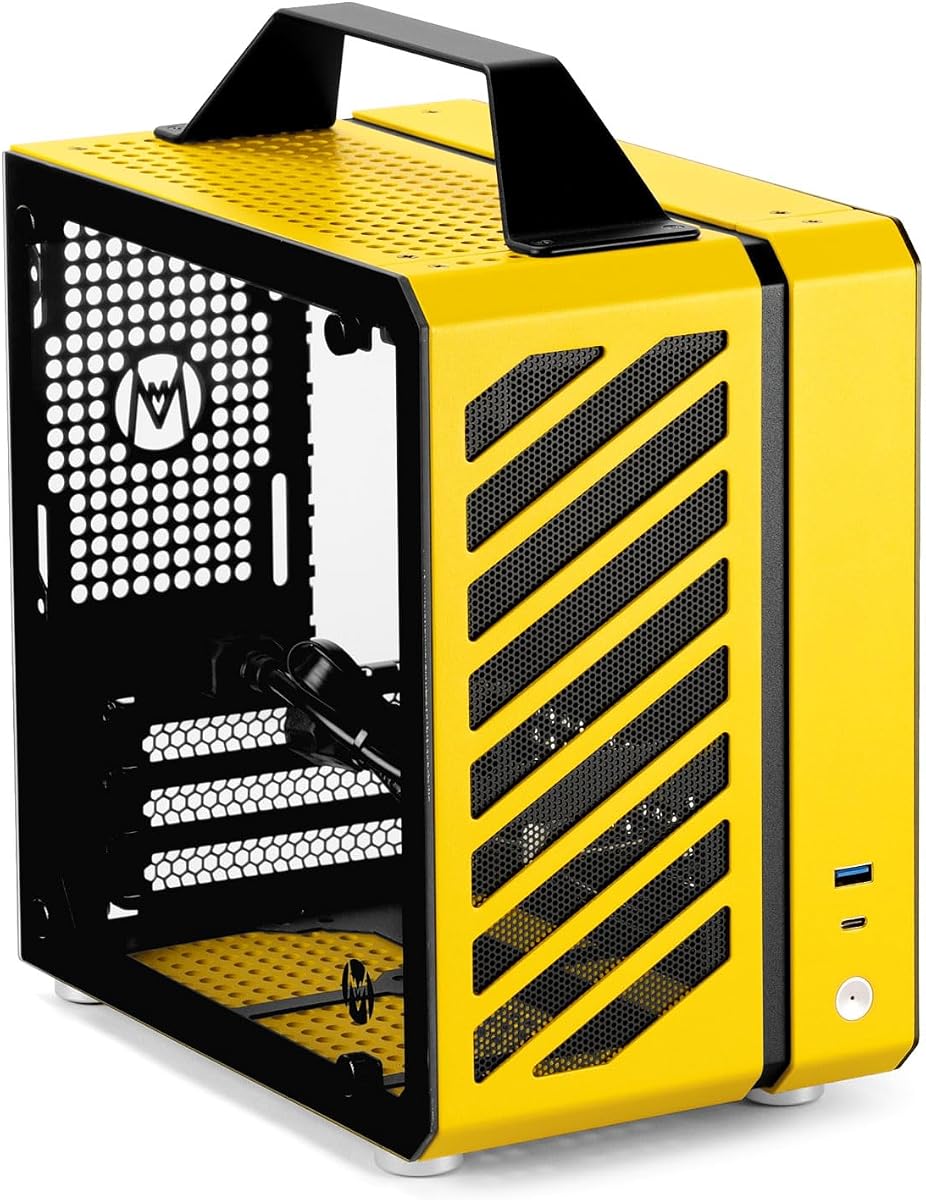
The Mechanic Master C24 is the most unconventional option here, combining a 9.9-liter volume with an integrated aluminum handle for genuinely portable computing. Its 4.4 rating reflects a distinctive design approach aimed at builders who want a compact system that can move between a desk, LAN event, and display setup.
We may earn a commission when you buy through this link, at no additional cost to you.
Motherboard support covers ITX and DTX boards, while the enclosure requires SFX power supplies. Graphics cards such as the RTX 3060 and RTX 4060 series are supported within the intended size range. Air coolers up to 135mm and liquid coolers up to 120mm are also accommodated, so compact but efficient components remain realistic choices.
Cooling positions include two 8cm fans at the top, one 9cm rear fan, and one 12cm bottom fan, allowing air to be directed through the compact volume. The aluminum-steel hybrid frame, detachable panels, and tool-free installation simplify assembly. Dual 2.5-inch SSD mounts, preinstalled dust filters, and a detailed screw kit add to the user-focused design.
The C24 is best for portable Mini-ITX systems, compact gaming PCs, and users who value mobility and modular construction. The carry handle gives it a clear advantage over stationary cubes at LAN events or when moving a completed computer. The trade-offs are SFX PSU requirements, modest cooler clearance, and a smaller interior that cannot accommodate every high-end component.
The integrated aluminum handle is more than a decorative flourish because it supports the case's portable purpose. A 9.9-liter body can be moved between locations while retaining a rigid, carefully engineered frame rather than relying on loose panels or a separate carrying case.
Detachable panels and tool-free installation reduce the friction of building and servicing a very small system. Preinstalled dust filters and a detailed hardware kit also show attention to the details that become especially valuable when every millimeter inside the enclosure is occupied.
We may earn a commission when you buy through this link, at no additional cost to you.
The Fractal Design Node 804 No Power Supply listing offers the same distinctive cube foundation as the fan-equipped version, with a 4.7 customer rating. Its Micro-ATX proportions and dual-chamber concept make it a compelling choice for storage-heavy compact systems, mini servers, and builds that need more drive capacity than a typical gaming cube provides.
We may earn a commission when you buy through this link, at no additional cost to you.
The internal bay arrangement supports eight 3.5-inch drives, four 2.5-inch drives, or up to ten 3.5-inch and two 2.5-inch HDD or SSD combinations. Micro-ATX and Mini-ITX motherboards are supported, giving the builder freedom to choose a more capable platform without moving to a full tower.
Construction combines aluminum and steel for a rigid exterior, while the dual-chamber structure keeps storage and cables separated from the primary hardware section. As the listing is sold without a power supply, builders must select an appropriate unit separately. The provided specification is also more concise than those for the other Node 804 listing, offering less detail about included fans and front connectors.
This version is best for builders who value the established Node 804 layout and want to choose their own power supply or fan configuration. It is particularly relevant to storage-oriented builds where numerous drives are a priority. Those who want a fully specified modern bundle, detailed cooling package, or the latest USB Type-C connectivity should examine the alternate Node 804 listing instead.
The available drive combinations are exceptional for a cube enclosure. A builder can create a substantial local game archive, a media server, or a compact data workstation while keeping the separate chamber organized and away from the main component airflow path.
The Node 804's aluminum and steel construction offers a mature feel that many newer plastic-heavy cases do not. It provides a stable platform for users who value a recognizable enclosure design, flexible motherboard support, and abundant internal organization over a bundled lighting package.
We may earn a commission when you buy through this link, at no additional cost to you.
The Cooler Master Qube 540 Moonstone is the light-finished counterpart to the more prominently detailed QUBE 540 listing. It has a 3.8 customer rating, the lowest in this group, and the supplied product information is limited to identifying it as a compact ATX case. That makes its appeal primarily about appearance and case format.
We may earn a commission when you buy through this link, at no additional cost to you.
A pale Moonstone finish can give a gaming setup a cleaner, more coordinated look than an entirely black enclosure. It may pair well with white components, neutral desks, and understated RGB lighting. The compact ATX classification also suggests a more accommodating platform than cases limited to Mini-ITX, although buyers should verify additional dimensions on the live listing.
Because the product data does not specify included fans, graphics card clearance, CPU cooler limits, radiator support, or front I/O, those details should not be assumed from the separate QUBE 540 model. A case may share a family name and exterior while differing in configuration, finish, or bundled components. Confirming the exact specification sheet is especially important before committing to a build.
The Moonstone version is best for buyers whose priority is a distinctive light-colored cube that complements an existing theme. It is also a reasonable starting point for an ATX build if the live listing confirms the required clearances. For buyers who prioritize included cooling, detailed connectivity, or extensive radiator options, one of the better-specified alternatives is the safer choice.
The Moonstone finish offers a softer alternative to the dark cases that dominate gaming hardware. It can become the visual anchor of a white or neutral system, especially when paired with pale components and restrained accent lighting.
Finish variants can differ in bundled fans, lighting, and possibly internal layout. Before ordering, check the current product page for GPU length, cooler height, radiator locations, drive support, and front ports rather than assuming they match another version of the Qube 540.
We may earn a commission when you buy through this link, at no additional cost to you.
A cube shaped case should be selected around the hardware already owned or planned for the build. Motherboard size, graphics card length, CPU cooler height, power supply format, cooling strategy, and storage requirements determine whether a compact enclosure will remain comfortable during assembly.
Motherboard support establishes the practical foundation of any compact build. Mini-ITX offers the smallest board footprint, Micro-ATX adds expansion options without demanding the space of full ATX, and standard ATX support provides the greatest processor and memory flexibility. Some cube designs also accept E-ATX boards, as the Cooler Master QUBE 540 does with support for models up to 11 inches wide. A case may look compact while accepting a full ATX board, so the external dimensions matter more than the cube label itself.
Choose the form factor based on your processor and expansion needs, not simply the largest supported option. Confirm that the board, rear I/O shield, mounting hardware, and front connectors all align with the case.
Modern gaming graphics cards can be considerably longer than older components, making clearance one of the most important checks in a cube case. The models reviewed support lengths ranging from 260mm to 415mm, but a stated maximum can depend on fan and radiator placement. The QUBE 540 reaches its largest figure when the front fan is removed, illustrating why the complete layout matters. Also consider the card's width, power connector clearance, and the effect of a side-mounted cooler on usable space.
Measure the exact card and leave room for power cables. If you expect to upgrade the graphics card later, select extra clearance rather than fitting the current card exactly.
CPU cooler height is a simple but essential compatibility check. Listed limits range from 137mm in the smallest Zalman CUBIX to 165mm in the Apevia Prism-Elite-BK. A low-profile air cooler is often more appropriate for a very small cube, while larger Micro-ATX and ATX cases can accommodate taller tower coolers. For liquid cooling, verify radiator width and mounting position instead of checking only whether the case says it is water-cooling ready.
Match the cooling hardware to the case's actual mounting points and airflow path. Leave enough space around the pump, fittings, and tubing for assembly and future service.
Cube cases require deliberate airflow planning because their compact internal dimensions can restrict circulation around dense components. Included fans range from one small 80mm unit to seven 120mm ARGB PWM models. More fans can create a strong cooling package, but their placement is just as important as their count. Mesh or perforated intake panels, ventilated side panels, and balanced exhaust positions help move air through the enclosure rather than trapping it around the motherboard tray.
Prioritize adequate intake and exhaust positions, clean filters, and unobstructed paths. Add a second intake fan if the manufacturer recommends it, and connect PWM fans to a suitable motherboard header or controller.
Power supply size and format can determine whether a compact build is straightforward. The Zalman CUBIX-G accepts ATX power supplies up to 140mm, the smaller CUBIX supports standard ATX units, and the Mechanic Master C24 requires an SFX power supply. The Node 804 no-power-supply listing naturally leaves that selection entirely to the builder. A PSU shroud can improve appearance and cable organization, but the power supply still needs to fit and leave room for plugs and bending.
Verify both form factor and depth before buying. For very small cases, use a modular or semi-modular power supply to reduce unused cables, and confirm that the manufacturer permits it in the specified position.
Storage needs often determine the difference between a gaming cube and a practical workstation cube. The Fractal Design Node 804 supports unusually large HDD and SSD combinations, while most compact gaming cases offer only a few 2.5-inch mounts. A dual-chamber layout provides a dedicated area for cables and drives, improving the appearance of the glass side and keeping wiring away from airflow obstructions. Screwed-in expansion-slot covers can also simplify GPU installation by preventing accidental movement of adjacent cards.
Count every drive, including the boot drive, and allow room for cables. Prefer a dual-chamber model when neatness and future storage expansion are important.
Front-panel connections are increasingly important for daily use. USB Type-C is useful for compatible phones, cameras, and portable devices, while multiple USB-A ports support keyboards, controllers, and storage drives. HD audio connections are useful for gaming headsets, and status indicators help confirm that a system is powered. The reviewed cases range from a single USB 3.0 and one USB 2.0 port to combinations that include USB Type-C, several USB-A ports, and audio.
List the peripherals you use most often and make sure the case has enough convenient ports. Confirm the USB Type-C port supports data rather than serving only as a decorative connector.
A cube case is visible from multiple angles, making exterior finish, glass coverage, and lighting coordination as important as raw capacity. Triple or dual tempered-glass panels emphasize components, while pale finishes create a more coordinated white build. Portability introduces another consideration: the Mechanic Master C24's handle and 9.9-liter volume make it easy to move, unlike larger stationary cubes. Removable, washable dust filters and tool-free panels make routine maintenance easier and help preserve airflow over time.
Choose the visual treatment and serviceability that suit your desk. Confirm that the removable parts can be cleaned, and plan where cables, dust, and fan power leads will be serviced.
Begin by reviewing the case manual and laying out the included screws, standoffs, cable ties, and hardware before installing components. Confirm motherboard form factor, power supply type, graphics card length, and radiator placement, then secure the power supply and motherboard first. Install the graphics card and storage after the main board is stable, followed by fans, cooling hardware, and finally the power cables.
Route wires behind the motherboard tray or through the dedicated cable-management area wherever possible. Avoid pinching cables between panels, and leave gentle service loops at the drive and fan connections. Do not force a side panel or tempered-glass panel if it meets resistance; check for an internal bracket, cable, or improperly aligned fastener first.
Clean the case every few months by shutting down and disconnecting power. Remove dust filters, wash them according to the manufacturer's instructions, and let them dry fully before replacement. Use compressed air or a soft brush to remove dust from fans, radiators, filters, and vents, while keeping liquid cleaners away from electrical components. Recheck cable clearance and fan connections after every maintenance session.
They can be, because their compact dimensions reduce the distance between air inlets, components, and exhausts. A cube case with a full mesh intake, balanced fans, and a sensible radiator position can still provide effective cooling. Compare the included fan count and airflow layout rather than judging cooling by the cube shape alone.
No. Many models are limited to Mini-ITX or Micro-ATX, while others support full ATX and, in some cases, E-ATX. The Cooler Master QUBE 540 supports ATX and large E-ATX boards, whereas several compact alternatives accept only Micro-ATX. Always verify the exact board dimensions and mounting pattern.
It depends on the model and the position of other components. Listed graphics clearance ranges from 260mm in the Zalman CUBIX to 415mm in the QUBE 540. Measure your intended card, check whether the maximum requires removing a fan, and confirm there is room to bend the power cable safely.
Some models accept standard ATX power supplies, while very small enclosures may require SFX units. The Mechanic Master C24 supports SFX power supplies, and the Zalman CUBIX accepts standard ATX power supplies. Check both the form factor and maximum supported depth before ordering.
Yes, when the radiator size and mounting position are supported. The reviewed cases mention 240mm support in several models, while the Apevia Prism-Elite-BK accepts 240mm, 280mm, and 360mm radiators at the top and side. Check the exact mounting location because side-mounted radiators can restrict airflow in compact designs.
They can be, provided the intake filters are maintained. The Apevia models include removable magnetic top filters, and the Fractal Design Node 804 has removable filters at all intakes. Clean or wash the filters at regular intervals and keep them fully dry before reinstalling them.
Preinstalled fans can simplify a build and provide coordinated lighting immediately. ARGB models offer more colors and motherboard synchronization, but they may require compatible headers, software, or internal controls. Fixed-RGB fans are simpler and often more budget-conscious, while plain cases offer maximum visual restraint.
They can be well suited to portability because small components and cases are easier to transport. The Mechanic Master C24 goes further with a 9.9-liter body, integrated aluminum handle, and detachable panels. A portable build still needs careful protection for the tempered glass, so a padded carrying case remains useful for frequent transport.
The Yeah Magic Cube stands out as the strongest overall choice because it combines a 270-degree tempered-glass presentation, a 28.5-liter footprint, three ARGB fans, and useful support for Mini-ITX and Micro-ATX hardware. The Zalman CUBIX-G offers a more modest and budget-conscious route into a compact illuminated build, while the Mechanic Master C24 earns the premium distinction for portability, modular construction, and its integrated handle.
For broader motherboard and graphics card compatibility, the Cooler Master QUBE 540 is the more practical cube. Builders who need extensive storage should examine the Fractal Design Node 804, and those who want many factory-installed ARGB fans can consider the Apevia Prism-Elite-BK. Before ordering, compare exact dimensions, power supply format, cooling options, front ports, and every planned component against the manufacturer's specification.
Product prices, configurations, and availability can change, so verify the current listing and recent customer feedback before making a final decision. A well-chosen cube case can save desk space, present the hardware attractively, and remain comfortable for everyday use, but compatibility should always come before appearance.