
VTech SN5147
4.0Editor score
Corded and cordless system
Extra-loud visual ringer
Four photo speed-dial slots
Our Captioned Telephone guide compares 10 accessible phones for real-time captions, amplification, large controls, voice features, and easier calling at home.
A captioned telephone can make everyday conversations easier by displaying speech as text, while related senior-friendly phones add amplification, large controls, voice dialing, photo buttons, and visual call alerts. The best model depends on hearing level, vision, dexterity, internet availability, and how much support the user needs.
We compared all 10 phones supplied for this guide on their captioning, sound amplification, visual alerts, button design, voice controls, setup requirements, and accessibility features. The list includes one true real-time captioned phone, amplified corded and cordless systems, VoIP options, and voice-controlled home telephones.
Each review explains what makes a model distinctive, where its limitations matter, and who may benefit most from it. Ratings and specifications reflect the supplied product information, while availability, service requirements, and prices can change, so readers should confirm current details before purchasing.
4.0Editor score

4.3Editor score

4.5Editor score
The table below compares the ten phones by core accessibility method, connectivity, sound support, and ease of dialing so readers can identify the most suitable system for a particular user and home setup.




The Hamilton CapTel 2400iSPNBT is the clearest match for someone who specifically wants a telephone with real-time captions. It carries a 4.3 rating, and its defining advantage is a large touchscreen that lets the user listen while reading what the other party is saying. The system is intended for people with hearing loss who want fuller participation in ordinary phone conversations.
We may earn a commission when you buy through this link, at no additional cost to you.
Callers can select automatic captions or assisted captions with live operator support. Both incoming and outgoing calls can be captioned, while the built-in answering machine also presents voicemail as text. Sound can be amplified by as much as 40dB, and custom caption sizing and tone controls help match the display to individual preferences. The phone is also hearing aid compatible and includes simple on-screen navigation.
The important trade-off is dependence on connectivity and service. It needs high-speed internet, standard electrical power, and telephone service in some situations. Eligibility is also limited to US residents with hearing loss, who must register to use the captioning service. Those conditions may prevent the telephone from serving as an immediate, general-purpose home phone replacement.
This is the strongest recommendation for a user who considers captions essential rather than optional. Someone who only needs a louder ringer and easier dialing may find a less complicated amplified phone preferable, but for genuine visual access to conversation content, the CapTel offers the most complete solution in this group.
The large touchscreen turns speech into visible text during calls, reducing the chance that a user with hearing loss will miss names, questions, or important details. Automated and operator-assisted options let the household choose the level of transcription support that best fits its needs.
Amplified gain reaches up to 40dB, while adjustable caption size and tone controls improve readability. Hearing aid compatibility, captioned voicemail, and touchscreen navigation make the telephone useful for people who benefit from several visual and audio cues.
We may earn a commission when you buy through this link, at no additional cost to you.
This corded landline is built for seniors with memory impairment, dementia, reduced vision, or difficulty recognizing conventional numbers. It has a 4.2 rating and takes a different approach from captioning: instead of transcribing speech, it reduces memory and dexterity demands through photo speed dialing, oversized pictorial buttons, and one-touch access to frequently called people.
We may earn a commission when you buy through this link, at no additional cost to you.
Eight customizable photo buttons let a family member be reached by recognizing a face rather than recalling a number. The keypad buttons are approximately 0.88 inches across, and a separate programmable SOS button provides a dedicated emergency shortcut. The ringtone is specified at up to 110dB, with adjustable receiver and ringer levels, a flashing visual indicator, hands-free calling, and redial.
Its line-powered design is unusually practical for continuity. It uses a standard RJ11 connection without batteries, Wi-Fi, cellular service, or an external power supply, so it can remain connected during a power interruption. The handset also returns to its designated position after a call, which can help keep the area organized.
The important limitation is that this is not a captioned telephone in the literal sense. It cannot display call content as text. It is best for someone who primarily needs simpler dialing, stronger sound, and visual notifications, particularly when family members can assist with photo placement and initial setup.
A photograph on each speed-dial key gives the user a recognizable way to initiate a call. This is especially helpful for dementia or memory loss because it removes the need to search a contact list or recall a sequence of digits.
The amplified ringtone, adjustable receiver volume, and flashing visual indicator provide several ways to notice an incoming call. These features make the phone more useful in noisy homes and for users with different levels of hearing loss.
We may earn a commission when you buy through this link, at no additional cost to you.
The VTech SN5147 is a flexible amplified phone system for users who want both corded reliability and cordless mobility. It has a 4 rating and combines an extra-loud ringer, a 50dB one-touch audio boost, large controls, photo speed dialing, call blocking, and an answering machine in one senior-focused package.
We may earn a commission when you buy through this link, at no additional cost to you.
The corded base remains usable during power outages, which is an important advantage over many cordless-only systems. A cordless handset allows the user to move around the home, and the system can expand to as many as four handsets with the SN5307. Oversized high-contrast buttons, a large backlit display, spoken caller ID, and a flashing visual ringer support easier operation.
This is not a captioning telephone, so it does not turn speech into onscreen text. Its value instead comes from maximizing ordinary call access. The smart call blocker can reject up to 1,000 robocalls and unwanted numbers, while four photo slots reduce the effort needed to contact family. The 22-minute answering machine offers slow playback and remote access.
Among the phones here, it is a sensible budget-oriented choice for a household that prioritizes loud sound, reliable wired calling, and visual alerts over transcription. Buyers should assess the number of handsets needed and ensure that the menu controls will be comfortable for the intended user.
A corded base provides a dependable connection at home, including during a power outage, while the included cordless handset adds mobility. Expansion to four handsets makes this practical for caregivers or larger homes without changing the base system.
The extra-loud ringer, one-touch volume boost, speakerphone, spoken caller ID, and flashing visual indicator make calls easier to notice and answer. The broad set of audio and visual prompts suits users whose hearing needs vary by environment.
We may earn a commission when you buy through this link, at no additional cost to you.
The Voice-Controlled Home Telephone focuses on eliminating physical button use. It can answer calls, dial numbers, and end conversations through voice commands, making it a potentially useful option for people with mobility or vision difficulties. No numerical rating was supplied for this product, so the available specifications are the main basis for assessment.
We may earn a commission when you buy through this link, at no additional cost to you.
Its active-listening design is always on and ready to recognize commands. The user can speak a name or number without navigating a keypad, and no button needs to be pressed to activate the phone. This simplicity may be particularly valuable for someone with arthritis, limited hand movement, reduced dexterity, or difficulty locating small controls.
Because the telephone relies on speech recognition and an existing home phone line, its performance will depend on the user's voice, room acoustics, and service arrangement. It does not offer the text captions that define the Hamilton CapTel, nor does the supplied information describe volume amplification, photo speed dialing, or a visual ringer.
The best fit is a user who values complete hands-free operation more than transcription or amplified sound. Caregivers should test command recognition in the intended home environment before relying on it as the only method of handling important calls.
Answering, dialing, and ending calls with speech removes several fine-motor steps from a standard telephone exchange. That can make everyday communication more comfortable for people with stiffness, tremors, arthritis, or reduced hand strength.
The active-listening feature is designed to remain ready for a command without a separate activation control. Clear speech and a reasonably quiet room may still be important for reliable recognition in daily use.
We may earn a commission when you buy through this link, at no additional cost to you.
The Big Button Care Assist is a straightforward amplified corded telephone intended for seniors with hearing loss, low vision, dementia, or difficulty handling conventional controls. Its 4.2 rating and simple design make it worth considering when ease of use matters more than advanced calling features.
We may earn a commission when you buy through this link, at no additional cost to you.
The keypad has large buttons, while three replaceable picture buttons can store the numbers of favorite people. Adjustable amplification reaches up to 40dB, providing stronger incoming and outgoing sound for users with different hearing needs. The telephone can sit on a desk or be attached to a wall, and four nonskid plastic pieces help prevent sliding when used on a table.
A notable practical feature is memory retention. Stored numbers are described as remaining in place even if the telephone line is unplugged, reducing the risk that important contacts will disappear during routine line work. The device also supports hearing aid users, according to the supplied product information.
The phone does not offer captions, voice controls, caller ID details, or a visual ring indicator in the supplied description. It is therefore best for someone who wants a conventional, amplified telephone with visible favorite contacts and uncomplicated installation.
Oversized keys and three photo buttons reduce the need to locate tiny printed numerals. The combination supports users with low vision, memory challenges, or limited fine-motor control.
Wall mounting can keep the telephone within a comfortable reach, while nonskid feet help maintain stability on a bedside table or desk. The design accommodates both permanent and temporary use.
We may earn a commission when you buy through this link, at no additional cost to you.
The FLYINGVOICE FIP12WP is an accessibility-focused IP phone for homes already using VoIP, a SIP server, or a PBX. It has a 5 rating, the highest supplied rating in this group, and stands out through customizable image keys, a dedicated help button, very high speakerphone volume, and a red visual alert.
We may earn a commission when you buy through this link, at no additional cost to you.
The image keys can hold family photographs, helping seniors with dementia or Alzheimer's recognize the person they are calling. A dedicated help key opens a pre-programmed assistance contact rather than automatically placing an emergency call. Large keys support users with reduced vision, and on-phone volume adjustments make sound control accessible without navigating a complex setup.
The crucial limitation is compatibility. This is explicitly not a traditional analog telephone and will not connect directly to a standard POTS wall jack. It requires an active VoIP service, SIP server, or PBX system, making it most appropriate for households or care facilities that already have the necessary internet telephony infrastructure.
Despite that requirement, the phone is highly relevant for an organized VoIP installation. The handset exceeds 90dB, the speakerphone exceeds 110dB, and a bright red top light provides a visual cue for incoming calls or missed messages. Those features make it especially strong for users with significant hearing loss.
Each customizable image key can contain a familiar photograph, reducing memory and reading demands. This is useful in homes, hospitals, and nursing facilities where consistent visual contact cues can make communication calmer and more predictable.
The phone combines over 90dB handset volume, more than 110dB speakerphone output, and a bright red visual indicator. Users can adjust the audio level while still receiving a separate visual signal for incoming activity.
We may earn a commission when you buy through this link, at no additional cost to you.
The Serene Innovations High Definition Amplified Phone is a traditional amplified home telephone with a 3.5 rating. The supplied information describes it as a high-quality product designed for performance and identifies it as a high-definition amplified phone, but it does not provide detailed feature or compatibility information.
We may earn a commission when you buy through this link, at no additional cost to you.
That makes the phone worth considering primarily for shoppers who want a conventional amplified handset rather than a complex service-based or internet-dependent system. The emphasis on high-definition audio may appeal to users who find conventional landline speech difficult to hear, although the exact amplification level and control arrangement are not stated.
The lack of specifications limits comparison. There is no indication of live captioning, photo speed dialing, visual ringer, voice control, answering machine functionality, or hearing aid compatibility. Buyers should examine the current listing closely to determine whether its sound controls and physical layout meet their needs.
This model is a secondary recommendation rather than a standout choice for most shoppers. It may appeal to someone seeking a simple amplified phone, but the more documented products in the roundup provide clearer information about accessibility features and setup requirements.
The phone's core proposition is amplified, high-definition sound in a familiar home-telephone format. That simplicity may appeal to users who do not want photo buttons, voice assistants, touchscreen functions, or ongoing service plans.
Because the supplied listing offers limited specifications, shoppers should verify volume controls, ringer output, supported connections, and any additional accessibility features before making a final decision.
We may earn a commission when you buy through this link, at no additional cost to you.
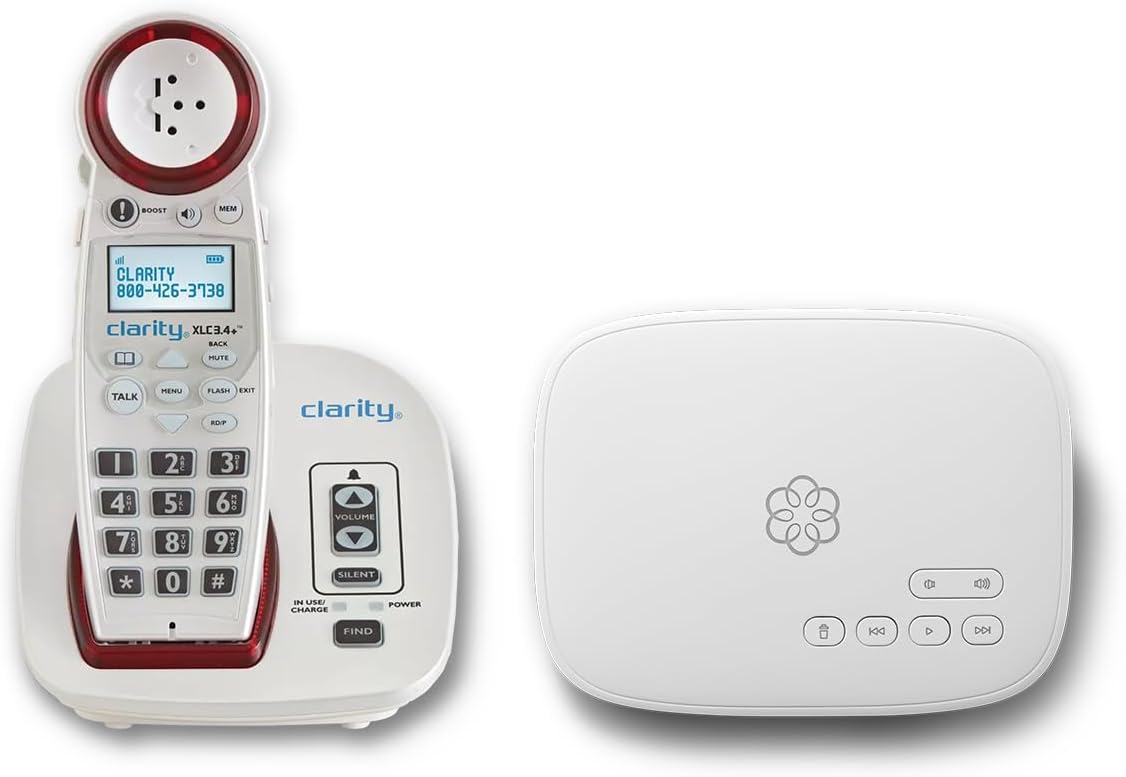
The Ooma Telo with Clarity XLC3.4+ combines an amplified cordless phone with a telephone service bundle and 24/7 concierge plan. Its 4.5 rating is the highest among the products with a supplied numerical rating, and the package offers a polished, service-supported alternative for households that want mobile calling with accessibility features.
We may earn a commission when you buy through this link, at no additional cost to you.
The Clarity handset includes a visual ringer, adjustable ringer and speaker volume, hearing aid compatibility, a talking keypad, and caller ID. Ooma also provides advanced robocall blocking and a contacts-only calling option. An exact registered address is sent to dispatchers during a 911 call, and loved ones can receive an SMS when emergency calling is activated from the home.
This premium option carries a subscription requirement, so it is less appropriate for buyers seeking a one-time traditional telephone purchase. Service details, international calling, number porting, and monthly fees should be reviewed before selection. Despite that ongoing commitment, the concierge support and personal setup assistance reduce the complexity of installing a service-based system.
It does not provide real-time captions, which limits its fit for the strictest interpretation of the keyword. It is an excellent choice for someone who primarily wants amplified cordless service, safety alerts, call filtering, and professional support rather than text transcription.
The talking keypad, hearing aid compatibility, adjustable speaker, and visual ringer provide several ways to navigate calls. Personal setup assistance and 24/7 concierge support add a guided layer that can be especially helpful for less technical users.
Emergency address registration, 911 text alerts, robocall blocking, and contacts-only calling add protection beyond the handset. These features are most valuable to users who want a complete managed home-phone service.
We may earn a commission when you buy through this link, at no additional cost to you.
The Voice Dialer Phone offers one of the broadest voice-command implementations in this roundup. It can make, answer, and end calls with speech, stores 17 programmable voice-activated contacts, and provides a prefix feature that speaks a number before dialing. Its supplied 2.1 rating is notably lower than those of the other rated products.
We may earn a commission when you buy through this link, at no additional cost to you.
Despite that rating, the specifications show meaningful accessibility potential. The phone includes a bright LED ring indicator, low, medium, and high earpiece volume settings up to 40dB, a hands-free volume control, and speaking caller ID. A two-line LCD shows the caller's name, while a programmable 911 button, redial, pause, flash, and menu-lock functions add traditional call-management tools.
The complexity is the central issue. There are multiple voice prompts, 17 memories, 80 incoming numbers, audio toggles, call controls, and several flash intervals. A user with memory impairment, limited vision, or hearing difficulty may benefit from voice access but struggle to configure or remember the system. Speech accuracy and ambient noise could also affect the experience.
This phone is most appropriate for an early adopter who values comprehensive voice control and is comfortable learning a rich feature set. Because the supplied rating is substantially below the group average, buyers should examine current customer feedback carefully and confirm that the voice commands meet their needs.
Seventeen voice memories and three primary commands allow users to initiate, answer, and conclude calls without touching the keypad. The spoken prefix function also provides confirmation of the number about to be dialed.
The LED indicator, adjustable ring controls, and speaking caller ID create multiple routes to identifying an incoming call. These alternatives are valuable in noisy settings or when the user cannot rely on the ringer alone.
We may earn a commission when you buy through this link, at no additional cost to you.
The Nine-Photo Corded Landline is a simple, loud telephone for seniors who benefit from picture-based contact selection. It has a 4.2 rating and provides nine photo memory keys, a ringer specified above 110dB, earpiece volume above 90dB, three independent volume settings, and hands-free calling.
We may earn a commission when you buy through this link, at no additional cost to you.
The photo keys let users press an image of a friend or relative to place a call without remembering a number. The telephone also includes a redial and flashback feature, an LED call-flash alert, and a four-step programming process described as taking about 20 seconds. It operates from an RJ11 phone line without batteries or a separate power source.
There are explicit functional boundaries. It is a traditional landline phone, not an internet telephone, and it cannot connect directly to the internet. It also does not support caller ID, voicemail, or message recording. Those limitations make it a focused choice for one-touch calling rather than a feature-complete communications hub.
This model is well suited to a home that wants a reliable, uncomplicated way for a senior to reach family. It is especially attractive when the user can benefit from very loud alerts and hands-free conversation but does not need captions, call recording, or service-based features.
Nine photo keys offer more direct-contact positions than many basic senior phones. Family photographs make it easier for a user with poor vision, memory loss, or cognitive impairment to recognize the intended recipient.
The amplified ringer and earpiece, independent volume controls, and LED flash provide several ways to hear and see an incoming call. Standard line power and the absence of batteries keep operation straightforward.
We may earn a commission when you buy through this link, at no additional cost to you.
The right accessible telephone depends on the user's specific barriers, existing service, and willingness to manage new equipment. Comparing captioning, sound, controls, alerts, and setup requirements is more useful than choosing on feature count alone.
If the defining need is to read what a caller says, start with a telephone that actually displays conversations as text. The Hamilton CapTel 2400iSPNBT provides automated and assisted captions for incoming and outgoing calls, along with captioned voicemail. Confirm that the service is available in the user's area and that the eligibility requirements are met before buying.
Choose real captions when visual access to speech is essential. An amplified ringer, speakerphone, or voice-dialing system may improve call awareness, but it does not replace a transcript of what the other person is saying.
Look for a phone with sufficient receiver amplification, a strong ringer, and a visual alert. Specified outputs range from 40dB amplification in the Hamilton CapTel to over 110dB ringers in the photo-dialing landlines and 110dB speakerphone volume in the FLYINGVOICE. Hearing aid compatibility can add another useful option for certain users.
Prioritize a model with several independently adjustable levels rather than one maximum setting. A household member may need a much louder ringer at night than during the day, and a comfortable conversation level can differ from the desired alert level.
Large high-contrast buttons help users with low vision or arthritis, while photo speed-dial keys reduce memory and number-recognition demands. The photo models range from three replaceable picture buttons to nine dedicated photo keys. A touchscreen, talking keypad, or voice commands may further reduce the need for precise keypad operation.
Match the interface to the user's strongest remaining ability. Someone who can read but has tremor may prefer large physical buttons, while a person who cannot reliably see small labels may benefit more from spoken caller information or photographs.
Traditional corded models generally use an RJ11 line and need no internet or subscription. The Hamilton CapTel requires high-speed internet and related service, while the FLYINGVOICE FIP12WP requires an active VoIP service, SIP server, or PBX. The Ooma Telo bundle also requires a subscription service for its full calling features.
Check the existing home setup before choosing. Buying a VoIP-only phone for an analog line can result in a product that cannot operate, while choosing a service-based model for a household without reliable internet may create setup problems.
A flashing light can reveal an incoming call that a user cannot hear, particularly in a noisy home or while hearing aids are removed. The Hamilton CapTel includes a touchscreen display, the Ooma bundle has a visual ringer, and several amplified landlines use an LED indicator. These visual signals are valuable additions to loud audio alerts.
Confirm that the visual alert is large, bright, and positioned where it can be seen. A small, dim light placed behind the handset may offer little practical value during a noisy daytime event.
Voice dialing can help seniors and people with mobility limitations answer, start, and end calls without pressing small keys. The dedicated Voice-Controlled Home Telephone keeps its feature set focused, while the Voice Dialer Phone adds 17 programmable memories, spoken caller ID, and a broader set of traditional controls.
Voice features should still be evaluated for recognition accuracy, background noise, and the user's comfort speaking commands. A limited command set may be easier to remember than a more powerful but complicated interface.
Some users need only photo dialing and a loud ringer, while others want call blocking, voicemail, an answering machine, emergency alerts, or professional setup help. The VTech includes call blocking, photo dial, and a 22-minute answering machine. The Ooma package adds service support, emergency text alerts, and contacts-only calling.
Avoid paying for unnecessary features, but do not overlook reliability and support. A simple line-powered model can be more dependable during outages, while a managed service may provide valuable assistance to a less technical user.
Consider what happens during a power or internet outage. The photo-dialing corded phones run from the telephone line without batteries, and the VTech corded base is described as working during power outages. Internet-based captioned and VoIP products need continuity from their service provider and local power.
Placement is equally important. Wall mounting can keep a phone at a comfortable height, while nonskid feet improve stability on a table. A corded handset naturally encourages the user to return it to its cradle, which can also reduce clutter and make the phone easier to find.
Begin by setting up the telephone in the location where it will be used most often. Connect the line, power, internet service, or required VoIP account as directed, then adjust the ringer, receiver, caption size, and tone settings. Keep the handset within reach and position any visual alert where it can be seen clearly.
Program contacts and accessibility shortcuts with the intended user present. For photo phones, insert recognizable family pictures and confirm every programmed number by making a test call. For voice-controlled phones, practice the required commands in a quiet room and use the caller's spoken confirmation features where available. For captioned service, complete any required registration and test both incoming and outgoing calls.
Review the phone periodically for loose cords, fading photo labels, low speaker volume, and outdated service settings. Do not disconnect a line-powered phone unnecessarily when stored contacts could be affected, and keep replacement handsets or compatible accessories available. For service-based systems, check the provider's latest setup instructions and emergency address information before relying on them for urgent calls.
The Hamilton CapTel 2400iSPNBT is the only product in the list explicitly designed to display real-time captions. It supports automated and operator-assisted captioning for incoming and outgoing calls, and its answering machine can present voicemail captions on screen.
It requires high-speed internet, standard power, and telephone service in some cases. Registration is also required, and the supplied information limits service to eligible US residents with hearing loss.
No. An amplified phone increases call or ringer volume, while a captioned phone converts speech into visible text. Several options in this guide also use visual ringer alerts, photo buttons, or voice controls, but those features do not provide a transcript of the conversation.
If the user needs to understand exactly what is being said, choose a true captioning telephone. If the main issue is hearing an alert or understanding a call at a comfortable volume, an amplified model may be sufficient.
Several traditional corded landlines use an RJ11 phone line without Wi-Fi, cellular service, or batteries. The photo-dialing models and the Big Button Care Assist are examples of phones designed around standard line service.
The Hamilton CapTel requires high-speed internet, and the FLYINGVOICE FIP12WP requires VoIP service, a SIP server, or a PBX system. The Ooma Telo bundle also requires a phone-service subscription for its complete feature set.
The photo-dialing models may be particularly useful because they replace stored numbers with recognizable images. The Nine-Photo Corded Landline offers nine photo keys, the Photo Dialing Landline offers eight, and the FLYINGVOICE provides customizable image keys for a VoIP setup.
Ease of use also depends on the individual. A simple four-step programming process, hands-free calling, and large buttons can be as important as the number of picture contacts available.
Sound output alone does not determine the best choice. Models with ringer levels above 110dB or speakerphone volume above 110dB include the FLYINGVOICE, the Photo Dialing Landline, and the Nine-Photo Corded Landline. The Hamilton CapTel adds visual captions and up to 40dB amplified gain.
Consider hearing aid compatibility, visual alerts, background noise, and the user's ability to read or follow the display. A hearing specialist or occupational therapist can also help identify the most appropriate communication method.
Yes, if the home has a traditional analog telephone line. The Photo Dialing Landline, Big Button Care Assist, and Nine-Photo Corded Landline are designed for RJ11 connections and do not require cellular service.
The same models do not need Wi-Fi or batteries, which can be useful during a power interruption. The FLYINGVOICE and Ooma options are different because they depend on internet-based service and power at the equipment location.
Not necessarily. The Photo Dialing Landline explicitly states that its SOS button must be programmed and does not automatically dial 911. The FLYINGVOICE help button provides access to a pre-programmed assistance contact, which also requires setup.
Always test any emergency shortcut after installation, confirm the assigned contact, and explain how it works to the intended user. Do not treat a programmable help button as a guaranteed emergency connection unless its behavior has been verified.
Start with the user's strongest communication need: captions, amplified sound, visual alerts, simple photo dialing, voice control, or reliable line service. Then confirm the required connection, available space, power situation, internet reliability, and any subscription or registration requirements.
Ask a family member or caregiver to test the final setup with the intended user. A phone that offers the right features on paper is most valuable when the user can comfortably see, hear, and operate it in everyday surroundings.
The Hamilton CapTel 2400iSPNBT is the leading choice when live text is the central requirement, with automated or assisted captions, captioned voicemail, amplification, and a large touchscreen. The VTech SN5147 is a well-rounded budget-oriented alternative for users who prioritize a loud ringer, a corded base, photo dialing, and a cordless handset.
For buyers seeking a premium managed service, the Ooma Telo with Clarity combines an amplified cordless handset, talking controls, call blocking, emergency text alerts, personal setup help, and concierge support. The photo-dialing landlines are best for straightforward family calling, while the voice-controlled options serve users who benefit more from speaking than pressing small buttons.
Before purchasing, confirm the connection type, service requirements, registration rules, and features the intended user can realistically operate. Product availability, subscription terms, and prices change over time, so check the current listing and compare the complete setup requirements before making a final decision.