
Hercules DJControl Mix
4.3Editor score
Compact smartphone-first format
Two-deck djay app control
Jog wheels, faders, and pads
Included foldable phone stand
This Bluetooth Dj Mixer guide compares 10 leading controllers and sound boards for portable mixing, live performance, streaming, recording, and parties.
A Bluetooth DJ mixer can range from a pocket-sized phone controller to a multi-channel console for live music, karaoke, podcasts, and fixed events. The best model depends on whether you prioritize wireless control, portable construction, stem manipulation, microphone support, recording, or straightforward speaker connections.
The products in this guide were compared using their stated channel counts, connectivity, mixer controls, performance features, portability, and intended applications. Controller-style models focus on software integration and beat-based performance, while compact analog mixers emphasize microphones, instruments, USB playback, live streaming, and flexible input options.
Each review highlights the strongest use case, important trade-offs, and the type of DJ or content creator most likely to benefit. Ratings and specifications reflect the supplied product information, while prices and availability can change, so confirm current details and accessory requirements before purchasing.
4.3Editor score

4.4Editor score

4.7Editor score
The comparison separates software-based DJ controllers from analog sound boards, making it easier to identify the right model for mobile mixing, live events, karaoke, recording, or streaming.




The Numark Party Mix III earns a 4.4 rating and stands out as a complete entry point for casual DJs, home-party hosts, and performers who want more atmosphere than a conventional controller provides. Its defining feature is a built-in, beat-synchronized LED light show that adds color and movement without requiring separate lighting equipment.
We may earn a commission when you buy through this link, at no additional cost to you.
The controller provides two decks, large touch-capacitive jog wheels, eight backlit performance pads per deck, dedicated filter controls, three-band EQ, and a smooth crossfader. Beat Align indicators help with manual timing, while automatic Fade FX can make transitions easier for inexperienced users. Real-time stems controls add another layer of creative potential by isolating or removing vocals, drums, and instruments.
Bluetooth MIDI allows compatible iOS and Android devices to work wirelessly through the Algoriddim djay app, and access to Serato DJ Lite for Mac and Windows is included. The trade-offs are that it still needs a compatible device and software, and USB-C power means it cannot operate as a fully self-contained battery-powered mixer.
This is an excellent choice for a beginner who wants a polished party setup, a casual DJ building confidence, or anyone who values lights and stems alongside traditional mixing tools. It offers more excitement than a basic two-channel board while remaining more approachable than a performance-oriented professional controller.
The integrated LED system projects patterns that move in time with the music, making the Party Mix III particularly useful for rooms where visual impact matters. It gives performers an immediate focal point without taking control away from the mixer workflow.
Visual Beat Align references and automatic Fade FX soften the learning curve for new users. At the same time, standard jog wheels, EQ, filters, pads, and crossfader controls provide enough depth for developing DJs to build a more hands-on mixing style.
We may earn a commission when you buy through this link, at no additional cost to you.
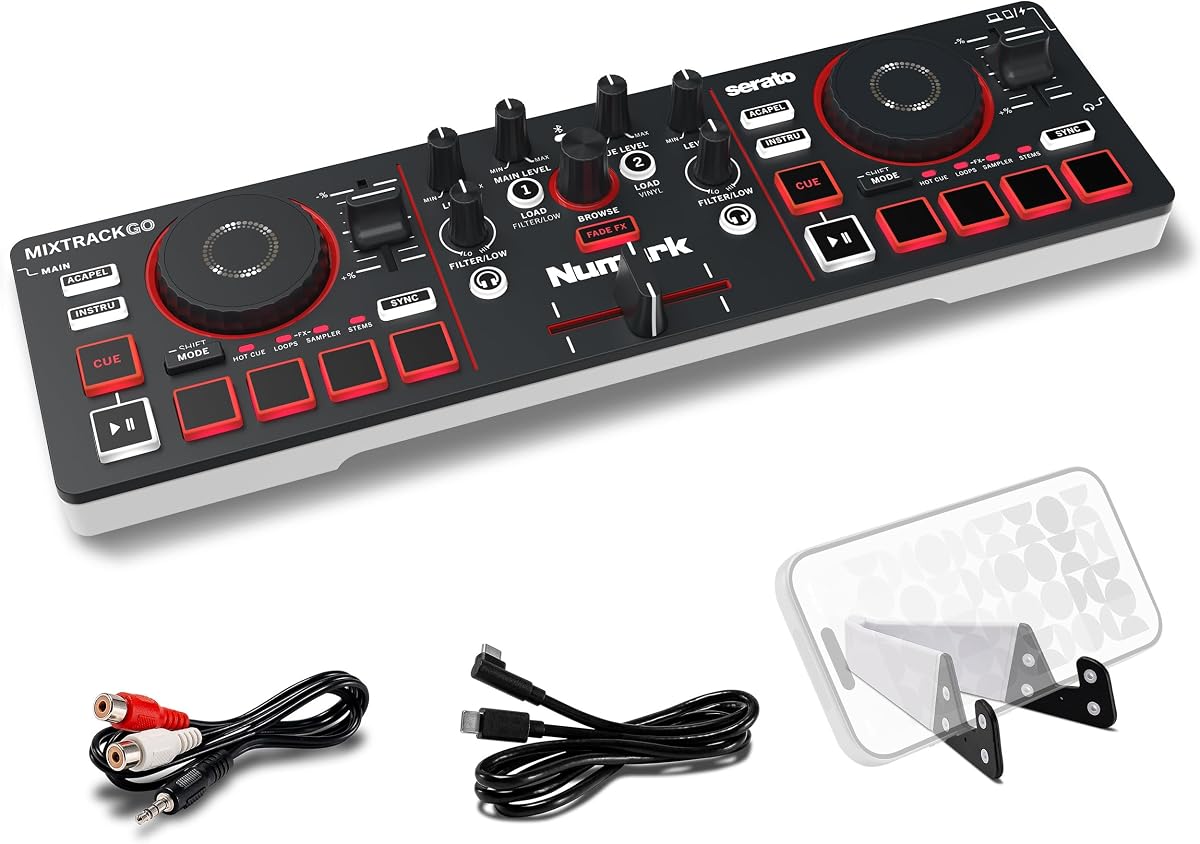
The Numark MixTrack Go carries a 4.4 rating and emphasizes portability in a way that suits coffee shops, outdoor gatherings, rehearsal spaces, and mobile performers. Its lightweight, compact two-deck design is easier to carry than a full-size controller, yet it still provides physical jog wheels, a crossfader, filters, channel gain, master volume, and performance pads.
We may earn a commission when you buy through this link, at no additional cost to you.
Bluetooth MIDI connects compatible iOS and Android devices to Algoriddim djay, while a single USB-C connection can power the controller from a computer, phone, tablet, or standard power bank. Included access to Serato DJ Lite and djay supports immediate setup, and compatibility is also stated for Serato DJ Pro and VirtualDJ.
Eight backlit pads per deck handle Hot Cues, Loops, Samples, and Stems. The dedicated real-time stems controls can isolate or remove vocals, drums, and instruments, while capacitive jog wheels support navigation, pitch bending, and scratching. Automatic Fade FX adds polish to blends without requiring constant manual effect management.
The MixTrack Go is best for a mobile DJ who values a full two-deck experience more than maximum hardware size. Its main limitation is obvious: it is not a standalone deck, so users need a compatible device, music source, software, and a separate audio route to speakers. Even so, it balances portability, useful performance controls, and wireless workflow remarkably well.
The compact chassis is intended to fit into a backpack, making the MixTrack Go a practical choice for performers who move between locations. USB-C power adds flexibility, although a power bank is still required when no suitable outlet or computer is nearby.
Real-time stems and eight pads per deck provide more creative options than many similarly compact controllers. Automatic Fade FX helps new DJs create smoother transitions, while the familiar mixer controls preserve a familiar learning path.
We may earn a commission when you buy through this link, at no additional cost to you.
With a 4.7 rating, the Pioneer DJ DDJ-FLX4 is the strongest-rated product in this guide and a compelling option for DJs who want helpful automation without giving up manual performance tools. Its layout is derived from professional Pioneer DJ equipment, yet the two-channel, two-deck configuration keeps it accessible for learning and growth.
We may earn a commission when you buy through this link, at no additional cost to you.
Smart Fader automatically adjusts volume, bass, and BPM to help users blend different genres by moving one fader. Sixteen Performance Pads support Hot Cues, Pad FX, Beat Jump, and Sampler functions, providing more room for assignments than controllers with four pads per deck.
The built-in sound card supports connections to PC, Mac, iPhone, iPad, or Android devices through USB or Bluetooth. It is also built for streaming, with stated support for mixing from Apple Music, Tidal, and Beatport and for live-streaming or MC use from one device.
This is the premium pick for a new DJ who wants structured help with beatmatching, a mobile performer who values wireless connectivity, or a streamer seeking a full controller layout. Users ready to develop traditional skills still receive jog-style deck control, while Smart Fader provides a useful bridge when blending styles or preparing live streams.
Smart Fader handles volume, bass, and BPM adjustments together during a transition, allowing a learner to focus on a single movement. It is a practical starting point rather than a replacement for developing manual mixing judgment.
The controller supports major streaming services and can handle live-streaming or MC duties from a single device. USB and Bluetooth options also make it suitable for rehearsal sessions in different locations with different hardware.
We may earn a commission when you buy through this link, at no additional cost to you.
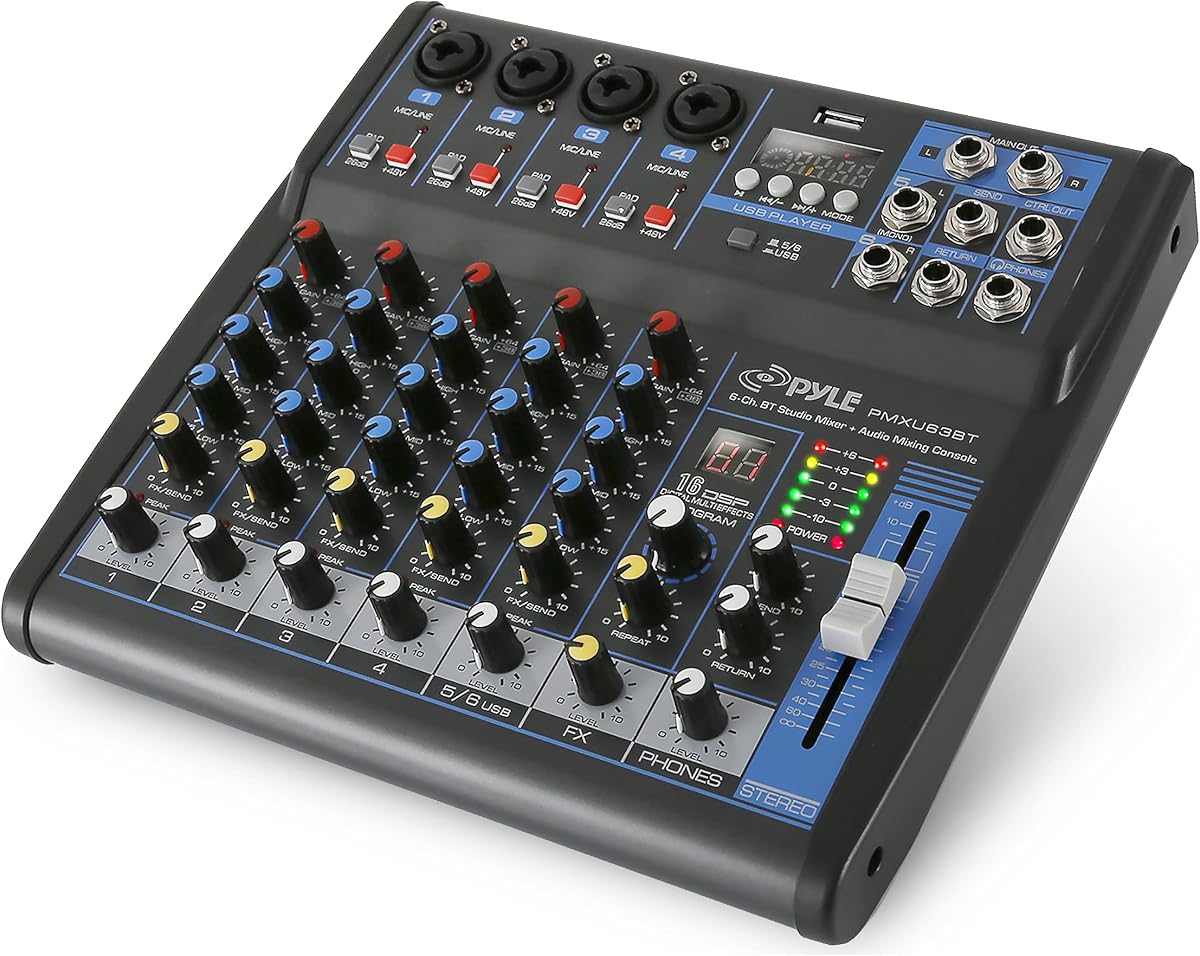
The Pyle PMXU63BT has a 4.3 rating and serves a different purpose from the software controllers above. It is a conventional six-channel audio mixer designed for live performers, bands, karaoke, presentations, and situations where microphones and instruments need to be combined with streamed or stored music.
We may earn a commission when you buy through this link, at no additional cost to you.
Each channel supports XLR and unbalanced quarter-inch connections, with 48V phantom power available for compatible condenser microphones. Three-band EQ, gain controls, sealed rotary controls, and peak-level indication support day-to-day operation. The built-in MP3 player and reader controls add another source without requiring every input to be handled manually.
Bluetooth allows a phone, tablet, or computer to send music into the console for mixing and recording. USB and flash-reader compatibility broaden the source options further. The steel chassis is designed to withstand stage use, while the supplied 100V–240V power adapter supports international applications.
This mixer is a strong fit for a singer, small band, event host, or rehearsal space that prioritizes analog input flexibility over track-based DJ features. It does not provide jog wheels, decks, or performance pads, so it should be chosen as a live sound console rather than a conventional DJ mixing system.
XLR and quarter-inch inputs make it practical to combine vocal microphones, instruments, and external playback. Phantom power broadens microphone options, while individual gain and EQ controls let performers balance sources.
The steel body and sealed controls are intended to resist dust and grime during transportation and live use. That makes the board better suited to mobile performers than buyers expecting a lightweight foldable controller.
We may earn a commission when you buy through this link, at no additional cost to you.
The FULUODE CT-80S carries a 4.4 rating and combines eight input channels with a relatively thin 1.57-inch body. It is aimed at family karaoke, bands, campus events, conferences, and other occasions where several wired or wireless microphones, instruments, and playback sources may need to be managed at once.
We may earn a commission when you buy through this link, at no additional cost to you.
Every channel has a three-segment equalizer, while the mixer includes 48V phantom power, an MP3 player, USB input, built-in Bluetooth 5.0, and a large LED display that can show song information. A connection to an external digital effect unit is also stated, adding flexibility for more advanced sound shaping.
Its slim format makes it easier to store and transport than a deep stage console, although it does not offer the compactness of a smartphone controller. The product information specifies 110-volt operation with an American plug, an important consideration for users outside that electrical standard.
This is a versatile option for karaoke hosts, teachers, presenters, and small ensembles who need more channels than a basic four-channel board. It is less suitable for someone seeking beat-synced software decks, and buyers should verify the exact signal routing and power requirements for their venue before ordering.
Eight channels provide room for multiple voices, instruments, and playback devices without moving to a full-size stage console. The slim body helps conserve storage and transport space.
The LED song display gives operators a quick visual reference while MP3, USB, and Bluetooth sources are in use. It is especially useful for hosts who need to identify tracks without opening software on a separate device.
We may earn a commission when you buy through this link, at no additional cost to you.
The Hercules DJControl Mix receives a 4.3 rating and is one of the most approachable ways to begin mixing with a phone. Rather than trying to include every function found on a full controller, it focuses on the essentials: two decks, jog wheels, faders, knobs, and pads within a compact wireless design.
We may earn a commission when you buy through this link, at no additional cost to you.
The controller works with the Algoriddim djay app on compatible iOS and Android devices. Bluetooth removes the need for a physical connection between the phone and controller, which can make practice and casual performance more convenient.
A foldable smartphone stand is included, helping keep the device visible while its controls are being operated. The limited surface area is both a strength and a drawback: it is easy to carry, but users who want more buttons, larger faders, or extensive performance features may feel constrained.
The DJControl Mix is best for a student, traveler, or casual user who wants to learn the fundamentals without carrying a laptop. It is not a standalone mixer and it is not designed for live musicians or multi-microphone routing, so it works best as a focused mobile DJ controller.
The controller provides the core physical controls needed to navigate and blend two tracks while keeping its footprint small. That focus makes it approachable for beginners who may be intimidated by a large professional console.
Bluetooth and the included djay app workflow eliminate the need to manage a USB connection during casual sessions. The bundled folding stand completes a practical phone-first setup.
We may earn a commission when you buy through this link, at no additional cost to you.
The Four-Channel Bluetooth Mixer has a 4.0 rating and targets mobile podcasting, live streaming, karaoke, recording, and small-event use. Its stated dimensions of 7.87 by 6.7 by 1.57 inches make it one of the more compact conventional boards in this guide.
We may earn a commission when you buy through this link, at no additional cost to you.
It combines XLR and 6.35-millimeter connections with stable 48V phantom power, allowing compatible condenser microphones, dynamic microphones, electric guitars, basses, and electronic keyboards to be connected. The USB interface supports plug-and-play computer recording and live streaming without extra drivers according to the product information.
Bluetooth is used for incoming music from smartphones, tablets, or laptops, while USB flash-drive MP3 playback adds another source. Importantly, the supplied details state that Bluetooth is input-only and cannot be used to send the mix to a speaker, so conventional wired outputs are still required.
This mixer is a practical option for a podcaster or mobile creator who needs a compact interface with microphone controls. It is not a traditional two-deck DJ controller, and its basic four-channel design has less flexibility than the larger analog mixers in the guide.
The built-in USB audio interface is designed for straightforward computer recording and streaming. Its driver-free setup reduces setup barriers for creators who need to combine vocals, instruments, and playback.
Bluetooth accepts audio from a phone, tablet, or laptop but does not transmit the mix to speakers. Users should plan a wired output path and activate the stated MP3 ROUTE control when using Bluetooth input.
We may earn a commission when you buy through this link, at no additional cost to you.
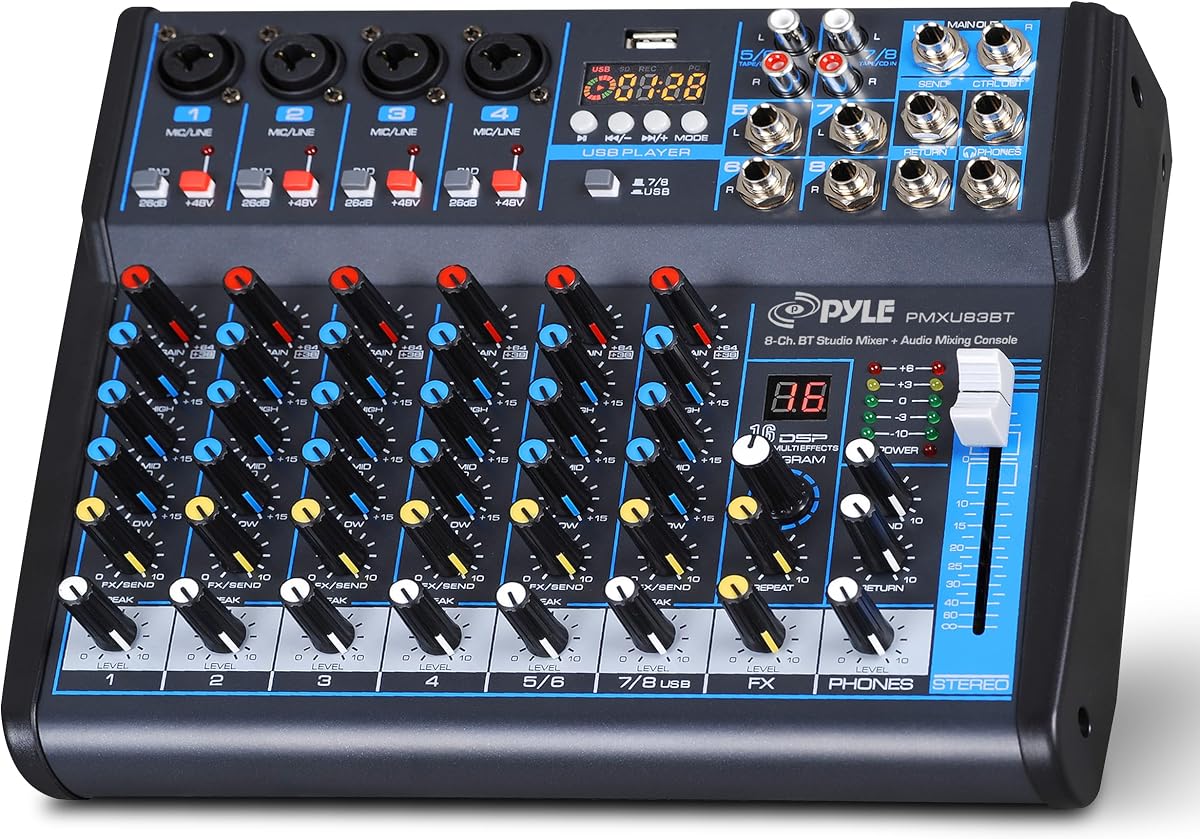
The Pyle 8 Channel DJ Audio Mixer has a 4.4 rating and is built for live gigs, karaoke, stage performances, and other situations requiring several audio inputs. It is a conventional analog mixer rather than a software deck controller, which makes it better suited to combining microphones, instruments, and playback sources.
We may earn a commission when you buy through this link, at no additional cost to you.
All channels support XLR and unbalanced quarter-inch inputs, and a 48V phantom-power control expands compatibility with condenser microphones. Per-channel three-band EQ, gain controls, and LED peak indicators help operators balance and monitor each source. Bluetooth adds cable-free streaming from a smartphone, while the title also identifies USB and audio-interface functionality.
DSP effects expand the board beyond basic level control, giving performers ready-made sound treatments for karaoke and live music. The rugged steel chassis and sealed rotary controls are intended to withstand dust and grime, while a 100V–240V power adapter supports use in many regions.
This mixer is best for a small band, mobile event operator, or karaoke host who needs numerous wired inputs in a durable board. It should not be confused with a controller that can perform beatmatching, hot cues, or stems; buyers seeking a mobile two-deck DJ experience should consider the Numark or Hercules options instead.
Individual EQ and gain controls give operators a familiar way to balance voices and instruments. The XLR and quarter-inch combinations make it possible to connect microphones and line sources within the same console.
A steel enclosure, sealed controls, DSP effects, and multi-voltage power supply support repeated mobile use. The eight-channel layout leaves room for growth as a small performance setup becomes more demanding.
We may earn a commission when you buy through this link, at no additional cost to you.
The Six-Channel Audio Interface Mixer holds a 4.3 rating and combines four microphone-capable channels, two additional stereo channels, USB connectivity, Bluetooth playback, and a broad collection of DSP effects. It is aimed at karaoke, studio, streaming, recording, live gigs, and musicians who need several analog inputs.
We may earn a commission when you buy through this link, at no additional cost to you.
The first four channels provide XLR connections with selectable 48V phantom power, while the unbalanced quarter-inch inputs can accept wireless microphones, electric guitars, direct boxes, and other instruments. Channels five and six are described as stereo quarter-inch connections, creating a flexible hybrid input layout.
A USB interface can be used with a flash drive for playback and for mixing and recording, while Bluetooth streams music from an iPad or smartphone. The built-in 16-bit DSP processor offers 16 effects, including delay and reverb, and each channel has high, mid, and low equalization plus gain control.
This mixer is a good fit for a home studio, rehearsal room, or karaoke setup that needs more input flexibility than a four-channel board. Its analog workflow and dependency on separate outputs or speakers make it less convenient as a portable phone-based DJ system.
Four XLR channels support microphones and other balanced sources, including compatible condenser microphones when 48V is enabled. The remaining stereo channels expand the board for instruments, wireless systems, and other line-level equipment.
The USB interface broadens the mixer's role from live sound control to recording and playback. Sixteen DSP effects provide quick treatments for vocals and instruments, while the MENU controls access transport and mode functions.
We may earn a commission when you buy through this link, at no additional cost to you.
The Pyle PMX466 has a 4.1 rating and is a six-channel live mixer with features aimed at DJ-style source management. It combines four XLR mic or line inputs, a USB interface, an auxiliary connection, an FX processor, MP3 playback, Bluetooth, and a headphone jack in a metal chassis.
We may earn a commission when you buy through this link, at no additional cost to you.
Its 16 preset digital effects offer ready-made treatments, and a sub output provides a dedicated route for low-frequency reinforcement. A headphone connection allows an operator to monitor the mix, which is useful when setting levels, cueing sources, or preparing for a live event.
Bluetooth and MP3 support simplify the addition of phone-based and locally stored music to an otherwise conventional mixer. The rugged metal body and detailed panel are better suited to a stable performance position than to highly mobile use.
The PMX466 is most appropriate for a mobile DJ or event host who wants more source inputs and monitoring options than a basic four-channel board. It does not provide software decks, beatmatching tools, performance pads, or stems, so those features are unavailable despite the DJ-oriented product positioning.
The headphone output supports private monitoring, while the dedicated sub output gives the operator a separate path for bass reinforcement. These features are valuable for balancing a live system before guests or performers arrive.
Sixteen digital effects can speed up setup for karaoke, parties, and live performances. The MP3 player, Bluetooth, USB, and flexible input connections let users combine stored and streamed music with microphones or instruments.
We may earn a commission when you buy through this link, at no additional cost to you.
The right Bluetooth DJ mixer depends on the kind of performance you want to create. Software controllers suit track mixing and portable DJing, while analog consoles are designed primarily for microphones, instruments, live events, recording, and karaoke.
A controller recreates some of the hands-on workflow of a traditional DJ setup. It generally pairs with a computer, tablet, or phone running DJ software, and features such as jog wheels, pads, hot cues, loops, pitch controls, or beatmatching assistance may be central to the experience. These products are best for blending recorded tracks and adding performance effects.
An analog console is fundamentally a signal mixer. Its channel strips, XLR microphone inputs, quarter-inch instrument inputs, EQ, effects, and output controls are more important than jog wheels or software decks. It is better suited to live music, presentations, karaoke, podcasts, and small events. Choose this format when multiple real-time sources must be combined.
Bluetooth can mean several different things in this product category. A DJ controller may use Bluetooth MIDI to send track and control data from a phone or computer, while a conventional mixer may use Bluetooth only to receive music from a phone. Some products also advertise Bluetooth broadly without explaining every direction of communication.
Check whether the mixer supports Bluetooth input, Bluetooth output, or wireless control. The four-channel product in this guide explicitly supports Bluetooth input but not output to speakers. App-based controllers also require a compatible mobile operating system and DJ application. Confirming these details prevents a mismatch between the intended workflow and the hardware.
Channel count is a basic measure of how many independent sources can be mixed, but connector types matter just as much. XLR inputs are useful for microphones and balanced equipment, quarter-inch inputs support instruments and line-level sources, and RCA or dedicated stereo inputs are common for playback devices.
Four channels may be enough for a podcaster with a microphone, music playback, and a few extras. Six channels suit a small band or karaoke setup, while eight channels provide more room for multiple performers, speakers, and playback devices. Avoid choosing solely by channel count; ensure every required connector and line-level or microphone-level function is present.
Controller-style mixers depend on compatible software for track loading, waveform display, effects, and performance controls. Included software can make setup easier, while support for established platforms gives a buyer more flexibility if they later change applications. The Numark controllers list Serato DJ Lite and Algoriddim djay, with broader compatibility stated for the MixTrack Go.
The Pioneer DDJ-FLX4 is also designed around streaming services, including Apple Music, Tidal, and Beatport, and can support live-streaming or MC use. Subscription access, regional availability, device support, and account requirements should be checked separately from the hardware. A controller's Bluetooth label alone does not guarantee that every streaming service will work.
Any mixer intended for vocals should have dedicated microphone inputs, preferably balanced XLR connections, and a clear way to control input gain. Three-band EQ is useful for reducing rumble, cutting harshness, or adding presence to a voice. LED peak indicators help operators identify overload before it becomes a persistent problem.
Condenser microphones may require 48V phantom power, while dynamic microphones generally do not. Confirm that the phantom-power control applies only to the appropriate channels and is not enabled unnecessarily. For a karaoke, church, classroom, or live-event installation, phantom power can be more important than extra performance pads.
USB audio-interface support can turn a mixer into a recording hub for a computer or live-streaming system. Look for stated driver-free operation if the goal is simple plug-and-play use, and determine whether the interface sends a stereo mix, individual channels, or both. The compact four-channel mixer in this guide specifically highlights driver-free recording and streaming.
USB flash-drive playback is a separate convenience from USB interface recording. MP3 and USB media controls are useful for background music or event playback, but they do not automatically provide multichannel recording. Confirm the actual recording path, sample-rate support, output routing, and required software before choosing a board for production work.
Portability is more than weight. A controller should fit the user's bag, fit the available table space, and remain stable during use. The Numark MixTrack Go and Hercules DJControl Mix emphasize compactness, while the Party Mix III uses USB-C power for access to a laptop or power bank. None should be assumed to contain a built-in battery unless the specifications explicitly state one.
Live mixers often trade pocketability for a metal chassis, sealed controls, and deeper layouts. The Pyle boards and FULUODE console are better suited to transport between venues and repeated setup. Also consider whether the included power supply operates on the local electrical standard; the FULUODE CT-80S is specifically listed for 110-volt operation.
The mixer is only one part of a usable sound system. Check the main output connectors, whether they are balanced or unbalanced, and whether a separate amplifier or powered speakers are required. A headphone output is valuable for cueing and level checks, but it does not replace main speaker connections.
For a simple party setup, a controller with integrated sound-card outputs can be paired directly with suitable powered speakers. For live events, a sub output and auxiliary route may be more valuable than another decorative feature. Confirm that the speakers, stands, cables, and adapters match the mixer's outputs before completing the purchase.
Begin by placing the mixer on a stable, level surface with adequate ventilation and enough room to reach every control. For a software controller, install the stated compatible application, connect the device, set the audio output to the mixer, and confirm that both channels register before preparing a full set. For an analog mixer, connect microphones and line sources one at a time, begin with gain controls low, and make sure the output level is down before switching anything on.
Once the signal path is working, build the mix gradually. Balance each input with its level control, apply only modest EQ changes, bring the master output to a safe listening level, and then rehearse the transitions. App controllers benefit from practice with cueing, tempo matching, loops, and performance pads before a live event. Live-sound users should test each microphone, instrument, playback source, headphone feed, and any subwoofer connection independently.
After use, lower master and channel levels before disconnecting cables, remove the USB drive or storage media safely, and power the system down. Clean the surface with a soft, slightly damp cloth, but do not allow liquid to enter knobs, faders, sockets, or ventilation openings. Store controllers in a padded case, route cables without sharp bends, and check phantom power, battery banks, adapters, and firmware or app updates before the next event.
It depends on the product. A conventional analog mixer can usually blend connected microphones, instruments, and audio sources without a computer, although Bluetooth music still comes from a separate phone or device. App-based controllers require a compatible computer, tablet, or phone to load tracks and operate their DJ software. Check whether the listed Bluetooth feature is for control, audio input, or both.
Bluetooth MIDI sends performance and track-control information between a software application and a DJ controller, allowing the controller's knobs, faders, and pads to operate the app. Bluetooth audio is simply a wireless audio source being sent into a mixer. The two functions serve different purposes and should not be treated as interchangeable.
Most require separate powered speakers or an amplifier because the mixer provides the controls and output signal rather than the loudspeakers themselves. Some controllers include a built-in sound card, but that still needs to be connected to an audio system. Check the stated main output and headphone connections, then use compatible powered speakers or an amplifier for the intended venue.
Only for a different type of performance. An analog mixer can combine music, microphones, and instruments, but it normally does not provide track decks, waveforms, hot cues, loops, beat synchronization, or stems. A DJ controller is the better choice for mixing recorded music, while an analog console is better for live sources and event audio.
Phantom power supplies the voltage required by many condenser microphones. Compatible dynamic microphones generally do not need it, so it should be enabled only when required. Several mixers in this guide include a dedicated phantom-power control, which is an important feature for singers, podcasters, and live performers using condenser microphones.
No. A USB audio interface sends audio between the mixer and a computer for recording, streaming, or software-based control. USB MP3 playback is a media-player function that reads compatible files from attached storage. A mixer may offer one, the other, or both, so check the requirements of your recording or party setup.
Count the independent sources you expect to control at the same time, including microphones, instruments, laptops, and dedicated music players. Four channels may suit a creator or small event, while six or eight channels are more practical for karaoke, bands, and multi-person gatherings. Ensure the required XLR or quarter-inch connector type is present on each channel.
No. Wireless connectivity does not necessarily mean the hardware is small or battery-powered. Phone controllers can fit in a pocket or bag, while live mixers may use substantial metal chassis and need a mains adapter. Check dimensions, weight, power requirements, and whether a built-in battery is specifically listed before planning to perform away from an outlet.
The Numark Party Mix III is the strongest all-around choice for parties and casual DJs because it combines approachable mixing controls, real-time stems, and a synchronized light show. The Numark MixTrack Go serves mobile users well, the Pioneer DJ DDJ-FLX4 leads for assisted blending and streaming workflows, and the Hercules DJControl Mix provides a simple, affordable way to begin with a phone.
For live performers, the selection shifts toward analog consoles. The Pyle PMXU63BT and eight-channel Pyle model suit stage and event work, while the FULUODE CT-80S provides eight channels in a thin housing. The compact four-channel mixer prioritizes mobile recording, and the six- and eight-channel options are better for microphones, instruments, USB recording, karaoke, and streaming.
Before buying, prioritize the exact sources you need to connect, confirm whether Bluetooth handles control or audio input, and verify outputs, power requirements, and software compatibility. Prices and availability change over time, so check current retailer details and the availability of speakers, cables, adapters, apps, and compatible playback software before placing an order.