
JADENS Portable US Letter Thermal Printer
4.6Editor score
Inkless direct thermal printing
Rechargeable 1800mAh battery
Bluetooth smartphone connectivity
US Letter paper support
Battery powered portable printers bring useful printing capability to travel, fieldwork, classrooms, and temporary offices where a full-size printer is impractical. The best model balances output quality, paper handling, wireless connectivity, battery life, and a body that is genuinely easy to carry.
We compared ten printers spanning inkjet, thermal, and dye-sublimation technologies. The review considers print capability, supported media, connection methods, portability, included accessories, and practical limitations, including that not every printer in this category includes a built-in rechargeable battery.
Each pick below shows how the product fits into a particular routine, from mobile business documents to compact photos and black-and-white worksheets. Ratings and availability can change over time, and current prices should always be checked on the retailer listing before purchase.
4.6Editor score

4.3Editor score
4.5Editor score
As an Amazon Associate we earn from qualifying purchases.
The table below compares all ten printers by technology, portability, connection options, paper support, and their most important practical limitation.




The Canon PIXMA TR160 is a lightweight wireless inkjet intended for portable documents and photos, earning a 4.2 rating in the supplied product data. Its most attractive feature is genuine color flexibility rather than the monochrome-only output common among compact thermal printers, while a 1.44-inch OLED helps users monitor ink levels and printer status.
We may earn a commission when you buy through this link, at no additional cost to you.
The 5-Color Hybrid Ink System supports sharp black text, rich color photos, square prints, and borderless output on sheets as large as 8.5 by 11 inches. Connectivity is flexible: the Canon PRINT app, Apple AirPrint, and Mopria Print Service provide supported mobile workflows, and Wireless Direct Mode can establish a connection even when no wireless router is available.
The principal trade-off is power. The TR160 is portable in size, but it does not include a built-in rechargeable battery, so true on-the-go printing requires access to mains power. It is therefore best for travelers who want a small color printer for a hotel or temporary workspace, but not for people who need to print in a vehicle, at a remote site, or wherever an outlet is unavailable.
This is a strong choice for users who prioritize color, borderless photos, and straightforward wireless setup over untethered operation. It is less suitable for field workers or travelers who need a completely self-contained printing kit. Buyers who require a battery should instead examine the HP OfficeJet models, the Epson Workforce WF-110, or one of the compact thermal printers in this guide.
Unlike thermal printers, which require specialized paper and generally produce black-and-white output, the PIXMA TR160 uses standard inkjet media. That makes it more appropriate when a travel kit needs receipts, forms, reference pages, and full-color snapshots in one device.
Router-free Wireless Direct Mode is especially useful on trips, while established app services support many phones and tablets. The built-in OLED also reduces guesswork when ink or connectivity needs attention.
We may earn a commission when you buy through this link, at no additional cost to you.
The HP OfficeJet 250 combines printing, scanning, and copying in one compact battery-powered unit, and it carries a 4.3 rating in the supplied data. It is the most complete mobile office solution here because it does more than output pages: it can scan documents and make copies wherever its built-in battery is charged.
We may earn a commission when you buy through this link, at no additional cost to you.
Its versatility extends to the paper it can handle. Supported formats include letter, legal, statement, and executive sizes; several card dimensions; common photo sizes; and No. 10, Monarch, and 6 3/4-inch envelopes. The HP app supports mobile workflows, while HP Auto Wireless Connect provides a straightforward setup path with or without an existing router.
Fast Charge can replenish the battery within 90 minutes while the printer is off, which makes charging at a home, office, or vehicle stop practical. The trade-offs are size and ongoing ink use. Compared with a pocket-sized thermal printer, the OfficeJet 250 is bulkier, and it uses Original HP 62 series cartridges rather than specialized thermal paper.
Choose the OfficeJet 250 when a mobile office needs a dependable combination of color printing, scanning, copying, familiar inkjet paper handling, and genuine untethered operation. It is a particularly sensible choice for consultants, field representatives, and small traveling teams. Those who only need occasional monochrome receipts or worksheets may find a lighter thermal model more convenient.
Printing, scanning, and copying eliminate the need to carry separate devices for common administrative tasks. The result is a more capable mobile kit without expanding beyond a single compact unit.
A 90-minute fast-charge cycle makes it easier to replenish power between stops. Users can work from a car, briefcase, or temporary office without depending on a nearby outlet during each task.
We may earn a commission when you buy through this link, at no additional cost to you.
The HP OfficeJet 200 is a print-focused mobile inkjet with a 4.4 rating, making it one of the strongest-rated products in this roundup. It delivers familiar color and document printing in a smaller package than many office-oriented machines, while the included battery allows operation away from a fixed outlet.
We may earn a commission when you buy through this link, at no additional cost to you.
Its connection options suit modern mobile workflows. The HP app provides print access from a smartphone, and HP Auto Wireless Connect simplifies setup from laptops, phones, and tablets with or without a router. As with the larger OfficeJet 250, fast charging can restore power within 90 minutes while the printer is switched off.
The main limitation is that it focuses on printing rather than scanning and copying. It also requires HP 62 series cartridges, so people accustomed to thermal paper should be prepared to purchase conventional inkjet supplies and select compatible sheets. It is not the most compact device in the guide, but it remains clearly designed for mobile placement in a car, backpack, or briefcase.
The OfficeJet 200 is well suited to users who want color inkjet quality and wireless flexibility in a lighter mobile design. It is a better fit than the OfficeJet 250 when scanning and copying are not needed. For the broadest office functionality, choose the 250; for the lowest inkjet weight and a print-only experience, the 200 makes a strong case.
The OfficeJet 200 supports standard color output, giving it more versatility than monochrome thermal devices. It can handle documents and common photo formats while remaining designed for transport between work locations.
HP Auto Wireless Connect and the HP app streamline printing from mobile devices. Support for operation with or without a router adds flexibility when the printer is used in hotels, vehicles, or temporary workspaces.
We may earn a commission when you buy through this link, at no additional cost to you.
The Epson Workforce WF-110 is a color mobile inkjet with a 4.1 rating and a built-in rechargeable lithium-ion battery. It stands out in this group because charging is unusually flexible: users can charge through USB or an AC adapter, or print while connected to AC power when the internal battery is not being used.
We may earn a commission when you buy through this link, at no additional cost to you.
Wireless capability includes Wi-Fi and Wi-Fi Direct, allowing compatible iPads, iPhones, tablets, smartphones, and laptops to print without requiring a conventional wireless router. The optional external accessory battery is intended to increase print volume, making the printer adaptable to longer assignments away from an outlet.
As with many inkjets, consumable costs and cartridge compatibility deserve attention. Epson states that the printing system is designed for Epson Genuine Cartridges and warns that non-genuine ink could cause damage not covered by the limited warranty. The Wi-Fi 5 specification may also feel conservative for buyers creating a new high-speed wireless network.
This printer is a practical fit for a mobile office that needs color pages and regular access to standard inkjet supplies. It is a better choice than a thermal model when photo reproduction, color documents, or ordinary paper are priorities. Buyers should confirm their cartridge supply plan before purchase and verify that their phone and network are supported.
USB and AC charging give users more ways to replenish the built-in battery. Printing directly on AC power also provides a practical fallback when a full charge is unavailable.
Unlike direct thermal models, the WF-110 produces color with conventional inkjet media. That versatility makes it more suitable for presentations, color forms, photographs, and visual work.
We may earn a commission when you buy through this link, at no additional cost to you.
The Gloryang Inkless Portable Printer is a travel-oriented thermal printer with a 4.2 rating and one of the most complete bundles in the guide. The package includes the printer, a carrying case, a charging cable, three thermal paper rolls, a manual, and a guide card, reducing the number of extra items needed before a trip.
We may earn a commission when you buy through this link, at no additional cost to you.
Direct thermal technology eliminates ink, toner, and ribbons, while the built-in paper bin helps keep the work area compact. The printer weighs 1.75 pounds and measures 1.7 inches thick, making it straightforward to place in a backpack or briefcase. Bluetooth connectivity works with iOS and Android through the Jadens Printer app, while computers can use it through the appropriate driver setup.
The important limitation is paper compatibility. The device supports thermal rolls and documents from 2 to 8.5 inches, but it cannot accept regular inkjet or plain paper. Its output is also not a substitute for a full-color photo printer, even though the listing notes that photos, images, drawings, and text can be printed in black and white.
Choose the Gloryang when a traveler wants a ready-to-pack monochrome printing solution with supplies already included. It is particularly suitable for contracts, notes, office documents, emergency records, and educational material. Users who print ordinary documents or need color should favor an inkjet or dye-sublimation model instead.
The included case and three paper rolls make this an unusually convenient starter setup. Buyers can organize the device and its consumables in a single portable package instead of sourcing compatible rolls separately.
Direct thermal printing removes the need for ink, toner, and ribbons. The trade-off is strict use of compatible thermal paper, which must be considered before the printer is chosen for everyday office documents.
We may earn a commission when you buy through this link, at no additional cost to you.
The A285M Portable Thermal Printer earns a 4.0 rating and focuses on a useful combination of compact size and broad media compatibility. At 1.5 pounds, it is easy to place in a backpack or briefcase, while its built-in paper bin supports contract, invoice, receipt, recipe, list, and boarding-pass printing.
We may earn a commission when you buy through this link, at no additional cost to you.
Its standout feature is support for five thermal paper widths: US Letter, A4, 4.33-inch, 3.14-inch, and 2.08-inch formats. This gives the printer more flexibility than models designed around one roll size. It accepts continuous and single-sheet thermal paper, and phones and tablets connect by Bluetooth through the required app.
Computers connect through USB-C, but the supplied instructions require downloading a driver first. The output is black and white only, and ordinary copy paper cannot be used. These constraints make the A285M more suitable for monochrome forms, logistics documents, and short printed records than for conventional office workflows.
This model is worth considering when packaging flexibility matters and the user already expects to work with thermal rolls. It also suits mobile notaries, truck drivers, teachers, students, and office workers who value a light body. Those needing color, full inkjet quality, or a scanner and copier should choose a different category of device.
Support ranging from compact rolls to US Letter and A4 thermal media allows the A285M to handle many document types. This flexibility is valuable when label-like, narrow, and full-page thermal formats are all part of a mobile workflow.
Bluetooth serves phones and tablets, while USB-C provides a path to computers. Users should install the specified driver before the first computer print to avoid compatibility issues.
We may earn a commission when you buy through this link, at no additional cost to you.
The ETIKEZ D90E is a compact black-and-white thermal printer with a 4.3 rating. Its 2.08-pound body, built-in paper handling, and included travel case position it for teachers, students, notaries, parents, and mobile workers who need a portable full-page output device.
We may earn a commission when you buy through this link, at no additional cost to you.
The package includes the D90E printer, a USB-C cable, ten sheets of paper, a travel case, and a guide, although a charging adapter is not included. Bluetooth serves compatible iPhones and Android devices through the Labelnize app, while PCs connect by USB after installing the appropriate driver. The printer is explicitly not compatible with Chromebooks, an important limitation for schools and travelers relying on that platform.
Output is limited to black and white and requires A4 thermal paper rather than ordinary copy paper. The product information also notes a paper-jam response that involves pressing the power button to eject the paper, while advising against forcefully opening the cover. Compatible flat paper can reduce curling after printing.
The D90E is a strong option for portable worksheets, forms, contracts, and monochrome records because the travel accessories and paper supply simplify packing. It is less suitable for color projects, standard office paper, or Chromebook-based workflows. Confirm the charging and computer requirements before buying for a classroom or remote assignment.
The included case, paper, and cable support a practical mobile kit. Its intended uses span teaching materials, student assignments, business forms, and travel documents, provided compatible thermal media is available.
Bluetooth through Labelnize handles phone and tablet printing, while USB supports compatible PCs after driver installation. The lack of Chromebook support and the missing charging adapter should be checked before purchase.
We may earn a commission when you buy through this link, at no additional cost to you.
The JADENS JD-166 has a 4.6 rating, the highest among the products in the supplied data, and stands out as a compact direct thermal printer with a rechargeable 1800mAh battery. Its 203 DPI resolution is designed to produce clear text and recognizable images for everyday documents, forms, worksheets, and learning materials.
We may earn a commission when you buy through this link, at no additional cost to you.
The built-in battery is rated for up to three hours of continuous printing or as many as 360 sheets per charge. That makes the device more practical for genuinely untethered work than a compact printer that requires a nearby outlet. Bluetooth connects through the Jadens Printer app to iOS and Android devices, and the app includes document, spreadsheet, and image printing alongside AI image generation, erasing, and translation features.
Its limitations are equally clear. It produces black-and-white output only and is compatible exclusively with JADENS JD-166 US Letter thermal paper. While local printing can keep documents off the cloud, the product still depends on a specific app and proprietary paper format, so prospective buyers should confirm both before committing.
The JD-166 is a compelling pick for students, teachers, travelers, and home users who need readable monochrome pages from a compact rechargeable device. It is especially appealing for users who value privacy and creative app features. Those requiring color, ordinary paper, scanning, or copying will need to look beyond the thermal category.
A claimed three-hour continuous runtime and 360-sheet capacity per charge provide meaningful freedom from an outlet. The result is a practical option for commuting, school, travel, and field documentation.
Files can be printed directly from a connected device without cloud upload, which is helpful for sensitive documents. The app also expands the printer's use with editing, filters, borders, and AI-assisted creative functions.
We may earn a commission when you buy through this link, at no additional cost to you.
The NDYIN N80 is a lightweight travel thermal printer with a 4.1 rating. At 1.5 pounds, it is among the more compact products here, and its built-in 1500mAh rechargeable battery is rated to print as many as 160 sheets of US Letter thermal paper on a full charge.
We may earn a commission when you buy through this link, at no additional cost to you.
Phones and tablets connect by Bluetooth using the Nada Print app, while laptops and computers use a USB-C cable and require a driver. The printer supports US Letter and A4 thermal paper and can also handle roll paper, folded paper, and tattoo transfer paper. A US Letter roll, manual, guide card, soft Type-C cable, and Type-C adapter are included according to the product information.
There are several restrictions to understand. Regular paper is unsupported, and Bluetooth does not extend to computers, so a wired setup is necessary for those systems. Although the package description refers to an included Type-C adapter, it also states that a charging adapter is not included; shoppers should therefore confirm the exact contents in the current listing and package.
The N80 is useful for travel documents, contracts, invoices, boarding passes, classroom material, and tattoo templates. Its compact size and battery make it a natural fit for a carry-on or vehicle kit. However, it is not a full-color solution, and users who need direct computer printing without setup or ordinary paper support should choose a more conventional printer.
The 1.5-pound body and compact format make the N80 easy to carry between hotels, vehicles, job sites, and classrooms. Its rechargeable battery supports genuinely mobile document production.
Support for US Letter, A4, folded thermal media, and tattoo transfer paper broadens its uses. The requirement for special thermal stock and separate computer drivers should be considered for routine office adoption.
We may earn a commission when you buy through this link, at no additional cost to you.
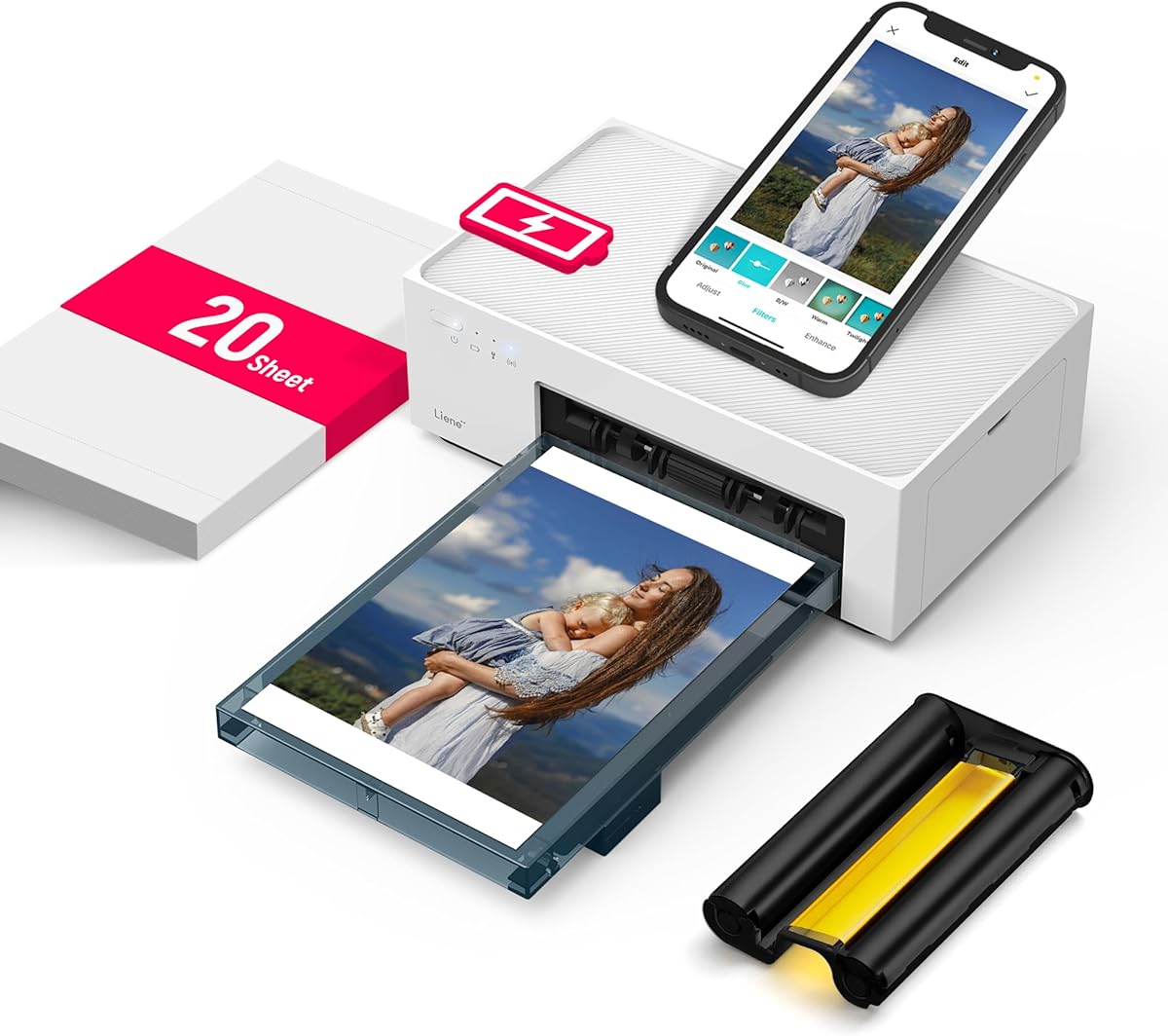
The Liene White M200 is a portable dye-sublimation photo printer with a 4.5 rating, making it the premium choice for color images. It produces clear, vibrant four-by-six-inch photos by applying primary color layers, and its final layer is intended to add resistance to water, scratches, and fading.
We may earn a commission when you buy through this link, at no additional cost to you.
The built-in rechargeable battery provides up to 40 prints per charge, which is ideal for travel, celebrations, and family events where a conventional printer is inconvenient. A built-in WiFi hotspot can be connected in about three seconds, helping avoid unreliable home networks. The printer supports iOS, Android, laptops, and PCs, with as many as five users able to connect at the same time.
The package includes 20 sheets of photo paper, one ink cartridge, and a power adapter. The Liene app supports basic editing, filters, and borders, while also informing the user when the ink cartridge or paper is running low. The magnetic top design stores the photo cassette close to the device and helps reduce its overall footprint.
This printer is ideal for someone who values portable, full-color photo output more than multipurpose document printing. Its fixed photo format, dedicated media system, and cartridge requirement make it less suitable for contracts, reports, or ordinary office pages. For those needs, an inkjet mobile printer is the more sensible choice.
Dye sublimation creates vibrant four-by-six images that are designed to resist water, scratches, and fading. This makes the M200 well suited to vacations, celebrations, and family events where immediate prints are valuable.
The integrated WiFi hotspot provides a direct connection without dependence on the surrounding network. Simultaneous connections for up to five users also make it practical for a family or small group sharing one printer.
We may earn a commission when you buy through this link, at no additional cost to you.
The most important decision is whether you need color documents, full-page monochrome records, or photographs, followed by whether the printer must work without power and which paper system you are willing to maintain.
Choose color inkjet or dye sublimation for visual material. Choose thermal for monochrome forms, notes, receipts, and records.
Verify an included rechargeable battery and realistic runtime. A compact body alone does not mean unplugged operation.
Confirm supported sizes and use only approved media. Thermal printers need specialized paper and produce black-and-white output.
Confirm Bluetooth platform support, computer driver requirements, and router-free operation. USB and app setup are common thermal compromises.
Compare total kit size, built-in paper storage, and carried accessories. More document versatility usually means a bulkier design.
Choose an all-in-one when scanning and copying matter. A print-only model is often simpler and more compact.
Prioritize legible text for forms and records. Select color inkjet or dye sublimation when image quality is the main objective.
Check adapters, charging time, and local file handling. Mobile convenience includes keeping documents away from unnecessary cloud services.
Begin by fully charging the printer and installing the specified battery or power adapter. Charge thermal models according to their app instructions, and use only the required USB or AC source. Before opening the paper compartment, confirm that the model is not powered on and that any previous roll has been fully removed.
Load compatible media squarely and follow the paper-width or paper-size setting in the app. For thermal printers, match the selected setting to the actual roll and allow enough room for the paper to exit without curling. For inkjet models, ensure that ink is installed as directed, and for the Liene M200, confirm that the correct photo cassette and ink cartridge are seated properly.
Pair the printer with the required mobile app or install the specified computer driver before beginning. Print a short test page to verify alignment, darkness, and paper selection. Turn the device off during long periods of inactivity, keep thermal paper away from heat and direct sunlight, and store inkjet cartridges according to the manufacturer's guidance. Clean the exterior with a dry, soft cloth and avoid opening inkjet or dye-sublimation housings unless the manual specifically authorizes it.
No. A printer can be physically small and wireless without containing a rechargeable battery. The Canon PIXMA TR160, for example, is compact and wireless but requires a power connection, while several HP, Epson, JADENS, NDYIN, and Liene models include built-in batteries. Check the specifications for battery inclusion, capacity, charging time, and whether operation while plugged in is supported.
No. Direct thermal printers require compatible thermal paper because the printing process uses heat to create the image. Ordinary copy paper will not work and may cause feeding problems. Some models accept only a specific branded paper size, while others support several widths, so verify the exact media requirements before purchasing replacement rolls.
The HP OfficeJet models and Epson Workforce WF-110 offer conventional inkjet color output and can handle a broader range of ordinary media than thermal printers. The Canon PIXMA TR160 also prints color, but it does not include a built-in battery. For portable full-color photographs rather than documents, the Liene White M200 is the more specialized choice.
Most models in this guide support Bluetooth printing from iOS or Android devices. The required app varies by brand, including Jadens Printer, Nada Print, and Labelnize among the supplied products. Bluetooth computer support is less consistent: some thermal printers require a USB connection and a downloaded driver, and the ETIKEZ D90E is not compatible with Chromebooks.
The stated figures vary by model. The JADENS JD-166 is listed for up to 360 sheets per charge and three hours of continuous printing, while the NDYIN N80 is listed for up to 160 US Letter thermal sheets. Real results can vary with page density, darkness, paper type, wireless activity, and the age and condition of the battery.
Thermal printers in this guide are primarily monochrome devices. They can render images, graphics, and text in black and white, but they do not reproduce full color. If color photos are the main purpose, the Liene White M200 uses dye sublimation to produce four-by-six-inch color images, while the mobile inkjets provide broader color document and general photo support.
Start with the required functions: printing, scanning, copying, color, or photographs. Then verify battery inclusion, runtime, charging method, supported paper, device compatibility, and whether a driver is needed. The HP OfficeJet 250 is the most complete office option in the guide, while thermal printers are generally lighter and better for monochrome travel documents.
No ink, toner, or ribbon is required for direct thermal printing. The consumable is compatible thermal paper, which should be stored away from excessive heat and direct sunlight. This can simplify maintenance, but owners should budget for a steady supply of the correct paper size and type, particularly when a printer is restricted to a specific branded format.
The JADENS JD-166 is the strongest budget-oriented choice for battery-powered monochrome printing, combining a compact design, a rechargeable battery, local app printing, and useful creative features. The HP OfficeJet 250 is the editor's choice for mobile offices because it combines genuine battery operation with printing, scanning, copying, and broad paper support. The Liene White M200 leads the premium group for portable full-color four-by-six-inch photographs.
Prioritize the output you need before focusing on the smallest possible body. Inkjets provide the most flexible ordinary-paper workflows, thermal printers excel at lightweight monochrome records, and dye sublimation is specialized for color photos. Confirm battery inclusion, compatible media, app requirements, charging accessories, and computer support before completing an order.
Ratings, product configurations, and prices can change, so check the current retailer listing and manufacturer details before buying. The link associated with each product provides the relevant listing, while current price, availability, package contents, and technical specifications should be reconfirmed at that time.