
ASUS Prime AP201
4.7Editor score
Compact 33-liter footprint
Supports 360mm radiators
Tool-free side panels
Our ASUS PC Case guide compares 10 models for airflow, compatibility, expandability, cable management, connectivity, and build quality.
An ASUS PC Case can shape everything from a compact everyday system to an expansive enthusiast build, making careful comparison essential. A strong enclosure needs effective airflow, practical motherboard and graphics-card compatibility, tidy cable routing, convenient front connections, and enough room to work without compromising the finished appearance.
This guide compares ten ASUS cases across mid-tower, micro-ATX, and full-tower designs. We considered cooling support, radiator placement, pre-installed fans, chamber layout, component clearance, accessibility, cable management, connectivity, and the features that distinguish gaming-focused, premium, and space-saving models.
Each pick highlights a different practical strength, from compact efficiency to sophisticated dual-chamber cooling and premium construction. The recommendations reflect the supplied specifications and customer ratings, while current availability and pricing can change, so readers should verify the latest product details before purchasing.
4.7Editor score

4.7Editor score

4.6Editor score
The comparison below places all ten ASUS PC cases side by side, focusing on form factor, cooling capacity, component support, connectivity, and build-friendly features that materially affect everyday use.


The ASUS TUF Gaming GT501 is a full-tower E-ATX case that combines a spacious interior, extensive liquid-cooling support, and a strong set of included fans. Its 4.8 rating is the highest among the supplied models, and the specification sheet suggests a balanced foundation for a high-power gaming system or a workstation-style build where internal room matters.
We may earn a commission when you buy through this link, at no additional cost to you.
Cooling is a major strength. Three 120mm Aura Sync RGB-illuminated fans and one 140mm PWM rear fan provide a useful starting configuration, while seven optional fan-mounting points make it possible to improve airflow. The chassis supports a 360mm radiator at the top or front and a 140mm radiator at the rear, giving builders flexibility when planning custom water cooling. Pre-drilled pump and reservoir mounting holes further simplify that process.
The GT501 also accommodates demanding component layouts. Support for E-ATX motherboards creates room for extended boards, while a vertical GPU expansion slot can be used alongside seven traditional expansion slots. A 4mm smoked tempered-glass panel reveals the components, while the metal chassis and TUF-inspired spatter pattern create a recognizable gaming appearance. The ergonomic woven-cotton handles are also more practical than decorative-only grips, with a listed transport capacity of up to 65 pounds.
The principal compromise is physical size. A full-tower enclosure needs a large desk or floor area, and builders working with a more moderate component collection may find the ASUS Prime AP201 more convenient. Even so, the GT501 offers an unusually convincing combination of room, cooling flexibility, and visual appeal, making it a strong all-around recommendation for builders who want a roomy ASUS PC Case without moving into the GR701’s more specialized premium design.
The included three 120mm and one 140mm fans create immediate airflow potential, while 360mm radiator positions and seven optional mounts allow a more elaborate cooling system. This makes the GT501 suitable for a staged build that can grow alongside more powerful components.
E-ATX motherboard support, seven traditional expansion slots, and vertical GPU placement make the interior unusually flexible. The result is useful for elaborate layouts that would be difficult to accommodate in a compact mid-tower.
We may earn a commission when you buy through this link, at no additional cost to you.
The ASUS Prime AP201 is a compact 33-liter micro-ATX case designed to preserve performance and usability in a smaller footprint. Its 4.7 rating reflects a strong balance of airflow, component compatibility, and convenience, making it an appealing choice for builders who do not need the expansion room offered by a full tower.
We may earn a commission when you buy through this link, at no additional cost to you.
The quasi-filter mesh panels use more than 57,000 precision-machined 1.5mm holes to encourage airflow while keeping the internal components visible. Cooling support includes 280mm and 360mm radiators and room for as many as six fans. This is especially noteworthy in a compact enclosure because the choice of chassis affects how readily heat can move away from the CPU, graphics card, and power supply.
Despite its small volume, the AP201 supports ATX power supplies up to 180mm long, graphics cards up to 338mm long, custom liquid cooling, and several types of storage. Tool-free side panels remove the need for screws during routine access, while an extended motherboard tray, strategic cable cutouts, and a 32mm cable-management gap help maintain a clean interior. The design therefore feels more considered than the dimensions alone might suggest.
Its limitations follow naturally from the micro-ATX format. It cannot accept full-size ATX or E-ATX motherboards and will offer less freedom for multiple expansion cards or elaborate add-on hardware than the TUF GT501 or ROG Hyperion GR701. For a compact gaming PC, a smaller office-oriented workstation, or a build where desk space is valuable, though, the Prime AP201 is a remarkably versatile recommendation.
A 33-liter footprint is the AP201’s defining advantage, yet it still accommodates long graphics cards, standard-size power supplies, multiple storage devices, and custom liquid cooling. That balance makes it more versatile than a case designed solely around the smallest possible components.
The precision-machined mesh panels support airflow while preserving visibility into the chamber. Combined with radiator and fan support, this helps the compact chassis maintain a sensible thermal foundation.
We may earn a commission when you buy through this link, at no additional cost to you.
The ASUS ROG Hyperion GR701 is a premium E-ATX full tower built for elaborate gaming systems, substantial cooling hardware, and polished build experiences. Its 4.6 rating is supported by a specification set that emphasizes structural strength, component management, and convenience rather than basic enclosure functions.
We may earn a commission when you buy through this link, at no additional cost to you.
Its semi-open structure is designed to improve airflow, and the case can accommodate up to two 420mm radiators for large all-in-one or custom water-cooling loops. A sturdy diecast aluminum-alloy frame adds rigidity, while the top bars double as carry handles rated for up to 80 kilograms. Those details give the GR701 an unmistakable premium character and make it practical for transporting a completed system.
Build convenience is unusually well considered. The hinged, tool-free side panel opens easily, a built-in storage drawer keeps small components organized, and the integrated graphics-card holder supports both vertical and horizontal installation. At the front, two Type-C ports include 60W fast charging, useful for compatible devices that benefit from higher charging power. Together, these features reduce friction during both initial assembly and later maintenance.
The trade-off is size and weight. A full-tower enclosure with a substantial alloy frame will require more room than any compact or conventional mid-tower, and buyers must ensure their floor or desk space can accommodate it. For a system featuring a long GPU, a large radiator, elaborate cable routing, and premium visual presentation, however, the GR701 provides the most specialized and luxurious experience in this ASUS PC Case guide.
Support for two 420mm radiators is among the most advanced specifications in the list. It enables substantial heat-transfer capacity for powerful processors and graphics cards while taking advantage of the GR701’s generous full-tower proportions.
The hinged tool-free panel, storage drawer, and adjustable GPU support reduce the need for extra accessories. Even the top-bar handles serve a practical purpose, combining transport with the case’s rigid structural design.
We may earn a commission when you buy through this link, at no additional cost to you.
The ASUS TUF Gaming GT502 Horizon uses a dual-chamber mid-tower design to establish separate cooling zones for the CPU and graphics card. Its 4.5 rating reflects a modern, visually dramatic enclosure whose architecture prioritizes airflow separation and straightforward access over the broader expansion capacity of a full tower.
We may earn a commission when you buy through this link, at no additional cost to you.
Tempered and tinted glass panels at the front and side provide an expansive view of the main chamber. Behind that display, the division into two chambers can improve the organization of a powerful build by keeping CPU cooling and GPU cooling in separate areas. The result is especially useful for builders who want a structured layout rather than a conventional single-chamber arrangement.
Modern device support improves the everyday experience. The front panel includes a USB Type-C connection with a stated 10Gbps transfer rate, while hidden rear buttons allow the side panels to be removed without reaching for tools. Most panels and mounting components are detachable, which can simplify installation and future maintenance. This modular approach is a meaningful advantage when a system needs frequent access.
The trade-off is that dual-chamber construction imposes more constraints than a standard open-layout mid-tower. A builder should plan component placement and airflow routes carefully, and the panoramic structure may be more visually assertive than desired. For a contemporary ATX gaming system that values independent cooling zones, front Type-C convenience, and tool-free modularity, the GT502 Horizon remains a strong and distinctive choice.
Independent CPU and GPU zones make it easier to direct intake and exhaust where each major heat source needs it. This structured architecture can also produce a tidier final build than a crowded single-chamber layout.
A 10Gbps front Type-C port supports current accessories, while tool-free panels and removable mounts make system assembly less cumbersome. These are practical improvements for builders who expect to open the case more than once.
We may earn a commission when you buy through this link, at no additional cost to you.
The ASUS A31 PLUS Black is an ATX mid-tower that emphasizes clean cable presentation, broad component clearance, and a coordinated set of pre-installed ARGB fans. Its 4.1 rating is the lowest among the selected cases, but the listed features target a specific buyer who wants a visually uncluttered system with minimal initial fan purchases.
We may earn a commission when you buy through this link, at no additional cost to you.
Four pre-installed ARGB fans provide cooling and lighting from the start, simplifying the process of creating a balanced airflow arrangement. The case is also built for motherboards with hidden connectors, allowing power and other cables to route behind the tray without becoming visible in the main chamber. That focus on concealment is a major difference from cases that leave the wiring exposed behind the motherboard.
Component compatibility is another strength. The chassis supports up to 360mm radiators combined with fans up to 80mm thick, graphics cards up to 380mm long, and CPU air coolers up to 165mm high. Dual tempered-glass panels provide visibility, and the angled 8-degree base is designed to improve airflow efficiency while giving the system a more dramatic viewing angle.
Its main qualification is that the hidden-connector approach works best with compatible motherboards, and its rating suggests some buyer experiences may be less favorable than those of the other models. Still, the included fans, long graphics-card support, and clean-routing design make the A31 PLUS Black a sensible option for builders assembling a polished ATX system around a suitable motherboard.
Support for hidden-connector motherboards helps keep wiring behind the tray and outside the visible chamber. This is especially valuable when paired with the dual tempered-glass panels, which otherwise expose every cable inside the case.
Four ARGB fans remove the need to source an initial fan set, while support for 380mm graphics cards and 360mm radiators covers many high-performance upgrade paths. The result is convenient for builders starting from a complete internal layout.
We may earn a commission when you buy through this link, at no additional cost to you.
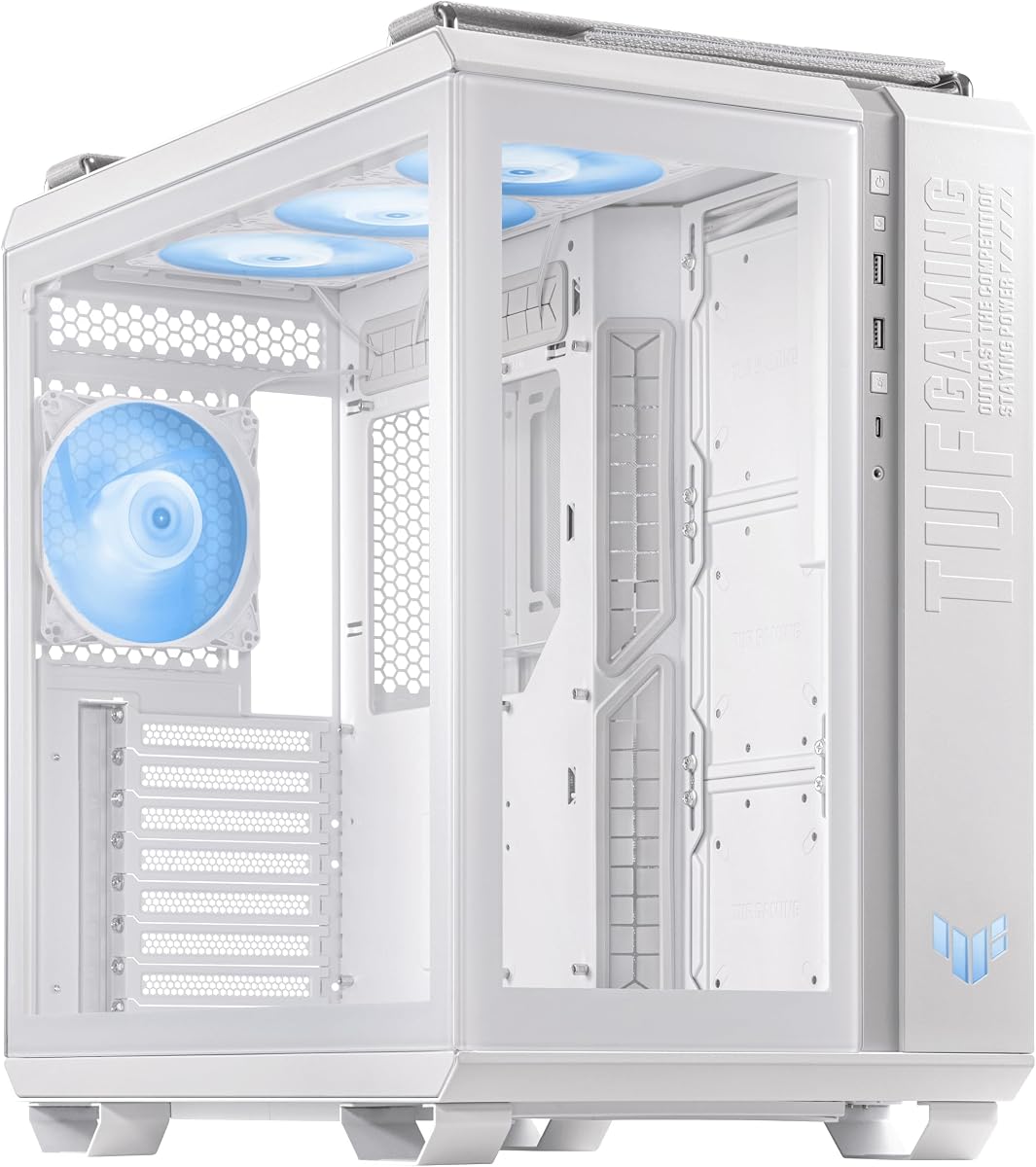
The ASUS TUF Gaming GT501 White Edition brings the room and cooling flexibility of the E-ATX GT501 platform into a striking white finish. Its 4.7 rating indicates a well-received design, and its fan and cable placement are optimized for TUF Gaming motherboards and related components.
We may earn a commission when you buy through this link, at no additional cost to you.
The enclosure includes three 120mm Aura Sync RGB-illuminated fans and a 140mm PWM rear fan, along with as many as seven optional fan-mounting points. Liquid-cooling support covers front- and top-mounted 360mm radiators and a rear-mounted 140mm radiator. This gives white-case builders several ways to create a balanced thermal setup without compromising the visual theme.
A 4mm smoked tempered-glass side panel displays the internal components, while the metal front panel uses the recognizable TUF Gaming spatter pattern. Ergonomic woven-cotton handles provide a transport function, with the supplied specification listing a capacity of up to 30 kilograms. Fan and cable placement has also been arranged around TUF Gaming equipment for a more coherent system build.
As a full tower, it will occupy a substantial area and will not appeal to anyone seeking a compact enclosure. Its listed handle capacity is also lower than that of the standard black GT501, and buyers should account for that distinction. Even so, the White Edition combines E-ATX capacity, useful cooling provisions, and a distinctive finish, making it a strong match for a coordinated white gaming setup.
The white metal front, smoked side glass, and integrated RGB lighting create a distinctive appearance. Optimized placement for TUF Gaming hardware further helps the internal layout look deliberate rather than adapted after the fact.
Front and top 360mm radiator positions, rear 140mm support, and four included fans provide several thermal layouts to consider. The generous chassis gives builders room to select a configuration based on their CPU and graphics card.
We may earn a commission when you buy through this link, at no additional cost to you.
The ASUS TUF Gaming GT301 is a compact-feeling ATX mid-tower centered on airflow, pre-installed lighting, and useful gaming-oriented controls. Its 4.6 rating reflects a balanced design that gives builders a complete fan package and a perforated front panel without moving into the more expansive full-tower category.
We may earn a commission when you buy through this link, at no additional cost to you.
Three 120mm Aura Sync addressable RGB-illuminated fans and one 120mm rear fan come pre-installed. Up to six additional fan-mounting points provide room to expand the airflow arrangement. The honeycomb front panel promotes air movement into the case, while the tempered-glass side panel keeps the RGB components and internal layout visible to the user.
Water-cooling options include 280mm and 360mm radiators in the front and a 120mm radiator at the rear. An integrated six-port Aura Sync addressable-RGB controller hub simplifies the connection of multiple illuminated fans, and a dedicated front-panel control button gives users direct control over the lighting effect. The headphone hanger is a small but practical gaming-oriented addition that helps keep a headset accessible.
The GT301 does not offer the front-and-side glass presentation or dual-chamber separation of newer GT502 variants. It is also less expansive than the GT501 full towers. Its advantage is a focused combination of airflow, pre-installed fans, controller integration, and a relatively manageable ATX format, making it a good option for a straightforward gaming build without unnecessary complexity.
The honeycomb front panel is designed to admit air while maintaining the TUF visual identity. Paired with four included fans, it gives a new system a useful airflow foundation before additional components are added.
The integrated six-port Aura Sync controller reduces the complexity of wiring several addressable RGB fans. A dedicated front button makes the final lighting configuration easier to adjust during everyday use.
We may earn a commission when you buy through this link, at no additional cost to you.
The ASUS GT502 Horizon TG ARGB White combines a white panoramic exterior, independent CPU and GPU cooling zones, and four pre-installed ARGB fans. Its 4.7 rating makes it one of the strongest options in the guide, particularly for builders who want a modern white system with contemporary cooling architecture and front connectivity.
We may earn a commission when you buy through this link, at no additional cost to you.
The two-chamber housing divides the interior into independent CPU and graphics-card zones. This arrangement makes airflow planning more deliberate and can help builders keep major heat-producing components isolated. Four ARGB fans provide balanced cooling and vivid illumination, reducing the need to purchase an initial fan set while also supporting the case’s visual theme.
Tempered and tinted glass panels cover the front and sides, creating a broad view of the main chamber. The front panel includes a USB Type-C connection rated at 20Gbps for high-speed storage, making it well suited to recent accessories. Most panels and mounting hardware can also be removed, which simplifies installation and allows builders to approach the chassis in the sequence that best suits their components.
As with other dual-chamber designs, the layout requires more deliberate component planning than a conventional mid-tower. The extensive glass surfaces can also reveal fingerprints and dust, both normal considerations for display-focused cases. Still, the combination of white styling, independent cooling zones, four installed ARGB fans, and 20Gbps Type-C connectivity gives this model a highly complete and attractive package.
Tempered glass on both the front and sides gives the white chassis a clean, expansive appearance. Internal RGB lighting becomes a central visual element, making the four included fans part of the design as well as the cooling system.
The 20Gbps front Type-C connection supports compatible high-speed storage devices, while removable panels and hardware reduce assembly friction. Together, these details make the chassis convenient for both new builds and future upgrades.
We may earn a commission when you buy through this link, at no additional cost to you.
The ASUS A31 Plus TG ARGB Black stands out for its 4.9 rating, the highest customer score among the supplied cases. Its angled base, tempered-glass presentation, and broad component support give it a distinctive identity, while the concealed-connector focus helps create a cleaner final build.
We may earn a commission when you buy through this link, at no additional cost to you.
The case is designed for motherboards with concealed connectors, which allows wiring to remain hidden from the main viewing area. That approach is reinforced by tempered-glass panels on the front and sides, producing a neat appearance without exposing a dense bundle of power leads. The 8-degree base angle adds visual drama and is also described as improving airflow efficiency and widening the viewing angle.
Its compatibility figures are generous for a mid-tower. The chassis supports 360mm radiators with fans up to 80mm thick, graphics cards up to 380mm long, and CPU air coolers up to 165mm high. Those limits give builders considerable freedom when choosing modern processors, lengthy graphics cards, and either air or liquid cooling.
The key requirement is a suitable motherboard with concealed connectors, since the tidy design is less applicable to a board with permanently exposed leads. The feature set is also more focused than the GT502 series, which adds a built-in GPU holder, modular components, and a front Type-C port. Even so, the A31 Plus TG ARGB Black offers excellent compatibility and a striking presentation, making it a compelling ATX recommendation.
The 8-degree angled base changes how the case sits on a desk and presents the glass panels. It is intended to improve airflow while making the internal lighting and components easier to admire.
Support for 380mm graphics cards, 165mm CPU coolers, and 360mm radiators provides room for a wide range of hardware. Buyers should nevertheless compare exact dimensions with their selected components before finalizing a build.
We may earn a commission when you buy through this link, at no additional cost to you.
The ASUS TUF Gaming GT502 Plus is a white ATX mid-tower that brings dual-chamber cooling, four ARGB fans, tool-free access, and front Type-C connectivity together in a polished gaming enclosure. Its 4.6 rating reflects a well-rounded design aimed at builders who value organization and convenience without requiring a full-tower footprint.
We may earn a commission when you buy through this link, at no additional cost to you.
The dual-chamber chassis divides the interior into independent cooling zones for the CPU and GPU. This can produce a more orderly airflow plan, with separate areas for two of the system’s most important heat sources. The front and side tempered-glass panels provide a subtly tinted view of the main chamber, allowing the white exterior and internal lighting to remain the central visual features.
Four ARGB case fans come pre-installed, providing both cooling and illumination from the beginning. The front panel includes a USB 32 Gen 2 Type-C port with transfer speeds up to 10Gbps for compatible devices. Tool-free side panels release by pressing a button hidden at the rear of the chassis, allowing quick access without removing screws, and most panels and mounts are detachable for a more flexible installation process.
Dual-chamber construction requires careful placement of drives, cables, cooling hardware, and expansion components, so it is less forgiving than an open-layout mid-tower. It also offers less storage space than a full tower. For a white ATX build that prioritizes neat cooling zones, modern connectivity, and quick panel access, the GT502 Plus is a strong and focused recommendation.
Independent CPU and GPU zones let builders tailor the movement of cool and warm air around each major heat source. The result is a more deliberate layout that can also remain visually uncluttered.
Rear-button tool-free panels make routine access straightforward, while detachable mounts help reduce assembly complexity. These features are particularly helpful during initial construction and later component maintenance.
We may earn a commission when you buy through this link, at no additional cost to you.
Choosing the right ASUS PC Case means balancing chassis size, motherboard format, cooling strategy, component dimensions, cable routing, and daily usability. The most important step is to inventory the hardware you already own or plan to install before selecting a model.
The case must support the exact motherboard standard used by the build. The ASUS Prime AP201 is designed for micro-ATX boards, while the GT501 and ROG Hyperion GR701 support E-ATX. The GT301, GT502 family, and A31 family are listed for ATX builds. E-ATX support is useful for more advanced boards, but it usually requires a larger chassis, so a full tower may be difficult to place on a compact desk.
Choose the board format first, then confirm that the case also accommodates the processor cooler, graphics card, power supply, and storage. In general, match the case to the motherboard rather than trying to force a larger board into a smaller model.
Full towers such as the GT501 and ROG Hyperion GR701 provide the most room, but they require substantial desk or floor space. Mid-towers are easier to position around a room and can still support ATX boards, long graphics cards, and large radiators. The AP201 goes further with its 33-liter footprint, making it attractive where physical space is especially valuable.
Consider not only the case footprint but also the room needed to open panels, connect cables, and install a radiator. A technically compatible chassis can still be inconvenient if it cannot be pulled away from a wall or accessed comfortably.
Cooling support determines how effectively the case can handle the heat generated by the CPU and graphics card. The AP201 supports 280mm and 360mm radiators, the GT301 supports 280mm and 360mm radiators, and the GT501 supports a 360mm radiator at the front or top. The ROG Hyperion GR701 goes further with support for two 420mm radiators.
Count included fans, inspect radiator positions, and check whether thick radiator fans will fit. The A31 models support 360mm radiators with fans up to 80mm thick, while the GT502 family uses a dual-chamber approach to separate CPU and GPU cooling.
Modern graphics cards vary considerably in length, and the combination of card size, cooler thickness, and front cooling hardware can determine whether a build fits. The A31 models support graphics cards up to 380mm long, while the Prime AP201 accommodates cards up to 338mm. The ROG Hyperion GR701 also offers an integrated graphics-card holder for vertical or horizontal installation.
Compare the manufacturer’s clearance with the dimensions of the specific card rather than relying only on the case classification. If using a vertical GPU mount, verify that the graphics card and its power cables can be positioned safely and without awkward bends.
A clean build improves airflow, simplifies maintenance, and makes components easier to identify. The AP201 has an extended motherboard tray, strategic cutouts, and a 32mm gap for cables. The A31 models are designed for motherboards with concealed connectors, while the GT501 White Edition places cables with TUF Gaming hardware in mind. The GT502 family uses a divided internal layout that can further organize the major components.
Look for cable cutouts, routing channels, and hidden spaces behind the motherboard tray. Also consider whether the chosen motherboard exposes its power connectors, because a case designed for concealed connectors cannot provide the same clean appearance with a different board layout.
Front-panel connections determine how conveniently a system accepts everyday accessories. The GT502 Horizon TG ARGB White provides a 20Gbps Type-C port, while the GT502 Horizon and GT502 Plus offer 10Gbps Type-C. The ROG Hyperion GR701 adds two front Type-C ports and 60W fast charging. Other models emphasize traditional USB connectivity, an RGB control button, or a headphone hanger.
Match the front panel to the devices used most often. A faster Type-C interface is useful with compatible storage and accessories, but buyers should also verify the number and type of USB-A ports, audio connections, power button placement, and any included controller.
Lighting can either complement a system or become the main attraction. The TUF GT501, GT301, GT501 White Edition, and GT502 family include Aura Sync or ARGB illumination, while the A31 models focus on an illuminated fan package. White options include the GT501 White Edition, GT502 Horizon TG ARGB White, and GT502 Plus.
Consider the finish of the motherboard, graphics card, fans, and cooling hardware before selecting the enclosure. A panoramic case shows more of the interior, including any cable-management imperfections, so a tidy layout and regular cleaning become more important.
A case should remain pleasant to use after the first successful installation. Tool-free side panels, removable mounting hardware, built-in storage drawers, and integrated GPU supports can make upgrades easier. The ROG Hyperion GR701 includes all of these conveniences, while the GT502 family uses detachable panels and mounts and the AP201 provides tool-free side access.
Also inspect carry handles, the location of the power supply, and how much room remains around the CPU cooler. Features that simplify initial assembly are valuable, but long-term usability depends on whether the completed system can still be reached and serviced comfortably.
Before installing components, lay the case on its side and review the interior mounting points, removable panels, fan positions, and cable-routing openings. Install the power supply, storage, CPU cooler or radiator, motherboard, memory, and graphics card in an order that avoids forcing connectors around installed parts. Use the case’s indicated airflow direction so cool air enters and warm air exits rather than creating opposing paths.
Manage cables as you go. Route modular power leads through the spaces behind the motherboard tray, use the provided cutouts and tie points, and leave enough service loops for components that may need removal. With dual-chamber models, check that the divider does not obstruct the intended CPU or GPU airflow route. For a vertically mounted graphics card, confirm that its power cables fit without being sharply bent.
Maintain the case by cleaning dust from the mesh panels, fan frames, radiator surfaces, and filters where applicable. Unplug the system before opening it, hold fan blades when cleaning, and avoid compressing or bending heat-transfer components. Review cable connections and airflow periodically, and confirm that all panels, screws, and mounts are secure before returning the system to service.
The ASUS Prime AP201 is the most compact model in this guide, with a 33-liter footprint designed around micro-ATX motherboards. It still supports 280mm and 360mm radiators, up to six fans, graphics cards up to 338mm long, and standard-size ATX power supplies. Choose it when desk space is a priority and the planned motherboard is micro-ATX.
A mid-tower is generally smaller and more convenient for everyday desk placement, while a full-tower provides more interior room and broader expansion potential. The ASUS TUF GT501 and ROG Hyperion GR701 are full towers for E-ATX boards, whereas the GT301, GT502, and A31 models use the more compact ATX mid-tower format.
Dual-chamber cases can make airflow planning more effective by separating the CPU and graphics card into independent zones. The ASUS GT502 family and GT502 Horizon use this approach, which can reduce interference between the two heat sources. Actual results still depend on the selected fans, radiators, component arrangement, and ambient conditions.
Many do. The GT501, GT501 White Edition, and GT301 include four cooling fans, while the A31 PLUS and GT502 family configurations include four ARGB fans. The Prime AP201 supports up to six fans, but the supplied information does not specify an equivalent included-fan package. Always verify the exact contents of the selected listing before ordering additional cooling hardware.
The ROG Hyperion GR701 stands out with two front Type-C ports and 60W fast-charging support. For storage-focused performance, the GT502 Horizon TG ARGB White includes a 20Gbps Type-C port, while the GT502 Horizon and GT502 Plus provide 10Gbps Type-C connections. The right choice depends on which accessories and devices you use most often.
The supplied specifications state that the A31 models support up to 360mm radiators combined with fans up to 80mm thick. Buyers should still confirm radiator placement, pump clearance, and the selected motherboard layout before purchase. The case is also designed to pair especially well with motherboards that use concealed connectors for a cleaner cable arrangement.
The AP201 is a strong candidate for straightforward access because its side panels use a simple tool-free clip mechanism. The ROG Hyperion GR701 offers a hinged tool-free side panel, a built-in storage drawer, and an integrated GPU holder. The GT502 family similarly uses removable panels and mounting components, making it convenient for builders who expect frequent upgrades.
E-ATX support usually requires a larger enclosure, and the full-tower models in this guide provide that capability. The ASUS TUF GT501 and ROG Hyperion GR701 are suitable choices, with the GR701 adding a premium frame, built-in storage drawer, GPU support, and extensive liquid-cooling capacity. A smaller ATX case generally cannot accept an E-ATX board.
The ASUS TUF Gaming GT501 stands out as the strongest all-around recommendation because it combines E-ATX room, four included fans, flexible radiator mounting, vertical GPU support, and a well-established full-tower layout. The Prime AP201 is ideal for compact micro-ATX systems, while the ROG Hyperion GR701 delivers the most premium and specialized build experience.
For builders who prefer modern organization, the GT502 Horizon family offers independent CPU and GPU cooling zones, modular construction, and front Type-C connectivity. The GT502 Horizon TG ARGB White is especially complete, whereas the A31 models prioritize broad component clearance, hidden-connector cable management, and an angled presentation. Prioritize the exact hardware dimensions and form factor before choosing a design.
Finally, review current pricing, availability, included accessories, and the latest manufacturer specifications before ordering. Case layouts and component bundles can change, so the current listing and support documentation are the most reliable sources for final compatibility details.