
ASUS ProArt PA32QCV
3.9Editor score
31.5-inch 6K IPS display
Dual Thunderbolt 4 connectivity
Factory-calibrated DCI-P3 colors
A 6K monitor delivers substantially more detail than a conventional 4K display, making it a compelling option for photographers, video editors, designers, software developers, and serious multitaskers. The best model depends on color accuracy, panel quality, connectivity, ergonomics, refresh rate, and how the display will be used every day.
We compared ten 6K monitors using the specifications and feature information supplied for each product. The list covers compact 32-inch professional panels, touch-enabled creator displays, high-refresh gaming models, and expansive 52-inch curved screens designed for control rooms and multi-application workspaces.
Each review highlights the monitor's strongest attributes, practical trade-offs, and ideal buyer. Ratings and specifications reflect the provided product information, while availability and prices can change, so confirm current listings and compatibility before purchasing your preferred 6K monitor.
3.9Editor score

4.6Editor score

4.1Editor score
As an Amazon Associate we earn from qualifying purchases.
This side-by-side comparison covers screen size, resolution, panel features, color performance, connectivity, refresh rate, and the workflows best suited to each of the ten monitors.



The ASUS ProArt PA32QCV is a 31.5-inch 6K monitor built around a LuxPixel AGLR IPS display with a 6016-by-3384 native resolution. It carries a 3.9 rating, but its specifications make it a strong all-round choice for creators and Mac users who value both pixel density and accurate color. Factory calibration, Calman Verified status, and a Delta E below two are particularly valuable for image and video work.
We may earn a commission when you buy through this link, at no additional cost to you.
The display covers 98% of DCI-P3 and 100% of sRGB, while the dedicated M Model-P3 preset is designed to match the color performance of a MacBook display. Its Intelligent Light Sync system combines ambient and backlight sensing to support consistent color from startup. For everyday productivity, dual Thunderbolt 4 ports with up to 96W of power delivery, daisy-chaining, HDMI 2.1, DisplayPort 1.4, and a built-in USB hub create a tidy one-cable setup for compatible laptops.
The main trade-off is that this is primarily a professional productivity monitor rather than a competitive gaming display. Its 3.9 rating also suggests that some buyers may have found aspects of the overall package less compelling, although the supplied specifications present a generous feature set. The included warranty coverage and bundled three-month Adobe Creative Cloud subscription add extra value for creators, subject to the stated registration and promotion conditions.
Choose the PA32QCV if you want a manageable 6K display with accurate color, extensive connectivity, and convenient Mac integration. It is a particularly sensible recommendation for photo editors, designers, developers, and students who need more detail than 4K without moving to a much larger desk footprint.
Factory calibration and a Delta E below two make this screen more compelling for color-sensitive work than a generic high-resolution monitor. The 98% DCI-P3 coverage supports demanding photo and video workflows, while the Mac-matching preset simplifies movement between a laptop and external display.
Thunderbolt 4 power delivery can charge a compatible laptop while carrying the display signal and hub data. The Auto KVM switch also makes it practical to move between two systems without reconnecting every peripheral.
We may earn a commission when you buy through this link, at no additional cost to you.
The Dell 52-Inch 6K 120Hz Hub is designed for buyers who want an entire command center on one desk. Its 21:9 curved panel combines 6K detail with 129 pixels per inch, offering broad horizontal space for timelines, video walls, financial dashboards, and side-by-side applications. The supplied 4.1 rating reflects a strong overall proposition, although such a large screen demands careful room planning.
We may earn a commission when you buy through this link, at no additional cost to you.
An IPS Black panel supplies a 2000:1 contrast ratio, while 99% DCI-P3 and Display P3 coverage with Delta E below 1.5 target accurate, vivid output. The 120Hz refresh rate offers noticeably smoother movement than standard 60Hz productivity panels. TÜV 5-star certification, hardware low-blue-light technology, and an ambient light sensor are meaningful additions for extended work sessions.
Connectivity is the centerpiece. Thunderbolt 4 can power devices at up to 140W, and the monitor supports Picture-by-Picture and KVM functions for managing multiple PCs. USB-C, USB-A, and Ethernet connections further strengthen its role as a central hub. The principal drawback is physical: a 52-inch curved display is not a casual upgrade, and it may demand a deep desk, careful viewing distance, and dedicated mounting solution.
This Dell is most appropriate for control rooms, enterprise visualization, high-end trading environments, creative studios, and power users who routinely need multiple full-size applications visible at once. If your desk and room can accommodate it, its combination of scale, color, refresh rate, and hub functionality is difficult to duplicate in a more conventional 6K monitor.
The wide 21:9 format is more useful than sheer diagonal size alone because it creates horizontal room for complementary tools. Editors can keep media, preview, and timeline views open, while analysts can compare data from several systems without constantly resizing windows.
Thunderbolt 4 charging, Ethernet, USB ports, KVM support, and Picture-by-Picture make the display a central connection point. This reduces desk clutter and simplifies transitions between different computers in a demanding professional environment.
We may earn a commission when you buy through this link, at no additional cost to you.
The G32P combines a 32-inch 6144-by-3456 IPS display with 10-bit color, 99% sRGB coverage, and 99% DCI-P3 accuracy. Its 4.6 rating is the highest among the listed models, and the supplied specifications reveal a balanced combination of sharp detail, 500-nit brightness, 2000:1 contrast, and practical single-cable connectivity. It suits creative professionals, developers, and high-end home-office users.
We may earn a commission when you buy through this link, at no additional cost to you.
At 223 pixels per inch and 178-degree viewing angles, the display can make fine interface elements and text easier to inspect without requiring an oversized panel. The stated Delta E below two provides a useful indication of color consistency, while HDR support and 500-nit brightness improve the handling of bright highlights. A 100W universal port can charge a laptop while carrying high-speed video and data.
This is not a high-refresh gaming monitor, as its stated 60Hz refresh rate is the most important limitation. The glossy screen may also produce more reflections than an anti-glare alternative, potentially making it less comfortable beside a bright window. Conversely, the supplied feature list includes flicker-free backlighting, a low-blue-light mode, and an anti-glare coating intended to reduce eye fatigue.
The G32P is a strong all-round recommendation for users who prioritize detail, color, and clean desk setup over competitive gaming performance. Its height-adjustable, swiveling, tilting, and pivoting stand, along with 100-by-100-millimeter mounting compatibility, makes it flexible for both a permanent editing station and a multi-purpose desk.
The 223-PPI density provides a large amount of usable information without the footprint of a 40-inch display. That balance is useful when editing fine detail, arranging complex timelines, reviewing code, or comparing large image sets side by side.
Ten-bit color, 99% DCI-P3 coverage, and 500-nit brightness give the G32P a credible foundation for HDR and professional editing. The 2000:1 contrast specification also improves depth compared with many conventional IPS panels.
We may earn a commission when you buy through this link, at no additional cost to you.
The Samsung 32-inch Odyssey G8 G80HS is built to make 6K resolution relevant to competitive gaming. It has a 3.7 rating and introduces a dual-mode design: 6K at 165Hz for exceptional detail or 3K at 330Hz for very fast competitive action. A near-instant 1ms response time and Fast IPS panel make it the most gaming-focused monitor in this guide.
We may earn a commission when you buy through this link, at no additional cost to you.
Its 6144-by-3456 6K mode operates at 224 pixels per inch, allowing fine scenery, interface elements, and weapon textures to look unusually crisp. HDR10+ support is designed to improve brightness and contrast in compatible games. NVIDIA G-SYNC compatibility and AMD FreeSync Premium address tearing and synchronization, while DP 2.1, HDMI 2.1, and a USB hub cover modern connection needs.
The unavoidable trade-off is that the monitor changes resolution to achieve its highest refresh rate. If the appeal of buying a 6K monitor is specifically ultra-high resolution, the 3K mode should be viewed as an optional performance setting rather than the primary reason to own it. The relatively low 3.7 rating may also reflect the premium nature of this early high-end gaming specification.
The Odyssey G8 is best for a gamer who wants both 6K detail and exceptional refresh-rate options. Its height-adjustable, pivoting, tilting, and swiveling stand also makes it suitable for general use, although color-focused creative work is not the clear strength suggested by the professional displays elsewhere in this list.
The display can remain at 6K when visual detail matters, then switch to 3K when the fastest possible response is more important. This flexibility is unusual among 6K monitors and gives competitive players a meaningful performance option.
Fast IPS technology, 165Hz 6K operation, HDR10+, adaptive synchronization, and modern display inputs create a feature set aimed squarely at high-end gaming. The main decision is whether you will regularly value 330Hz performance more than native 6K sharpness.
We may earn a commission when you buy through this link, at no additional cost to you.
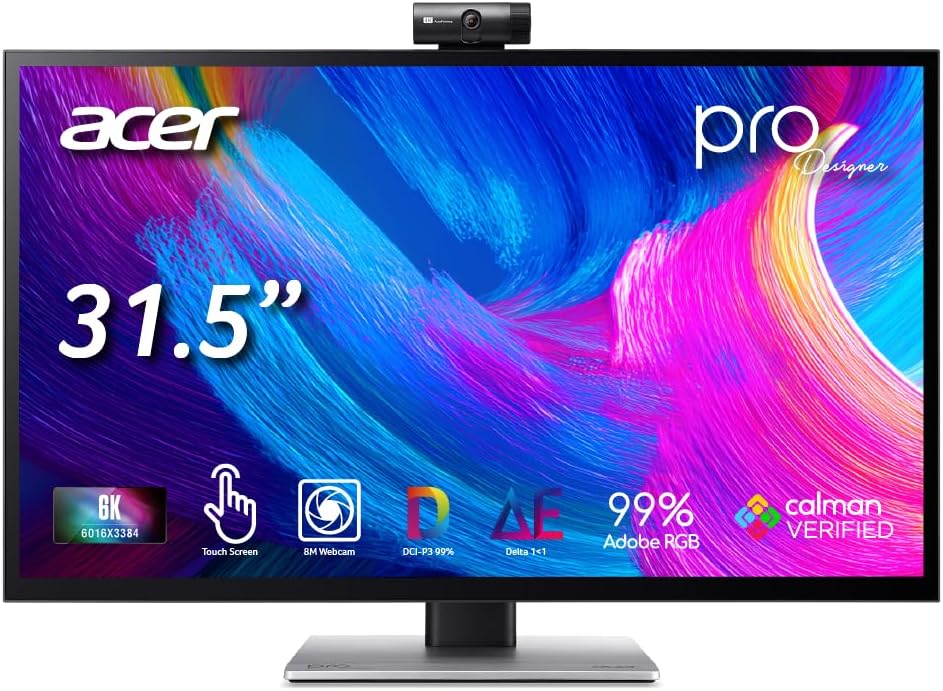
The Acer ProDesigner PE320QXT is the most specialized 6K monitor in the group, combining a 31.5-inch Quantum-Dot IPS panel with 10-point touch. Its 4.0 rating reflects a capable creator workstation, and the 20.4-million-pixel screen offers enough detail for illustration, retouching, annotation, and detailed review directly on the display.
We may earn a commission when you buy through this link, at no additional cost to you.
Factory calibration, Calman verification, and a Delta E below one provide excellent stated color accuracy in the standard sRGB mode. Coverage reaches 99% Adobe RGB and 99% DCI-P3, and DisplayHDR 600 certification is paired with peak brightness of 600 nits. The monitor also includes an adjustable 8MP webcam and a four-microphone array with hardware-level noise reduction, reducing the need for separate meeting hardware.
It supports MPP 2.0 active styluses with 4,096 pressure levels and tilt recognition, although the supplied specifications clarify that an active stylus is not included. Acer Creator Hub provides color-space switching, calibration tools, and screen splitting, making the software an important part of the experience. USB-C also carries the full 6K signal and up to 90W of charging, while HDMI and DisplayPort provide alternatives.
This is a compelling recommendation for illustrators, retouchers, educators, presenters, and creative teams that want direct interaction with a high-resolution canvas. It also supports Mac, Windows, and Linux, but buyers who require a bundled stylus or prefer a simpler setup should consider whether the specialized benefits justify that extra planning.
Combining touch, stylus support, and a high-density display removes the need to work across a separate tablet surface. The result is particularly useful for sketching, detailed retouching, review markups, and teaching or client demonstrations.
The factory-calibrated display, broad Adobe RGB and DCI-P3 coverage, and HDR support target color-critical work. Meanwhile, the integrated camera and microphone array simplifies remote reviews without adding separate desktop devices.
We may earn a commission when you buy through this link, at no additional cost to you.
The G32X is a 32-inch 6K display with a minimalist design and a 5.0 listed rating, the highest numerical score in the group. Its 6016-by-3384 resolution produces 218 pixels per inch, giving text and fine graphics a clean appearance while keeping the screen smaller than the 52-inch alternatives. The supplied specifications position it as a balanced productivity and creative monitor.
We may earn a commission when you buy through this link, at no additional cost to you.
Color performance is strong on paper, with 98% DCI-P3 and 99% sRGB coverage, a stated Delta E below two, 500-nit brightness, and 178-degree viewing angles. A high-speed port provides up to 100W of charging while supporting video and data. The ergonomic stand includes height, swivel, tilt, and pivot adjustment, and the 100-by-100-millimeter VESA pattern supports third-party monitor arms.
Like the G32P, its refresh rate is limited to 60Hz, making it less attractive for fast competitive gaming. The multi-layer anti-reflective coating, anti-glare surface, flicker-free backlighting, and low-blue-light mode are useful for daily use, while the CNC-machined aluminum body adds a more refined physical construction than many office-oriented displays.
The G32X is a good choice for users who want high resolution and strong color without a visibly gaming-oriented design. It is particularly suitable for office productivity, photo review, general content creation, and developers who appreciate minimal visual distractions and a flexible stand.
The minimalist enclosure and restrained visual presentation suit desks where appearance matters as much as function. It can integrate into a professional office more discreetly than an aggressively styled gaming monitor.
Flicker-free backlighting, low-blue-light mode, and multiple anti-reflective layers help manage visual fatigue during long sessions. Adjustable stand movement and broad viewing angles add flexibility without complicating the setup.
We may earn a commission when you buy through this link, at no additional cost to you.
The Dell U5226KW is a 52-inch Thunderbolt Hub monitor built around a 6144-by-2560 6K-wide panel. It targets professional users who value horizontal workspace more than a conventional 16:9 shape. Its 3.0 rating is the lowest listed here, so buyers should weigh the expansive screen and connectivity against mixed user feedback while confirming their exact needs.
We may earn a commission when you buy through this link, at no additional cost to you.
The 120Hz refresh rate provides smoother interaction than a standard 60Hz office monitor, and the Advanced IPS Black panel is intended to deliver deeper blacks. Connectivity is extensive: dual HDMI 2.2, dual DisplayPort 1.4 with HDCP 2.2, two Thunderbolt 4 ports, a built-in USB hub, speakers, power delivery up to 140W EPR, and a remote control.
Remote operation, KVM functionality, Dell Color Management, and Dell Display and Peripheral Manager reinforce its professional focus. The major caveat is that 6K-wide is not the same as a 6144-by-3456 16:9 6K canvas. Its ultrawide proportions are ideal for timelines, dashboards, and adjacent applications, but some games, office layouts, and split-screen workflows are designed around 16:9.
This monitor is best for analysts, engineers, editors, and control-room users who want a broad, smooth command surface. It is less appropriate if your priority is a conventional 6K pixel grid, a smaller desk footprint, or a highly rated customer experience.
The extra horizontal pixels make it easier to place several information-dense applications beside one another. Rather than adding more monitors, users can consolidate a dashboard, timeline, communication channel, and reference material into a single field of view.
Dual Thunderbolt 4, multiple legacy display inputs, USB connectivity, speakers, KVM, and remote control cover common enterprise and studio requirements. The 140W EPR capability also supports a cleaner single-cable laptop arrangement when the attached device is compatible.
We may earn a commission when you buy through this link, at no additional cost to you.
The LG UltraFine evo 32U990A-S is a 32-inch Nano IPS Black professional display with a 6144-by-3456 resolution and 224 pixels per inch. Its 4.5 rating reflects a well-rounded feature set for creators, developers, and office professionals. The supplied specifications also claim approximately 150 percent more usable screen space than a 4K display, making it a meaningful upgrade for dense workflows.
We may earn a commission when you buy through this link, at no additional cost to you.
True 10-bit color, 98% DCI-P3 coverage, and 99.5% Adobe RGB coverage make the monitor well suited to photo, video, and design work. DisplayHDR 600 certification, a 2000:1 contrast ratio, and up to 450 nits of brightness support color-critical production. The Nano IPS Black panel is positioned as an alternative to conventional IPS, with deeper blacks and smoother tonal transitions.
Thunderbolt 5 provides display signal, data transfer up to 80 gigabits per second, and up to 96W of charging over one cable. Daisy chaining, an integrated USB-C hub, HDMI 2.1, and DisplayPort 2.1 offer additional flexibility. KVM functionality supports controlling two computers in picture-in-picture or picture-by-picture arrangements, while the bundle includes cable ties and an LCD cleaning kit.
The 60Hz refresh rate and 450-nit HDR peak make this more of a professional productivity monitor than a gaming or maximum-brightness reference display. It is a strong recommendation for Adobe-centric creative teams and laptop-based professionals who value a modern interface, wide color gamut, and considerable usable workspace.
The combination of ten-bit processing, 99.5% Adobe RGB, and 98% DCI-P3 is particularly useful when moving between print, photography, streaming, and web deliverables. DisplayHDR 600 support adds a credible option for reviewing high dynamic-range material.
Thunderbolt 5 handles display, high-speed data, hub duties, and laptop charging through a single connection. Daisy chaining can simplify a two-display setup, and KVM support helps professional users move between connected systems efficiently.
We may earn a commission when you buy through this link, at no additional cost to you.
The Dell UltraSharp U3224KB is a 31.5-inch 6K monitor with a 6144-by-3456 maximum resolution and a 3.3 rating. Its specification list emphasizes practical productivity rather than advanced color measurement. That makes it a candidate for office power users, developers, and general creative work where sharp text, strong brightness, and convenient connectivity matter most.
We may earn a commission when you buy through this link, at no additional cost to you.
A 450-nit backlight provides good visibility in well-lit rooms, while LED backlighting supports energy efficiency and consistent illumination. USB Type-C enables high-speed data transfer, and the included Thunderbolt 4 cable, Mini DisplayPort cable, and USB 3.2 Gen 2 cable cover the principal wired connection methods. The package also adds a two-year premium extended service protection plan.
The 5ms GTG response time makes the display more responsive than many general-purpose productivity panels, although it is not competitive with dedicated gaming monitors. The supplied details do not provide specific DCI-P3 or Adobe RGB coverage figures, so creative buyers who require documented color performance should look for more precise technical information before committing.
This Dell is a sensible recommendation for users who want a conventional 16:9 6K format in a manageable size and value bundled accessories and service coverage. It may be less compelling than the ProArt, G32P, or LG options for color-critical work, but it remains focused on everyday productivity and maximum screen detail.
The conventional 6144-by-3456 format can be easier to integrate into standard software layouts than an ultrawide 6K display. Its 31.5-inch size offers high pixel density without requiring the desk space demanded by a 52-inch model.
The supplied Thunderbolt 4, Mini DisplayPort, and USB cables cover several common device connections immediately. The added protection plan may also appeal to organizations that want a single bundle for deployment and support.
We may earn a commission when you buy through this link, at no additional cost to you.
This renewed Dell U5226KW configuration is a 52-inch curved 6K monitor supplied without a stand. It retains a 21:9 aspect ratio, 120Hz refresh rate, and Thunderbolt 4 hub functionality, making it particularly relevant to buyers who already have a compatible wall mount, ceiling mount, or adjustable arm. No customer rating is supplied, so the usual rating-based confidence signal is unavailable.
We may earn a commission when you buy through this link, at no additional cost to you.
The renewed designation may appeal to cost-conscious buyers seeking a large-format 6K display, but buyers cannot evaluate the product from a numerical customer score in the provided information. The absence of a stand is also a meaningful distinction from the standard U5226KW listing. You must account for a suitable VESA mounting solution in your desk, furniture, and room plan.
Its 120Hz refresh rate is a meaningful advantage for data visualization, general office interaction, and light gaming compared with 60Hz 6K panels. The integrated Thunderbolt 4 hub can simplify compatible laptop connections, while the very wide canvas can accommodate multiple applications, dashboards, timelines, or monitoring feeds. Curvature may improve immersion, though it is less suitable for tasks requiring a perfectly flat reference plane.
The ideal buyer is an experienced renovator, installer, or professional with a reliable mount and a strong need for a large ultrawide workspace. Confirm the renewed condition, included cables, warranty terms, mounting compatibility, and return policy before ordering, particularly because the supplied listing provides no numerical customer rating.
This package is best suited to installations where a stand is unnecessary or undesirable. A wall or ceiling mounting solution can reclaim desk space and make a very large display easier to position at a comfortable viewing height.
The 120Hz rate and 21:9 canvas support smooth interaction and broad application placement. It can serve as a consolidated command display for technical work, business analysis, media monitoring, or control-room functions.
We may earn a commission when you buy through this link, at no additional cost to you.
A 6K monitor can improve text clarity, image detail, and multitasking capacity, but the best choice depends on panel quality, color performance, connectivity, physical design, and your primary workload. Use the following factors to narrow the field before making a purchase.
A true 6K display provides about 20 million pixels, offering a substantial increase in working space over 4K. Resolution becomes especially valuable with fine text, dense interfaces, timelines, timelines, and high-resolution photography. However, a higher pixel count also demands more capable graphics hardware and can make small interface elements harder to read unless operating-system scaling is configured properly.
Choose a monitor with a full 6144-by-3456 16:9 canvas when standard application layouts and maximum vertical detail are priorities. A 6144-by-2560 ultrawide panel provides exceptional width but creates a different aspect ratio that may require rearranged windows and software support.
IPS, Nano IPS Black, Quantum-Dot IPS, and Fast IPS panels differ in color behavior, contrast, response, and gaming suitability. The listed models emphasize wide viewing angles and accurate color, while IPS Black variants target deeper blacks and a 2000:1 contrast ratio. Fast IPS is more appropriate when gaming response matters alongside high resolution.
Prioritize a panel that matches your workload rather than selecting solely by the 6K label. Color creators should examine measured gamut and calibration data, while gamers should consider refresh rate, response time, and variable-refresh support.
Color specifications indicate whether a monitor can support demanding photo, video, print, or digital-art workflows. DCI-P3 coverage is central to modern media work, while Adobe RGB is important for print preparation. A low stated Delta E indicates closer agreement between displayed and reference colors, although the measurement conditions and test mode still matter.
Look for both gamut coverage and calibration information. Factory calibration, Calman verification, color presets, and software-based calibration tools can make the display more useful, but they cannot compensate for a panel whose native capabilities fall short of your requirements.
A 60Hz 6K monitor is appropriate for office work, coding, editing, and general media consumption, but it may feel conservative beside high-refresh alternatives. The Samsung Odyssey G8 stands apart by offering 165Hz in 6K and a 330Hz 3K mode, while the Dell 52-inch models provide 120Hz for smoother everyday interaction.
Choose 120Hz or higher if you work with moving content, responsive interfaces, or demanding games. Check the refresh rate at your intended native resolution, since some monitors reduce speed when higher resolutions or multiple displays are enabled.
Thunderbolt 3, 4, or 5 can combine video, data, networking, and charging over a single cable. Power delivery ratings range from 90W to 140W across the listed professional models, allowing compatible laptops to charge while the display handles peripherals. Daisy chaining can also simplify setups involving multiple high-resolution screens.
Match the interface to your computer and docking needs. Confirm the required bandwidth for the target resolution and refresh rate, and verify whether you need Ethernet, KVM, Picture-by-Picture, or additional USB-A ports rather than relying on a generic cable.
A 31.5-inch or 32-inch 6K panel provides high density in a familiar footprint and can replace a conventional 4K arrangement with more usable space. A 52-inch 21:9 model goes further, functioning like an ultrawide command center for dashboards, media timelines, monitoring, and side-by-side applications. Larger curved screens are more immersive but require more room and careful positioning.
Choose the smallest screen that comfortably supports your workflow. If you regularly move between multiple applications, a 52-inch model may be worthwhile; if you need detail, portability between desks, and a conventional shape, a 32-inch option is usually easier to integrate.
Height, tilt, swivel, and pivot adjustments help place a high-resolution display at a comfortable height and angle. The Acer offers particularly extensive movement, including a 7.87-inch height range and 180-degree swivel, while several other models include fully adjustable stands. VESA compatibility gives you additional freedom to use a monitor arm.
A 52-inch display should ideally be mounted rather than placed on a standard desk. Check desk depth, wall clearance, viewing distance, and the weight and ergonomics of any arm before installation. For smaller models, verify that the stand offers enough adjustment for your preferred posture.
Some 6K displays are complete creative tools rather than plain screens. The Acer includes 10-point touch, stylus support, an 8MP webcam, and a four-microphone array. The ASUS adds a Mac-oriented color preset and automatic KVM operation, while the LG includes built-in speakers and extensive Thunderbolt 5 integration.
Consider whether these specialized features save money or simplify your setup. Touch and stylus input are valuable for illustration and markups, but they are unnecessary for conventional office work. Cameras, speakers, microphones, and KVM functions can be helpful, provided their quality and control software meet your expectations.
Begin by connecting the display with the interface appropriate for your computer, using the supplied cable when possible. For a full 6K experience, confirm that the graphics adapter, driver, application, and selected input can output the monitor's native resolution and intended refresh rate. On macOS and Windows, adjust scaling so text remains legible without making menus excessively large.
Enter the monitor's OSD after installation to select the intended color mode, check the input and refresh rate, and configure ergonomic controls. If the model includes a brightness sensor, ambient light adjustment, KVM, Picture-by-Picture, or a creator color preset, configure these features to suit your workspace. Professional users should allow the display to warm up before judging color or HDR performance.
Clean the panel with a soft, lint-free microfiber cloth and a suitable screen-cleaning solution; avoid abrasive pads, compressed air that can force dust into bezel gaps, and harsh household cleaners. Keep vents unobstructed, avoid placing the screen in direct sunlight, and handle large curved models with additional support during mounting. Periodically tighten mounts, update display and control software, and recheck firmware and color settings after major computer changes.
A 6K monitor offers about 20 million pixels and a much higher pixel density than a 4K display. That can produce noticeably sharper text, finer image detail, and more usable screen space. It is especially useful for creative work, coding, and detailed productivity, although your computer must support the full resolution and the extra pixels do not improve every type of content.
You need a GPU and connection that can handle the target resolution and refresh rate without limitations. A 6K display demands substantially more bandwidth than 4K, particularly at high refresh rates. Integrated graphics may work for basic office use if the output supports the required mode, but demanding applications benefit from a discrete GPU with ample memory bandwidth.
It can be useful because the higher pixel density reveals more environmental detail and produces cleaner imagery. However, games must be designed to run at 6144 by 3456, and demanding titles may benefit more from lower resolution and a higher refresh rate. The Samsung Odyssey G8 addresses this tradeoff with both 6K and faster 3K operating modes.
A standard 6K display usually has a 6144-by-3456 16:9 pixel grid, while 6K-wide uses 6144 by 2560 across an ultrawide aspect ratio. The latter provides more horizontal workspace, but fewer vertical pixels and a different shape that may require rearranged applications. The Dell 52-inch models in this guide use the wide format.
Yes, provided the MacBook model and selected connection support the desired resolution and refresh rate. Thunderbolt 3 or 4 is common on recent MacBook models, while newer professional laptops may support Thunderbolt 5. The ASUS ProArt is explicitly designed around Mac workflows, and several other listed monitors offer USB-C or Thunderbolt power delivery.
High pixel density can make text cleaner and reduce the need to zoom or move closer to the screen, but resolution alone does not prevent eye strain. Proper scaling, suitable brightness, an ergonomic viewing distance, reduced blue light, and flicker-free backlighting also matter. The listed ASUS, Dell, G32P, G32X, and Acer displays include various eye-comfort features.
Choose 31.5 or 32 inches for a conventional footprint, familiar proportions, and high density on a normal desk. Choose 52 inches for a wide, immersive command-center experience with more applications visible simultaneously. The larger model demands substantially more desk space, appropriate viewing distance, and often a stronger mounting solution.
For professional media, look for at least 98 or 99 percent DCI-P3 coverage and a low stated Delta E. Adobe RGB coverage is valuable for print workflows, while 10-bit color can improve gradient rendering. Factory calibration and verification are also useful, but confirm the target color space and whether the reported Delta E applies to the mode you intend to use.
The ASUS ProArt PA32QCV is the strongest value-oriented recommendation, combining a conventional 32-inch format, factory-calibrated color, and rich Thunderbolt 4 connectivity. The G32P stands out for its 4.6 rating, 10-bit color, high brightness, and balanced feature set, while the Dell 52-Inch 6K Hub leads the premium category with expansive scale, 120Hz motion, and 140W charging.
Your priorities should determine the winner. Choose the Samsung Odyssey G8 for gaming, the Acer ProDesigner PE320QXT for touch and stylus work, the LG UltraFine evo for modern connectivity and professional color, or a 52-inch ultrawide for maximum workspace. For conventional 6K productivity, prioritize a full 6144-by-3456 canvas, stable ergonomics, and compatible wired connections.
Finally, confirm current specifications, warranty terms, device compatibility, and prices directly with the retailer, as both availability and pricing can change. A 6K monitor is a substantial investment in detail and workspace, so choosing the model that matches your actual applications will deliver more value than simply selecting the largest available display.

