
Thermalright TL-B6B
4.6Editor score
12V four-pin PWM control
3200 RPM maximum speed
20.17 dBA maximum noise
60mm cooling fans compared for noise, airflow, speed, dimensions, voltage, and applications, helping you choose the right model for your setup.
A 60mm cooling fan is a compact airflow solution for everything from network equipment and 3D printers to electronics cabinets, project builds, and small computer cases. The right model should match your voltage, connector, available depth, noise tolerance, and cooling demand rather than simply offer the highest headline speed.
We compared all ten options by examining their stated dimensions, electrical requirements, bearing systems, speed ranges, airflow figures, pressure ratings, noise levels, mounting options, and intended applications. The list covers 12V DC, 5V PWM, and universal-voltage AC options in both 15mm- and 25mm-thick formats.
Each review identifies the strongest use for that fan, while the comparison table provides a faster way to scan the major differences. Our top selections favor useful control, installation versatility, or strong airflow, but availability and prices can change, so confirm current specifications before purchasing.
4.6Editor score

4.8Editor score
4.9Editor score
This side-by-side comparison highlights the most important differences among the ten fans, including electrical format, thickness, maximum speed, airflow, noise, and control options.


The Noctua NF-A6x25 PWM combines a 60 x 60 x 25mm format with a maximum speed of 3000 RPM and a stated maximum noise level of 19.3 dB(A). Its 4.8 rating reflects a strong balance of quiet cooling, controlled speed, and installation accessories, making it our most broadly useful recommendation.
We may earn a commission when you buy through this link, at no additional cost to you.
This version operates on 12V and uses a four-pin PWM interface for automatic speed control through a compatible fan header. Its broad 550 to 3000 RPM range provides more adjustment than a fixed-speed replacement, while the supplied Low-Noise Adaptor reduces the maximum to 2300 RPM when lower noise is the priority.
The fan uses Flow Acceleration Channels and an Advanced Acoustic Optimisation frame, features Noctua says help the A-series design deliver strong airflow with low acoustic output. Anti-vibration mounts, screws, an extension cable, a Low-Noise Adaptor, and a y-cable make it particularly convenient for small enclosures and replacement projects.
It is a sensible choice for DVRs, NAS and network devices, storage equipment, 3D printers, and other devices that use 6cm fans. Buyers must confirm that a 12V four-pin PWM source is available and that the enclosure provides enough clearance for a 25mm-deep fan. For most standard installations, that small compatibility check is worthwhile.
The NF-A6x25 PWM is not the fastest option in this guide, nor does it offer the pressure capability of a high-speed industrial model. It wins because its balance is convincing: meaningful speed control, restrained noise, long stated service life, and a complete accessory package are all present in a widely applicable package.
The 550 to 3000 RPM PWM range lets an equipment owner reduce fan speed when full cooling is unnecessary. That flexibility makes the fan especially attractive for desktop electronics, storage systems, and other installations where constant maximum-speed operation would be distracting.
Anti-vibration mounts, extension wiring, and the included y-cable address common installation obstacles in tight spaces. These extras can reduce the need to improvise mounting solutions or reroute cramped internal wiring.
We may earn a commission when you buy through this link, at no additional cost to you.
The Noctua NF-A6x25 FLX is the traditional-voltage-control alternative to the PWM version. It has the same 60 x 60 x 25mm dimensions, 3000 RPM maximum speed, stated maximum noise of 19.3 dB(A), and more than 150,000-hour MTTF, but it uses a three-pin Molex connection.
We may earn a commission when you buy through this link, at no additional cost to you.
Its defining feature is a three-speed control scheme at 3000, 2400, and 1600 RPM through the included Low-Noise and Ultra-Low-Noise Adaptors. For installations where a motherboard or controller does not provide four-pin PWM, this straightforward setup may be easier to implement than software-controlled fan management.
The fan retains the A-series Flow Acceleration Channels and Advanced Acoustic Optimisation frame. It also includes anti-vibration mounts, fan screws, extension cable, and a 3-to-4-pin adaptor for powering it directly from a suitable power supply, giving builders several options for integrating it with older equipment.
This model is most appropriate for users replacing a 12V three-pin 6cm fan in a DVR, NAS, network appliance, storage device, or 3D printer. Check the original wiring and connector before ordering, because the included adapters are helpful but do not make every incompatible header directly usable.
The FLX version is not as flexible as the PWM model for automatic response to changing temperatures. It remains a compelling option for a fixed three-speed system because it combines quiet full-speed capability, lower-speed alternatives, and one of the most thoughtful accessory packages among the 60mm fans reviewed.
The 1600, 2400, and 3000 RPM settings let users select a useful balance between noise and cooling without relying on PWM control software. This is particularly helpful in older or specialized equipment with limited fan management options.
The standard 60 x 60 x 25mm dimensions make this model relevant to many devices designed around 6cm cooling fans. Its three-pin interface suits installations that use voltage-based speed control rather than a four-pin PWM signal.
We may earn a commission when you buy through this link, at no additional cost to you.
The Wathai EC AC Axial Brushless Cooling Fan is a 60 x 60 x 25mm project fan designed for 90V to 270V AC power. It reaches up to 4800 RPM, delivers a stated 24.8 CFM, and carries a 4.4 rating, distinguishing it from the PC-focused 12V models in this guide.
We may earn a commission when you buy through this link, at no additional cost to you.
Its broad voltage range can simplify projects powered from different AC supplies. The package includes mounting screws and nuts, a power plug with a lead measuring about 59 inches, and a wiring head. This makes it more immediately suitable for stand-alone ventilation equipment than a bare internal PC replacement fan.
A dual-ball bearing system is rated for 67,000 hours and allows the fan to operate flat or upright. Its stated operating power is only 1.5W, although the speed figure and universal AC input distinguish it sharply from low-voltage DC cooling fans.
The main installation detail is that the plug is not prewired to the fan. Users must connect the leads themselves, which offers project flexibility but requires basic electrical care and familiarity with the intended mains supply. It should not be treated as a simple drop-in replacement for a 12V header.
Choose this fan for cabinet ventilation, equipment cooling, or other AC-powered DIY work where a 60mm format and higher speed are priorities. Its rating trails the leading models, but the universal input and project-oriented hardware make it useful for a distinct category that most compact PC fans do not serve.
The included plug and wiring head suit builders assembling a free-standing ventilation or cooling arrangement. It is especially relevant when the device has access to mains power but no conventional 12V fan header.
The stated bearing design permits the fan to be laid flat or mounted upright, which is useful in prototypes where airflow direction and chassis geometry may change. That flexibility is valuable during iterative project design.
We may earn a commission when you buy through this link, at no additional cost to you.
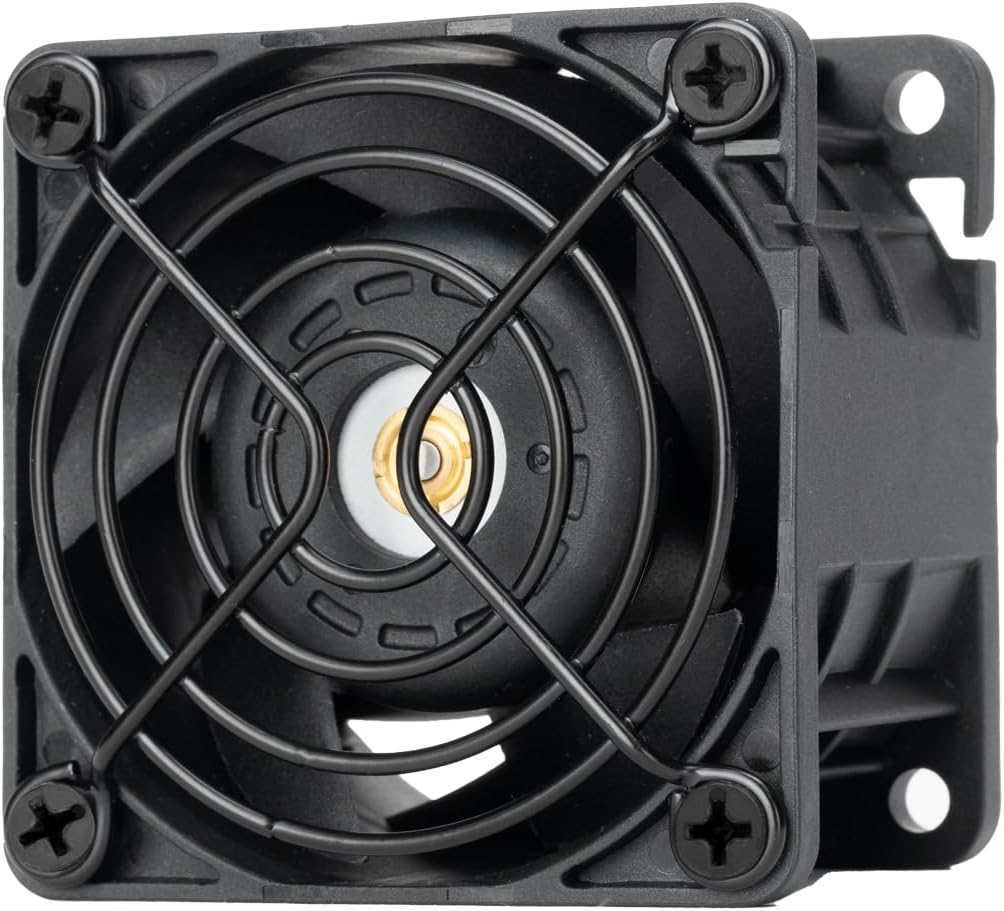
The Thermalright TL-B6B is a 12V four-pin PWM fan measuring 60 x 60 x 25mm. It reaches 3200 RPM, provides a stated 16.17 CFM, and has a 4.6 rating. Its combination of PWM control and a relatively accessible position makes it our best value-oriented choice.
We may earn a commission when you buy through this link, at no additional cost to you.
Seven blades are designed to move a higher air volume through the compact frame, while an S-FDB V2 bearing is intended to reduce vibration and sustain cooling performance. The listed electrical figures are 0.13A and 12V, with a stated maximum noise level of 20.17 dB(A).
Double-sided silicone pads around the frame provide vibration absorption and help maintain a quieter operating environment. Direction markings on the inner frame show airflow orientation, while the included screws allow direct mounting in compatible cases and equipment.
One installation caveat is that the listed fan screw-hole spacing is 50mm, and the holes are not threaded. This means the screws need enough force to cut into the chassis holes, and a different mounting pattern could require extra hardware or careful alignment.
The TL-B6B works well for small computer cases, electronics projects, and equipment seeking PWM control without moving into premium pricing. It is a sensible default when the application fits a 25mm depth, uses a standard four-pin header, and does not need the extreme pressure or airflow of a high-speed industrial fan.
Four-pin PWM support allows compatible systems to vary fan speed according to cooling demand. This is a major functional advantage over many inexpensive fixed-speed 60mm options.
Silicone pads around the frame help isolate fan vibration from the mounting surface. While they cannot eliminate airborne noise, they can reduce the transfer of mechanical vibration in a small enclosure.
We may earn a commission when you buy through this link, at no additional cost to you.
The ANVISION two-pack includes two 60 x 60 x 15mm brushless DC fans rated at 12V. Each operates at up to 4000 RPM, moves a stated 17.6 CFM, and is listed at 30.7 dBA. Its 4.5 rating and two-fan package make it convenient for matched intake-and-exhaust installations.
We may earn a commission when you buy through this link, at no additional cost to you.
The thin profile is the defining advantage. A 15mm fan can fit inside thin 3D printer frames, compact electronics enclosures, router or switch housings, and other equipment where a 25mm fan would not have sufficient depth. The package also includes two fans for symmetrical placement.
Both fans use a dual-ball bearing and include a 200mm lead terminating in a 2-pin, 2.5mm connector. That connection is simple for direct DC supply wiring, although it does not provide a PWM control signal or tachometer wire based on the supplied information.
The trade-off is acoustic. At 4000 RPM and a stated 30.7 dBA, these fans are considerably louder than the Noctua alternatives in this guide. They remain practical for equipment where maximum speed, compactness, or dual-fan availability matters more than near-silent operation.
This pack is best for projects needing two shallow 12V fans, particularly 3D printer and small electronics cooling. Choose quieter PWM-controlled models when the enclosure amplifies noise, when automatic thermal response is required, or when the installation demands a connector with more control and monitoring options.
Using one fan for intake and one for exhaust can create more effective enclosure airflow than a single fan mounted at one end. The matching pair also simplifies the visual and mechanical consistency of a compact build.
The 15mm depth leaves considerably more room than a standard 25mm fan. That clearance is valuable in slim 3D printer designs and tightly packed electronics where cable routing, brackets, and structural panels can compete for space.
We may earn a commission when you buy through this link, at no additional cost to you.
The Antrader three-pack provides 60 x 60 x 15mm brushless DC fans intended particularly for 3D printers and other compact applications. With a 4.3 rating, 3600 RPM speed, and stated airflow of 22.7 CFM, it offers a high fan count for multi-position cooling.
We may earn a commission when you buy through this link, at no additional cost to you.
Each fan uses plastic construction and a nine-blade rotor, while the product information identifies a dual-ball bearing. A two-terminal 2.5mm connector and 12V DC rating make these straightforward options for projects designed around basic two-wire fan power.
Three fans create an advantage for 3D printer enclosures with multiple circulation positions. A part-cooling fan can be combined with an enclosure or exhaust fan, allowing airflow across the hotend and out of the frame without sacrificing the shallow dimensions needed by compact printer designs.
The specifications do not list a noise rating, which makes direct acoustic comparison difficult. A fixed two-pin connection also means there is no described PWM signal, so the fan will generally run continuously unless controlled by other means. Confirm that your controller or power system supports the stated connector.
This three-pack is most compelling for 3D printer builders, humidifiers, aromatherapy devices, communication equipment, and other compact systems that benefit from multiple shallow fans. If quiet operation, precise speed control, or detailed acoustic data is the main requirement, a fan with those specifications clearly stated may be a better fit.
Compact printers can benefit from an internal circulation fan and a separate part-cooling fan. Three matching units provide enough inventory to address both needs while retaining an additional replacement for future maintenance.
The two-terminal connector is suitable for straightforward 12V projects. It does not offer four-pin control signaling, so builders should design their cooling strategy around continuous operation or a separate control solution.
We may earn a commission when you buy through this link, at no additional cost to you.
The UMLIFE two-pack is designed for indoor small-space ventilation and equipment cooling with AC power. Each fan measures 60 x 60 x 25mm, supports a broad 90V to 270V rated range, and can reach 4800 RPM. Its 4.6 rating supports its position as a capable general-purpose ventilation option.
We may earn a commission when you buy through this link, at no additional cost to you.
Stated airflow reaches 24.8 CFM with plus-or-minus 10% tolerance, while the dual-ball bearings are listed for 67,000 hours and can accommodate flat or upright installation. The product description identifies cabinets, small campers, modems, projectors, amplifiers, receivers, and similar compact applications.
The package is particularly useful for airflow-through projects that need both intake and exhaust. Two identical fans can be mounted at opposite ends of a cabinet, small enclosure, or appliance, creating a clearer intake-to-exhaust path than one isolated exhaust unit.
Because the input is AC, this is not a substitute for a conventional 12V or 5V header. Users must account for safe mains wiring and confirm that the plug and electrical configuration are appropriate for their region and installation. The universal voltage rating simplifies supply selection but does not remove electrical safety responsibilities.
Choose the UMLIFE pack for a small cabinet, DIY enclosure, or stand-alone ventilation project powered from AC. It is less appropriate for sensitive low-voltage electronics unless a safe, isolated AC-to-DC arrangement is already part of the design.
Opposed intake and exhaust positions can improve circulation inside enclosed cabinets. The matching pair reduces the need to choose two unrelated fans with potentially different airflow characteristics and mounting needs.
The 90V to 270V input range accommodates many common AC supplies. That flexibility is useful for project work, while safe connections and correct regional electrical standards remain essential.
We may earn a commission when you buy through this link, at no additional cost to you.
The Noctua NF-A6x15 PWM is a 60 x 60 x 15mm 12V fan with a 4.9 rating, the highest numerical rating among these products. It reaches 3500 RPM and has a stated maximum noise of 19.8 dB(A), combining a shallow profile with quiet, automatically controlled operation.
We may earn a commission when you buy through this link, at no additional cost to you.
Its four-pin PWM connection allows a compatible controller to vary speed. The supplied Low-Noise Adaptor reduces the maximum from 3500 to 3050 RPM, giving users a second operating range for applications where lower acoustic output is preferable.
As with the 25mm Noctua models, the fan incorporates Flow Acceleration Channels and an Advanced Acoustic Optimisation frame. Anti-vibration mounts, screws, an extension cable, a Low-Noise Adaptor, and a y-cable support tidy installation and flexible wiring.
The main benefit over a 25mm model is physical clearance. It can fit into thinner 3D printers, compact network and storage devices, slim electronics cases, and other applications where every few millimeters matter. As a trade-off, a 15mm frame generally has less room for the same kind of high-pressure performance as the thick industrial model.
This is the top choice when quiet operation, thin construction, PWM control, and a 12V supply are all priorities. It is especially suitable for replacing a noisy 6cm fan in compatible equipment without requiring the depth of a 25mm model.
The stated 19.8 dB(A) maximum and broad control range suit compact devices that benefit from active cooling without constant high-speed noise. The PWM connection lets the host equipment respond when temperatures change.
The 15mm frame opens up installation options in slim enclosures without giving up extension wiring, anti-vibration mounts, or fan-sharing accessories. It balances space, control, and acoustic performance unusually well.
We may earn a commission when you buy through this link, at no additional cost to you.
The Silverstone FHS 60X is an industrial and server-oriented 60mm fan with a 38mm frame, a 4.9 rating, and a maximum speed of 15,000 RPM. It delivers a stated maximum airflow of 65.74 CFM and maximum pressure of 62.95 mmH2O, far exceeding the ordinary cooling performance of standard PC replacements.
We may earn a commission when you buy through this link, at no additional cost to you.
Its wide 0 to 15,000 RPM PWM range gives substantial control over the balance between airflow and noise. A custom impeller and 38mm-thick frame are designed to improve performance, while dual-ball bearings are intended to extend service duration in demanding installations.
A protective metal fan grille is included, adding a useful layer of protection when the fan handles high-speed operation. This accessory is especially relevant in server, industrial, or exposed project environments where accidental contact with the blades would otherwise pose a hazard.
The trade-offs are substantial. Its 38mm depth is much greater than the 25mm and 15mm options, while its maximum noise figure reaches 61.5 dBA. Such a fan may demand serious acoustic isolation when operated at the top of its range, and it is not intended to squeeze into a conventional slim enclosure.
Choose the FHS 60X when maximum cooling capacity, high static pressure, or industrial durability is more important than a standard footprint or quiet operation. For ordinary electronics, one of the PWM Noctua models is more proportionate; for demanding server or equipment cooling, this model is the specialized premium option.
The stated 62.95 mmH2O maximum pressure is the key figure for dense heatsinks, restrictive filters, and narrow ducts. In those situations, moving air through the obstruction matters more than reaching high speed in open space.
PWM control across a very wide speed range allows operators to reduce output when full cooling is not necessary. This helps manage the dramatic difference between near-idle and maximum-performance operating conditions.
We may earn a commission when you buy through this link, at no additional cost to you.
The Noctua NF-A6x25 5V PWM is a purpose-built 5V version of the popular 60 x 60 x 25mm fan. It reaches 3000 RPM, has a stated maximum noise of 19.3 dB(A), and carries a 4.8 rating. It is most relevant to equipment that uses 5V rather than standard 12V cooling power.
We may earn a commission when you buy through this link, at no additional cost to you.
The four-pin PWM interface supports automatic speed control, and the fan includes polarity protection for 5V applications. That protection is a useful safeguard during installation, particularly in small projects where identifying power pins and orientation can be difficult.
Flow Acceleration Channels and the Advanced Acoustic Optimisation frame preserve the core design priorities of the 25mm Noctua family. The package includes anti-vibration mounts, fan screws, an extension cable, a y-cable, and an OmniJoin adaptor set for connection to proprietary fan headers.
Its 25mm depth and 12V-oriented sibling are important cautions: this version cannot replace a 12V fan, and it may not fit applications designed around a shallower frame. Always verify both the electrical rating and connector format before ordering.
This model is a strong choice for 5V 3D printers, DVRs, NAS systems, switches, routers, and other low-voltage network or storage equipment. Its combination of quiet operation, PWM control, polarity protection, and connection accessories makes it a strong specialist option for properly matched 5V installations.
Using a fan rated for the actual supply voltage improves compatibility and avoids relying on a 12V fan with an improvised power arrangement. The 5V specification makes this a more focused option for compatible low-voltage equipment.
Polarity protection helps guard against an incorrect power connection in compact builds where access and visibility are limited. It is an added installation safeguard rather than a substitute for checking the wiring before connecting power.
We may earn a commission when you buy through this link, at no additional cost to you.
Choosing a 60mm cooling fan starts with the physical and electrical limits of the installation, then comes the balance between airflow, pressure, noise, control, and expected service conditions.
The first filter is the power source. Most computer and electronics fans use 12V DC, while some specialized 3D printers and network devices use 5V. The AC project fans in this guide accept a broad 90V to 270V range and should never be connected directly to a low-voltage DC header. Connector type is equally important: two-pin leads provide power, three-pin FLX connections support discrete voltage-based speed settings, and four-pin PWM cables add a speed-control signal. A physically similar plug does not guarantee electrical compatibility, so confirm voltage, pin arrangement, and control method before ordering.
The familiar 60mm face size does not tell the whole installation story. This guide includes 15mm, 25mm, and 38mm-thick fans. A 15mm model offers the easiest fit in slim printer frames and tightly packed devices, while 25mm remains the conventional choice for many replacement applications. The Silverstone FHS 60X is 38mm deep and is best reserved for builds with generous clearance. Measure from the mounting surface to the nearest obstruction, account for screws, cables, grille clearance, and airflow direction, and avoid assuming that a 60mm opening can accept any 60mm fan.
Maximum speed is only one part of the performance picture. The Wathai and UMLIFE fans reach 4800 RPM, the ANVISION and Noctua thin models operate at 4000 and 3500 RPM respectively, and the Silverstone reaches 15000 RPM. Higher speed can move more air but often produces more noise. The Noctua models show the value of a quieter design, with maximum noise figures around 19 dB(A), while the Silverstone lists a much higher 61.5 dBA maximum. For a quiet office, bedroom, or audio-sensitive installation, a lower-noise fan with adjustable speed is often more useful than raw maximum performance.
Airflow figures indicate how much air a fan can move under specified conditions, while static pressure indicates how well it can push air through a restrictive path. A freely rotating fan may perform adequately in an open enclosure but struggle against a dense heatsink, filter, grille, or narrow duct. The Silverstone's stated 62.95 mmH2O maximum pressure is unusually high for this size and suits constrained server or industrial applications. Lower-pressure compact fans are generally more appropriate for open-area cooling. Use both figures as part of the decision rather than treating CFM alone as a universal measure of cooling effectiveness.
Bearing type affects expected service life, noise behavior, mounting orientation, and suitability for continuous operation. Dual-ball bearing fans appear throughout this guide and are often used where longer service duration or the ability to operate flat or upright matters. The Thermalright model uses an S-FDB V2 bearing intended to address vibration during operation. The Antrader description combines sleeve-bearing language with a dual-ball bearing claim, so buyers should treat the full listing as the authoritative source. For critical or sustained service, review the stated bearing specification, operating orientation, environmental conditions, and the device manufacturer's replacement guidance.
PWM control lets compatible equipment increase fan speed with heat and reduce it when demand falls. The Noctua NF-A6x25 PWM, NF-A6x15 PWM, NF-A6x25 5V PWM, and Thermalright TL-B6B support this approach, while the Silverstone offers an unusually wide 0 to 15,000 RPM PWM range. Three-pin Noctua FLX fans instead provide 3000, 2400, and 1600 RPM settings through adapters. Fixed two-pin fans and AC models are simpler electrically but offer less direct control. If the device cannot issue a PWM signal, paying for that capability may not improve the installation.
The supplied hardware can determine how much additional work an installation requires. Noctua fans include anti-vibration mounts, extension leads, and y-cables for sharing a header. The Thermalright includes screws, although its unthreaded 50mm hole pattern may require force during installation. The Wathai fan includes screws, nuts, a plug, and a wiring head, but its power leads are not preconnected. AC ventilation fans may also have region-specific plug considerations. Check the screw pattern, hole threading, cable length, connector style, grille, and vibration accessories before finalizing a purchase.
A multi-fan pack can be more useful than a single premium fan when the system needs balanced intake and exhaust. The ANVISION bundle includes two thin fans, Antrader supplies three 15mm units, and UMLIFE offers two AC fans. Pairs work well for opposite sides of an enclosure, while three fans can support part cooling, internal circulation, and exhaust in a compact 3D printer. For one small hot spot, a single fan with PWM control may be enough. Consider the airflow path as a whole rather than simply filling every available mounting hole.
Begin by disconnecting power from the equipment and confirming the replacement fan's voltage, connector, control method, dimensions, and airflow direction. Mount the fan securely with appropriate screws and vibration-isolating pads where available. Route cables away from blades and hot components, and ensure the fan does not obstruct the intended intake or exhaust path.
For PWM models, connect to a compatible four-pin header or controller and configure a conservative minimum speed before testing maximum output. For three-pin FLX models, select the appropriate speed adapter. Two-wire DC fans normally receive power and ground only, while AC project fans require safe, correct connections to a suitable supply and appropriate regional electrical practices.
After installation, restore power gradually and listen for scraping, cable contact, rattling, or unexpected vibration. Confirm that airflow moves in the intended direction, monitor temperatures under realistic load, and adjust speed settings as needed. Clean accumulated dust from the intake path and fan blades with power disconnected, avoiding moisture or compressed air that could force debris into the bearings.
No. Although they share the same nominal face size, they may differ in depth, voltage, connector, pinout, and speed-control method. A 12V four-pin PWM fan cannot automatically replace a 5V or three-pin unit, and a 38mm-thick industrial fan will not necessarily fit where a 15mm model was intended. Check the full electrical and physical specifications before purchasing.
The main difference is physical depth. A 15mm fan provides greater clearance in slim 3D printers and compact electronics, while a 25mm fan generally offers more conventional housing clearance. Both can be effective, and the better choice depends on the available space, mounting pattern, airflow requirements, and noise tolerance of the specific equipment.
A PWM fan can adjust output as cooling demand changes, potentially reducing unnecessary noise during light loads. It is only better if the equipment can supply the correct four-pin control connection. A simple fixed-speed fan may be entirely adequate for a small project, but PWM is generally more adaptable in a temperature-responsive system.
You should not connect a 5V fan directly to a 12V supply. The fans in this guide are designed for their stated voltage, and applying the wrong voltage can damage the motor or connected electronics. Use the correct voltage model or a properly designed regulated power arrangement appropriate to the equipment.
Static pressure indicates a fan's ability to move air against resistance, such as through a dense heatsink, filter, grille, or narrow duct. It is important when the airflow path is restricted. CFM is also useful, but the two specifications describe different aspects of cooling and should be considered together.
The quietest products in this guide list maximum noise around 19 to 20 dB(A), while faster basic models and the high-speed industrial fan list higher values. Perceived loudness also depends on chassis resonance, mounting vibration, operating speed, and distance from the listener. Choose controllable fan speed and use anti-vibration mounting for the best result.
Not always. Two fans can improve airflow when positioned as a coordinated intake and exhaust system, but they can also create more noise or short-circuit if the arrangement is poorly planned. One correctly placed and appropriately sized fan may be sufficient. Consider the complete enclosure path, component temperatures, and available space before adding fans.
That depends on the fan's bearing design and manufacturer guidance. The Wathai and UMLIFE descriptions specifically state that their dual-ball bearing fans can be laid flat or stand upright. Other models may be intended for a particular orientation, so check the listing and equipment instructions rather than assuming every axial fan can be mounted in any position.
The Thermalright TL-B6B is the best budget-oriented choice for standard 12V PWM installations, while the Noctua NF-A6x25 PWM is the strongest all-around recommendation for quiet, controllable cooling. The Silverstone FHS 60X stands apart as the premium high-performance option for demanding server, industrial, or restricted-airflow applications.
Prioritize compatibility before performance. Match the voltage, connector, depth, mounting pattern, and airflow direction to the equipment, then decide whether you need basic cooling, automatic PWM control, multiple fans, or high-pressure capability. Quiet operation can be just as important as peak RPM in an enclosure that sits close to a person.
Finally, confirm the current specifications, included accessories, connector details, and price before purchasing. Product availability and pricing can change, but the technical distinctions in this guide provide a durable basis for narrowing the best 60mm cooling fan for your particular build.