
Slinkdsco Low-Profile 4×4 MIMO Antenna
3.2Editor score
698–6000 MHz wideband coverage
5 dBi omnidirectional gain
Low-profile wall-mount design
10-foot RG174 cable
SMA male connector
This 4x4 Mimo External Antenna for 4G and 5G guide compares 10 antennas by gain, bandwidth, MIMO design, mounting, cables, and router compatibility now.
A 4×4 MIMO external antenna can give a compatible 4G or 5G router, modem, gateway, or hotspot a stronger outdoor signal path, especially when indoor equipment sits behind walls, cabinets, or metal. The right antenna depends on coverage, mounting location, carrier, connector arrangement, and whether you prefer omnidirectional placement or directional aiming.
This guide compares ten antennas using the supplied specifications, including operating range, gain, radiation pattern, MIMO configuration, included cables, weather resistance, and installation hardware. It covers practical options for home internet, RV use, routers, gateways, modems, and hotspots rather than treating every antenna as suitable for every setup.
The selections reveal three broad approaches: compact omnidirectional units for easy placement, directional panels for focused tower reception, and complete kits for more involved installations. Ratings, availability, and pricing can change, so readers should confirm the current listing and their router's external antenna requirements before purchasing.
3.2Editor score

4.1Editor score
4.4Editor score
The table below compares all ten antennas by antenna type, supported frequency range, stated gain, and installation approach, making it easier to identify the model that matches your coverage and equipment.



The Slinkdsco Low-Profile Antenna is a budget-oriented option for users who want to move a compatible cellular router's antenna connection closer to a window, eave, or other less obstructed location. It has a 3.2 rating and a 4×4 MIMO omnidirectional design, making it more relevant to home internet, RV, router, gateway, and hotspot installations than conventional single-antenna products.
We may earn a commission when you buy through this link, at no additional cost to you.
Its stated 698–6000 MHz frequency range covers major 4G LTE and 5G cellular bands, while 5 dBi of gain and 50-ohm impedance provide the core electrical specifications. The fixed wall-mount format is particularly convenient for permanent installations. Unlike a directional panel, the omnidirectional pattern does not require careful aiming, which helps when the strongest cell direction is unknown or changes with the device.
The main limitation is the included 10-foot RG174 cable. RG174 is relatively lossy compared with lower-loss alternatives, so a long run may reduce the practical benefit of the antenna. The shorter cable also limits where it can be mounted. Its low 3.2 rating is another reason to validate connector type, cable routing, and router compatibility before committing to a larger installation.
This is a sensible choice for someone seeking an inexpensive way to test whether exterior placement improves a compatible system. It is less attractive when long cable runs, severe weather exposure, or four long, low-loss leads are required. For a straightforward window or exterior wall trial, however, it offers the essential features without directional aiming.
The antenna can receive signals from around its position without the repeated rotation and fine adjustment associated with a directional panel. The supplied guidance recommends an open location such as near a window or beneath an eave, where walls and obstructions are less likely to degrade the radio path.
The fixed wall mount and 10-foot RG174 lead make this model straightforward to deploy near compatible networking equipment. Keep the cable as short as practical because signal loss through the lead can offset some of the antenna's stated gain.
We may earn a commission when you buy through this link, at no additional cost to you.
The Waveform QuadMini stands out as the most balanced overall option in this guide. It combines a low-profile omnidirectional 4×4 MIMO design with a complete installation kit, making it especially suitable for users who want a compact antenna for a 4G or 5G router with four antenna connections. Its current rating is 4.1.
We may earn a commission when you buy through this link, at no additional cost to you.
Waveform states up to 5.2 dBi of gain and emphasizes MIMO isolation and polarization as important contributors to real-world performance. The supplied kit includes a Window Entry Cable, UltraFlex-Quad cables, weatherproofing boots, and mounting hardware. Suction cups, a pole adapter, a desktop stand, and direct wall mounting allow the antenna to be adapted to temporary or permanent installations.
A 4.1 rating does not guarantee that every cellular system will improve, and the QuadMini's modest gain figure should not be confused with a highly directional panel. Its strongest advantage is installation flexibility rather than maximum gain. Users should still place it where cellular signals can reach it and use suitable low-loss connections rather than adding unnecessary cable length.
The QuadMini is a strong recommendation for someone who wants one kit to cover several mounting scenarios. It is especially attractive when tower direction is uncertain, the equipment needs a small footprint, or a temporary window installation must later become a more permanent wall or pole setup. Complete packaging also reduces the need to source separate cables and adapters.
The included cables, entry hardware, weatherproofing boots, and mounting accessories make the QuadMini more self-contained than an antenna-only purchase. That convenience is valuable for first-time installers who are unsure which brackets, leads, and adapters their router will require.
The low-profile omni design removes the need to identify and track a cell tower. Place the unit on the side of a home or vehicle with the best signal, then use its suction cups temporarily while confirming that external antenna mode produces a worthwhile improvement.
We may earn a commission when you buy through this link, at no additional cost to you.
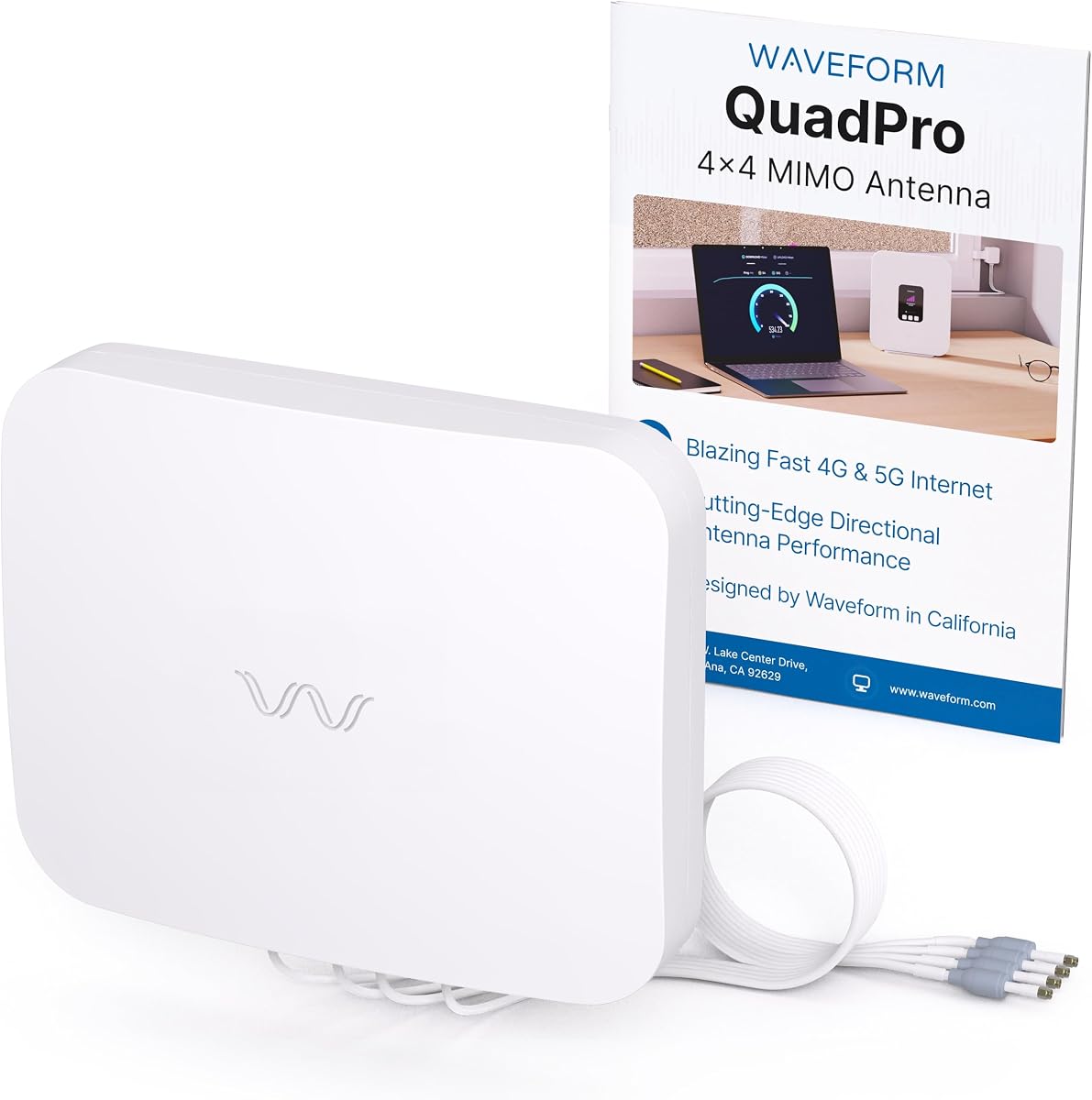
The Waveform QuadPro is the premium directional choice for users who can identify the location of the nearest cell tower and want to concentrate reception toward it. It carries a 4.4 rating, the highest among the three highlighted picks, and supports full 4×4 MIMO operation with up to 9.1 dBi gain across 600–6000 MHz.
We may earn a commission when you buy through this link, at no additional cost to you.
Its performance-oriented design is reinforced by a kit containing a Window Entry Cable, FlexMount, UltraFlex-Quad cable, and weatherproofing boots. Installation can therefore avoid drilling in many situations. Detailed guidance is also supplied for T-Mobile Home Internet gateways, Verizon 5G Home Internet, and AT&T Internet Air, making the product easier to match with common fixed wireless equipment.
The important trade-off is that a directional antenna requires aiming. Even a small placement error can reduce the signal reaching the panel, and the included mounting choices must be used carefully. The title also identifies this as an antenna-only product, so buyers should check the contents of the package against their router's connector and mounting requirements before ordering.
The QuadPro is best suited to a stationary installation in weak or edge-of-coverage service where the user can optimize placement. It offers a stronger theoretical alternative to compact omni antennas when tower direction is known. For RV travelers, renters, or people who cannot establish a fixed position, an omnidirectional model will usually be easier to manage.
A directional panel concentrates its radiation pattern toward the intended tower, making it a strong option for home and office installations with a stable cell direction. The stated 9.1 dBi maximum gain is most useful when the router is otherwise receiving a weak or obstructed signal.
Gateway-specific guides are a meaningful advantage for fixed wireless internet users. They can reduce uncertainty around connecting the four MIMO elements and selecting the correct adapter for common T-Mobile, Verizon, and AT&T systems.
We may earn a commission when you buy through this link, at no additional cost to you.
This omni 4×4 MIMO kit is designed for installations where the router or gateway is some distance from the best outdoor or window position. Its 5.0 rating and two 10-meter cable assemblies provide a compelling combination of flexible placement and straightforward omnidirectional reception.
We may earn a commission when you buy through this link, at no additional cost to you.
The stated operating range extends from 600 to 6000 MHz, and the product description lists common cellular bands such as n66, n41, n77, n2, n5, and n71. Up to 7 dBi of gain is specified, while the omni pattern lets installers find a better location without adjusting the antenna's angle. Compatibility extends to routers and gateways with suitable external antenna ports.
Cable quality and length deserve careful attention. The product includes antenna leads with SMA male connectors, while many compatible devices use SMA female ports or other interfaces. The listing notes that an adapter may need to be purchased separately. Long runs can also introduce loss, so the antenna should be mounted where it receives a clear signal rather than merely as far from the router as possible.
This kit is a strong choice for homes, RVs, and temporary cellular installations that need long reach and no aiming. The perfect 5.0 rating makes it a notable candidate, although ratings remain product-specific and may not reflect every network. Confirm connector gender, supported ports, and external antenna settings before installation.
Two dual 10-meter cable assemblies allow the antenna to be positioned well away from the router while retaining an omnidirectional pattern. This is useful when a window, exterior wall, eave, or RV location offers better cellular reception than the equipment's original position.
The 600–6000 MHz specification covers a wide selection of LTE and 5G bands. That makes the kit adaptable across major carriers, although real performance still depends on the tower, frequency plan, terrain, router capabilities, and carrier restrictions in the user's area.
We may earn a commission when you buy through this link, at no additional cost to you.
The Wide-Band Omni Antenna offers a direct 4×4 MIMO upgrade for compatible routers, gateways, and hotspots. Its 2.9 rating is the lowest among the ten products, so buyers should consider the specifications and installation details carefully, but the core design is appropriate for basic external antenna needs.
We may earn a commission when you buy through this link, at no additional cost to you.
The antenna covers 600–6000 MHz and provides 6 dBi of stated gain in an omnidirectional pattern. A 50-ohm impedance and SMA male connector are specified, along with a 3-meter, or roughly 10-foot, KSR100 cable. The listing positions it for Verizon, AT&T, T-Mobile, RV, and home internet setups where an unobstructed mounting position is available.
Its modest 6 dBi gain and relatively low rating make it less compelling for users seeking the strongest possible directional performance. The short lead is helpful for avoiding excess cable loss, but it restricts the distance between the router and antenna. The listing also describes a cable-optimized design intended to reduce clutter around a desktop setup.
The model is most appropriate for a nearby window, wall, or open-area installation where a compact and uncomplicated antenna is enough. Buyers should compare its rating and specifications with the Slinkdsco alternatives and determine whether a longer, lower-loss cable or a higher-gain directional panel would better match their coverage problem.
The supplied KSR100 lead is intended to keep a compact installation manageable. Using the shortest practical cable helps limit loss and makes the antenna less conspicuous near a router or gateway.
Because the antenna supports 600–6000 MHz and is described as compatible with major carriers, it can be considered across common 4G and 5G plans. The user's equipment must still expose the necessary antenna ports and support external antenna operation.
We may earn a commission when you buy through this link, at no additional cost to you.
The Outdoor Panel Antenna Kit is built for serious outdoor deployments where a high-gain directional panel can be mounted on a pole and aimed at a cell tower. It has a 5.0 rating, up to 10 dBi of gain, and a complete package containing a pole, four 32-foot low-loss cables, and four TS9 adapters.
We may earn a commission when you buy through this link, at no additional cost to you.
The kit supports 600–6000 MHz and is described as compatible with major 4G and 5G networks worldwide, including AT&T, T-Mobile, Verizon, US Cellular, Bell Canada, Rogers, Telus, Digicel, and Telcel. Each cable is listed as an N-male-to-SMA-male run, with TS9 adapters supplied for compatible devices. Weatherproof construction supports use outside the home or vehicle.
The main constraint is the installation effort. A directional panel should be aimed at the intended tower, and four 32-foot cables create a larger installation than a compact indoor solution. Users must also identify the correct interface on their router and ensure the four MIMO leads are assigned properly. The stated gain does not overcome a blocked or incorrect radio path.
This is a compelling kit for rural homes, fixed wireless internet, or other weak-coverage locations where outdoor mounting is possible. Its high rating, bundled pole, long cables, and strong gain make it one of the most complete options. It is less suitable for renters, temporary RV travel, or anyone unable to identify and maintain a tower-facing position.
The supplied mounting pole and four long cables reduce the need to assemble an outdoor system from separate components. This is especially useful when each router connection must be routed from a distant elevated panel back to the equipment.
The 10 dBi maximum gain and directional pattern are intended to improve reception where cellular service is weak but a tower remains within line of sight. Installation height, tower identification, and correct aiming can matter as much as the advertised gain.
We may earn a commission when you buy through this link, at no additional cost to you.
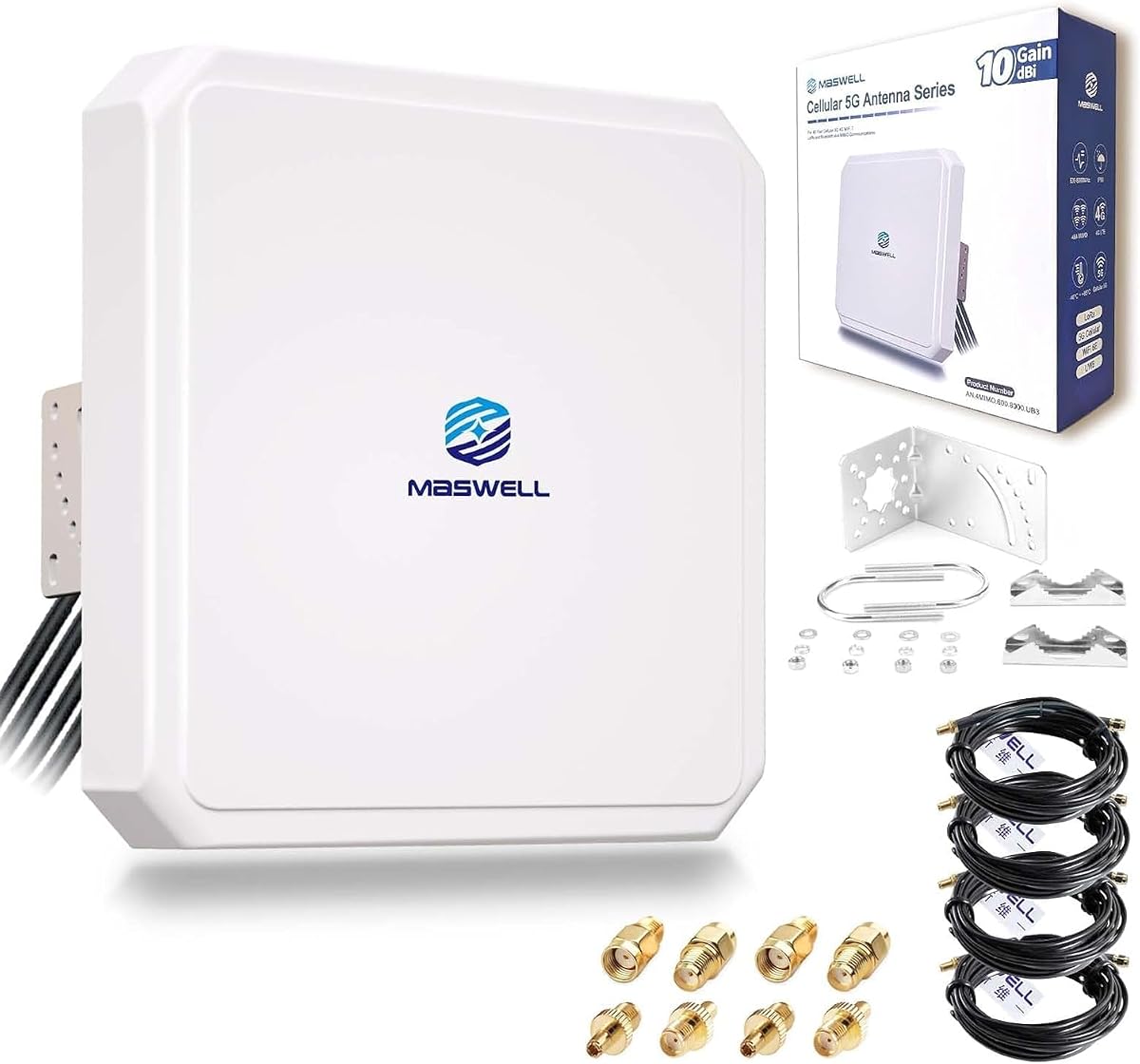
The Maswell Cubic-4C is an industrial-minded omnidirectional antenna for compatible routers, gateways, CPE equipment, smart meters, and other cellular-connected devices. It has a 5.0 rating and is particularly notable for its 600–8000 MHz range, rugged ASA housing, and dual IP67 dustproof and waterproof certification.
We may earn a commission when you buy through this link, at no additional cost to you.
The cross-polarized 4×4 MIMO design provides up to 6 dBi of gain, and the supplied description notes that the figure was tested with a 20-centimeter cable. Two meters of professional cable, four SMA male connectors, and TS9 adapters support common external antenna arrangements. The housing is UV stabilized and intended to tolerate hot, cold, and exposed environments.
Maswell provides specific installation guidance: enable external antenna mode on the router, restart it, and avoid lower-quality RG58 or RG174 cable. It recommends LMR240-equivalent or better and limits total cable length to no more than five meters. Those instructions are useful because a durable antenna can still underperform if the feed system introduces excessive loss or the router is not configured correctly.
The Cubic-4C is a good fit for RV installations, outdoor business equipment, rural cellular gear, and users who value physical protection over a panel antenna's maximum gain. The included screws, brackets, waterproof adhesive, and M24 holes provide several ways to secure it to a wall or pole.
The impact-resistant ASA enclosure, UV stabilization, and IP67 standards make the antenna suitable for demanding installations. Weather resistance helps protect the radome and internal elements when the unit is mounted on an RV, exterior wall, pole, or industrial enclosure.
Extending to 8000 MHz gives the antenna headroom for modern cellular bands and WiFi 6E or WiFi 7 applications. Actual gain varies by frequency, so the 6 dBi maximum should not be interpreted as a constant value across the entire range.
We may earn a commission when you buy through this link, at no additional cost to you.
The Slinkdsco Industrial-Grade Omni combines a 4.7 rating with a relatively high 9 dBi stated gain and an omnidirectional pattern. It is a practical option for compatible routers, gateways, and hotspots used in home internet or RV environments where the user wants more stated gain without having to aim a panel at a tower.
We may earn a commission when you buy through this link, at no additional cost to you.
Its operating range is 698–6000 MHz, with 50-ohm impedance, a 5-meter or 16.4-foot cable, and an SMA male connector. The low-profile screw mount can be attached to a suitable surface, while the listed rain-resistant construction broadens its suitability for exterior placement. Major carrier compatibility is highlighted for Verizon, AT&T, and T-Mobile.
The notable question is how the stated gain was achieved and whether the included cable preserves it in a real installation. As with any high-gain antenna, performance varies across frequencies and environments. The five-meter lead also gives installers room to separate the antenna from the router, but users should minimize unnecessary slack and avoid sharply bending the coax.
This antenna is a good middle ground for users who want the placement freedom of an omni design with more stated gain than the smaller budget models. It suits permanent home or RV installations where a screw mount is practical. Verify that the router has the required SMA interface and supports external antenna mode before ordering.
The combination of 9 dBi stated gain and omnidirectional reception is attractive when the cell tower's direction is uncertain or changes. This allows users to optimize placement by location rather than by fine-tuning the antenna's angle.
The screw mount gives a more permanent alternative to suction cups or an adhesive-only installation. A suitable panel or bracket can hold the antenna above nearby obstructions while the five-meter lead reaches the router or gateway.
We may earn a commission when you buy through this link, at no additional cost to you.
The Maswell 4MIMO_Ultra is a complete high-gain panel kit for users prepared to install a directional antenna outdoors. It has a 3.9 rating and combines up to 10 dBi of gain, a 600–8000 MHz range, and a 60–80 degree beamwidth with mounting hardware, four professional cables, and several adapter options.
We may earn a commission when you buy through this link, at no additional cost to you.
The complete kit includes four 6.5-foot, or two-meter, LMR240-equivalent low-loss cables. SMA male, TS9, and RP-SMA adapter options are provided to accommodate a variety of four-port cellular and WiFi devices. The UV-resistant ASA housing carries IP66 dustproof and waterproof certification, while the supplied brackets and screws support a permanent outdoor installation.
Maswell recommends testing RSRP at several outdoor positions, avoiding readings at or below -120 dBm, and enabling external antenna mode after connection. These steps reflect the reality that a 10 dBi figure cannot create usable coverage without a viable signal path. The directional pattern also needs to be pointed generally toward the tower, and the stated beamwidth affects how precisely that must be done.
The kit is well suited to fixed wireless home internet, commercial gateways, and high-value installations where weather protection and low-loss leads are priorities. It is less attractive for temporary RV use or users who need to reposition the antenna frequently. Its broad adapter coverage and professional support are meaningful advantages for complex installations.
The four LMR240-equivalent leads are a notable improvement over thin RG174 or RG58 runs. Lower-loss coax helps preserve the benefit of the panel when the router is located some distance from the outdoor mounting position.
The IP66 housing, UV-resistant material, and heavy-duty brackets are designed for long-term outdoor exposure. The panel's 4.4-pound weight also makes it more stable against wind than a lightweight indoor-style antenna, provided the pole or structure is securely anchored.
We may earn a commission when you buy through this link, at no additional cost to you.
The 10-Meter Omni MIMO Antenna provides a generous installation radius for home internet, gateways, and routers that must remain indoors while the antenna is positioned outside. Its stated 7 dBi gain, 600–6000 MHz range, and omnidirectional 4×4 MIMO configuration closely match the needs of common 4G and 5G systems.
We may earn a commission when you buy through this link, at no additional cost to you.
The package includes one antenna, two dual 10-meter cable assemblies with SMA male connectors, and a mounting bracket. Its kit structure is easy to understand, and the long leads allow placement near a window, exterior wall, or other position with a clearer view of cellular coverage. The product is also described as compatible with various modem and router manufacturers.
The absence of a listed rating makes it difficult to assess customer feedback relative to the other products. Cable loss is another consideration because 10 meters is a substantial run; the quality of the supplied lead and any unavoidable additional adapters will influence the result. The listing specifically notes that the device should have an SMA female connector, so compatibility should be verified before purchase.
This antenna is best for installers who value reach and omnidirectional placement more than compactness or a complete high-gain panel package. It can suit fixed wireless and broader home internet configurations where a long coax route is manageable. Confirm ports, external antenna settings, and the practical signal readings at the proposed mounting position.
Two dual 10-meter assemblies provide ample separation between the outdoor antenna and indoor equipment. This flexibility is useful when the best reception point is far from the router, although installers should keep the lead as short as the placement allows.
No directional adjustment is required, so users can evaluate several positions without repeatedly rotating the antenna. The included bracket provides a basic mechanical mounting solution for a fixed outdoor or exterior-wall installation.
We may earn a commission when you buy through this link, at no additional cost to you.
Choosing a cellular antenna involves balancing radio coverage, gain, radiation pattern, cable quality, connector type, and environmental durability. The most important first step is confirming that the router or gateway has the correct external antenna ports and will function with them.
A 4×4 MIMO antenna is useful only when the connected equipment can use four independent antenna elements or ports. Check the router or gateway manual for supported antenna interfaces, the number of cellular antenna connectors, and whether external antenna mode must be enabled. Some consumer devices expose only two cellular ports, while others use proprietary or recessed connectors that require specific adapters.
Match the antenna and router at the port level, then confirm that the router supports the intended carrier bands. Correctly attaching four leads does not guarantee full 4×4 operation if the software, ports, or antenna assignments are incompatible.
Omnidirectional antennas receive from multiple directions and suit homes, vehicles, and changing locations where the tower direction is unknown. Directional panels concentrate energy toward a particular tower and can provide greater gain, but they require careful aiming. A panel is generally preferable for a stationary installation with a known tower, while an omni is easier for RV travel and temporary setups.
Choose the pattern based on how stable your location and tower direction are, not simply on the highest gain figure. A precisely aimed panel can outperform a higher-gain omni in its target direction, but it may provide little benefit when pointed incorrectly.
Many current cellular antennas cover 600–6000 MHz, while some extend to 8000 MHz. A wide range can support multiple 4G and 5G bands, but coverage alone does not guarantee equal gain or efficiency at every frequency. Check the router's supported bands and the carrier's current network plan in the area where the antenna will operate.
For a 5G router that also supports WiFi 6E or WiFi 7, an extended range may be useful. For a dedicated LTE system, a model covering the relevant cellular bands is generally the more important requirement.
Gain figures describe antenna performance, not a guaranteed increase in internet speed. A higher-gain directional antenna can improve the signal available to the router, but actual throughput is influenced by tower distance, congestion, terrain, signal quality, and the router's modem. Omnidirectional models with moderate gain may be more appropriate when signal quality is already good and only placement needs improvement.
Compare gain together with radiation pattern and bandwidth. Ten dBi in a narrow directional beam is not directly equivalent to ten dBi spread around an omnidirectional circle.
The feed cable can lose as much signal as the antenna gains. RG174 is thin and relatively lossy, RG58 is better but still limited, and LMR240-equivalent cable is a stronger choice for longer runs. Shorter, lower-loss routes are generally preferable. Avoid unnecessary coils, sharp bends, poorly seated connectors, and adapters that create additional loss or mismatches.
The Maswell products specifically recommend professional-grade cable and provide guidance on acceptable total lengths. Match the cable length to the installation rather than selecting the longest available run.
SMA male, SMA female, TS9, N male, RP-SMA, and U.FL are among the interfaces encountered on cellular antennas and routers. Connector gender matters, and a physically similar connector can still have different threading or pin arrangements. RP-SMA is not the same as SMA, and TS9 requires a device with a corresponding socket.
Check the package contents before ordering additional adapters. Some kits include several options, while others provide one interface. Use quality adapters, tighten them appropriately, and protect outdoor connections from moisture.
An indoor window mount may be sufficient for a temporary test, but a permanent outdoor installation should use weather-resistant hardware. Look for IP67 or IP66 ratings, UV-stable materials, sealed connectors, and mounting points suitable for the surface. The Maswell Cubic-4C and 4MIMO_Ultra emphasize rugged housings, while several smaller models prioritize low cost and simple installation.
Mount the antenna high enough and far enough from metal obstructions to improve the radio path. Strong suction cups are convenient for testing, but screws, brackets, and properly prepared adhesive are more dependable for long-term use.
Before permanently mounting an antenna, compare the router's signal readings and speed tests in its original location. Temporarily place the antenna near a window, exterior wall, or eave, enable external antenna mode, and repeat the measurements. A meaningful comparison should use the same server, network conditions, time period, and device when possible.
If the improvement is small, try a different position or a directional panel. If the result is strong and stable, secure the best arrangement permanently and document the router settings for future troubleshooting.
Begin by confirming that the router or gateway supports external cellular antennas and that every required connector is present. Connect the antenna while the device is powered off, label the leads if there are four, and consult the router manual for the correct port arrangement. Do not assume all similarly named SMA connectors are electrically identical.
Place the antenna temporarily in an open location, enable external antenna mode, restart the router, and compare signal readings and performance with the original setup. Move the antenna in small increments and repeat the measurements. For a directional panel, rotate it gradually toward the strongest tower signal; for an omni, compare multiple sides of the building or vehicle.
After identifying the best position, secure the mounting hardware, route the cables without tight bends, and protect every outdoor connection from moisture. Periodically inspect the seal, brackets, antenna position, and cable condition. If performance declines, check the connectors first and then confirm that vegetation, construction, vehicle movement, or tower changes have not altered the radio path.
No. The router must expose the correct number and type of external cellular antenna connectors and must support external antenna operation. A 4×4 MIMO antenna cannot create four usable cellular connections on hardware that only provides two antenna ports. Always check the device manual and connector layout before purchasing.
No. A directional panel can provide stronger reception toward a known tower because it concentrates energy in a narrower direction. An omnidirectional antenna is easier to position and works better when tower direction is unknown, the installation moves, or multiple signal sources may be present. The best choice depends on location stability and placement constraints.
No. Gain can improve the signal available to the router, but speed also depends on tower load, carrier congestion, radio conditions, the modem, frequency band, and network configuration. An antenna may help most when the original signal is weak, obstructed, or unstable. Compare actual readings and speed tests before and after installation.
The signal must travel from the antenna through the coax to the router, and every cable loses some signal along the way. Thin or lengthy RG174 and RG58 runs can undermine the benefit of a good antenna. A shorter route with LMR240-equivalent cable is generally preferable, especially for outdoor or RV installations.
Choose an open location with the clearest possible radio path, such as an exterior wall, eave, pole, or suitable window position. Keep the antenna away from metal, dense masonry, electronic equipment, and unnecessary obstructions. Temporary placement and testing should precede final mounting because the best position can vary by building and carrier.
Many cellular routers require external antenna mode or a related configuration to use connected antennas correctly. This setting tells the modem how to interpret its antenna ports and may change transmit behavior. If the router supports automatic configuration, follow its instructions; otherwise enable the documented external antenna setting and restart the device.
Most listed antennas cover the major 4G and 5G bands used by these carriers, but compatibility depends on the router's supported bands, ports, and carrier configuration. The product alone cannot guarantee service on every plan or gateway. Confirm the equipment specifications and regional network requirements before installation.
Some products support either indoor or outdoor mounting, while others are explicitly designed for permanent exterior use. Check the weather-resistance rating, housing material, connector sealing, and included mounting hardware. Even an indoor-rated antenna should not be exposed to rain unless the manufacturer explicitly permits it.
The Waveform QuadMini is the most balanced overall choice because it combines a compact 4×4 MIMO omnidirectional antenna with a complete installation kit and several mounting methods. The Waveform QuadPro is the stronger premium option for a stationary directional installation, while the Slinkdsco Low-Profile Antenna provides a straightforward budget entry point for testing exterior placement.
Prioritize router compatibility first, then decide between an omni and a directional panel based on whether the installation is fixed or mobile. Pay equal attention to gain, frequency coverage, connector type, cable loss, and weather protection. A well-matched antenna with sensible cable routing will generally be more useful than an expensive model that is poorly aimed or connected through unsuitable leads.
Finally, check current ratings, package contents, availability, and pricing immediately before purchasing, since all three can change. Compare the device's current port requirements with the antenna kit, and use temporary placement tests to verify that the selected model improves signal quality in the user's particular home, office, or vehicle.