
SCRIB3D P1 3D Printing Pen with Display
4.4Editor score
Stepless speed control
Adjustable filament temperature
Three starter filament colors
Discover the best 3D printing pens for kids in 2026, comparing safety, filament support, controls, starter kits, and creative learning features for families.
A 3D printing pen can turn simple lines, stencils, and imaginative ideas into raised creations children can hold, decorate, and explore. The best models make drawing more intuitive while providing useful controls, dependable filament feeding, and an engaging activity kit for creative, screen-free play.
We compared all ten featured pens using the supplied product information, focusing on the factors that matter most to families: child-oriented safety, ease of use, included accessories, filament compatibility, display quality, flow control, and the ability to support both beginners and more ambitious creators.
Each pick highlights a different strength, from a particularly child-safe starter set to advanced temperature controls and complete color bundles. Product details, ratings, and availability can change over time, so readers should verify the latest listing information and current prices before making a purchase.
4.4Editor score
4.4Editor score
4.5Editor score
The comparison below evaluates every featured pen across its most useful family-facing features, including safety approach, controls, filament options, bundled accessories, and the kinds of creative projects each kit supports.


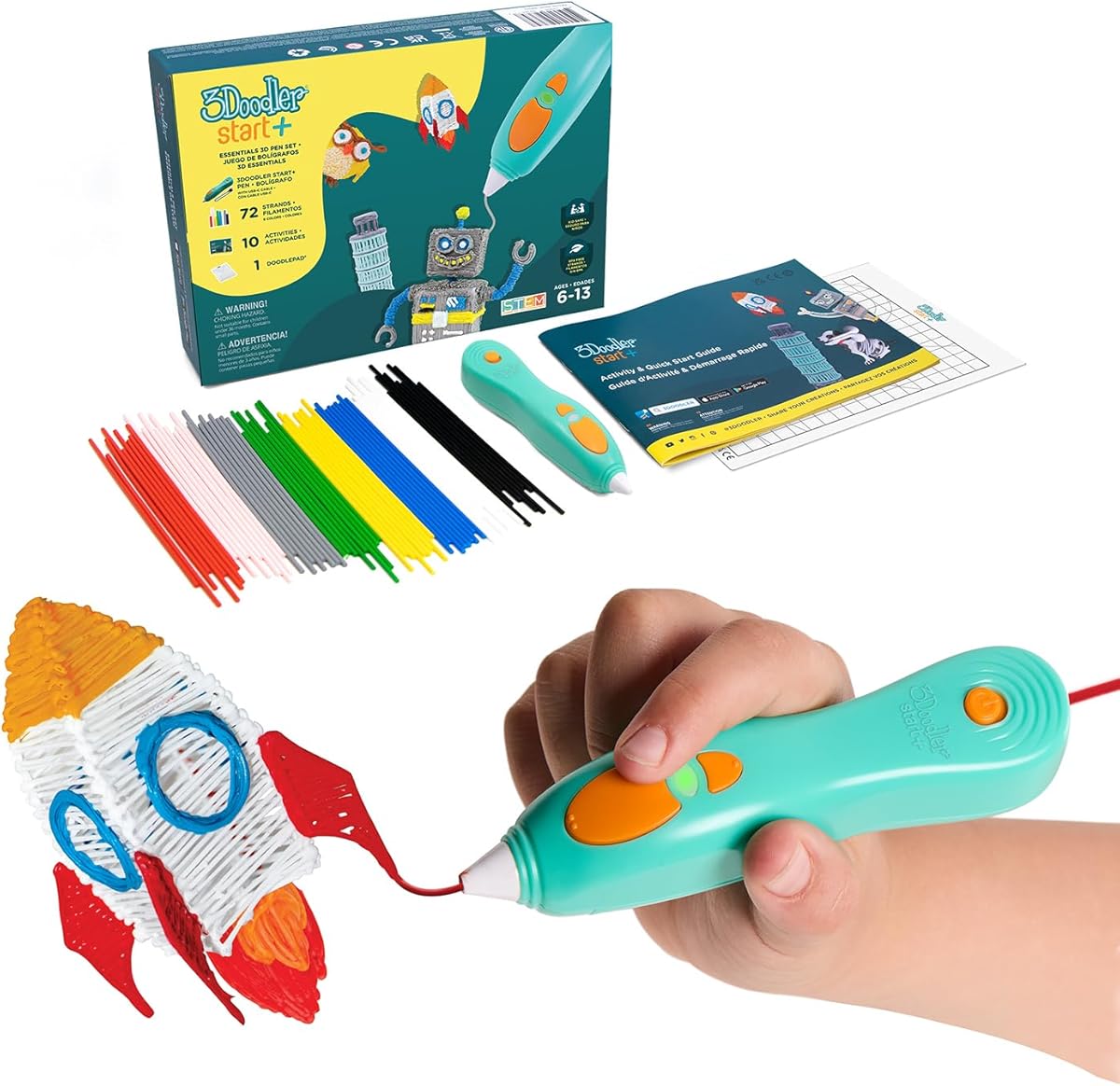
The 3Doodler Start+ Essentials stands out as the most deliberately child-oriented option in this guide, earning a 4.4 rating and an Editor's Choice designation. Its defining feature is a cool-touch design with no hot parts, allowing children aged six and older to handle the pen nozzle and plastic without the burn risk associated with conventional hot-end tools. That safety-conscious construction makes it particularly suitable for younger makers working with close supervision.
We may earn a commission when you buy through this link, at no additional cost to you.
The kit is also well organized for immediate creative use. It includes the pen, a DoodlePad and Doodlemat, 72 strands of mixed-color Start+ plastic, a USB-C cable, an activity guide, and ten new stencils. The upgraded package provides more filament than earlier basic configurations, and the slimmer pen is easier for small hands to hold. A standby mode adds another practical layer by allowing the tool to pause between activities without requiring constant active use.
The main limitation is that this model is built around the Start+ plastic system rather than the broader filament compatibility found in advanced pens. Children can create colorful raised artwork, trace patterns, and explore spatial relationships, but they have less freedom to experiment with ABS, wood-filled filament, or other specialist materials. The included stencils may also become familiar to enthusiastic users, making additional blank templates or fresh project ideas useful over time.
This is the strongest general recommendation for families with children around age six or older who value safety, simplicity, and a complete screen-free activity kit. It is particularly well suited to first-time 3D pen users because the pen, drawing surface, guides, and material are supplied together. More technically ambitious children may eventually want a pen with broader filament support, but within child-focused sets, the Start+ Essentials offers the clearest balance of safety and creative variety.
The absence of exposed hot parts is the kit's most important feature for younger creators. Its child-safe construction, accessible age guidance, and standby function reduce the need for delicate handling while still allowing children to experience the mechanics of additive drawing.
Children receive more than a bare pen: mixed-color filament, a dedicated drawing surface, stencils, and an activity guide form a ready-to-use starter system. The included extras make it easier to move from opening the box to finishing a recognizable three-dimensional object.
We may earn a commission when you buy through this link, at no additional cost to you.
The SCRIB3D P1 combines a 4.4 rating with more adjustment than most entry-oriented 3D pens, making it an appealing value for families who want room to grow. Its stepless speed control allows children to move smoothly between slow, detailed work and faster material placement, while adjustable temperature settings support both PLA and ABS filament. That flexibility helps a single pen serve simple trace-along projects and more ambitious freeform builds.
We may earn a commission when you buy through this link, at no additional cost to you.
The kit includes the P1 pen, 30 feet of PLA filament in three colors, a power adapter, a step-by-step manual, and a stencil guide. Setup is straightforward: the adapter connects at the rear, the pen warms up in approximately two to three minutes, and a red light indicates the process. Controls support forward feeding, continuous flow, reverse retraction, and pausing, giving children useful ways to manage the material rather than simply drawing without interruption.
Its ceramic nozzle, anti-clogging features, and automatic two-minute sleep function help reduce common frustrations. A child who pauses to plan the next section of a design can let the pen rest without leaving it active indefinitely. The trade-offs are that only three filament colors are supplied, the pen relies on a wired power adapter rather than USB power, and the controls may feel more technical than those of a pen created specifically for small children.
The P1 is best for families seeking a capable general-purpose pen without paying for the most advanced bundle. It is less obviously tailored to young children than the 3Doodler Start+, yet it offers useful safety measures, a clear control scheme, and material flexibility. A child who already understands basic 3D pen operation or has an attentive adult nearby can get substantial creative mileage from this package.
The stepless slider gives users finer control than a small set of preset modes. Children can slow the feed for decorative details, increase it for filling larger areas, and change settings without replacing the entire pen.
Support for PLA and ABS expands the range of possible projects. PLA remains the easiest starting point, while ABS gives older or supervised users another plastic option for different finishes and construction needs.
We may earn a commission when you buy through this link, at no additional cost to you.
The MYNT3D Professional is a refined choice for creators who want detailed feedback while drawing, earning a 4.4 rating. Its large OLED display is the defining interface, showing material temperature and other operating information clearly without requiring repeated button presses. That visibility is especially helpful when children are learning how heat and filament settings affect the shape and consistency of their work.
We may earn a commission when you buy through this link, at no additional cost to you.
Temperature can be adjusted in one-degree increments from 140 to 230 degrees Celsius, offering unusually precise control. An adjustable feed system regulates the speed and flow of material independently, so users can establish a suitable balance for the design in front of them. The kit includes three colors of PLA filament, an AC adapter, and a slim ergonomic pen, along with a one-year limited warranty.
This level of control is excellent for older children, teens, and adults working on detailed models or learning additive manufacturing concepts. For younger beginners, however, the range of settings may be more than necessary, and the need to understand temperature differences could slow the first session. The supplied material quantity and color selection are also modest compared with bundles that provide extensive refills.
Choose the Professional when precise monitoring and a clear display matter more than an elaborate child-themed kit. It is a strong transitional option between a simple toy-style pen and a full advanced system. A motivated child ready to experiment with settings will appreciate the direct feedback, while an adult seeking immediate artistic results may prefer a bundle with more filament and drawing aids.
The OLED display keeps relevant operating information visible while the user focuses on the drawing surface. This is particularly useful when learning which settings create consistent lines and when a material change requires a different temperature.
One-degree temperature increments and adjustable feed provide fine control over deposited material. These features support detailed decorations, structural shapes, and deliberate experimentation rather than restricting the pen to quick decorative lines.
We may earn a commission when you buy through this link, at no additional cost to you.
The MYNT3D Super combines a 4.3 rating with a practical focus on durability and straightforward operation. It is designed for kids, artists, and engineers of all ages, making it a flexible choice for a household where the pen may be used for drawings, model parts, and general creative experiments. Its slim ergonomic body is comfortable to hold, while the stepless slider provides continuous adjustment of the material flow.
We may earn a commission when you buy through this link, at no additional cost to you.
A major upgrade is the ultrasonic sealed nozzle, which is described as nearly clog-proof and intended to withstand regular use. This is a meaningful advantage for children who may not consistently load filament or maintain the tool as carefully as an experienced adult. The Super also accepts standard PLA and ABS filament, giving users more material options without moving to the advanced Pro bundle.
Its simplicity also comes with trade-offs. There is no large display for monitoring temperature or speed, so children must learn the controls and develop an intuitive feel for the pen. The package includes three colors of PLA and an AC adapter, but not the extensive color selection, stencils, or padded work surfaces found in some complete bundles.
The Super is well suited to families wanting one dependable pen for varied projects rather than a themed starter package. It is particularly compelling for children who have already shown an interest in building and who might enjoy experimenting with speed. Younger first-time users may benefit more from stencils and a simpler activity guide, but the Super remains a capable and durable creative tool.
The ultrasonic sealed nozzle is intended to resist clogs and extend operating life. For children making frequent mistakes or changing filament colors, that durability can mean fewer interruptions caused by material buildup.
The slim, ergonomic touch pen is designed for comfortable handling during sustained drawing. A body that feels natural in the hand can also make it easier for children to maintain steady movement and control.
We may earn a commission when you buy through this link, at no additional cost to you.
The SCRIB3D Advanced balances accessibility with detailed control, earning a 4.3 rating. Its large LCD screen provides clear information about heat and operating status, while eight speed options allow users to select different flow rates for line thickness and filling. This is a friendly middle ground between a basic pen with minimal controls and an advanced model with nearly continuous adjustment.
We may earn a commission when you buy through this link, at no additional cost to you.
The curved, soft-touch body is shaped for comfortable extended use, and the kit provides a generous 50 feet of PLA filament across five colors. A power adapter, step-by-step manual, stencil guide, and project guide make the package approachable for beginners. Forward, pause, and reverse controls support normal filament management, and the described anti-clogging and built-in safety features help reduce common operating problems.
Compared with the stepless SCRIB3D P1, the Advanced offers more preset speed options and a larger information display but does not provide the same continuously variable slider. The separate power adapter also means the pen is tied to a nearby outlet, which may be inconvenient for portable use. Some young children may also find eight presets slightly less intuitive than a single simple control.
This Advanced model is a strong choice for children who are ready to manage a few settings without becoming overwhelmed. The larger screen, helpful guides, and material quantity support a satisfying first project, while the ergonomic shell remains appropriate for longer creative sessions. It is particularly attractive for homes that want a capable pen and a complete beginner package in one box.
Eight speed options offer meaningful variation without introducing a complicated stepless mechanism. Younger users can rely on recognizable presets, while more experienced makers can select the flow that suits each section of a project.
The curved soft-touch surface supports comfortable handling, and the stencil and project guides reduce the challenge of beginning with a blank design. Five filament colors also give children enough variety to distinguish parts of a model.
We may earn a commission when you buy through this link, at no additional cost to you.
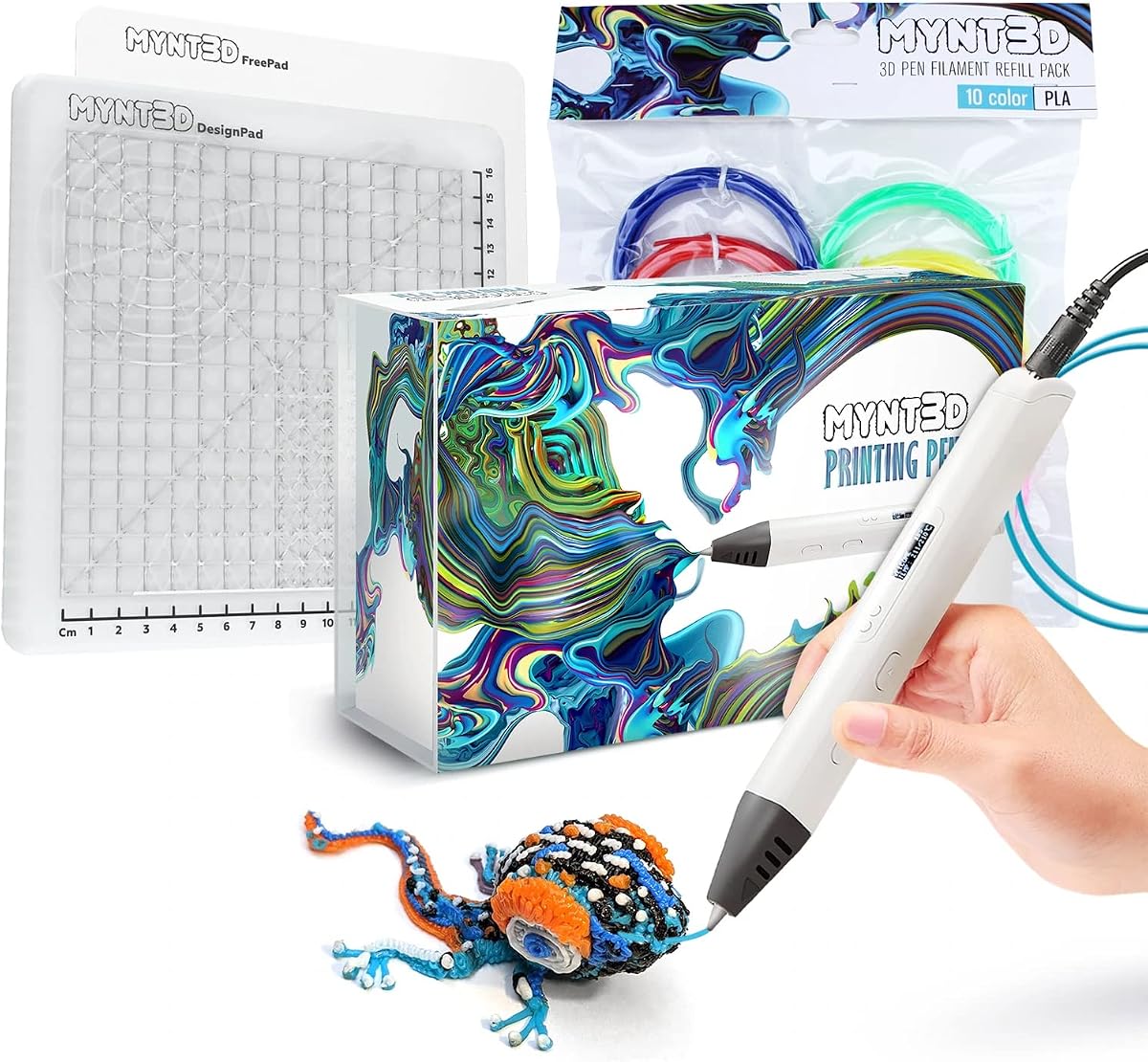
The MYNT3D Pro Bundle is the most complete package in the guide and carries the highest listed rating at 4.5. It combines a capable Pro pen, ten colors of vacuum-sealed PLA filament, and a two-part drawing surface system. The DesignPad provides silicone channels for geometric shapes, while the FreePad is a transparent surface intended for tracing patterns and creating original outlines.
We may earn a commission when you buy through this link, at no additional cost to you.
The pen itself supports stepless flow control, discrete temperature adjustments, and a replaceable sealed nozzle designed for long-lasting operation and reduced clogging. Those features suit children who have moved beyond simple trace-along projects and want to build larger objects, test different plastic characteristics, or create consistently controlled lines. The broad color range also supports color-coded models, school projects, and decorative crafts.
This level of equipment naturally has a learning curve. The user must understand separate speed and temperature controls, and the multiple accessories require organization to avoid being misplaced. It is also more than a child needs for a first attempt, which could make the Pro Bundle a better choice for an enthusiastic repeat user, a teen, or a family with several children rather than a very young beginner.
For families seeking one well-rounded 3D pen system, this bundle is the premium recommendation. The combination of reliable hardware, plentiful filament, and purpose-built drawing surfaces reduces the need to buy accessories separately later. A child can start with stencils or traced patterns, then gradually explore freeform construction as confidence and control improve.
Ten vacuum-sealed PLA colors allow children to plan visually complex creations without immediately needing refills. The range includes bright primary and accent shades, plus neutral tones suited to animals, buildings, figures, and layered models.
The DesignPad channels encourage geometric forms, while the transparent FreePad supports tracing and freeform outlines. These dedicated surfaces make it easier to achieve consistent geometry and can reduce the mess associated with drawing directly on an ordinary table.
We may earn a commission when you buy through this link, at no additional cost to you.
The MYNT3D Super Bundle combines the straightforward Super pen with ten colors of PLA and the DesignPad and FreePad system, earning a 4.4 rating. It offers much more material variety than the basic MYNT3D Super package while retaining the appealing characteristics of stepless speed control, ABS and PLA compatibility, and a replaceable sealed nozzle.
We may earn a commission when you buy through this link, at no additional cost to you.
The included filament colors span blue, green, red, yellow, orange, pink, black, tan, brown, and gold. That range is broad enough for detailed scenes, seasonal crafts, recognizable characters, and color-coded STEM demonstrations. The DesignPad channels support geometric shapes, while the transparent FreePad allows children to trace their own patterns or transfer favorite drawings into raised plastic.
The main drawback is the lack of a display. Unlike the MYNT3D Professional, users cannot readily monitor temperature through a dedicated screen, so they must learn the settings through practice. The larger assortment may also feel excessive for a first-time maker, and the pen requires an AC adapter rather than USB power. Nevertheless, the core package remains more versatile than a bare starter set.
This bundle is a strong match for families that want abundant color and helpful surfaces without moving to a more complex premium pen. It works well for children who enjoy building colorful objects and for parents who want a ready-to-use kit that can support a variety of projects. Compared with simpler packages, it reduces the likelihood of needing separate filament or tracing accessories soon after opening the box.
A broad starter palette supports experimentation with color combinations and more visually detailed models. Children can see how different hues behave as they build, while the vacuum-sealed packaging helps keep unused filaments organized.
Stepless speed adjustment provides precise material flow even though the pen omits a screen. This makes it approachable for children who do not need temperature monitoring and suitable for creators who already understand basic settings.
We may earn a commission when you buy through this link, at no additional cost to you.
The 3Doodler Flow is positioned for teens, adults, and creators rather than exclusively for young children. It earns a 4.1 rating and stands apart through compatibility with 1.75-millimeter PLA, ABS, and wood filament. That wider material support lets users vary the look, weight, and finish of their creations rather than remaining limited to one type of plastic.
We may earn a commission when you buy through this link, at no additional cost to you.
An integrated LCD provides real-time temperature monitoring, which is useful when changing filament types because each material may require a different operating temperature. The pen requires no complicated software or hardware setup: users connect it, insert filament, wait for warm-up, and begin drawing on stencils or freehand. Eight spools totaling 80 feet provide a strong color assortment, and the activity guide covers fundamentals as well as more advanced ideas.
The heated nozzle and broader material capability make this less obviously child-specific than the Start+ model. Younger users need close adult guidance when handling the working end, particularly during filament changes or if they use ABS or wood-filled material. Its 4.1 rating is also the lowest numerical score among the products with published ratings, although the difference remains within a closely grouped field of well-regarded options.
Choose the Flow for an older child, teen, or family member who wants to experiment beyond basic PLA. The pen's compact, lightweight form and no-software operation also suit travel and spontaneous making. It is less compelling as a first toy for a six-year-old, but it provides an accessible path into more advanced materials and project techniques for users ready to grow beyond simple starter kits.
PLA, ABS, and wood filament compatibility gives makers distinct choices for color, surface, and project character. This versatility is especially useful for older children who want to compare materials rather than simply repeat plastic models.
No software or complicated assembly is required, so a new user can begin quickly. The lightweight housing also makes the Flow convenient to pack for a family craft session, school activity, or creative trip.
We may earn a commission when you buy through this link, at no additional cost to you.
The SCRIB3D P1 Bundle builds around the display-equipped P1 with a silicone drawing mat and a beginner accessory set. It is especially suited to children who need structured practice before attempting freeform models. The mat's built-in shapes and patterns provide visual guidance that can help young users maintain steady lines, practice spacing, and understand how two-dimensional outlines become raised forms.
We may earn a commission when you buy through this link, at no additional cost to you.
The bundle includes the pen, starter PLA filament, a stencil book, a project guide, and a power adapter. Its two-sided silicone surface is described as reusable, heat-resistant, and easy to wipe clean. That design can protect the work area while giving the pen a more stable drawing surface. The mat is also compatible with the SCRIB3D P1, Advanced, and PRO pens, adding flexibility for households that may upgrade later.
One important caveat is that no customer rating is supplied for this listing, so its performance cannot be compared numerically with the rated models. Its guided layout may also be less attractive to children who prefer immediate open-ended drawing. Although the silicone surface is heat-resistant according to the product information, responsible adult supervision remains appropriate for young children using heated tools.
This bundle is a compelling choice for beginners who will benefit from templates, stencils, and repeated exercises. It provides a gentler learning curve than an advanced pen alone while preserving the P1's useful display and speed controls. Families should check current listing details, included quantities, and customer feedback before ordering because this specific bundle does not have a published rating.
Built-in shapes give children a clear target while they learn to move the pen consistently. The guided surface can be particularly useful for tracing exercises, basic geometry, and developing the hand control needed for larger models.
The silicone mat is easy to wipe clean and designed for repeated use. Its compatibility with multiple SCRIB3D pen models also makes it a reusable part of a growing 3D printing setup rather than a disposable accessory.
We may earn a commission when you buy through this link, at no additional cost to you.
The 3Doodler Start+ Refill Bundle is built for sustained creative use, with more than 1,250 feet of additional filament beyond the starter set. It retains the child-safe Start+ pen design, including no hot parts and a construction intended to be safe for children aged six and older. This makes it the most substantial refill-focused option for a household where 3D drawing is likely to become a regular activity.
We may earn a commission when you buy through this link, at no additional cost to you.
The standard accessories remain useful: the pen, DoodlePad, 72 strands of mixed-color filament, USB-C cable, activity guide, and ten stencils. The bundle also works with the free 3Doodler app for iOS and Android, where users can find additional stencils, templates, and step-by-step instructions. That combination of physical and digital guidance supports both independent play and structured learning.
The enormous material supply is not ideal for a family that is only experimenting once, and there is no published rating for this particular listing. It also remains limited to Start-compatible filament, just like the standard Start+ package. Families should consider storage requirements because such a large quantity of plastic can occupy significant space, particularly if the materials are sorted by color.
This bundle makes the most sense for enthusiastic young makers, homeschool families, classrooms, or multiple children sharing a pen. The quantity reduces the likelihood of running out during ambitious projects, while the child-safe design preserves the central benefit of the Start+ line. For a first-time user with uncertain long-term interest, the standard Essentials set is the more measured purchase.
More than 1,250 feet of additional plastic can support large structures, repeated lessons, and projects shared among several children. The supply is particularly useful when a maker prefers extensive freeform building over short stencil-based activities.
Ten physical stencils are complemented by optional app-based templates and instructions. Families can balance screen-free drawing with guided digital learning, while the DoodlePad helps organize the physical workspace.
We may earn a commission when you buy through this link, at no additional cost to you.
The right 3D printing pen depends on the child's age, creative interests, and the amount of guidance required. Safety, control quality, filament support, and included accessories can matter more than advanced specifications when selecting a model that will actually be used.
For younger children, begin with the construction of the pen and the age for which it is designed. The 3Doodler Start+ and Start+ Refill Bundle are explicitly positioned for children aged six and older and use a no-hot-parts approach, allowing the nozzle and plastic to be touched without the burn risk associated with exposed heated components. Other models include automatic sleep, anti-clogging features, and ceramic nozzles, but those features do not necessarily mean the entire tool is cool to the touch. An adult should establish safe handling rules regardless of the model, keep the pen on a stable surface while active, and supervise younger children until they consistently follow the loading and retracting procedures.
The best control system is the one a child can understand without feeling limited. Stepless sliders allow smooth changes between slow detail work and faster filling, while preset buttons are easier for a first-time user to remember. Displays add useful information but can also make a pen feel overly technical. A large LCD or OLED screen is valuable when temperature and speed are visible at a glance, especially if the family plans to try ABS or other materials. Younger children may benefit more from stencils, simple forward and reverse controls, and an activity guide than from a large menu of technical settings. Older children and teens are more likely to value fine temperature adjustment and independent control over material flow.
PLA is the most straightforward starting material because it is versatile and widely used with entry-level 3D pens. Some models also support ABS, while the 3Doodler Flow adds wood filament compatibility for users who want a different appearance or texture. Compatibility matters when a child begins asking new questions about materials or wants to try designs that require different properties. The child-specific Start+ system prioritizes its own compatible filaments and safety features rather than broad material support. Families should also consider whether refills are available in the colors and quantities they need, because a large initial supply does not prevent a child from rapidly working through one color while leaving others unused.
A pen is only one part of a satisfying creative system. DoodlePads and silicone mats give the tool a stable, clean drawing surface, while stencils help children learn the relationship between flat patterns and three-dimensional objects. Project books provide starting points that can be adapted rather than copied rigidly. The MYNT3D bundles add a DesignPad with channels for geometric forms and a transparent FreePad for tracing, making them particularly useful for more structured designs. The P1 Bundle's silicone mat offers built-in shapes for practice, and the 3Doodler Flow package includes an activity and stencil guide. These extras often create a better first session than a bare pen because they reduce blank-canvas uncertainty.
A pen that feeds smoothly gives children more confidence in their designs. Sealed or ultrasonic-sealed nozzles are designed to resist clogs, while replaceable nozzle designs can extend the useful life of a favored tool. Feed controls should be easy to stop and reverse so children can correct mistakes and recover unused filament. The P1 and Super offer stepless flow adjustment, the Advanced provides eight speed settings, and the MYNT3D Professional combines adjustable feeding with precise temperature monitoring. Reliability also depends on correct loading and suitable filament, so families should follow the included instructions and avoid forcing material when the pen is not at the proper operating temperature.
Starter filament determines how long a new user can work before the creative experience is interrupted. Three colors are sufficient for a short trial, while five or more colors support more expressive models. The MYNT3D Pro and Super bundles each provide ten PLA colors, and the Start+ Refill Bundle offers an unusually large supply. More material is not automatically better for every household, however. Very large quantities require storage, and some children may prefer one color that they can turn into an entire sculpture. Consider the supplied strand length or footage alongside color selection, and remember that compatible refill availability will matter once the initial projects are finished.
Displays make temperature and operating status easier to monitor, but they are not essential for every child. The MYNT3D Professional offers the most detailed interface with its large OLED screen, while the SCRIB3D Advanced and P1 provide LCD-style feedback. Portability depends on both size and power method: the 3Doodler Flow is described as compact and lightweight, whereas many other pens use a wired AC adapter. The 3Doodler Start+ uses USB-C, which can make it easier to power from a compatible setup and contributes to its child-friendly simplicity. Families should consider where the pen will be used, whether a nearby outlet is convenient, and how much storage space is available for cords, mats, filament, and project accessories.
Begin by choosing a stable, protected work area and reading the pen's instructions, particularly the loading and temperature requirements. Place the included drawing mat or pad beneath the tool, check that the filament fits the specified diameter, and confirm that children understand where to keep their hands while the material is heating and flowing. Connect the correct power adapter or USB-C cable, insert the filament as directed, and allow the pen to reach the indicated operating temperature before a child starts drawing.
To draw, move the pen steadily while guiding the first layer so the plastic attaches to the surface. Beginners can trace a stencil or a pattern on the FreePad, while more confident creators can build forms freehand. Use slower feed for narrow details and faster settings for filling larger areas. Pause or stop the extrusion before lifting the pen away, because pulling while the material is flowing can create long strands or uneven lines. The forward and reverse controls can help feed or retract filament when changing colors or correcting a placement.
After the session, stop the pen and reverse the remaining filament as instructed. Allow hot components to cool before cleaning, and use a soft, dry cloth or a method specifically approved by the manufacturer. Never pull a solid filament strand forcefully from a warm nozzle, and do not use water unless the product instructions specifically permit it. Store filament in a dry place, keep the nozzle clear of loose debris, coil cords without sharp bends, and inspect the pen and power connection before the next use.
The 3Doodler Start+ models in this guide are designed for children aged six and older, with a no-hot-parts approach intended to reduce burn risk. Other 3D pens use heated components and may have different age guidance, so parents should check the listing carefully. Younger children should always receive close adult supervision, regardless of the advertised age.
A child-appropriate model can provide a controlled and engaging way to make three-dimensional artwork, but no tool should be treated as completely risk-free. Look for clear age guidance, safe nozzle construction, insulated components, automatic shutoff features, and simple controls. Adults should also establish safe handling practices and supervise filament changes and use.
PLA is generally the easiest starting material because it is easy to use and works with many popular 3D pens. The pen's manual and product listing should confirm the required filament diameter and supported materials. Children should never substitute strands of a different diameter or type simply because the color looks appealing.
No. All ten featured products are designed to perform direct freehand drawing, tracing, and stencil work without a computer or complex software setup. The Start+ Refill Bundle offers an optional app with additional templates and instructions, but the pen's core activity remains usable without digital assistance.
Most featured pens include forward, stop, and reverse controls that allow the user to pause extrusion or retract material. The specific sequence varies by model, so follow the included manual. Stopping the flow before reversing can reduce tangles, and the pen should reach the appropriate temperature before new filament is loaded.
Common causes include an unsupported filament type, incorrect diameter, a feed path that has not been loaded as directed, or a nozzle that needs cleaning or cooling. Stop the pen and consult the troubleshooting instructions rather than forcing the strand. Sealed nozzles and anti-clogging features can reduce these problems, but correct setup remains essential.
Yes, when the activity matches the child's skill level and the teacher's supervision requirements. A 3D pen can support geometry, spatial reasoning, design, color, and hands-on STEM demonstrations. For group settings, a kit with multiple colors, stencils, and dedicated drawing surfaces may be especially practical, while the supervising adult should check the school's rules.
Turn off and disconnect the pen, let it cool fully, and follow the manufacturer's cleaning instructions. Many surfaces can be wiped gently, but liquids should not be applied unless the manual explicitly allows them. A soft cloth, careful filament removal, and regular nozzle care are generally safer than aggressive scrubbing or pulling hard residue from a warm nozzle.
The 3Doodler Start+ Essentials is the most compelling choice for younger children because it combines a specifically child-safe design with a generous starter set, drawing surface, stencils, and activity guide. The SCRIB3D P1 offers the best balance of accessible pricing and versatile controls, while the MYNT3D Pro Bundle stands out as the premium option with ten filament colors, precise adjustments, and dedicated drawing surfaces.
For most families, prioritize a model the child can operate without constant technical intervention, enough material to complete several projects, and accessories that make starting easier. Younger makers benefit from cool-touch construction and guided activities, while older children may value stepless flow control, temperature displays, and broader filament compatibility. Choosing a pen that matches the child's current confidence is more important than choosing the model with the largest specification list.
Before ordering, verify the current product listing, included components, filament requirements, age guidance, safety information, customer feedback, and warranty terms. Ratings, bundles, accessories, and availability can change, and current prices vary across sellers. Comparing those details with the child's age and creative interests will help produce the most satisfying and durable 3D printing experience.